We’re very happy to announce the immediate availability of PyCharm 1.0 Release Candidate, the (almost) final release of our Python and Django IDE.
Besides bugfixing, we’ve managed to sneak in a couple of last minute feature improvements:
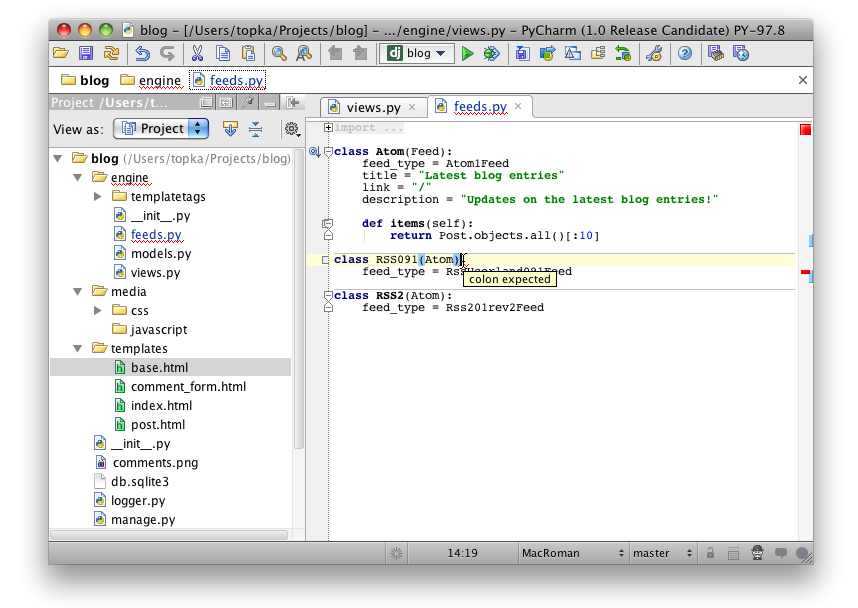
- Files containing errors are now highlighted with a wavy red underline in the Project View (see screenshot);
- You can now ignore certain unresolved identifiers everywhere in your project, by pressing Alt-Enter on an identifier and selecting the “Ignore…” quickfix from the popup;
- You can now disable the auto-import popup on a per-file basis (click on the “Hector the Inspector” status bar icon and uncheck the “Import popup” checkbox);
- Handling of lines wrapped with backslashes has been significantly improved (the formatter can reformat such lines correctly now, and can also add backslashes when it’s necessary to wrap the line correctly).
Note that we’ve enabled final licensing code in this build, so when you run it, you’ll see a prompt to enter a license. Please select the 30-day evaluation option — and don’t be afraid to lose the days of your evaluation period, because when the final 1.0 version is released, it’ll restart the 30 days period again.
Download the Release Candidate version now, and don’t forget the 50% discount coupon for the PyCharm license. If you haven’t got your coupon just yet, next week may already be too late.
Develop with pleasure!
- JetBrains PyCharm Team

Looking forward to the general release, and just wanted to let you know that PyCharm is the best Python / Google App Engine development environment today, hands down. Congrats and many thanks for the enormous effort this must have taken – good stuff!!
Cheers
Jan
I don’t know whether it’s the project I’m working on or the RC release, but I’m getting lots of errors since upgrading. Hopefully the traceback reporter button is doing its job…
Great job, looking forward to the release!
At this moment you can’t open single files in pycharm and i think that should be addressed, because then your Pycharm IDE would be more flexible, for exemple if i want to write/edit one (XHTML/CSS/JS/PY) file i can’t, so i have two options, creating a dummy python project or use other editor to do the job, and that is annoying, time consumable and costs money.
I want to congratulate Jetbrains/Pycharm team for this fantastic product, keep the good work!
What were the bugs that were fixed? Is there a list somewhere?
I was specifically looking for:
http://youtrack.jetbrains.net/issue/PY-1976
The requested URL /python/PyCharm-1.0.exe was not found on this server.
Best Python IDE for Django! I like what I see. Waiting for PyCharm support PyGTK/PyQT/WxWindows, especially PyQT.
Ondinha,
Which specific features for PyGtk and PyQt support would you like to see? The general code insight / code completion should work fine in this build.
The download link appears to be broken (for Windows, at least)
@stlum9495
There are usually release notes linked from the EAP download page (http://confluence.jetbrains.net/display/PYH/JetBrains+PyCharm+Preview), but the release notes are still for 96.1203 so I guess the staff forgot to update them.
On your issue 1976 though, bugs are generally closed as soon as they’re fixed in trunk, not when the fix is released (or at least that how it’s been for all of mine). When you get a “bug closed” notification you’ll have your fix in the following release. Your bug hasn’t been closed, so it’s not fixed in the RC1.
> Which specific features for PyGtk and PyQt support would you like to see?
I’m guessing he’d like IJ’s UI designer for PyGTK/PyQT/wxWindows as the libraries should work correctly as-is. Not sure the IJ UI designer was built with that kind of flexibility in mind though…
Excellent. I still have my coupon and look forward to buying this as soon as possible. Thanks for the hard work you’ve put into this!
I’m using PyCharm on a mac. Let me say that I’ve really enjoyed using the betas.
I do have a question, is it possible to save just a single file? It seems really trivial, but I happen to be missing it.
Bonhomme,
PyCharm saves all your changes automatically, you don’t need to worry about saving individual files. If you made some changes accidentally, you can revert them using the Local History feature.