If you, like me, like the minimalistic UI, you’ve definitely hidden the toolbar and customized the RubyMine as you prefer.
Here is one thing you may like as well — Navigation Bar.
It is hidden by default in RubyMine. You can have in shown permanently (try View->Navigation Bar in main menu) but you can also summon it every time you need it — just hit ⌥ Home/Alt+Home.
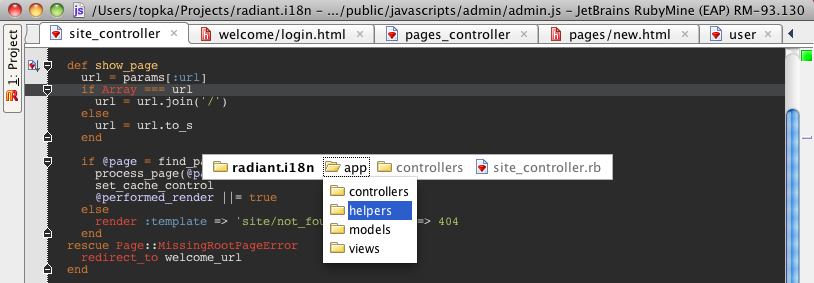
Navigation Bar a nice replacement to the Project View. You can quickly navigate through folders structure and open files in the editor.
NOTE: I know the Home key is not available on laptops, so if you use a laptop keyboard, you’ll need to re-assign the hotkey in IDE Settings.
By the way, you can filter files/folders in the navigation bar popups, if you just start typing…
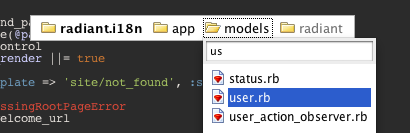
And many cool shortcuts such as ⌃N/Alt+Insert work nicely inside of Navigation Bar, which lets you create new files, classes, and everything really really quickly and using keyboard only.
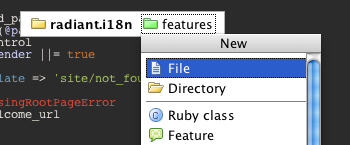
Remember: ⌥ Home/Alt+Home. Try it if you haven’t yet and let us know what you think!
Develop with pleasure!
JetBrains Team

I like this feature. I can even do a fuzzy search by explicitly using “*” in the file name that I want to search for.
But there is still room for improvement by providing more file and version control details as outlined by Geoffrey Grosenbach: http://blog.peepcode.com/tutorials/2010/file-navigation-in-text-editors
@Emmanuel: Thanks. Have you checked this screencast about our ‘Go to file’ feature? http://blogs.jetbrains.com/ruby/2009/12/rubymine-tipcast-find-files-like-a-pro/ Do you miss any features? Suggest them in our tracker: http://www.jetbrains.net/jira/browse/RUBY
When I hit Alt+Home, I see the navigation screen but it is docked at the top of my IDE, just under the menu, and when I start typing its not focus on it, how do I change this, cause this sounds like an awesome feature if I can get it to work like you guys do!
@Joseph: Can’t say for sure what’s happening.
Do you have Navigation Bar shown permanently?
Does anything happen if you press Left arrow key?
It would be easier to discuss on the forum: http://www.jetbrains.net/devnet/community/ruby
Interesting feature, but not sure how/why this beats CTRL+SHIFT+N (find file) – which I’m addicted to. Seems like these two overlap quite a bit, although ALT+HOME has a browsing metaphor and CTRL+SHIFT+N a search metaphor…
Same problem as Joseph.
The ‘navigation bar’ doesn’t get focus.
I use ‘alt-home’ to make the ‘navigation bar’ visible and it had focus.
I’d then use the arrows to navigate to the file I want.
Without focus I’m reaching for the mouse to put the focus on the navigation bar.
Andy
