A few weeks have passed since RubyMine 3.1 release and RubyMine 3.1.1 bugfix update is almost ready.
However today I want to show you some new cool feature — coming YARD support (http://yardoc.org). We’ve received a good number of votes for this YARD and external docs support in our tracker: RUBY-5590 and RUBY-3309. And voila, your votes did the trick!
Now let me show you what we are working on!
First, RubyMine understands YARD tag annotations syntax in ruby comments as well as in plain rdoc files.
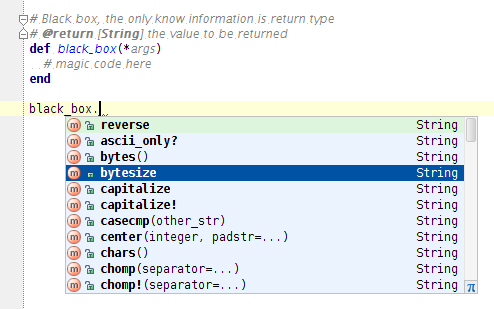
Then, RubyMine is smart enough to extract type annotations from the YARD annotated comments. On the screenshot below you can see that the inferred type of the black_box method is String, this means that you’ll get accurate code completion and validation.
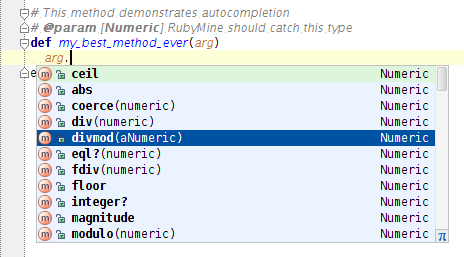
But that’s not all, you also get code completion according to the @param types in method bodies.
There is still a lot to be discussed and done, however feel free to tell us what features you would like to see in the next version of RubyMine as far as documentation functionality is concerned.
Develop with pleasure!
-JetBrains RubyMine Team

That looks very nice. RubyMine is becoming more and more indispensable for my daily work. I wish more people would try it, unfortunately, they’ve been burned by IDEs before
Something I’d like to see in YARD support is Markdown support as syntax, which is the one I’m using. That means *italic*, **bold**, etc. Currently it’s interpreted as rdoc syntax and it gets it wrong (better to not interpret it at all).
Not sure how you can figure it out; it would be ok with me if it was a project-wide config or you read it from the Rakefile (that would be hard though).
It is wonderful.
yard, jsdoc, all support now.
Hello linux_china,
I guess that we are going to drop NetBeans type annotation support and focus on the mainstream YARD support to make it more comfortable to work with. Please let us know if you have any objections.
Regards,
Oleg
Hey Oleg & the RubyMine team,
This looks great! Can’t wait to see it fleshed out.
Let me know if you have any questions/issues with YARD!
- Loren
Hello Loren,
Great to hear that you liked it, by the way could you please drop me a letter at oleg[dot]shpynov[at]jetbrains[dot]com to start the conversation?
Regards,
Oleg
I note that code completion on @returns [MyClass] works quite well, but I have not been able to get it to work on @param [MyClass]. Is this supposed to work yet? Is there some magic setting I need to turn on?
I’m using 3.1.1 #RM-103.260
This would be a killer feature. Also how doesthis work with methods that have more than one parameter?
Hello Jonathan,
Actually YARD advanced features like code completion of type parameters are in development now, and RubyMine 3.1.1 doesn’t have them all. Expect yet another post on the subject coming soon.
Regards,
Oleg
Oleg,
I can hardly wait. Also, will there be support for mutiple types or arguments or return values, for instance a method that returns either a String or a Numeric? The obvious syntax would, I suppose, be @param [String | Numeric]. Anyway, that’s a nice to have. Looking forward to the next release.
Have a nice weekend,
Jonathan
For sure RubyMine will support most of the features provided by yard.
Regards,
Oleg
John, the syntax is @param [String, Numeric]
I am more interested to see how the Ctrl+Q documentation formatting is coming along though
Gleb,
@param [String, Numeric] makes sense too! Thanks,
Jonathan
There is no way to TURN OFF all this garbage. I don’t want you to provide the Microsoft clippy, I want you to let me code without interruption. I have disabled Intentions, Code Completion, and everything but it doesn’t work; every time I type anything I still get popups, I get my keystrokes swallowed.
I start typing:
at this point, RubyMine decides that I am not competent to determine the value of the :text attribute. So it pops up a contextual menu. Never mind that I had already typed a space and was about to type more characters. RubyMine knows better. My space gets swallowed, because RubyMine has an important suggestion menu to show me! It begins with __FILE__. Thanks, RubyMine! I wanted that to be :text =>__FILE__, that’s the ticket!
There is no way to disable this crap. I’ve unchecked all “Intentions” all “Code Completion” and everything.
So concludes day #3 of trying to use RubyMine. It’s unfit for purpose because of this crufty, glitchy, invasive garbage. Because it won’t LEAVE ME ALONE AND LET ME CODE.
Hello Ben,
You can easily turn off autopopup code completion at File | Settings | Editor | Code Completion | Autopopup code completion.
Regards,
Oleg
Hello Gleb,
Could you please clarify what you behavior do you expect from Ctrl+Q in this particular case?
Regards,
Oleg
What ben say is true for the ‘bold text’ in comments, when I type:
. By the way you won another subscriptor.
#something
most of the time ‘something’ will become bold text, why? It hasn’t any relation with any variable nor other object, so this is a kind of bug. I seem that in many podcats you put the comments like this
# something
in that way ‘something’ will not become bold text, but.. in the html produced later by rdoc that line(‘something’) will become ‘text code kind’, because when there’s a space between # and what comes after, that line is treated like ‘text code kind’… that’s not what I want, I just want the simple text. I think this is a kind of bug and I think nobody desire this. I’ve found how can be this feature disabled, just turn of the bold text in IDE Setting|Editor|RDoc|identifier and Tag. Will be nice if this is fixed, is usefull to have comments in bolt when it’s pointing to some variable, or object, let me know if you do that
Hi Damián,
What RubyMine version do you use?