This feature is available from buildĀ 0.5.142. Now you can generate Scaladoc html documentation for the entire project or custom scope from the IntelliJ IDEA.
To use it, select “Generate Scaladoc” from Tools menu. Then you will see configuration dialog:
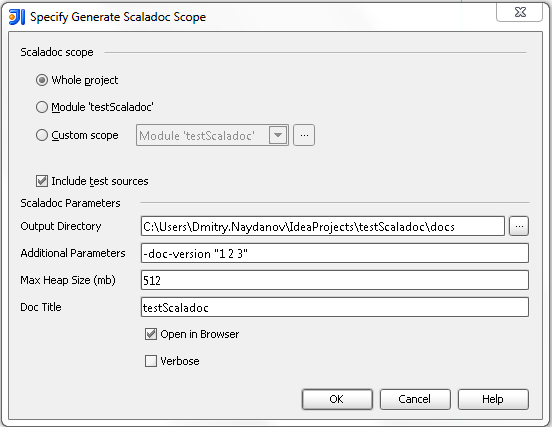
After choosing output directory you can press OK and get documentation for your project.
The @constructor tag is being marked as invalid in my scala code (@param works fine). Is there a way to allow @constructor tags in the code (the scala doc is generated correctly and the compiled code is fine it just shows up as an error when viewing the source).
Thanks,
Nathaniel
To add a bit – @constructor occasionally works but usually doesn’t with the error “under construction”
It is bug, fixed in the latest nightly (.327): http://confluence.jetbrains.net/display/SCA/Scala+Plugin+Nightly+Builds+for+Leda
Thanks – is there a fix for 11.1.4 (build 117.963)?