This long-awaited feature gives you a possibility to define your own code-folding regions with special line comments.
Let me give a simple example. I start with the following code and select a code region I would like to fold:
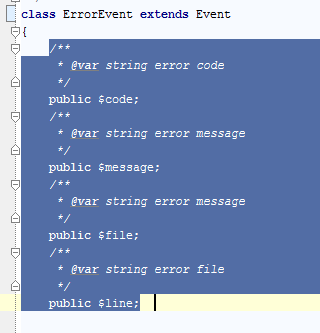
I press Ctrl+Alt+T now to get “surround with” action options:
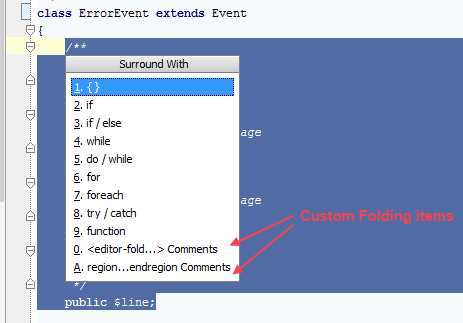
As you can see there are two custom folding items: “<editor-fold..>” for NetBeans-like style and “region..endregion” for VisualStudio style. If you don’t have any custom folding regions yet, you can choose either style. For example, NetBeans-like “<editor-fold..>”:
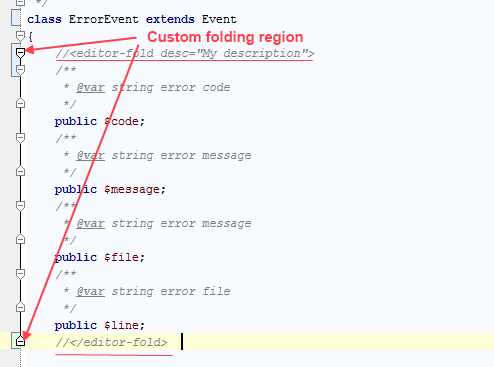
Now I can collapse the region just like any other code folding region:
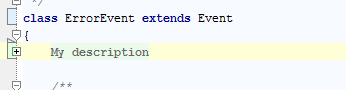
The whole code gets hidden behind “My description”, the text I have specified as a value of “desc” attribute.”defaultstate” attribute is supported too but not added automatically.
For VisualStudio-like range comments PhpStorm/WebStorm adds “//” comment instead of “#” although “#range” is recognized too. In general the IDE uses typical language line comments for any kind of style.
Note that you can not mix up two styles in one file. The IDE will recognize only the first it can find and assume this is a style you have chosen for your code. I guess it’s needless to say that mixing custom region styles in one project is a bad practice. I would like also to stress that using custom folding regions is not a panacea from a badly structured code. Keep your code clean and readable even without any extra folding regions.
Try this feature in PhpStorm & WebStorm 4.0 EAP. Also I hope you get back to us with your findings and improvement suggestions which can be submitted at http://youtrack.jetbrains.com.
For up-to-date information please follow to corresponding WebStorm blog or PhpStorm blog.


This is awesome, but how to get it to remember the folded state? I.e. When I open a php file with regions, they aren’t collapse even though I left them collapsed when I last edited the file??
Brendan,
the collapsed state must be kept automatically. If this is not the case, feel free to submit a bug at http://youtrack.jetbrains.com.
I assume, this is currently not supported for all available languages?
Is there a list of the supported ones?
The list currently includes Java and Groovy (in Intellij IDEA), PHP, JavaScript, Ruby, Python and CSS. For CSS you have to use /*…*/ comments. If you find that something is missing, please file a request at YouTrack.
The key combo on mac is: CMD (Apple Key)+ Option (Alt)+ T.
In the future I’d appreciate if you’d remember that your app runs on Linux and Apple, too.
Is it very complicated to implement a custom code folding like in Dreamweaver? That means; just select a code block and on the left side a plus and a minus symbol appears to mark and collapse/expand the custom folding region? That kind of custom code folding must not be permanent; I often wish such a feature to fold large number of lines in a big file, while working on it, to increase readability “on-the-fly”….
@tufi
Please submit a feature request at http://youtrack.jetbrains.com. At some point we may investigate it although the feature is definitely not a candidate for 4.0.
Submitted a feature request: http://youtrack.jetbrains.com/issue/WI-10239
Thx.
I tested this function and it’s a great new thing and extremly helpful! But also in my case it’s not collapsed anymore when I re-start PHPStorm and open the file again.
I hope this has been fixed eventually, please check the latest 4.0 build when it becomes available (after April, 9).
I wish it would also work for coffeescript files
#region Description
alert(1);
#endregion
Hi, how can I use this for folding code in html templates?
Porfirio, Heidi,
For any missing things you are welcome to submit a feature request at http://youtrack.jetbrains.com. Currently custom regions are not supported in HTML but I think they can be added there too.
When will the collapsible region work with Scala? Currently the comments can get put in but the folding does not work.
Nick, it makes sense to submit a separate feature request for Scala and Scala team will handle it.
