What’s mining: run Rake tasks quickly

This one is really hot, not even available to our QA yet. We are adding the feature to quickly execute Rake tasks.
Once activated, a field appears allowing to enter the name of a task to execute. The search mechanism is smart enough to find just what is needed by short names and also allows using the * wildcard.
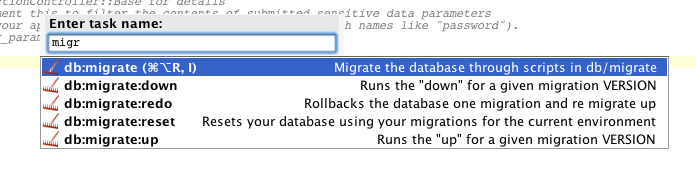
We are now finding a best place for the action in the menu and choosing the right shortcuts.
Additionally, when a needed task is selected you can execute it with simple Enter key press or, by using the Alt+Enter, invoke Rake task options dialog first, if additional arguments needed.
The feature should be available in the next EAP build to play with. Stay tuned!
Update: the action goes to Run menu: Tools | Run Rake Task…. It also will be available by Alt+Shift+R / ⌥R shortcuts.
Subscribe to RubyMine Blog updates