
We are announcing start of Scala Worksheet feature support. It’s available in scala plugin for Leda from v.0.6.368.
A worksheet is a scala file with .sc extension which you can run and get evaluation results in a special view appeared in the editor.
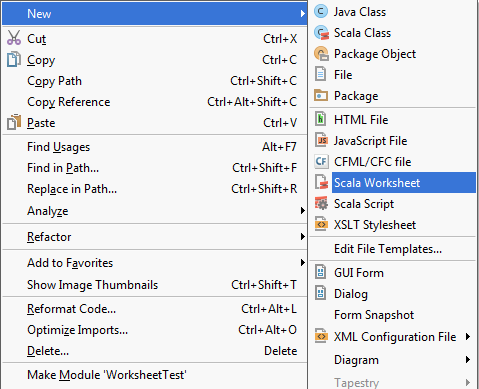
Create worksheet by right-clicking on your Project and choosing ‘New’ -> ‘Scala Worksheet’.
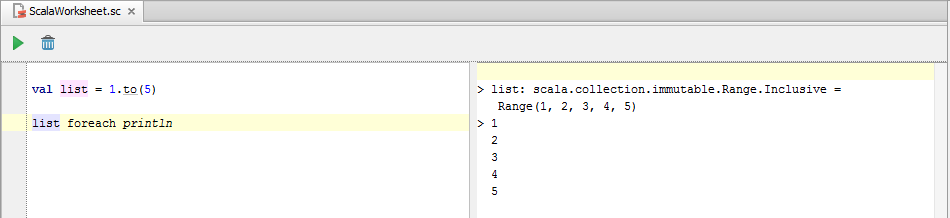
Just type your code, press ‘Evaluate worksheet’ button and results appear.
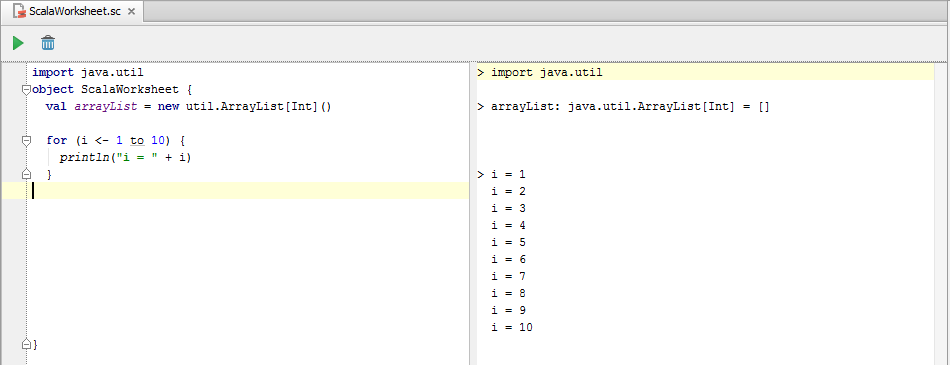
Evaluation of Scala Objects is also supported.
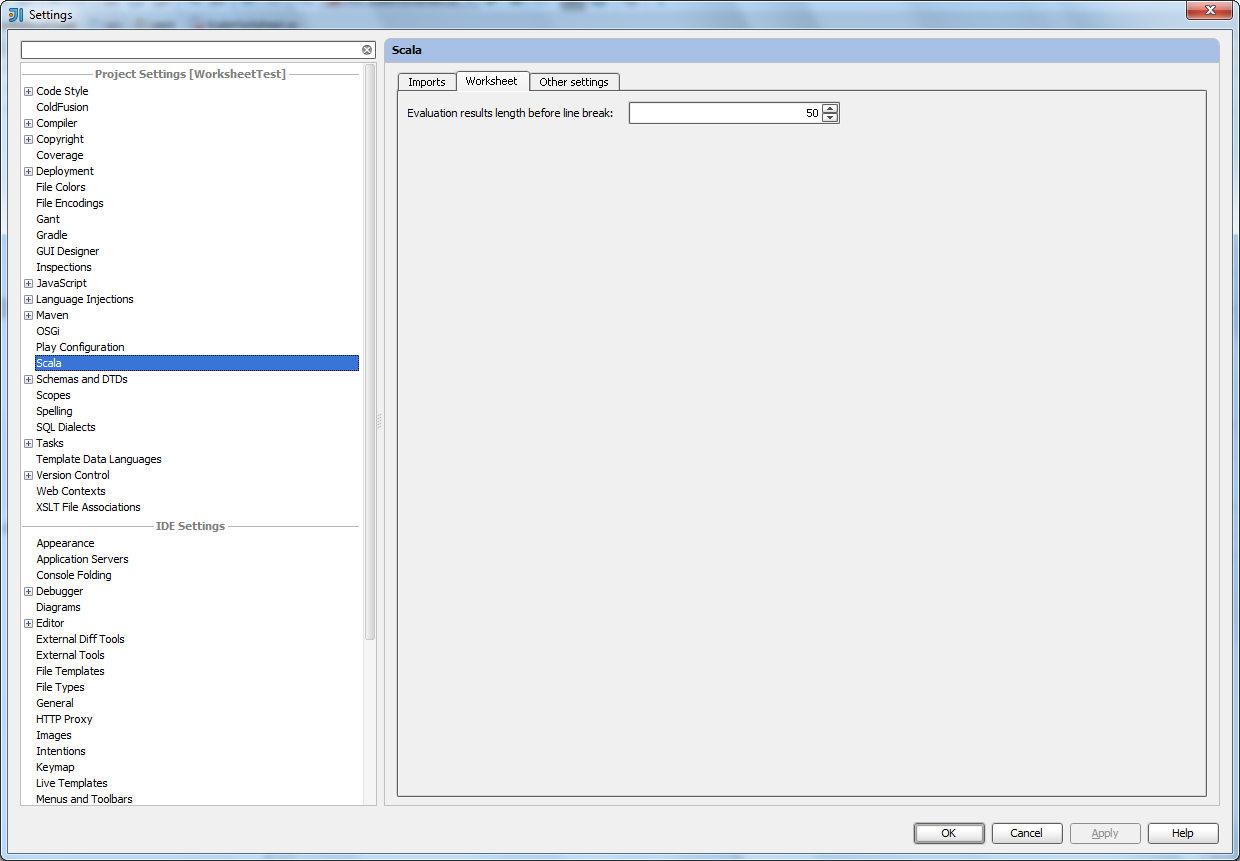
‘Worksheet’ tab is available in ‘Project setting’ -> ‘Scala’. You can configurate output length before line break.
All features of Scala editor are supported because worksheet file is treated as simple scala file.

Good work! After using Eclipse for the Functional Programming in Scala course recently, I found this to be a really nice feature. Thanks guys!
Thanks ! Will be very useful indeed.
Btw, does this mean the “fast” compiler will be fixed for Leda ?
Very nice indeed. Will this also become available for Groovy? Or maybe even Java? Sometimes it’s really handy to be able to type in some code and see the results of that.
I believe the Scala worksheet is powered by scala’s REPL, so I don’t know if java would be as able to get the worksheet functionality.
On a different note, will people who bought the personal licence during the back to school sale be able to upgrade to Leda for free?
However there is special issue for Java Worksheet: http://youtrack.jetbrains.com/issue/IDEABKL-6587
You can vote for it.
Great! Happy to read it! But unfortunately my scala plugin has v.0.5.983 and can’t be updated to v.0.6.368 yet. Hope it would be possible soon.
You need to download the latest Intellij 12 at http://confluence.jetbrains.net/display/IDEADEV/IDEA+12+EAP
Awesome, now there’s no reason at all to show eclipse to people at Scala trainings I do!
Thank you to the beautiful people who made this happen.
This is truly a great feature! However – it is painfully slow! Is there some trick to make the worksheet work faster?
Same here. It’s a wonderful feature, and means that I don’t have to reach for eclipse for this kind of thing, but on both my systems it is excruciatingly slow. Ideally, it needs to be as-I-type, or at least interactive. I’m waiting several seconds for each line to be evaluated. The same code in a REPL session is instantaneous.
Yes, currently we have to make worksheet much faster (for example, not to stop JVM after run to avoid running JVM and loading classes cost).
Amazing feature indeed. But is there any update on the progress on improving the speed? It’s still painfully slow
(Just bought the IntelliJ Ultimate for scala development; amazing IDE, but faster worksheet is a *must*!
This is a great first version. What it really needs is more speed as others have noticed. It would also be nice if the worksheet would be evaluated every time it’s saved (either by the autosave or manually) but this depends on speed improvements. These additions/fixes would really make it up to par or even better when compared to worksheets in Scala IDE.
Keep up the good work!
Great stuff.
One improvement: if the project you’re in has compile errors, the worksheet doesn’t function. It seems the worksheet tries to compile the whole project every time; maybe this is why it’s so slow. The Eclipse version works fine without you having to fix the whole of the rest of your project.
I cannot use scala worksheet. When trying to run it it always gives me an error:
Error running WS
Cannot run program “/usr/java/latest/bin/java” (in directory “/home/avatah/projects/myproject”): java.io.IOException: error=7, Arguments list too long
Probably classpath of my project is too long
Check the .idea/workspace.xml file and switch the dynamic.classpath option to “true” if it’s needed.
By the way the best way to report such problems is our issue tracker: http://youtrack.jetbrains.com/issues/SCL
This is really great. Last time I checked it, it was pretty slow. Is it planned to use fsc?
This is seriously awesome. Installed it and having a lot of fun. It may be the best way to learn Scala. Zero setup required and it works pretty well. I think it would be nice if it were to be faster, but I’m sure there are issues with essentially redefining all of the functions that are left in worksheet everytime IntelliJ has to be invoke the repl. Not sure though. Either way, fantastic work making programming more enjoyable!
Is there any possibility that this will be backwards compatible with IDEA Ultimate 11?
I am not in a position to upgrade to 12 but would love to have this feature.
Unfortunately, Scala Worksheet is available only in IDEA 12.
It’s a shame I can’t import classes from the current project. The names will autocomplete when typing in the worksheet, but when running, the compiler just gives the “object mypackage is not a member of com” error.
Installing the SBT plugin, and compiling with SBT from within IDEA before executing the worksheet, seemed to fix this.
Doesn’t seem to work on Mac. I can edit the worksheet, however there is no output pane/area.
Unfortuantely worksheets do not work with namespaces/packages. Putting the worksheet in a package/subdir e.g. “examples” and defining a class in the worksheet does not work.
Content of the scala worksheet ws.sc inside the examples dir:
class Foo {
val a = 10
}
new Foo().a
Compiles, but generates no output.
Adding a package statement leads to the IDE warning that the package structure does not correspond to the directories structure, compiling results in an error (illegal start of definition).
Regards,
Michael
Unlike the Eclipse Worksheet that immediately updates when the file is saved, the IdeaJ Scala Worksheet plugin only re-evaluates the worksheet when you press Cmd-Opt-W.
Note also that the SBT plugin is required.
And… it’s very, very slow to update. The Eclipse Scala Worksheet updates immediately, while the Idea Scala Worksheet launches an external build, Scala process, then updates the results approx. 30s later.