

PhpStorm 2026.1 がリリースされました

PhpStorm 2026.1 へようこそ! このリリースでは、新しい PhpStorm MCP ツール、IDE 内で新しいサードパーティエージェントを利用するための機能、Git ワークツリーのサポート、および PHP および Laravel 開発者の生産性を強化するその他多数の機能が導入されています。
PhpStorm の MCP ツール
PhpStorm 2025.2 では、Claude Code、Windsurf、Codex などのサードパーティコーディングエージェントによる IDE のツールのアクセス・使用を可能にする組み込み MCP サーバーを追加しました。
2026.1 では MCP サーバーツールセットを拡張し、以下のような PhpStorm の機能を追加しています。
- インスペクションとクイックフィックス: エージェントが PhpStorm の強力な静的解析エンジンを利用できるようにしました。
- IDE 検索機能: PhpStorm の構造検索とコードパターンのセマンティック検索を含みます。
- IDE のアクションへのアクセス: IDE のセットアップやカスタマイズをコーディングエージェントに委任できます。
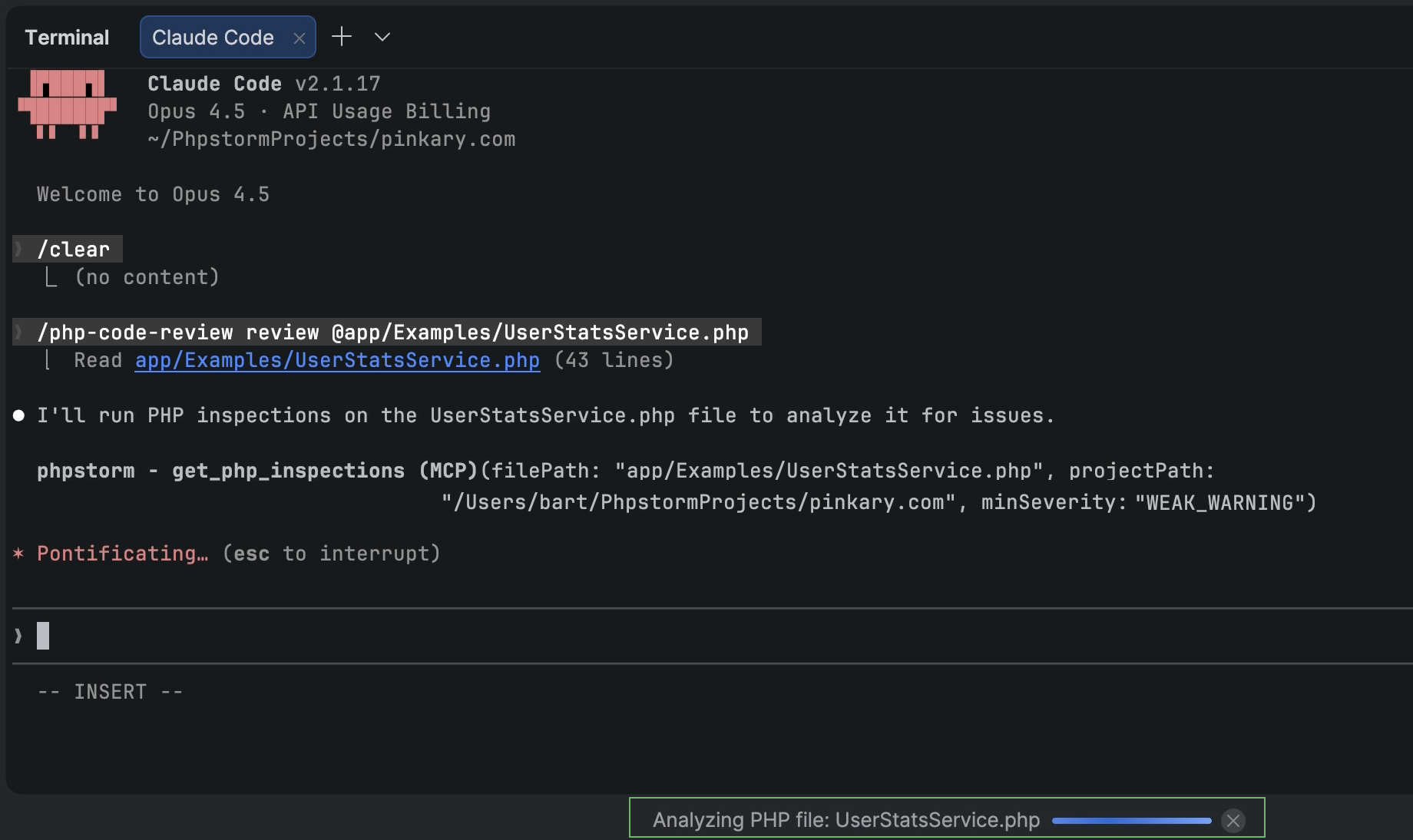
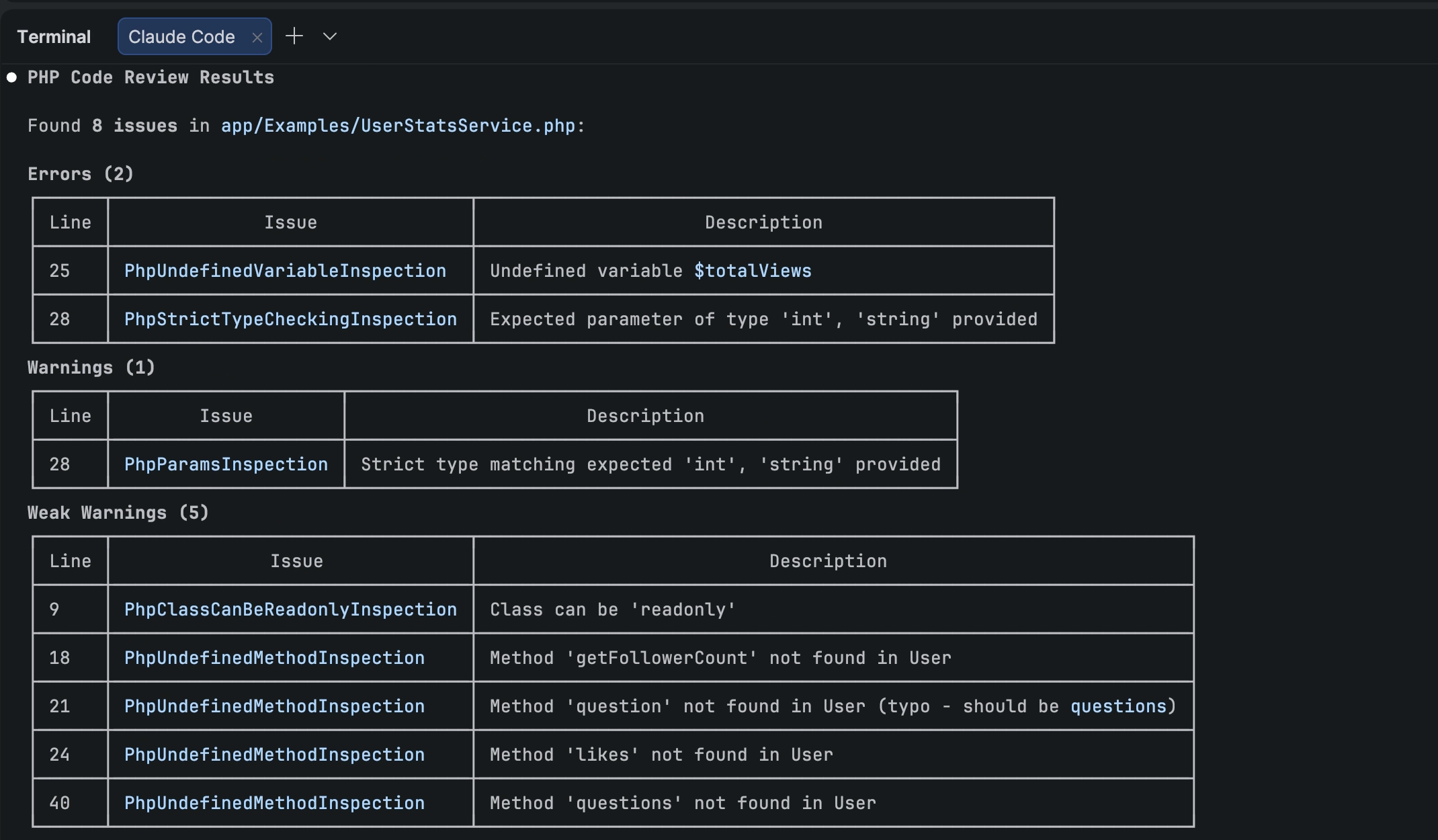
さらに、Claude Code 用 PhpStorm プラグインにより、Claude Code は PhpStorm の MCP サーバーツールを使用するためのコンテキストと指示を取得できるようになります。同プラグインのスキルとフックをプロジェクトに追加するには、PhpStorm の Settings(設定)| Tools(ツール)| PHP Claude Skills(PHP Claude スキル)に移動してください。
注意: PhpStorm の MCP サーバーはデフォルトで無効化されています。サーバーを有効化してコーディングエージェントとの統合を構成するには、Settings(設定)| Tools(ツール)| MCP Server(MCP サーバー)に移動してください。
AI
PhpStorm でのサードパーティエージェントの利用
PhpStorm は、任意の AI ツールを業務開発ワークフローに取り込めるオープンプラットフォームへと進化しつつあります。
Junie、Claude Agent、そして最近新たに追加された Codex に加えて、PhpStorm の AI チャットでさらに多くの AI エージェントを直接利用できるようになりました。エージェントクライアントプロトコル を介して GitHub Copilot、Cursor、およびその他多くのサポート対象エージェントを選択することができます。
次の編集提案
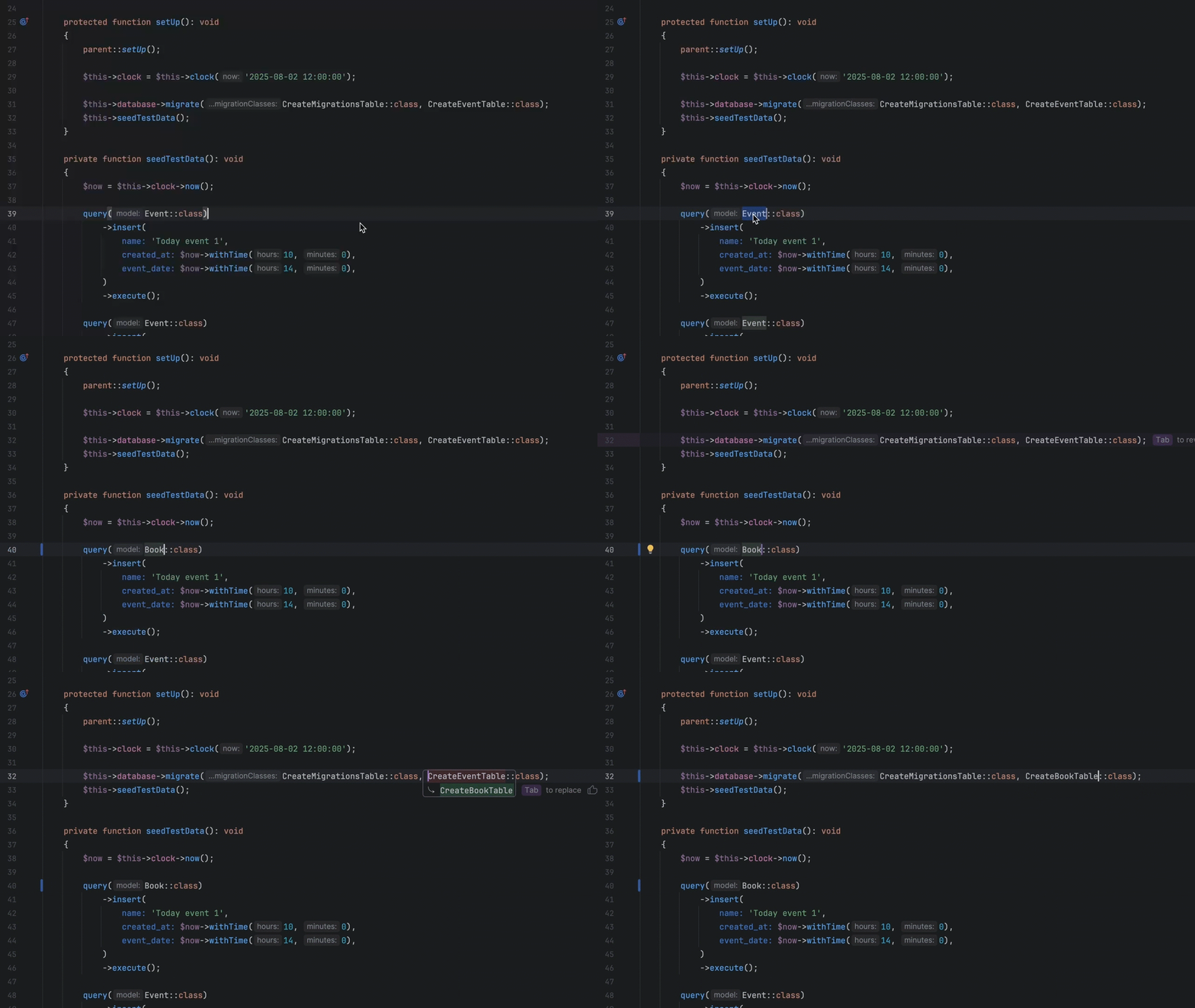
次の編集提案が JetBrains AI Pro、Ultimate および Enterprise サブスクリプションの AI 利用枠を消費しなくても提供されるようになりました。 また、従来の PHP 向けのコード補完に留まらない提案が提供されます。カーソルのある箇所のみを更新するのではなく、ファイル全体で関連する変更がインテリジェントに適用されるため、最小限の手作業でコードを矛盾なく最新の状態に維持しやすくなります。
このようにコード補完を自然に進化させることで、 作業を中断することなく Tab キーを連続で叩くだけでスムーズに操作できるようにしています。
Junie CLI がベータ版になりました
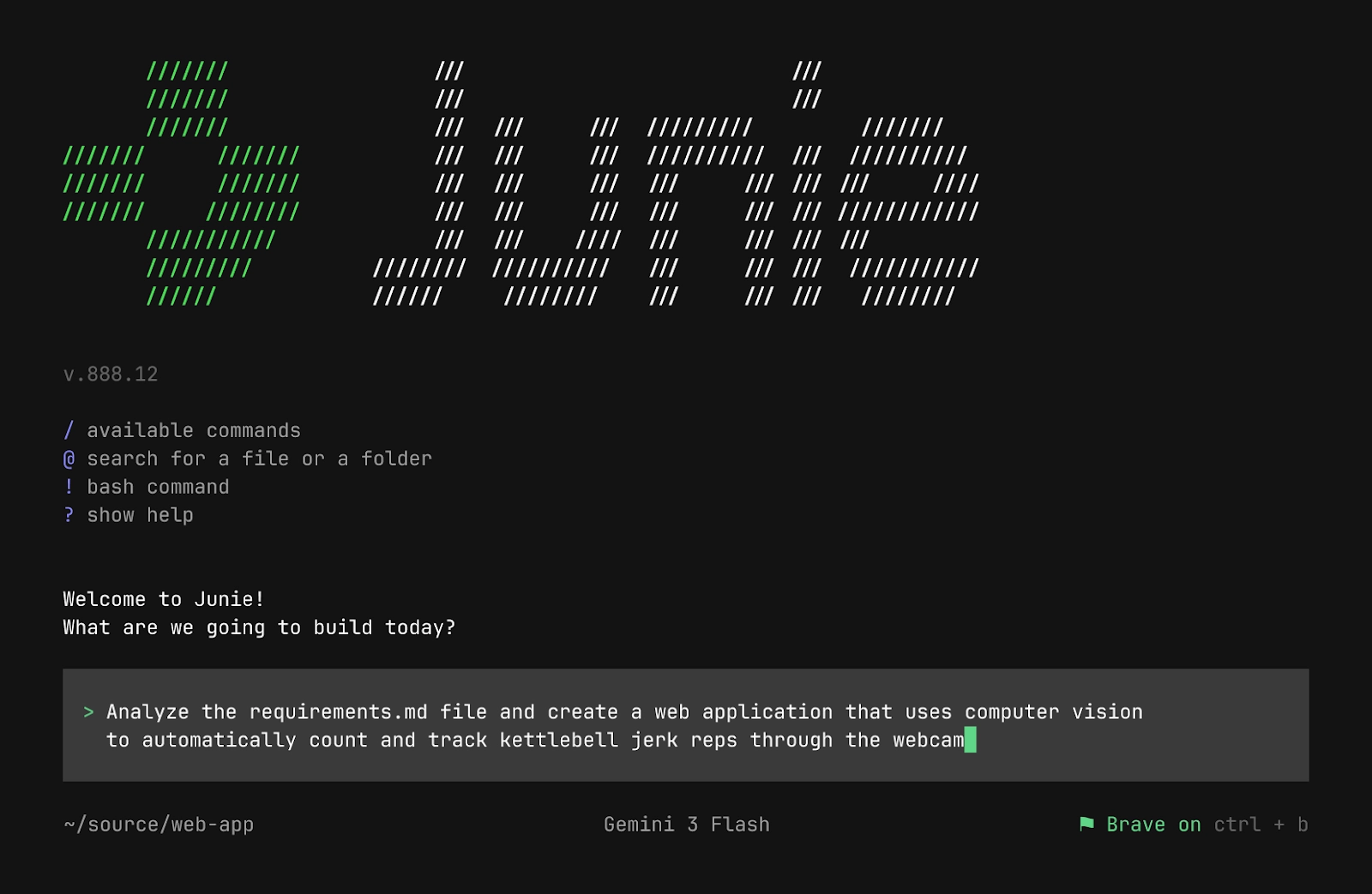
Junie CLI は JetBrains の LLM 非依存型コーディングエージェントであり、ターミナル、IDE 内、CI/CD 内、さらには GitHub または GitLab 上で直接使用できます。Junie CLI には以下のような特徴があります。
- BYOK(Bring Your Own Key)の価格設定: モデルプロバイダーから取得した独自のキーを追加料金なしで使用できます。
- ワンクリック移行: Claude Code や Codex などの他のエージェントから移行できます。
- 柔軟なカスタマイズ: ガイドライン、カスタムエージェントとエージェントスキル、コマンド、MCP などを使用できます。
この発表の全文については、公式のブログ記事をお読みください。
プロジェクトのインデックス作成を最適化
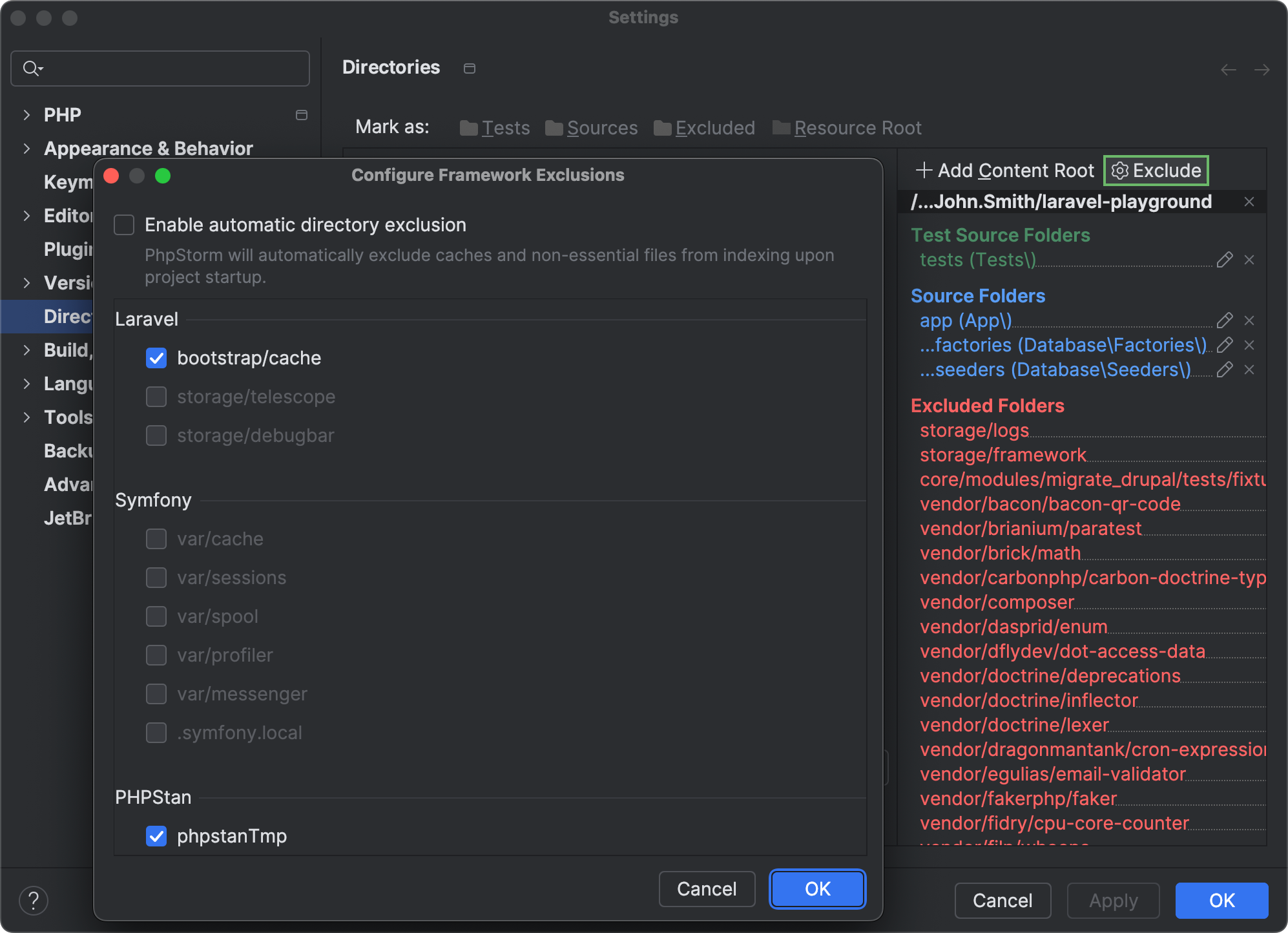
PhpStorm が頻繫に変わる生成コンテンツ、キャッシュコンテンツ、またはユーザーがアップロードしたコンテンツを含むフレームワーク固有のディレクトリを自動的に検出し、そのようなディレクトリをプロジェクトのインデックス作成から除外するようになりました。
IDE で検索、解析、およびその他の操作を行う際には、除外対象のフォルダーは処理されません。インデックス作成のオーバーヘッドが軽減されるため、IDE の CPU 使用率とパフォーマンスの最適化が促進されます。
自動的に除外されたフォルダーのインデックス作成を再度有効化するには、Settings(設定)| Directories(ディレクトリ)内で Exclude(除外)をクリックし、インデックス作成の対象にするディレクトリの横にあるチェックボックスの選択を解除してください。
ジェネリック型のサポート
この新リリースでは、PhpStorm の型推論エンジンに関する以下のような多数の改善とバグ修正が導入されています。
- callable ジェネリック型の型推論を改善しました。 IDE が
callable(T)アノテーションの入力パラメーターの型と callable テンプレートの戻り値の型の両方を推論できるようになりました。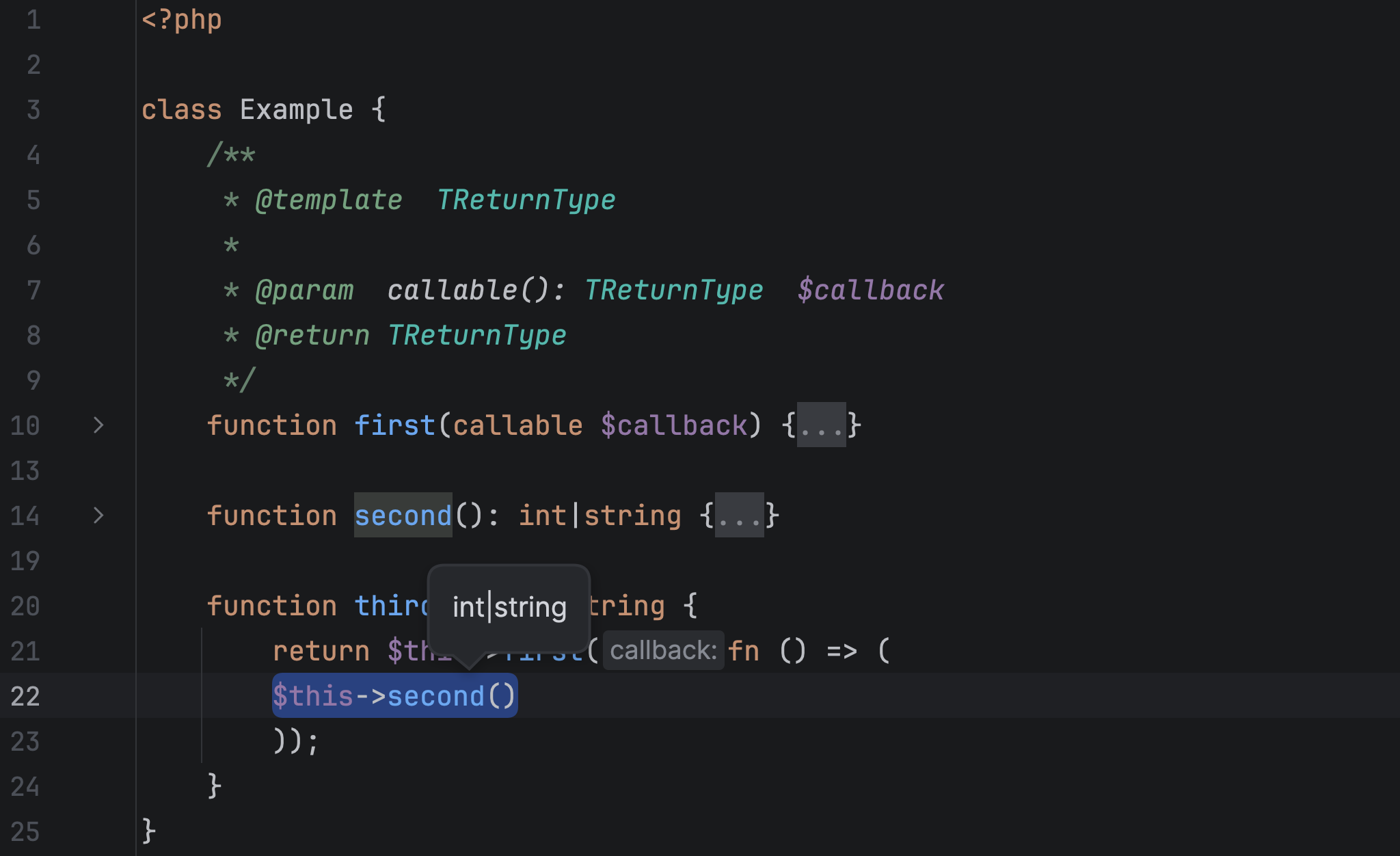
- ネストしたパラメーター化テンプレート型の表示を改善しました。 PhpStorm 2026.1 では、
Wrapper<Wrapper<Wrapper<stdClass>>>のような複数階層のラップでもパラメーターの型(Ctrl + Shift+P)とクイックドキュメント(F1)の情報を表示できるようになりました。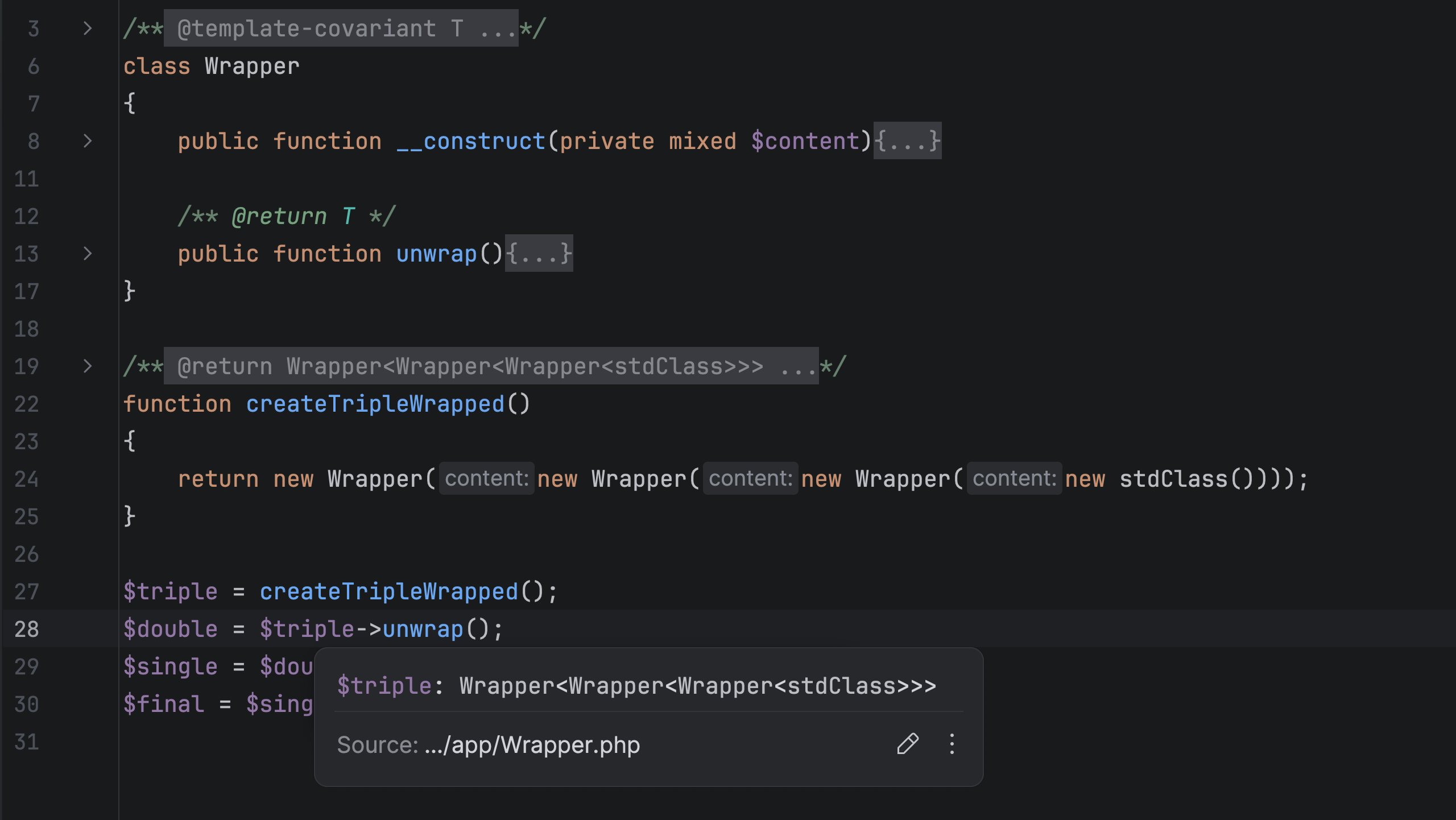
作業を楽にするその他の改善
非 PHP ファイルのデバッグ
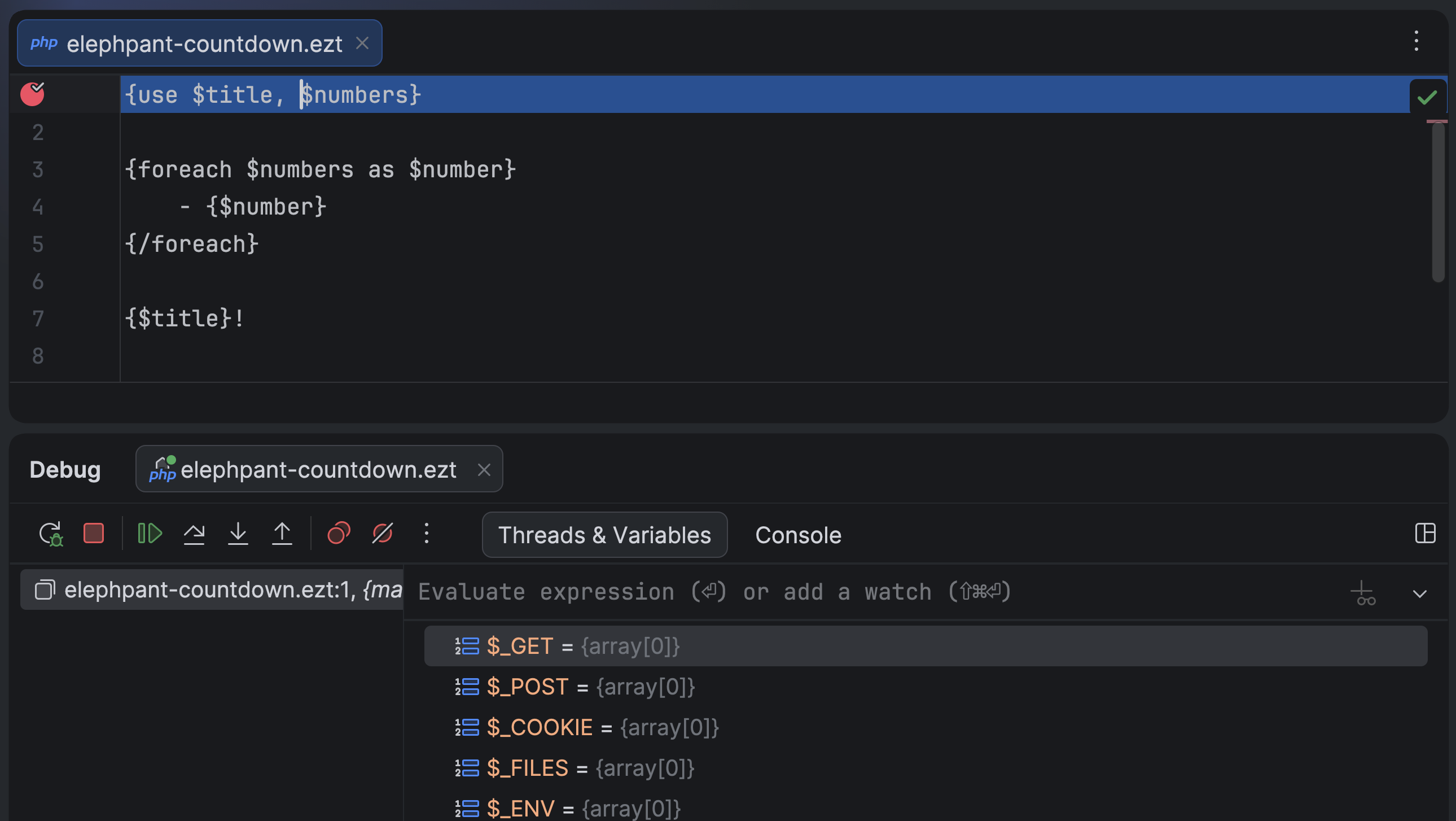
IDE の設定内で非 PHP ファイルのファイル名パターンが PHP ファイル形式に関連付けされている場合、そのファイルにブレークポイントを設定できるようになりました。この機能と Xdebug 3.5 で導入されたテンプレートとコンパイル済み PHP ファイル間の標準のパスマッピングを組み合わせると、.ezt のようなニッチな拡張子を含むあらゆる形式のソーステンプレートファイルをデバッグすることができます。
Go to test(テストに移動)操作の改善
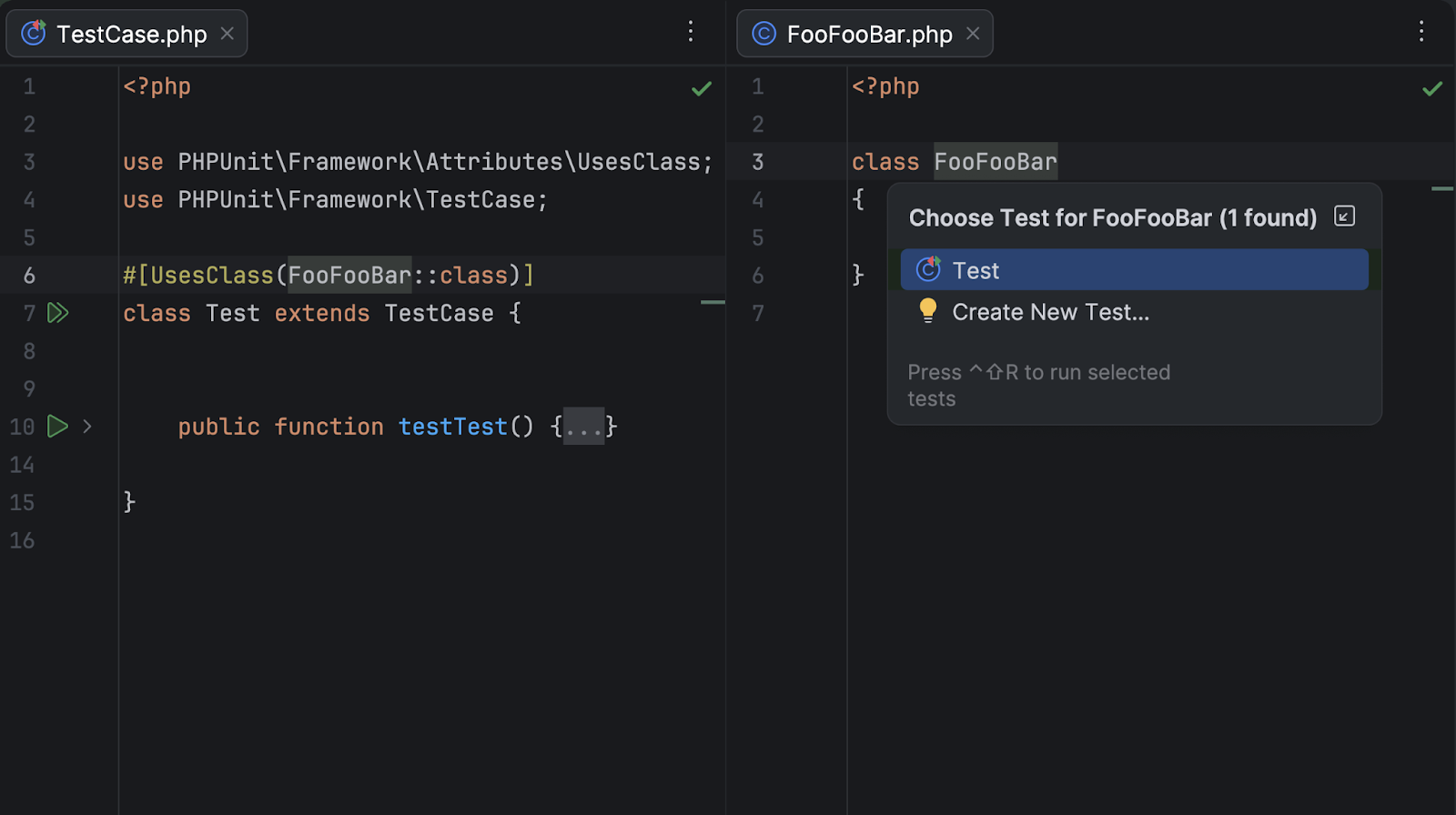
PhpStorm 2026.1 では、PHPUnit および Pest テストの Go to test(テストに移動)操作が以下の機能強化によって改善されました。
#[UsesClass]または#[UsesMethod]アトリビュートを使用する PHPUnit テストと関連するクラス/メソッド間の移動操作。- Pest テストで Test Runner(テストランナー)タブから Pest の describe ブロック内にあるネストしたソーステストに移動できるようになりました。
Convert to pipe operator(パイプ演算子に変換)クイックフィックス
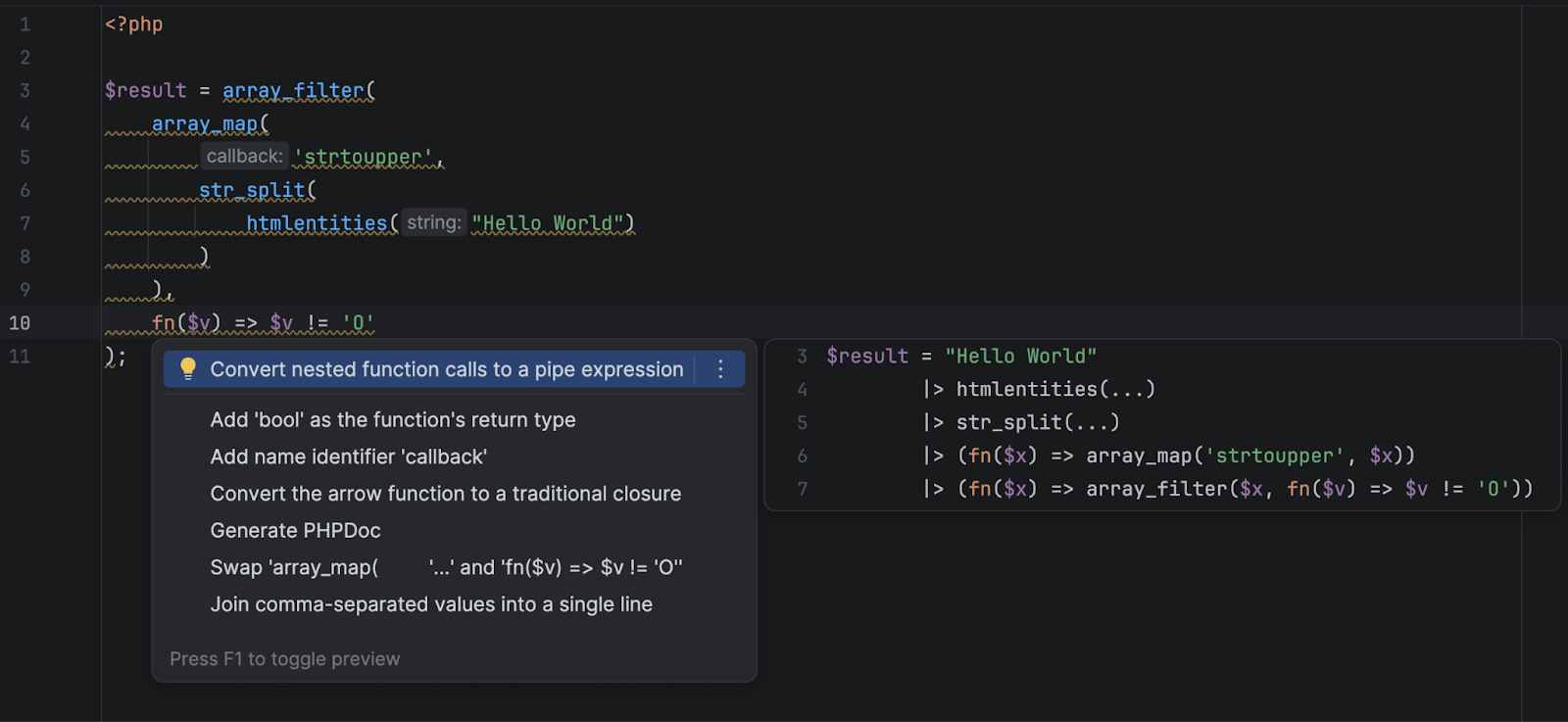
PhpStorm が PHP 8.5 パイプ演算子構文を使用可能なコード要素を検出し、そのようなコードを可読性に優れたパイプ演算子チェーンに変換するクイックフィックスを提案するようになりました。
Laravel
- フレームワークのサポート: Laravel 13 と新しいバージョンの Livewire および Filament のサポート。新しい @hasStack および @includeIsolated Blade ディレクティブのサポート。
- 新しいパッケージのサポート: Laravel Wayfinder、PHP Native、staudenmeir/laravel-cte および staudenmeir/laravel-adjacency-list パッケージ。
- Eloquent の機能強化: スコープ、アトリビュート、およびリレーションメソッドの Find Usages(使用箇所の検索)での高度な #[Scope] メソッドのサポート、最適化、精度の向上。
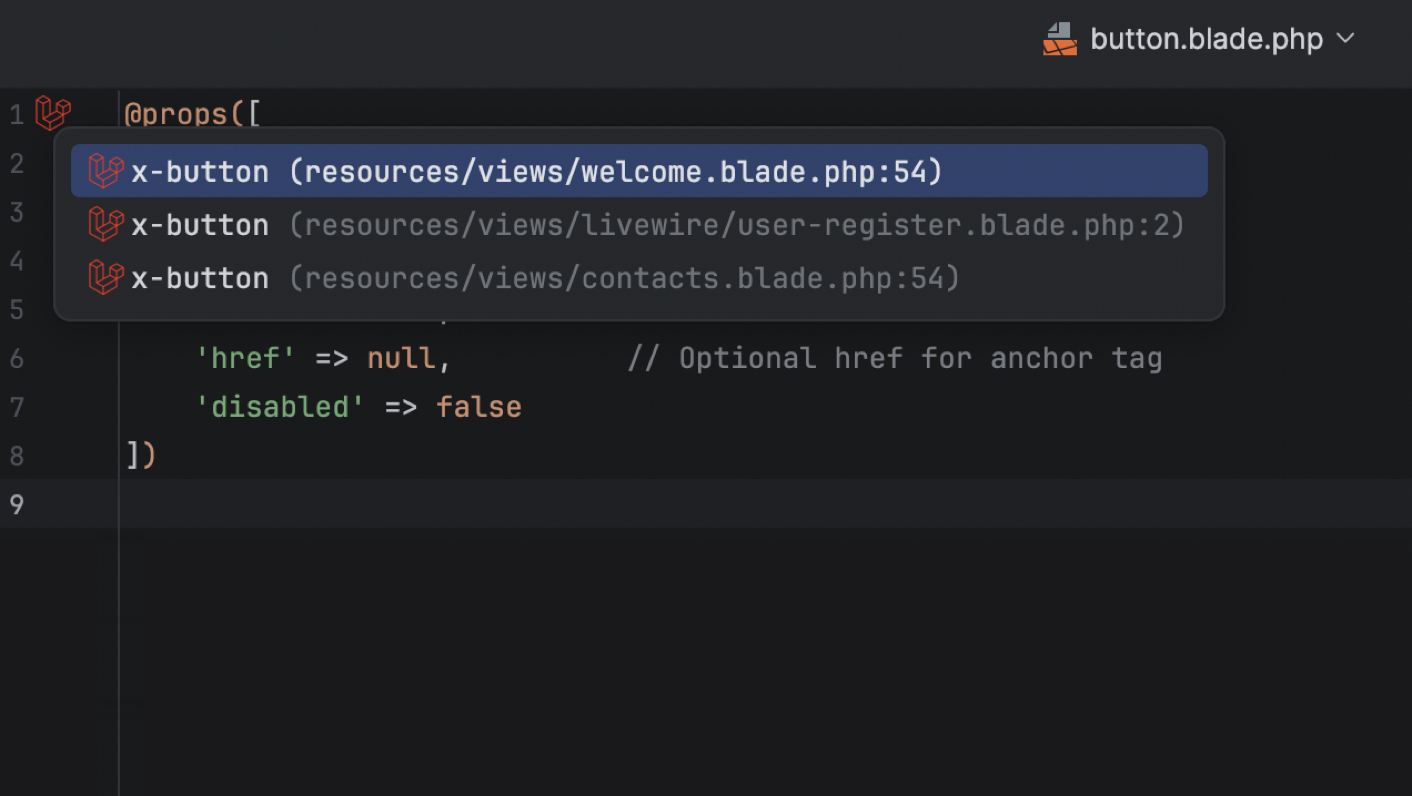
- UI と移動操作: Blade ビューの使用箇所の UI、コントローラーインレイの改善、新しい Route Search(ルート検索)の UI、Endpoints(エンドポイント)ツールウィンドウへのアクセス方法の追加。
- 生産性機能の調整: 新しい Add Application Database(アプリケーションデータベースの追加)アクション。Terminal(ターミナル)ツールウィンドウ内または PHP インタープリター経由での Artisan コマンドの実行。
- Laravel Idea MCP サーバー: PhpStorm MCP サーバーとともに提供。
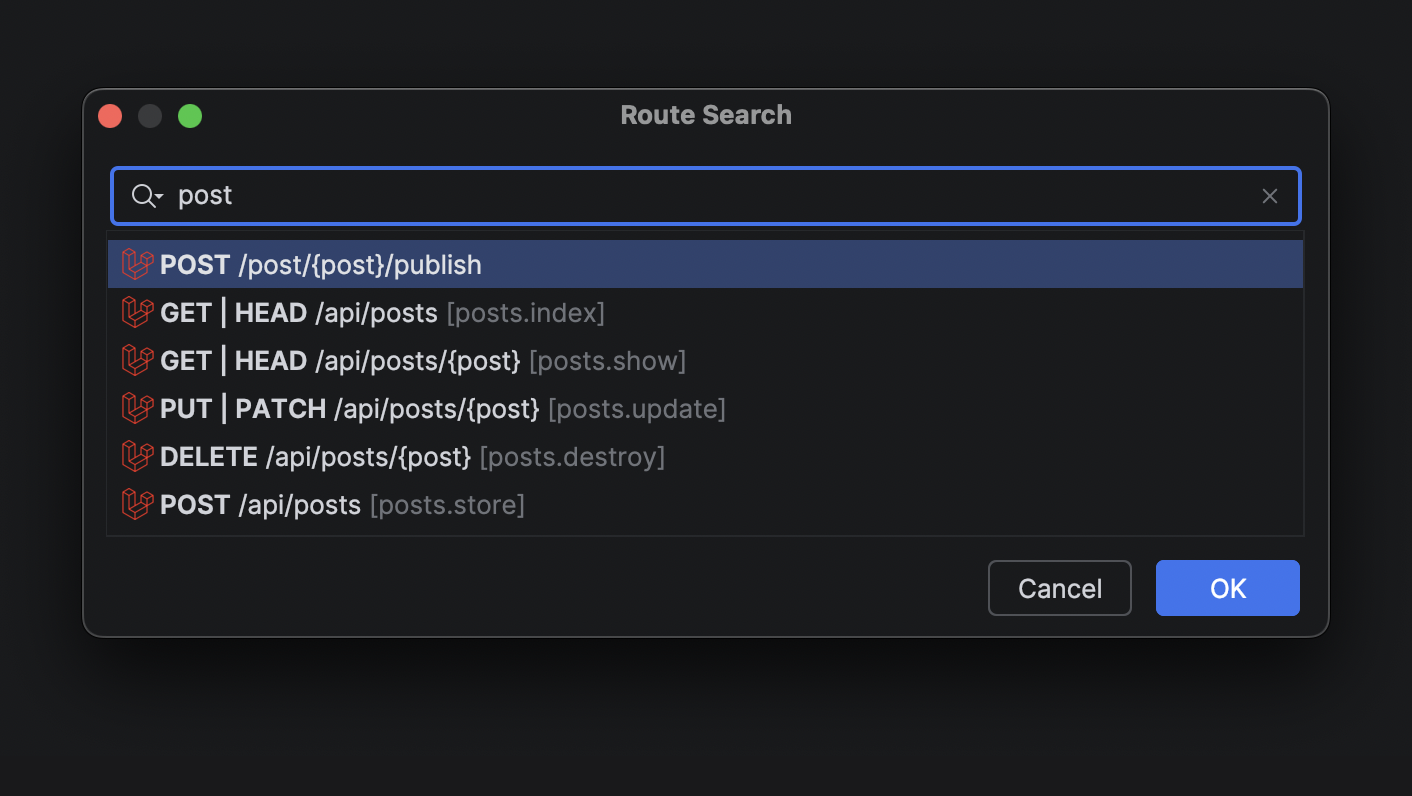
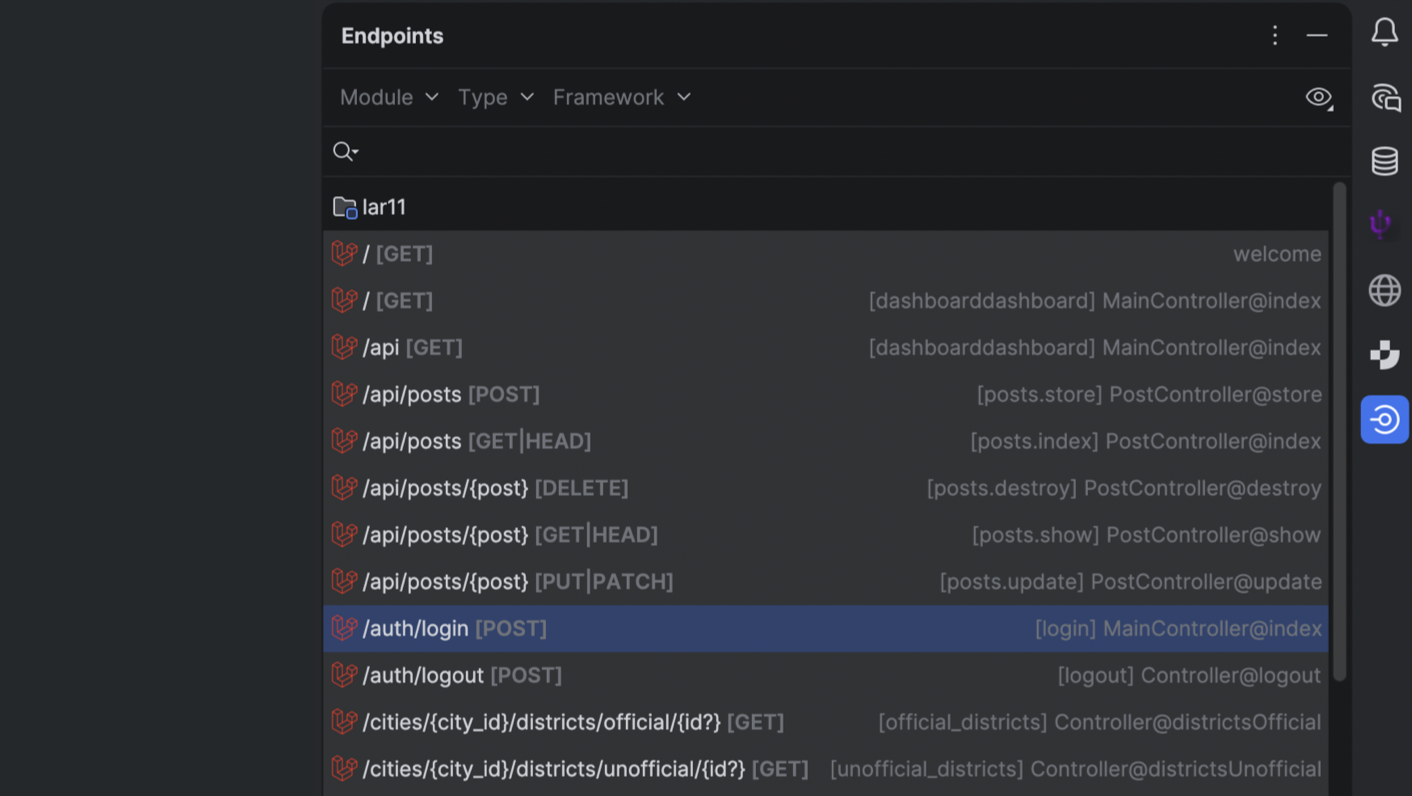
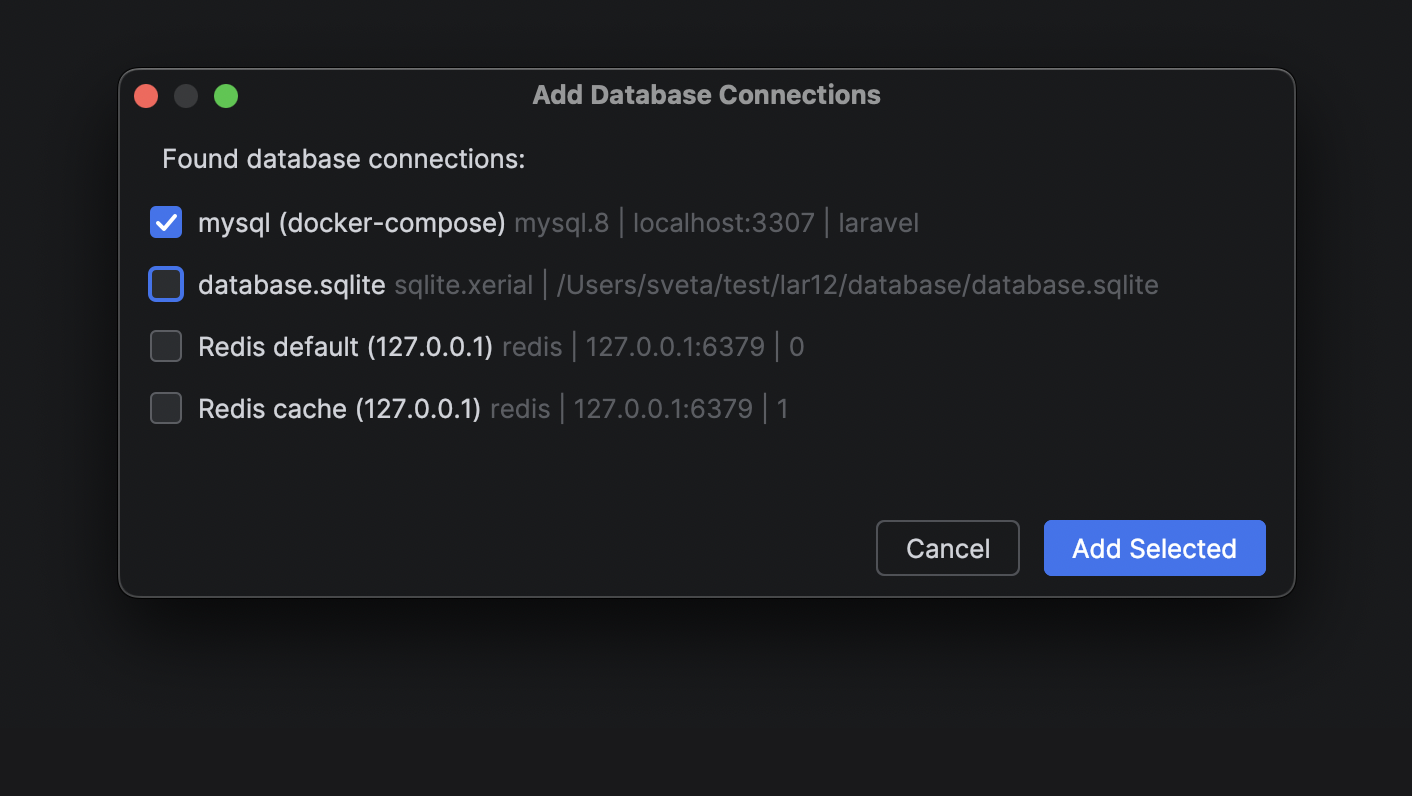
更新内容の全リストについては、Laravel Idea の変更ログをご覧ください。
フロントエンド
PhpStorm の TypeScript サポートにサービス駆動型の型エンジン(TypeScript 言語サービスベース)がデフォルトで使用されるようになり、大規模なプロジェクトでの型推論の精度が向上し、CPU 使用率が低下しました。TypeScript のサポートが大幅に強化され、パスエイリアスとプロジェクト参照の自動インポート処理に加えて、TypeScript の Go ベースの言語サーバーのインレイヒントの統合が改善されています。JavaScript の構文解析で文字列リテラルの import / export 指定子も正しく処理されるようになりました。
フレームワークとスタイル設定のサポートが全面的に改良されました。
- IDE が React の新しい
use memoディレクティブとuse no memoディレクティブをハイライトするようになりました。 - Vue の統合で新しいバージョン 3.18 の
@vue/typescript-pluginを使用するようになりました。 - Astro の設定で JSON ベースの言語サーバー統合の構成を受け付けるようになりました。
- スウォッチとプレビューで、モダンな CSS の
color()関数と追加の色スペースがサポートされるようになりました。 - Angular 21.x のテンプレート構文がサポートされるようになりました。
データベース
AI チャットと Codex、Claude Agent の統合でユーザーが接続したデータベースが完全に標準でサポートされるようになりました。これにより、IDE から自然言語でデータベースの状態を照会、解析、変更できるようになりました。
外部エージェントでも MCP サーバー経由で同じ機能を使用できます。
データソーステンプレートを使用してデータソース設定を JetBrains Account 内に保管できるようになりました。このアップグレードは All Products Pack ユーザーや JetBrains IDE の複数のインスタンスを使用するユーザーにとっては特に有益で、データベース機能を備えたすべての JetBrains IDE でデータソースのテンプレートと設定にアクセスすることを可能にします。
生産性向上機能
エディターのキャレットと選択の更新
IDE のモダン化は継続的に行われており、このアップデートでは操作頻度の高いエディターを更新しました。スムーズなキャレットアニメーションと選択動作の更新によって快適さを向上させ、よりクリーンな外観とより楽しいコーディング体験を提供しています。
Git ワークツリーによる複数ブランチの同時操作
AI エージェントの進化に伴い、複数タスクの並列実行が大幅な時間短縮手法になりつつありますが、Git ワークツリーはまさにその目的に大いに役立ちます。AI 駆動型ソフトウェア開発の最先端のワークフローをサポートするため、PhpStorm に最高水準の Git ワークツリーのサポートが導入されました。緊急のホットフィックス用に別のワークツリーを作成し、別のワークツリーを AI エージェントに引き渡し、main ブランチで作業を続行できます。これらすべては、作業を中断することなく常に行うことができます。
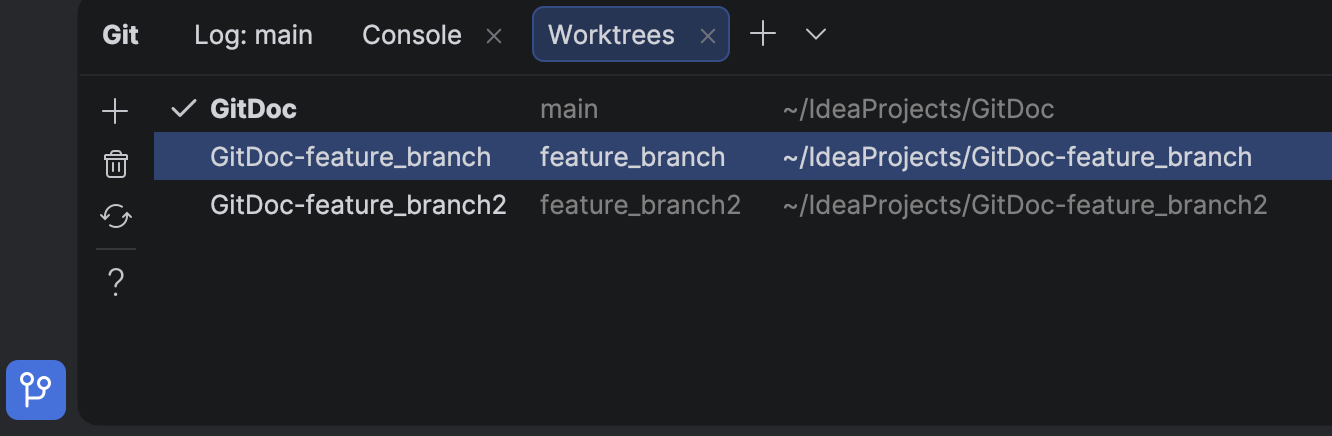
エージェントを使用しない場合でも、ワークツリーによってブランチの切り替えにかかる時間を節約することができます。これは、大規模なプロジェクトの場合には特に効果的です。
Wayland のネイティブサポート
IntelliJ ベースの IDE がデフォルトで Wayland 上でネイティブに実行されるようになりました。この変更により、より鮮明な HiDPI 表示と入力処理の改善を通して Linux 開発者に最高の快適さがもたらされ、Vulkan のサポートなどの今後の機能強化への道も開かれます。
Wayland はさまざまなメリットをもたらし、今後の改善のベースとなるものですが、信頼性を最優先するため、IDE ではサポート対象外の環境では X11 に自動的にフォールバックしてワークフローの中断を防ぐようにしています。詳細はこちらをご覧ください。
ターミナルの補完
コマンドを記憶するのではなく、 発見できるようになります。ターミナル内での補完により、入力の途中で使用可能なサブコマンドとパラメーターをすぐに調べることができます。この機能は、Git、Docker、kubectl などの複雑な CLI ツールを使用している場合や独自のスクリプトを使用している場合に有効なオプションをリアルタイムでインテリジェントに提案します。
Code With Me のサポート終了
IDE を継続的に進化させ、開発者にとって最も有益な部分に注力するため、協働コーディングとペアプログラミングのサービスである Code With Me のサポートを終了することを決定しました。近年はこの種の機能に対する需要が低下していることから、業務ソフトウェア開発に適したよりモダンなワークフローを優先させています。
バージョン 2026.1 からは Code With Me がすべての JetBrains IDE にバンドルされなくなります。その代わり、JetBrains Marketplace で独立したプラグインとして提供されるようになります。2026.1 は Code With Me を公式にサポートする最後の IDE バージョンとなり、その提供は段階的に終了される予定です。
この発表の全文とサポート終了の時期については、公式のブログ記事をお読みください。
オリジナル(英語)ブログ投稿記事の作者:

Subscribe to PhpStorm Blog updates
Discover more


PhpStorm 2026.1 现已发布

欢迎使用 PhpStorm 2026.1! 此版本带来了全新的 PhpStorm MCP 工具、集成在 IDE 中的全新第三方智能体、对 Git 工作树的支持,以及诸多提升 PHP 和 Laravel 开发者工作效率的功能。
如有进一步咨询需求,请发送邮件至 sales.cn@jetbrains.com(购买相关)或 support.cn@jetbrains.com(使用相关)。
PhpStorm MCP 工具
在 PhpStorm 2025.2 中,我们为 Claude Code、Windsurf 或 Codex 等第三方编码智能体添加了集成式 MCP 服务器,以用于访问并使用您 IDE 的工具。
在 2026.1 中,我们扩展了 MCP 服务器工具集,增加了更多 PhpStorm 功能,包括:
- 检查和快速修复,使智能体能够利用 PhpStorm 强大的静态分析引擎。
- IDE 搜索功能,包括 PhpStorm 针对代码模式的结构化搜索和语义搜索。
- 访问 IDE 操作,以便将 IDE 的设置与自定义任务委托给编码智能体。
此外,适用于 Claude Code 的 PhpStorm 插件为 Claude Code 提供了使用 PhpStorm MCP 服务器工具的上下文和指令。要将插件的技能和挂钩添加到您的项目中,请前往 PhpStorm 的 Settings | Tools | PHP Claude Skills(设置 | 工具 | PHP Claude 技能)。
注意:PhpStorm 的 MCP 服务器默认禁用。要启用服务器并配置与编码智能体的集成,请前往 Settings | Tools | MCP Server(设置 | 工具 | MCP 服务器)。
AI
PhpStorm 中的第三方智能体
PhpStorm 正发展为一个开放平台,允许用户将自己选择的 AI 工具带入专业开发工作流。
除了 Junie、Claude Agent 和最近新增的 Codex 之外,PhpStorm 现在还支持直接在 AI 聊天中使用更多 AI 智能体。您可以选择 GitHub Copilot、Cursor 等智能体,以及其他许多通过 Agent Client Protocol (ACP) 支持的智能体。
后续编辑建议
现在,后续编辑建议不会消耗您的 JetBrains AI Pro、Ultimate 和 Enterprise 订阅的 AI 配额。这些建议超越了针对 PHP 的传统代码补全。它们不仅会更新光标所在位置的内容,还可以智能地跨整个文件应用相关更改,帮助您轻松保持代码一致性和最新状态。
这种代码补全的自然演进带来了无缝的 Tab Tab 体验,让您保持流畅的开发节奏。
Junie CLI 现已进入测试阶段
Junie CLI 是 JetBrains 推出的一款不受 LLM 制约的编码智能体,可以直接在终端、任何 IDE 内、CI/CD 中,以及 GitHub 或 GitLab 上使用。Junie CLI 具有以下特点:
- 自带密钥 (BYOK) 定价:您可以使用模型提供商为您提供的密钥,无需额外付费。
- 一键迁移:从 Claude Code 或 Codex 等其他智能体一键迁移。
- 灵活自定义:通过准则、自定义智能体与智能体技能、命令、MCP 等实现灵活自定义。
阅读我们博文中的完整公告。
项目索引优化
PhpStorm 现在能够自动检测包含频繁更改的生成内容、缓存内容或用户上传内容的框架特定目录,并将这类目录从项目索引中排除。
IDE 在搜索、解析和其他操作过程中会跳过被排除的文件夹。减少索引开销有助于优化 CPU 使用率并提升 IDE 性能。
如果您想要重新启用对任何自动排除文件夹的索引编制,可以在 Settings | Directories(设置 | 目录)中点击 Exclude(排除),然后取消选中您要编制索引的目录旁边的复选框。
泛型支持
新版本为 PhpStorm 的类型推断引擎带来了多项改进和 bug 修正,包括:
- 改进了对可调用泛型类型的类型推断。现在,IDE 可以通过
callable(T)注解推断出输入形参类型,同时推断出可调用模板的返回值类型。 - 改进了嵌套参数化模板类型的显示。PhpStorm 2026.1 可以通过多层嵌套(如
Wrapper<Wrapper<Wrapper<stdClass>>>)显示形参类型 (Ctrl + Shift+P) 和快速文档 (F1) 信息。
更多体验优化改进
调试非 PHP 文件
现在,只要在 IDE 设置中将文件名模式与 PHP 文件类型相关联,便可在非 PHP 文件中设置断点。结合 Xdebug 3.5 中引入的模板与编译 PHP 文件之间的原生路径映射,此功能允许您调试任何格式的源模板文件,包括像 .ezt 这样的小众扩展程序。
改进了 Go to test(转到测试)导航
在 PhpStorm 2026.1 中,我们对 PHPUnit 和 Pest 测试的 Go to test(转到测试)导航进行了以下增强:
- 在使用
#[UsesClass]或#[UsesMethod]特性的 PHPUnit 测试与关联类/方法之间导航。 - 对于 Pest 测试,您现在可以从 Test Runner(测试运行程序)标签页导航到嵌套在 Pest describe 块中的源测试。
Convert to pipe operator(转换为管道运算符)快速修复
PhpStorm 现在能够检测可以使用 PHP 8.5 管道运算符语法的代码元素,并提供快速修复建议,将此类代码转换为更易读的管道运算符链。
Laravel
- 框架支持:支持 Laravel 13 以及新版 Livewire 和 Filament。支持新增的 @hasStack 和 @includeIsolated Blade 指令。
- 支持新软件包:Laravel Wayfinder、PHP Native、staudenmeir/laravel-cte 和 staudenmeir/laravel-adjacency-list 软件包。
- Eloquent 增强:支持高级 #[Scope] 方法,并针对作用域、特性和关联方法优化了 Find Usages(查找用法),提高了其准确性。
- UI 和导航:Blade 视图用法 UI、更出色的控制器嵌入提示、新路由搜索 UI,以及 Endpoints(端点)工具窗口路由。
- 工作效率调整:新增 Add Application Database(添加应用程序数据库)操作。在 Terminal(终端)工具窗口中或通过 PHP 解释器运行 Artisan 命令。
- Laravel Idea MCP 服务器随 PhpStorm MCP 服务器提供。
如需查看完整更新列表,请参阅 Laravel Idea 的更改日志。
前端
PhpStorm 对 TypeScript 的支持现在默认使用基于服务的类型引擎(基于 TypeScript 语言服务构建),可以在大型项目中提供更准确的类型推断,并降低 CPU 使用率。进一步改进了对 TypeScript 的支持,包括优化了对路径别名和项目引用的自动导入处理,以及集成了基于 Go 的 TypeScript 语言服务器的嵌入提示。JavaScript 解析现在也能正确处理字符串字面量 import / export 说明符。
框架和样式支持也得到了全面优化:
- IDE 现在会高亮显示 React 新增的
use memo和use no memo指令。 - Vue 集成采用更新的 3.1.8 版
@vue/typescript-plugin。 - Astro 设置接受基于 JSON 的配置,可以实现语言服务器集成。
- 支持在色板和预览中使用现代 CSS
color()函数和额外的色彩空间。 - 支持 Angular 21.x 模板语法。
数据库
Codex 和 Claude Agent 的 AI 聊天集成现在对您连接的数据库提供完整的原生支持。您现在可以直接在 IDE 中使用自然语言查询、分析和修改数据库状态。
外部智能体也可以通过 MCP 服务器使用相同的功能。
现在,可以通过数据源模板将数据源设置存储在您的 JetBrains Account 中。对于 All Products Pack 用户或任何使用多个 JetBrains IDE 实例的用户来说,此项升级尤为实用,您可以在每个支持数据库功能的 JetBrains IDE 中访问数据源模板和设置。
提升工作效率的功能
编辑器文本光标和选择更新
我们将持续对 IDE 进行现代化升级,在本次更新中,我们更新了您频繁交互的组件 — 编辑器。平滑的文本光标动画和更新的选择行为提供更好的舒适感、更清洁的外观和更愉悦的编码体验。
使用 Git 工作树同时处理多个分支
随着 AI 智能体的发展,并行运行多项任务已成为大幅节省时间的主要方式,而这正是 Git 工作树最擅长的工作。为了支持 AI 赋能软件开发的前沿工作流,PhpStorm 现在提供对 Git 工作树的一流支持。为紧急的修补程序创建一个单独的工作树,将另一个工作树交给 AI 智能体,并在 main 分支中继续工作 – 这些都可以同时进行,毫不干扰。
即使您不使用智能体,工作树也能节省分支切换的时间,这一优势在大型项目中尤为显著 。
原生 Wayland 支持
基于 IntelliJ 的 IDE 现在默认在 Wayland 上原生运行。这一转变带来了更清晰的 HiDPI 效果和更出色的输入处理能力,为 Linux 专业人士带来极为舒适的使用体验,同时也为后续 Vulkan 支持等增强功能奠定了基础。
尽管 Wayland 具有诸多优势,并为后续改进奠定了基础,但我们仍优先考虑可靠性:在不受支持的环境中,IDE 会自动回退到 X11,以确保工作流不会中断。了解详情。
终端补全
不再死记硬背命令。改为发现命令。在终端内补全的帮助下,您输入时即可立即探索可用的子命令和形参。无论您使用的是 Git、Docker 或 kubectl 这类复杂的 CLI 工具,还是自定义脚本,此功能都能实时、智能地提供有效的选项建议。
Code With Me 弃用
随着我们继续发展 IDE,并将关注点放在能为开发者创造最大价值的领域,我们决定弃用 Code With Me 这项协作式编码和结对编程服务。近年来,对此类功能的需求已下降,我们将优先开发针对专业软件开发量身定制的现代工作流。
自版本 2026.1 起,Code With Me 将从所有 JetBrains IDE 中解绑。取而代之的是,它将作为独立插件在 JetBrains Marketplace 上提供。2026.1 将是最后一个官方支持 Code With Me 的 IDE 版本,因为我们将逐步弃用该服务。
有关完整公告和弃用时间线,请阅读我们的博文。
本博文英文原作者:
Subscribe to PhpStorm Blog updates
Discover more

PhpStorm 2026.1 is Now Out
Welcome to PhpStorm 2026.1! This release brings new PhpStorm MCP tools, new third-party agents inside your IDE, support for Git worktrees, and lots of other productivity-enhancing features for PHP and Laravel developers.
PhpStorm MCP tools
In PhpStorm 2025.2, we added an integrated MCP server for third-party coding agents like Claude Code, Windsurf, or Codex to access and use your IDE’s tools.
In 2026.1, we are extending the MCP server toolset with more PhpStorm features, including:
- Inspections and quick-fixes that enable agents to leverage PhpStorm’s powerful static analysis engine.
- IDE search capabilities, including PhpStorm’s structural search and semantic search for code patterns.
- Access to IDE actions so that you can delegate setup and customization of your IDE to your coding agent.
Furthermore, the PhpStorm plugin for Claude Code provides Claude Code with context and instructions for using PhpStorm MCP server tools. To add the plugin’s skills and hooks to your project, go to PhpStorm’s Settings | Tools | PHP Claude Skills.
Note: PhpStorm’s MCP server is disabled by default. To enable the server and configure integration with your coding agent, go to Settings | Tools | MCP Server.
AI
Third-party agents in PhpStorm
PhpStorm is evolving as an open platform that allows you to bring the AI tools of your choice into your professional development workflows.
In addition to Junie, Claude Agent, and most recently Codex, PhpStorm now lets you work with more AI agents directly in the AI chat. You can choose from agents such as GitHub Copilot, Cursor, and many others supported through the Agent Client Protocol.
Next edit suggestions
Next edit suggestions are now available without consuming AI quota of your JetBrains AI Pro, Ultimate, and Enterprise subscriptions. These suggestions go beyond traditional code completion for PHP. Instead of updating only what’s at your cursor, they intelligently apply related changes across the entire file, helping you keep your code consistent and up to date with minimal effort.
This natural evolution of code completion delivers a seamless Tab Tab experience that keeps you in the flow.
Junie CLI is now in Beta
Junie CLI is JetBrains’ LLM-agnostic coding agent you can use directly from the terminal, inside any IDE, in CI/CD, and on GitHub or GitLab. Junie CLI comes with:
- Bring Your Own Key (BYOK) pricing, allowing you to use your own keys from model providers without additional charges.
- One-click migration from other agents such as Claude Code or Codex.
- Flexible customization through guidelines, custom agents and agent skills, commands, MCP, and more.
Read the full announcement in our blog post.
Project indexing optimization
PhpStorm now automatically detects framework-specific directories that contain frequently changing generated, cached, or user-uploaded content and excludes such directories from project indexing.
The IDE skips excluded folders during search, parsing, and other operations. Reducing indexing overhead helps optimize the CPU usage and performance of your IDE.
If you want to re-enable indexing for any of the automatically excluded folders, you can do so in Settings | Directories by clicking Exclude and unselecting the checkboxes next to the directories you want to be indexed.
Generics support
The new release brings a number of improvements and bug fixes for PhpStorm’s type inference engine, including:
- Improved type inference for callable generic types. Now the IDE can infer both the input parameter type from a
callable(T)annotation and the callable template return type. - Improved display for nested parameterized template types. PhpStorm 2026.1 displays parameter type (Ctrl + Shift+P) and quick documentation (F1) info with multiple layers of wrapping, such as
Wrapper<Wrapper<Wrapper<stdClass>>>.
More quality-of-life improvements
Debugging non-PHP files
You can now set breakpoints in non-PHP files as soon as the file name pattern is associated with the PHP file type in the IDE settings. Together with native path mapping between templates and compiled PHP files introduced in Xdebug 3.5, this feature allows you to debug source template files of any format, including niche extensions like .ezt.
Improved Go to test navigation
In PhpStorm 2026.1, we’ve improved Go to Test navigation for PHPUnit and Pest tests with the following enhancements:
- Navigation between PHPUnit tests that use a
#[UsesClass]or#[UsesMethod]attribute and the related class/method. - For Pest tests, you can now navigate from the Test Runner tab to the source test nested inside Pest describe blocks.
Convert to pipe operator quick-fix
PhpStorm now detects code elements where the PHP 8.5 pipe operator syntax can be used and suggests a quick-fix to convert such code into easier-to-read pipe operator chains.
Laravel
- Framework support: support for Laravel 13 and new versions of Livewire and Filament. Support for the new @hasStack and @includeIsolated Blade directives.
- New package support: Laravel Wayfinder, PHP Native, staudenmeir/laravel-cte and staudenmeir/laravel-adjacency-list packages.
- Eloquent enhancements: advanced #[Scope] methods support, optimized and more accurate Find Usages for scope, attribute and relation methods.
- UI and navigation: Blade view usages UI, better controller inlays, new Route Search UI, and routes to the Endpoints tool window.
- Productivity tweaks: a new Add Application Database action. Run Artisan commands in the Terminal tool window or via PHP interpreter.
- Laravel Idea MCP server shipped with the PhpStorm MCP server.
For the full list of updates, see Laravel Idea’s changelog.
Frontend
PhpStorm’s TypeScript support now uses the service-powered type engine (built on the TypeScript language service) by default, delivering more accurate type inference and lower CPU usage in large projects. The TypeScript support is further improved with better auto-import handling for path aliases and project references, as well as the integration of inlay hints from the TypeScript Go-based language server. JavaScript parsing now also correctly handles string-literal import / export specifiers.
Framework and styling support have been refined across the board:
- The IDE now highlights React’s new
use memoanduse no memodirectives. - The Vue integration uses the updated 3.1.8 version of
@vue/typescript-plugin. - Astro settings accept JSON-based configuration for language server integration.
- Modern CSS
color()functions and additional color spaces are supported in swatches and previews. - Angular 21.x template syntax is supported.
Databases
The AI chat integration for Codex and Claude Agent now offers full, native support for your connected databases. With that, you can now query, analyze, and modify your database state using natural language right from the IDE.
The same functionality is available for external agents via an MCP server.
Data source settings can now be stored in your JetBrains Account via data source templates. Especially nifty for All Products Pack users or anyone who uses multiple instances of JetBrains IDEs, this upgrade allows you to access data source templates and settings in every JetBrains IDE with database functionality.
Productivity-enhancing features
Editor caret and selection updates
We’re continuing to modernize our IDEs, and in this update, we’ve refreshed something you interact with constantly – the editor. Smooth caret animation and updated selection behavior provide improved comfort, a cleaner look, and a more enjoyable coding experience.
Work on multiple branches at once with Git Worktrees
With the evolution of AI agents, running multiple tasks in parallel has become a major time-saver, and this is precisely where Git worktrees are extremely handy. To support cutting-edge workflows for AI-boosted software development, PhpStorm now provides first-class support for Git worktrees. Create a separate worktree for an urgent hotfix, hand off another one to an AI agent, and keep working in your main branch – all at the same time, without interruption.
Even if you don’t use agents, worktrees will save you time on branch switching, especially in big projects.
Native Wayland support
IntelliJ-based IDEs now run natively on Wayland by default. This transition provides Linux professionals with ultimate comfort through sharper HiDPI and better input handling, and it paves the way for future enhancements like Vulkan support.
While Wayland provides benefits and serves as a foundation for future improvements, we prioritize reliability: The IDE will automatically fall back to X11 in unsupported environments to keep your workflow uninterrupted. Learn more.
Terminal completion
Stop memorizing commands. Start discovering them. In-terminal completion helps you instantly explore available subcommands and parameters as you type. Whether you’re working with complex CLI tools like Git, Docker, or kubectl or using your own custom scripts, this feature intelligently suggests valid options in real time.
Code With Me sunset
As we continue to evolve our IDEs and focus on the areas that deliver the most value to developers, we’ve decided to sunset Code With Me, our collaborative coding and pair programming service. Demand for this type of functionality has declined in recent years, and we’re prioritizing more modern workflows tailored to professional software development.
As of version 2026.1, Code With Me will be unbundled from all JetBrains IDEs. Instead, it will be available on JetBrains Marketplace as a separate plugin. 2026.1 will be the last IDE version to officially support Code With Me, as we gradually sunset the service.
Read the full announcement and sunset timeline in our blog post.