

Встречайте PhpStorm 2021.3!


В этом релизе мы полностью поддержали PHP 8.1, улучшили обработку дженериков, реализовали drag-and-drop для перемещения классов и пространств имен, обновили HTTP-клиент, повысили удобство процесса развертывания и управления версиями, а также добавили новые возможности удаленной разработки.
Под катом подробный разбор всех изменений и новых возможностей с кучей гифок.
Скачать PhpStorm можно на сайте или через приложение Toolbox App.
Как и раньше, студентам, преподавателям и тем, кто занимается опенсорс-проектами, JetBrains предоставляет бесплатные лицензии. Стартапам доступна скидка 50%.
Итак, вот что мы подготовили для вас в этом обновлении:
Полная поддержка PHP 8.1
- Перечисления
- Readonly-свойства
- Пересечения типов
- Новое (не)возвращаемое значение: `never`
- Финальные константы
- Оператор `new` в инициализаторах
- Синтаксис First-class callable
- Устаревшие возможности
Дженерики в PHP
- Улучшенная поддержка Doctrine Collections
- Поддержка коллекций Laravel 9
- Вывод дженерик-типа из конструктора
- Поддержка аннотаций phpstan-*
Улучшения рефакторингов
Более быстрый и улучшенный деплоймент
- Поддержка `rsync`
- Повторная попытка для неудачных загрузок
- Ускорение для SFTP/FTP/FTPS благодаря многопоточным соединениям
- Новое действие: Загрузить все открытые файлы
- Быстрое переключение сервера по умолчанию для проекта
- Поддержка proxу для SSH соединений
HTTP клиент
- Поддержка текстовых и JSON стримов
- Бинарные ответы
- Перенаправление вывода в файл или каталог
- Поддержка идентификаторов HTTP-запросов
VCS
- Выравнивание изменений при просмотре диффа
- Checkout and Rebase onto Current для удаленных веток
- Реорганизованные настройки VCS
- Новое действие ‘Push All up to Here’
Обновления UX
PHP 8.1
PHP 8.1 уже вышел! Подробнее об обновлениях языка можно узнать из видеоролика, который мы подготовили совместно с Brent Roose и авторами разных RFC: Larry Garfield, Matheu Napoli, Aaron Pietrowski, Дмитрий Стогов, Никита Попов.
PhpStorm 2021.3 полностью поддерживает изменения, введенные PHP 8.1. Подробнее об этом рассказываем ниже.
Как обычно, чтобы попробовать новые возможности, необходимо установить PHP 8.1 в качестве PHP language level. Настройка доступна в панели инструментов. Либо вы можете прописать соответствующее требование в composer.json.

Перечисления
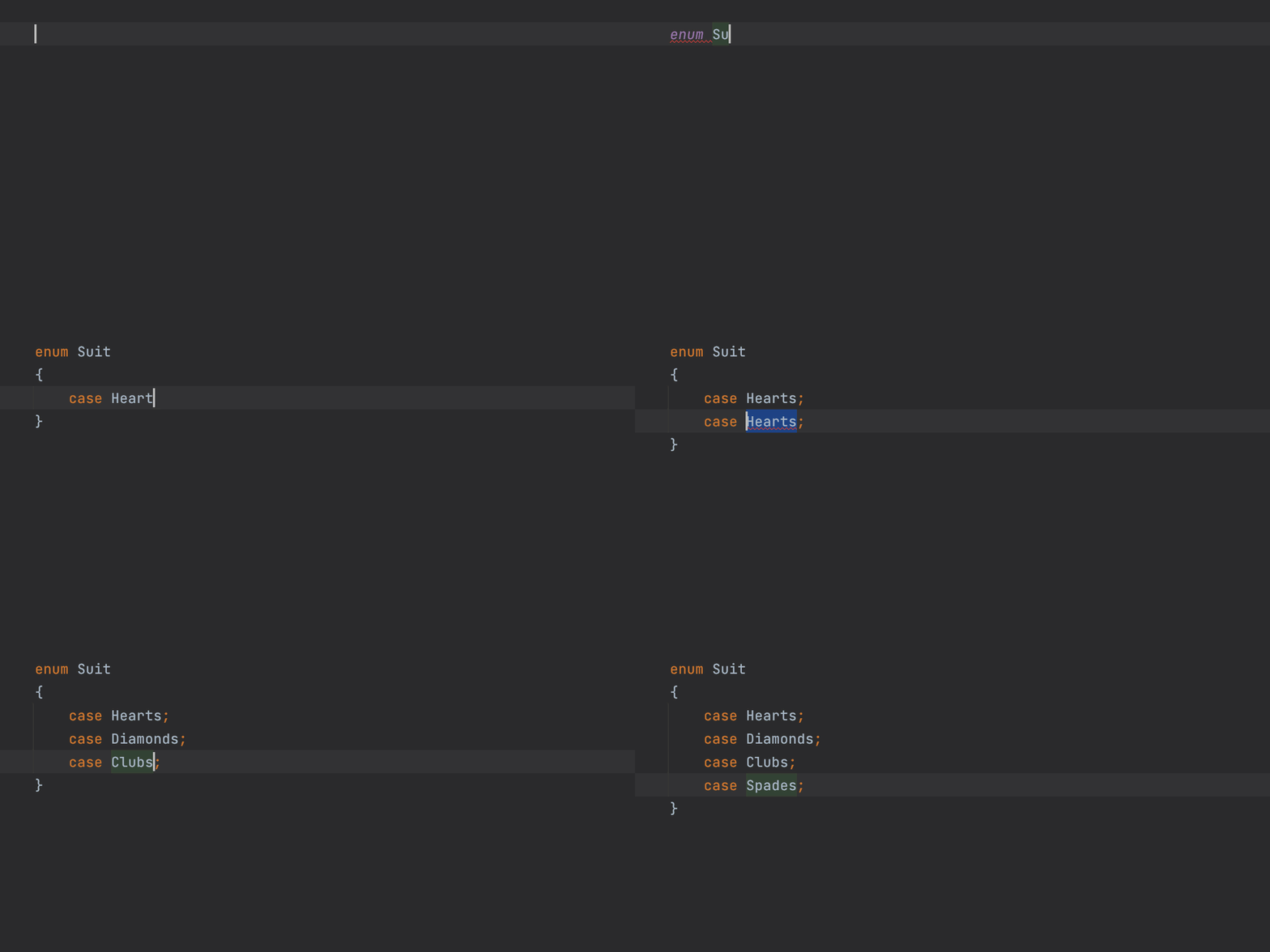
Вместо набора констант теперь можно использовать перечисления (enum). Они обеспечат проверку типов из коробки.
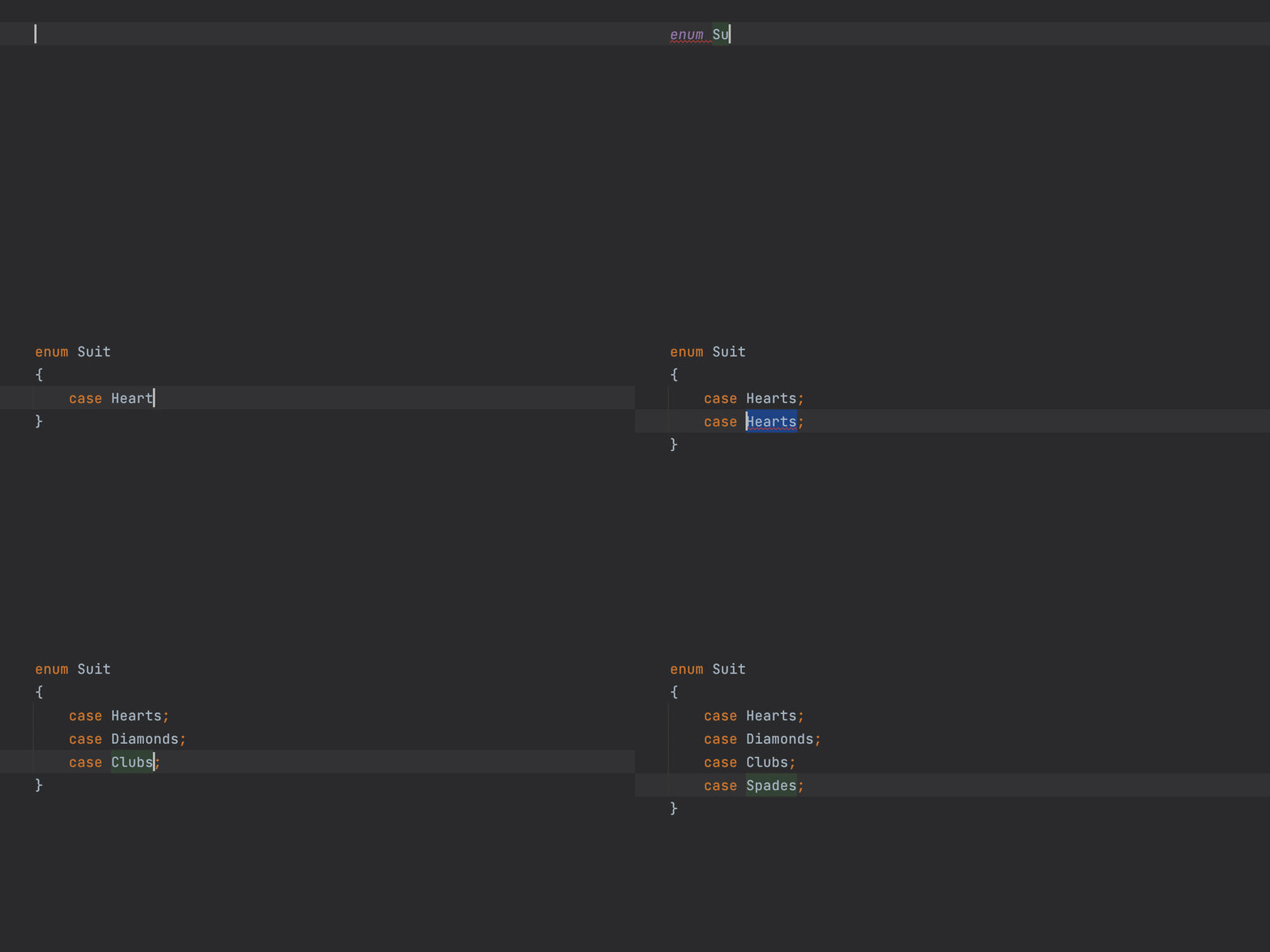
Поддержка перечислений появилась в PhpStorm еще в релизе 2021.2. Подробнее об этом читайте в предыдущем посте.
Readonly-свойства
Свойства с флагом readonly — это свойства, которые нельзя изменить после инициализации (то есть после присвоения им значения).
В предыдущих версиях PHP можно было добиться похожего поведения с помощью приватных сеттеров. Однако ключевое слово readonly позволяет сделать класс более читаемым, а ограничение — более строгим.
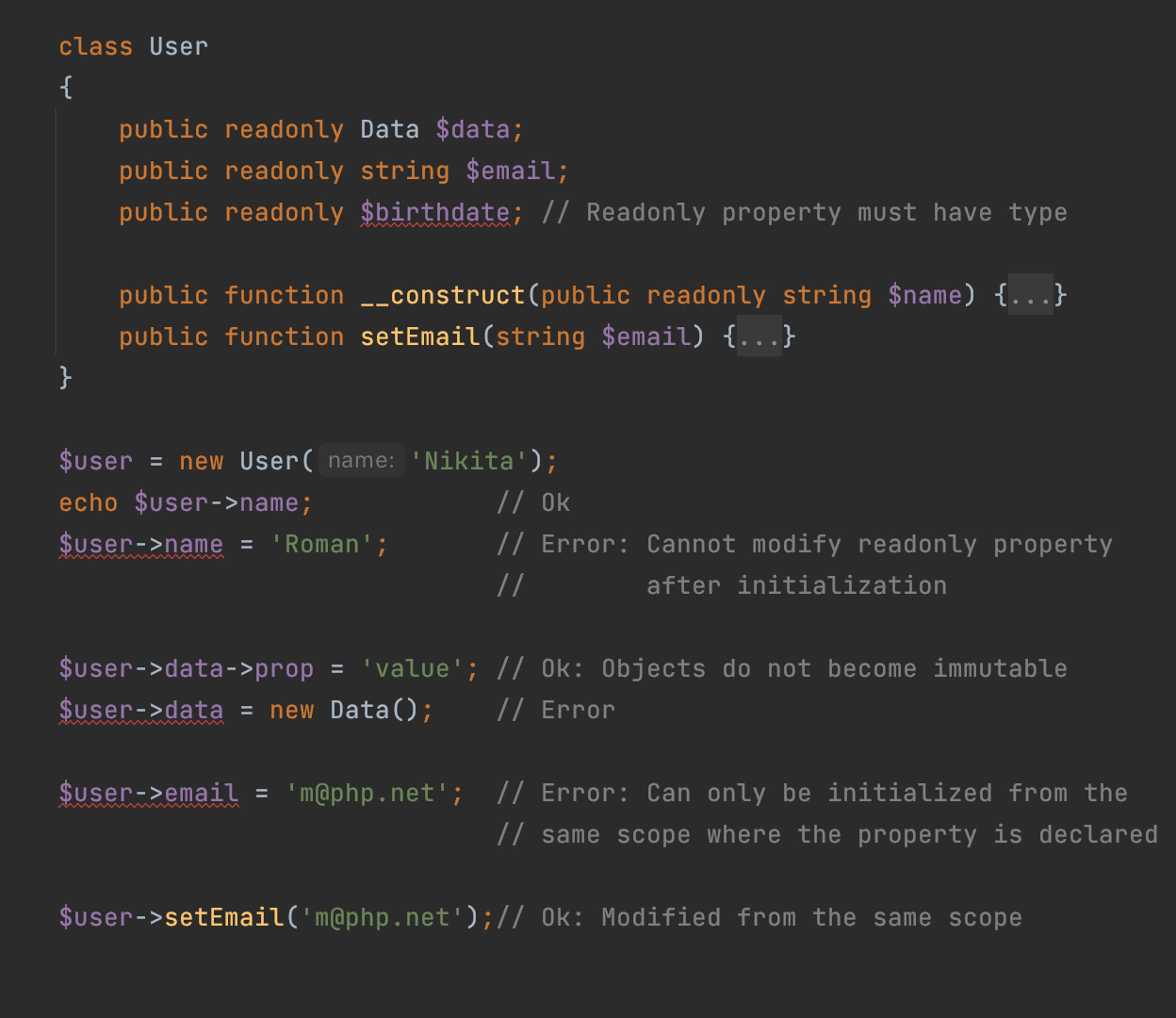
Свойство readonly может быть инициализировано только в той же области видимости, в которой оно объявлено, то есть в самом объявлении либо в методе класса.
Свойства с флагом readonly должны быть типизированы, но если вы не знаете тип заранее, можно использовать mixed.
Если вы проинициализировали свойство readonly объектом, то этот объект (его внутреннее состояние) останется изменяемым.
У свойства readonly не может быть значения по умолчанию. Однако такое свойство можно инициализировать в конструкторе: нажмите Alt+Enter, чтобы применить соответствующее быстрое исправление:

Пересечения типов
В PHP 8.0 были добавлены объединения типов (union). А теперь в PHP 8.1 появились пересечения (intersection).
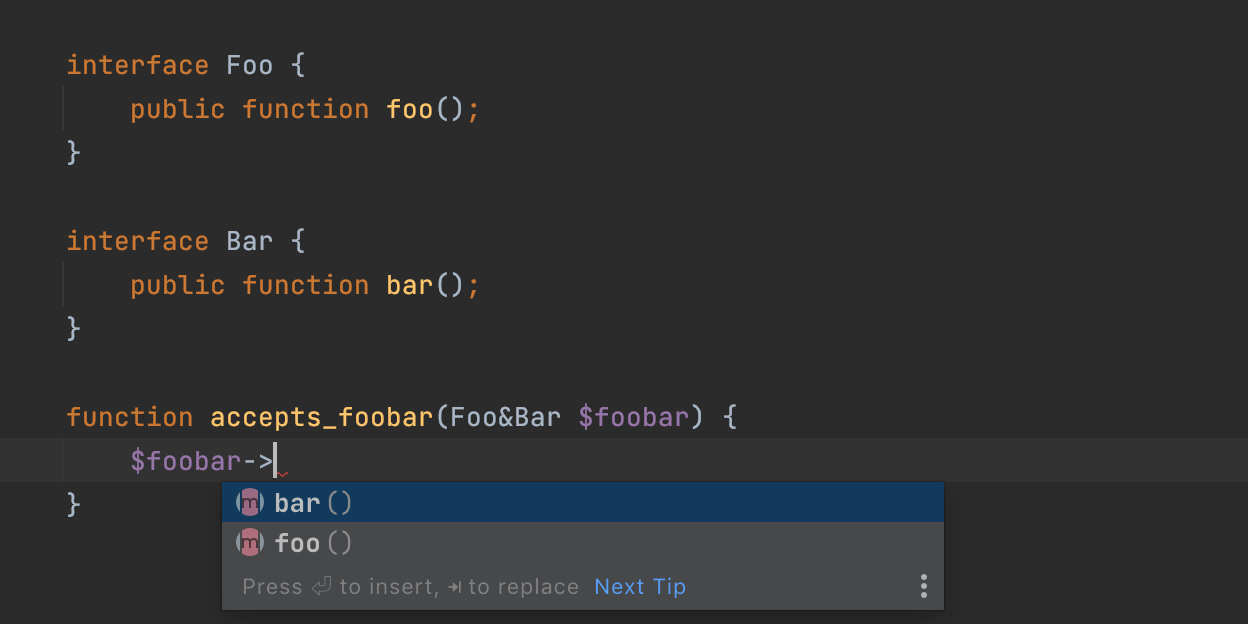
Синтаксис типов intersection такой: TypeA&TypeB. То есть значение должно одновременно являться instanceof TypeA и instanceof TypeB.
В PhpStorm 2021.3 автодополнение типов union и intersection устроено одинаково, ведь их различие только в том, что union может содержать члены всех указанных типов, а intersection должен содержать члены этих типов.
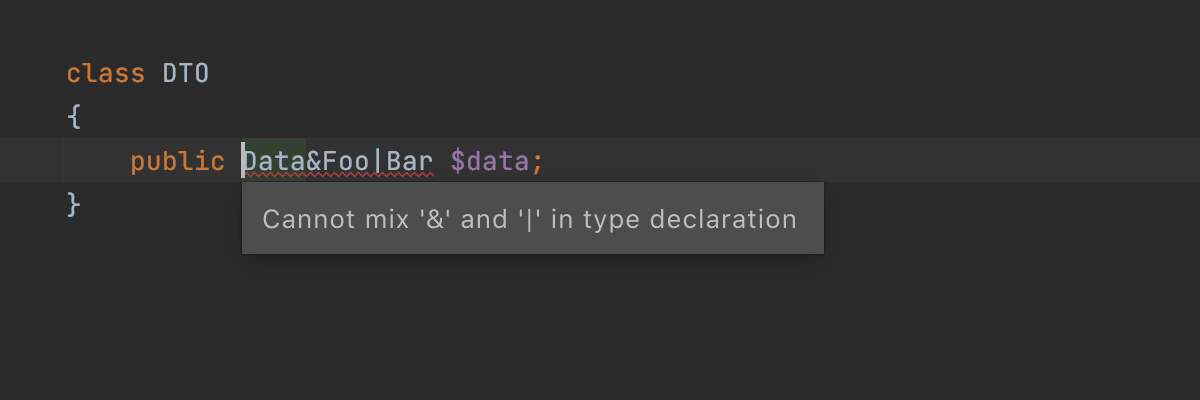
Комбинации с типами union PHP пока не поддерживает. Поэтому такое выражение будет считаться ошибкой:
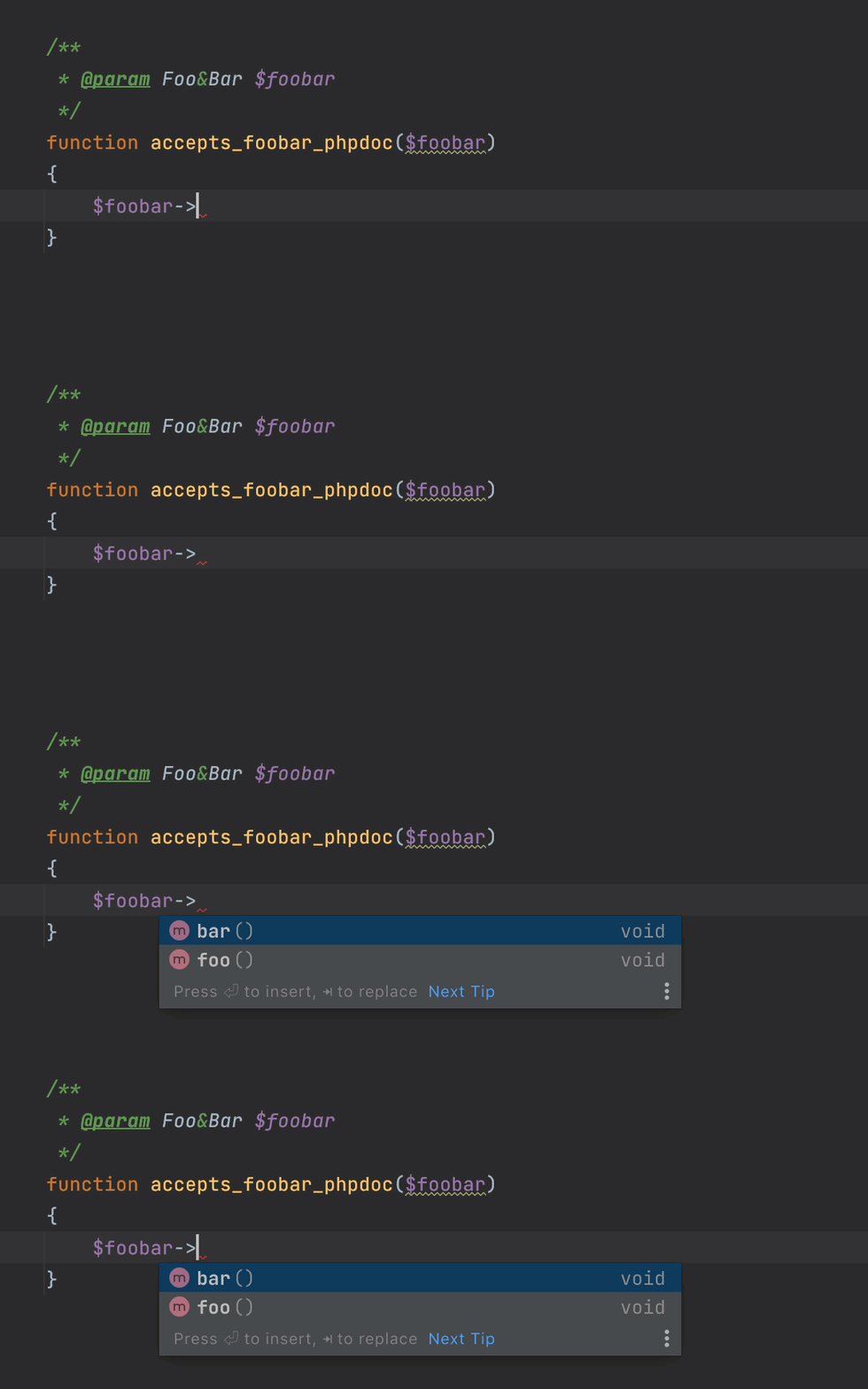
В более старых версиях PHP можно было встретить пересечения типов в аннотациях PHPDoc. Они тоже поддерживаются в PhpStorm 2021.3. Когда вы решите перейти на PHP 8.1, то сможете легко трансформировать аннотации PHPDoc в нативные определения с помощью Alt+Enter:
Новый тип never
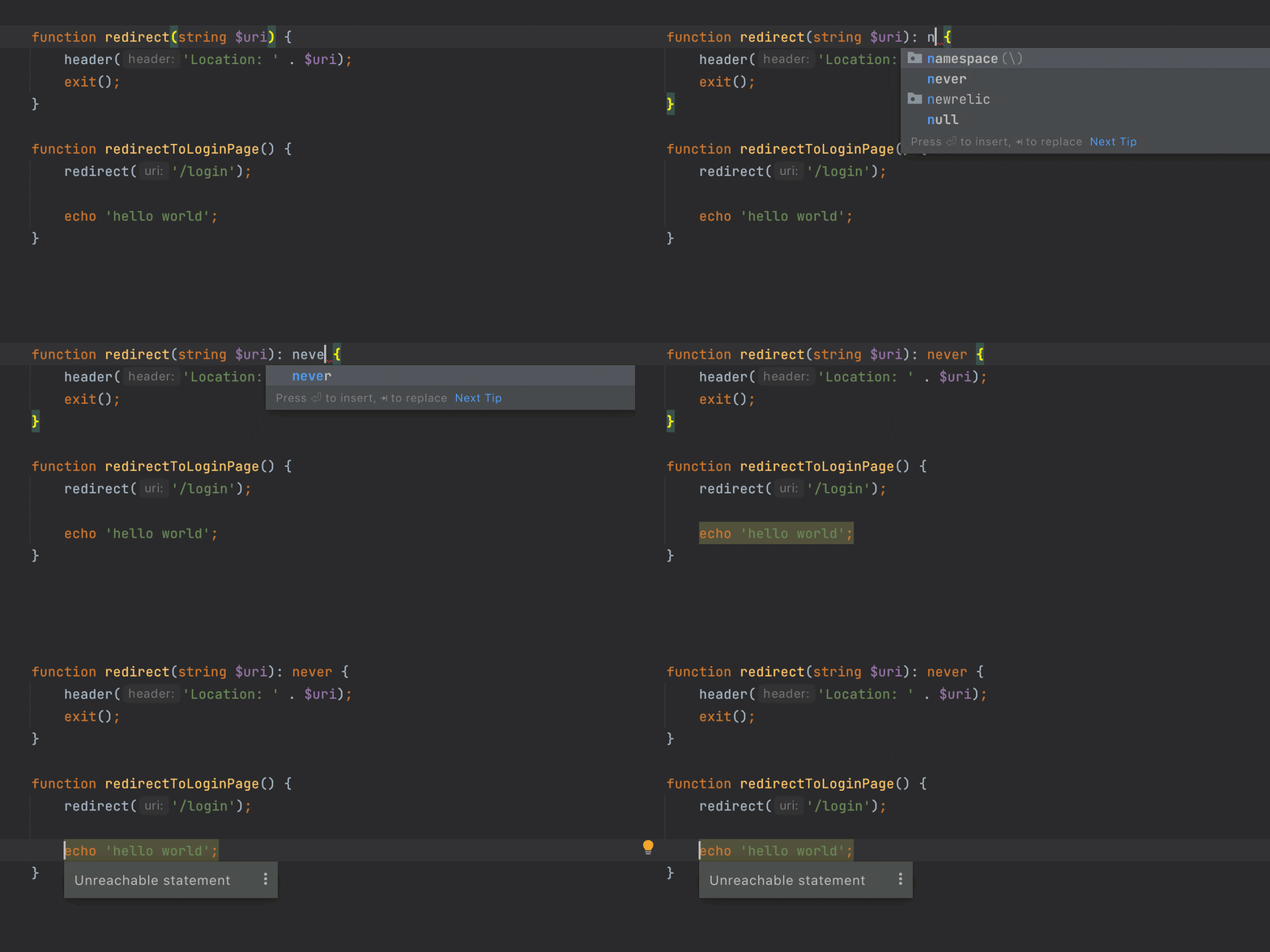
В PHP 8.1 появился новый тип для (не)возвращаемых значений — never.
Tип never означает, что функция (или метод) не возвращает ничего и либо генерирует исключение, либо завершает выполнение вызовом die(), exit(), trigger_error() и т. п.
Тип never улучшает анализ кода. Он делает практически то же самое, что и атрибут PhpStorm #[NoReturn], — отличие в том, что теперь это полноценная часть языка!

Финальные константы
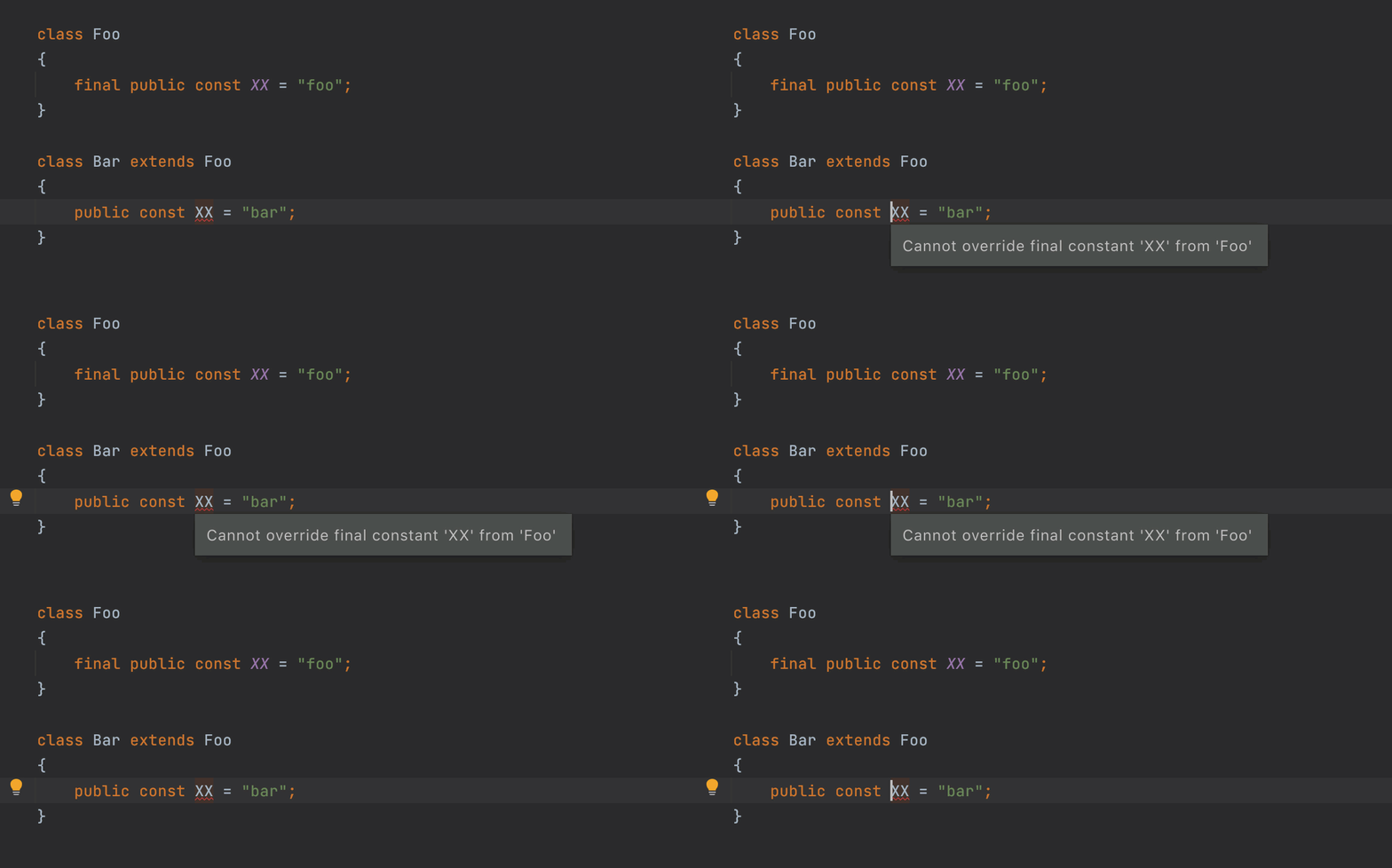
PHP 8.1 позволяет объявлять константы класса как финальные, после чего их нельзя переопределить в дочерних классах.
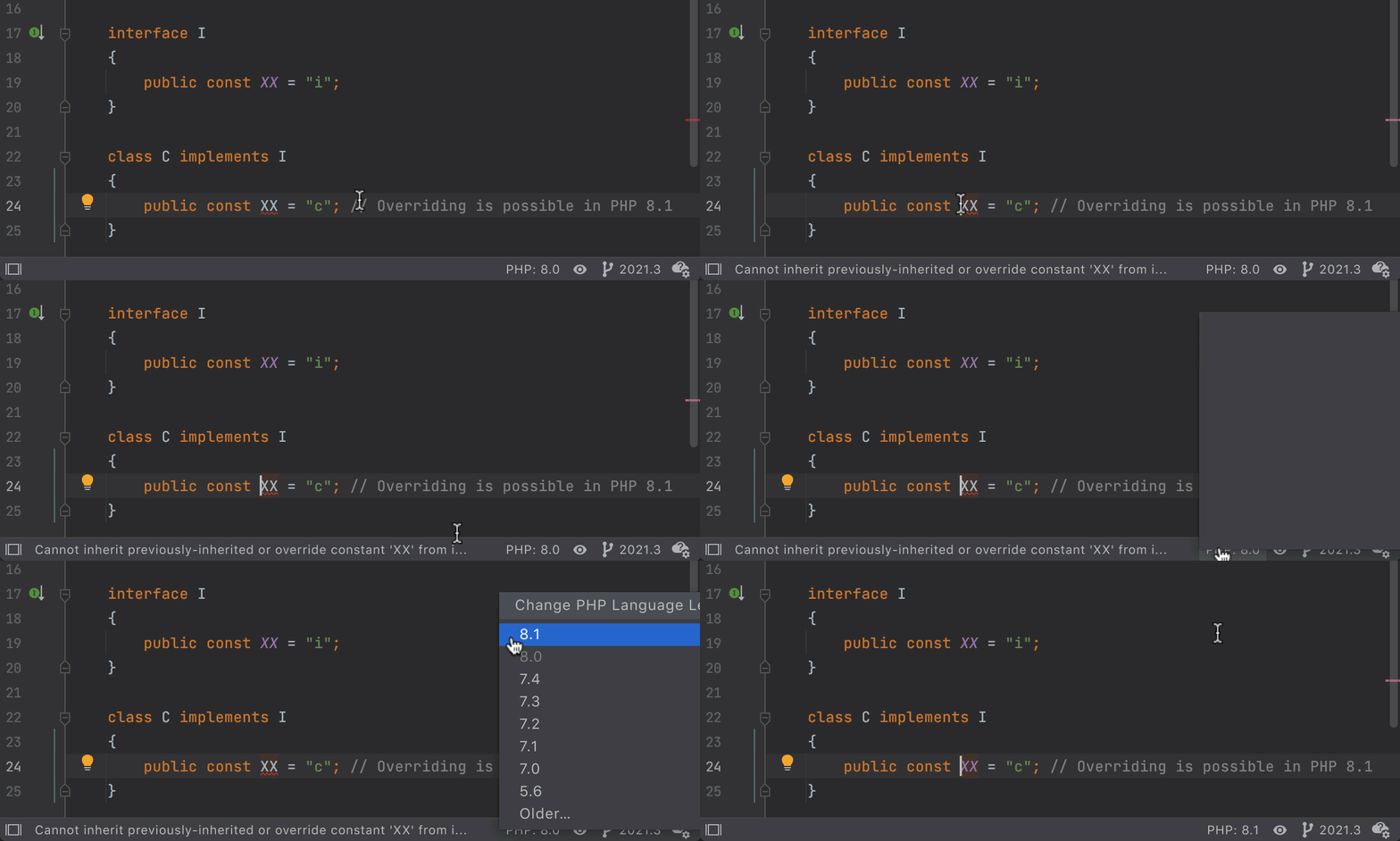
В PHP 8.0 и более ранних версиях языка константы в интерфейсах были неявно финальными, и их нельзя было изменить. В PHP 8.1 эту неконсистентность убрали: теперь константы по умолчанию — не финальные.
Оператор new в инициализаторах
В PHP 8.1 для параметров, статических переменных, глобальных констант и аргументов атрибутов можно указывать значения по умолчанию.
У этого есть приятный побочный эффект — появляется возможность использовать вложенные атрибуты.

PhpStorm проверяет, где именно вы используете оператор new. Например, использовать его со свойствами или константами класса нельзя, так как при этом возникают проблемы с порядком инициализации:

Синтаксис First-class callable
В PHP 8.1 появилась возможность получить ссылку на любую функцию.
Раньше это нужно было делать вот так:$fn = Closure::fromCallable(‘strlen’);
Теперь все гораздо проще:$fn = strlen(…);
Новый синтаксис соблюдает область видимости в точке создания вызываемого объекта, а также поддается статическому анализу и выглядит более лаконично.

Вызовы fromCallable можно преобразовать к новому синтаксису. Для этого нажмите Alt+Enter и выберите нужное быстрое исправление:
Устаревшие возможности
PHP порой удивлял своим причудливым поведением. Но с каждой новой версией языка проблем в нем становится все меньше. И PHP 8.1 не исключение: многие проблемные места объявлены устаревшими.
Чтобы перевести проект на PHP 8.1, прежде всего нужно поправить совместимость и свериться со списком устаревших возможностей.
PhpStorm поможет найти устаревший код и обновить его.
Вот пара примеров устаревших возможностей.
Использование интерфейса Serializable
Вместо интерфейса Serializable рекомендуется использовать магические методы __serialize() и __unserialize(), появившиеся в PHP 7.4.
В PHP 8.1 разрешает использовать Serializable, но только в тех случаях, когда реализующий его класс содержит __serialize() и __unserialize().
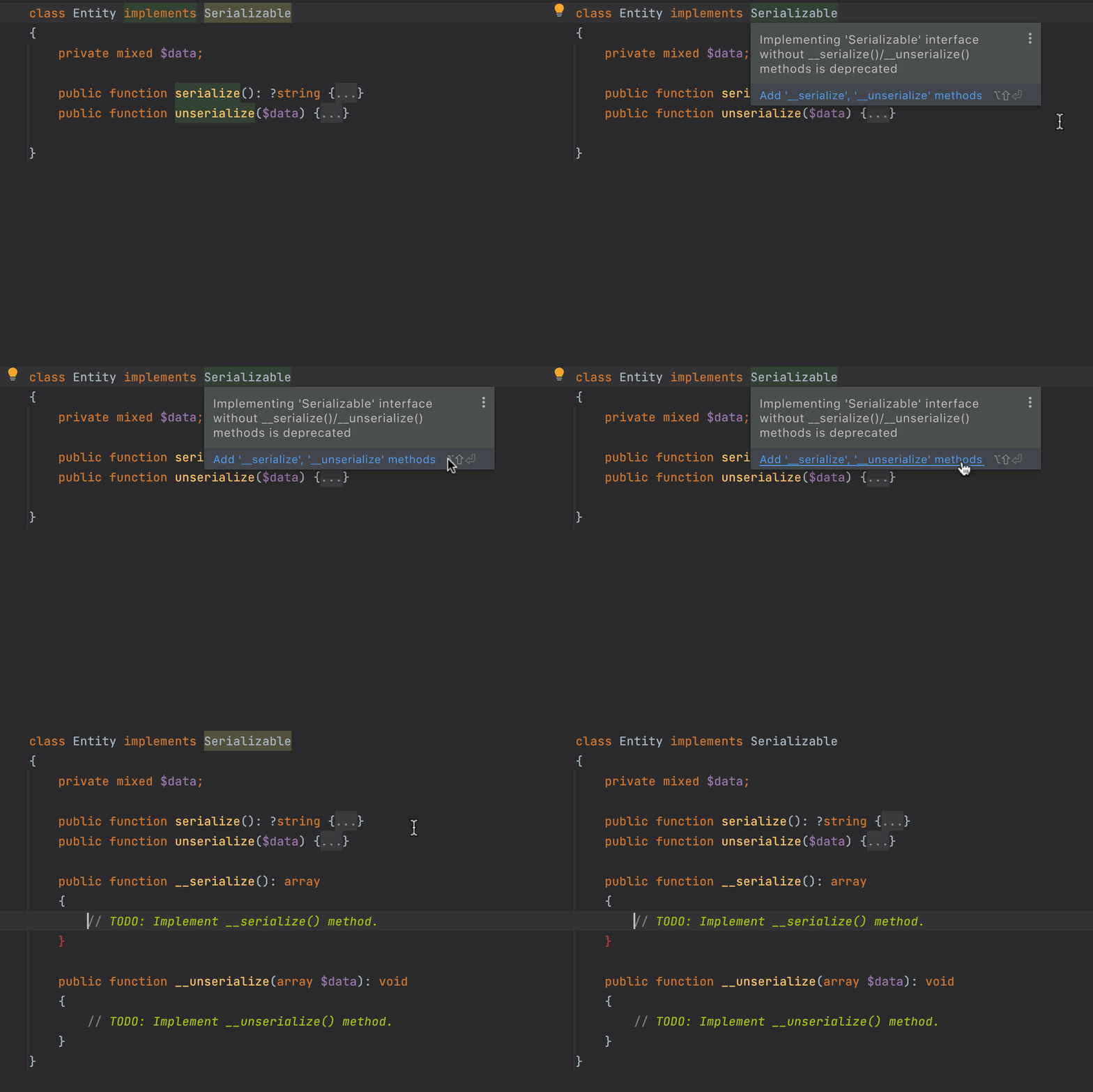
PhpStorm выделит неправильный код и предложит добавить магические методы в класс при помощи быстрого исправления:
Использование $GLOBALS
Некоторые варианты использование суперглобальной переменной $GLOBALS требовали специальный обработки в интерпретаторе, что влияло на производительность всех массивов. Поэтому были ограничены попытки изменить саму переменную, а вот чтение и запись в нее остались как раньше.
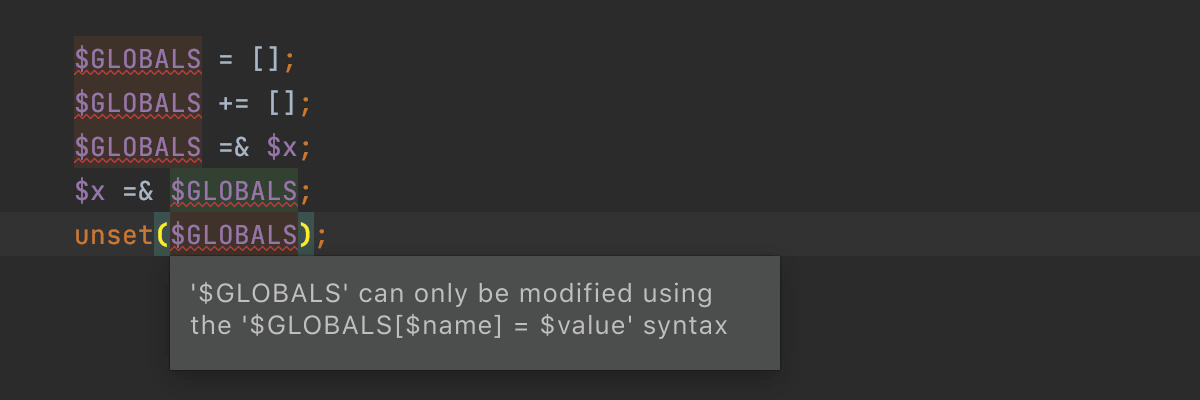
Подробнее об устаревших возможностях PHP можно узнать в руководстве по обновлению.
Улучшения для дженериков
В PhpStorm 2021.2 появилась долгожданная базовая поддержка дженериков. Мы продолжаем ее совершенствовать. Спасибо за ваши отзывы и тикеты в трекере!
Вот что нам удалось сделать в этом релизе:
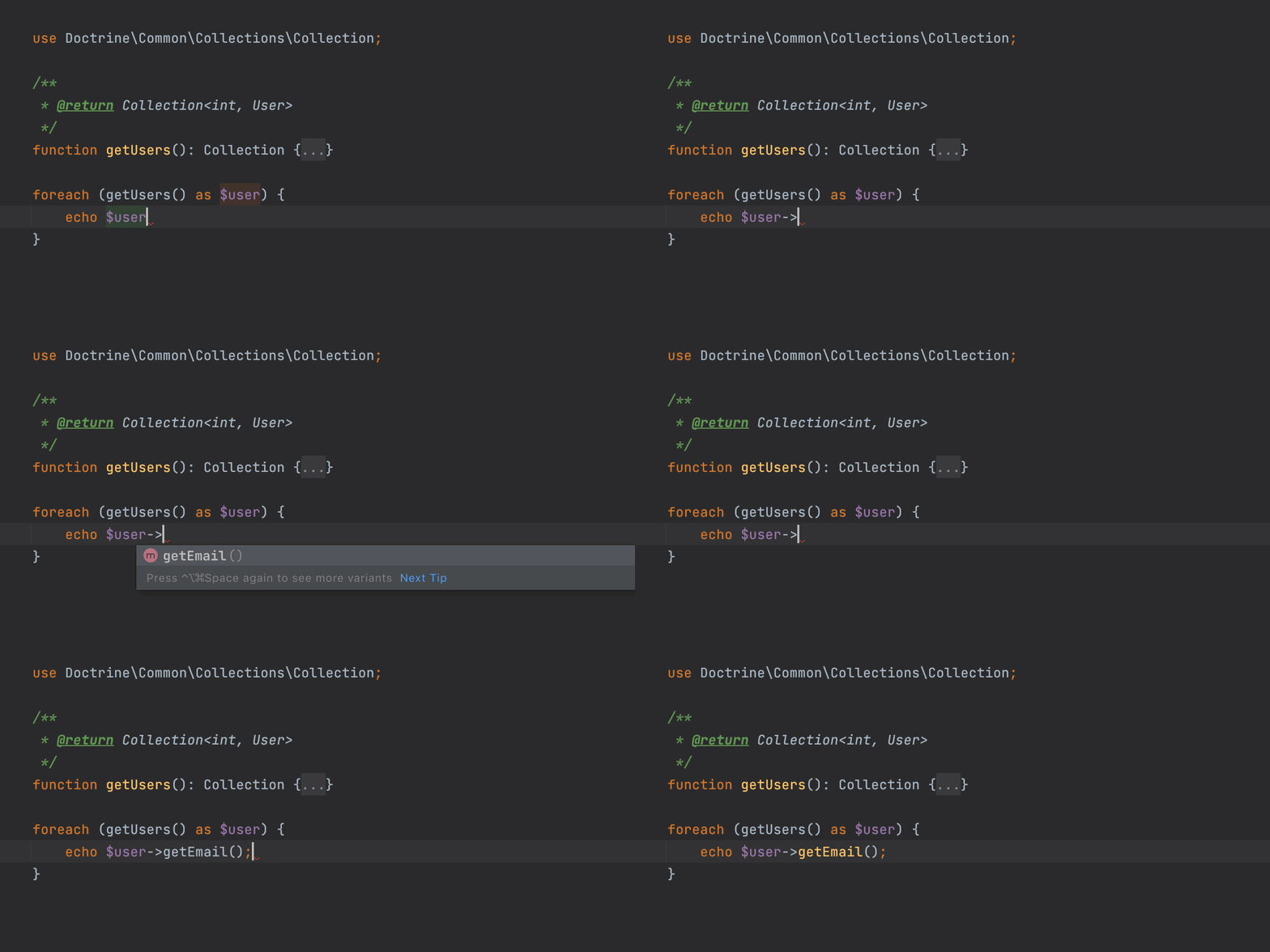
Улучшение поддержки Doctrine Collections
Аннотация @template теперь поддерживает интерфейс IteratorAggregate. Таким образом, итерация по коллекциями Doctrine теперь работает из коробки!
Поддержка коллекций Laravel 9
В ближайшем выпуске Laravel, пакет illuminate/collections будет покрыт аннотациями дженериков. В PhpStorm 2021.3 для них автоматически заработает автодополнение кода.

Вывод дженерик-типов из конструктора
Допустим, в конструкторе есть дженерик-параметр @template, и вы хотите уточнить тип, передав объект в качестве аргумента. Это не сработало бы в предыдущих версиях. В версии 2021.3 это работает правильно. Также вы сможете воспользоваться автодополнением.

Поддержка аннотаций phpstan-*
PhpStorm 2021.3 поддерживает любые аннотации для дженериков. Можно использовать префикс @psalm-* или @phpstan-*, а также чистые теги без префиксов, например @template.
Улучшенные рефакторинги
Перемещение классов и неймспейсов с помощью drag-and-drop 🎉
move_class_drag_and_drop
Раньше, если вы перемещали файл или папку в дереве файлов проекта, то неймспейсы в классах при этом не изменялись, и приходилось править файлы вручную.
Теперь вы можете перемещать файлы и даже целые папки, используя drag-and-drop. PhpStorm сам обновит неймспейсы в классах и во всех их использованиях!

Рефакторинг Move Class / Move Namespace поможет вам легко реструктурировать проект. Ну а если что-то пойдет не так, то всегда можно отменить рефакторинг, нажав Ctrl-Z.
Чтобы этот рефакторинг работал, необходимо правильно настроить PSR-0 / PRS-4.
Мы переработали рефакторинги Inline method, Inline variable, Extract variable и Extract method. Они стали работать более надежно и предсказуемо. Попробуйте их!
Inline function or method
Когда тело метода более очевидно, чем его название, имеет смысл заменить вызовы метода его содержимым, асам метод удалить.
Чтобы использовать этот рефакторинг, поместите каретку на вызов метода и нажмите Ctrl+Alt+N (⌥⌘N на macOS).

То же самое с приватными методами, используемыми всего один раз. Вы можете встраивать их при помощи нового быстрого исправления Inline method, доступного также по Alt+Enter:

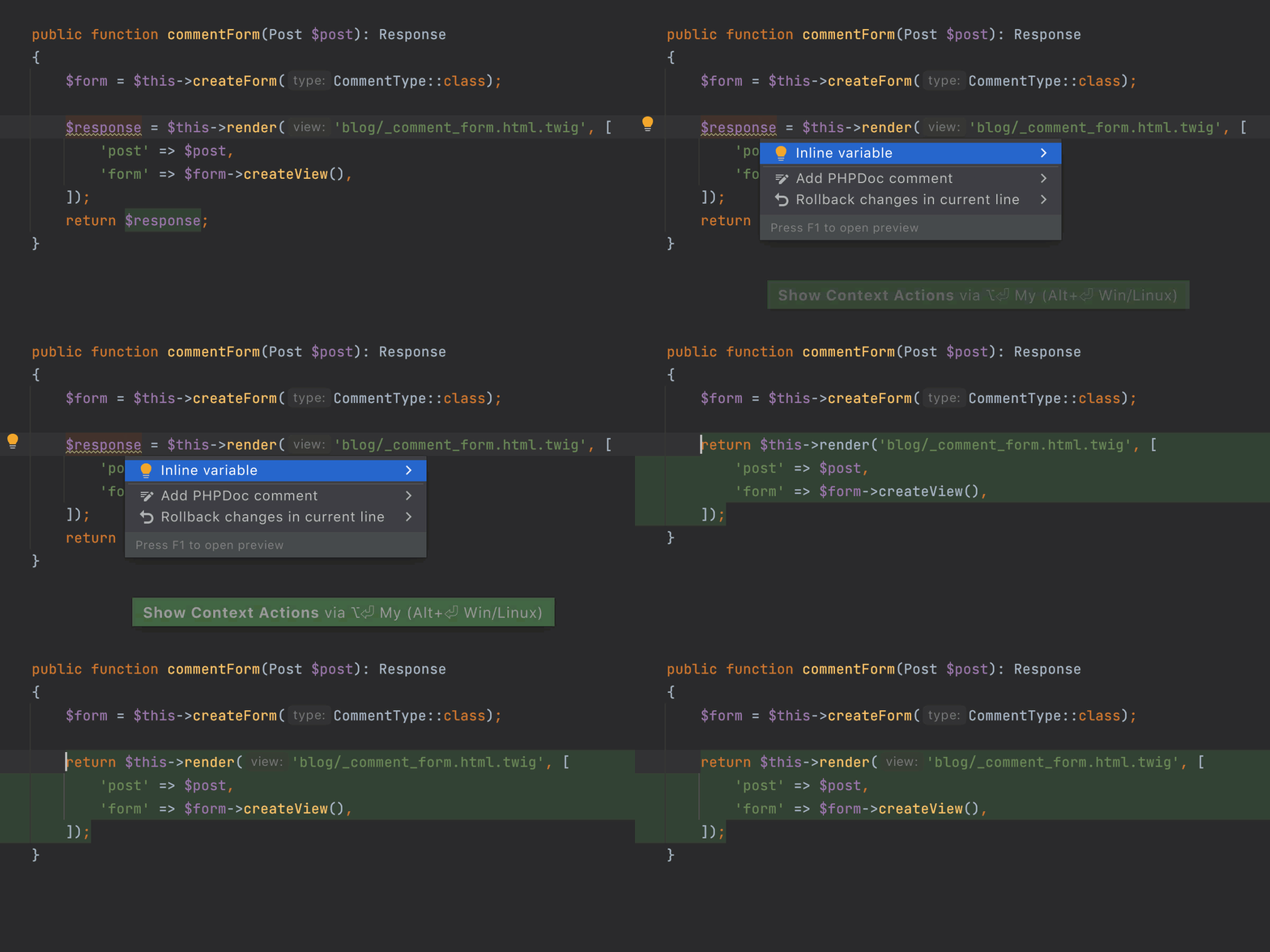
Inline variable
Порой лишние переменные только загромождают код.
Вы можете заменить ссылку на переменную самим выражением, поместив каретку на переменную и нажав Ctrl+Alt+N (⌘⌥N на macOS).
Если переменная используется только один раз, ее можно заменить при помощи быстрого исправления (Alt+Enter):
Если вы не помните название рефакторинга или сочетание клавиш для его вызова, просто нажмите Ctrl+T (⌃T) и найдите нужный рефакторинг в списке.
Удаленная разработка
PhpStorm 2021.3 поставляется с возможностями удаленной разработки. Они позволят вам писать, запускать и отлаживать код с любой машины.
Теперь вы можете подключаться к удаленному серверу, на котором запущен бэкенд PhpStorm. Вся обработка данных выполняется на мощной удаленной машине. При этом вы можете работать над проектом привычным образом — как будто он размещен локально.
Функция удаленной разработки доступна на начальном экране PhpStorm, а также в новом приложении JetBrains Gateway (чтобы установить его, воспользуйтесь Toolbox App).
Пока что возможности удаленной разработки доступны в бета-версии. Мы продолжаем активно дорабатывать их.
Улучшенные возможности развертывания
PhpStorm позволяет загружать файлы на удаленную машину. В версии 2021.3 мы ускорили этот процесс и добавили несколько долгожданных возможностей.
Все настройки развертывания доступны в Settings/Preferences | Build, Execution, Deployment | Deployment.
Поддержка rsync
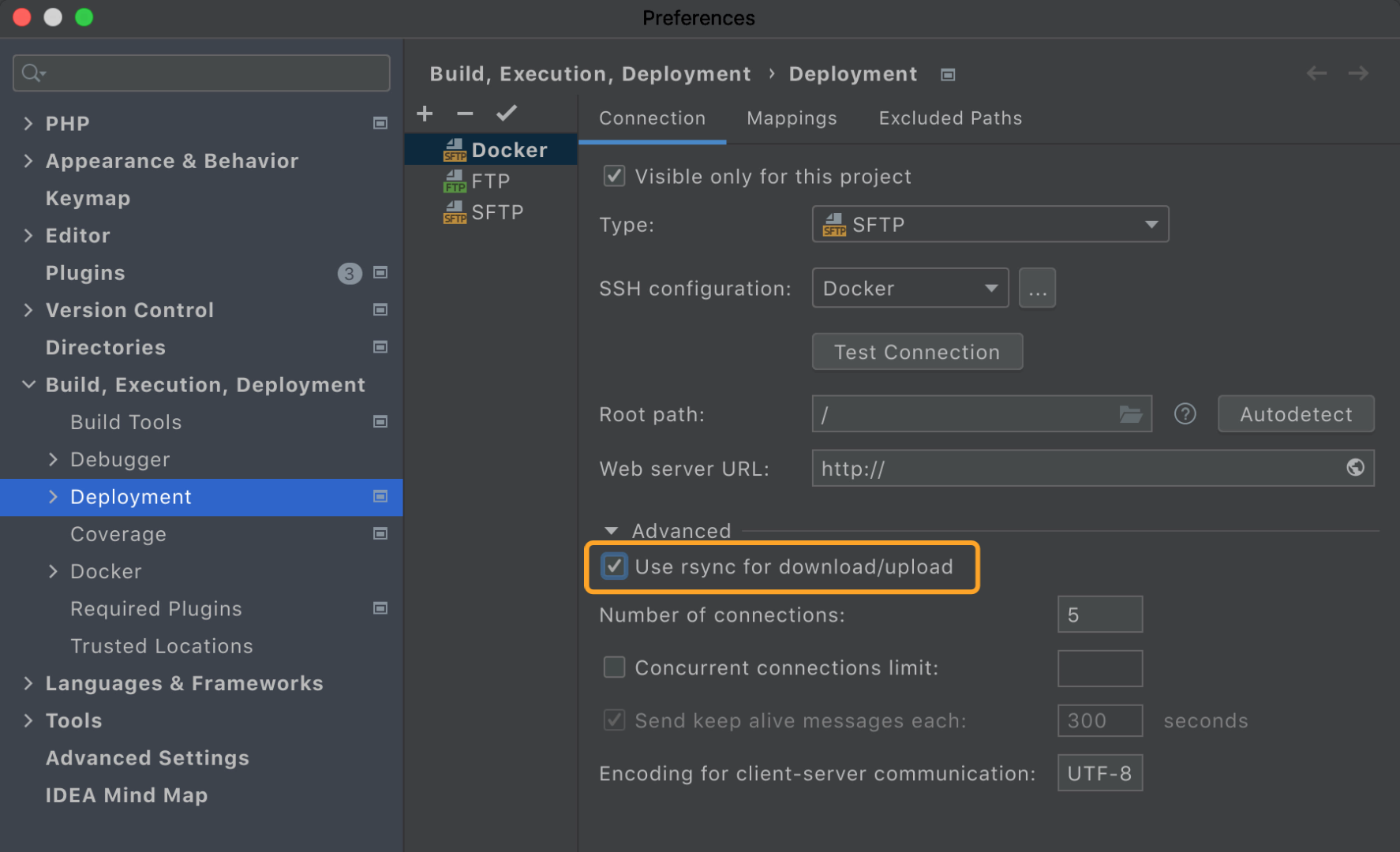
При использовании SFTP-сервера для развертывания в разделе Advanced, появится новая опция rsync.
Использование rsync позволяет значительно ускорить развертывание!
Вот результаты бенчмарка загрузки Drupal 8 (12 757 файлов, 120 МБ, SFTP на локальном Docker):
rsync выключен: 6.26 минут
rsync включен: 38.192 секунд — в 9 раз быстрее!
Чтобы включить rsync, перейдите в настройки SFTP-сервера и поставьте флажкок `Use rsync for download/upload`:
Путь к исполняемому файлу rsync настраивается в разделе Settings/Preferences | Tools | Rsync:
Для macOS и Linux он должен быть доступен сразу же. Для Windows мы рекомендуем использовать Cygwin и OpenSSH.
Повторная загрузка файлов
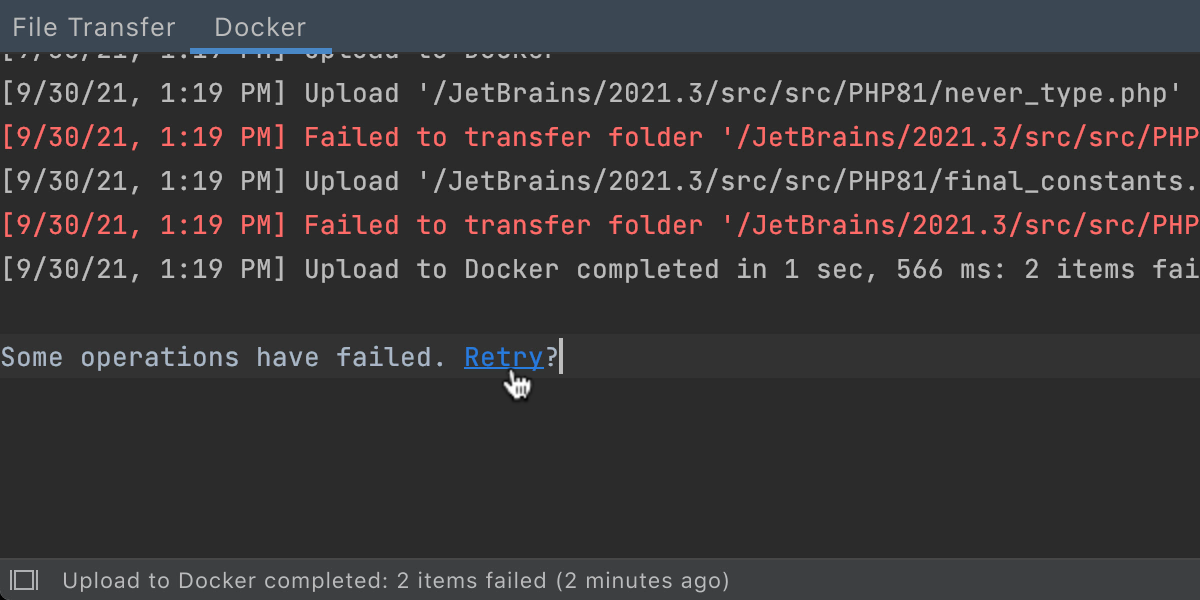
Загрузка файлов на сервер может зафейлиться по разным причинам. В таком случае вы сможете легко повторить загрузку.
Если загрузка сорвется, вы увидите ссылку Retry в окне File Transfer.
Speedup for SFTP/FTP/FTPS with multithreaded connection
Мы подготовили долгожданную реализацию многопоточного развертывания. Поддерживаются операции upload, download и drag-and-drop. Синхронизация и автоматическая загрузка пока не поддерживаются.
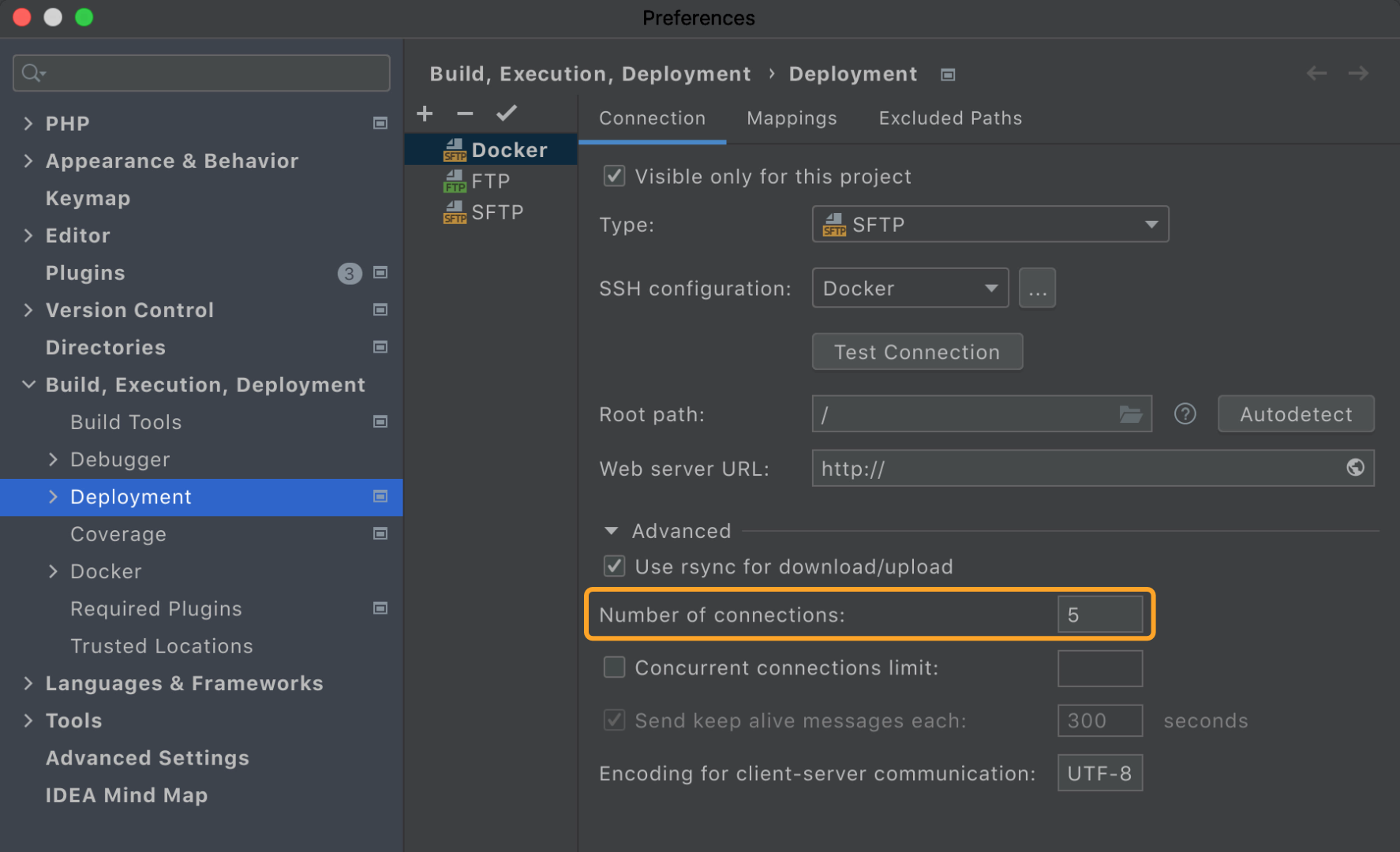
Новая опция Number of connections находится в секции Advanced в конфигурации SFTP/FTP/FTPS сервера. Число подключений по умолчанию — 5:
Новое действие Upload all opened files
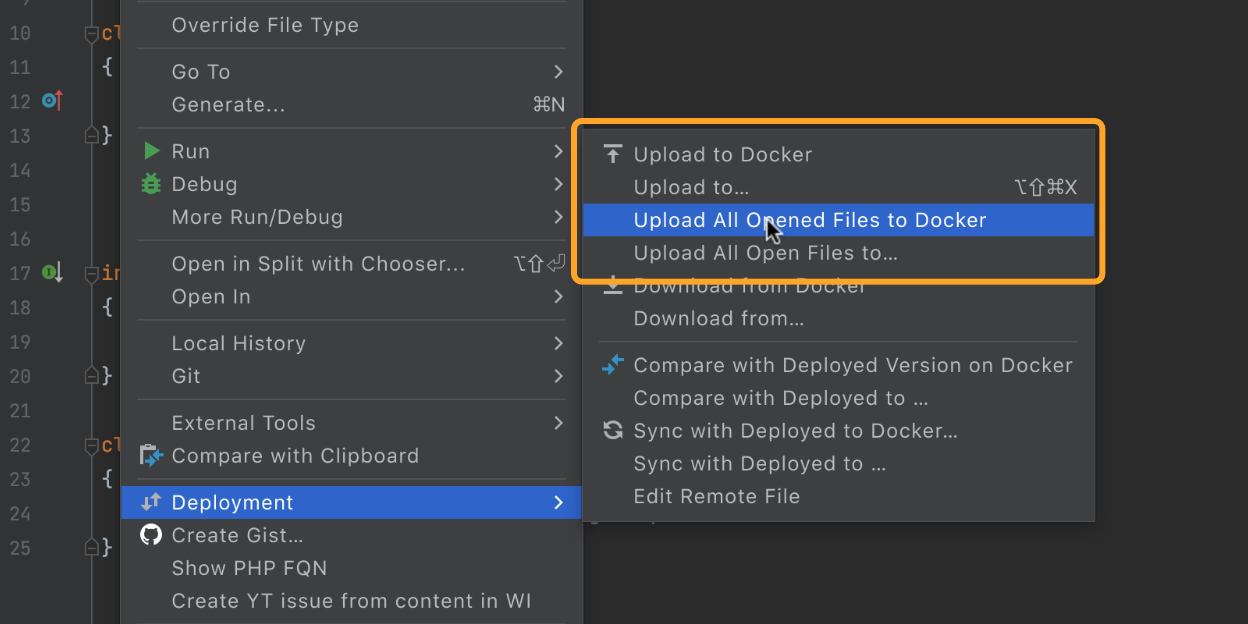
Если у вас открыто несколько файлов в разных вкладках, то теперь можно загрузить их все одной командой, Upload All Open Files to…. Она доступна в разделе Tools | Deployment, через поиск по командам (Cmd/Ctrl+Shift+A), или из контекстного меню любого файла.
Выбор сервера по умолчанию для проекта
В строке состояния доступен новый виджет, который показывает текущий сервер по умолчанию. Здесь же вы можете выбрать другой сервер.

Поддержка прокси для SSH-соединений
Теперь можно указать прокси-сервер HTTP или SOCKS для SSH-конфигураций в Preferences / Settings | Tools | SSH Configurations.
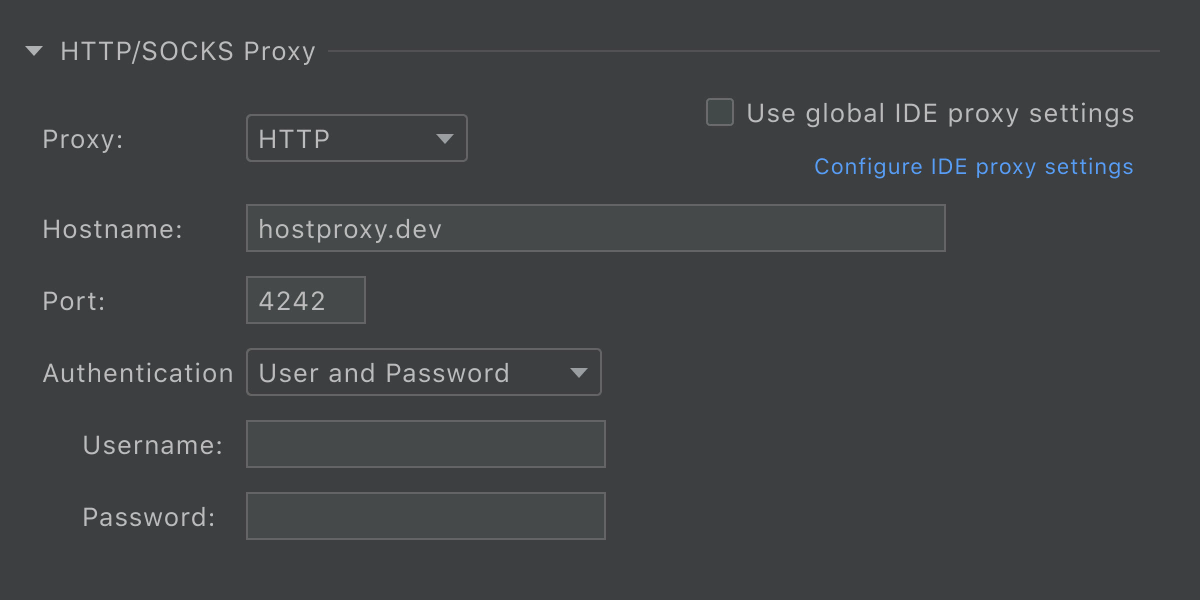
Также можно синхронизировать настройки SSH-прокси с глобальными настройками IDE. Для этого установите флажок Use global IDE proxy settings.
Улучшения HTTP-клиента
Поддержка текстовых и JSON стримов
Теперь стало проще тестировать потоковые приложения, потому что версия PhpStorm поддерживает следующие типы контента: text/event-stream, application/stream+json и application/x-ndjson. Это означает, что HTTP-клиент больше не будет ждать окончания стрима, а будет отображать сразу вывод на лету.
Бинарные ответы в HTTP-клиенте
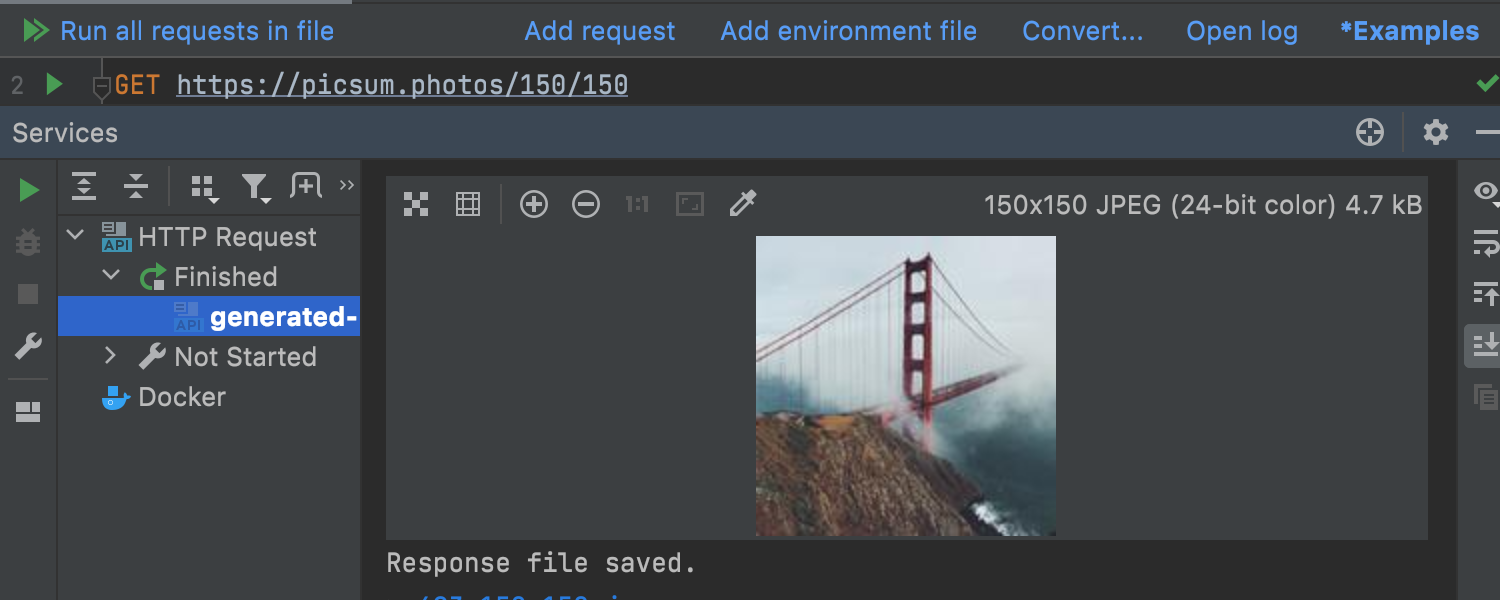
Теперь, если HTTP-клиент получает в качестве ответа изображение, он отображает картинку в консоли ответа.
Перенаправление вывода в файл или каталог
HTTP-клиент теперь может перенаправлять вывод в файл или каталог с помощью соответствующих операторов:
>>(всегда создает новый файл),>(переписывает файл, только если он уже существует).
Поддержка идентификаторов HTTP-запросов
PhpStorm 2021.3 теперь понимает идентификаторы (или имена) для запросов — как объявленные в виде комментария (с @name), так и объявленные в виде текста в первом разделителе (###).
Вы сможете вызывать запрос по идентификатору из окна Services, а также из диалоговых окон Run Configuration, Run Anything или Search Everywhere.
VCS
Выравнивание изменений при просмотре Diff
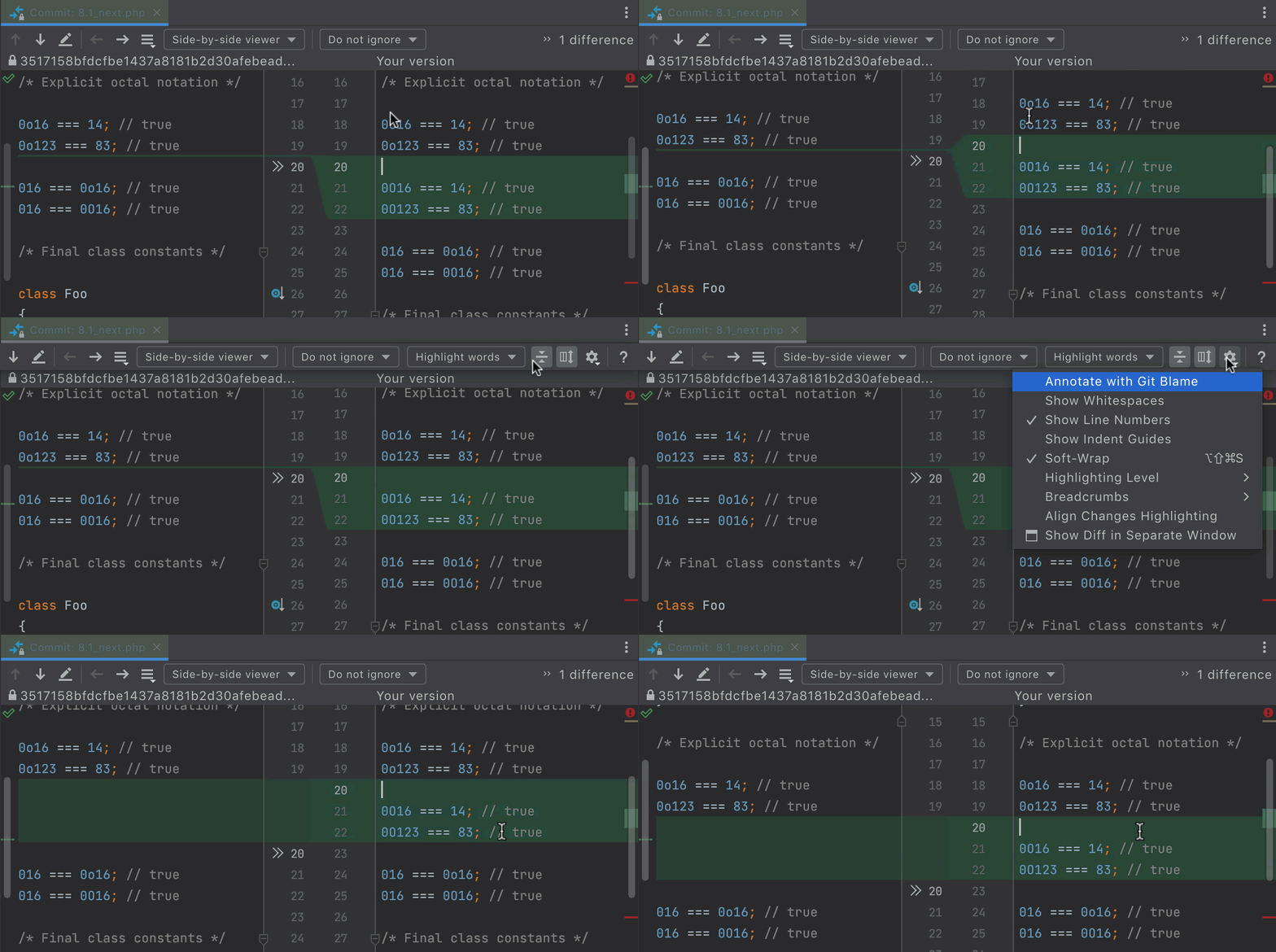
Мы добавили новую опцию Align Changes Highlighting в окне Diff под шестеренкой.
Эта опция выравнивает строки, в которых нет изменений, так, чтобы они отображались рядом друг с другом. Так вы будете лучше видеть код, который был добавлен или удален.
Checkout and Rebase onto Current для удаленных веток
Действие Checkout and Rebase onto Current позволяет сделать чекаут выбранной ветки и перебазировать ее поверх текущей ветки. Раньше это работало только для локальных веток, а теперь возможно и для удаленных.
Реорганизация настроек VCS
Настройки системы контроля версий доступны в Preferences/Settings | Version Control. Мы по-новому структурировали их — теперь вам будет легче находить нужные действия.

Новое действие Push All up to Here
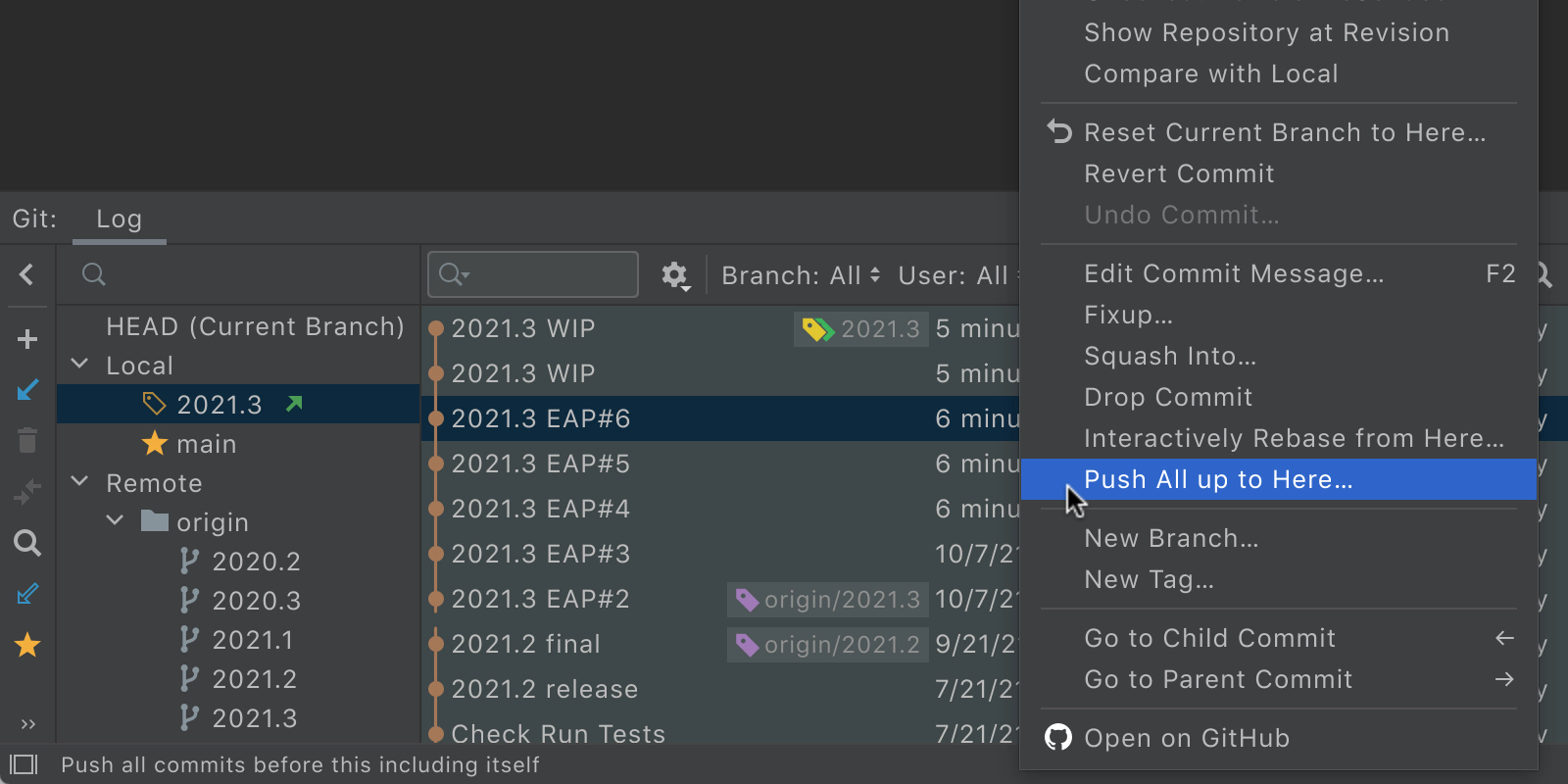
Если вы хотите сделать push части коммитов, а другую часть пока оставить в работе, можете использовать новое действие Push All Up to Here.
Просто перейдите на вкладку Log окна Git, выберите нужный коммит и, щелкнув по нему правой кнопкой мыши, выберите действие Push All up to Here.
UX
Новое окно Bookmarks
Мы объединили сущности Favorites и Bookmarks в одну и создали отдельное окно Bookmarks.
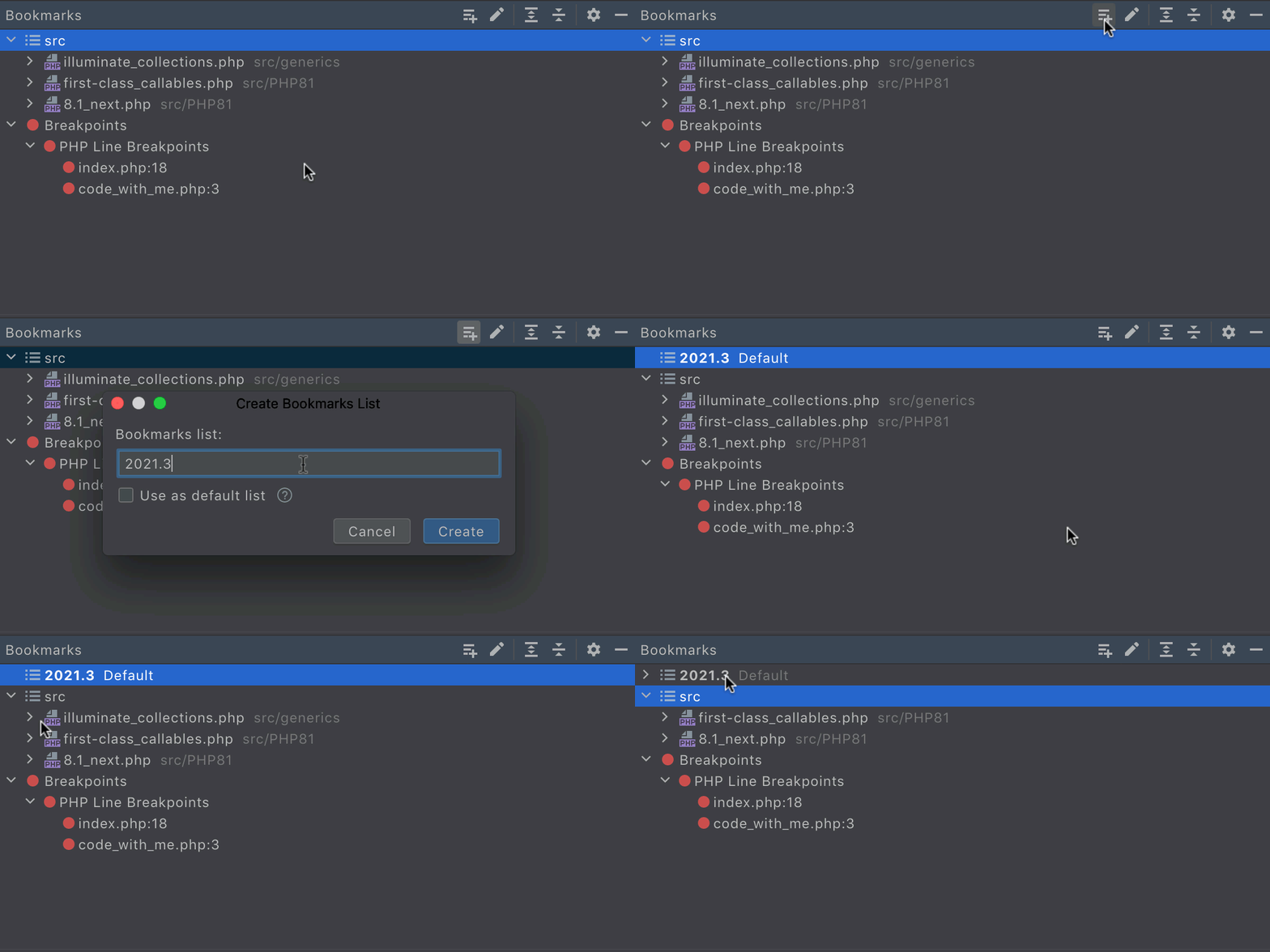
Вы можете добавить закладку для определенной строки, файла или папки, нажав F3 на macOS или F11 на Windows/Linux. Все созданные закладки будут доступны в окне Bookmarks.
Просмотр кода в Show Usages
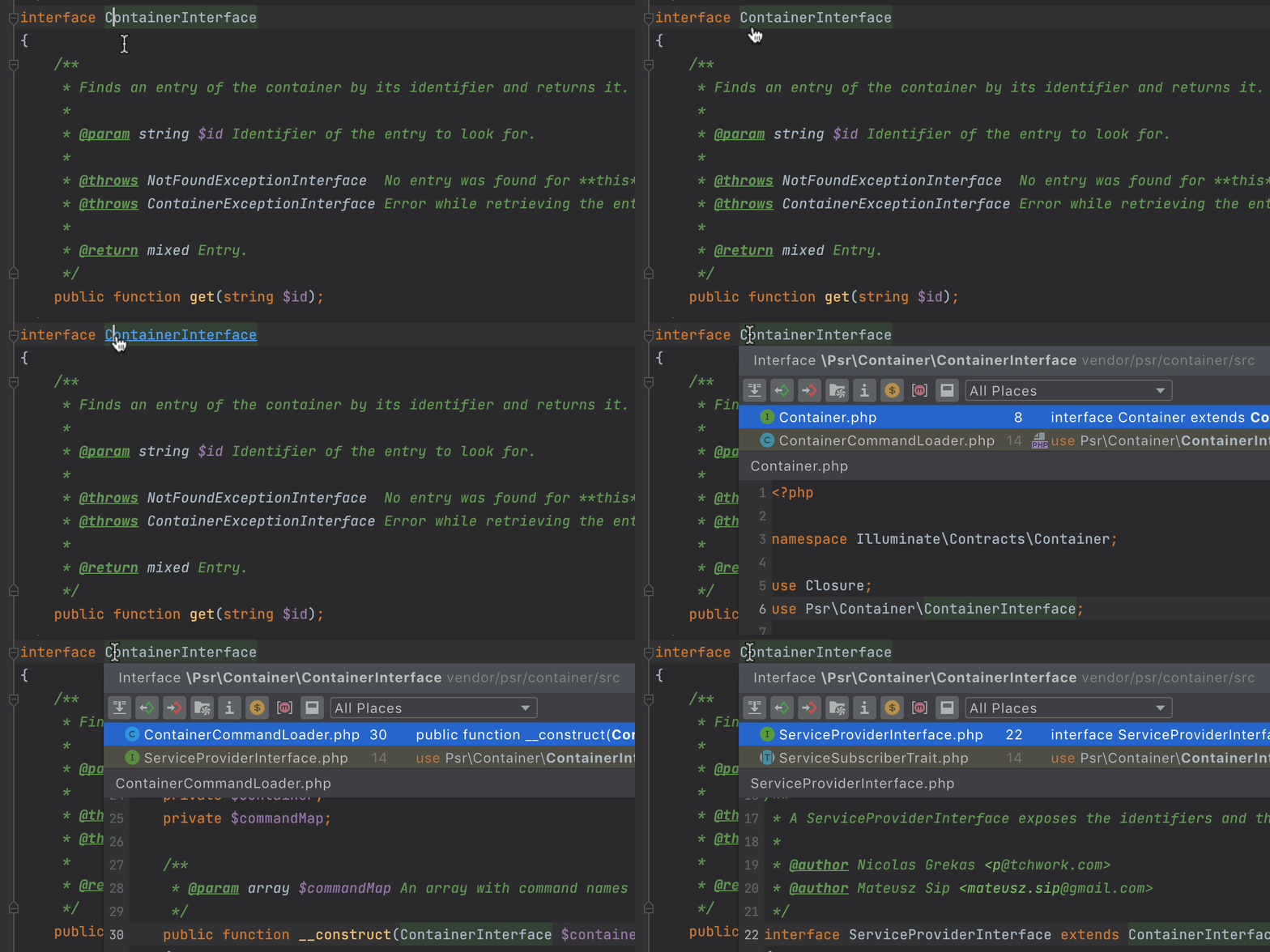
Диалоговое окно Show Usages, доступное по Ctrl+Click (⌘+Click) теперь показывает превью исходного кода для найденного использования.
Чтобы включить предпросмотр, нажмите кнопку  на панели инструментов.
Улучшения для Markdown
Одной из самых муторных проблем при редактировании markdown всегда было добавление и редактирование таблиц. В PhpStorm 2021.3 эта проблема решена.
Теперь достаточно открыть контекстное меню (в любой точке markdown-файла) и выбрать Insert | Table. И это все! Размер исходной таблицы можно выбрать мышкой.
Для создания новой строки таблицы можно использовать Shift+Enter, а для перехода к следующей ячейке — Tab.

Инструменты для работы с БД
PhpStorm включает встроенную функциональность DataGrip. Подробнее обо новых возможностях DataGrip читайте в обзоре релиза DataGrip 2021.3 от наших коллег.
Веб-разработка
И как всегда, в PhpStorm вошли все обновления из WebStorm 2021.3.
А вот видеоролик (на английском), представляющий главные фичи нового релиза:
На этом пока все. Будем рады вашей обратной связи — вопросам, пожеланиям, баг-репортам и просто мыслям. Оставляйте их в комментариях ниже.
Ваша команда PhpStorm
The Drive to Develop
Оригинал статьи опубликован на Habr.com.
Subscribe to PhpStorm Blog updates
Discover more



PhpStorm 2021.3: PHP 8.1, Generics, Remote Development, Refactorings, and More

PhpStorm 2021.3 is now available!
This major release introduces full support for PHP 8.1, better handling of generics in PHP, remote development, improvements to deployment, an HTTP client, refactorings, and much more.
Here are the highlights of the release:
Full support for PHP 8.1
- Enums
- Readonly properties
- Intersection types
- New return type: `never`
- Final constants
- `new` operator in initializers
- First-class callables
- Deprecations
Generics in PHP
- Improved support for Doctrine Collections
- Support for future Laravel 9 collections
- Infer generic types from constructor
- Support for the phpstan-* annotation for templates
Improved refactorings
- Drag and drop support for the Move Class refactoring
- Inline function or method
- Inline variable
- Introduce (extract) variable
Faster and better deployment
- Support for `rsync`
- Retry for failed uploads
- Speedup for SFTP/FTP/FTPS with multithreaded connection
- Upload all opened files
- Quickly switch default server for project
- Proxy support for SSH connections
HTTP Client
- Support for text streams and JSON streams
- Binary responses
- Output redirection to custom file or directory
- Support for HTTP request identifiers
UI Updates
VCS
- Align diff highlighting
- Checkout and Rebase onto Current for remote branches
- Reorganized VCS settings
- New ‘Push All up to Here’ action
Read this blog post for details about all the significant updates, demonstrated through a ton of GIFs!
PHP 8.1
PHP 8.1 has already been released! We would like to express our thanks to all the contributors and release managers!
PhpStorm 2021.3 supports all of the latest language changes. Here’s what’s available and how you can use it in the IDE.
As usual, you can try new features by setting the project language level to PHP 8.1. You can switch from the toolbar or by specifying the requirement in composer.json.

Enums
Enumerations can be used instead of a set of constants, and they provide type validation out of the box.
PhpStorm has supported PHP 8.1 Eums since the 2021.2 release. Learn more about enums support in PhpStorm.
Readonly properties
Readonly properties are properties that cannot be changed after initialization, meaning after a value is assigned to them.
It was possible to achieve similar behavior in previous versions of PHP with a private setter, but the readonly keyword makes classes cleaner and constraints stricter.

A readonly property can only be initialized in the same scope where it’s declared. This means you can assign a value either in the declaration itself or in a class method.
Properties with the readonly flag must be typed, but if you don’t know the specific type, then you can use the mixed type.
If a readonly property is initialized by an object, it does not become immutable. That is, its internal state can still be changed.
A readonly property cannot have a default value, but you can initialize it in the constructor as a promoted property. PhpStorm has an Alt+Enter quick-fix for this:

Pure intersection types
Union types were added in PHP 8.0, and now PHP 8.1 is introducing intersection types.
The syntax is TypeA&TypeB, and it means that the variable must be both instanceof TypeA and instanceof TypeB.
In PhpStorm 2021.3, code completion for this is mostly the same as it is for union types, because a union can contain members of all involved types, and an intersection must contain members of all types.

This feature is called pure intersection types because combinations with union types are not supported and are being left for future consideration. PhpStorm 2021.3 will check the syntax:

In older PHP versions, it was quite common to use intersection types in PHPDoc annotations. Those are also supported in PhpStorm 2021.3, and when you decide to upgrade to PHP 8.1, you can add a native type declaration:

New return type: `never`
PHP 8.1 features a new type for return values: never.
A function or method declared with the never type indicates that it will not return a value and will either throw an exception or end the script’s execution by calling die(), exit(), trigger_error(), or something similar.
This type improves code analysis and does pretty much the same thing that the #[NoReturn] attribute has been doing in PhpStorm. It’s great that this is a language feature now!
Final constants
PHP 8.1 allows you to declare final class constants so that they cannot be overridden in child classes.

`new` operator in initializers
In PHP 8.1, objects can be used as default parameter values, static variables, and global constants, as well as in attribute arguments.
As a cool side effect, this change makes nested attributes possible.

However, you can’t use the new operator with properties or class constants because of problems with the initialization order.
PhpStorm validates all of the cases to help you use these new language features:

First-class callables
In PHP 8.1 it is possible to get a reference to any function. This is called first-class callable syntax.
This is what it used to look like:
$fn = Closure::fromCallable('strlen');
Now you will be able to do the following instead:
$fn = strlen(...);
The advantage is that the new syntax is accessible to static analysis, and it respects the scope at the point where the callable is created.

In PhpStorm, convert fromCallable calls to the new syntax by pressing Alt+Enter and choosing a quick-fix from the dropdown list:

Deprecations
PHP has been known for its quirky behavior in some cases, but each new version cleans up many of these issues. Version 8.1 is no exception, as it deprecates a lot of problematic legacy features.
PhpStorm will help you find deprecated code in your projects and make the upgrade process easier.
Let’s take a closer look at some of the significant deprecations.
Deprecated usage of Serializable interfaces
Instead of broken Serializable interfaces, it is recommended to use __serialize() and __unserialize() magic methods, which were introduced in PHP 7.4.
In PHP 8.1 you can still use Serializable, but only if the implementing class has __serialize() and __unserialize() as well.
PhpStorm will highlight incorrect code and offer a quick-fix to add the magic methods to a class:

Restricted GLOBALS usage
Usage of the GLOBALS superglobal variable will be restricted to disallow problematic cases, while allowing most code to continue working as-is.

To learn more about all deprecations, see the Migration Guide.
More for generics
In PhpStorm 2021.2, we added long-awaited support for generics. It covers basic use cases, but there’s still work to be done. Thank you for your feedback and tickets in the tracker!
Here’s what’s in the upcoming batch of enhancements for generics:
Improved support for Doctrine Collections
We’ve added support for the IteratorAggregate interface in @template annotations.
As a result, iterating over Doctrine Collections now works out of the box!

Support for future Laravel collections
In the upcoming Laravel release, the illuminate/collections package is getting generics annotations. With PhpStorm 2021.3, you’ll get better completion for them too.

Infer generic types from constructor
Let’s say there is a generic @template parameter in a constructor and you want to specify the type by passing an object as an argument. This would not have worked in previous versions because the type would be missing and you would not get code completion. In this version it works correctly.

Support for the phpstan-* annotation for templates
PhpStorm now supports any annotation for generics. You can use a @psalm-* or @phpstan-* prefix or use pure tags without prefixes, like @template.
Improved Refactorings
Move Class and Move Namespace refactorings with drag and drop 🎉
Previously, if you moved a file or a folder in the Project view tree, that would not change namespaces in the classes under those folders.
In PhpStorm 2021.3, you can simply drag files or even whole folders to a new destination, and PhpStorm will take care of updating the namespaces of the classes and all the class usages too!

This change makes it much easier to restructure a project. And you can undo moves with Ctrl-Z!
You would need a properly configured PSR-0 / PRS-4 projects to use this refactoring.
The existing refactorings Inline method, Inline variable, Extract variable, and Extract method received multiple updates and fixes. They are now much more reliable and predictable. Give them a try!
Inline function or method
When a method body is more obvious than the method itself, it makes sense to replace calls to the method with the method’s content and delete the method itself.
To use this refactoring, position the caret at the redundant method and press Ctrl+Alt+N (⌥⌘N on macOS).

There is also a new quick-fix available. When you have a private method that is only used once in the code, you can press Alt+Enter on it and choose Inline method:

Inline variable
Sometimes you may have redundant variables in the code that just add clutter and can be removed.
To replace the references to the variable with the expression itself, position the caret at the redundant variable and press Ctrl+Alt+N (⌘⌥N on macOS).
If a variable has only been used once, then you can inline it with a quick-fix by pressing Alt+Enter:

If you don’t remember the refactoring name or shortcut, you can also use Ctrl+T (⌃T) and choose one from the list.
Remote Development
PhpStorm 2021.3 comes with bundled remote development capabilities to help you code, run, and debug your projects from any machine.
Here’s how it works:
- On the client side, you run JetBrains Client, which is a lightweight application that enables you to work with your remote project.
- On the server side, there is a headless build of PhpStorm, potentially the same executable as the one you are currently running.
- You can connect to a remote server from the PhpStorm Welcome screen or by using JetBrains Gateway, which is a lightweight application that is used as an entry point and connects everything via SSH.
With remote development workflows, you can:
- Feel like you are running your IDE locally with lag-free typing and code assistance.
- Develop on any machine without being limited by the power of your local devices.
- Keep source code off your laptop. With JetBrains Gateway, source code is kept on the server side.
- Work securely from anywhere. Remote development functionality supports working from home and hybrid schedules. Your projects are securely located on the remote machine and can be accessed from anywhere.
Please note that this is an early access version of the remote development functionality and we’re still actively working to improve it.
Faster and Better Deployment
PhpStorm allows you to upload files to a remote server. In version 2021.3, we’re making this process faster and adding some highly anticipated options.
All deployment settings are available at Settings/Preferences | Build, Execution, Deployment | Deployment.
Support for rsync
When using an SFTP server for deployment, you’ll see a new rsync option under the Advanced section.
Using rsync will result in significantly faster deployments!
Here are benchmark figures for uploading Drupal 8 (12,757 files, 120 MB, SFTP on local Docker):
Rsync option disabled: 6.26 minutes
Rsync option enabled: 38.192 seconds – 9x faster!
To activate rsync, you’ll need to tick the `Use rsync for download/upload` checkbox for the SFTP server as shown below:

The path to the rsync executable is configured under Settings/Preferences | Tools | Rsync:

For macOS and Linux, it should be available right away. For Windows, we recommend using Cygwin and OpenSSH.
When configured correctly, rsync will be used to upload and download files and folders, including when you use auto-uploading and drag and drop.
SFTP will still be used to provide navigation in the Remote Host tool window and for some operations like Delete, Create Folder, Move, Change Permissions, etc.
Also, the Sync command still uses SFTP to get the list of differences and to upload or download.
Retransmit files that failed to upload
When uploading to a server, file uploads may fail for any number of reasons. PhpStorm 2021.3 makes it easy for you to retry uploading.
You’ll see a Retry link in the File Transfer tool window if anything failed during the upload.

Speedup for SFTP/FTP/FTPS with multithreaded connection
We’ve prepared a highly anticipated implementation for multithreaded deployment. The following operations are currently supported: Upload, Download, and Drag and Drop. Sync and auto-upload are out of the scope and are not yet supported.
A new option, Number of connections, is located in the Advanced section of the SFTP/FTP/FTPS server configuration area available at Settings/Preferences | Build, Execution, Deployment | Deployment. It is set to 5 by default:

Upload all opened files
If you open multiple files in different tabs, you will be able to upload all of them with a single command, Upload All Open Files to…. It’s available under Tools | Deployment, via Search for action (Cmd/Ctrl+Shift+A), or from the context menu of any file.

Quickly switch default server for project
In PhpStorm 2021.3, the status bar will have a new widget that shows the current default server. You will be able to switch it right from the status bar, as well. This can come in handy when you need to deal with multiple environments.

Proxy support for SSH connections
You can now specify an HTTP or SOCKS proxy server for your SSH configuration in Preferences / Settings | Tools | SSH Configurations.
Under the new HTTP/SOCKS Proxy section, you can select the proxy type, enter a hostname and a port, and, if necessary, apply authentication details.

It’s also possible to sync your SSH proxy settings with the global IDE ones. To do so, select the Use global IDE proxy settings checkbox. If you haven’t yet configured the global settings, you can easily do so by clicking the corresponding link under the checkbox.
HTTP client enhancements
Support for text and JSON streams in the HTTP Client
It is now easier to test streaming applications in your favorite IDE, as the upcoming v2021.3 supports the following content types: text/event-stream, application/stream+json, and application/x-ndjson. This means the HTTP client will no longer wait for a stream to end and will instead display the output on the fly.
The HTTP client will also listen for the end of a stream and will show a message when the process is finished.
Binary responses in the HTTP client
The HTTP client now shows an image preview in the response console if a response is an image.

Output redirection to a custom file or directory
The HTTP client can now redirect output to a custom file or directory. It supports two operators for force and soft redirects:
- The
>>operator always creates a new file, adding an -n suffix to a file name if the requested file name already exists. - The
>operator only rewrites the file if it already exists.
Support for HTTP request identifiers
The upcoming PhpStorm 2021.3 now understands identifiers (or names) for requests. The IDE understands identifiers both that were declared as a comment with @name and that were declared as text in the first separator (###).
You can invoke a request through its identifier from the Services tool window or from the Run Configuration, Run Anything, or Search Everywhere dialogs.
VCS
Align changes highlighting
We’ve added the new Align Changes Highlighting option to the Diff screen settings that can be found under the gear icon. This feature makes the Diff easier to read, especially when there are complex modifications, because it aligns the unchanged lines so that they are displayed next to each other. This helps you see the code that has been added or removed more clearly.

Checkout and Rebase onto Current for remote branches
The Checkout and Rebase onto Current action allows you to check out the selected branch and rebase it on top of a branch that is currently checked out. Until now, it has only been available for local branches. Starting from this EAP, we’ve added the ability to apply this action to remote branches as well.

Reorganized VCS settings
To improve the user experience and speed up the process of configuring your version control systems, we’ve made the VCS settings more discoverable and more clearly structured. Here are some of the changes you’ll find in Preferences/Settings | Version Control.
The Version Control node now lists all the available settings. You can easily navigate to the settings by clicking on them.

We’ve improved the layout inside the Git node. We divided all of the settings into sections that account for the most important processes: Commit, Push, and Update. Additionally, the parameters inside these sections are now organized more logically.
We’ve added a separate node for Directory mappings, and the background operations are now switched on by default. The Background node no longer exists.
New ‘Push All up to Here’ action
If you have several commits that are ready to be shipped while others are still work in progress, then you may want to push only the ones you are sure about. PhpStorm 2021.3 will let you push commits up to the one you have selected in the Log tab of the Git tool window. Select the necessary commit, right-click it and use the new Push All up to Here action.

User Experience
New Bookmarks tool window
In PhpStorm 2021.3, the Favorites and Bookmarks functionality has been merged into one – Bookmarks. You can add a bookmark on a specific line, file, or folder by pressing F3 (macOS) or F11 (Windows/Linux). All the added bookmarks will be available in the unified Bookmarks tool window.

Source preview for Show Usages
The Show Usages dialog, which you can invoke by ⌘+clicking (macOS) or Ctrl+clicking (Windows/Linux) a symbol, can now display the source code preview per found usage. To enable the preview, click the [img] toolbar button.

Improved Markdown support
In PhpStorm 2021.3, tables can be created with ease. Simply invoke the context menu and select Insert | Table. That’s it! You can select the preferred size using the mouse hover action or the keyboard.

The cell width in the table will be adjusted as you type. You can edit the table content using the floating toolbars.
To create a new row you can use Shift+Enter, and Tab to navigate to the next cell.
Database Tools
PhpStorm includes almost all of DataGrip’s features as standard. Check out What’s New in DataGrip 2021.3 for an overview of the new features we’ve added for working with databases.
Web
As usual, all of the updates for WebStorm 2021.3 have also been incorporated into PhpStorm.
The full list of changes in PhpStorm 2021.3 is available on the lengthy release notes page.
That’s all for today. Thanks for keeping up with the changes! We hope they improve your PhpStorm experience.
- Download PhpStorm.
- Tweet @ us!
- Report bugs to our issue tracker.
Your JetBrains PhpStorm team
The Drive to Develop