JetBrains Platform
Plugin and extension development for JetBrains products.
Structuring IntelliJ Plugins with Optional Content Modules

What if one part of your plugin should load only when a specific IDE functionality is available? Plugin Model v2 is now available as an experimental way to structure, package, and build plugins, and to support such scenarios in a future-proof way. Its primary use case is in Split Mode (Remote Development) plugins.
In this post, let’s create a plugin that moves the CSS PSI-related functionality into an optional plugin content module.
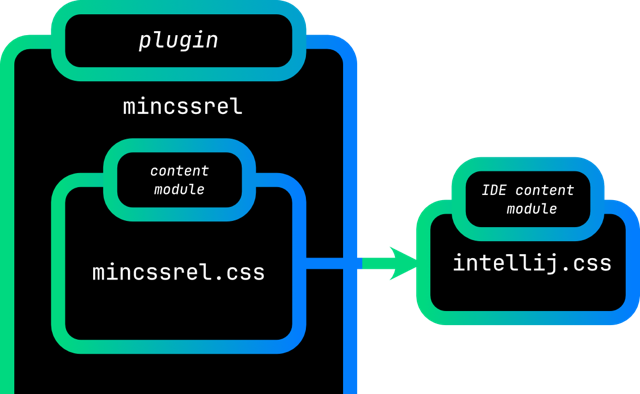
The IDE includes a bundled plugin content module that provides CSS support, and our optional plugin content module depends on it. In IntelliJ IDEA 2026.1, where CSS PSI became available for free, without a subscription, this content module will be automatically available. In IntelliJ IDEA 2025.3, it is loaded only when the user has a subscription.
New plugin
Create a plugin by using the IDE Plugin generator, which is available in File | New Project starting with IntelliJ IDEA 2026.1 if the Plugin DevKit is installed. Remove the boilerplate code, such as comments and dependencies, and set the proper plugin descriptor metadata.
More importantly, set the Gradle build script to depend on IntelliJ IDEA 2025.3. This is the version in which Plugin Model v2 is still experimental, but generally available for third-party plugins.
dependencies {
    intellijPlatform {
        intellijIdea("2025.3")
    }
}
Preparing the Gradle build script for modular builds
The IntelliJ Platform Gradle Plugin 2.16.0 and newer provides a streamlined configuration for Gradle submodules that correspond to IntelliJ plugin content modules.
Each such Gradle submodule needs two Gradle plugins: Kotlin and Plugin content module support.
Enable this in the build.gradle.kts.
subprojects {
    apply(plugin = "org.jetbrains.kotlin.jvm")
    apply(plugin = "org.jetbrains.intellij.platform.module")
}
Preparing the plugin descriptor for modular builds
In modular plugins, the plugin descriptor plugin.xml is minimal.
Even the com.intellij.modules.platform dependency is no longer necessary, as it is provided automatically.
Actions, extensions, and listeners do not belong here anymore. They are declared in the corresponding plugin content module descriptors.
Creating a plugin content module
In the IDE, create an empty Kotlin module css, built with Gradle. It maps to both a Gradle subproject and a plugin content module.
Initially, its build script should be reduced to an empty file.
All the necessary configuration will be provided by the parent build script and its Gradle plugins.
To make it work, declare this Gradle subproject as a dependency in the main build script.
dependencies {
    intellijPlatform {
        // ...
    }
    implementation(project(":css"))
}
Then, set up the plugin content module descriptor. Take care of its naming and location. Unlike the usual plugin.xml, the plugin content module descriptor belongs in src/main/resources, at the root of the classpath. The descriptor name is derived from the parent project name.
In other words, create src/main/resources/mincssrel.css.xml with an empty <idea-plugin> element.
With this plugin content module descriptor ready, the last configuration step is to declare the plugin content module in the plugin descriptor. In plugin.xml, declare this module as optional in the loading attribute.
<idea-plugin>
    <!-- omitted for brevity -->
    <content>
        <module name="mincssrel.css" loading="optional" />
    </content>
</idea-plugin>
The loading attribute can be omitted, but it is recommended to specify it explicitly to avoid confusion.
Depending on PSI functionality
CSS PSI functionality lives in the IDE plugin content module intellij.css. Add this dependency to the css plugin content module in two places: first, in the plugin content module Gradle build script, and second, in the plugin content module descriptor. There are two aspects to these declarations: Gradle decides what compiles, and the plugin content module descriptor decides what loads.
The css/build.gradle.kts file now gets proper content. Add the dependency in the intellijPlatform block by using the bundledModule notation provided by the IntelliJ Platform Gradle Plugin.
dependencies {
    intellijPlatform {
        bundledModule("intellij.css")
    }
}
The src/main/resources/mincssrel.css.xml descriptor will no longer be empty. Declare a dependency on this bundled plugin content module by referring to the full module name, including its prefix.
<idea-plugin>
    <dependencies>
        <module name="intellij.css" />
    </dependencies>
</idea-plugin>
Plugin content module dependencies are part of Plugin Model v2. Each <module> element declares a mandatory, non-optional dependency. If this dependency is not available, the mincssrel.css module will not load.
As a general rule, if the plugin has no available plugin content modules, it will be disabled.
CSS PSI
To demonstrate that the functionality works, create a CssAction action and declare it in the plugin content module descriptor, mincssrel.css.xml.
<actions>
    <action id="org.intellij.sdk.css.CssAction"
            class="org.intellij.sdk.css.CssAction"
            text="Invoke CSS Action"
    />
</actions>
Then, provide the source. Create an in-memory CSS file from a static stylesheet string, read the PSI under readAction on a background thread, walk the ruleset, collect CSS selector names, and show them in a dialog on the event dispatch thread (EDT).
import com.intellij.lang.css.CSSLanguage
import com.intellij.openapi.actionSystem.AnActionEvent
import com.intellij.openapi.application.*
import com.intellij.openapi.progress.currentThreadCoroutineScope
import com.intellij.openapi.project.*
import com.intellij.openapi.ui.Messages
import com.intellij.psi.PsiFileFactory
import com.intellij.psi.css.*
import com.intellij.util.concurrency.annotations.RequiresReadLock
import kotlinx.coroutines.*
import org.intellij.lang.annotations.Language

@Language("CSS")
private const val SAMPLE_STYLESHEET = """
body {
  font-family: sans-serif;
}

h1 {
  font-size: 2.5em;
}
"""

class CssAction : DumbAwareAction() {
    override fun actionPerformed(e: AnActionEvent) {
        val project = e.project ?: return
        currentThreadCoroutineScope().launch {
            val selectorNames = readAction {
                project.createSampleCssPsiFile()?.getSelectorNames() ?: emptyList()
            }
            val selectorsMessage = selectorNames.joinToString(", ")
            withContext(Dispatchers.EDT) {
                Messages.showInfoMessage(selectorsMessage, "CSS Selector List")
            }
        }
    }

    private fun Project.createSampleCssPsiFile(): CssFile? {
        val psiFile = PsiFileFactory
            .getInstance(this)
            .createFileFromText(CSSLanguage.INSTANCE, SAMPLE_STYLESHEET)
        return psiFile as? CssFile
    }

    @RequiresReadLock
    private fun CssFile.getSelectorNames() = stylesheet.rulesetList.rulesets.flatMap {
        it.selectors.toList()
    }.map {
        it.presentableText
    }
}
Running the plugin
If the intellij.css plugin content module is present in the IDE, the CSS action can access the CSS PSI. If it is missing, this mincssrel.css plugin content module does not load.
In IntelliJ IDEA 2025.3, this CSS PSI functionality is available with a subscription. In IntelliJ IDEA 2026.1 and newer, the CSS PSI is available even without a subscription.
To demonstrate it, add a dedicated Gradle run task to the main build script build.gradle.kts.
import org.jetbrains.intellij.platform.gradle.IntelliJPlatformType.IntellijIdea
// ...
// Gradle build script content omitted
// ...
val runIde261 by intellijPlatformTesting.runIde.registering {
    type = IntellijIdea
    version = "2026.1"
}
Run the runIde261 task, open Search Everywhere, and invoke the CSS action. This demonstrates optional functionality backed by the intellij.css IDE plugin content module and CSS PSI.
Summary
The plugin can declare an optional plugin content module to isolate platform-specific functionality whose dependencies determine exactly when it can load. There is no limit on the number of plugin content modules. For a more complex example, see the multi-module-plugin repository, which showcases two plugin content modules: one mandatory and one optional, with an API dependency between them.
For a visual summary of this post, watch Gradle Setup Powering Multi-module IntelliJ Plugins. To continue with the Remote Development story, read Make Your Plugin Remote Development-Ready as a follow-up.