

Представляем PyCharm 2021.3


Мы приложили много усилий, чтобы повысить удобство и эффективность работы в PyCharm. В новой версии мы обеспечили поддержку удаленной разработки в бета-режиме, добавили тип проекта FastAPI и поддержку Poetry, полностью переработали интеграцию с Jupyter и внесли еще много улучшений.
В этой статье рассказываем о главных нововведениях версии 2021.3.
Поддержка Poetry
Poetry продолжает набирать популярность среди Python-разработчиков, и нас не раз просили поддержать его в PyCharm. Хорошая новость для пользователей Poetry: в PyCharm 2021.3 появилась поддержка Poetry из коробки. Но это еще не все! Мы также встроили в IDE плагин TOML, и теперь для файлов pyproject.toml доступно автодополнение кода.
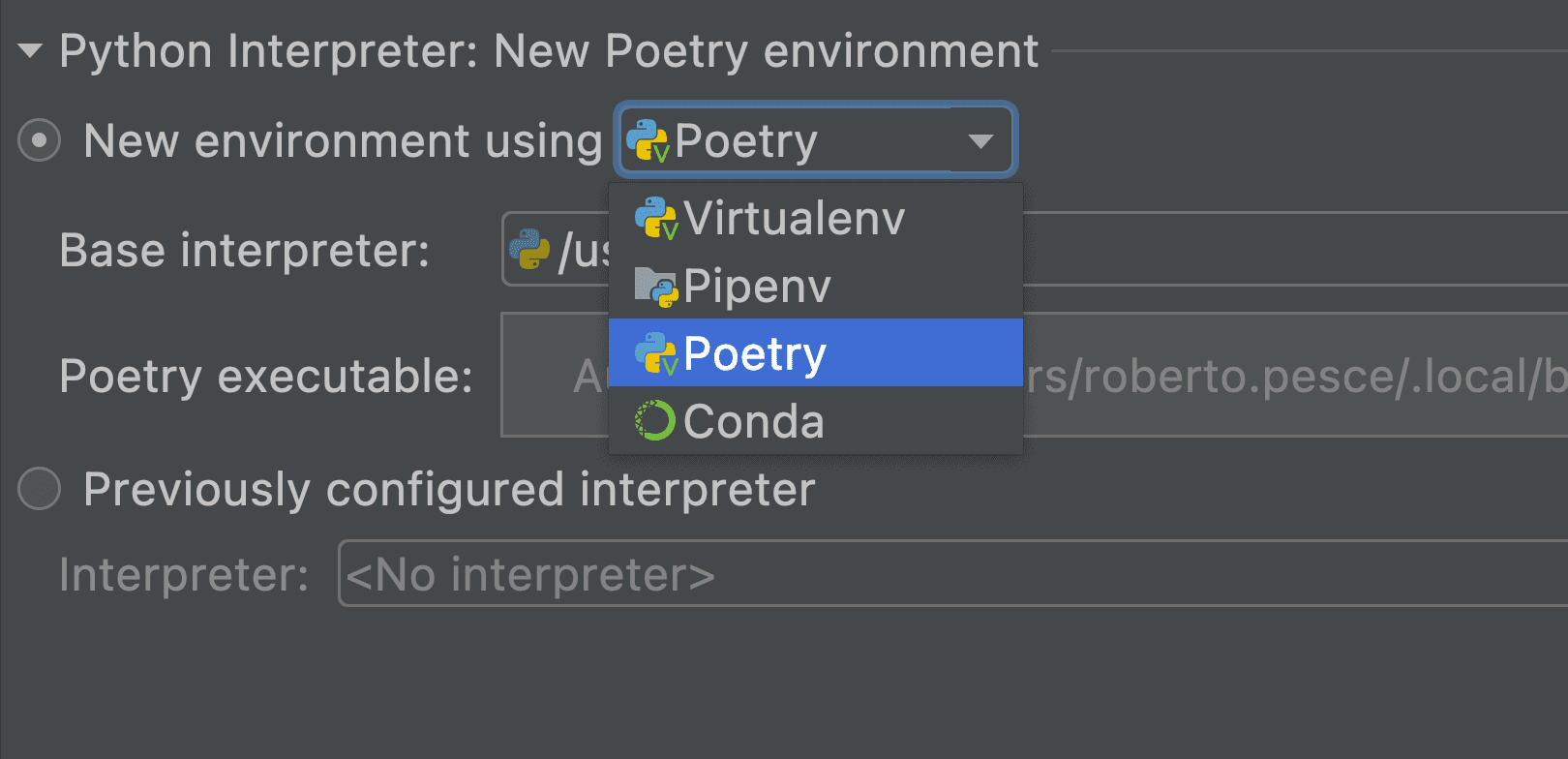
Эту функцию удалось реализовать благодаря встраиванию в исходный код PyCharm плагина, созданного Коудаи Аоно. Спасибо за помощь!
Поддержка FastAPI [Pro]
В PyCharm Pro появилась поддержка FastAPI — популярного высокопроизводительного веб-фреймворка Python для создания API — как типа проекта и конфигурации запуска.
Чтобы создать проект FastAPI, выберите FastAPI в качестве типа проекта. PyCharm автоматически устанавливает нужные зависимости и создает конфигурации для запуска и отладки приложения.
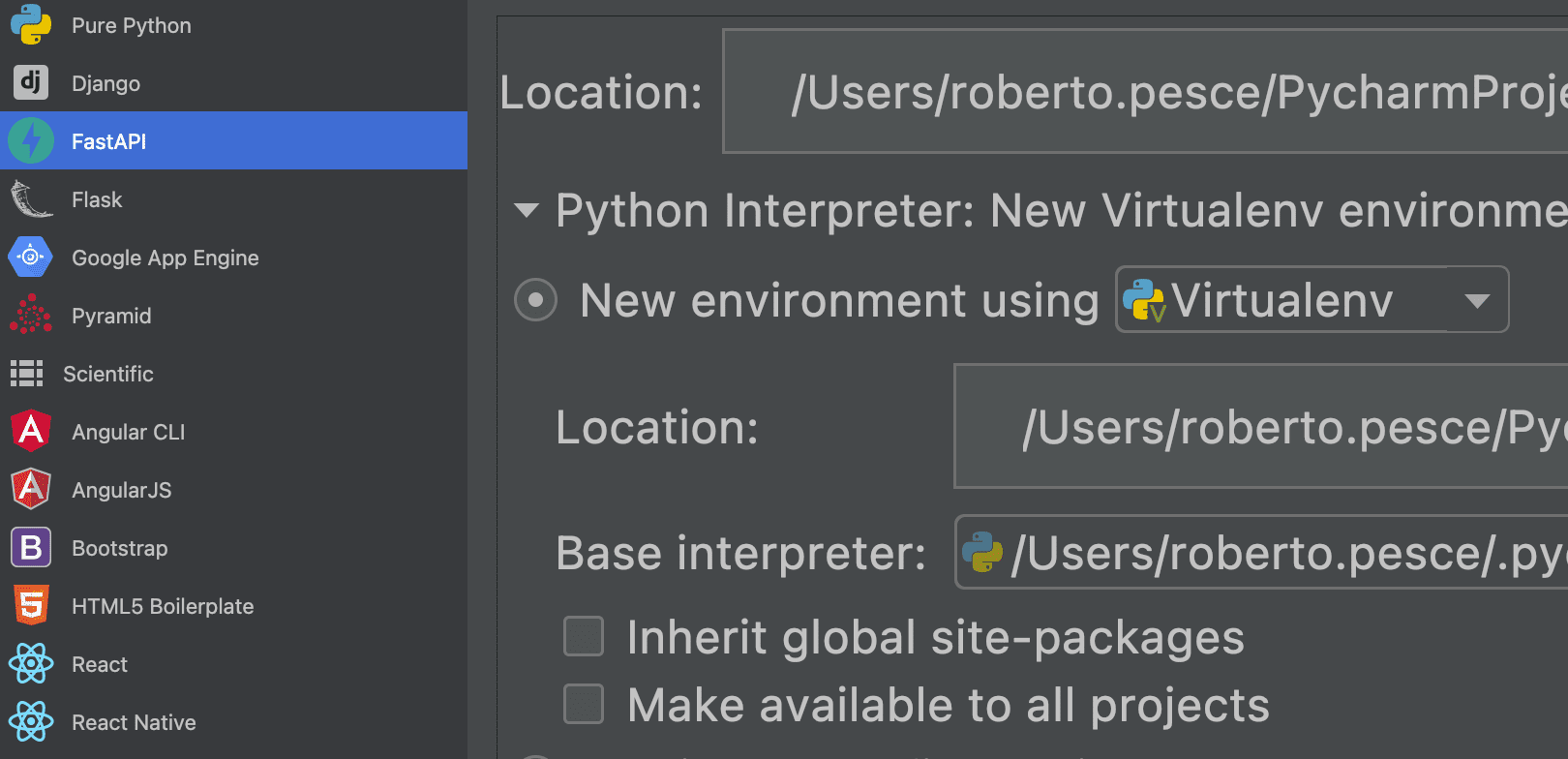
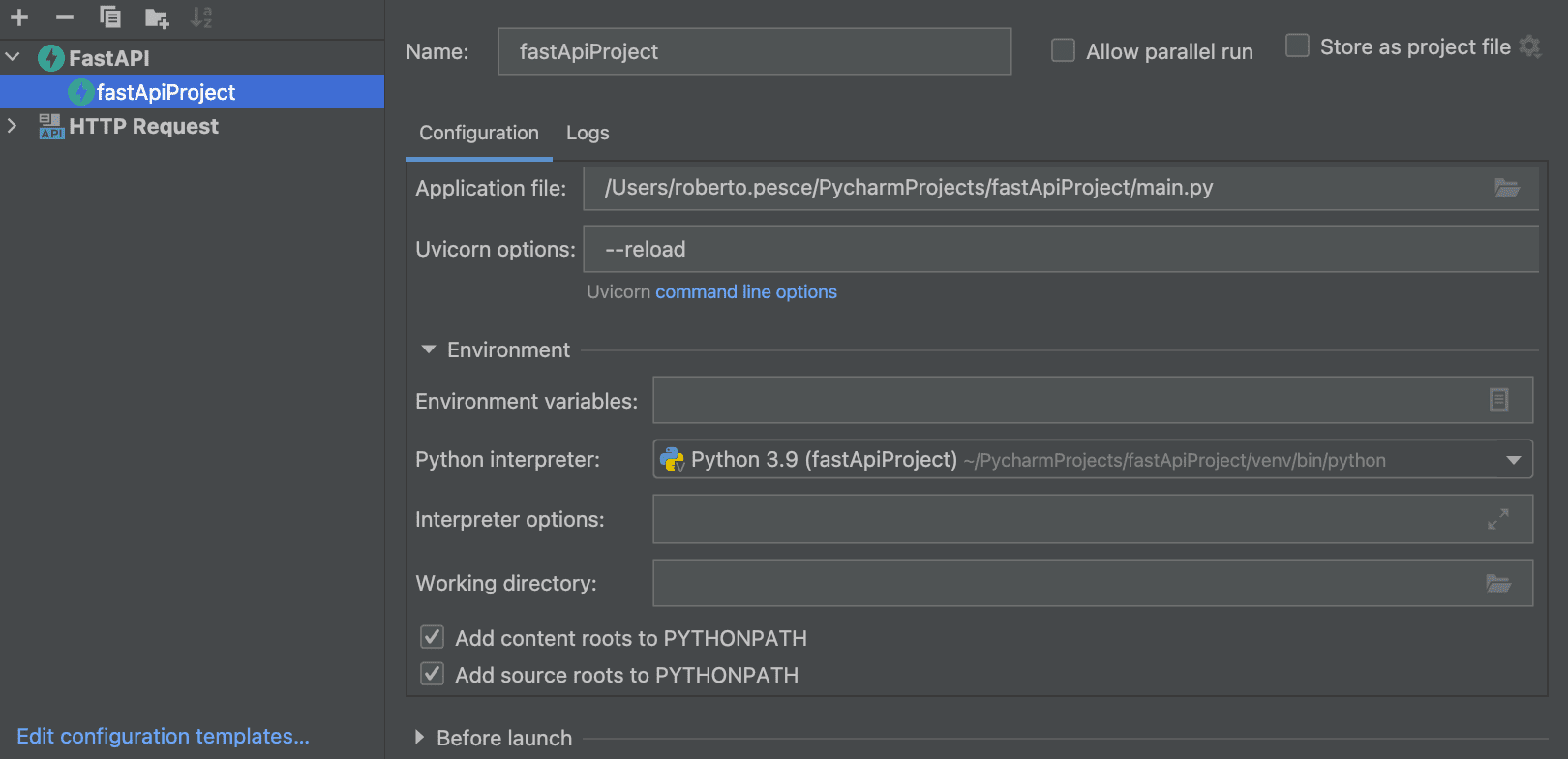
Можно также открыть в PyCharm Pro существующий проект FastAPI, чтобы IDE создала для вас виртуальную среду, а конфигурацию запуска FastAPI создать самостоятельно. После этого PyCharm найдет ваше приложение и запустит Uvicorn.
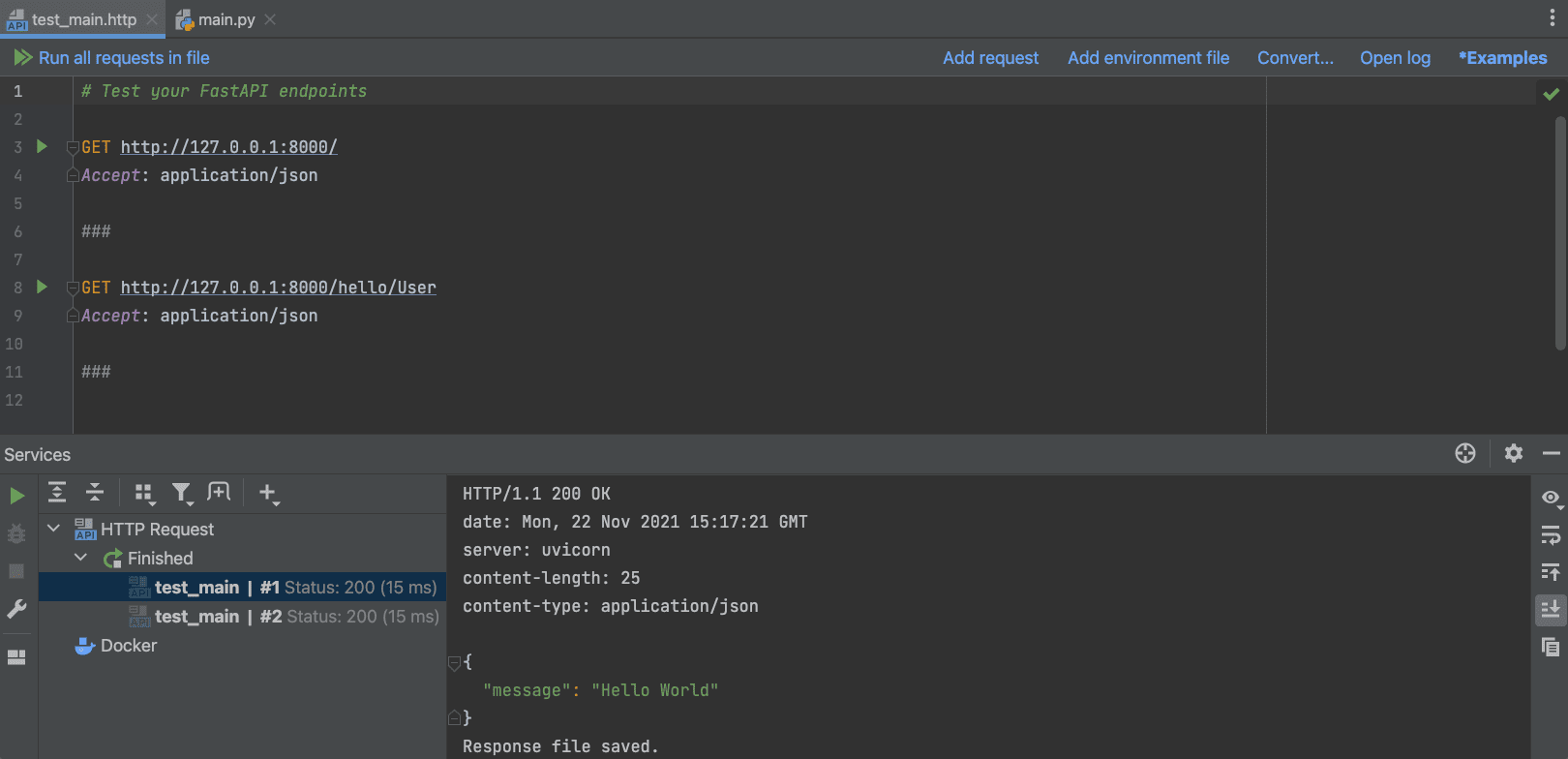
При работе с конечными точками в FastAPI их нужно часто тестировать, чтобы убедиться, что все работает как надо. В PyCharm Pro это можно сделать прямо из редактора благодаря интеграции с HTTP-клиентом.
Просто откройте файл “file_name.http” (в новых проектах FastAPI, созданных с помощью мастера PyCharm, он уже есть) и используйте его для отправки запросов конечным точкам приложения. Подробнее об этом читайте в документации.
Новое окно Endpoints для FastAPI и Flask [Pro]
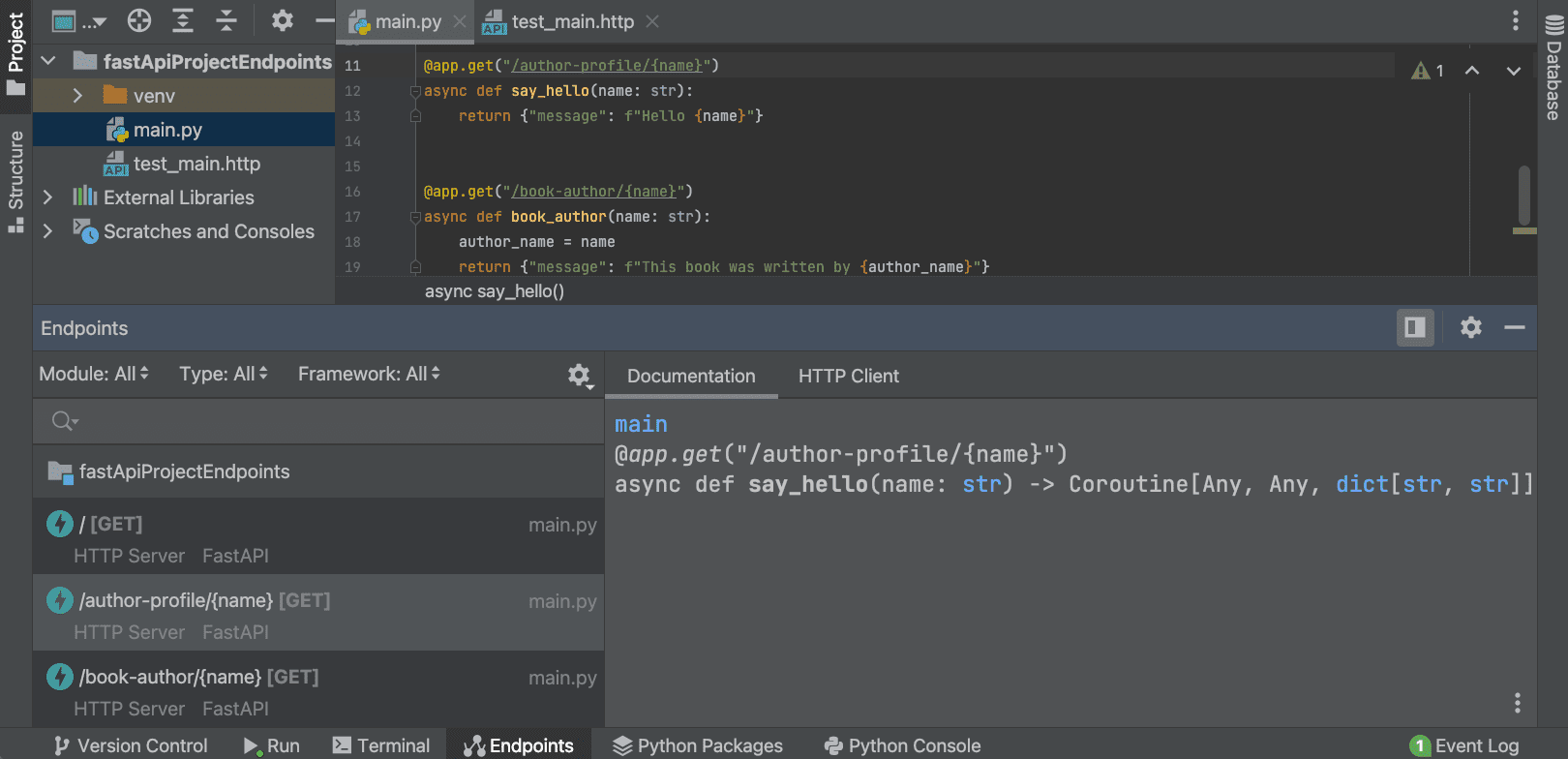
Если вы разрабатываете API, мы предлагаем новый удобный способ управления конечными точками. PyCharm Pro быстро сканирует маршруты проектов FastAPI и Flask и выводит их в новом окне Endpoints, где можно посмотреть все URL. Доступны автодополнение, навигация и рефакторинги. Кроме того, в окне Endpoints показывается документация по каждой конечной точке, и ее можно протестировать с помощью HTTP-клиента.
Улучшения для работы с Jupyter-ноутбуками [Pro]
Мы постарались сделать работу с PyCharm удобнее для тех, кто занимается Data Science. В PyCharm Pro 2021.3 улучшена поддержка Jupyter-ноутбуков.

Поддержка Jupyter в PyCharm Pro появилась благодаря DataSpell — нашей новой профессиональной IDE для специалистов в области Data Science. Если вы занимаетесь Data Science, попробуйте DataSpell!
Новый интерфейс для ноутбуков
Новая версия PyCharm Pro по умолчанию поддерживает классический интерфейс Jupyter-ноутбуков, включая часто используемые сочетания клавиш.
Интерактивные результаты
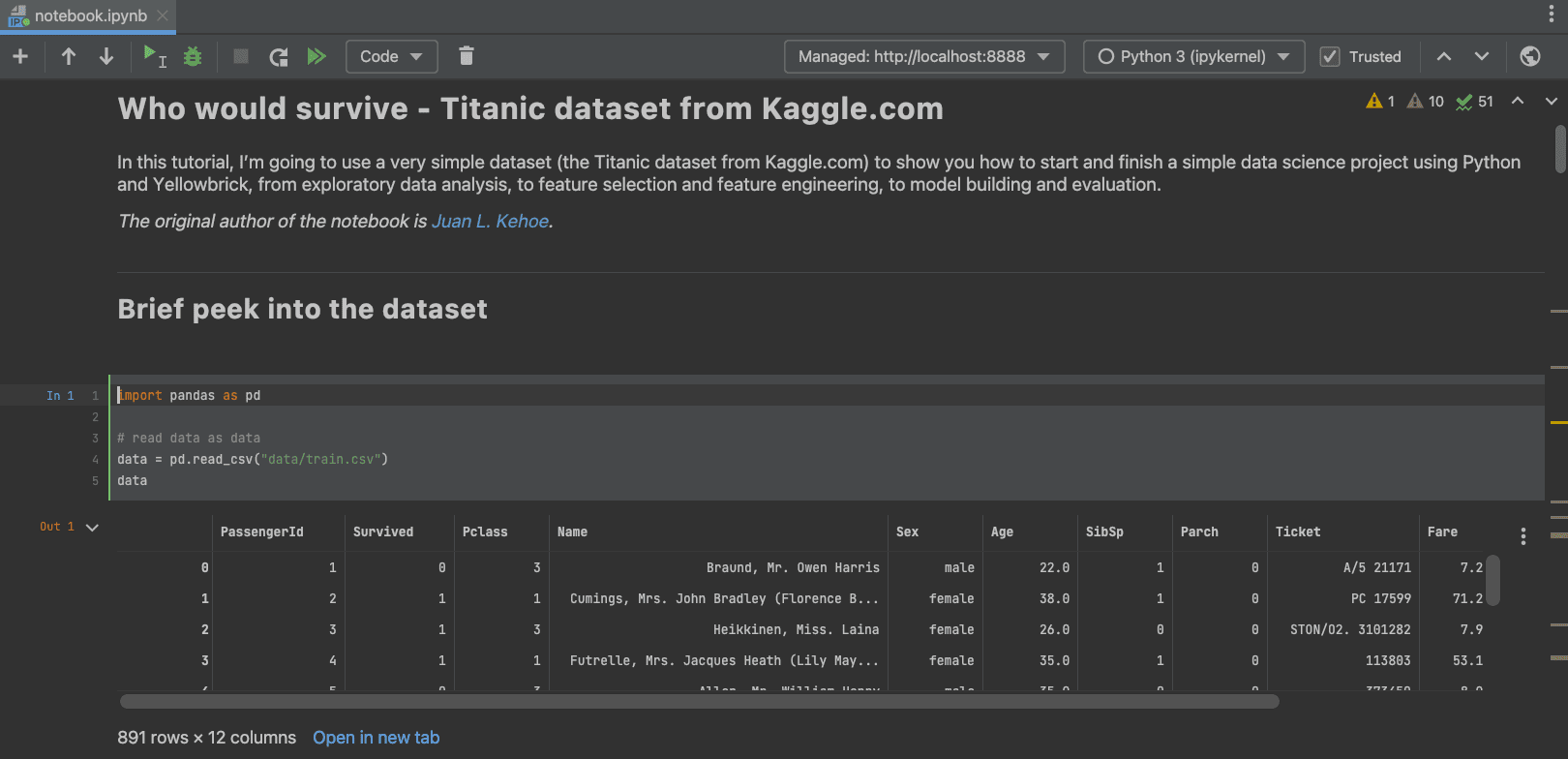
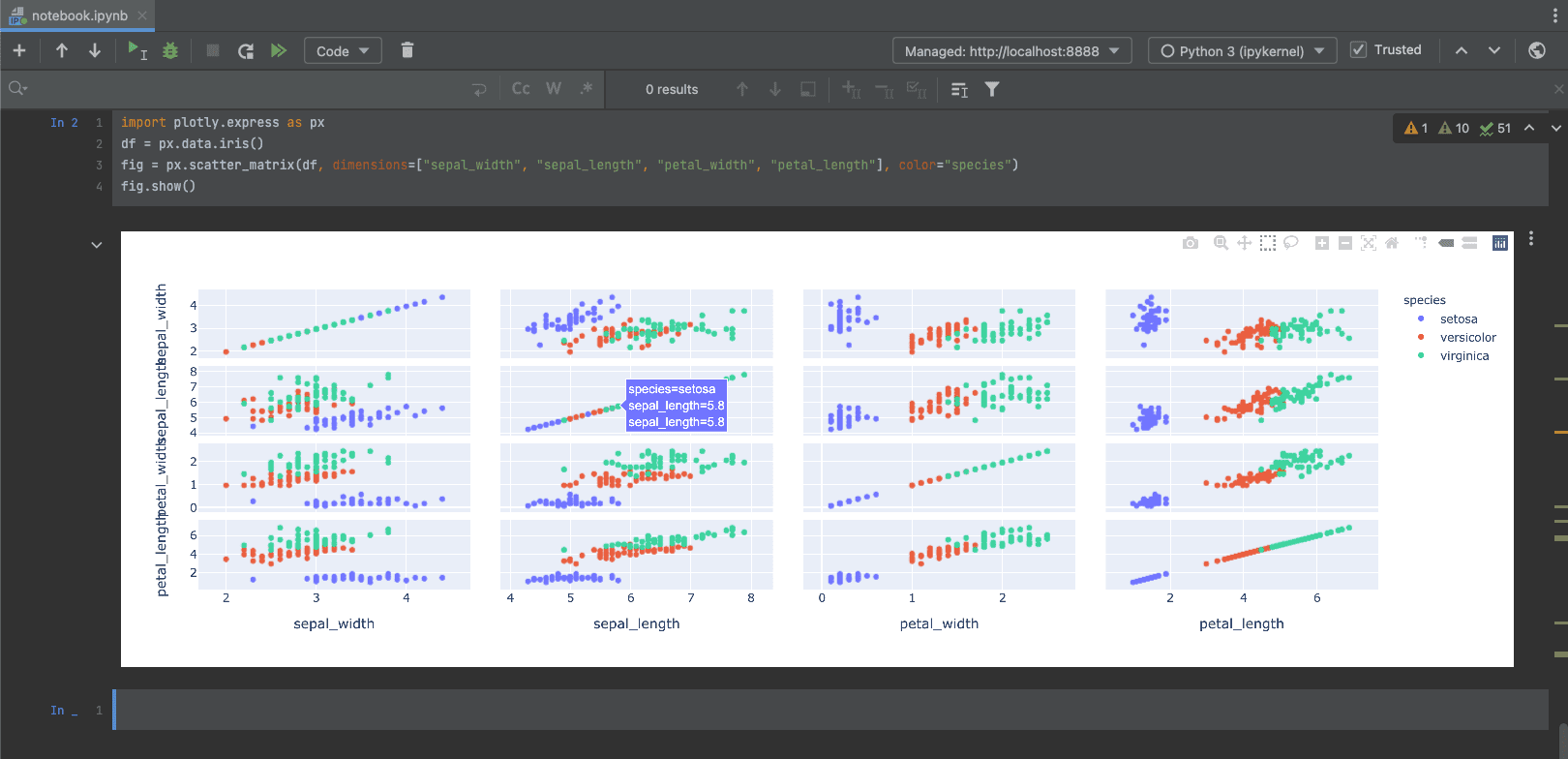
Теперь PyCharm полностью поддерживает как статические, так и JavaScript-результаты, используемые в Plotly, Bokeh, Altair, ipywidgets и других библиотеках. Также поддерживаются объекты DataFrame: их можно исследовать непосредственно в ноутбуке либо открыть в отдельной вкладке.
Возможности IDE
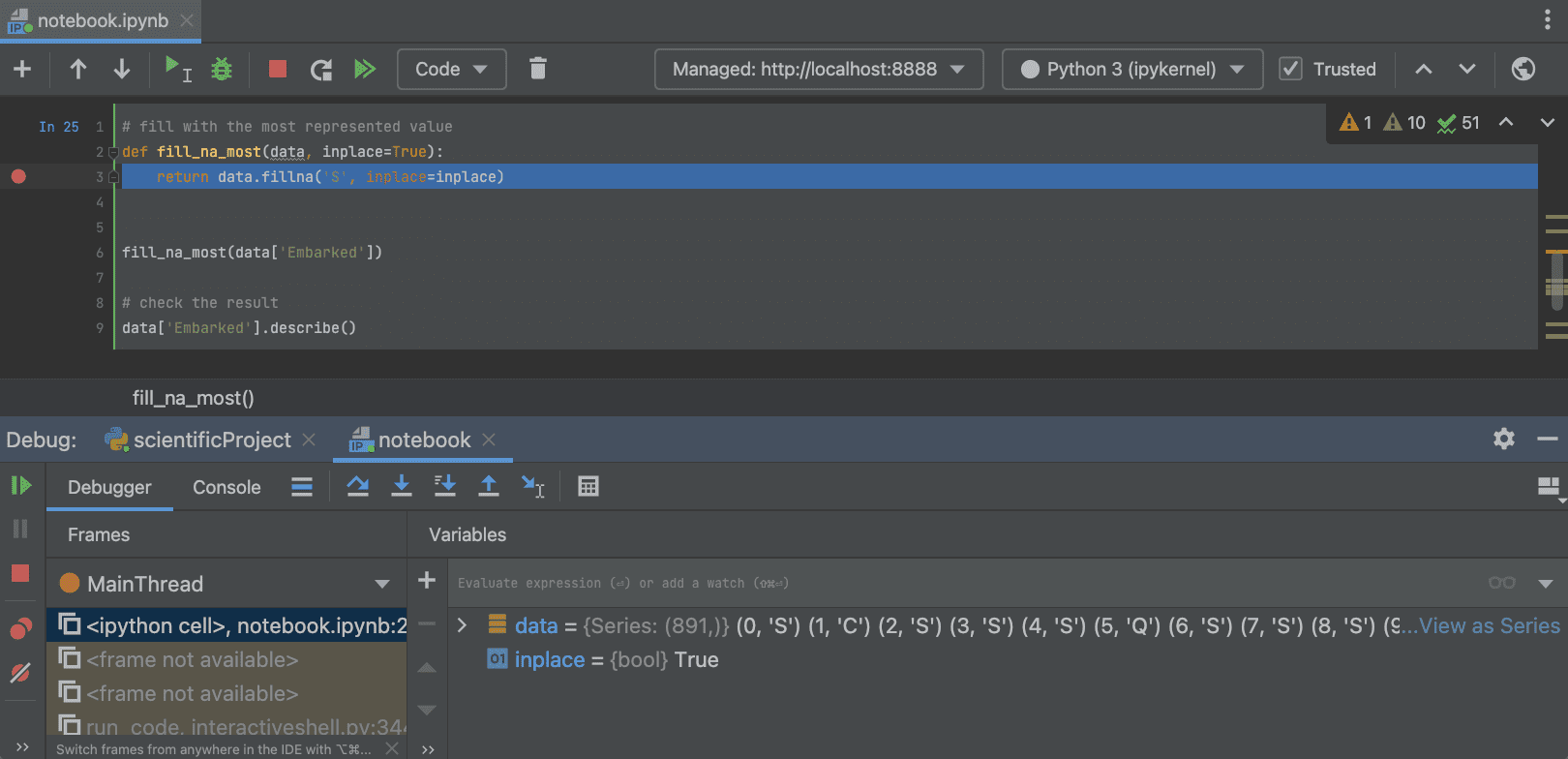
У встроенной в IDE поддержки Jupyter немало плюсов. Вы можете пользоваться в Jupyter-ноутбуках всеми преимуществами, которые дают инструменты PyCharm: автоматический импорт, автодополнение кода, отладка, рефакторинг и многое другое. Чтобы выполнить отладку в Jupyter-ноутбуке, просто создайте точку останова и запустите ячейку в отладчике.
Удаленная разработка (бета) [Pro]
Нас часто просили добавить поддержку удаленной разработки. В версии 2021.3 она появилась в бета-режиме. Теперь вы можете подключаться к удаленным устройствам откуда угодно, запускать бэкенд PyCharm и пользоваться удаленными ресурсами так же легко, как и локальными.
Чтобы попробовать, на начальном экране IDE нажмите Remote Development, выберите опцию SSH и следуйте инструкциям мастера установки по вводу учетных данных, установке соединения и загрузке IDE на сервер. После этого вы сможете открыть удаленный проект в PyCharm. Подробнее об этом читайте в документации.
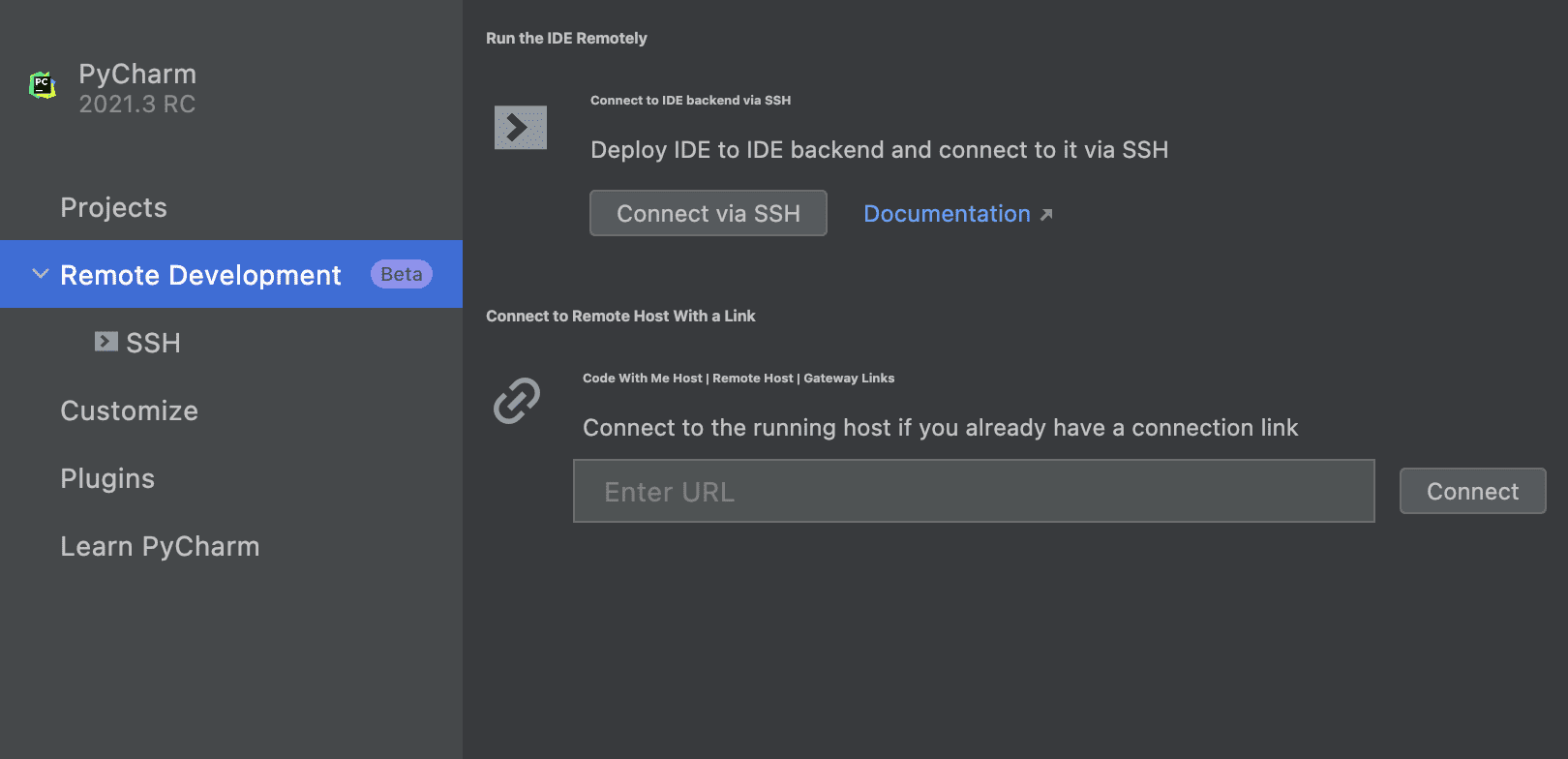
В данный момент функциональность работает в бета-режиме, и мы будем очень благодарны за ваши отзывы.
Взаимодействие с IDE
В новой версии мы постарались сделать работу с PyCharm удобнее во многих аспектах. Вот главные улучшения:
Знакомство с IDE и серия уроков по Git
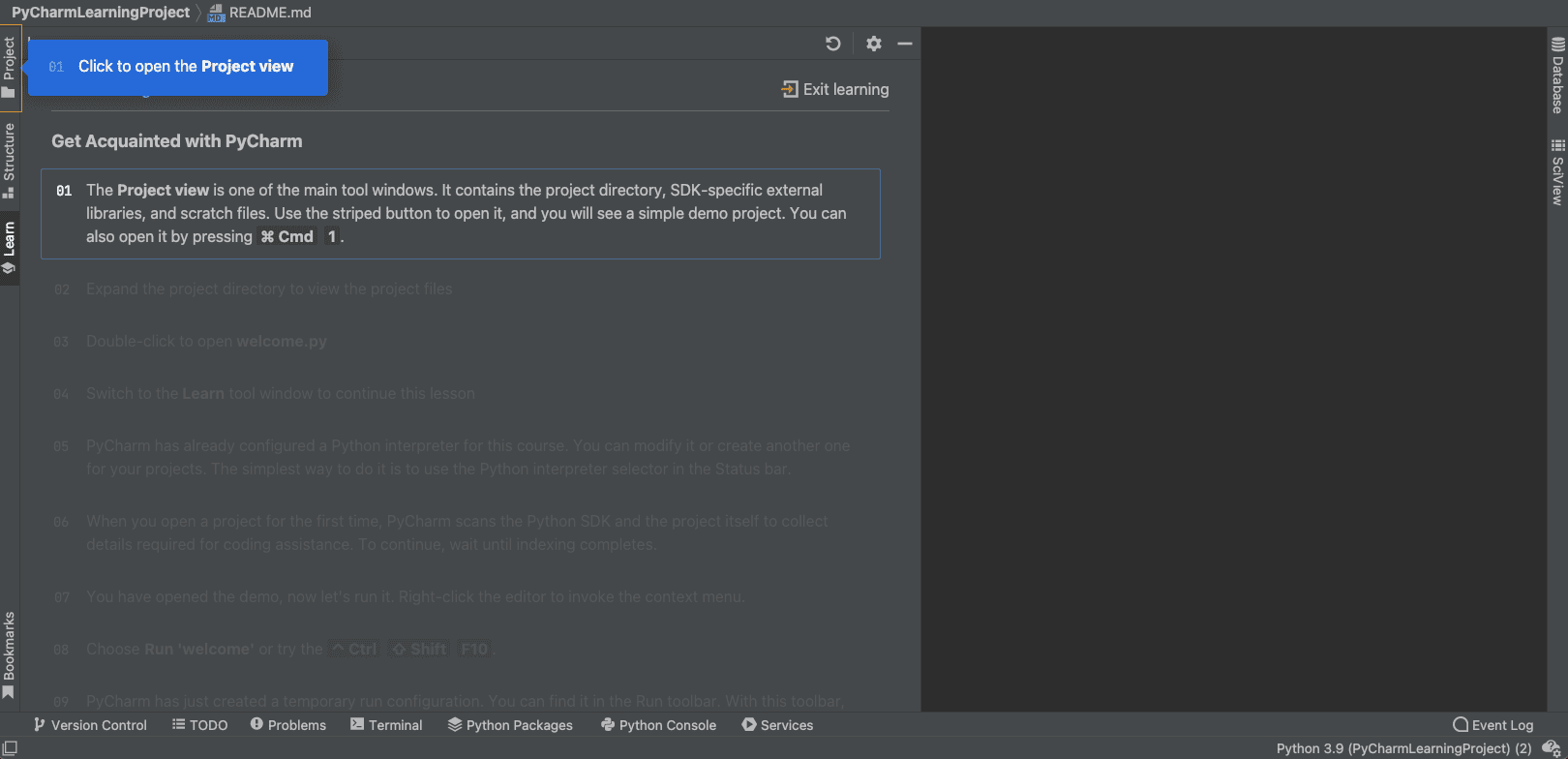
Для тех, кто только начинает пользоваться PyCharm или хочет все хорошенько повторить, мы добавили в Feature Trainer ознакомительный тур и новые уроки. Вы найдете их на начальном экране (опция Learn PyCharm), а также в разделе Help | Learn IDE главного меню.
Реорганизация настроек VCS
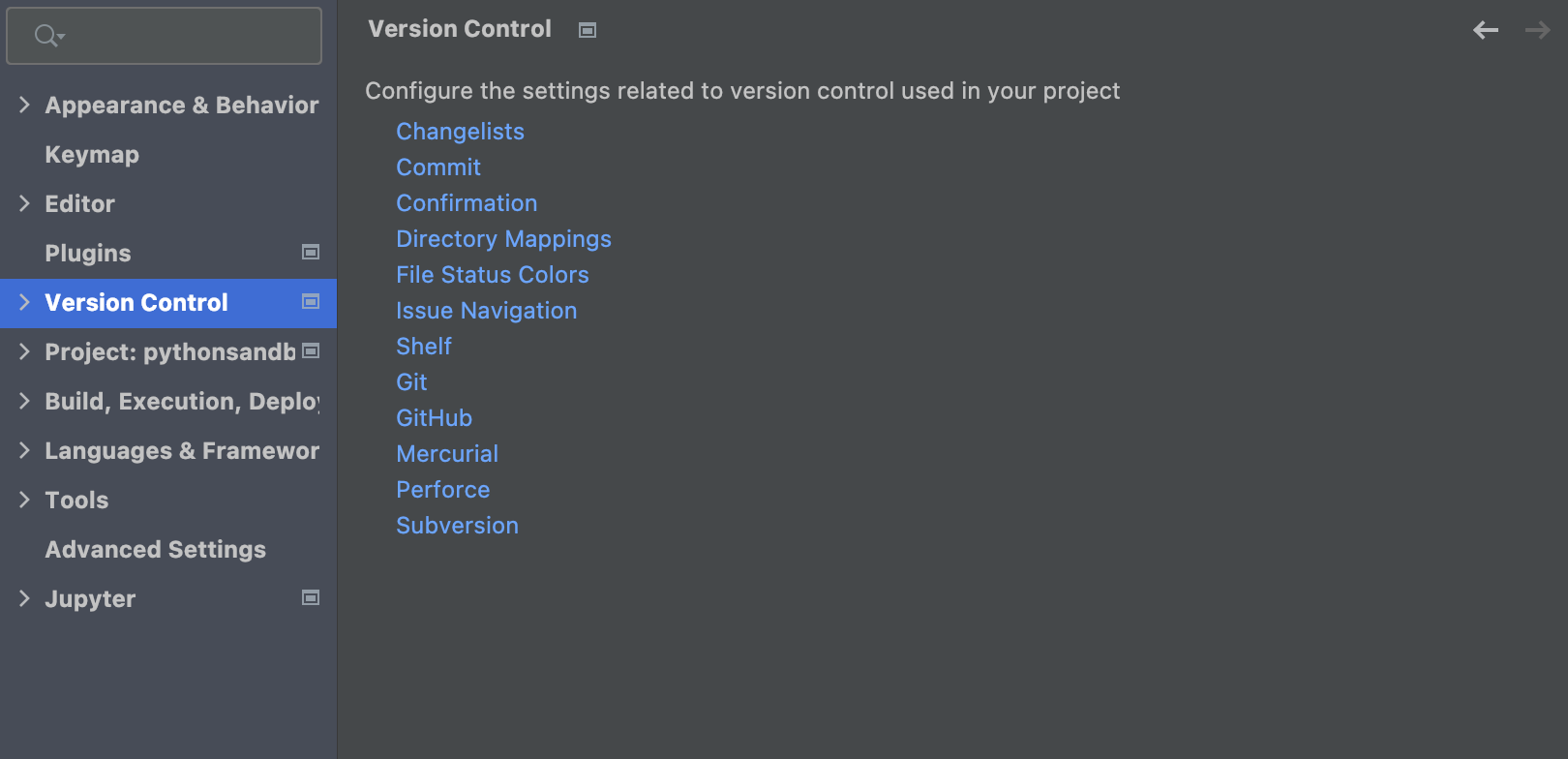
Мы реорганизовали настройки VCS, чтобы их было проще найти. В разделе Preferences / Settings | Version Control теперь собрано все необходимое для настройки VCS. Настройки для Commit, Push и Update теперь находятся в разных секциях.
Представление Aggregate в редакторе данных [Pro]
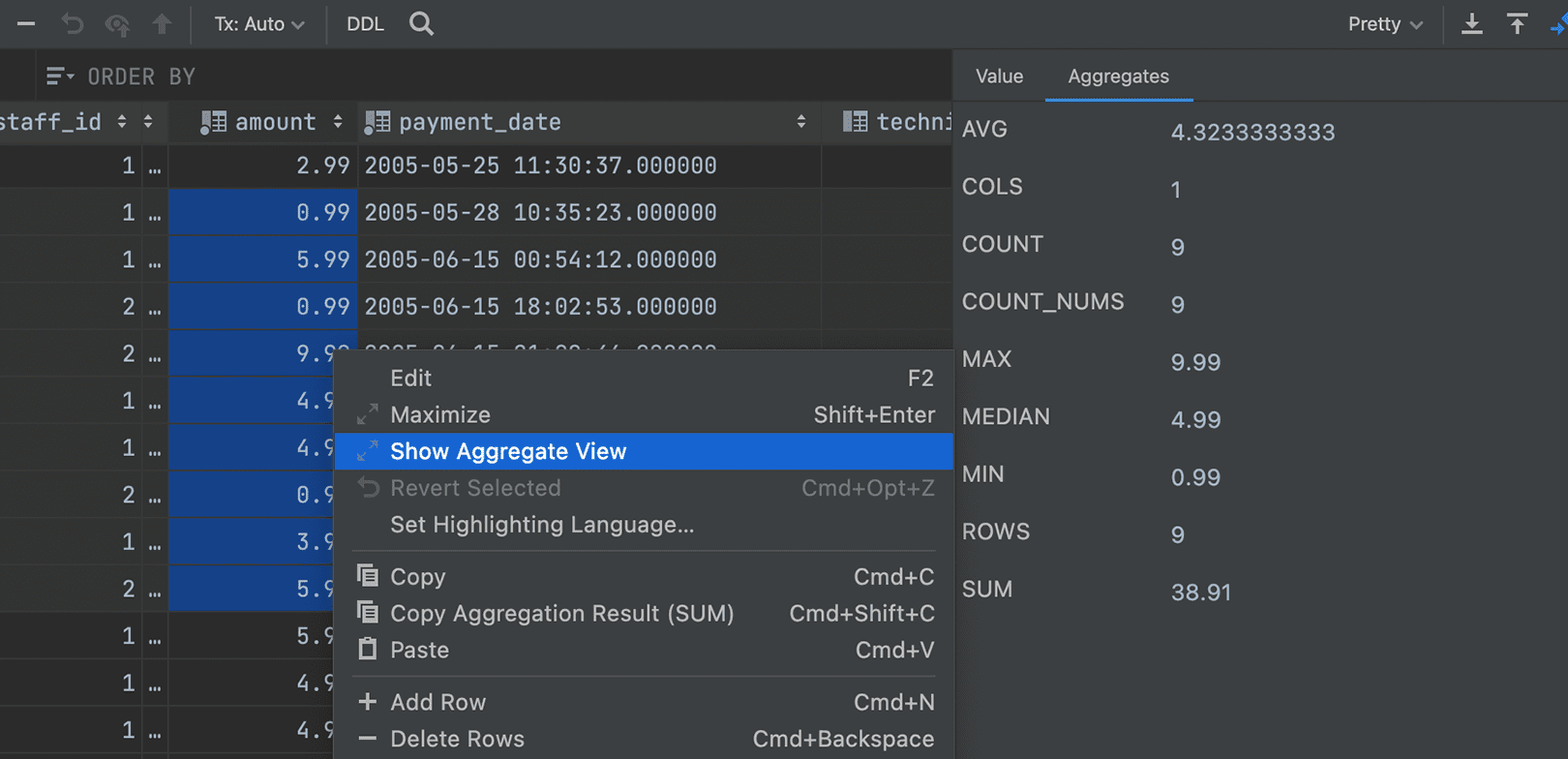
Для просмотра диапазонов ячеек мы добавили режим Aggregate. Эта функция, которую так давно ждали наши пользователи, поможет управлять данными, позволит не писать дополнительные запросы и упростит работу с редактором данных, предоставляя возможности из арсенала Microsoft Excel и Google Spreadsheets.
Выберите диапазон ячеек, к которому вы хотите применить агрегатные функции, кликните по нему правой кнопкой мыши и выберите Show Aggregate View.
Прекращение поддержки Mako, Buildout и Web2Py
Выпуская предыдущую версию, мы предупреждали, что в PyCharm 2021.3 будет прекращена поддержка Mako, Buildout и Web2Py.
Это основные изменения, о которых мы хотели вам рассказать. Подробную информацию о других возможностях новой версии вы найдете на нашем сайте. Полный список изменений и устраненных ошибок смотрите в примечаниях к релизу.
Как всегда, мы с нетерпением ждем ваших отзывов. Делитесь впечатлениями в Twitter (@pycharm), а об ошибках сообщайте в баг-трекере.
Программируйте с удовольствием!
Ваша команда PyCharm
The Drive to Develop
Автор оригинальной статьи:


Subscribe to PyCharm Blog updates
Discover more





Introducing PyCharm 2021.3!

We’ve been working hard to deliver features in PyCharm that will make you more productive and your coding smoother. This release cycle introduces Poetry support, the new FastAPI project type, the Beta version of our remote development support, a redesigned Jupyter notebook experience, and much more!
In this blog post, we will go through some of the highlights.
Poetry Support
Poetry is becoming more and more popular among Python developers, and there were a lot of issues reported to our tracker to add support for it. The good news for Poetry users (and for those wanting to try it) is that PyCharm now supports Poetry out of the box. But that’s is not all! We’ve also bundled the TOML plugin so that you also get code completion for your pyproject.toml file.
This feature was made possible by merging the plugin created by Koudai Aono into the PyCharm source code. Thank you Koudai for all your hard work!
FastAPI Support [Pro]
FastAPI is a popular, high-performance, Python web framework for building APIs, and PyCharm Pro now offers support for it as a project and run configuration type.
To create a new FastAPI project, select the FastAPI project type and let PyCharm install its dependencies and create the run/debug configurations for you.
Alternatively, you can also open an existing FastAPI project with PyCharm Pro, let PyCharm handle creating the virtual environment for you, and create a FastAPI run configuration yourself. PyCharm will then detect your application and run Uvicorn for you.
When working with endpoints in FastAPI, you will frequently need to test them to ensure that everything is working as expected. In PyCharm Pro you can do this from the comfort of your editor using the HTTP Client integration.
Just open the “file_name.http” file (already present for new FastAPI projects created using the PyCharm wizard) and use it to send requests to your application endpoints. You can read more about this in the documentation.
New Endpoints Tool Window for FastAPI and Flask [Pro]
If you develop APIs, we also have a great new feature to help you manage your endpoints. PyCharm Pro will scan FastAPI and Flask project routes and list them in the new Endpoints tool window, where you can have an overview of all your URLs, as well as code completion, navigation, and refactoring capabilities. The Endpoints tool window also displays documentation for each endpoint and allows you to test it using the HTTP client.
New Jupyter Notebook Experience [Pro]
Our team has been working hard to improve PyCharm for software engineers working in the data science sphere. PyCharm Pro 2021.3 comes with new and improved support for Jupyter notebooks.
Jupyter support in PyCharm Pro is powered by DataSpell, our new IDE designed for professional data scientists. Are you a data scientist? Try DataSpell now!
New Notebook UI
For starters, PyCharm Pro now comes with support for the classic Jupyter notebook user interface out of the box, including full compatibility with its popular shortcuts.
Interactive Outputs
We’ve also added full support for both static and JavaScript-based outputs used by popular scientific libraries such as Plotly, Bokeh, Altair, ipywidgets, and others, as well as rich support for DataFrames, that you can explore in situ, or open in a dedicated tab.
IDE capabilities
Having Jupyter support inside the IDE has its perks. It means that you get to benefit from all of the powerful PyCharm tools such as auto import, code completion, debugging and refactoring capabilities, and more in your Jupyter notebooks. To debug inside a Jupyter notebook, just add a breakpoint and run the cell under the debugger.
Remote development Beta [Pro]
Remote development support has also been a commonly requested feature from our users, and 2021.3 brings beta support for it. PyCharm users can now connect to remote machines from anywhere in the world, run PyCharm’s backend, and take advantage of remote computing power while feeling that everything is running locally.
To try it out, just click Remote Development on the Welcome screen, select the SSH option and follow the wizard to provide your credentials, establish the connection, download the IDE on the server, and open your remote project in PyCharm. You can read the documentation for more details.
This feature is still in Beta, and your feedback on it is highly appreciated.
User experience
We have also been working to improve the overall PyCharm user experience. Some of the highlights include:
Feature trainer: New onboarding tour and a series of Git lessons
For users who are new to PyCharm or just want a refresher on how to use it, the IDE feature trainer now comes with an onboarding tour and new lessons. Trying it out is as easy as clicking ‘Learn PyCharm’ on the Welcome screen or clicking Help | Learn IDE in the main menu in the IDE.
Reorganized Version Control Settings
We’ve reorganized the VCS settings and made them more discoverable. In Preferences / Settings | Version Control you will now find a list of all the available settings, serving as a starting point for configuring your VCS. The settings inside the sections are now organized by the most important processes: Commit, Push, and Update.
Data editor Aggregate view [Pro]
We’ve implemented an Aggregate view for ranges of cells. This highly anticipated feature will go a long way towards helping you manage your data by taking away the burden of writing additional queries! It also makes the data editor easier to use, bringing it a step closer to Microsoft Excel and Google Sheets.
To use this feature you will first need to select the cell range you want to see the view for, then right-click and select Show Aggregate View from the menu.
End of support for Mako, Buildout, and Web2Py
As announced in our previous release (2021.2 announcements), from PyCharm 2021.3 onwards there will no longer be support for Mako, Buildout, or Web2Py.
These are all the features I’d like to highlight for this release. If you want to read more about the other features included in this release check out our What’s New page or read the release notes for the full list of features implemented and bugs fixed.
As always, your feedback is highly appreciated. Feel free to share it with us on Twitter (@pycharm), or by reporting any bugs you encounter to our tracker.
Happy coding!
The PyCharm team
Subscribe to PyCharm Blog updates
Discover more
PyCharm 2021.3 ist da!

Wir haben hart daran gearbeitet, Funktionen in PyCharm bereitzustellen, die Sie produktiver und Ihre Programmierung reibungsloser machen. Diese Version wird mit Poetry-Unterstützung, dem neuen FastAPI-Projekttyp, der Beta-Version unserer Unterstützung für Remote-Entwicklung, einer neuen Jupyter-Notebook-Erfahrung und mehr geliefert.
In diesem Blogbeitrag gehen wir auf einige Highlights ein.
Poetry-Unterstützung
Poetry wird in der Python-Gemeinde immer beliebter, und in unserem Tracker wurden zahlreiche Tickets mit der Bitte um Unterstützung eröffnet. Wenn Sie Poetry-Nutzer*in sind (oder Poetry einfach mal ausprobieren möchten), haben wir eine gute Nachricht für Sie: Poetry wird jetzt in PyCharm standardmäßig unterstützt. Aber das ist noch nicht alles! Das TOML-Plugin wird auch mitgeliefert, so dass Sie auch Code-Completion für Ihre pyproject.toml-Datei erhalten.
Diese Funktion wurde durch das von Koudai Aono erstellte Plugin ermöglicht, das in den PyCharm-Quellcode integriert wurde. Vielen Dank, Koudai, für die harte Arbeit!
FastAPI-Unterstützung [Pro]
FastAPI, ein beliebtes und leistungsfähiges Python-Web-Framework zum Erstellen von APIs, wird jetzt von PyCharm Pro als Projekt- und Run-Konfigurationstyp unterstützt.
Wenn Sie den FastAPI-Projekttyp auswählen, installiert PyCharm automatisch die Abhängigkeiten für Sie und erstellt die entsprechenden Run/Debug-Konfigurationen. Um ein neues FastAPI-Projekt zu erstellen, wählen Sie den FastAPI-Projekttyp aus und lassen Sie PyCharm die Abhängigkeiten installieren und die Run/Debug-Konfigurationen für Sie erstellen.
Alternativ dazu können Sie auch ein vorhandenes FastAPI-Projekt in PyCharm Pro öffnen, PyCharm die Erstellung der virtuellen Umgebung überlassen und selbst eine FastAPI-Run-Konfiguration erstellen. PyCharm erkennt dann Ihre Anwendung und führt Uvicorn für Sie aus.
Wenn Sie mit Endpunkten in FastAPI arbeiten, müssen Sie diese häufig testen, um sicherzustellen, dass alles wie erwartet funktioniert. In PyCharm Pro können Sie dies bequem von dem Editor aus tun, indem Sie die HTTP-Client-Integration verwenden.
Öffnen Sie einfach die Datei “file_name.http” (bereits vorhanden bei neuen FastAPI-Projekten, die mit dem PyCharm-Assistenten erstellt wurden) und verwenden Sie sie, um Anfragen an Ihre Anwendungsendpunkte zu senden. Sie können mehr darüber in der Dokumentation lesen.
Endpoints-Toolfenster für FastAPI und Flask [Pro]
Wenn Sie APIs entwickeln, haben wir auch eine großartige neue Funktion, um die Verwaltung Ihrer Endpunkte zu erleichtern. PyCharm Pro scannt FastAPI- und Flask-Projektrouten und listet sie im neuen Endpoints-Toolfenster auf, wo Sie einen Überblick über alle Ihre URLs sowie Code-Completion, Navigationshilfen und Refactoring-Funktionen haben. Das Endpoints-Toolfenster zeigt auch die Dokumentation für jeden Endpunkt an und ermöglicht es Ihnen, ihn mit dem HTTP-Client zu testen.
Neue Jupyter-Notebook-Erfahrung [Pro]
Unser Team hat intensiv daran gearbeitet, PyCharm für Softwareentwickler*innen im Data-Science-Bereich attraktiver zu machen. PyCharm Pro 2021.3 kommt mit neuer und verbesserter Unterstützung für Jupyter-Notebooks.
Die Jupyter-Unterstützung in PyCharm Pro wird von DataSpell bereitgestellt – unserer neuen IDE für professionelle Data Science. Sie sind Data Scientist? Probieren Sie DataSpell jetzt aus!
Neue Notebook-UI
PyCharm Pro bietet jetzt Unterstützung für die klassische Jupyter-Notebook-Benutzeroberfläche, einschließlich voller Kompatibilität mit den beliebten Tastenkombinationen.
Interaktive Ausgabe
Wir haben auch vollständige Unterstützung für statische und JavaScript-basierte Ausgaben hinzugefügt, die von populären wissenschaftlichen Bibliotheken wie Plotly, Bokeh, Altair, ipywidgets und anderen verwendet werden, sowie umfangreiche Unterstützung für DataFrames, die Sie direkt vor Ort erkunden oder in einem eigenen Tab öffnen können.
IDE-Funktionen
Die integrierte Jupyter-Unterstützung innerhalb der IDE hat einige Vorteile. Es bedeutet, dass Sie alle leistungsstarken Tools in PyCharm wie Auto-Import, Code-Completion, Debugging- und Refactoring-Funktionen und mehr in Ihren Jupyter-Notebooks nutzen können. Um innerhalb eines Jupyter-Notebooks zu debuggen, fügen Sie einfach einen Haltepunkt hinzu und führen die Zelle unter dem Debugger aus.
Remote-Entwicklung Beta [Pro]
Die Unterstützung von Remote-Entwicklung war ebenfalls eine von unseren Nutzer*innen häufig nachgefragte Funktion, und 2021.3 bietet Beta-Unterstützung für diese Funktion. Verbinden Sie sich jetzt von überall auf der Welt mit einem Remote-Computer, der ein PyCharm-Backend ausführt. Dabei profitieren Sie von der vollen Leistung des Remote-Systems und können gleichzeitig genauso komfortabel arbeiten wie auf einem lokalen System.
Zum Ausprobieren klicken Sie einfach auf dem Begrüßungsbildschirm auf Remote Development, wählen Sie die SSH-Option und folgen Sie den Anweisungen des Assistenten, um Ihre Anmeldeinformationen bereitzustellen, die Verbindung herzustellen, die IDE auf den Server zu laden und Ihr Remote-Projekt in PyCharm zu öffnen. Sie können die Dokumentation für weitere Details lesen.
Diese Funktion befindet sich noch in der Beta-Phase, und wir würden uns über Ihr Feedback sehr freuen.
Benutzererfahrung
Wir haben auch daran gearbeitet, die allgemeine Benutzererfahrung von PyCharm zu verbessern. Zu den Highlights gehören unter anderem:
Funktionstrainer: neue Onboarding-Tour und Git-Schulungsreihe
Wenn Sie PyCharm-Neuling sind oder Ihre Kenntnisse auffrischen möchten, bietet Ihnen der IDE-Funktionstrainer jetzt eine Onboarding-Tour und neue Lektionen. Klicken Sie zum Ausprobieren einfach auf dem Begrüßungsbildschirm auf „Learn PyCharm“ oder klicken Sie im Hauptmenü der IDE auf Help | Learn IDE.
Einstellungen für Versionsverwaltung mit neuer Struktur
Die VCS-Einstellungen wurden neu strukturiert und sind jetzt leichter zu finden. Preferences / Settings | Version Control ist jetzt der Ausgangspunkt für die Konfiguration Ihres VCS – Sie finden dort alle verfügbaren Einstellungen. Die Einstellungen sind jetzt innerhalb der Abschnitte nach den wichtigsten Vorgängen geordnet: Commit, Push und Update.
Aggregate-Ansicht im Dateneditor [Pro]
Wir haben eine Aggregate-Ansicht für Zellenbereiche implementiert. Diese lang erwartete Funktion wird Ihnen die Verwaltung Ihrer Daten erheblich erleichtern, da Sie keine zusätzlichen Abfragen mehr schreiben müssen! Außerdem wird der Dateneditor dadurch einfacher zu bedienen und kommt damit Microsoft Excel und Google Tabellen einen Schritt näher.
Wählen Sie einfach den gewünschten Zellenbereich aus, klicken Sie mit der rechten Maustaste und wählen Sie den Menüpunkt Show Aggregate-Ansicht.
Kein Support mehr für Mako, Buildout und Web2Py
Wie in unserer letzten Version (Ankündigungen zu 2021.2) angekündigt, wird ab PyCharm 2021.3 Mako, Buildout, or Web2Py nicht mehr unterstützt.
Dies sind alle Funktionen, die wir für diese Version hervorheben möchten. Wenn Sie mehr über die anderen in dieser Version enthaltenen Funktionen lesen möchten, besuchen Sie unsere Seite Das ist neu oder lesen Sie die Versionshinweisen für die vollständige Liste der implementierten Funktionen und Bugfixes.
Wie immer ist uns Ihr Feedback herzlich willkommen. Teilen Sie es uns auf Twitter (@pycharm) mit, oder melden Sie uns Fehler, die Sie in unserem Tracker finden.
Viel Spaß beim Entwickeln!
Ihr PyCharm-Team
Autor des Original-Blogposts:
Subscribe to PyCharm Blog updates
Discover more
隆重推出 PyCharm 2021.3!

在这篇博文中,我们将介绍一些亮点。
Poetry 支持
FastAPI 支持 [Pro]
FastAPI 和 Flask 的新 Endpoints(端点)工具窗口 [Pro]
全新 Jupyter Notebook 体验 [Pro]
全新 Notebook UI
首先,PyCharm Pro 现在原生支持经典 Jupyter Notebook 用户界面,包括完全兼容其热门快捷键。
交互式输出
PyCharm Pro 现在完全支持热门科学库使用的静态和基于 JavaScript 的输出,例如 Plotly、Bokeh、Altair、ipywidgets 等。对于 DataFrame,PyCharm Pro 也提供了丰富的支持。您可以在原位探索 DataFrame,或在专用选项卡中打开。
IDE 功能
远程开发(测试版)[Pro]
此功能仍处于测试阶段,我们期待收到您的反馈。
用户体验
Features Trainer:全新入门导览和一系列 Git 课程
重新组织了版本控制设置
数据编辑器聚合视图 [Pro]
终止对 Mako、Buildout 和 Web2Py 的支持
本文英文原作者: