JetBrains Platform
Plugin and extension development for JetBrains products.
UI Freezes and the Dangers of Non-Cancellable Read Actions in Background Threads

In JetBrains IDEs, UI freezes are often blamed on “heavy work on the EDT,” but our recent investigations show another common culprit in plugins: long, non-cancellable read actions running in background threads.
We receive a lot of freeze reports via our automated exceptions reporting system, and many reports actually show problems in plugins that contain that single erroneous pattern. Let’s try to highlight this problem arising from non-cancellable code and figure out how to fix it.
A real-world example
Let’s look at the following stack traces that come from a Package Checker plugin freeze. Note how a background thread “DefaultDispatcher-worker-27” ends up executing ReadAction.compute:
"AWT-EventQueue-0" prio=0 tid=0x0 nid=0x0 waiting on condition
     java.lang.Thread.State: TIMED_WAITING
 on com.intellij.openapi.progress.util.EternalEventStealer@1356e599
    at java.base@21.0.8/java.lang.Object.wait0(Native Method)
    at java.base@21.0.8/java.lang.Object.wait(Object.java:366)
    at com.intellij.openapi.progress.util.EternalEventStealer.dispatchAllEventsForTimeout(SuvorovProgress.kt:261)
    at com.intellij.openapi.progress.util.SuvorovProgress.processInvocationEventsWithoutDialog(SuvorovProgress.kt:125)
    at com.intellij.openapi.progress.util.SuvorovProgress.dispatchEventsUntilComputationCompletes(SuvorovProgress.kt:73)
    at com.intellij.openapi.application.impl.ApplicationImpl.lambda$postInit$14(ApplicationImpl.java:1434)
    at com.intellij.openapi.application.impl.ApplicationImpl$$Lambda/0x000001fafa58b530.invoke(Unknown Source)
    at com.intellij.platform.locking.impl.RunSuspend.await(NestedLocksThreadingSupport.kt:1517)
...
    at com.intellij.openapi.application.impl.ApplicationImpl.runWriteAction(ApplicationImpl.java:1106)
    at com.intellij.psi.impl.PsiManagerImpl.dropPsiCaches(PsiManagerImpl.java:108)
    at com.intellij.lang.typescript.compiler.TypeScriptServiceRestarter.restartServices$lambda$1(TypeScriptServiceRestarter.kt:24)
    at com.intellij.lang.typescript.compiler.TypeScriptServiceRestarter$$Lambda/0x000001fafcf4a780.run(Unknown Source)
    at com.intellij.openapi.application.TransactionGuardImpl.runWithWritingAllowed(TransactionGuardImpl.java:240)
    at com.intellij.openapi.application.TransactionGuardImpl.access$100(TransactionGuardImpl.java:26)
...
    at com.intellij.ide.IdeEventQueueKt.performActivity(IdeEventQueue.kt:974)
    at com.intellij.ide.IdeEventQueue.dispatchEvent$lambda$12(IdeEventQueue.kt:307)
    at com.intellij.ide.IdeEventQueue$$Lambda/0x000001fafa7f0468.run(Unknown Source)
    at com.intellij.ide.IdeEventQueue.dispatchEvent(IdeEventQueue.kt:347)

"DefaultDispatcher-worker-27" prio=0 tid=0x0 nid=0x0 runnable
     java.lang.Thread.State: RUNNABLE
 (in native)
    at java.base@21.0.8/java.io.WinNTFileSystem.getBooleanAttributes0(Native Method)
    at java.base@21.0.8/java.io.WinNTFileSystem.getBooleanAttributes(WinNTFileSystem.java:479)
    at java.base@21.0.8/java.io.FileSystem.hasBooleanAttributes(FileSystem.java:125)
    at java.base@21.0.8/java.io.File.isDirectory(File.java:878)
    at com.intellij.lang.javascript.library.JSCorePredefinedLibrariesProvider.getLibFilesByIO(JSCorePredefinedLibrariesProvider.java:265)
    at com.intellij.lang.typescript.library.TypeScriptCustomServiceLibrariesRootsProvider.getAdditionalProjectLibraries$lambda$0(TypeScriptCustomServiceLibrariesRootsProvider.kt:22)
...
    at com.intellij.psi.impl.source.PsiFileImpl.isValid(PsiFileImpl.java:177)
    at com.intellij.packageChecker.javascript.NpmProjectDependenciesModel.declaredDependencies$lambda$15$lambda$14(NpmProjectDependenciesModel.kt:165)
    at com.intellij.packageChecker.javascript.NpmProjectDependenciesModel$$Lambda/0x000001fafd722aa0.compute(Unknown Source)
    at com.intellij.openapi.application.impl.AppImplKt$rethrowCheckedExceptions$2.invoke(appImpl.kt:106)
    at com.intellij.platform.locking.impl.NestedLocksThreadingSupport.runReadAction(NestedLocksThreadingSupport.kt:784)
    at com.intellij.openapi.application.impl.ApplicationImpl.runReadAction(ApplicationImpl.java:1043)
    at com.intellij.openapi.application.ReadAction.compute(ReadAction.java:66)
    at com.intellij.packageChecker.javascript.NpmProjectDependenciesModel.declaredDependencies(NpmProjectDependenciesModel.kt:164)
    at com.intellij.packageChecker.javascript.NpmProjectDependenciesModel.declaredDependencies(NpmProjectDependenciesModel.kt:185)
    at com.intellij.packageChecker.model.ProjectDependenciesModelSimplified.declaredDependencies$lambda$1(ProjectDependenciesModelSimplified.kt:29)
    at com.intellij.packageChecker.model.ProjectDependenciesModelSimplified$$Lambda/0x000001fafd8557e0.invoke(Unknown Source)
...
“AWT-EventQueue-0” asks for write lock – PsiManagerImpl.dropPsiCaches -> ApplicationImpl.runWriteAction
“DefaultDispatcher-worker-27” holds the read lock and does not react to write action attempts; there is no progress indicator on the screen, so users cannot cancel.
Let’s look at the code that causes this freeze (simplified):
fun declaredDependencies(project: ProjectSnapshot): List<Package> {
    return project.modules.asSequence()
      .flatMap { module ->
          ReadAction.compute {
            declaredDependencies(module)
          }
        }
      }
      .toList()
  }
Even though this code is not on the Event Dispatch Thread (EDT), the non-cancellable read action blocks write actions, freezing the UI until it completes. Non-cancellable here means that the read action block must be executed completely and cannot be interrupted by write actions or the user.
The core problem
Note that the following APIs are not cancellable by default:
ReadAction.compute { … }Application.runReadAction { … }runReadAction { … }
When such a read action runs for a long time in a background thread, it can block write actions (PSI changes, workspace model updates, editor changes). Since many write actions are initiated by the UI thread, the result is a UI freeze, even though the work itself is “in the background”.
Background threads holding read locks for too long prevent the platform from progressing.
Why is this dangerous?
- Background doesn’t mean safe: Read locks affect the entire platform.
- Long reads starve write actions.
- Write actions are required for UI responsiveness.
- The platform cannot cancel these reads.
How does this work under the hood? The IntelliJ Platform uses a reader-writer lock where multiple read actions can run concurrently but write actions require exclusive access. When a write action is requested, it must wait for all active read actions to complete before it can proceed. A non-cancellable read action holds its lock until finished, and the platform has no way to interrupt it. If that read action takes seconds, every pending write action and the UI thread are blocked for the entire duration.
In short, a long read action can freeze everything.
What you should do instead
Avoid ReadAction.compute (and similar APIs) for long work in background threads.
Use it only when:
- The read action is very short, or
- It runs with a modal, cancellable progress.
Recommended alternatives:
- Use cancellable read actions – for coroutine APIs use
readAction/smartReadAction{},ReadAction.nonBlocking{ … }.submit(), or for Java code without coroutines useReadAction.nonBlocking{ … }.executeSynchronously()). - For blocking, non-coroutine code, split work into small, predictable chunks. Run them under
ProgressManager.run(Task.Backgroundable){ … }with async progress and short read actions. - Periodically check for cancellation with
ProgressManager.checkCanceled() - In advanced use cases, such as inlays or highlighting passes, use
ReadAction.computeCancellable{…}, which makes only a single attempt and does not restart when a write action interrupts it.
If your code touches the PSI, project model, or indexes and runs for a long time, it must be cancellable, or it will eventually freeze the UI. Following this rule is one of the most effective ways plugin authors can keep JetBrains IDEs fast and responsive.
Finally, code may not use network calls under read or write actions for the same reason: Such calls cannot be cancelled easily because they do not check cancellation via ProgressManager. Network latency is unpredictable, and these calls don’t participate in the cooperative cancellation mechanism.
Let’s see how to access the model from background processing in a cancellable manner. Please note that both readAction and ReadAction.nonBlocking are intended for idempotent computations that are safe to retry (they will cancel and restart if WriteAction is pending!). Idempotent means the computation produces the same result when run multiple times. This is required because cancellable read actions may be interrupted and restarted when write actions are pending.
- Using the coroutine Read Action API in suspend context
  suspend fun processOnBackground(virtualFile: VirtualFile, project: Project) {
    val methodNames = readAction {
      if (!virtualFile.isValid()) return@readAction null // validity checks first in read action!

      // inside a read action access the model
      val psiFile = PsiManager.getInstance(project).findFile(virtualFile)
      if (psiFile == null) return@readAction null

      // Compute something expensive — e.g., collect all method names
      return@readAction PsiTreeUtil.findChildrenOfType(psiFile, PsiMethod::class.java)
        .map { it.name }
    }

    // continue processing on background without locks
  }
- Using Java and the ReadAction.nonBlocking API
  @RequiresBackgroundThread
  public void processOnBackground(@NotNull VirtualFile virtualFile, @NotNull Project project) {
    var methodNames = ReadAction.nonBlocking(() -> {
        if (!virtualFile.isValid()) return null; // validity checks first!

        // inside a read action access the model
        PsiFile psiFile = PsiManager.getInstance(project).findFile(virtualFile);
        if (psiFile == null) return null;

        // Compute something expensive — e.g., collect all method names
        return ContainerUtil.map(PsiTreeUtil.findChildrenOfType(psiFile, PsiMethod.class), PsiMethod::getName);
      })
      .expireWith(project)
      .executeSynchronously(); // use submit() for callback-style code


    // continue processing on background without locks
  }
Note on API deprecation: As of the 2026.1 versions of our IDEs, we are deprecating runReadAction and ReadAction.compute in favor of the more explicit runReadActionBlocking and ReadAction.computeBlocking. Instead of just replacing usages, consider ReadAction.nonBlocking for background processing without suspend or readAction for suspend contexts.
How to analyze freezes
You can easily analyze thread dumps using the built-in Analyze Stacktrace or Thread Dump action with Search Everywhere (Shift-Shift shortcut). The only thing you need is a full dump text.
Here, for instance, the reason is detected clearly as:
> Long read action in com.intellij.packageChecker.javascript.NpmProjectDependenciesModel.declaredDependencies$lambda$15$lambda$14
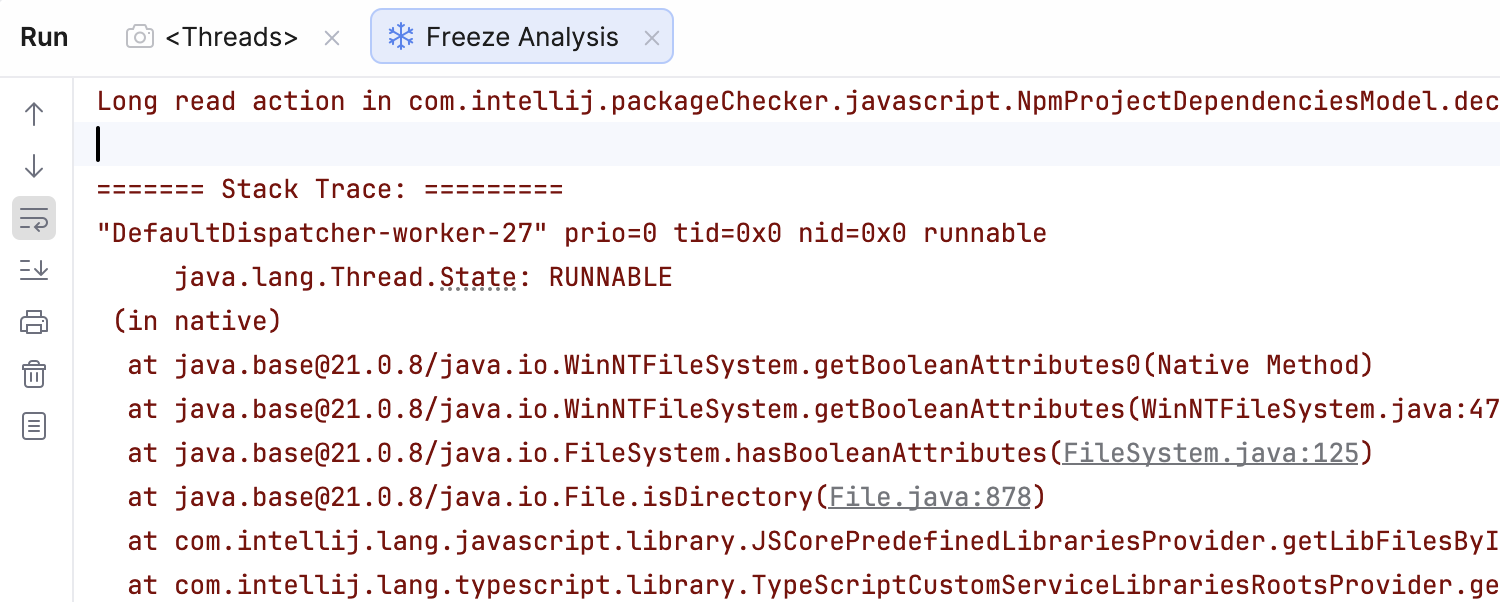
We strongly recommend reworking such code paths in plugins to fix UI freezes. Given the number of reports and the customer impact, this is not a theoretical issue but a problem actively affecting users. Such improvements will visibly improve the perceived performance of JetBrains IDEs.
Join us live on March 19 at 03:00 PM UTC for an in-depth session with me and Patrick Scheibe and learn how to eliminate UI freezes in your JetBrains IDE plugins. We will figure out how to build cancellable, freeze-safe plugin code that keeps IDEs fast and responsive—plus, stay until the end to get your questions answered in a live Q&A with the experts.