

JetBrains AI
Supercharge your tools with AI-powered features inside many JetBrains products
組織向けの高度な AI 管理と解析

今日はチーム全体の AI の使用状況とコストを管理、監視、および制御できる新機能を含め、組織向けの高度な AI 管理と解析を可能にする JetBrains Console をご紹介します。
AI は大多数の開発チームにとって実験的な存在ではなくなりました。今や基本ツールチェーンの一部となりつつあります。その使用率が高まるにつれて、使用状況を明確化することが求められています。リーダーは組織内で AI がどのように使用され、日常業務にどのように影響し、責任をもって管理する方法を把握しておく必要があります。
最初のステップとして、標準でガバナンスと可観測性を実現し、そのような明確化を行うための新機能が設計されました。さらなる透明化を進めるため、今後も AI ガバナンス機能の開発を継続したいと考えています。
チーム全体の AI ガバナンスの一元化
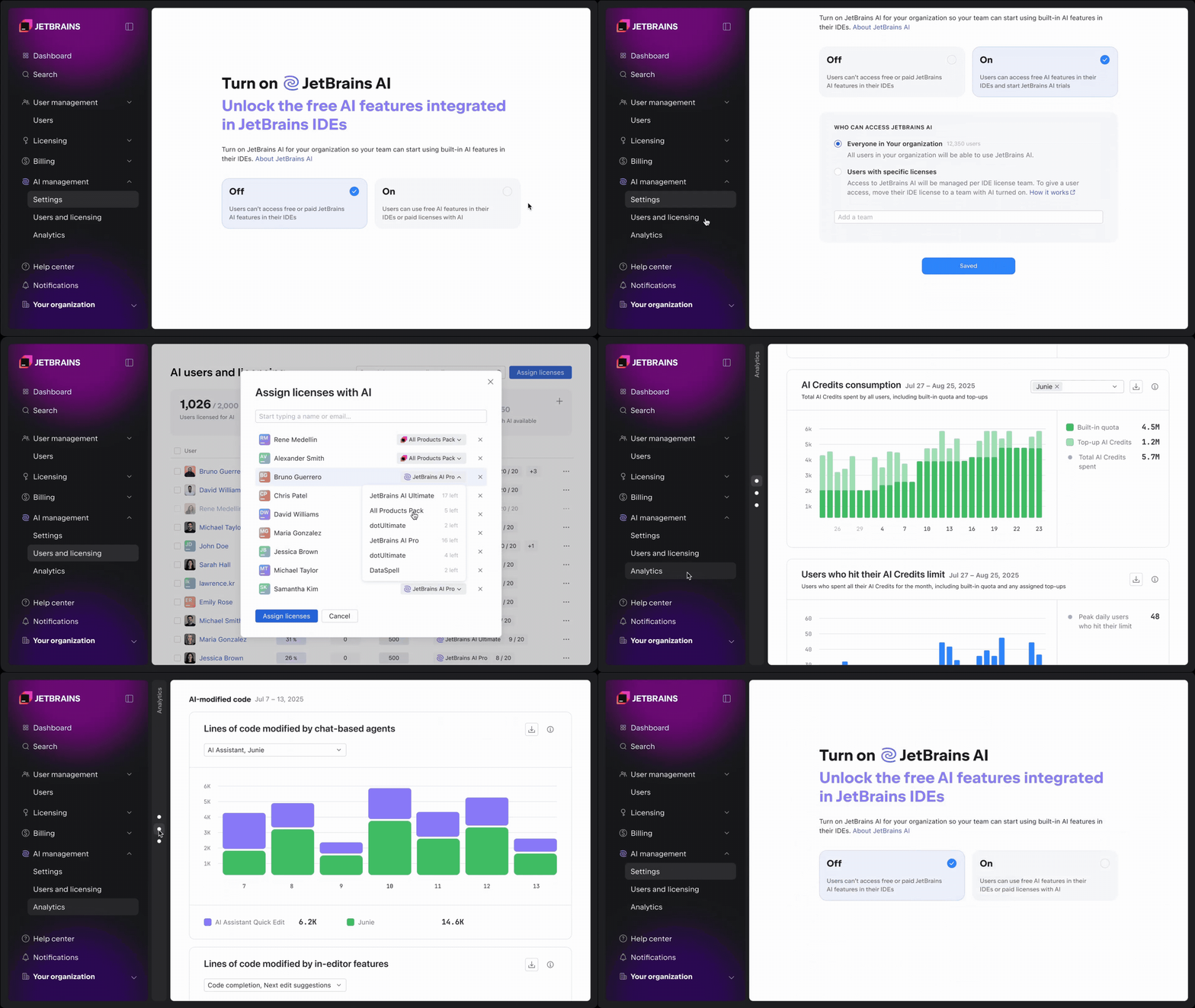
組織が JetBrains Console を使用して会社レベルまたはチームレベルで AI の使用状況とコストを管理できるようになりました。AI の設定セクションでは、以下を行えます。
- 組織またはチームレベルでの AI の有効化
- Junie、Claude Agent、OpenAI Codex などの AI ツールとエージェントへのアクセスの制御
- AI クレジットの共有プールの管理
- デフォルトおよびユーザー単位のクレジット上限の設定
- データ収集オプションの構成
AI 機能は有効化された後、開発者の JetBrains IDE 内で直接使用できるようになります。セットアップやワークフローの変更を別途行う必要はありません。この仕組みにより、AI を段階的に展開し、使用を野放しにすることを回避できます。
AI クレジットとライセンスの管理
AI の使用率が高まるにつれて、ライセンスと消費量を可視化することが重要になります。
AI management(AI の管理)セクションの Users and licensing(ユーザーとライセンス供与)タブでは、以下の項目をまとめて確認できます。
- 組織全体で使用可能なライセンスの数と割り当て状況
- ライセンスに含まれる AI クレジットの使用状況
- 残りのチャージクレジット
管理者は AI Pro、AI Ultimate、All Products Pack、dotUltimate などの AI クレジットが含まれるライセンスを個別のユーザーに割り当てることができます。アクセスは必要に応じて付与または制限可能で、変更は即座に適用されます。
比較的使用ニーズが高いチームや個人には、追加の AI クレジットの上限をユーザー単位で構成するか、一括で適用できます。そのため、組織のデフォルト値を残したまま AI を頻繁に使用するユーザーを支援できます。
AI の使用状況と導入状況に関する可観測性
チーム全体で AI の導入状況が一様になることはめったにありません。ワークフローに AI を深く組み込む開発者もいれば、時々使用する開発者やまったく使用しない開発者もいます。
コンソールでは組織全体での AI の使用状況が明確に可視化されるため、導入パターンを理解し、より適切な予算を組みやすくなります。
AI の導入状況と使用状況の経時変化を追跡する
Active AI users(有効 AI ユーザー)チャートには AI を積極的に使用している開発者の数が示されるため、チーム全体の導入トレンドと使用レベルをより簡単に把握することができます。これらのメトリクスの計算方法については、こちらをご覧ください。
AI クレジットの消費状況を監視する
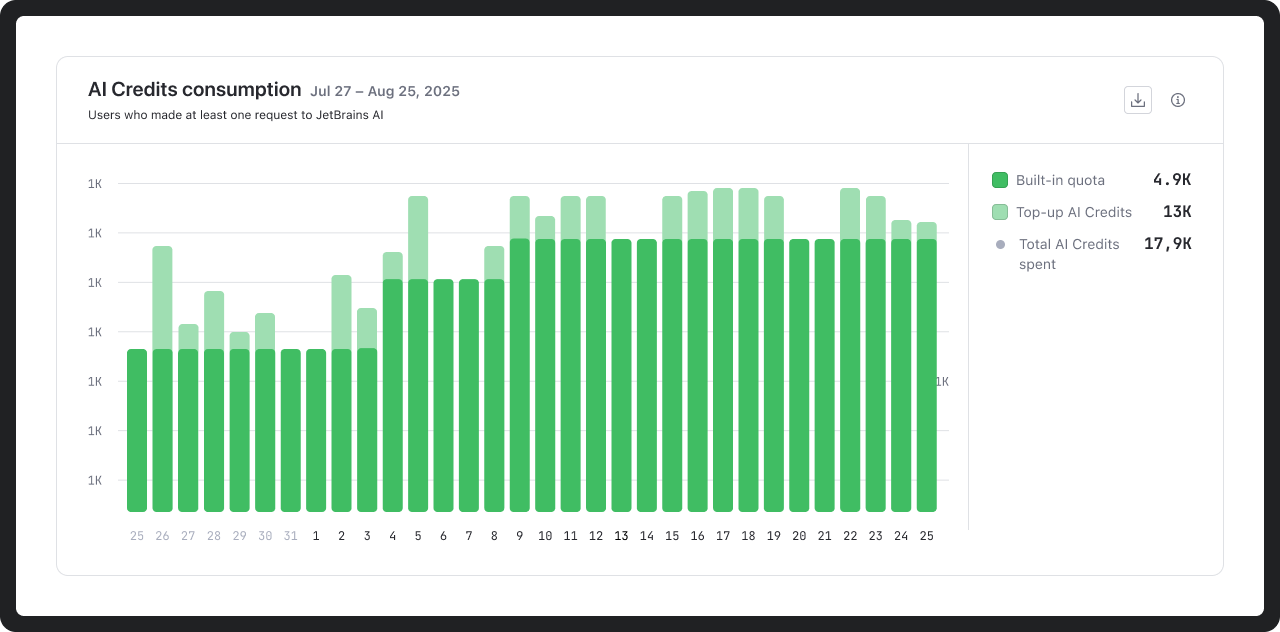
任意の期間の AI クレジットの使用状況を AI ライセンスに含まれるクレジットとチャージクレジットの両方について解析できます。このデータは、予算と使用上限を計画する際の情報として使用できます。
開発者が AI クレジットの上限に達している時期を特定する
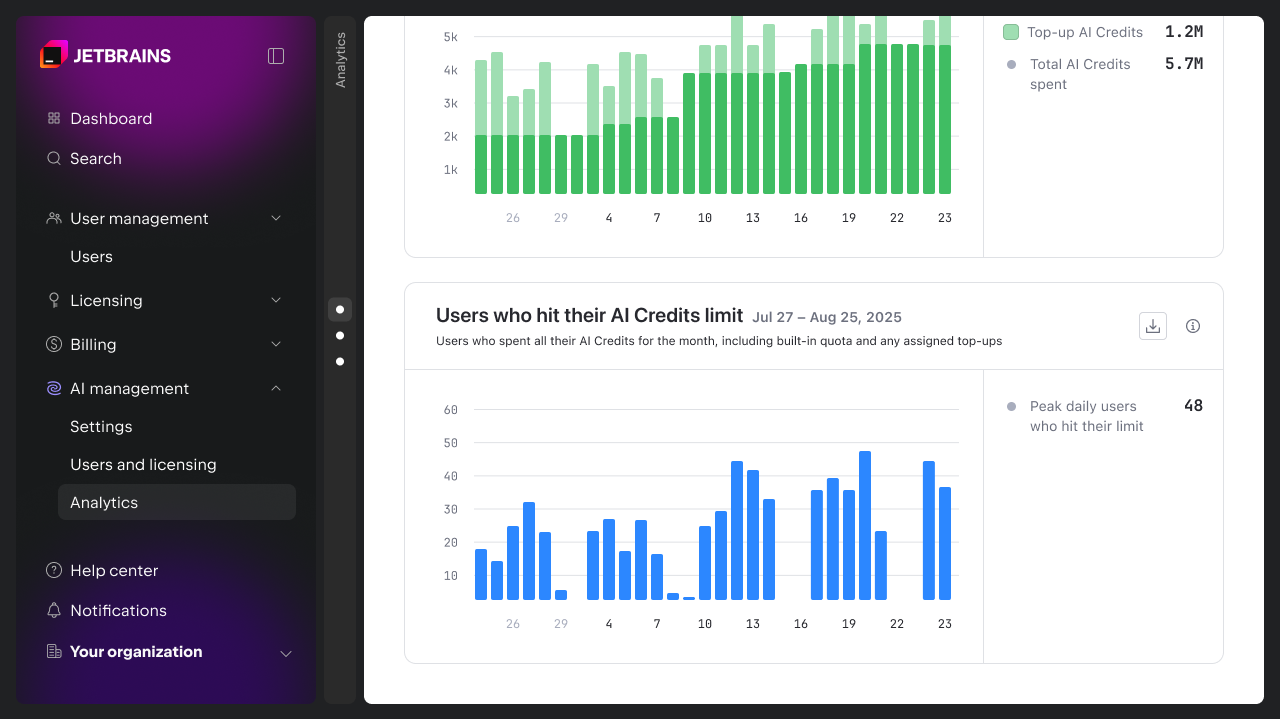
コンソールには、ユーザーが 1 か月の AI クレジット上限に達している頻度も示されます。これにより、チームレベルまたは個人レベルで使用が滞りやすい時期を特定し、必要に応じて上限を調整しやすくなります。
AI による開発作業への影響の把握
コンソールでは使用状況やコストだけでなく、開発者による AI の使用方法や受け入れ状況を早い段階で詳細に把握できます。AI activity and impact (AI のアクティビティと影響)チャートは、比較と情報に基づく意思決定の支援を目的としています。
今後のリリースでは、組織がエンジニアリングと業務の成果に対する AI の影響を評価できるようにするため、より高度なメトリクスや API アクセスを導入する予定です。
AI が生成したコードの受け入れ状況
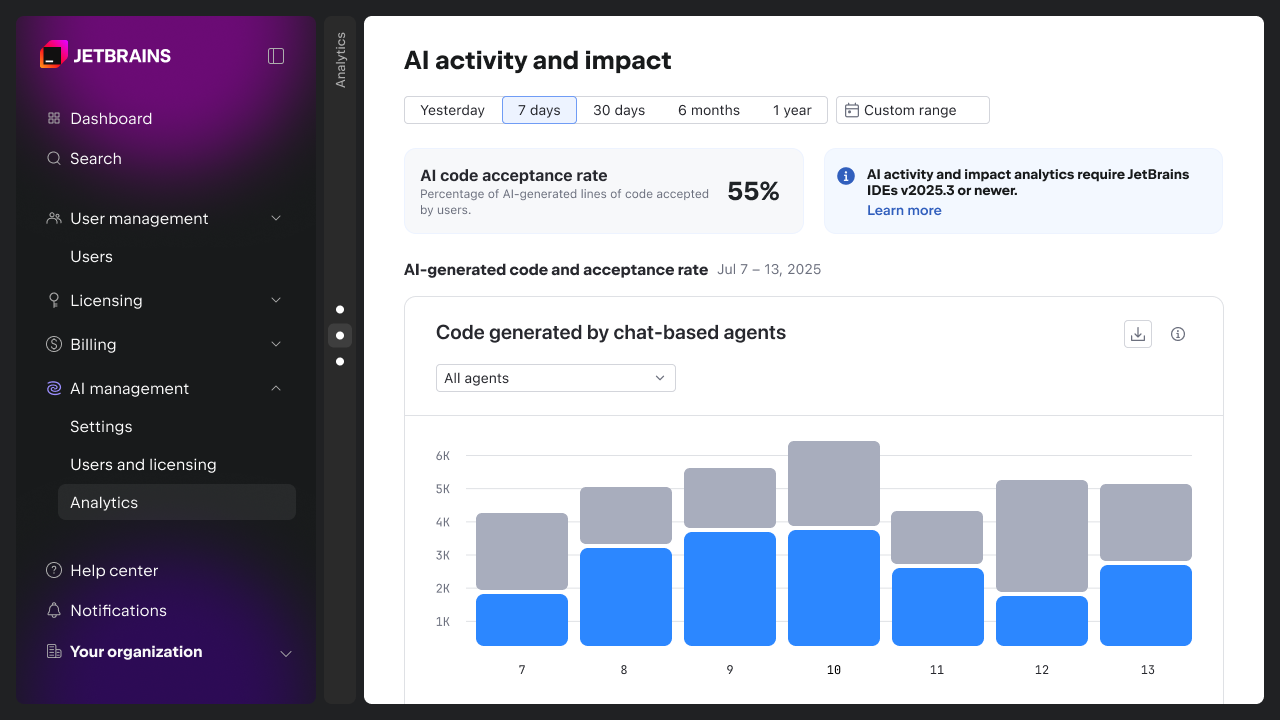
AI-generated code and acceptance rate(AI が生成したコードと受け入れ率)チャートには開発者による AI が生成したコードの受け入れ頻度が示され、それを品質と関連性の指標として使用できます。
このデータを使用することで、AI Assistant に統合したツールやエージェントを比較できます(今後、Junie、Claude Code、OpenAI Codex などもサポートされる予定です)。これは常に期待に沿わない提案を特定し、構成、イネーブルメント、またはツールの選択を再考する必要がある箇所を判断するのに役立ちます。
これらのメトリクスの計算方法については、こちらをご覧ください。
AI が変更したコード
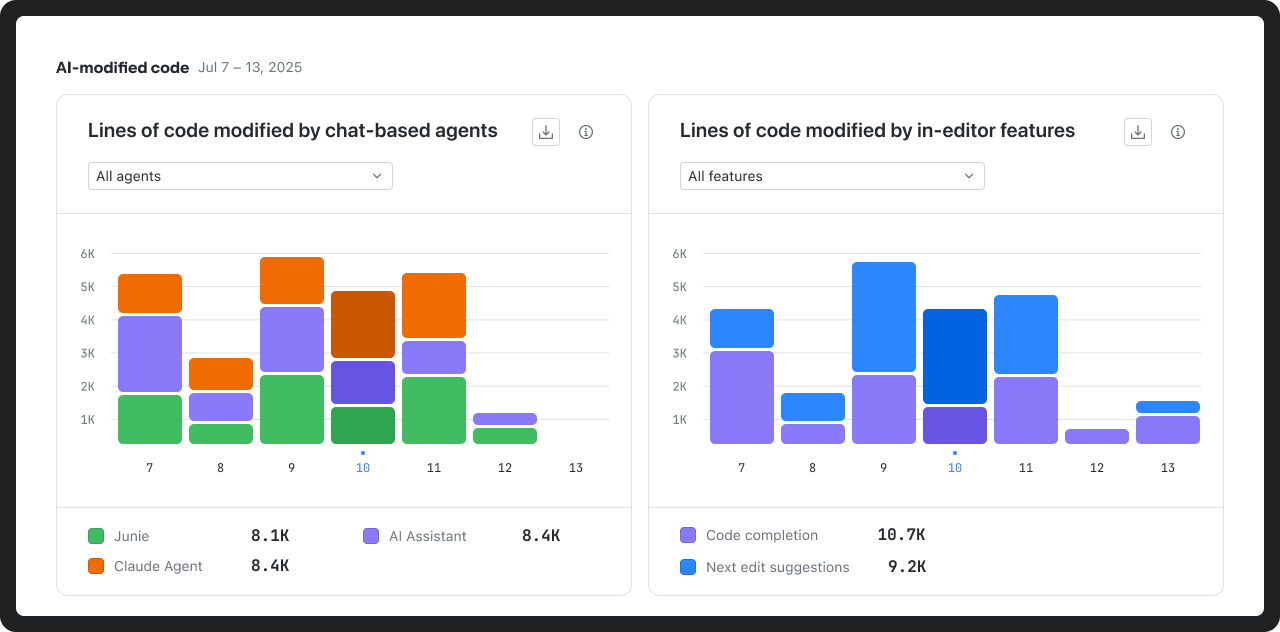
AI-modified code(AI が変更したコード)チャートには、コードベース内で使用されたさまざまな AI ツールや機能の相対的なフットプリントが明確に示されます。
これを確認することで、AI が開発に有意義な貢献を行った箇所を正確に把握できます。
AI 機能のアクティビティ
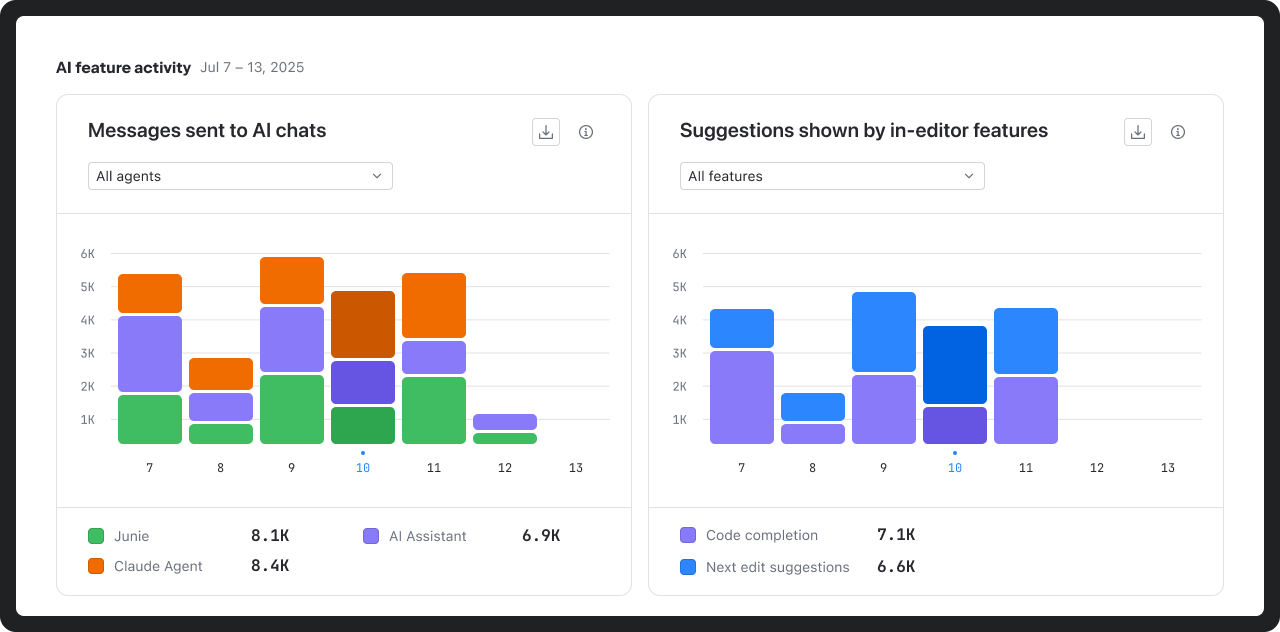
AI feature activity(AI 機能のアクティビティ)チャートには、IDE 内でのチャットの使用状況や提案の量などの開発者と AI との対話状況が示されます。
このような解析情報は実験と継続的な使用を区別し、有効化された機能と実際の開発者の行動とのずれを発見するのに役立ちます。
今すぐ始める
現在、AI 管理と解析は AI ライセンスをお持ちのすべての商用利用ユーザーを対象に JetBrains Console から追加料金なしで提供されています。アクセスはロールベースであるため、AI 設定の管理、使用状況データと導入状況データの参照、ライセンスの割り当てを行えるユーザーを定義することができます。
使用を開始するには、JetBrains Console の AI management(AI の管理)セクションを開いてください。詳細については、ドキュメントまたはビジネス向け AI のページをご覧ください。
現在、組織向けの AI 管理とガバナンスの機能をさらに強化しているところです。今後、以下のような機能をリリースする予定です。
- AI プロバイダー向けの一元化された BYOK(Bring Your Own Key)管理
- 組織の MCP 管理
- 一元化されたコードベースのインデックス作成(RAG)
- AI ガードレールと AI 監査
- さらに高度な使用状況解析ダッシュボードと API アクセス
今後の最新情報をご希望ですか? 下の欄から JetBrains AI ニュースレターの配信登録を行ってください。
オリジナル(英語)ブログ投稿記事の作者:

Subscribe to JetBrains AI Blog updates
Discover more





조직을 위한 향상된 AI 관리와 분석

오늘은 팀 전반에서 AI 사용과 비용을 관리, 관찰 및 제어할 수 있는 새로운 기능을 포함하여 조직을 위한 향상된 AI 관리 및 분석 기능을 제공하는 JetBrains Console을 소개합니다.
AI는 이제 대부분의 개발 팀에게 더 이상 실험 단계가 아니라 핵심 툴체인의 일부가 되어가고 있습니다. 사용이 증가함에 따라 명확성에 대한 필요성도 함께 커지고 있습니다. 회사의 리더는 AI가 어떻게 사용되고 있는지, 일상적인 업무에 어떤 영향을 미치는지, 그리고 조직 내에서 이를 어떻게 책임감 있게 관리할 수 있는지를 이해할 필요가 있습니다.
첫 단계로, 이러한 새로운 기능들은 처음부터 거버넌스와 가시성을 내포하여 이러한 명확성을 제공하도록 설계되었습니다. 앞으로 더 높은 수준의 투명성을 제공하도록 AI 거버넌스 기능을 계속 발전시켜 나갈 예정입니다.
팀 전반에 걸친 중앙 집중식 AI 거버넌스
이제 조직은 JetBrains Console을 사용하여 회사 또는 팀 수준에서 AI 사용과 비용을 관리할 수 있습니다. AI 설정 섹션에서 다음을 수행할 수 있습니다.
- 조직 또는 팀 수준에서 AI 활성화
- Junie, Claude Agent, OpenAI Codex와 같은 AI 도구 및 에이전트에 대한 접근 권한 제어
- AI 크레딧 공유 풀 관리
- 기본 크레딧 한도와 사용자별 크레딧 한도 설정
- 데이터 수집 옵션 구성
활성화된 AI 기능은 추가적인 설정이나 워크플로 변경 없이 개발자의 JetBrains IDE 내에서 바로 사용할 수 있습니다. 이를 통해 AI를 단계적으로 도입하고 관리되지 않는 사용을 방지할 수 있습니다.
AI 크레딧 및 라이선스 관리
AI 사용이 증가함에 따라 라이선스와 사용량에 대한 가시성이 중요해집니다.
AI management(AI 관리) 섹션의 Users and licensing(사용자 및 라이선스) 탭에서는 다음 항목을 하나의 화면에서 확인할 수 있습니다.
- 조직 전반의 라이선스 사용 가능 여부와 할당 현황
- 포함된 AI 크레딧 사용량
- 남아 있는 충전 크레딧
관리자는 AI Pro, AI Ultimate, All Products Pack, dotUltimate과 같이 AI 크레딧이 포함된 라이선스를 개별 사용자에게 할당할 수 있습니다. 필요에 따라 액세스 권한을 부여하거나 제한할 수 있으며 변경 사항은 즉시 적용됩니다.
사용량이 많은 팀이나 개인의 경우, 사용자별로 추가 AI 크레딧 한도를 설정하거나 일괄 적용할 수 있습니다. 이를 통해 조직은 회사의 기본 한도를 유지하면서도 AI 사용량이 많은 사용자를 지원할 수 있습니다.
AI 사용과 도입에 대한 가시성
AI 도입은 팀마다 양상이 다른 경우가 많습니다. 일부 개발자는 이를 워크플로에 깊이 통합하는 반면 다른 개발자는 가끔 사용하거나 전혀 사용하지 않기도 합니다.
콘솔은 조직 전반에서 AI가 어떻게 사용되고 있는지에 대한 명확한 가시성을 제공하여 도입 패턴을 이해하고 예산을 더 효과적으로 계획할 수 있게 도와줍니다.
시간 경과에 따른 AI 도입 및 활용도 추적
Active AI users(활성 AI 사용자) 차트에는 AI를 적극적으로 사용하는 개발자의 수가 표시되어 팀 전반의 도입 추세와 활용 수준을 더 쉽게 이해할 수 있습니다. 이러한 메트릭을 계산하는 방법에 대한 자세한 내용은 여기에서 확인할 수 있습니다.
AI 크레딧 사용량 모니터링
AI 크레딧 사용량은 AI 라이선스에 포함된 크레딧과 충전 크레딧 모두에 대해 원하는 기간에 걸쳐 분석할 수 있습니다. 이 데이터를 근거로 더 계획적으로 예산과 사용 한도를 결정할 수 있습니다.
개발자가 AI 크레딧 한도에 도달하는 시점 파악
콘솔에서는 사용자가 월별 AI 크레딧 한도에 얼마나 자주 도달하는지도 확인할 수 있습니다. 이를 통해 불편이 발생하는 지점을 더 쉽게 파악하고, 필요에 따라 팀 또는 개인 단위에서 한도를 조정할 수 있습니다.
AI가 개발 작업에 미치는 영향 이해
단순한 사용량과 비용을 넘어, 콘솔은 AI가 개발자들에게 어떻게 사용되고 받아들여지는지에 대한 초기 인사이트를 제공합니다. AI activity and impact(AI 활동 및 영향) 차트는 비교와 근거 있는 의사결정을 지원하기 위한 용도로 제공됩니다.
향후 릴리스에서는 조직이 엔지니어링 및 비즈니스 성과에 미치는 AI의 영향을 평가할 수 있도록 고급 메트릭과 API 액세스 기능을 도입할 예정입니다.
AI 생성 코드의 수용도
AI-generated code and acceptance rate(AI 생성 코드 및 수용도) 차트는 AI가 생성한 코드를 개발자가 얼마나 자주 수용하는지를 보여주며, 품질과 관련성의 지표로 활용됩니다.
AI Assistant에 통합한 도구 또는 에이전트(Junie, Claude Code, OpenAI Codex 및 향후 지원될 기타 도구)를 비교하는 데 이 데이터를 사용할 수 있습니다. 이를 통해 제안이 지속적으로 기대에 미치지 못하는 지점을 파악하고 구성, 도입 방식 또는 도구 선택을 어디에서 다시 검토해야 하는지 판단할 수 있습니다.
이러한 메트릭을 계산하는 방법에 대한 자세한 내용은 여기에서 확인할 수 있습니다.
AI로 수정된 코드
AI-modified code(AI로 수정된 코드) 차트는 코드베이스 내에서 다양한 AI 도구와 기능이 차지하는 상대적 비중을 보여줍니다.
이를 통해 팀은 AI가 개발 과정에서 실제로 의미 있는 기여하는 지점을 더 명확하게 이해할 수 있습니다.
AI 기능 활동
AI feature activity(AI 기능 활동) 차트는 채팅 사용량과 제안 생성량을 포함하여 개발자가 IDE 내에서 AI와 어떻게 상호작용하는지를 보여줍니다.
이러한 인사이트는 실험적 사용과 지속적인 사용을 구분하고, 활성화된 기능과 실제 개발자 사용 방식 간의 불일치를 파악하는 데 도움을 줍니다.
시작하기
AI 관리 및 분석 기능은 이제 AI 라이선스를 보유한 모든 상업용 고객에게 추가 비용 없이 JetBrains Console을 통해 제공됩니다. 액세스는 역할 기반으로 제공되므로 조직은 AI 설정을 관리하고, 사용량 및 도입 데이터를 확인하며, 라이선스를 할당할 수 있는 사용자를 정의할 수 있습니다.
시작하려면 JetBrains Console에서 AI management(AI 관리) 섹션을 여세요. 자세한 내용은 문서를 참조하거나 비즈니스를 위한 AI 페이지를 방문하시기 바랍니다.
조직을 위한 AI 관리 및 거버넌스 기능을 더욱 강화하기 위해 계속해서 개선 노력을 기울이고 있습니다. 다음과 같은 기능이 도입될 예정입니다.
- AI 공급자를 위한 중앙 집중식 Bring Your Own Key(BYOK) 관리
- 조직을 위한 MCP 관리
- 중앙 집중식 코드베이스 색인 생성(RAG).
- AI 가드레일 및 AI 감사
- 고급 사용 분석 대시보드 및 API 액세스
업데이트 소식을 계속 받아보고 싶으신가요? 아래에서 JetBrains AI 블로그를 구독하세요.
게시물 원문 작성자
Subscribe to JetBrains AI Blog updates
Discover more
Enhanced AI Management and Analytics for Organizations
Today, we’re introducing the JetBrains Console, which provides enhanced AI management and analytics for organizations, including new capabilities to manage, observe, and control AI usage and costs across teams.
AI is no longer an experiment for most development teams. It’s becoming part of the core toolchain. As usage increases, so does the need for clarity. Leaders need to understand how AI is used, how it affects day-to-day work, and how to manage it responsibly in an organization.
As a first step, these new capabilities are designed to provide that clarity, with governance and observability built in from the start. We will continue to further develop AI governance functionalities to provide even greater transparency.
Centralized AI governance across teams
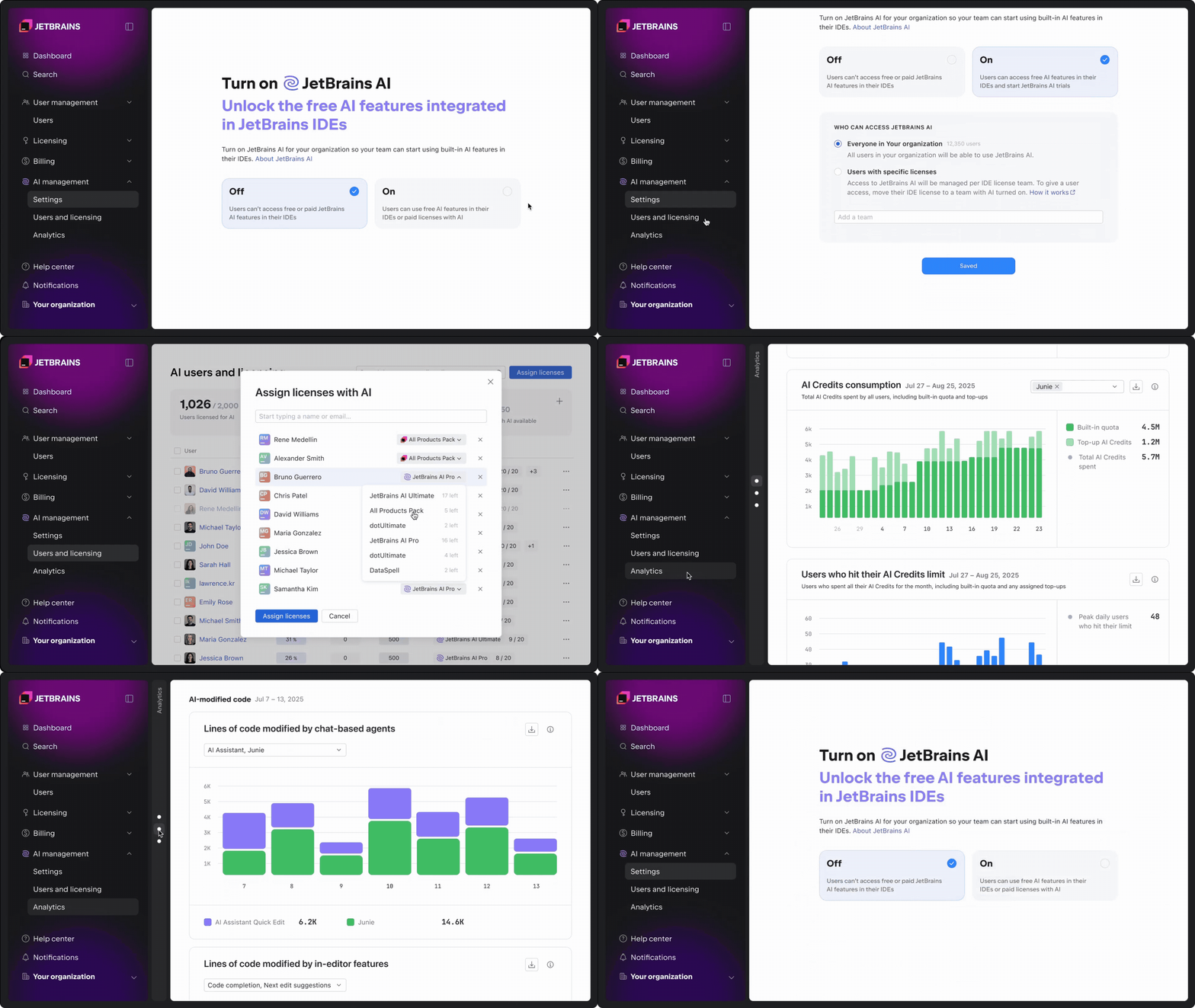
Organizations can now use the JetBrains Console to manage AI usage and costs at the company or team level. In the AI settings section, you can:
- Enable AI on the organization or team level.
- Control access to AI tools and agents, including Junie, Claude Agent, and OpenAI Codex.
- Manage a shared pool of AI Credits.
- Set default and per-user credit limits.
- Configure data collection options.
Once enabled, AI capabilities are available directly inside developers’ JetBrains IDEs, with no additional setup or workflow changes required. This makes it possible to roll out AI incrementally and avoid ungoverned usage.
Managing AI Credits and licenses
As AI usage grows, visibility into licenses and consumption becomes critical.
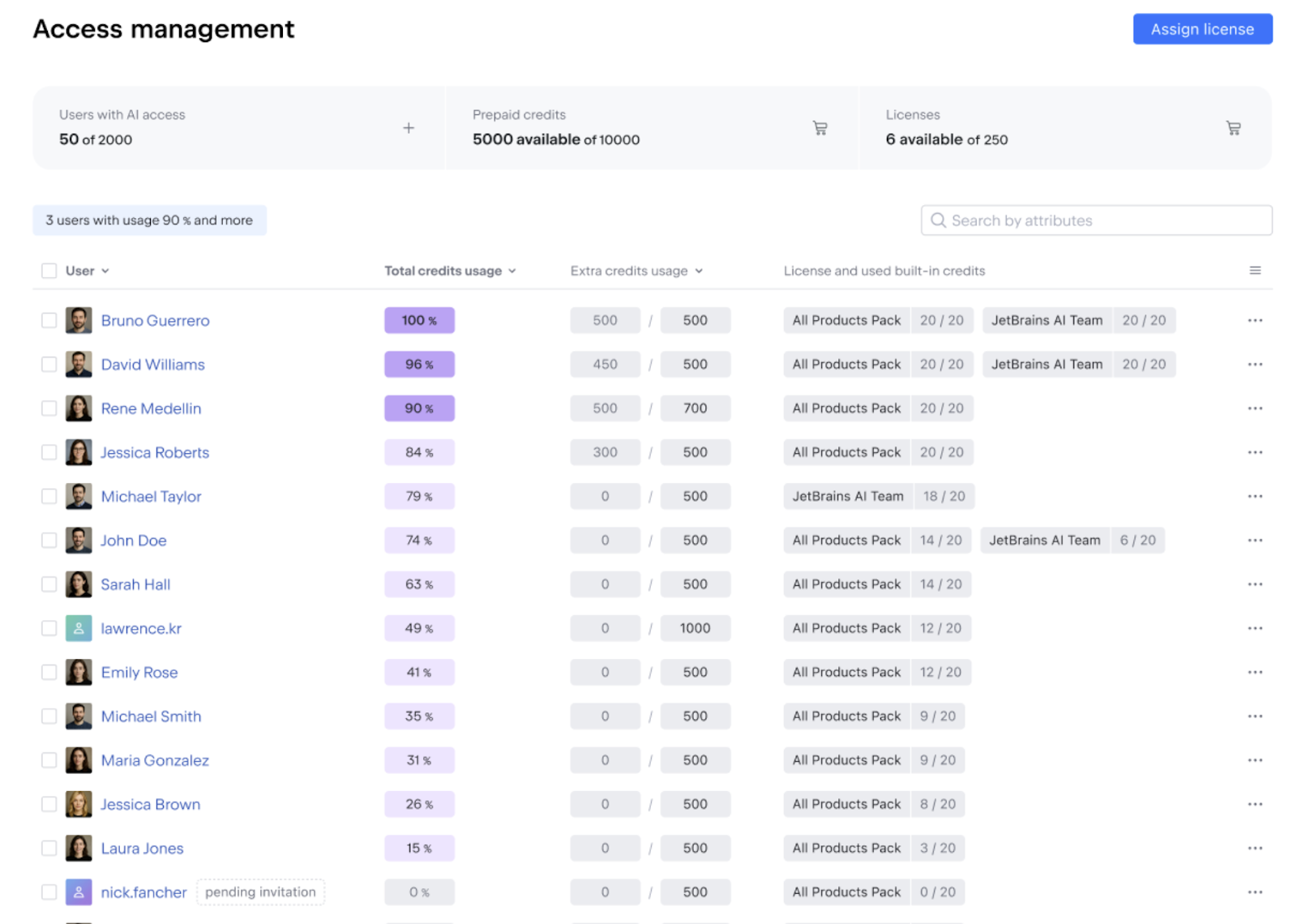
The Users and licensing tab in the AI management section provides a single view of:
- License availability and assignment throughout the organization.
- Included AI Credit usage.
- Remaining top-up credits.
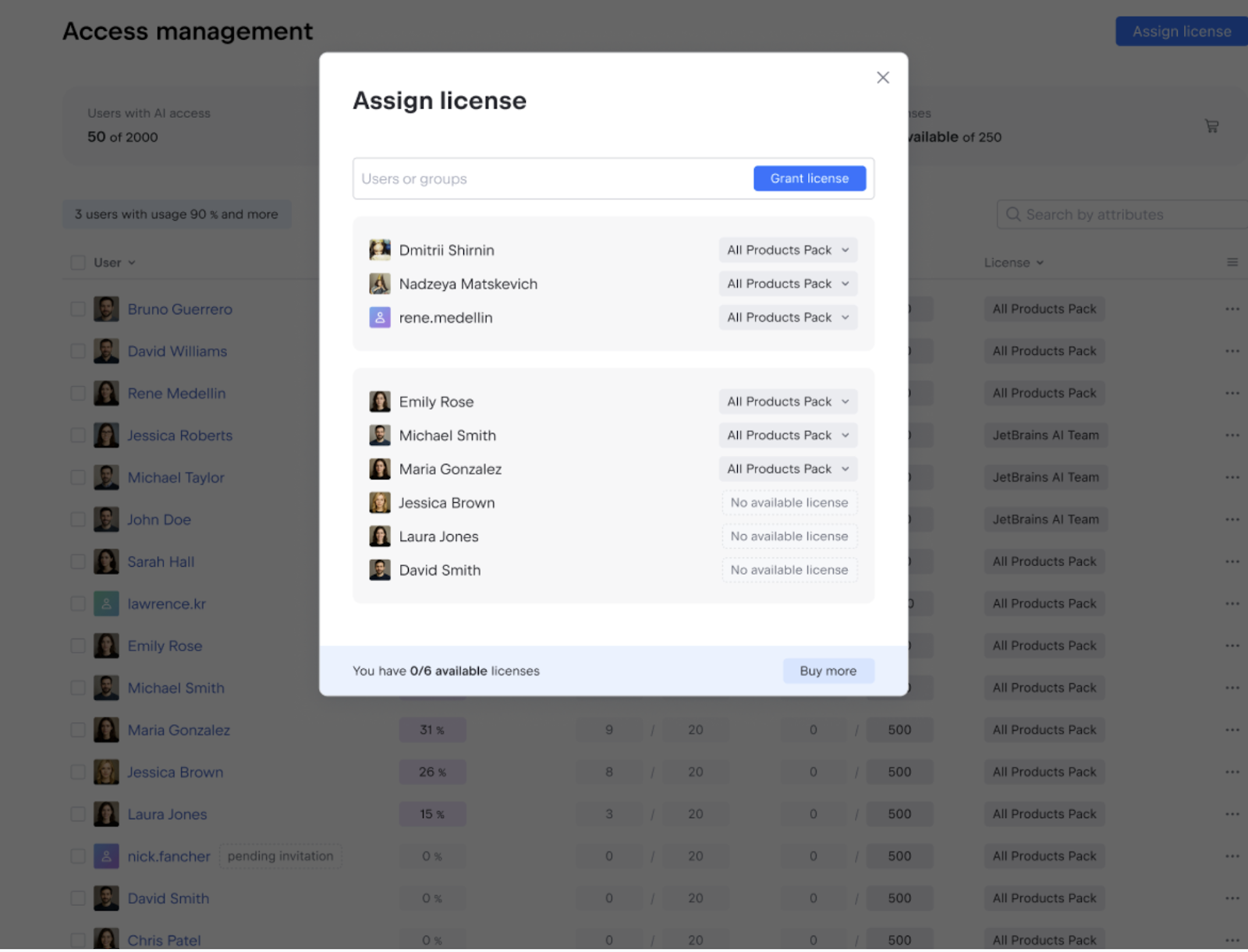
Admins can assign licenses that include AI Credits, such as AI Pro, AI Ultimate, All Products Pack, and dotUltimate, to individual users. Access can be granted or restricted as needed, with changes taking effect immediately.
For teams or individuals with higher usage needs, additional AI Credit limits can be configured per user or applied in bulk. This allows organizations to support power AI users without removing default values in the company.
Observability into AI usage and adoption
AI adoption rarely looks the same across teams. Some developers integrate it deeply into their workflow, while others use it occasionally or not at all.
The console provides clear visibility into how AI is used throughout the organization, helping you understand adoption patterns and plan budgets better.
Track AI adoption and engagement over time
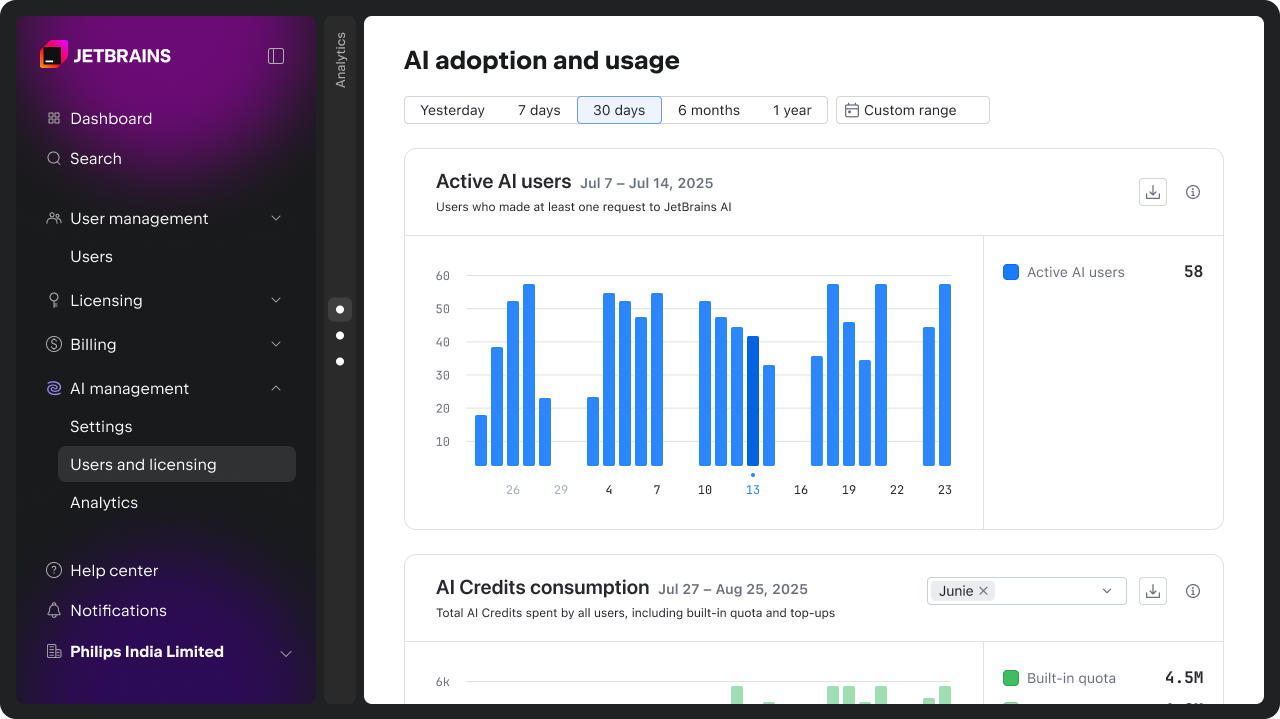
The Active AI users chart shows how many developers actively use AI, making it easier to understand adoption trends and engagement levels across teams. You can find more details on how we calculate these metrics here.
Monitor AI Credit consumption
AI Credit usage can be analyzed over any time period, both for credits included in your AI license and top-up credits. This data supports more informed planning around budgets and usage limits.
Spot when developers reach their AI Credit limits
The console also shows how frequently users reach their monthly AI Credit limits. This makes it easier to identify friction points and adjust limits where needed, whether at the team or individual level.
Understanding how AI influences development work
Beyond usage and cost, the console provides early insights into how AI is used and received by developers. The AI activity and impact charts are intended to support comparison and informed decisions.
In upcoming releases, we will introduce more advanced metrics and API access to help organizations assess the impact of AI on engineering and business outcomes.
Acceptance of AI-generated code
The AI-generated code and acceptance rate charts show how often AI-generated code is accepted by developers and act as indicators of quality and relevance.
You can use this data to compare the tools or agents you have integrated into AI Assistant (Junie, Claude Code, OpenAI Codex, and others that will be supported in the future). This helps you identify where suggestions consistently fall short of expectations and decide where configuration, enablement, or tool choice should be revisited.
You can find more details on how we calculate these metrics here.
AI-modified code
The AI-modified code charts highlight the relative footprint of different AI tools and features within the codebase.
This helps teams understand exactly where AI is making meaningful contributions to development.
AI feature activity
The AI feature activity chart shows how developers interact with AI inside the IDE, including chat usage and suggestion volume.
These insights help distinguish experimentation from sustained use and identify mismatches between enabled capabilities and actual developer behavior.
Get started
AI management and analytics are now available at no additional cost to all commercial customers with AI licenses via the JetBrains Console. Access is role-based, allowing organizations to define who can manage AI settings, view usage and adoption data, and assign licenses.
To get started, open the AI management section in the JetBrains Console. For more details, refer to the documentation or visit the AI for Business page.
We’re working to further enhance AI management and governance capabilities for organizations. Upcoming features include:
- Centralized Bring Your Own Key (BYOK) management for AI providers.
- MCP management for your organization.
- Centralized codebase indexing (RAG).
- AI guardrails and AI audit.
- More advanced usage analytics dashboards and API access.
Want to stay updated on what’s next? Subscribe to the JetBrains AI newsletter below.