JetBrains AI
Supercharge your tools with AI-powered features inside many JetBrains products
Building AI Agents in Kotlin – Part 5: Teaching Agents to Forget

Previously in this series:
- Building AI Agents in Kotlin – Part 1: A Minimal Coding Agent
- Building AI Agents in Kotlin – Part 2: A Deeper Dive Into Tools
- Building AI Agents in Kotlin – Part 3: Under Observation
- Building AI Agents in Kotlin – Part 4: Delegation and Sub-Agent
Agents eventually run out of context. When they do, they crash, and you lose everything mid-task.
We’ve been running GPT-5 Codex since Part 1. It scores 0.58 on SWE-bench Verified. We tried Claude Sonnet 4.5 next, which scored 0.6 and ran faster on most tasks. But complex problems hit Claude’s 200K context window faster.
You’ll probably find yourself switching models too, for better performance, lower cost, or to run locally. Sometimes that means smaller context windows, especially for local models limited by expensive memory. But even the biggest context windows fail on complex and long tasks. You can’t just keep buying more context.
The problem is that agents hold onto everything: every file, every command output, every search result, every user message. Eventually, there’s no room left.
That’s where compression comes in. But not the lazy kind that just drops old messages when you run out of space. Think about handing off a task to another developer. You don’t give them a transcript of everything you did. You tell them the goal, what files you changed, what worked, and what didn’t. That’s smart compression: Keep the context needed to continue; drop the verbose history.
Let’s figure out how to implement this in Koog. First, we need to understand what strategy = singleRunStrategy() has been doing since Part 1. This is where you see how strategies control your agent’s loop and how you can modify them to create your own flow. We’ll examine singleRunStrategy(), and then build a version that compresses automatically.
What that strategy line does
In the previous parts, you built a coding agent. You gave it tools, along with this line:
strategy = singleRunStrategy()
Here, a strategy is the code that runs your agent loop. All strategies share the same core elements: call the LLM, execute tools, send results back, repeat. But they differ in when they stop and what they do between iterations.
singleRunStrategy() is the simplest possible version. It keeps iterating as long as the LLM returns tool calls. In other words: call the LLM → return tool call? → execute → call again → return text? → done.
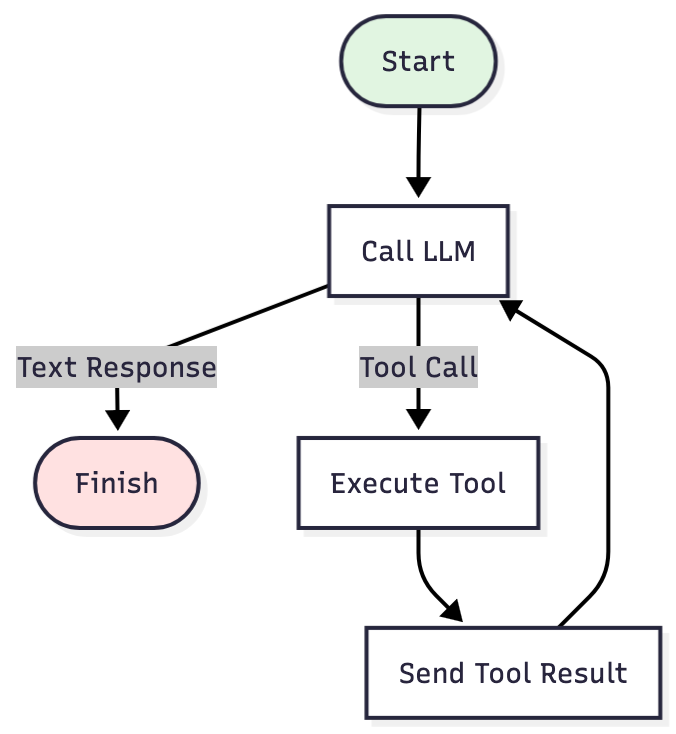
It works fine for simple tasks. But on complex problems, the history keeps growing. Every command output, every file read, every search result stays in context. Eventually you hit the limit and crash mid-task.
What we need instead is a strategy that runs the same loop but also checks the history size and compresses it when it grows too large.
Adding compression
We’re swapping this:
strategy = singleRunStrategy()
For this:
strategy = singleRunStrategyWithHistoryCompression()
The loop is the same, but there’s now a checkpoint between Execute Tool and Send Tool Result. After each tool execution, the strategy asks:
- Check: Is the history greater than the threshold?
- If yes? Compress it: Extract the important facts. Drop the rest.
- If no? Continue as usual.
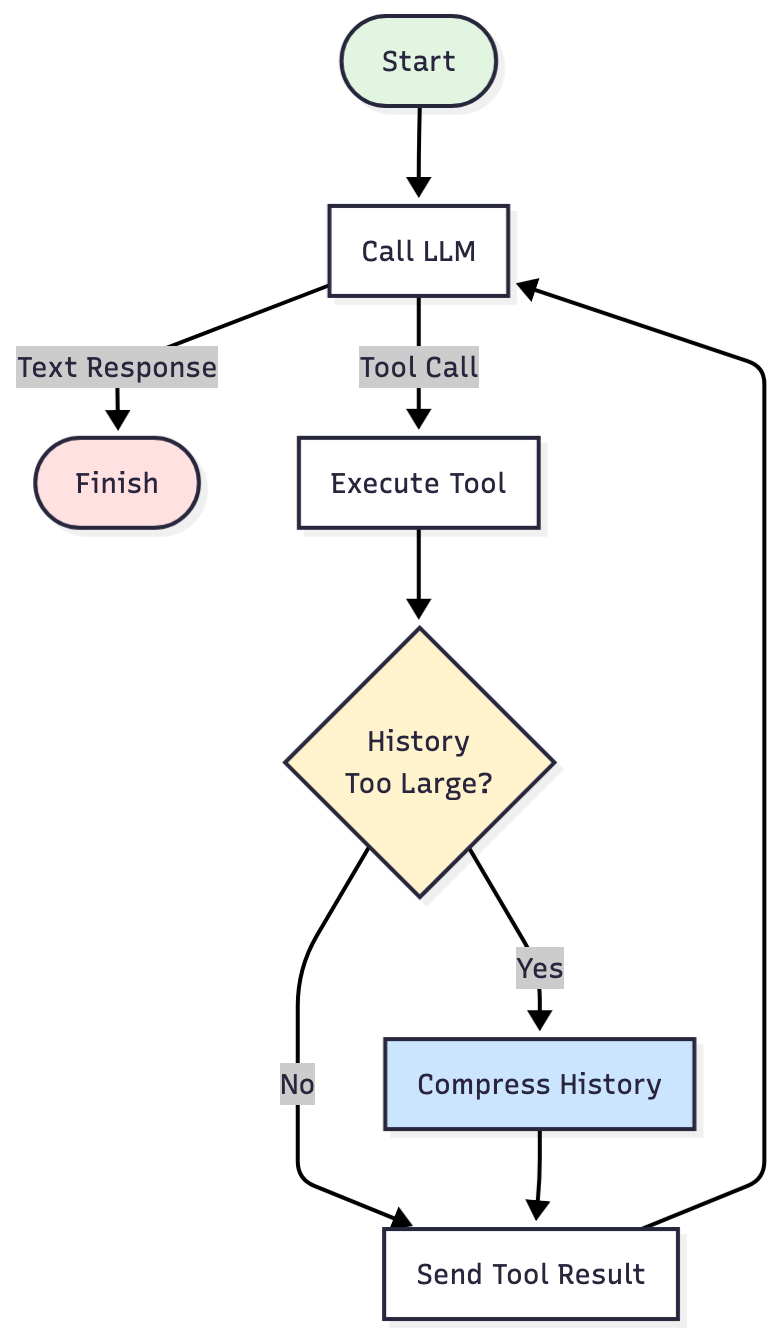
That checkpoint is what lets your agent complete long-running tasks within tighter token budgets to avoid the error “context window exceeded”.
But you have to configure it. The strategy can’t guess when the history is too big or what facts matter for your task. You have to tell it two things: when to compress, and what to keep.
When to compress
First, you set thresholds – how many messages or characters you allow before compression kicks in:
val CODE_AGENT_HISTORY_TOO_BIG = { prompt ->
   prompt.messages.size > 200 || prompt.messages.sumOf { it.content.length } > 200_000}
Why these numbers? We experimented with different thresholds after seeing where errors appeared.

This agent hit 220K tokens and crashed. Claude’s limit is 200K tokens. We needed to compress before reaching that point.
We set compression at 200 messages or 200,000 characters, whichever comes first. Note that the code measures characters, not tokens. They’re different, but this threshold keeps us under the token limit – high enough to avoid over-compression, low enough to prevent hitting the limit.
These numbers aren’t fixed. If your agent hits the limit earlier, lower the threshold. Still completing tasks past these thresholds? Raise them. The choice depends on your use case: file sizes, message length, how verbose your tool outputs are, task complexity. Experiment and find what works.
What to keep
You’ve set when compression triggers. Now choose what to keep.
There are two options: Either trust the LLM to decide what’s important, or tell it exactly what to extract.
Option 1: Trust the LLM to summarize
The LLM decides what’s important using WholeHistory:
compressionStrategy = WholeHistory
When compression triggers, Koog asks the LLM to create a TL;DR summary of the entire conversation history.
Before compression:
- All messages up to the threshold: system prompt, user messages, assistant responses, tool calls, tool results.
After compression:
- System prompt (preserved).
- First user message (preserved, so the agent remembers the original goal).
- One TL;DR summary message (written by the LLM).
The tradeoff: This approach is simple and fast, but you’re trusting the LLM to decide what matters. Sometimes it keeps exactly the right details. Sometimes it drops something critical.
Option 2: Tell the LLM exactly what to extract
Instead of telling the model to summarize everything, you specify exactly what facts to extract using RetrieveFactsFromHistory:
compressionStrategy = RetrieveFactsFromHistory(
   Concept(...),
   Concept(...),
   ...
)
How it works:
You define Concept objects: specific questions about your task that the agent must remember. When compression triggers, Koog makes one LLM call per concept, sending the full conversation history each time and asking just that single question.
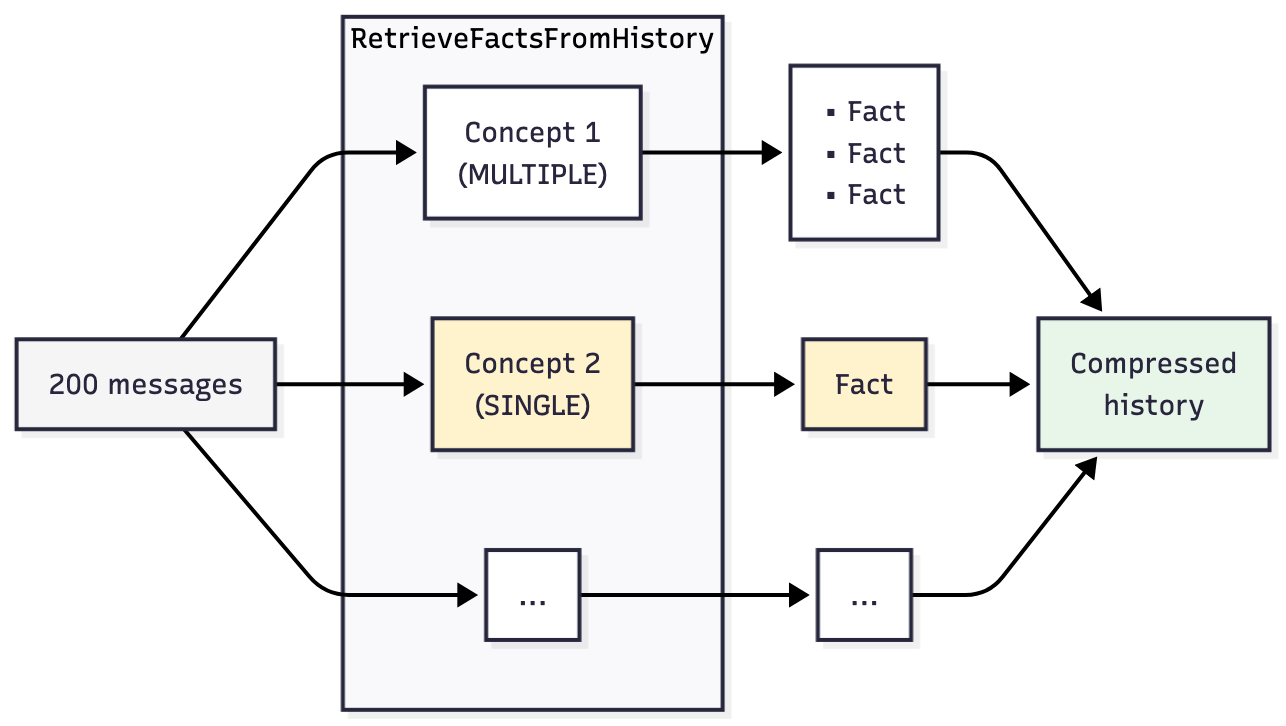
Why separate calls? LLMs get worse at answering when you ask multiple questions at once. We saw this in testing: Bundle eight concepts into one prompt, and some answers come back vague or incomplete. Ask them one at a time, and each response is more reliable.
Defining a concept
Each Concept instance has three parts:
keyword: a label for logsdescription: the actual question or instruction the LLM should answerfactType: the expected format of the answerMULTIPLEfor listsSINGLEfor single value
Concept(
    keyword = "project-structure",
    description = "What is the project structure?",
    factType = FactType.MULTIPLE
)
Choosing the right concepts
For our coding agent, the key question is: What information, if lost, would force the agent to start over?
Here’s what happens when compression drops critical information:
- The agent opens the same file twice as though it’s never seen it before.
- It rewrites tests that already exist.
- It drifts away from the task you originally gave it.
Each failure shows what must survive compression:
- Re-exploring files → You need a
project-structureconcept. - Redoing finished work → You need an
important-achievementsconcept. - Losing direction → You need an
agent-goalconcept.
Our coding agent concepts
When we tested on SWE-bench-Verified, we ended up with eight concepts. Here are three of them:
val CODE_AGENT_COMPRESSION_STRATEGY = RetrieveFactsFromHistory(
    Concept(
        "project-structure",
        "What is the structure of this project?",
        FactType.MULTIPLE
    ),
    Concept(
        "important-achievements",
        "What has been achieved during the execution of this current agent?",
        FactType.MULTIPLE
    ),
    Concept(
        "agent-goal",
        "What is the primary goal or task the agent is trying to accomplish in this session?",
        FactType.SINGLE
    ),
    ...
Your agent may need different concepts. The goal isn’t to copy the list; it’s to identify what state your agent needs to continue working and define concepts that preserve that information.
You can check out the full implementation of the eight concepts on GitHub.
Which model to use
Just like with sub-agents (Part 4), you can use different models for different parts of the process. The retrievalModel parameters lets you specify which LLM handles the history compression. This parameter is optional – if not specified, compression uses your agent’s main model.
retrievalModel = OpenAIModels.Chat.GPT4_1Mini
Here’s the complete configuration for the coding-agent strategy:
strategy = singleRunStrategyWithHistoryCompression(
   config = HistoryCompressionConfig(
       isHistoryTooBig = CODE_AGENT_HISTORY_TOO_BIG,
       compressionStrategy = CODE_AGENT_COMPRESSION_STRATEGY,
       retrievalModel = OpenAIModels.Chat.GPT4_1Mini
   )
)
Three parameters: when to compress (isHistoryTooBig), what to keep (compressionStrategy), and which model does the work (retrievalModel).
Conclusion
At this point, your agent can run longer tasks without hitting context limits. The compression problem is solved. Instead of crashing when it runs out of space, the agent compresses its history, keeping decisions and outcomes while dropping verbose outputs, and continues working within whatever token budget you have.
In this series, we started with a basic coding agent in Part 1. Since then, we’ve added tools, observability, sub-agents, and history compression. These five pieces give you what you need to build working AI agents in Kotlin that can operate within the constraints of real models.
If you want to keep building and practicing these patterns, planning and reasoning are interesting areas to explore: how agents decide what to do across multiple turns and how they break down complex problems. We didn’t cover those here, but they’re good practice once you’ve got these pieces working.
The full code’s on GitHub. If you run into any issues, leave a comment. We’re happy to help ?