This tutorial was written by an external contributor.
Vivek Kumar Maskara
Vivek Kumar Maskara is an Associate Software Engineer at JP Morgan. He loves writing code, developing apps, creating websites, and writing technical blogs about his experiences. His profile and contact information can be found at maskaravivek.com.
Over a decade ago, Netflix became one of the early adopters of microservice architecture, showcasing its potential at a large scale. Since then, many companies have jumped on the microservices bandwagon, building their backends this way from day one. While microservices offer isolation and independent scaling, their distributed nature requires managing multiple deployments, monitoring interservice communication, and handling network failures across service boundaries.
As teams have gained real-world experience with this complexity, there’s been a shift back toward monoliths, but not the tightly coupled monoliths of the past. Instead, developers are embracing modular monoliths: an architectural pattern where single deployable applications are organized into well-defined modules based on logical boundaries or business domains. Think of an e-commerce platform where users, products, and orders live in separate modules that interact through clear contracts, such as APIs for synchronous calls and events for async communication. This separation lets teams work in parallel for faster development and better maintainability, while single-unit deployment keeps releases simple and avoids microservice operational complexity.
In this guide, we explore how modular monoliths differ from traditional monoliths, why they’re gaining traction, and how to build them using Spring Modulith and Kotlin.
The Need for Modular Monoliths
The growing modular monolith countertrend makes more sense when viewed against the shortcomings of traditional approaches.
Traditional Monoliths
Traditional monoliths bundle the entire backend into a single codebase with tight coupling between user interfaces, business logic, and data access patterns. In an e-commerce platform, for example, the product catalog, checkout, payments, and order history services are in a single codebase and are deployed together. A monolith uses function calls for internal communication, and often, the call patterns and interdependencies become messy or difficult to maintain.
Microservices
Microservices emerged to solve these maintainability challenges by splitting backends into loosely coupled services, each handling a specific domain. A cab-hailing platform may separate users, drivers, ride matching, payments, and notifications into independent services. However, this introduces distributed system challenges, including complex service discovery, coordinating deployments across dependent services, and debugging interservice communication issues. Without proper expertise, tooling, and observability, this can slow down development.
Benefits of Modular Monoliths
Modular monoliths strike a balance by keeping everything in a single codebase and deploying it as one artifact, while structuring the application into logical modules with well-defined interfaces. This addresses the challenges of distributed systems while maintaining the structural benefits of well-defined interfaces and independent development workflows. Some benefits of a modular monolith include:
Simplified deployment: A single deployment artifact simplifies the release process because you don’t need to coordinate multiple service rollouts, manage service meshes, or handle distributed database migrations and rollbacks.
Reliable testing: As modules in a monolith communicate in-process rather than over a network, integration tests are faster and more stable. You can use mocks where needed, avoid brittle network dependencies, and run end-to-end (E2E) and performance tests in a controlled environment.
Stronger domain modeling: Modular monoliths group related business logic into modules, with clear ownership and communication boundaries between modules. It enforces communication only through well-defined interfaces and enables domain objects to be shared directly without serialization or cross-service APIs. This makes the system easier to maintain and improves development velocity.
In-process communication: Since modules communicate through direct method invocations instead of network calls, it reduces latency and points of failure.
Designing a Modular Monolith
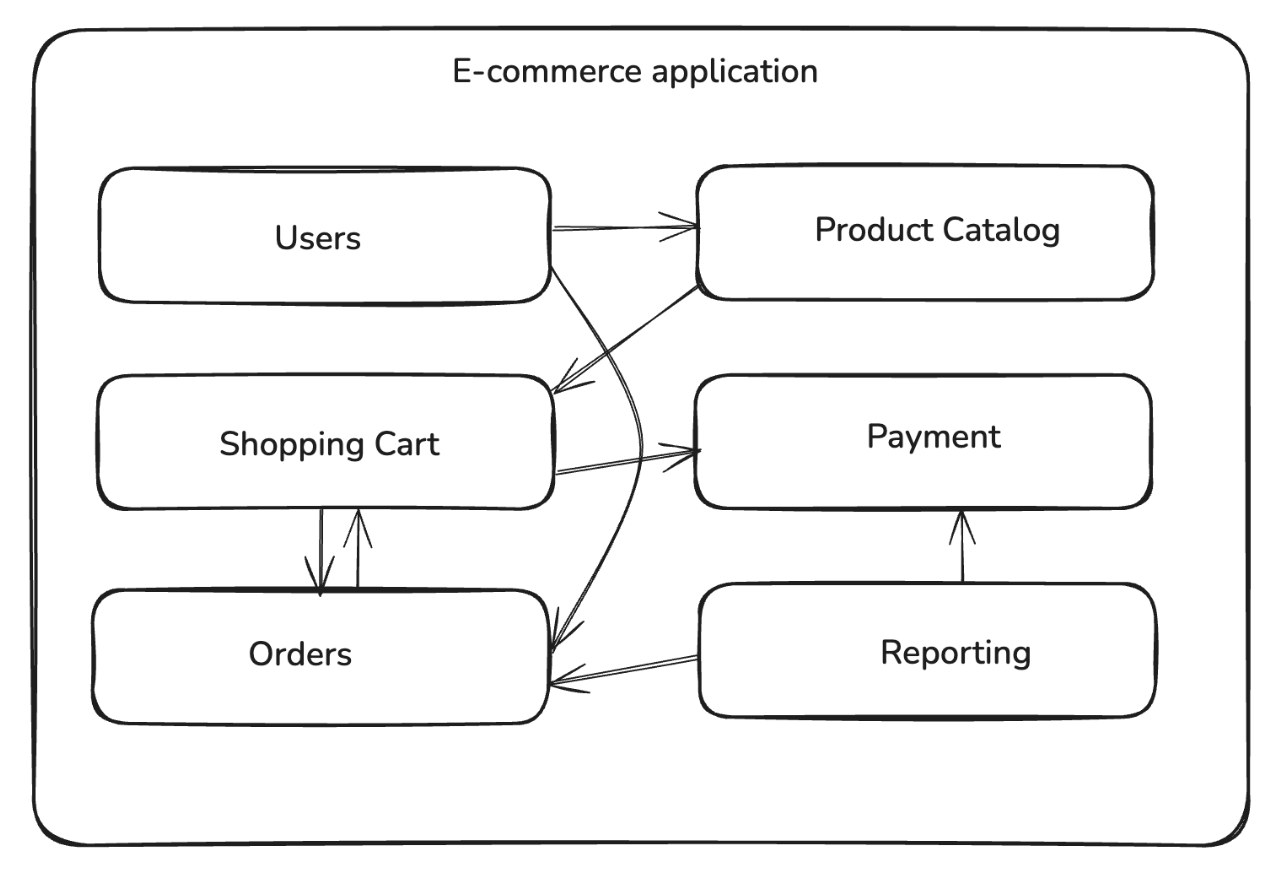
When you’re building a modular monolith, you first identify the business domains and split the application into multiple loosely coupled modules with clear boundaries and dependencies. Unlike the tightly interwoven code of a traditional monolith, the modular design ensures that the modules can be developed and maintained independently while still being deployed as a single unit. For example, you can break down an e-commerce platform into separate modules such as users, product catalog, shopping cart, payments, and orders:
Each module encapsulates a specific entity or capability. A product catalog module would manage product details and categories, and an order processing module would handle order and payment entities.
Unlike traditional monoliths, where internal calls often use ad hoc dependencies, in a modular monolith, the interactions with other modules are performed using explicit interfaces and well-defined contracts. This ensures that the intermodule dependencies remain clear and intentional. The communication between the modules uses in-process function calls, so it’s faster and less error-prone compared to network-based interservice calls in microservices.
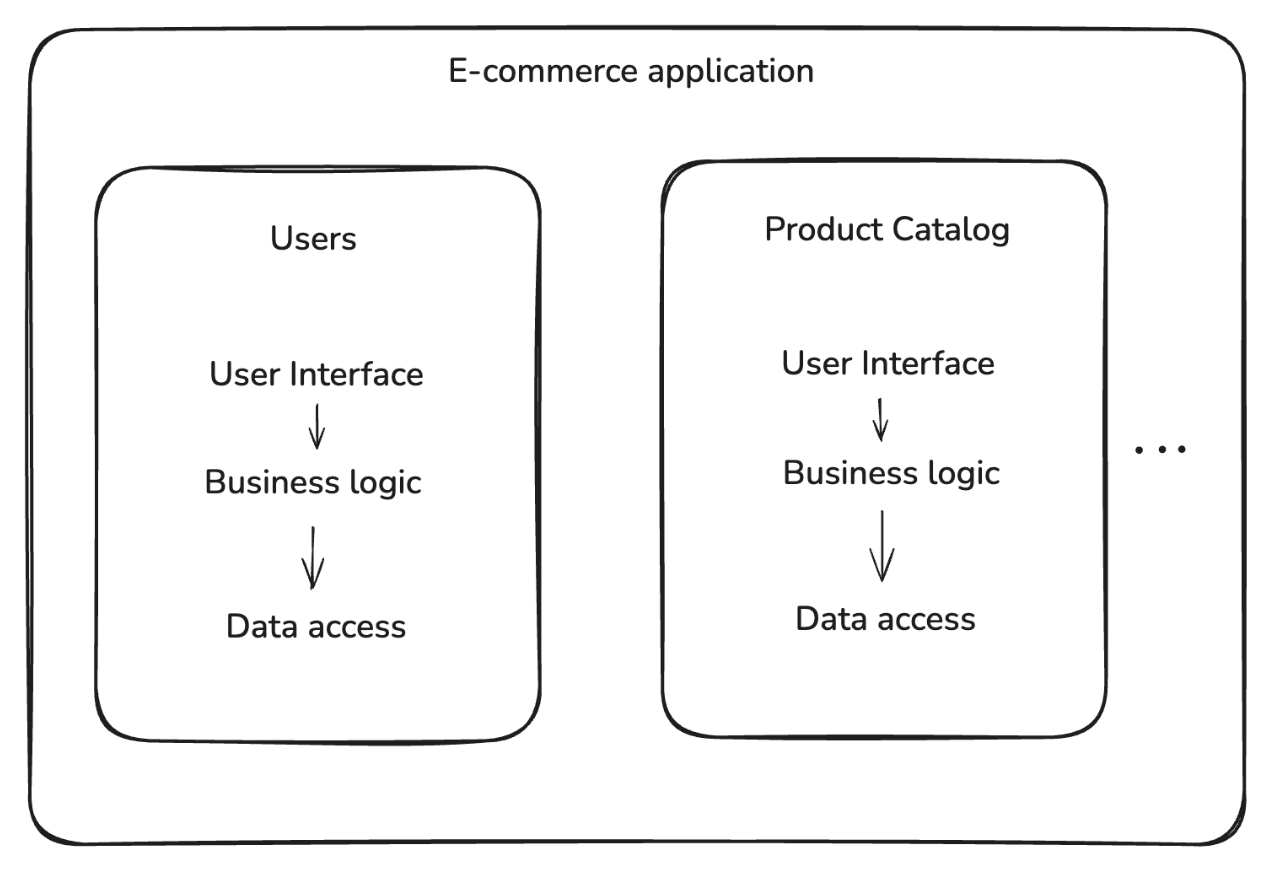
The modular structure allows logical separation between the modules and enforces fixed boundaries, increasing development speed, improving maintainability, and making testing more reliable. Each module defines its user interface, business logic, and data access layers separately:
These boundaries also lay the groundwork for extracting a particular module as a microservice based on the scaling requirements.
Integrate Spring Modulith
Spring Modulith is a Spring Boot framework that’s based on modular monolith architectural principles. It helps identify, structure, and enforce application modules. It also includes tools for verifying module boundaries and observing their behavior, along with module-level testing capabilities, making Spring Boot applications easier to build and maintain.
Here’s how to integrate Spring Modulith into a Kotlin-based Spring Boot application.
All the code samples are drawn from a fully working Kotlin example, which you can find in this GitHub repository.
Repository with the companion code for the tutorial
Note: If your project uses Maven, you can add these dependencies to the pom.xml file.
To define the modules, you need to add relevant package directories to the src directory. This code snippet illustrates order and product packages added to the application, each handling its own business logic, data, and services:
Within each of the modules, you can define the business logic, service, and data access layers based on your application’s requirements. The following code snippet shows a ProductService within the example.product package that returns a static greeting message:
package com.example.springmonolith.product

import org.springframework.stereotype.Service

@Service
class ProductService {

    fun getGreeting(): String {
        return "Hello from Product Module!"
    }
}
Similarly, define an OrderService within the example.order package that invokes ProductService::getGreeting() and returns a combined greeting message:
package com.example.springmonolith.order

import com.example.springmonolith.product.ProductService
import org.springframework.stereotype.Service

@Service
class OrderService(
    private val productService: ProductService
) {

    fun getGreeting(): String {
        return "Hello from Order Module!"
    }

    fun getCombinedGreeting(): String {
        return "Hello from Order Module and: ${productService.getGreeting()}"
    }
}
After adding similar business logic for each of the modules (egProductService, PaymentService), you also need to add the @Modulithic annotation to the Spring Boot Application class to mark it as modular.
The annotation tells Spring Modulith to automatically detect modules based on package structure and enable the tooling for verification, testing, and observability:
package com.example.springmonolith

import org.springframework.boot.autoconfigure.SpringBootApplication
import org.springframework.boot.runApplication
import org.springframework.modulith.Modulithic

// add this annotation to the application
@Modulithic
@SpringBootApplication
class SpringmonolithApplication

fun main(args: Array<String>) {
    runApplication<SpringmonolithApplication>(*args)
}
Defining allowed module dependencies
Next, you can update the package info file for each of the modules to define the allowed module dependencies. Since the order module depends on the methods defined in the product module, you’ll need to add the following annotation in the order/package-info.java file:
// add this annotation
@org.springframework.modulith.ApplicationModule(allowedDependencies = {"product"})
@org.springframework.lang.NonNullApi
package com.example.springmonolith.order;
Finally, you can update the product/package-info.java file to set an empty dependency list for the product module:
// add this annotation
@org.springframework.modulith.ApplicationModule(allowedDependencies = {})
@org.springframework.lang.NonNullApi
package com.example.springmonolith.product;
The above annotation ensures that if a class or object defined in the product module tries to invoke a method defined outside the module, Spring Modulith verification tests will flag the violation. You will see an example of this scenario in later sections.
Spring Modulith Features
Spring Modulith supports various tools for working with modules, including module verification, documentation, and runtime observability. With @Modulithic, the application automatically recognizes its modules (based on package structure) and enables the modulith tooling. Let’s look at how these work.
Modular Structure Checks
Spring Modulith provides built-in tooling to verify that the module boundaries adhere to the constraints. It checks for cyclic dependencies, validates that modules access other modules only through their public API packages (not internal code), and enforces explicit dependency rules. In your tests, you can use the ApplicationModules.verify() to verify the modular structure:
Refer to the source code on GitHub for a complete example of the ModularityTest. With the above test configured, if the ProductService tries to invoke an order module method, the module verification test will fail. You can test the behavior by extending the ProductService to call getGreeting as shown below:
// add import
import com.example.springmonolith.order.OrderService

@Service
class ProductService(
    private val orderService: OrderService
) {

    // add this after getGreeting()
    fun getCombinedGreeting(): String {
        return "Hello from Product Module and: ${orderService.getGreeting()}"
    }
}
Since product module is configured to disallow all intermodule dependencies, when you run unit tests (./gradlew test), you would get a module violation error as shown below:
You can replace direct intermodule calls with application events that let one module publish a domain event and another module listens to it. This preserves boundaries and avoids compile-time coupling between modules. For example, the order module can publish an event when an order is created, as shown below:
// order module
import org.springframework.context.ApplicationEventPublisher

@Service
class OrderService(private val events: ApplicationEventPublisher) {

    fun completeOrder(orderId: String) {
        events.publishEvent(OrderCompleted(orderId))
    }
}

data class OrderCompleted(val orderId: String)
Notice that the completeOrder method publishes the OrderCompleted event, and other modules (eg, InventoryPolicy) could react to the event using @ApplicationModuleListener, as shown below:
// product module
import org.springframework.modulith.events.ApplicationModuleListener
import org.springframework.stereotype.Component

@Component
class InventoryPolicy {

    @ApplicationModuleListener
    fun on(event: OrderCompleted) {
        println("Updating inventory for order: ${event.orderId}")
    }
}
Notice that the InventoryPolicy component has a listener configured for the OrderCompleted event that prints the order ID when it receives the event. Refer to the refactor branch on GitHub for a complete example on domain events.
Modular Level Testing
Modulith supports writing integration tests scoped to a single module. You can annotate a test class with @ApplicationModuleTests to test the module and its dependencies in isolation. This avoids the need to spin up the entire application, reducing setup overhead and making tests more reliable. For example, this code snippet shows a bare-bones integration test for the product module:
import org.junit.jupiter.api.Test
import org.springframework.modulith.test.ApplicationModuleTests

@ApplicationModuleTests
class ProductModuleTests {

    @Test
    fun testProductServiceGreeting() {
        val greeting = productService.getGreeting()
        assertTrue(greeting.contains("Product Module"))
    }
}
For the OrderService test, since it depends on the product module, you need to set the extraIncludes parameter in the @ApplicationModuleTests annotation to include it as shown below:
package com.example.springmonolith.order

import org.junit.jupiter.api.Test
import org.springframework.beans.factory.annotation.Autowired
import org.springframework.modulith.test.ApplicationModuleTest
import org.springframework.test.context.junit.jupiter.SpringJUnitConfig
import kotlin.test.assertTrue

@ApplicationModuleTest(extraIncludes = ["product"])
@SpringJUnitConfig
class OrderModuleTests {

    @Autowired
    private lateinit var orderService: OrderService

    @Test
    fun testOrderServiceGreeting() {
        val greeting = orderService.getGreeting()
        assertTrue(greeting.contains("Order Module"))
    }
}
Observability into Module Interactions
Spring Modulith helps generate developer documentation using the Documenter abstraction. This tool can generate Unified Modeling Language (UML) component diagrams describing the relationship between modules and can also generate a tabular view of the key elements of a module.
This code snippet generates an application module component diagram using Documenter:
class DocumentationTests {
    private val modules = ApplicationModules.of(SpringmonolithApplication::class.java)

    @Test
    fun writeDocumentationSnippets() {
        Documenter(modules)
            .writeModulesAsPlantUml()
            .writeIndividualModulesAsPlantUml()
    }
}
Spring Modulith also integrates with Micrometer to capture spans for module interactions. These spans can be sent to tracing tools such as Zipkin to generate runtime visualizations, making it easier to inspect which modules depend on each other, see how events flow across modules, and monitor interactions in production.
Deciding When to Use a Modular Monolith
Although a modular monolith can be the ideal balance between simplicity and structure in many cases, it isn’t universally the right choice.
Modular Monolith Use Cases
Early-stage development or limited resources: In the early stages of a product or when working with small teams, a modular monolith reduces operational overhead. Developers can focus on delivering features quickly without the complexity of distributed systems. The modular design still enforces boundaries between business capabilities, so if the system grows, you can gradually migrate high-demand modules into separate microservices.
Example: A food delivery platform can start with modules for restaurants, menu, and orders inside a single deployable unit, but it can later extract and deploy one of the modules as a microservice.
Complex business domains: Applications that involve complex business logic, workflows, or dependencies can benefit from a modular structure. By encapsulating each business capability in its own module, the system becomes easier to develop, test, and maintain.
Example: An insurance platform can split policy management, claims processing, and customer support into separate modules to avoid creating interdependencies that can become difficult to maintain.
When Modular Monoliths Aren’t Always the Right Choice
Systems with independent scaling needs: Some systems have uneven load patterns where certain components handle millions of requests daily, while others are rarely used. Because modular monoliths deploy as one unit, you can’t scale individual parts independently. A microservice-based approach can more easily scale components that expect a higher load than others.
Example: In an e-commerce platform, the product catalog or recommendation services may experience higher request volumes than order or payment services.
Systems that use diverse tech stacks: In some organizations, different teams rely on different programming languages, runtimes, or specialized infrastructure for different parts of the system. A modular monolith requires the entire application to use the same stack, which can limit flexibility. In these cases, a microservice-based architecture can provide the isolation needed to mix and match technologies.
Example: Machine learning or analytics teams may want to use Python or Go for their services, while client-facing or internal services can be based on Kotlin or Java.
Conclusion
Modular monolith architecture allows you to split the application logic into isolated modules with their own business logic, while still being deployed as a single artifact. It combines the benefits of a modular design while maintaining the development and release-related benefits of a monolithic architecture. Additionally, modern programming languages such as Kotlin provide tools that can help you achieve monolith stability without giving up the productivity that draws people to microservices.
Spring Modulith and Kotlin provide the tools to design and enforce clear module boundaries, test modules independently, and monitor their interactions. Try out Spring Modulith to build modular Kotlin applications, while keeping the flexibility to evolve into microservices if your scaling needs change.