TCP Connections With DAP Debuggers, Different Formats for Numeric Values, and More in CLion 2026.1 EAP

The Early Access Program (EAP) for CLion 2026.1 is nearing its end, bringing a range of improvements to debugging capabilities, build tools, project formats, and more. This post is a brief overview of what is already available in the latest EAP build. As always, EAP builds are free to use, so you can explore all the new features at no cost before the stable release.
Debugger
Communicating with DAP debuggers over TCP. In CLion 2025.3, we introduced support for the Debug Adapter Protocol (DAP). It allows CLion to communicate with a range of debuggers beyond LLDB and GDB. Now, in addition to stdin/stdout, we’ve added support for TCP connections with DAP debuggers.
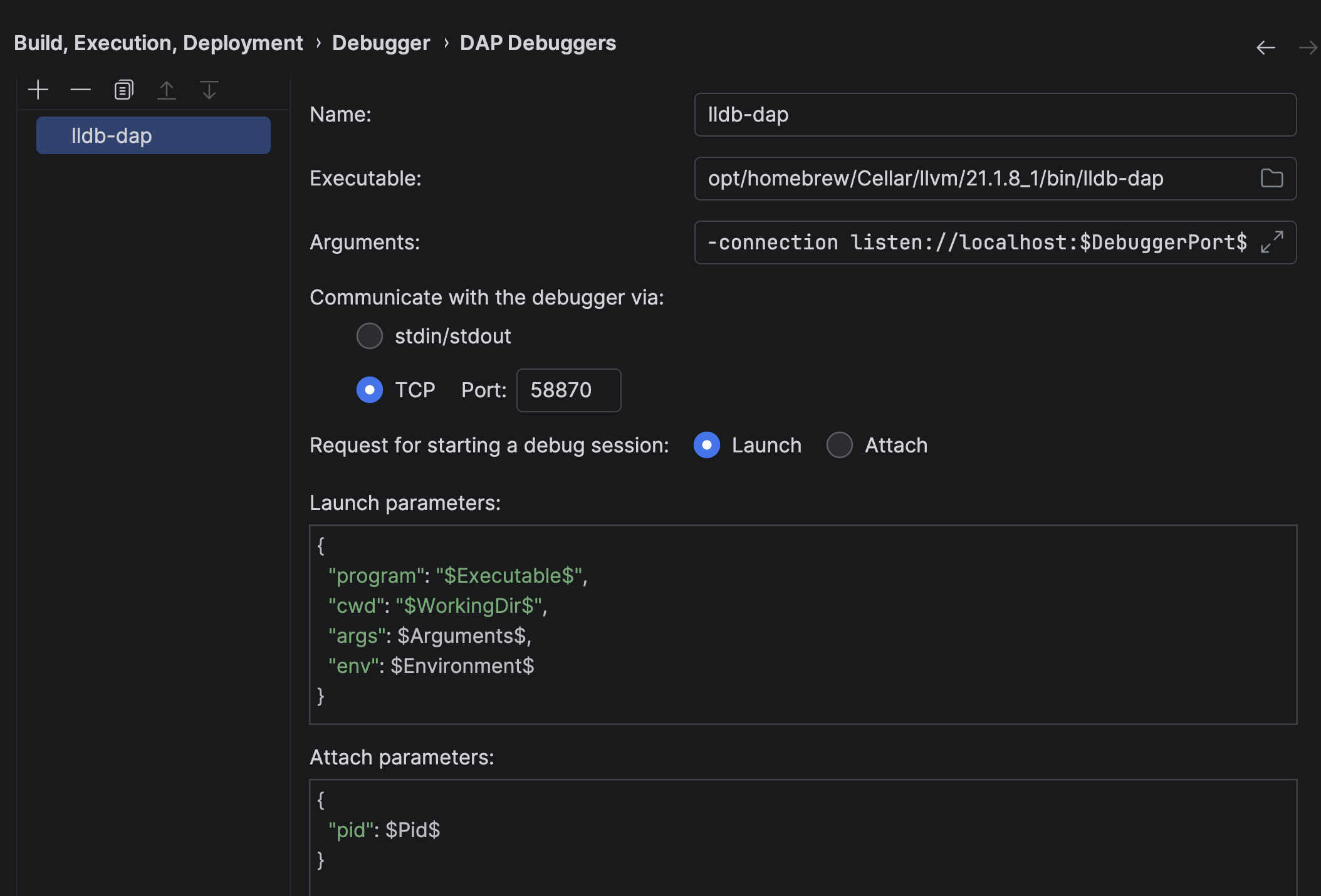
TCP support gives you more flexibility in choosing DAP debuggers to work with, including those that only work via TCP. You can now also choose between two modes: Launch and Attach, depending on which one your DAP debugger requires. To learn more about configuring a DAP debugger and specific settings, read the documentation.
Viewing numeric values in different formats. When examining the suspended program, you can now change the number format for individual variables, switching between decimal, hexadecimal, octal, or binary. This allows you to see values in a format better suited for a specific use case, whether it’s a human-readable number, a memory address, or file permissions.
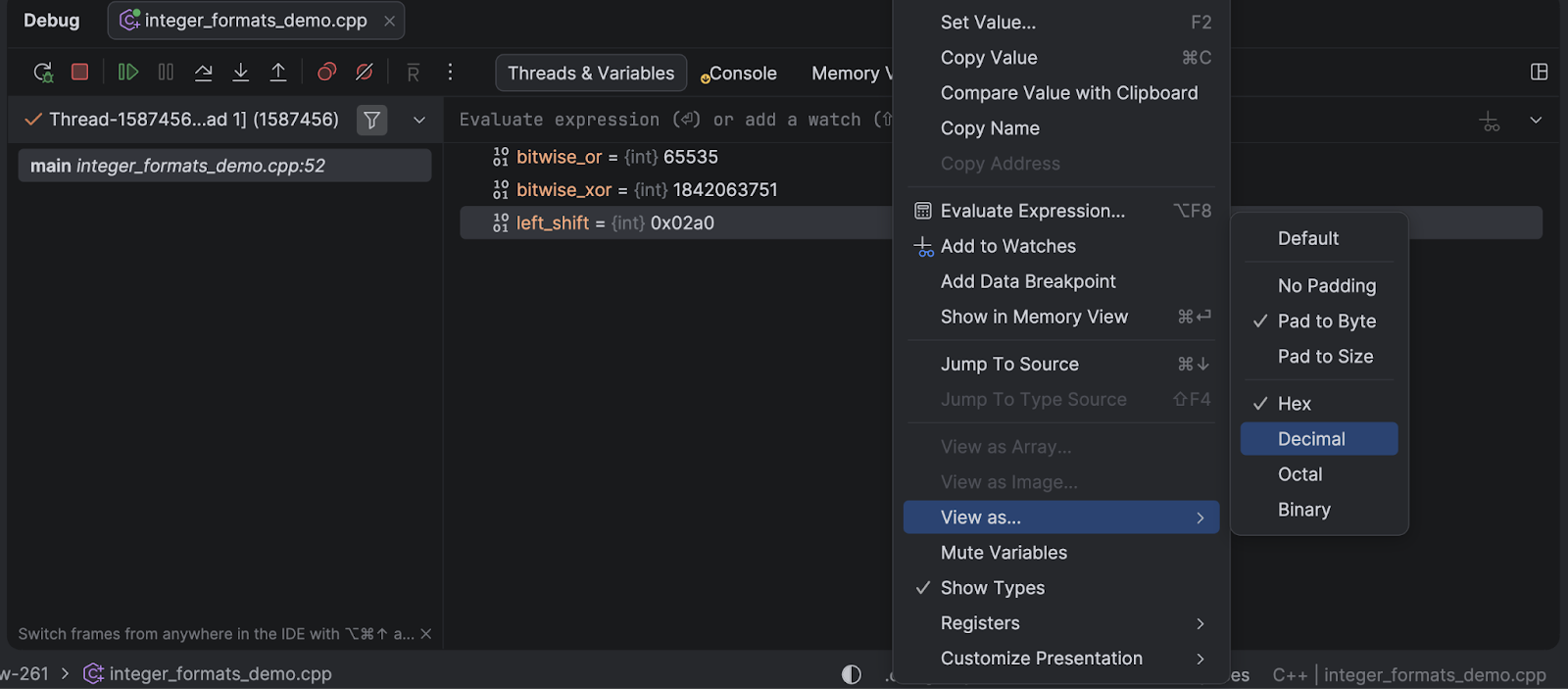
To change the number format, right-click a variable in the Threads & Variables pane, select View as…, and then select the desired format. You can also change the padding format in the same menu.
We encourage you to try the feature and let us know what you think in CPP-12303.
Faster debugging in remote development mode. Debugging in remote development scenarios is now much more responsive and stable, thanks to a completely reworked debugger architecture. The Debug tool window and breakpoints are now rendered on the IDE frontend, while the backend hosts the active debugger session and communicates with the target process. Note that we’re still addressing some issues and will continue refining this feature.
Natvis performance improvements. We’ve achieved dramatic performance improvements for the LLDB-based custom debugger when using Natvis expressions with the MSVC toolchain. Internal tests have shown debugging speed improvements of more than 80x and a 2.5x reduction in memory usage. This is especially beneficial for developers working with large projects that rely heavily on the Natvis framework. These improvements benefit users of both CLion and Rider. For a detailed technical breakdown of how we achieved these gains, check out the Rider team’s blog post.
Updated bundled LLDB. The bundled LLDB version available for macOS and Linux users has been updated from 19.1.7 to 21.1.7, bringing the latest debugger improvements and bug fixes from the LLVM project. See the LLDB release notes for detailed information about what’s new in the debugger.
Build tools and project formats
Support for custom project models. CLion now offers an easy way to set up or fine-tune code insight for all types of projects – including those based on unsupported project formats – and for non-project files, too. This feature also simplifies migration from VS Code for users who already work with C/C++ properties, making the transition to CLion even smoother. You can open projects that were previously edited in VS Code, and CLion will recognize settings from the c_cpp_properties.json file. You can even tweak the settings in this file, and CLion will apply them.
Code insight features for external projects. The IDE can now provide full code insight for external projects defined in the CMake ExternalProject_Add() section. CLion loads these projects as part of the primary CMake project. This gives you access to error detection, warnings, a search for usages, and refactoring capabilities without the need to load external projects separately. This update is particularly valuable for embedded frameworks such as Zephyr, STM32, and ESP-IDF, where projects are often split into multiple parts.
The reduced CLion Nova installer size. We’ve significantly reduced CLion’s disk footprint. After installation, the bundled C/C++ Language Support plugin now consumes 50% less disk space on average across all platforms. Overall, the total IDE footprint on disk has been reduced by 1 GB.
Improvements to CMake support:
- You can now specify command-line options for CMake profiles faster, thanks to code completion in the CMake options and Build options fields. Simply start typing an option, and a completion list will appear. Select the desired option from the list.
- CMake preset names that you see in the IDE’s UI are now based on the
displayNamevalue specified inCMakePresets.json– instead of thenamevalue as before. This means that you can now use more human-friendly, descriptive names for your CMake presets and see them in the CMake settings, tool window, and toolbar widget.
Language support
Unit testing support for Meson. We’ve made significant progress in making unit test integration independent of the CMake project format. All four major test frameworks – GoogleTest, Catch2, Boost.Test, and doctest – are now fully supported for Meson projects. This means you can enjoy the same comprehensive testing functionality that was previously available only for CMake projects, including running tests directly from the editor, viewing test results in a dedicated tool window, and navigating between tests and their implementations.
Improvements to CLion Nova code folding. The IDE automatically recognizes certain code structures in the editor and makes them foldable for better code organization. Previously, our default language engine, CLion Nova, had fewer code-folding options than the legacy CLion Classic. Now, the default engine offers full feature parity, making code navigation and organization more intuitive and aligned with what CLion Classic users have come to expect.
Try the EAP now
The CLion 2026.1 EAP is available for download now and is completely free to use. We encourage you to try out these new features and share your feedback with us in the comments below or in our issue tracker. Your input during the EAP helps us identify issues and refine functionality before the stable release.