CLion 2026.1 Is Here

GitHub Copilot, Cursor, and Other Agents in the AI Chat, Support for Custom Project Formats, DAP Debugging via TCP, and More
CLion 2026.1 focuses on stability and improving the existing functionality, but that didn’t stop us from shipping some exciting new features. Most notably, you can now use more agents directly in the AI chat, turning CLion into an open ecosystem for your AI tools and workflows.
The key updates in this release include:
- Support for GitHub Copilot, Cursor, Codex, and other agents via the Agent Client Protocol (ACP).
- Easy opening of custom and VS Code projects with
c_cpp_properties.json. - Code insight features for external CMake projects.
- TCP connections to debuggers that support the Debug Adapter Protocol (DAP).
- Enhanced Bazel support with new tools.

You can download CLion 2026.1 from the link below, via the Toolbox App, as a snap package if you’re using Ubuntu, or via a patch update from version 2025.3.
Open ecosystem for your AI tools and workflows
In addition to Junie, Claude Agent, and, most recently, Codex, CLion now allows you to work with more AI agents directly in the AI chat. You can choose from agents such as GitHub Copilot, Cursor, and many others supported via the Agent Client Protocol (ACP). This means you no longer need to worry about jumping between tools to access different AI agents or about getting locked into a single provider that doesn’t fit every use case.
To get started:
- Open Settings | Tools | AI Assistant | Agents or select Install From ACP Registry… in the AI chat agent picker menu.
- Find the agent you want to use.
- Click Install.
Other notable AI features include:
- The ability to connect your personal OpenAI or Anthropic account through Bring Your Own Key (BYOK) – without needing a separate JetBrains AI subscription.
- Context-aware suggestions that deliver small, digestible code hints as you edit, with clear diffs that are easy to review and apply – without consuming your AI credits.
Learn more in the AI Assistant documentation.
Build tools and project formats
Easy opening of custom and VS Code projects in CLion
CLion now offers an easy way to set up or fine-tune code insight for all types of projects – including those based on unsupported project formats – and for non-project files, too. This feature also simplifies migration from VS Code for users who already work with C/C++ properties, making the transition to CLion even smoother. You can open projects that were previously edited in VS Code, and CLion will recognize settings from the c_cpp_properties.json file. You can even tweak the settings in this file, and CLion will apply them.
Enhanced Bazel support with new tools
New updates to the Bazel for CLion plugin help you stay focused in the IDE and eliminate the need for external workarounds. We are particularly excited to introduce initial support for configuration transitions, a foundational step toward better handling of multi-architecture projects. While this support is currently in its early stages, we are dedicated to expanding its capabilities in upcoming releases.
Alongside these improvements, you can now experiment with Starlark directly using the built-in REPL.
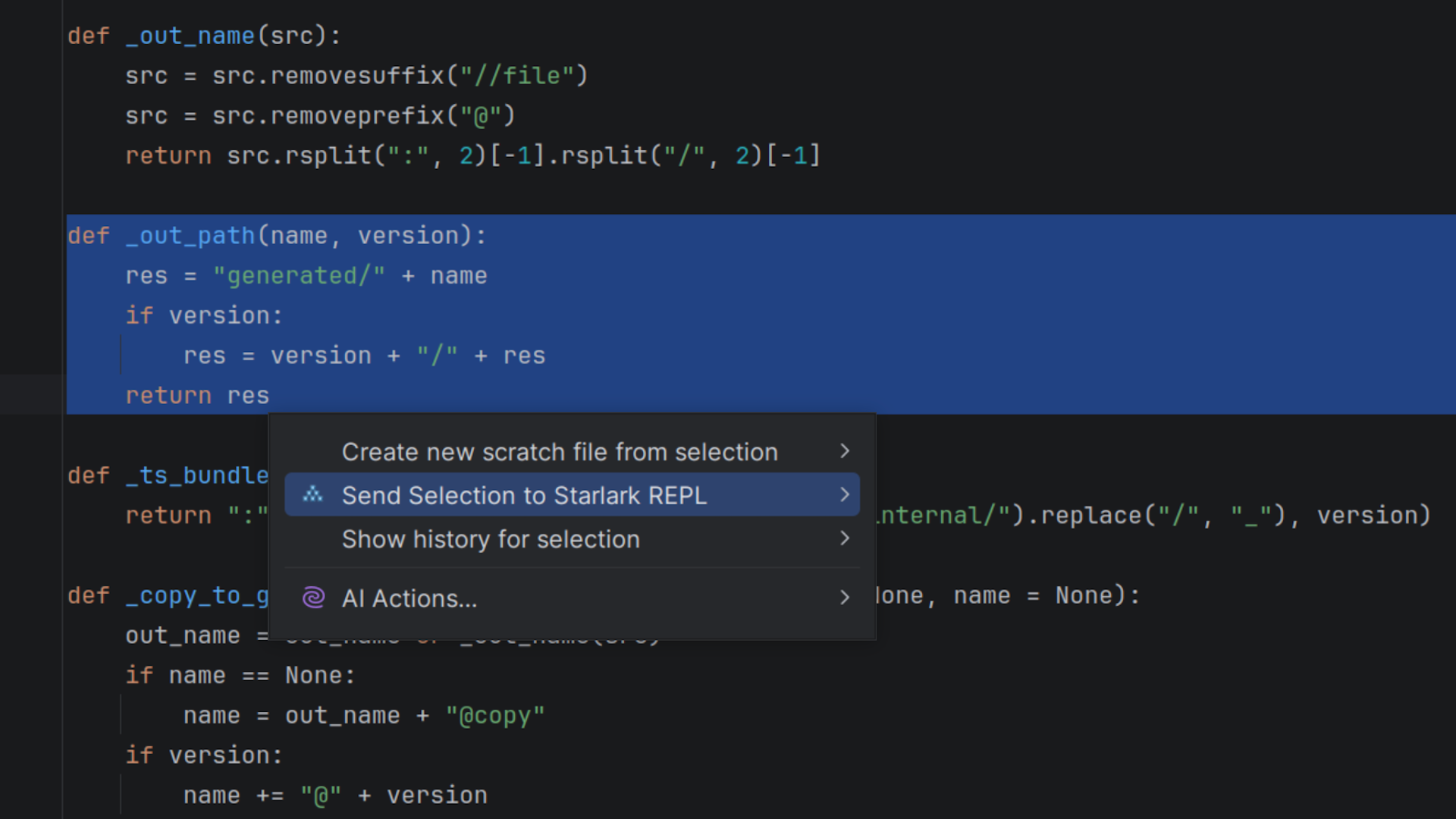
We’ve also included a first version of the execution log parser for performance analysis in CLion.
Code insight features for external projects
The IDE can now provide full code insight for external projects defined in the CMake ExternalProject_Add() section. CLion loads these projects as part of the primary CMake project, giving you access to error detection, warnings, usage search, and refactoring capabilities without the need to load external projects separately. This update is particularly valuable for embedded frameworks such as Zephyr, STM32, and ESP-IDF, where projects are often split into multiple parts.
Code completion for CMake and build options
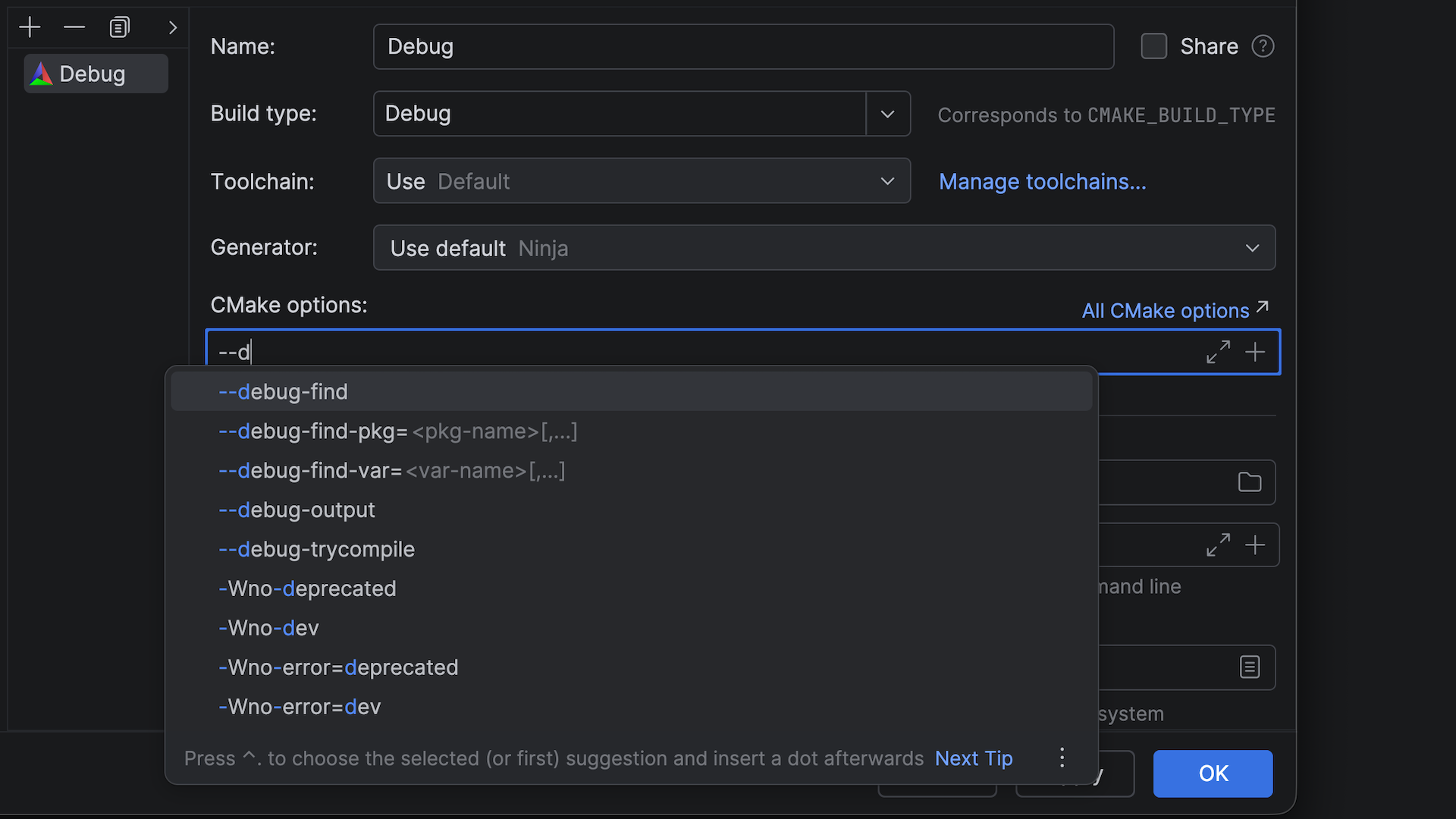
You can now specify command-line options for CMake profiles faster, thanks to code completion in the CMake options and Build options fields. Simply start typing an option, and a completion list will appear. Then select the desired option from the list.
More human-friendly names for CMake presets
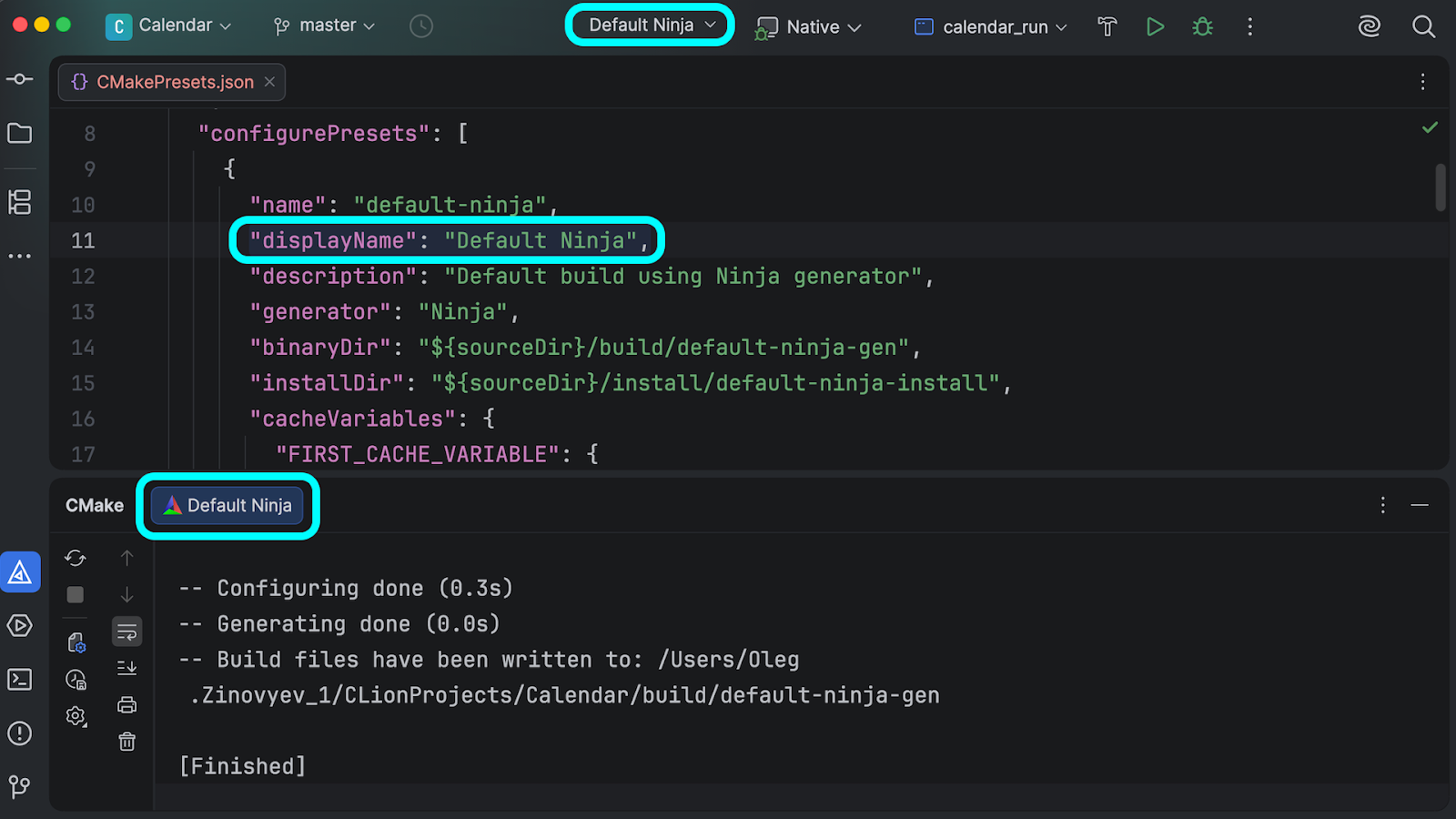
The CMake preset names that you see in the IDE’s UI are now based on the displayName value specified in CMakePresets.json – instead of the name value as before. This means that you can now use more human-friendly, descriptive names for your CMake presets and see them in the CMake settings, tool window, and toolbar widget.
Reduced CLion Nova disk usage after installation
We’ve significantly reduced CLion’s disk footprint. After installation, the bundled C/C++ Language Support plugin now consumes 50% less disk space on average across all platforms. Overall, the total IDE’s footprint on disk has been reduced by 1 GB.
Debugger
TCP connections to DAP debuggers
In v2025.3, we introduced support for the Debug Adapter Protocol (DAP), enabling CLion to communicate with a wider range of debuggers beyond LLDB and GDB. Now, in addition to stdin/stdout, we’ve added support for TCP connections to DAP debuggers.
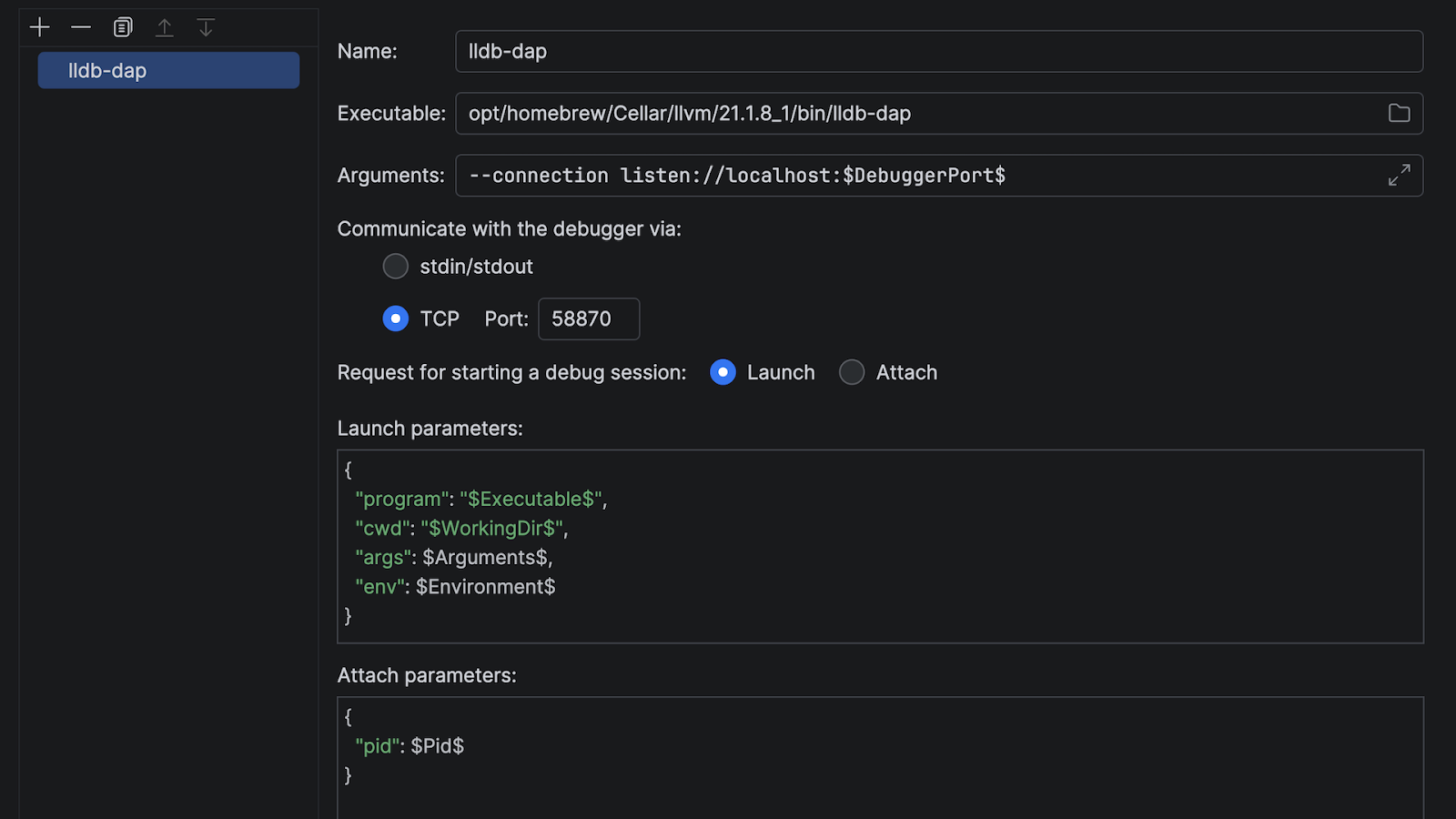
TCP support gives you more flexibility in choosing DAP debuggers to work with. You can now also choose between two modes: Launch and Attach, depending on which one your DAP debugger requires. To learn more about configuring a DAP debugger, read the documentation.
Multiple formats for numeric values
When examining a suspended program, you can now change the number format for individual variables, switching between decimal, hexadecimal, octal, or binary. This allows you to see values in a format better suited to a specific use case, whether it’s a human-readable number, a memory address, or file permissions.
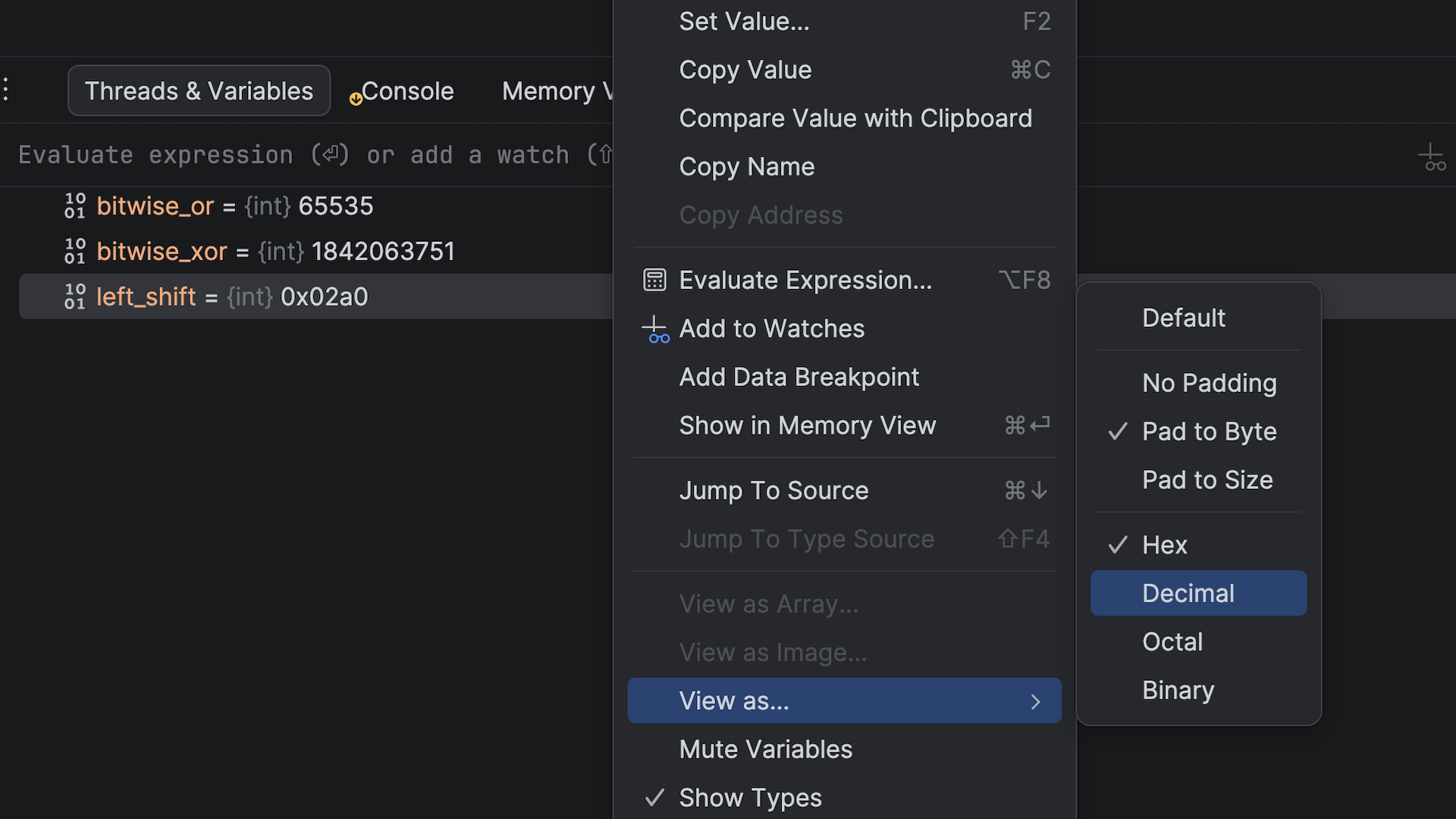
To change the number format, right-click a variable in the Threads & Variables pane, select View as…, and then select the desired format. You can also change the padding format in the same menu.
Faster debugging in remote development mode
The debugging experience in remote development scenarios is now much more responsive and stable, thanks to a completely reworked debugger architecture. The Debug tool window and breakpoints are now rendered on the IDE frontend, while the backend hosts the active debugger session and communicates with the target process. Note that we’re still addressing some issues and will continue to refine this feature.
Updated bundled LLDB
The bundled LLDB version available for macOS and Linux users has been updated from 19.1.7 to 21.1.7, bringing the latest debugger improvements and bug fixes from the LLVM project. See the LLDB release notes for detailed information about what’s new in the debugger.
Language support
Better code folding with CLion Nova
The IDE automatically recognizes certain code structures in the editor and makes them foldable for better code organization. Previously, our default language engine, CLion Nova, had fewer code-folding options than the legacy CLion Classic. Now, the default engine offers full feature parity, making code navigation and organization more intuitive and aligned with what CLion Classic users have come to expect.
Unit testing support for Meson
We’ve made significant progress in making unit test integration independent of the CMake project format. All four major test frameworks – GoogleTest, Catch2, Boost.Test, and doctest – are now fully supported for Meson projects. This means you can enjoy the same comprehensive testing functionality that was previously available only for CMake projects, including running tests directly from the editor, viewing test results in a dedicated tool window, and navigating between tests and their implementations.
New language features
Here are the latest C and C++ features available in CLion:
- The
#embedpreprocessor directive introduced in C++26 and C23 allows you to embed the contents of a binary resource file directly into your source code without requiring external tooling or code generation. - CLion now supports the
bfloat16_t,float16_t, andfloat128_tfloating-point types standardized in C++23. - The
_Countofoperator from C2Y (the upcoming C standard) now returns the element count of an array. - The IDE now offers better compatibility with compiler-specific extensions through GCC’s nested functions and Clang’s
_Nullableand_Nonnullpointer nullability qualifiers.
Improved coding assistance
The following new code inspections help you write code more efficiently:
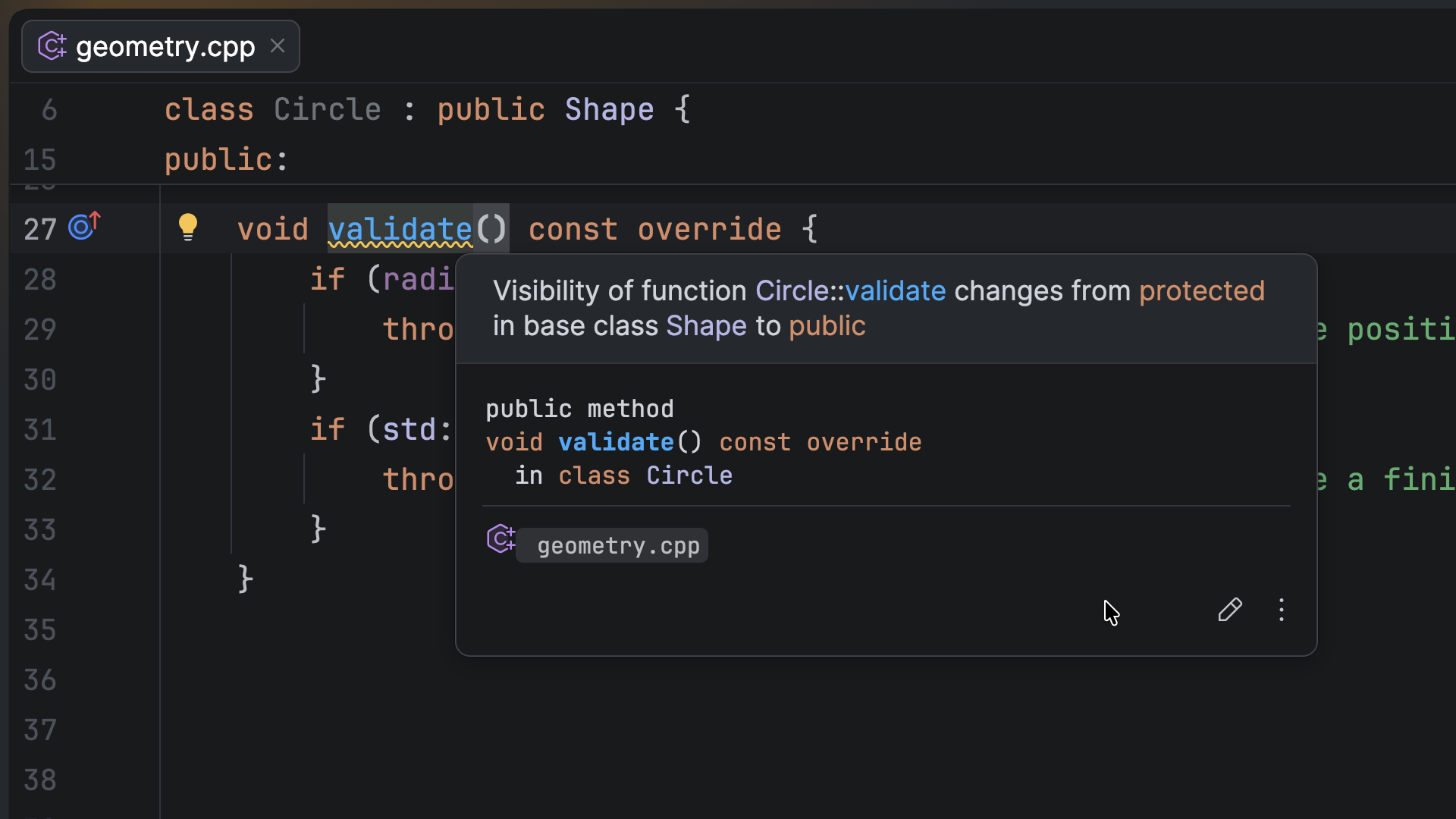
- CLion now detects instances where C++20 designated initializers are in an incorrect order and catches changes in access level when overriding virtual functions.
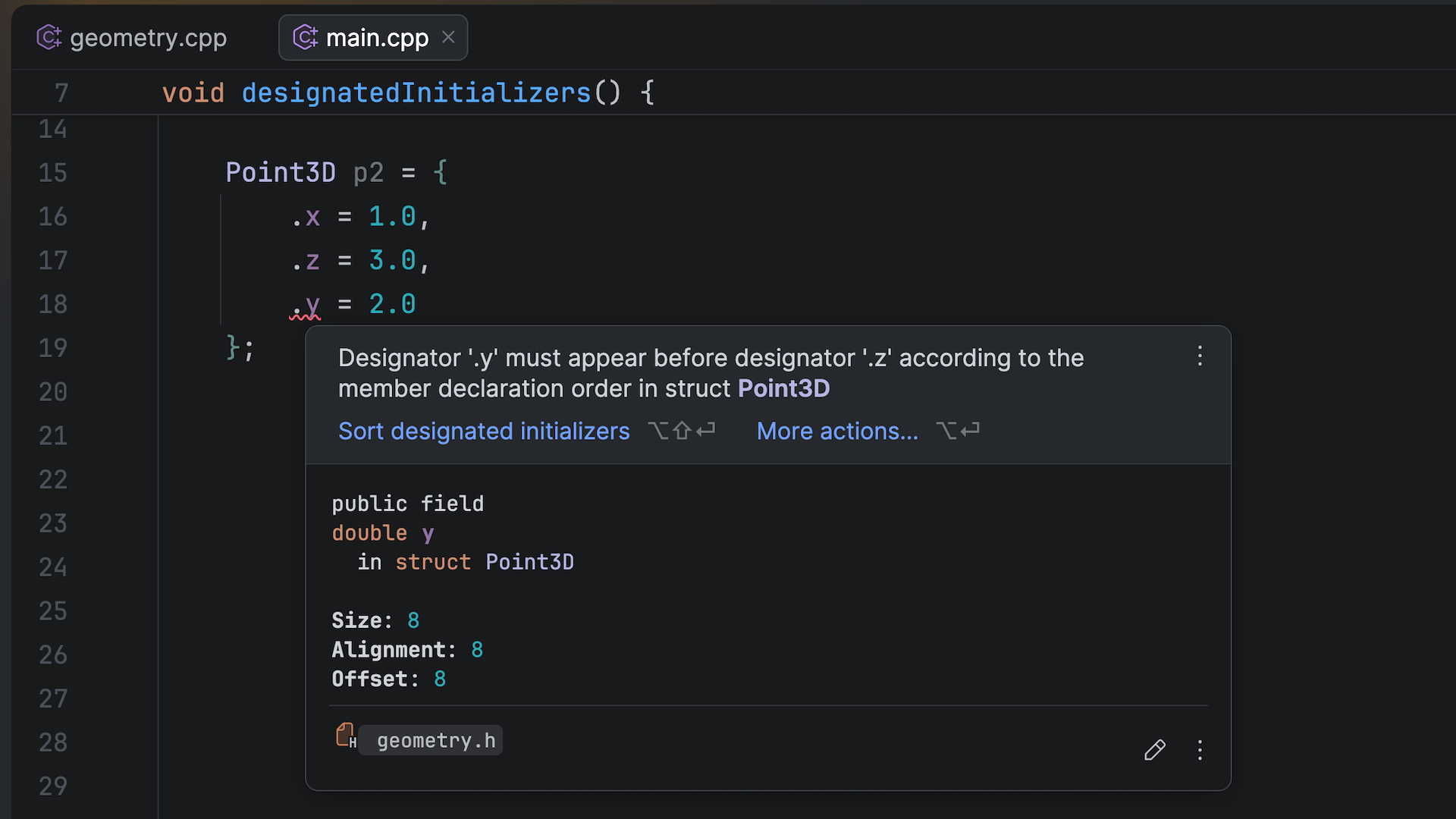
- The IDE warns you when a function has a different access level (
public,protected, orprivate) than the virtual function it overrides in the base class.
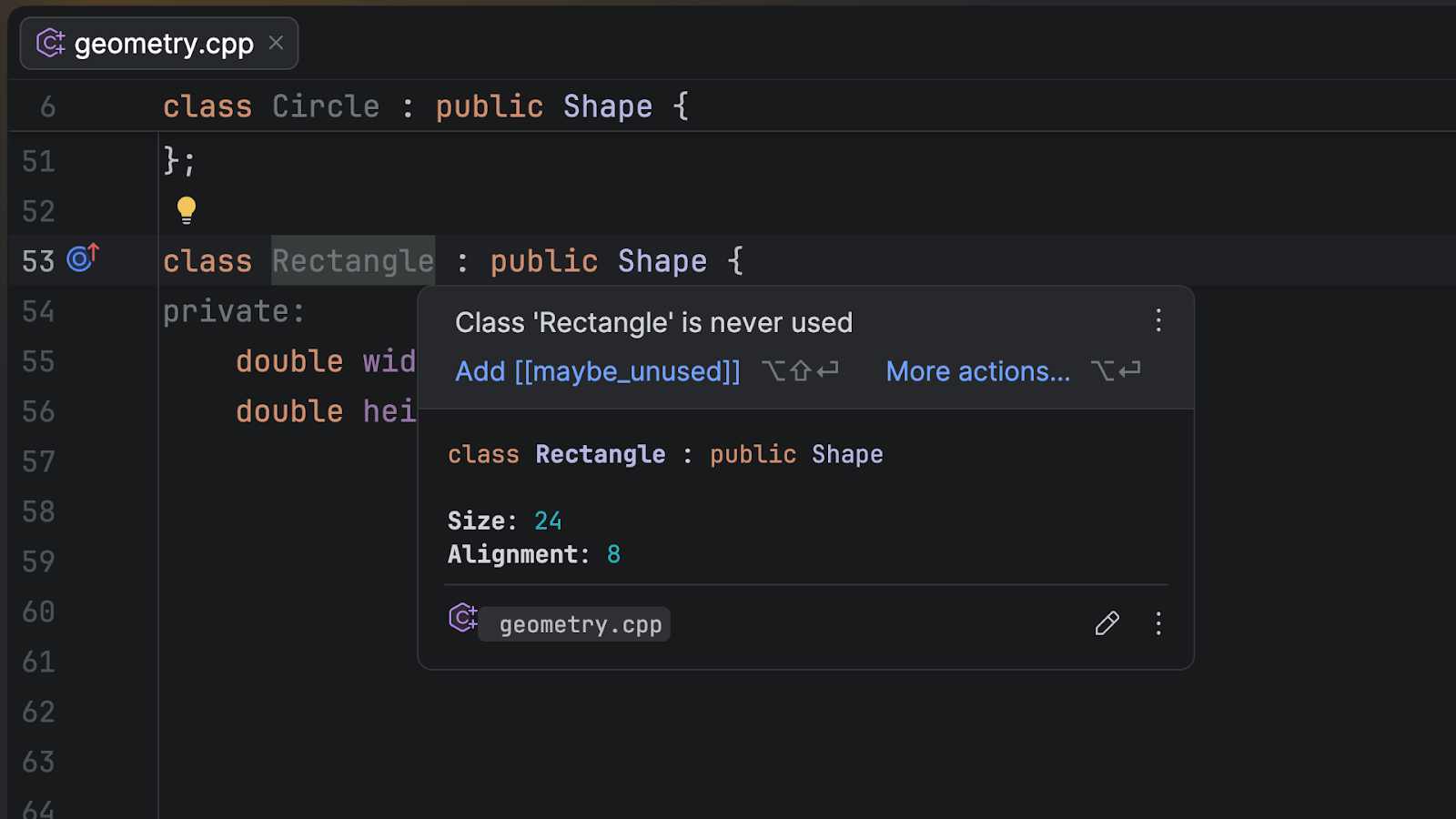
- The Unused symbol inspections have been extended to class members defined in
.cppsource files. Previously, these members were assumed to be externally visible and excluded from the Unused symbol analysis. Now, they are analyzed in the same way asstaticfunctions and anonymous namespace members.
Platform updates
Smoother caret movement and new selection behavior
The editor now feels more modern, reducing visual clutter and eye strain and making long coding sessions more comfortable. Here are the most important changes:
- The caret animation is now smoother, offering the new Snappy and Gliding modes, which make navigation easier to follow.
- Highlighting now covers only actual text, not blank line endings.
- The caret is rounded with smooth blinking, matching the Islands UI theme.
Git worktrees support
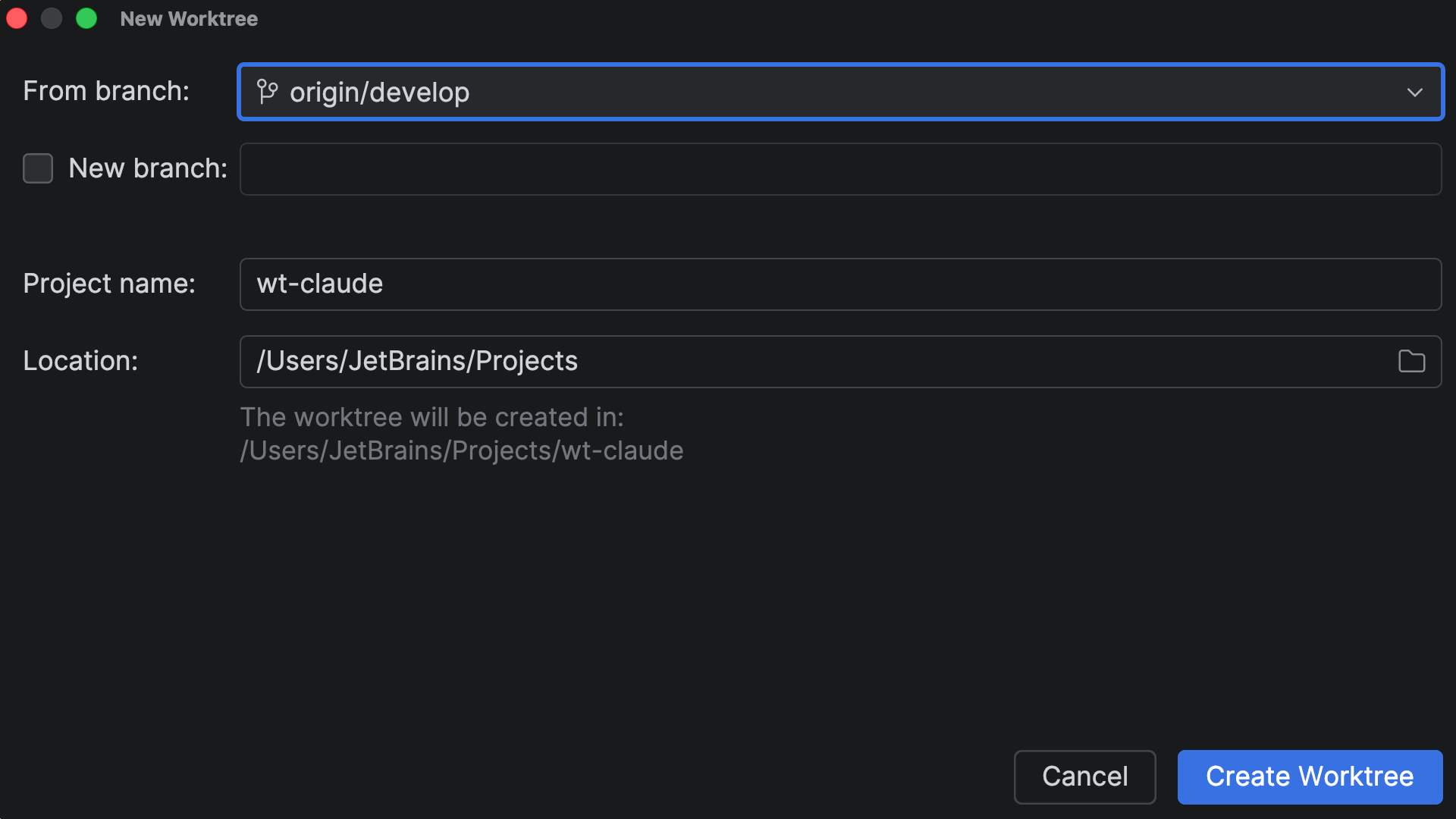
You can now work on multiple Git branches simultaneously and eliminate branch-switching delays. This is extremely useful for agentic development when you need to run multiple tasks in parallel. You can create separate worktrees for different tasks – handle an urgent hotfix, assign one to an AI agent, and continue working in your main branch, all at once. Switch between worktrees instantly without waiting for indexing or losing your context. For more details, check out the documentation.
Sunsetting of Code With Me
JetBrains has decided to gradually sunset Code With Me. This feature provided real-time collaborative coding and pair programming directly in JetBrains IDEs, including CLion. This decision was made after reviewing usage trends and balancing them against our long-term direction. Sunsetting this feature will allow us to focus our efforts on areas that deliver the most value and align with how teams collaborate today. To learn more about the timeline and see answers to the most common questions, read this blog post.
Try CLion and tell us what you think
We invite you to give CLion 2026.1 a try. If you have an active subscription, you can update it right away. New to CLion? You can work with the IDE for free if you plan to use it for non-commercial projects or for educational purposes. Otherwise, start a free 30-day trial to access all the latest features and improvements.
We value your feedback! If you have anything to share or if you run into any problems, please let us know in the comments below, on X, or via our issue tracker.