JetBrains AI
Supercharge your tools with AI-powered features inside many JetBrains products
Koog Comes to Java: The Enterprise AI Agent Framework From JetBrains

Adding AI agents to your enterprise backend shouldn’t mean compromising your architecture. If your core systems are built in Java, orchestrating LLMs shouldn’t require you to introduce separate Python microservices or rewrite your stack.
Today, we are launching Koog for Java. Originally built to keep pace as JetBrains scaled up its own activities, Koog replaces unpredictable, ad hoc prompt changing with structured, observable, and fault-tolerant agent workflows.
Now, one of the JVM’s most powerful agent frameworks comes with a fully idiomatic Java API. Your Java teams can build reliable AI agents directly inside your existing backends, with fluent builder-style APIs, thread pool executors, and native Java abstractions – completely free of Kotlin-specific friction.
What you get with Koog for Java
The Java API provides access to all of Koog’s features:
- Multiple workflow strategies (functional, graph-based, and planning): Control exactly how your agent executes tasks.
- Spring Boot integration: Drop Koog into your existing Spring applications.
- Support for all major LLM providers: Use your preferred models from OpenAI, Anthropic, Google, DeepSeek, Ollama, and more.
- Fault tolerance with Persistence: Recover from failures without losing progress or repeating expensive LLM calls.
- Observability with OpenTelemetry: Get full visibility into agent execution, token usage, and costs, with Langfuse and W&B Weave support out of the box
- History compression: Reduce token usage and optimize costs at scale
- And much more!
Read on to see what building agents in Java with Koog looks like.
Simple setup
AI agents work by connecting large language models (LLMs) with functions from your application, which are generally referred to as “tools”. The LLM decides which tools to call and when, based on the task you give it. Building an agent in Java starts with defining these tools. Annotate your existing Java methods with @Tool and add descriptions so the LLM understands what each function does:
public class BankingTools implements ToolSet {
    @Tool
    @LLMDescription("Sends money to a recipient")
    public Boolean sendMoney(
        @LLMDescription("Unique identifier of the recipient")
        String recipientId,
        Integer amount
    ) {
        return true; // Your implementation here
    }

    @Tool
    @LLMDescription("Account balance in $")
    public Integer getAccountBalance(String userId) {
        return 1000000; // Your implementation here
    }
}
Next, create an agent using the builder API. You’ll need to configure which LLM providers to use (OpenAI, Anthropic, etc.), set a system prompt that defines the agent’s role, and register your tools:
// Connect to one or more LLM providers
var promptExecutor = new MultiLLMPromptExecutor(
    new OpenAILLMClient("OPENAI_API_KEY"),
    new AnthropicLLMClient("ANTHROPIC_API_KEY")
);

// Build the agent
var bankingAgent = AIAgent.builder()
    .promptExecutor(promptExecutor)
    .llmModel(OpenAIModels.Chat.GPT5_2)  // Choose which model to use
    .systemPrompt("You're a banking assistant")  // Define the agent's role
    .toolRegistry(
        ToolRegistry.builder()
            .tools(new BankingTools())  // Register your tools
            .build()
    )
    .build();

// Run the agent with a user task
bankingAgent.run("Send 100$ to my friend Mike (mike_1234) if I have enough money");
When you run this agent, it will:
- Check the account balance using
getAccountBalance() - If there’s enough money, call
sendMoney()with the right parameters - Return a response to the user
This connects your Java application’s functionality with a fully autonomous AI agent that can reason about which actions to take.
Predictable workflows with custom strategies
The simple example above lets the LLM decide everything – which tools to call and in what order. But for production systems, you often need more control. What if you want to ensure certain operations happen before others? Or limit which tools are available at each step? Or implement verification loops?
Koog provides different approaches to defining agent workflows: functional (code-based), graph-based, and planning-based.
Functional strategies let you orchestrate individual agentic steps in code. Think of it like writing a regular Java method, but each step can involve LLM calls and tool executions. You split large tasks into smaller subtasks, each with its own prompt, limited set of tools, and type-safe inputs/outputs:
var functionalAgent = AIAgent.builder()
    .promptExecutor(promptExecutor)
    .functionalStrategy("my-strategy", (ctx, userInput) -> {
        // Step 1: First, identify the problem
        // Only give the agent communication and read-only database access here
        ProblemDescription problem = ctx
            .subtask("Identify the problem: $userInput")
            .withOutput(ProblemDescription.class)  // Type-safe output
            .withTools(communicationTools, databaseReadTools)  // Limited tools
            .run();

        // Step 2: Now solve the problem
        // Give the agent database write access only after problem identification
        ProblemSolution solution = ctx
            .subtask("Solve the problem: $problem") // Use output from step 1
            .withOutput(ProblemSolution.class)
            .withTools(databaseReadTools, databaseWriteTools)
            .run();

        // Verify the solution and try to fix it until the solution is satisfying
        while (true) {
            var verificationResult = ctx
                .subtask("Now verify that the problem is actually solved: $solution")
                .withVerification()
                .withTools(communicationTools, databaseReadTools)
                .run();

            if (verificationResult.isSuccessful()) {
                return problemSolution;
            } else {
                problemSolution = ctx
                    .subtask("Fix the solution based on the provided feedback: ${verificationResult.getFeedback()}")
                    .withOutput(ProblemSolution.class)
                    .withTools(databaseReadTools, databaseWriteTools)
                    .run();
            }
        }

    })
    .build();
This approach gives you the flexibility of code while still using AI agents for individual steps. Notice how you control the order of operations and which tools are available at each step. You can check the full runnable example here.
Graph strategies define workflows as finite state machines with type-safe nodes and edges. Unlike functional strategies, graph strategies separate the logic (nodes and edges) from its execution. This enables powerful features like fine-grained persistence – if your agent crashes, it can resume from the exact node where it stopped, not from the beginning:
var graphAgent = AIAgent.builder()
    .graphStrategy(builder -> {
        // Define the overall graph structure
        var graph = builder
            .withInput(String.class)
            .withOutput(ProblemSolution.class);

        // Define workflow elements: individual nodes (steps) and subgraphs
        var identifyProblem = AIAgentSubgraph.builder()
            .withInput(String.class)
            .withOutput(ProblemDescription.class)
            .limitedTools(communicationTools, databaseReadTools)
            .withTask(input -> "Identify the problem")
            .build();

        var solveProblem = … // subgraph for solving a problem

        var verifySolution = … // subgraph for verifying a solution

        var fix = ...// subgraph for fixing a problem

        // Connect the nodes with edges to define execution flow
        graph.edge(graph.nodeStart, identifyProblem);
        graph.edge(identifyProblem, solveProblem);
        graph.edge(solveProblem, verifySolution);

        // Conditional edges: if verification succeeds, finish; otherwise, attempt a fix
        graph.edge(AIAgentEdge.builder()
        	.from(verifySolution)
        	.to(graph.nodeFinish)
        	.onCondition(CriticResult::isSuccessful)
        	.transformed(CriticResult::getInput)
        	.build());

        graph.edge(AIAgentEdge.builder()
        	.from(verifySolution)
        	.to(fix)
        	.onCondition(verification -> !verification.isSuccessful())
        	.transformed(CriticResult::getFeedback)
        	.build());

        graph.edge(fix, verifySolution);

        return graph.build();
    })
    .build();
Graph strategies are ideal when you need persistence, complex branching logic, or want to visualize your agent’s workflow. You can share the visualization and discuss it with your ML colleagues:
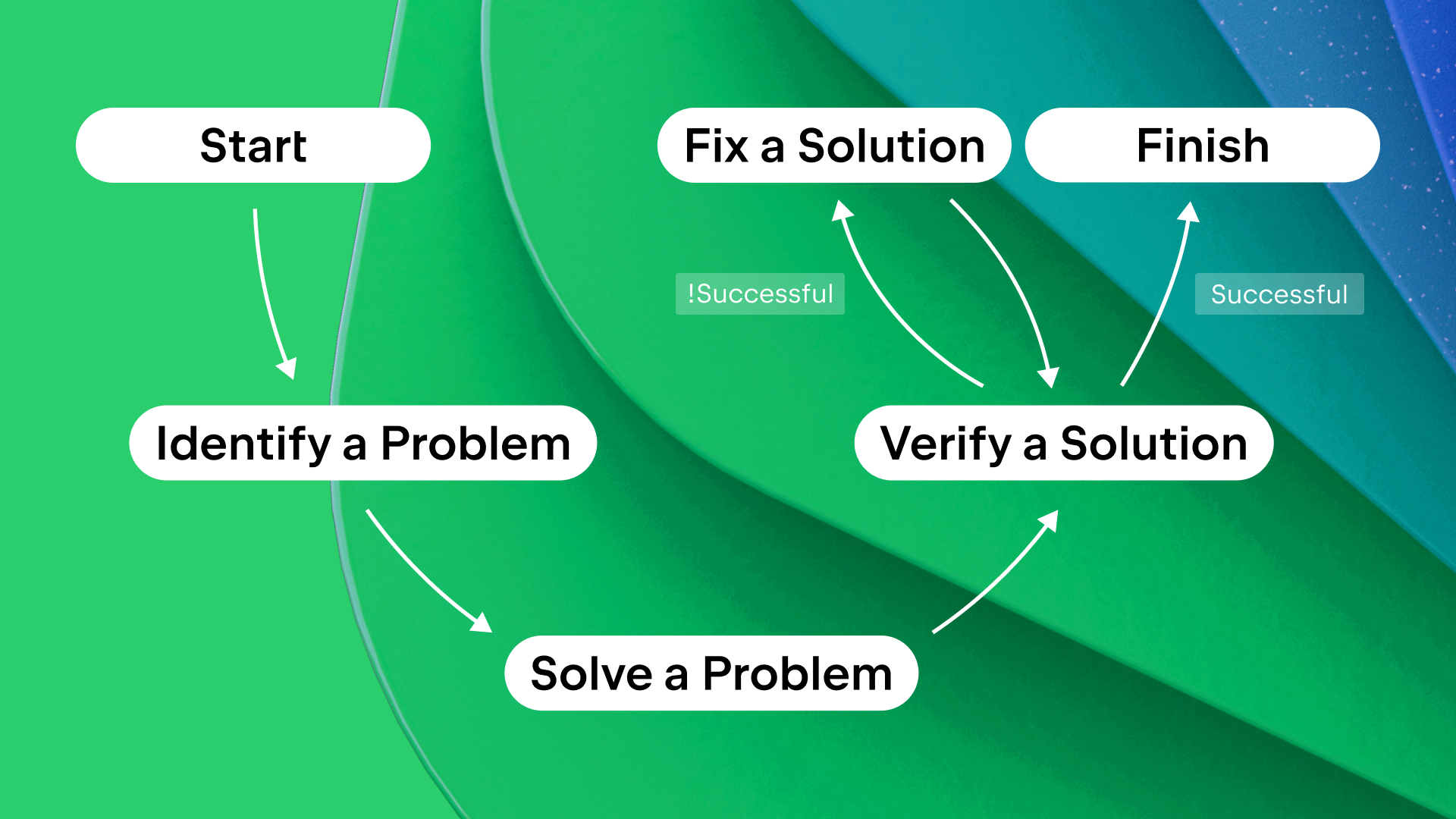
Each node is type-safe, ensuring that the outputs from one node match the expected inputs of the next. You can find the full example here.
Planning strategies use goal-oriented action planning (GOAP) or LLM-based planning. Instead of defining the exact execution order, you define:
- Available actions with their preconditions (when they can run)
- Effects (what they change in the agent’s state)
- A goal condition (what the agent should achieve)
The planner automatically figures out the optimal order for executing actions to reach the goal. This is powerful for complex scenarios where multiple paths might work, or when requirements change dynamically. See a detailed example here.
Persistence for fault tolerance
AI agents often handle complex, multi-step tasks that can take seconds or even minutes. During this time, servers can crash, network connections can fail, or deployments can happen. Without persistence, your agent would have to start all over again, wasting time and money on repeated LLM calls.
Koog’s persistence feature saves agent state to disk, S3, or a database after each step. If something fails, the graph-based agent can resume from exactly where it stopped, not from the beginning. It will restore at the last individual node and preserve all progress made before the failure:
// First, configure where to store checkpoints
// Can be Postgres, S3, local disk, or your own implementation
var storage = new PostgresJdbcPersistenceStorageProvider(
    dataSource = dataSource,
    tableName = “banking_agent_checkpoints”
)

// Install the Persistence feature on your agent
var recoverableAgent = AIAgent.builder()
    // ... other agent configuration
    .install(Persistence.Feature, config -> {
        config.setStorage(storage);
        config.setEnableAutomaticPersistence(true);  // Auto-save after each step
    })
    .build();

// First run - starts fresh
recoverableAgent.run("Help me with my account", "user-session-0123");

// If a crash happens mid-execution...

// Second run with same session ID - automatically recovers and continues
recoverableAgent.run("Help me with my account", "user-session-0123");
The session ID ties checkpoint data to a specific user session (like a user ID or request ID). This lets you run multiple agent instances simultaneously without conflicts.
Observability with OpenTelemetry
When running agents in production, you need visibility into what they’re doing. Which tools did they call? How many tokens did each LLM request use? Where are the bottlenecks? Where did costs come from?
Koog integrates with OpenTelemetry to provide this visibility. Connect to backends like Langfuse or W&B Weave to see detailed traces of agent execution, including nested events (nodes, tool calls, and LLM requests), token counts, costs, and timing information:
var observableAgent = AIAgent.builder()
    // ... other agent configuration
    .install(OpenTelemetry.Feature, config -> {
        // Export telemetry data to your observability backend
        config.addSpanExporter(OtlpGrpcSpanExporter.builder()
            .setEndpoint("http://localhost:4317")  // Your OpenTelemetry collector
            .build());
    })
    .build();
Once configured, every agent run automatically generates detailed traces that you can explore in your observability tool.
History compression
As agents work on complex tasks, their conversation history grows with every LLM call and tool invocation. This history is sent with each subsequent request to provide context. But longer context means:
- Slower LLM responses
- Higher costs (you pay per token)
- Eventually hitting context window limits
Koog’s history compression solves this by intelligently summarizing or extracting key information from the history, reducing token usage while preserving what’s important:
var agentWithCompression = AIAgent.builder()
    .functionalStrategy("compressed", (ctx, userInput) -> {
        var response = ctx.requestLLM(userInput);
        // Your agent logic...

        // When history gets long, compress it
        ctx.compressHistory();
    })
    .build();
You can customize how compression works:
HistoryCompressionStrategy.WholeHistory– compress entire history into a summary.HistoryCompressionStrategy.FromLastNMessages(100)– only compress the last N messages.HistoryCompressionStrategy.Chunked(20)– compress in chunks of N messages.RetrieveFactsFromHistory– extract specific facts from history (e.g. “What’s the user’s name?” or “Which operations were performed?”).
You can also implement your own history compression strategy.
Managing Java threads
In a typical Java application, you want fine-grained control over thread pools. Maybe you have a dedicated pool for CPU-bound work and another for I/O operations. Koog lets you specify a separate ExecutorService for each part of an agent’s execution:
var threadControlledAgent = AIAgent.builder()
    .promptExecutor(promptExecutor)
    .agentConfig(AIAgentConfig.builder(OpenAIModels.Chat.GPT5_2)
        .strategyExecutorService(mainExecutorService)      // For agent logic
        .llmRequestExecutorService(ioExecutorService)      // For LLM API calls
        .build())
    .build();
This separation lets you optimize resource usage – for example, using a larger pool for I/O-bound LLM requests while keeping a smaller pool for strategy execution logic.
Try Koog for Java
Koog for Java brings enterprise-grade agent engineering to your Java applications with an API that feels natural and idiomatic. Whether you’re building simple tool-calling agents or complex multi-step workflows with persistence and observability, Koog provides the abstractions you need.
Get started here: https://docs.koog.ai/