JetBrains AI
Supercharge your tools with AI-powered features inside many JetBrains products
Using ACP + Deep Agents to Demystify Modern Software Engineering

This guest post comes from Jacob Lee, Founding Software Engineer at LangChain, who set out to build a coding agent more aligned with how he actually likes to work. Here, he walks through what he built using Deep Agents and the Agent Client Protocol (ACP), and what he learned along the way.
I’ve come to accept that I will delegate an ever-increasing amount of my work as a software engineer to LLMs. I was an early Claude Code superfan, and though my ego still tells me I can write better code situationally than Anthropic’s proto-geniuses in a data center, these days I’m mostly making point edits and suggestions rather than writing modules by hand.
This shift has made me far more productive, but I’ve become increasingly uncomfortable with blindly turning over such a big part of my job to an opaque third party. While training my own model was out of the question for many obvious reasons (and model interpretability is an unsolved problem anyway), the agent harness and UX on top of it is just software, and software IS something I understand. So when I had some free time during my paternity leave, I took a stab at building some tooling to my own specifications.
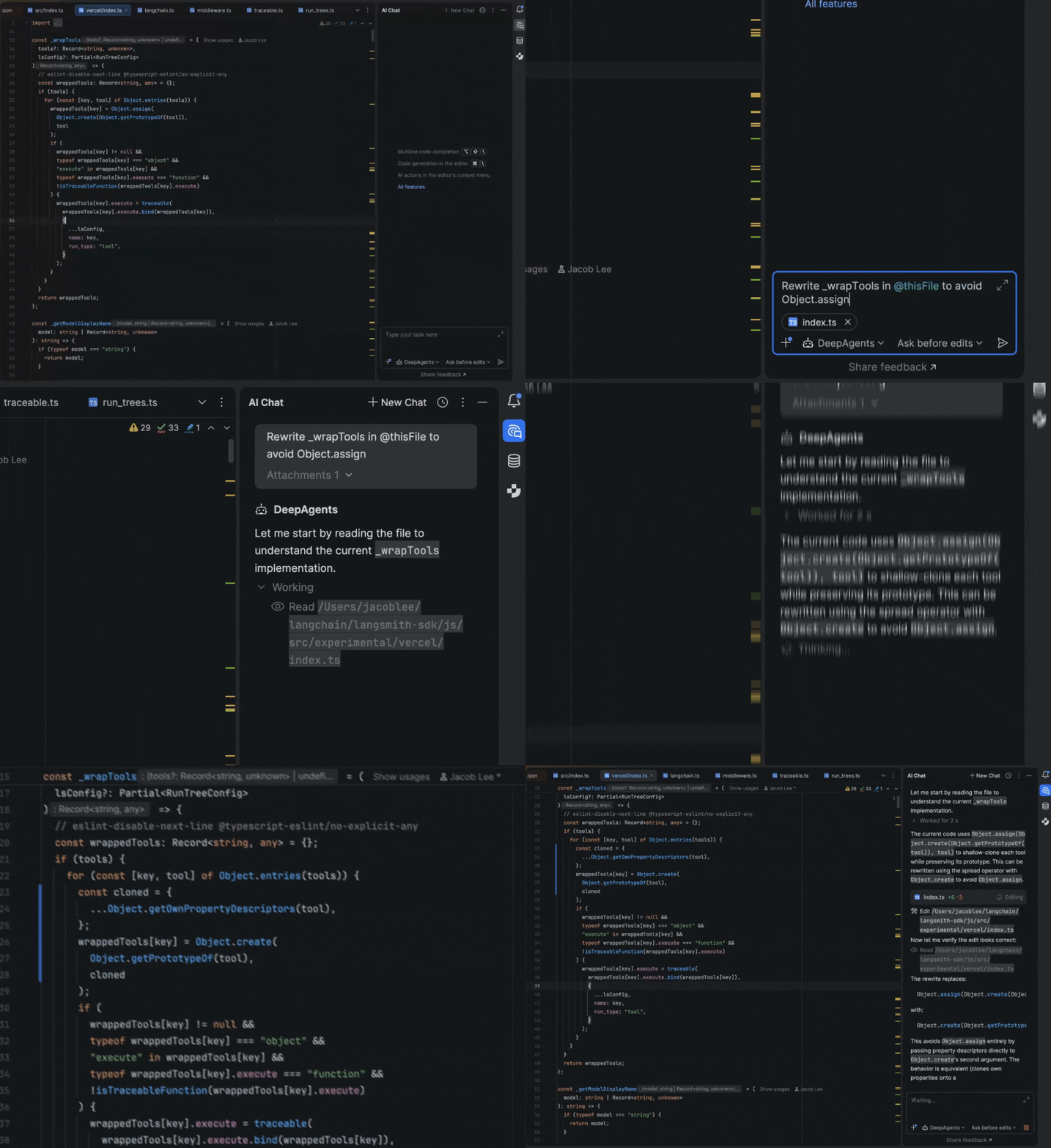
I work at a startup called LangChain, where we’ve been developing our own set of open-source agentic building blocks, and I settled on building an adapter between our Deep Agents framework and Agent Client Protocol (ACP). My goal was just to build a bespoke coding agent that fit my workflows, but the results were better than I expected. Over the past few months, it’s completely replaced Claude Code as my daily driver, with the added benefit of full observability into my agent’s actions by running LangSmith on top. In this post, I’ll cover how it works and how to set it up for yourself!
Why an IDE + ACP instead of a terminal + TUI?
If you’re not familiar with ACP, it’s an open protocol that defines how a client (most often used with IDEs like WebStorm or Zed) interacts with AI agents. It allows you to do cool things like quickly pass a coding agent the exact context you’re looking at in an IDE.
I’ve gotten quite used to being productive in IDEs over my decade writing software professionally, and I still find them valuable for a few reasons:
- I do still edit code by hand occasionally. Most often, these are small edits I can make faster than explaining the problem to an agent, or because I can do something in parallel alongside a running agent, like adding debug statements, but this still provides some alpha.
- IDEs are fantastic interfaces for viewing code in context. I most often use this to understand the general scope of a problem before prompting, or to self-review my current branch, but it’s also often just faster for me to point the agent at a file rather than asking it to
greparound.
I previously used Claude Code in a separate terminal pane in an IDE, which worked but always felt like two disconnected tools. In JetBrains IDEs, the agent lives in a native tool window with tight integration. I can @mention the file or block of code I’m currently looking at, and many of my threads are littered with messages like “Take a look at this. Does it look funny? @thisFile“.
How it works
The agent
Though I could have created the various pieces for my agent from scratch, Deep Agents provided a good, opinionated starting point, providing the following:
- Tools around interacting with the filesystem (
read/write/edit_file,ls,grep, etc.).
- Shell access, which allows the agent to run verifications like lint, tests, and more.
- Alongside this, human-in-the-loop support to allow restricting dangerous actions
- A
write_todostool, which encourages the agent to take a planning step that breaks work into steps and tracks progress.- In practice, this makes a big difference for longer refactors to keep the agent focused.
- Capabilities around spawning isolated sub-agents for parallel or compartmentalized work.
- Each one gets its own context, runs independently, and reports back, keeping the model’s context window manageable.
- Other important UX features like streaming, cancellation, prompt caching, and context summarization.
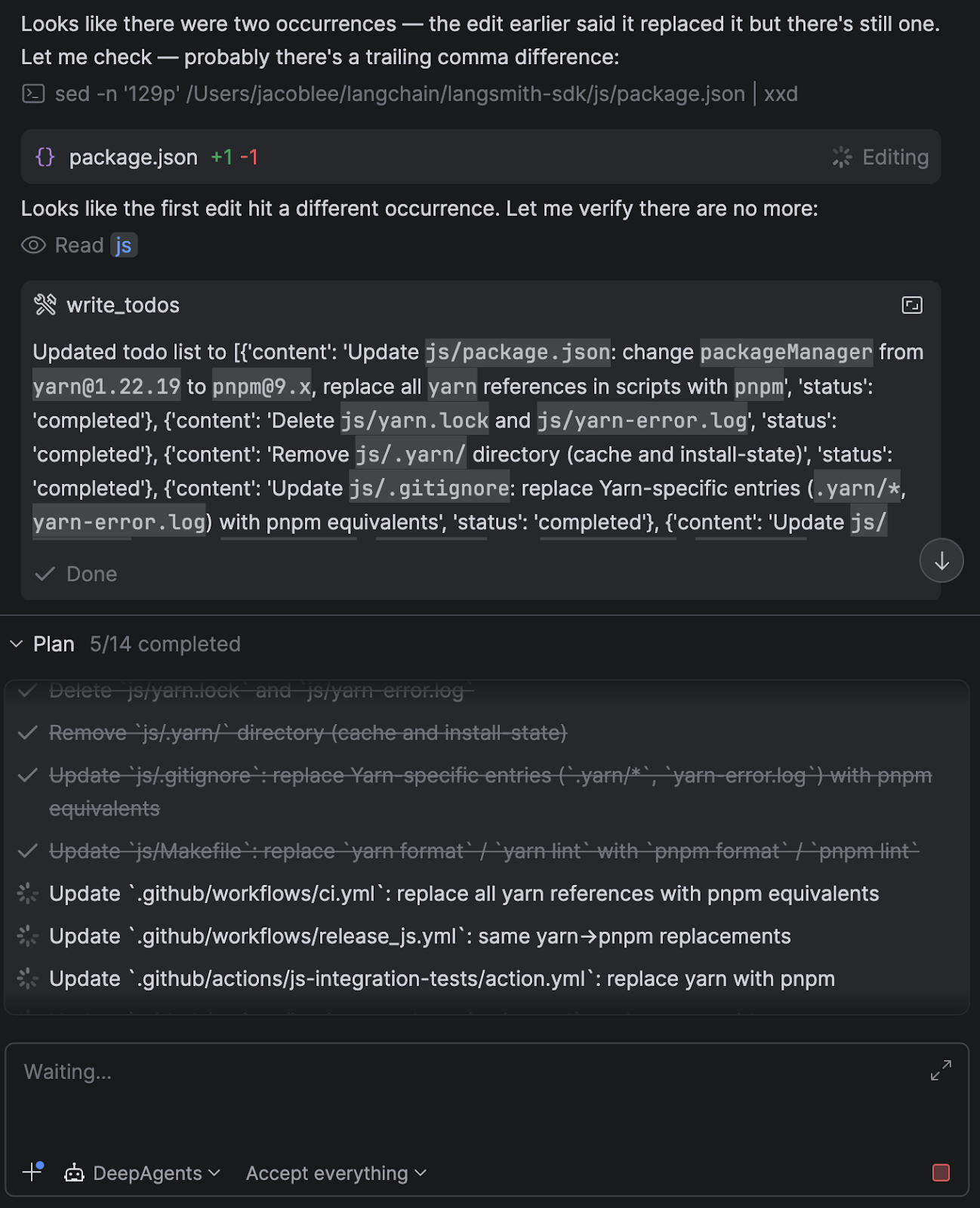
I also added some custom middleware that appends information about the current project setup in the system prompt, such as the current directory open in the IDE, whether a git repo was present, package manager detection, and more.
It’s also possible to add skills, tweak the system prompt, add custom tools or MCP servers, and more, directly in Python, rather than having to create a new CLI config option.
The ACP adapter
After deciding on a basic agent setup, I needed to hook that agent into the client via ACP. I created an adapter that implements the ACP interface and handles the session lifecycle, message routing, model switching, and streaming.
One nice surprise was how cleanly the agent’s capabilities mapped onto ACP concepts.
For example:
- The agent’s planning step (
write_todos) maps naturally to agent plans in ACP.
- Interrupts from the agent (e.g. “I want to run this command”) map to permission requests.
- Threads and session persistence were nearly 1:1 with Deep Agents checkpointers.
This meant I didn’t need to invent much glue logic – the protocol already had good primitives for most of what I wanted. The overall agent runner looks roughly like this, minus the tool call and message formatting:
current_state = None
user_decisions = []
while current_state is None or current_state.interrupts:
    # Check for cancellation
    if self._cancelled:
        self._cancelled = False  # Reset for next prompt
        return PromptResponse(stop_reason="cancelled")

    async for stream_chunk in agent.astream(
        Command(resume={"decisions": user_decisions})
        if user_decisions
        else {"messages": [{"role": "user", "content": content_blocks}]},
        config=config,
        stream_mode=["messages", "updates"],
        subgraphs=True,
    ):
        if stream_chunk.__interrupt__:
            # If Deep Agents interrupts, request next actions from
            # the client via ACP's session/request_permission method
            user_decisions = await self._handle_interrupts(
                current_state=current_state,
                session_id=session_id,
            )
            # Break out of the current Deep Agent stream. The while
            # loop above resumes it with the user decisions
            # returned from the session/request_permission method
            break

        # ...translate LangGraph output into ACP
        # Tools that do not require interrupts are called
        # internally results are just streamed back here as well

        # current_state will be none when the agent has finished
        current_state = await agent.aget_state(config)

return PromptResponse(stop_reason="end_turn")
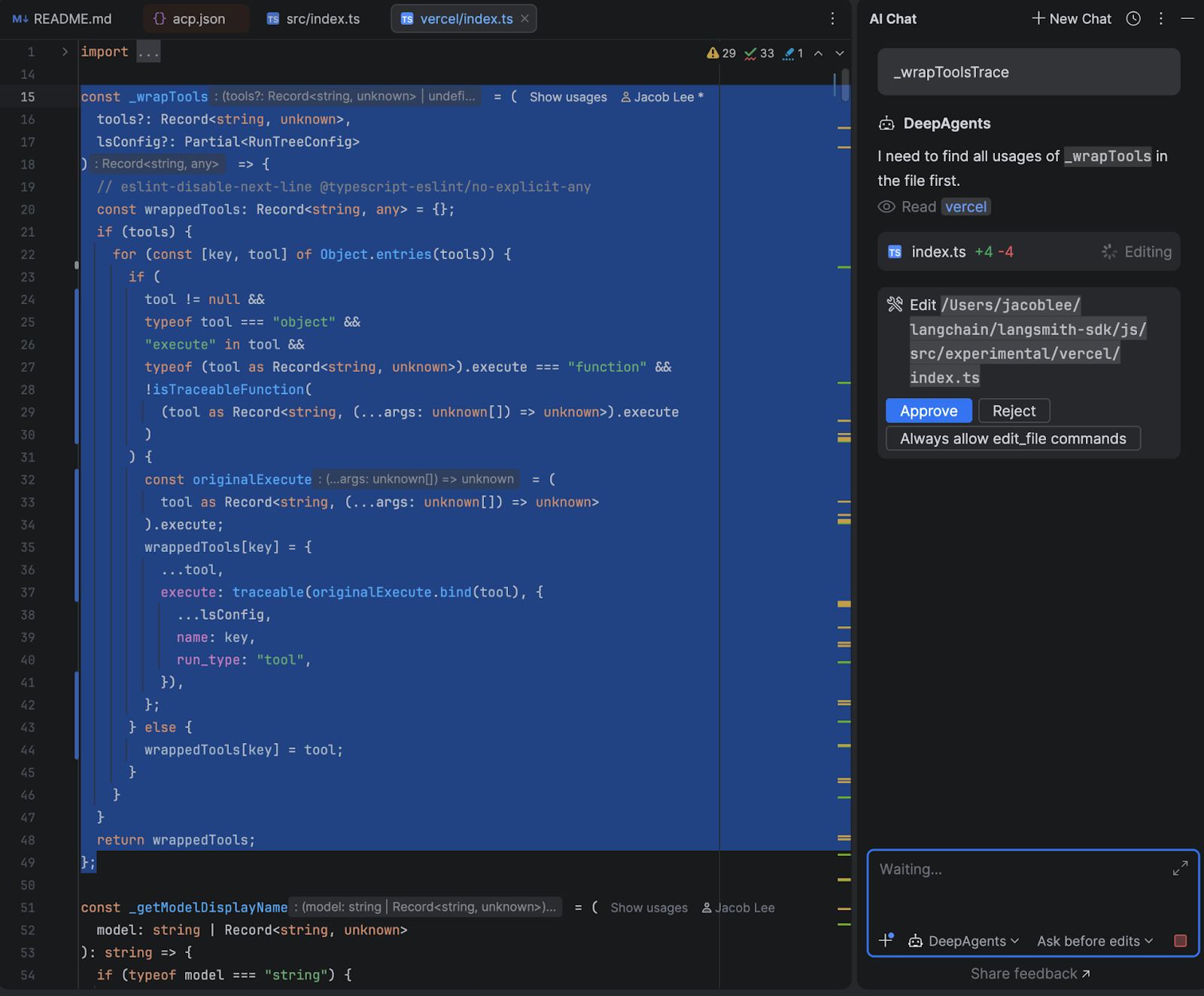
The human-in-the-loop flow was where I spent the most time. When the agent wants to run a shell command or make a file edit that requires approval, the adapter intercepts the interrupt from Deep Agents, and depending on what permissions mode the user has selected and what they have previously approved, either resumes immediately or sends a permission request to the IDE with options to approve, reject, or always-allow that command type.
The always-allow is session-scoped – if you approve uv sync once and choose “always allow”, subsequent uv sync calls skip the prompt automatically, but I made efforts to prevent similar commands such as uv run script.py from bypassing the permission check.
Here’s how the end result looks in WebStorm:
How it went
While I haven’t run formal evals, I was pleasantly surprised by how well my agent performed after only a few iterations. I didn’t actually expect to switch away from Claude Code, and it was a great dogfooding exercise as well, since our OSS team was able to upstream some of my feedback back into Deep Agents itself.
My original goal of regaining code-level, rather than config-level, control over my daily workflows has also been great. When Anthropic had an outage a few weeks ago, I was able to switch over to OpenAI’s gpt-5.4 without skipping a beat, and I even found that it had some interesting quirks. I switch back and forth between models mid-session to gain different perspectives from each model when working on tricky tasks, and have also found open-source models like GLM-5 are quite capable while offering significant cost savings.
Another boon is observability via LangSmith tracing, which allows me to debug and improve my agent when I run into issues. Being able to see exactly what context was passed to the model, which tools it called, and where it went sideways helped me understand behaviors that were previously hidden inside the harness. Here’s an example of what such a trace looks like:
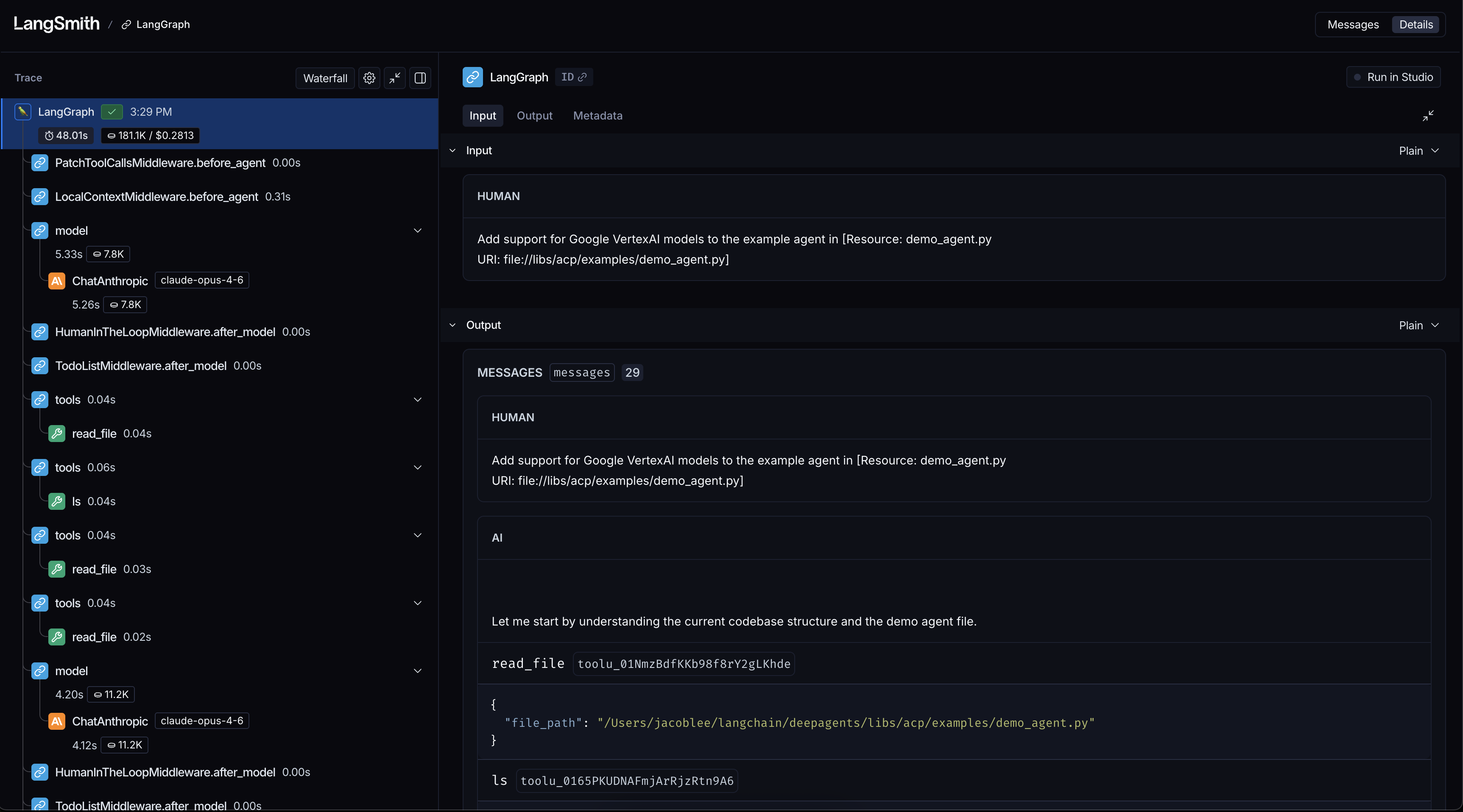
For example, when I noticed that my agent was starting to take wide, slow sweeps of my filesystem, I used a trace to find a bug in my system prompt that told the agent the project was at the filesystem root rather than the current working directory.
Taking back your dev workflows for fun and profit
What started as a small late-night project I worked on around taking care of a newborn daughter turned into a huge success, both for my own understanding of agent behavior and for improving my daily workflow.
It proved to me that Claude Code isn’t magic but a bundle of very clever tricks rolled up into a neat package. The harness layer is just software, and software is something any developer can shape to fit how they want to work.
If you’re curious, I’d highly recommend trying an experiment like this yourself. Even a small prototype can teach you a lot about how these systems think and where they break. Clone the repo and follow the setup guide here to get started from source code. I’d love to know what you think. You can reach out to me on X @Hacubu to let me know!
Special thanks to @veryboldbagel and @masondxry for helping productionize the adapter and dealing with my unending questions and feedback!