Modern C++ Support in CLion: What’s New

Modern C++ makes advanced high-performance techniques more accessible, with features like compile-time computation, zero-overhead abstractions, and expressive template code. But as your codebase grows, your ability to use these techniques productively depends heavily on how well your tooling understands them. Without proper language engine support, modern C++ features can lead to false positives, broken navigation, and missing completion, rather than productivity gains.
Supporting these techniques is a core part of what CLion’s language engine is built for – and it keeps getting better. In this blog post, we’ll look at the most interesting improvements introduced in recent releases. To get all the updates mentioned here, you need CLion 2026.1 or later with the CLion Nova engine enabled.
C++26 features
C++26 is a large release with dozens of new features, including ones that extend compile-time capabilities and simplify metaprogramming. CLion now supports all major C++26 features except reflection, which we plan to implement in the upcoming 2026.2 release (CPP-48365). Here are some examples:
#embed preprocessor directive: This feature allows you to embed the contents of binary files – such as images, icons, or encoded text – directly into your source code at compile time as byte arrays.
constexpr unsigned char logo[] = {
#embed "logo.png"
};

constexpr std::size_t logo_size = sizeof(logo);
Before C++26, this typically required external tools or custom scripts to convert binary files into C arrays, which you then had to manually sync with the source files – #embed removes that step.
Pack indexing: You can now access individual elements of a parameter pack directly by the element’s index using the pack...[index] format, for example, values...[0], values...[2], and so on.
template <std::size_t I, typename... Ts>
constexpr auto element_at(Ts... args) {
   // Use pack indexing to access an element
   return args...[I];
}
Previously, extracting a specific element required recursive template specializations or helper utilities. Now it’s as easy as indexing into an array.
Variadic friends: This feature lets you grant friendship to all classes in a template parameter pack. This is particularly useful in patterns where a group of closely related types – such as nodes in a data structure – need access to each other’s private class members.
template <class... Ts> class X {
   int data = 42;
   friend Ts...;
};

struct A {
   int get(X<A> x) { return x.data; }
};

struct B {
   int get(X<A, B> x) { return x.data; }
};
Previously, each friendship had to be declared individually, which became cumbersome as the number of types grew.
Updates to constexpr support
Compile-time code in C++ is powerful, but debugging it often requires dealing with cryptic compiler errors and little context. CLion’s latest releases bring features and improvements that make constexpr code significantly easier to debug and validate.
Constexpr Debugger
CLion 2025.3 introduced the Constexpr Debugger – the first in-IDE debugger to let you step through compile-time evaluations of constexpr and consteval code. From the debugger, you can inspect locals, navigate the call stack, and even step backward through each evaluation stage.
It’s especially helpful when constant evaluation fails. Instead of deciphering compiler errors, you can run the evaluation until failure and let CLion stop exactly at the point where things went wrong – with the full context in view.
Early detection of constexpr evaluation failures
The IDE now also provides an inspection that detects constexpr evaluation failures, for example, non-constexpr function calls or logic errors. The corresponding popup presents an evaluation trace to help you identify and fix the problems more easily.
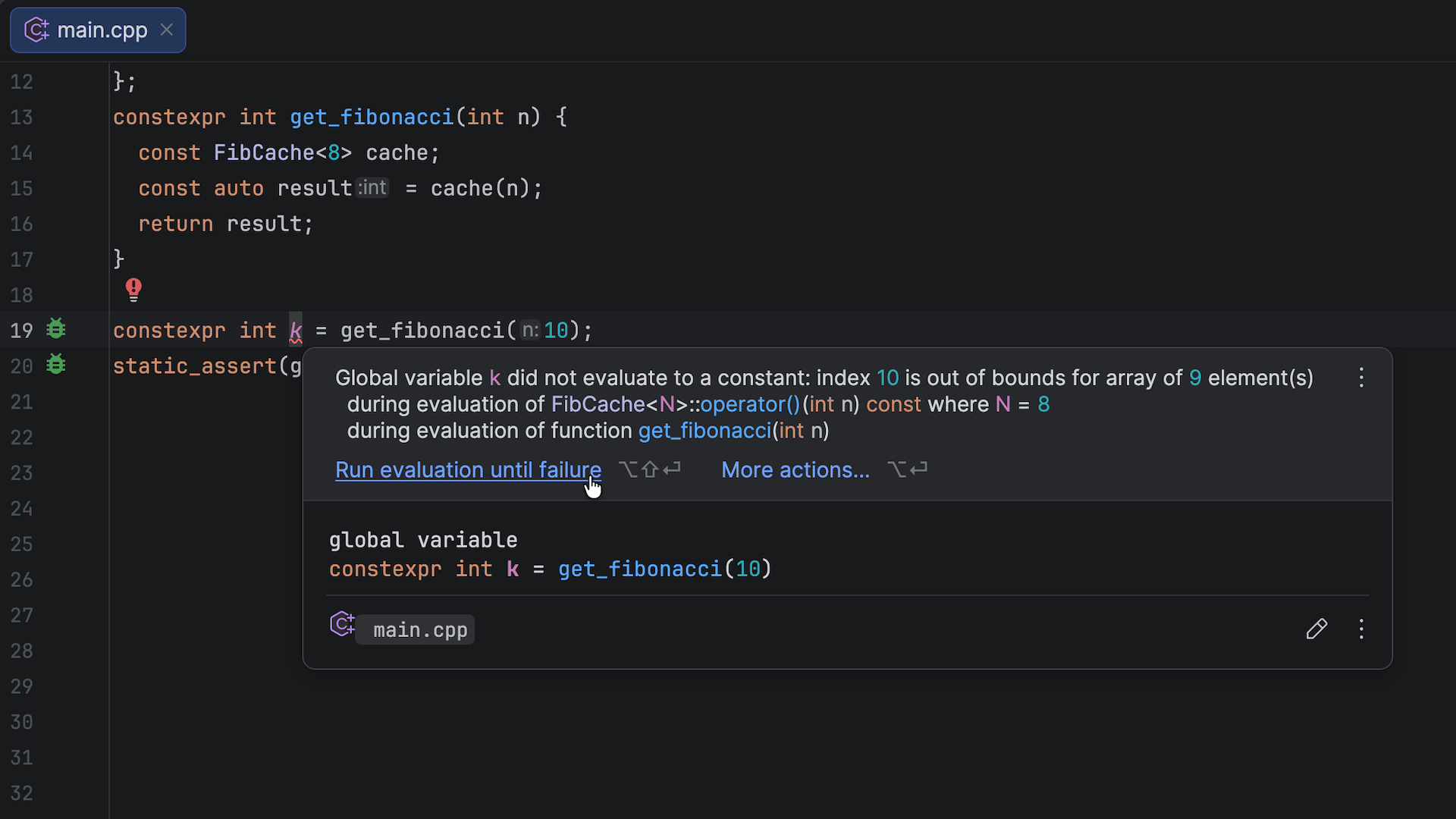
You can also use the Constexpr Debugger to investigate the cause of a problem in more detail by clicking Run evaluation until failure in the popup. The Constexpr Debugger will run and stop at the point of the failed evaluation. You can then use Step Into, Step Over, Step Backward, and other actions to debug the code. Learn more in the documentation.
Other updates to constexpr evaluation
We extended CLion’s constexpr evaluation capabilities to cover a wider range of C++ constructs and features, including:
switchstatementsifstatements with initializers- Structured bindings
- Trivial default initialization
- C++20’s defaulted
operator==
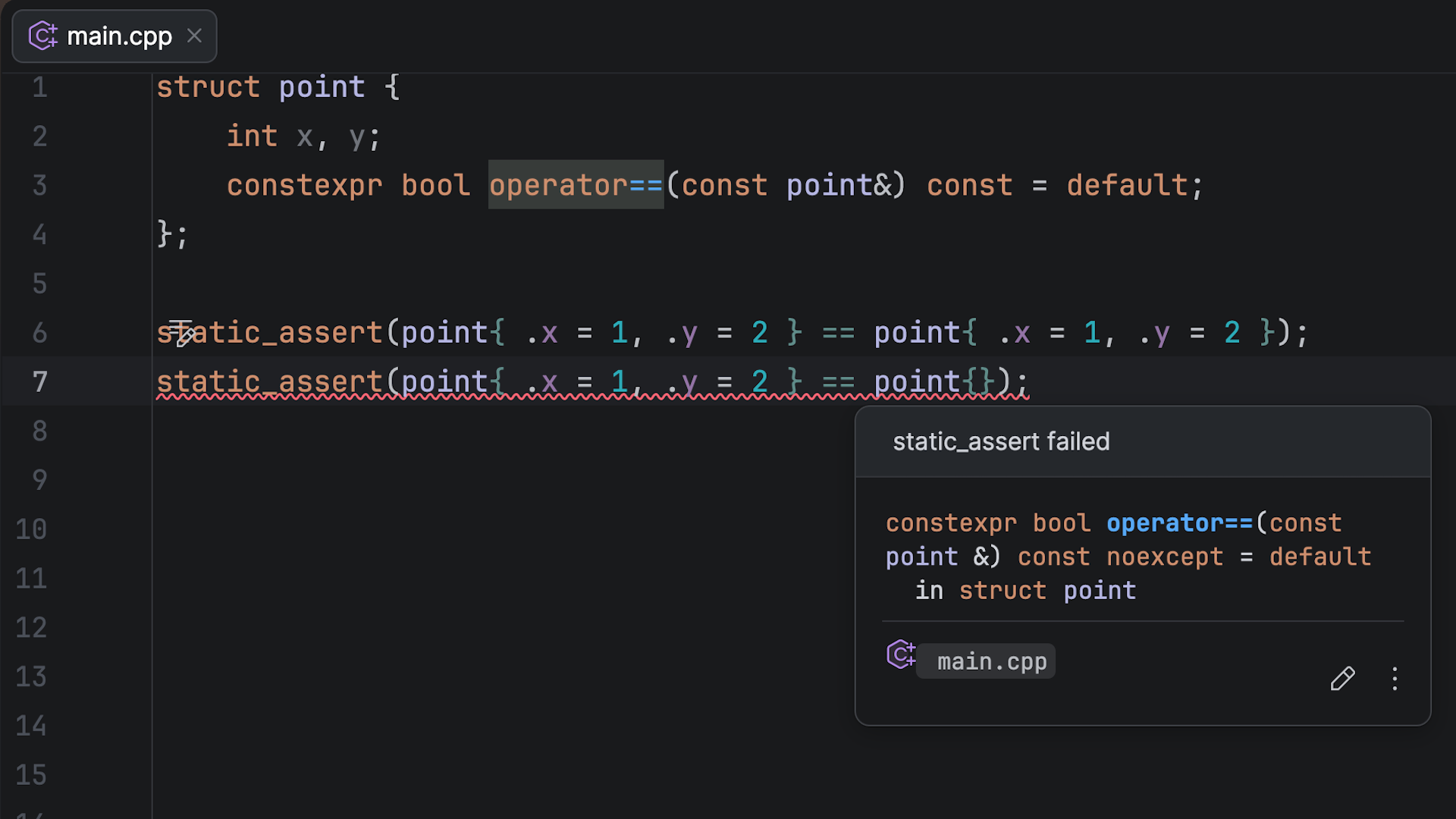
The following example shows CLion’s warning when evaluation of operator== fails:
The constexpr evaluator still doesn’t support some constructs. You can track our progress in the related YouTrack issues and upvote the ones that matter most to you.
New GCC and Clang extensions
We’ve improved the compatibility with compiler-specific extensions by adding support for the following:
Nested functions: CLion now supports the GCC extension for defining functions inside other functions in C code, which is useful when working with legacy codebases or embedded projects that rely on this pattern.
int main(void) {
   int outer_var = 10;

   // Define the nested function
   void nested_function() {
       printf("Inside nested function\n");
       printf("Accessing outer variable: %d\n", outer_var);
   }

   // Call the nested function
   nested_function();
   return 0;
}
_Nullable and _Nonnull qualifiers: Clang’s pointer nullability qualifiers indicate whether a pointer can be null or not. The parser now recognizes these qualifiers, so code that is shared with Apple platforms or that uses Clang-specific APIs no longer produces false-positive warnings or incorrect inspections.
Conditionals with omitted operands: The x ?: y shorthand, where the middle operand is omitted, is especially useful in GNU C codebases, providing a fallback value without repeating the condition.
Designated initializer range syntax: This GCC extension lets you initialize a range of array elements to the same value in a single expression, like int arr[100] = { [0 ... 49] = 0, [50 ... 99] = 1 };. This syntax is handy in embedded and system development for initializing hardware register maps, lookup tables, or memory-mapped I/O buffers that require arrays to have predictable default values.
New code assistance and refactoring features
CLion’s code assistance and refactoring capabilities have received several improvements designed to reduce manual cleanup and repetitive work. These include smarter module imports, new inspections that catch common mistakes early, refactoring support in inactive code blocks, and automatic definition sorting.
Auto-import for C++20 modules auto-import
When you use an exported symbol but the corresponding import declaration is missing, CLion suggests inserting it automatically with a shortcut (Alt + Enter on Windows and Linux or ⌥↩ on macOS).
Note that currently, auto-import for C++20 modules works for symbols exported directly from primary module interface units and module partitions.
New inspections
We’ve added several new built-in inspections that help you keep your code cleaner and easier to read. Here are some examples:
- CLion now automatically detects duplicate forward declarations, highlights them in gray, and offers a quick-fix to remove them, so you don’t have to hunt for them manually. You can also do this with a shortcut (Alt+Enter on Windows and Linux or ⌥↩ on macOS).
- If your project targets C++20 or later and contains the
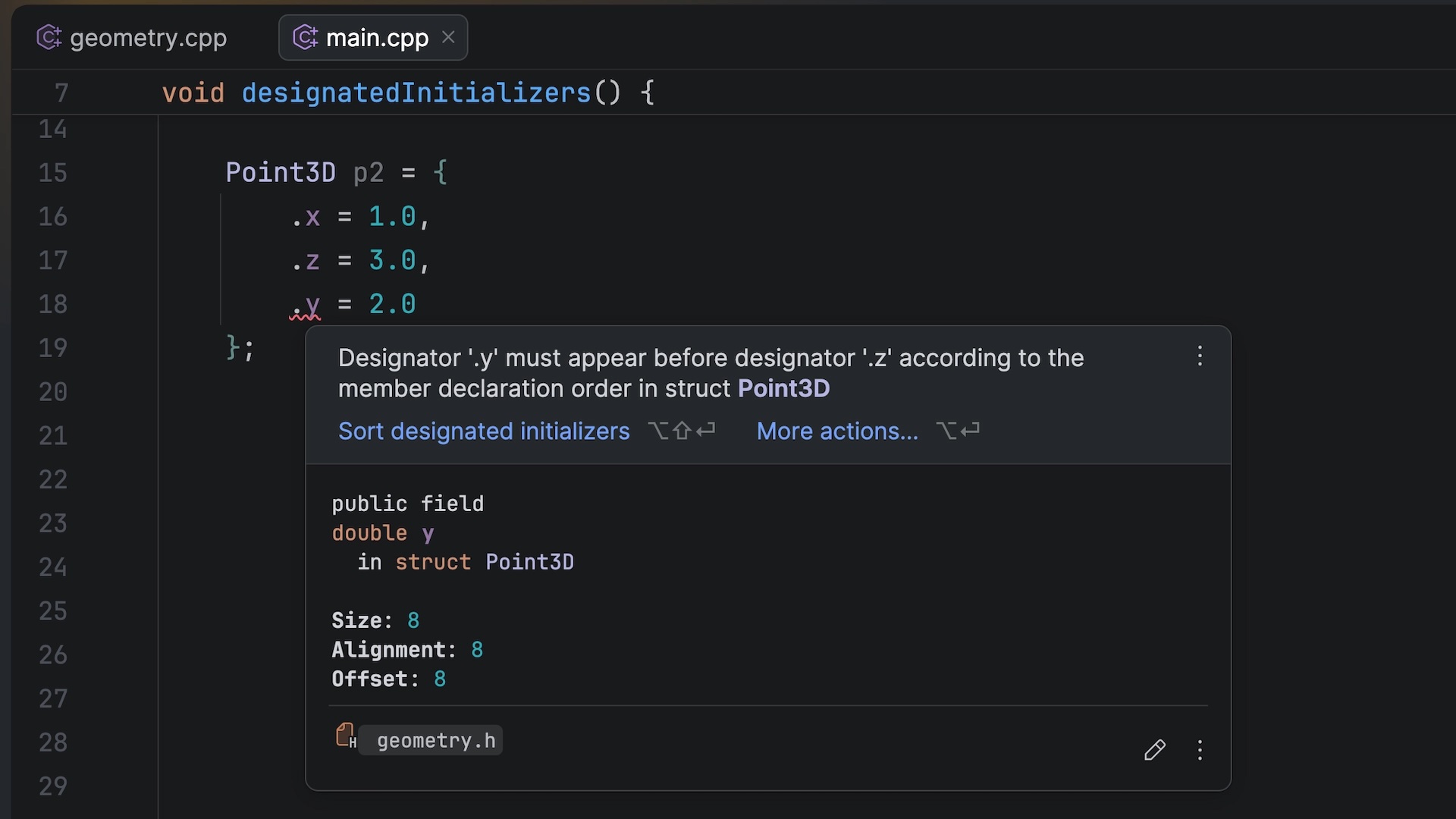
typenamekeyword in contexts where it’s no longer required, CLion identifies these cases and offers a quick-fix to remove them. - The IDE now detects instances where C++20 designated initializers are in the wrong order relative to their declarations within the struct. CLion highlights the problem directly in the editor, so you can see it immediately rather than after compilation.
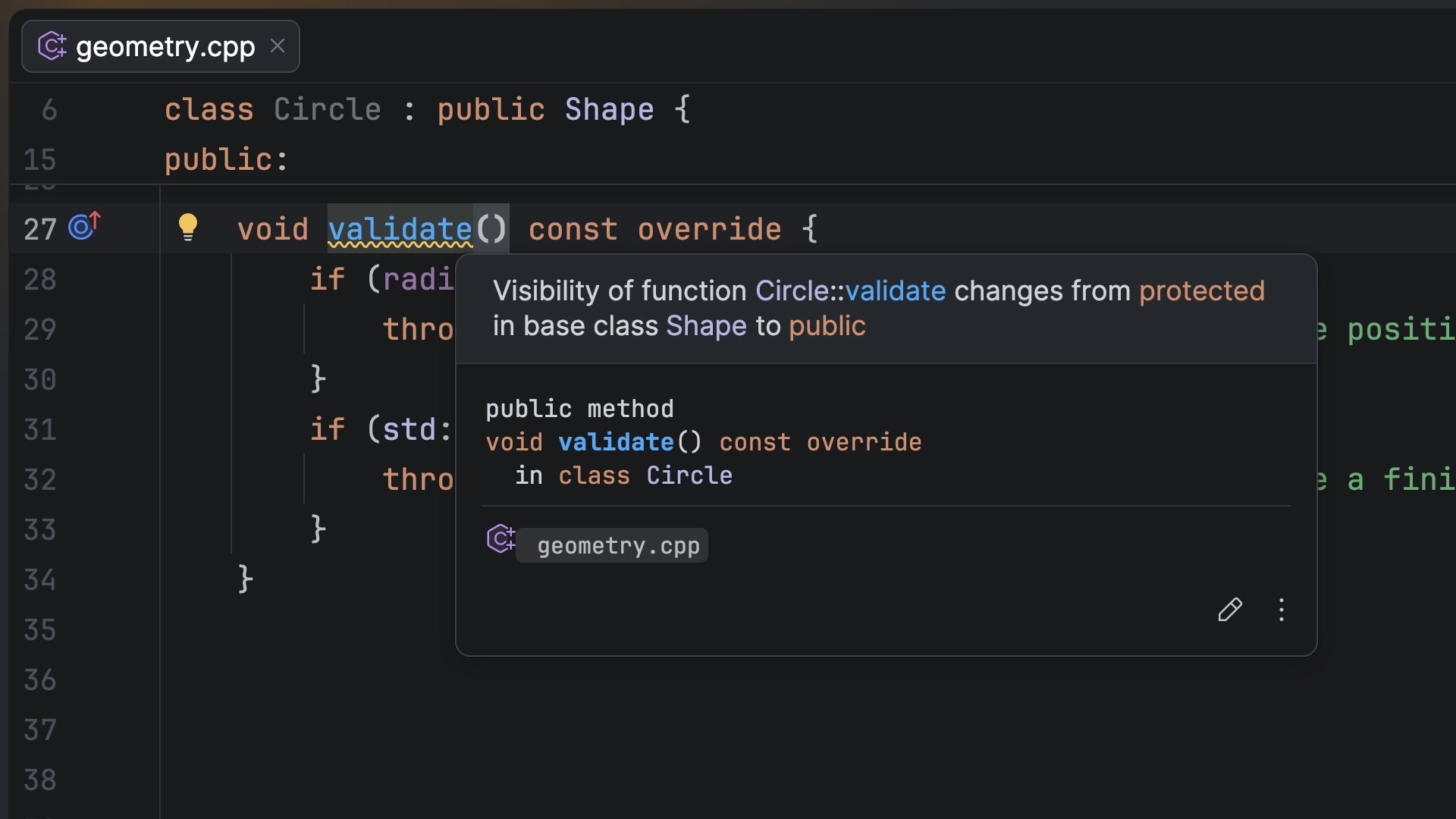
- Another new inspection warns you when a function has a different access level than the virtual function it overrides in the base class. For example, a
publicvirtual function in the base class can be overridden asprivatein the derived class. CLion helps you catch such access mismatches, which are often unintended but allowed by compilers.
Improved code assistance and refactorings in inactive code
Code analysis, code completion, and local refactorings are now fully available inside inactive preprocessor blocks, so you can edit platform-specific code without switching your build configuration.
Automatic definition sorting
CLion can now automatically sort function definitions in a source file to match the declaration order in the corresponding header file. For a one-time fix, use the Sort definitions by the order of declaration context action to reorder definitions for a single function, a whole file, or the entire project. For continuous monitoring, enable the corresponding style option in Settings | Editor | Code Style | C/C++ | Syntax Style. CLion will then flag any mismatches with an inspection, and you can fix them automatically with a single click.
The ability to edit naming rules
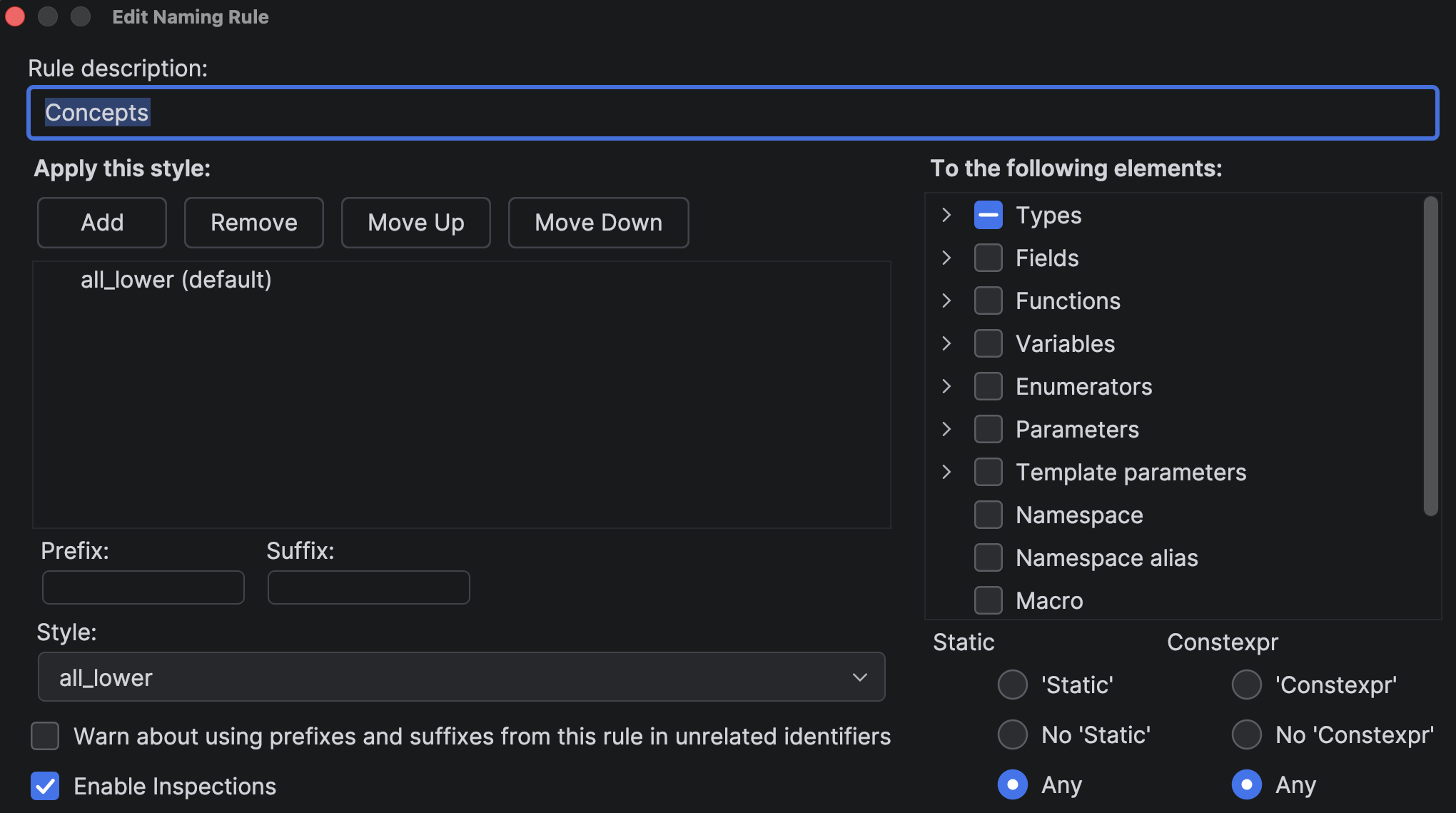
CLion now provides a new Edit Naming Rule dialog as part of the work to improve support for C/C++ naming rules. To get to this dialog, navigate to Settings | Editor | Code Style | C/C++ | Naming, then select a rule and click Edit, or just double-click it.
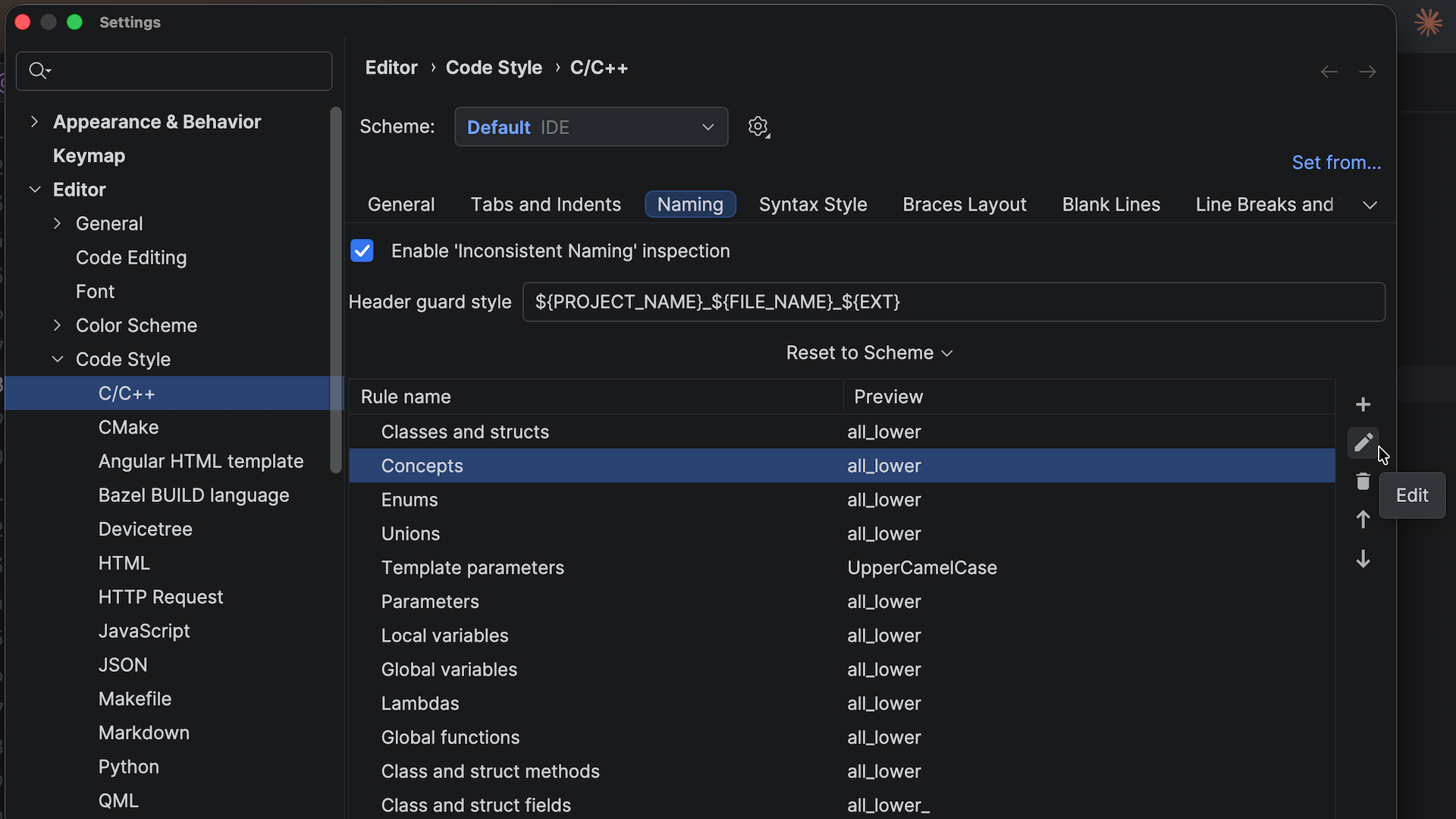
Each naming rule allows one or more styles, and for each style, you can configure the base naming pattern, the prefix and suffix, and more.
Conclusion
The improvements covered in this post are powered by CLion Nova, CLion’s custom C++ engine. Many thanks to the C++ Core team for developing it!
We’ll keep highlighting the most interesting language engine updates in upcoming release posts – more to come.