JetBrains Research
Research is crucial for progress and innovation, which is why at JetBrains we are passionate about both scientific and market research
理解 AI 对开发者工作流的影响

AI 编码助手不再是华而不实的附加工具:它们已经成为我们日常工作流的标准组成部分。我们了解开发者对它们的短期看法,很多开发者表示,借助 AI 编码助手,他们可以完成更多工作,并减少花在样板代码编写或枯燥任务上的时间。但对于在真实项目中经过数年实际工作后会发生什么,以及开发者所感知到的工作流的变化是否真的发生了改变,我们知之甚少。
目前已有很多关于开发者与 AI 交互的研究,但现有研究往往在规模或深度上存在局限,且很少有研究会进行长期调查。我们的人类-AI 体验团队 (HAX) 对开发者长期使用 AI 工具的体验很感兴趣,因此他们对 800 名软件开发者两年的日志数据进行了分析。他们还想分析开发者的主观感知,并将其与客观数据进行对比,于是开展了问卷调查和后续访谈。
在此,我们将展示 HAX 团队采用混合方法研究取得的成果,我们的团队将在里约热内卢举行的 ICSE 2026 上展示这些成果。
这项研究揭示了随着 AI 工具的引入,开发者的工作流会有怎样的演进。研究得出的一项重要结论是,AI 重新分配并重塑了开发者的工作流,而开发者自身往往难以察觉这些变化。
在这篇博文中,我们将:
- 介绍本研究采用的方法,具体来说,包括:
- 为期两年的日志数据
- 调查和访谈的回复
- 描述开发者工作流的组成部分,包括先前的相关研究。
- 探讨混合方法研究的成果。
分析开发者如何借助 AI 工具改进其工作流
在本部分中,我们将介绍 HAX 研究的设置情况,从开发者的行为方式(使用日志数据)和开发者的主观感知(通过访谈)两个维度开展调查。
这种设计的主要优势在于,不同方法可以弥补彼此的盲点。日志可以显示工作流在发生变化,但无法说明原因;主观感知可以解释动机和背景,但存在偏见,且常常会忽略细微的行为转变。通过综合运用这两种研究方法,混合方法能够更轻松地发现主观感知与做法之间的偏差,从而更全面、更贴合实际地还原 AI 重塑日常开发工作的全貌。
研究中采用的遥测技术
遥测是一种成熟的数据收集方法,至少从 19 世纪起便投入使用。这个词本身源自希腊语,由表示“远”的 tele 和表示“测量”的 metron 构成,通常指远程收集的数据。使用遥测技术时,无需持续进行手动测量即可提高实验的准确性,并提升可观测性。
例如,在医疗环境中,遥测技术可用于长期测量血压、心率和血氧水平。在研究中,遥测技术可用于捕获连续的实时数据(例如,生理信号、环境信号或系统性能信号),并将其发送到中央系统进行监测和分析。
在我们的研究上下文中,遥测是指 IDE 在开发者工作时自动记录的一系列细粒度、匿名化事件:包括开发者采取的行动、采取行动的时间以及行动的先后顺序。也就是说,遥测技术收集的信息包括输入的字符数(而非实际字符)、调试会话启动次数、代码删除次数、粘贴操作次数,以及窗口焦点变化次数等。如果您感兴趣,可以查看我们的产品数据收集和使用声明,以获取更多详细信息。
根据先前的研究,我们了解到,遥测技术确实能够揭示开发者行为中有趣的规律。例如,这些研究人员发现,开发者实际上在理解活动上花费很大一部分时间 (70%),如阅读、浏览和审查源代码。
开发者的行为方式:调查为期两年的日志数据
对于本研究,遥测技术从行为方面的视角观察开发者工作流。我们并未询问开发者认为 AI 助手会对其工作流产生何种影响,而是关注于两年时间内编辑器中实际发生的行为:编写的代码量、编辑或撤消代码的频率、插入外部代码段的时间,以及开发者从其他工具切换回 IDE 的频率。通过汇总和比较 AI 用户和非 AI 用户的这些信号,遥测技术能够观察到日常做法中细微的长期转变,而这些转变仅通过调查或受控实验室任务很难捕捉到。
更具体地说,我们的团队使用了包括 IntelliJ IDEA、PyCharm、PhpStorm 和 WebStorm 在内的多款 JetBrains IDE 提供的匿名使用日志。我们筛选出了在 2022 年 10 月和 2024 年 10 月均处于活跃状态的设备,以便对同一批开发者进行为期两年的全面跟踪。请注意,选择第一个日期(2022 年 10 月)的原因是 ChatGPT 当时首次发布。
在此基础上,我们构建了两组研究对象:第一组包含 400 名 AI 用户,其设备在 2024 年 4 月至 10 月期间每月至少与 JetBrains AI Assistant 进行过一次交互;第二组包含 400 名非 AI 用户,其设备在研究期间从未使用过 AI 助手。之所以检查自 2024 年 4 月起的使用情况,是因为那时 AI 助手已在 IDE 中得到广泛应用,且性能已比较稳定;我们还希望确保用户确实已将 AI 助手融入其工作流。
由于遥测日志本身就比较复杂,我们的团队挑选出了定义明确的事件(即用户操作)来代表各个工作流维度,相关维度将在下文详细说明, 具体包括:
- 输入的字符数 – 工作效率
- 调试会话启动次数 — 代码质量
- 删除和撤消操作次数 – 代码编辑
- 未进行 IDE 内复制的外部粘贴事件数 – 代码重用
- IDE 窗口激活次数 – 上下文切换
当然,任何选定替代指标都有其局限性,我们选择的指标也是如此。尽管如此,此研究的目标是检测开发者工作流在一段时间内的变化规律,而非确定因果关系。
通过汇总每位用户每月的这些指标,我们可以观察 AI 用户与非 AI 用户每个维度流在一段时间内的变化情况,重点观察变化规律。总体而言,我们的数据集包含 800 名用户执行的 151,904,543 个日志事件。
我们的数据处理过程涉及到计算每台设备每月各类操作的总发生次数。这意味着我们拥有了包含每项操作月度计数的清晰、宏观的数据集,该数据集非常适合跟踪和识别有意义的行为趋势。
开发者的主观感知:从调查和访谈得出的定性洞察
为了将行为观察与开发者自身的感知相结合,我们的团队还面向专业开发者开展了一项在线调查。我们围绕相同的工作流维度设计了问题,询问他们认为 AI 助手对其工作效率、代码质量、编辑习惯、代码重用规律以及上下文切换产生了何种影响。共有 62 名开发者完成了调查,这让我们对开发者自开始使用 AI 工具以来所感知到的益处、弊端以及变化有了全面的了解。
有关调查的详细信息,请参阅论文的第 3.1 节,以及补充材料。除了受众特征问题外,调查还包括:
- 关于整体体验以及对 AI 编码工具依赖程度的量表问题
- 特定于工作流维度的开发者主观感知量表问题
- 要求提供工作流影响以及 AI 编码工具具体示例的开放性问题
前两类问题(第 1 项和第 2 项)采用 5 分制量表形式,要求参与者用分数表示对某项陈述的赞同或反对程度。在我们的调查中,量表关注的是变化程度:(1) 分表示显著降低,(5) 分表示显著提高。
第 2 项中的问题可以总结如下:
- 关于工作效率,我们直接询问了整体工作效率以及花在编码上的时间。
- 关于代码质量,我们直接询问了代码质量以及代码可读性。
- 关于代码编辑,我们询问了编辑或修改自己代码的频率。
- 关于代码重用,我们询问了使用外部来源代码(例如,库、在线示例或 AI 建议的代码)的频率。
- 关于上下文切换,我们直接询问了上下文切换(在不同任务或思考过程之间切换)的频率。
调查结束后,我们的团队邀请了一小部分参与者进行简短的半结构化访谈。在访谈中,我们深入了解了他们日常实际使用 AI 的情况:何时会使用 AI、如何决定是否信任某条建议,以及他们觉得当前工作的碎片化程度有何变化。这些定性访谈内容帮助我们解读遥测曲线:例如,理解为何有人的日志显示在输入、删除或粘贴外部代码次数方面有很大转变,但他们仍报告“没有太大变化”。
开发者工作流的维度
为了更深入地了解开发者工作流,我们的 HAX 研究将关注领域划分为上文提到的以下几个维度:
- 生产效率
- 代码质量
- 代码编辑
- 代码重用
- 上下文切换
工作效率触及了人们关于 AI 工具最直观的问题:AI 工具能否帮助开发者完成更多工作? 此维度通过提出以下问题来奠定研究基础:使用 AI 辅助工作流是否只是提高代码生成速度,以及与完全不使用 AI 的开发者相比,这种优势在一段时间内呈现何种结果。
尽管基于 LLM 的编码工具对开发者工作效率的影响已成为众多研究的课题,但对于 AI 辅助通过何种方式或者是否能真正对开发者工作效率产生正面影响,目前尚无明确的研究结论。此外,研究人员采用各种衡量指标(例如,输入的字符数、完成的任务数、接受的完成请求数)。有趣的是,本研究发现,开发者认为使用 Copilot 后其工作效率有所提升,但数据却给出了相反的结论。另一项研究也有类似发现:尽管开发者认为自己处理仓库问题的时间缩短了 20%,但实际数据显示他们完成任务的速度反而降低了 19%。在本研究中,我们选择以代码数量作为衡量指标。
代码质量维度将关注点从“代码编写数量”转变为“代码编写质量”。此维度并非直接检查代码,而是观察开发者进入调试工作流的频率,将其作为遇到问题或不确定事件的行为信号。这引入的理念是:AI 不仅可能改变所出现问题的数量,也会改变开发者选择调查问题的方式和时间,从而反映开发者对最终在其项目中采纳的代码的信心程度。本研究的研究人员观察到,开发者会花费超过三分之一的时间复查和编辑 Copilot 建议。
代码编辑维度关注初稿完成之后的情况:代码重塑、更正或丢弃的频率。此维度的关注点是开发者进行编辑、撤消和删除操作的次数,以此了解 AI 是否将编程变成了一项更频繁迭代、高频修改的活动。此维度有助于揭示 AI 使用的“筛选”方面:接受建议、改写建议,以及决定最终保留在代码库中的内容。本研究并未关注花在编辑上的时间,而是关注被删除或改写的代码量:在最初被接受的代码中,近五分之一的代码后来被删除,约 7% 被大幅重写。
开发者一直都在重用代码(例如,从库、内部代码段、Stack Overflow),但 AI 助手带来了一种全新且通常不透明的外部代码引入渠道。代码重用作为一个工作流维度,从宏观视角探究代码的原始来源。我们从先前的同类研究了解到,AI 助手提供样板代码,并建议从训练数据衍生出的常用模式或代码段。此维度关注开发者集成当前文件或项目之外代码的频率,将 AI 视为重用做法中更广泛转变的一部分,而非一项孤立的功能。
现代开发工作本就需要在集成开发环境 (IDE)、浏览器、终端与通信工具之间频繁切换,而 AI 助手承诺在编辑器内提供更多帮助,以简化部分切换过程。上下文切换维度将关注点从代码扩展到注意力。此维度探讨这一承诺是否在实践中实现,或 AI 最终是否重塑(而非仅仅减少)了开发者日常工作中跨工具、跨任务的注意力转移方式。
一方面,本研究表明,与 AI 助手交互可能会增加认知开销,并使任务碎片化,因为开发者需要在编写代码、解读建议和管理与系统的对话之间不断切换。这就引出了一个开放性问题:这些工具实际是从整体上减少了上下文切换操作,还是主要将一种中断形式替换成了另一种中断形式?
AI 辅助工作流的两大视角
通过结合多种方法,本研究能够更全面地呈现 AI 编码工具如何改变(或不改变)开发者的工作流。我们还了解到,开发者自身在很大程度上察觉不到自己的行为变化。这些规律共同勾勒出了在现代 IDE 中借助 AI 实现演进究竟意味着什么。
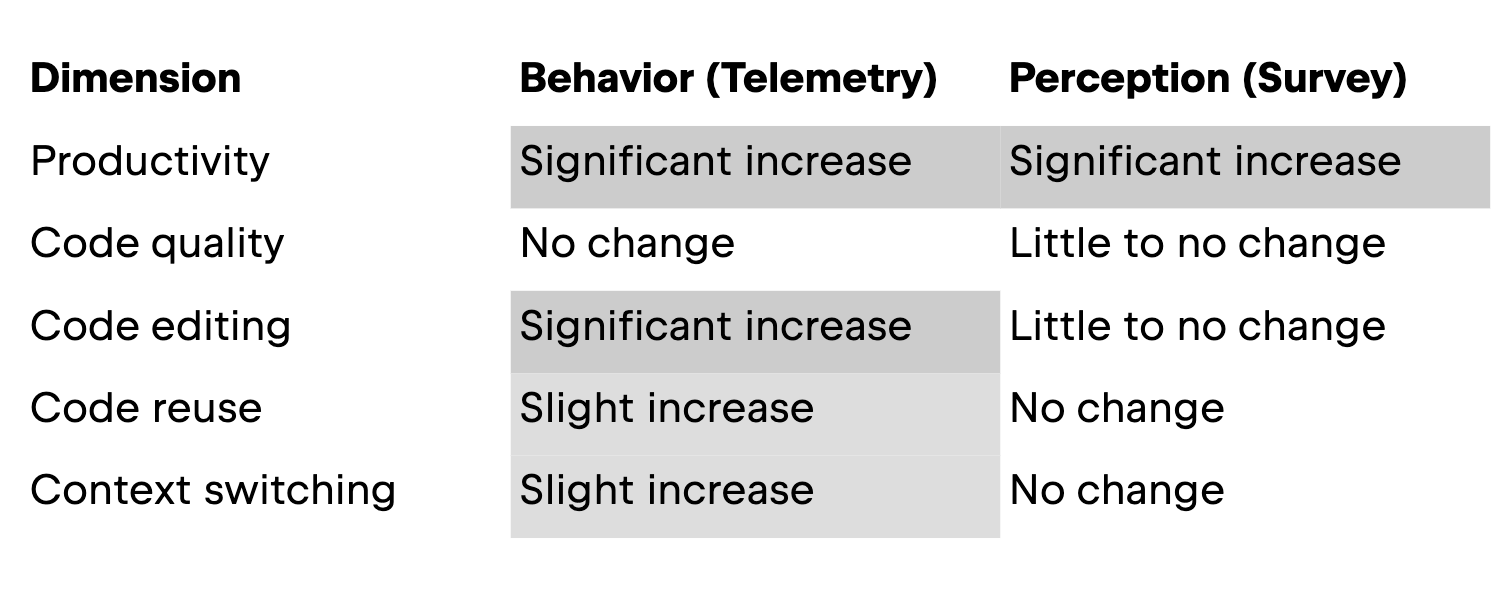
在本部分中,我们将按维度介绍研究结果。下表展示了研究结果概览。
生产效率
本研究的第一个维度关注 AI 助手对工作效率的影响,在遥测数据部分中以开发者在一段时间内输入的代码量来衡量;在调查中,以开发者对自身工作效率的主观感知和花在编码上的时间来衡量。在这一维度,实际行为和主观感知是一致的:在使用 IDE 内 AI 助手的情况下,开发者编写的代码更多了。
下图展示了调查周期内 AI 用户和非 AI 用户的平均字符输入量。阴影区域表示与平均值 ±1 倍的偏差范围。
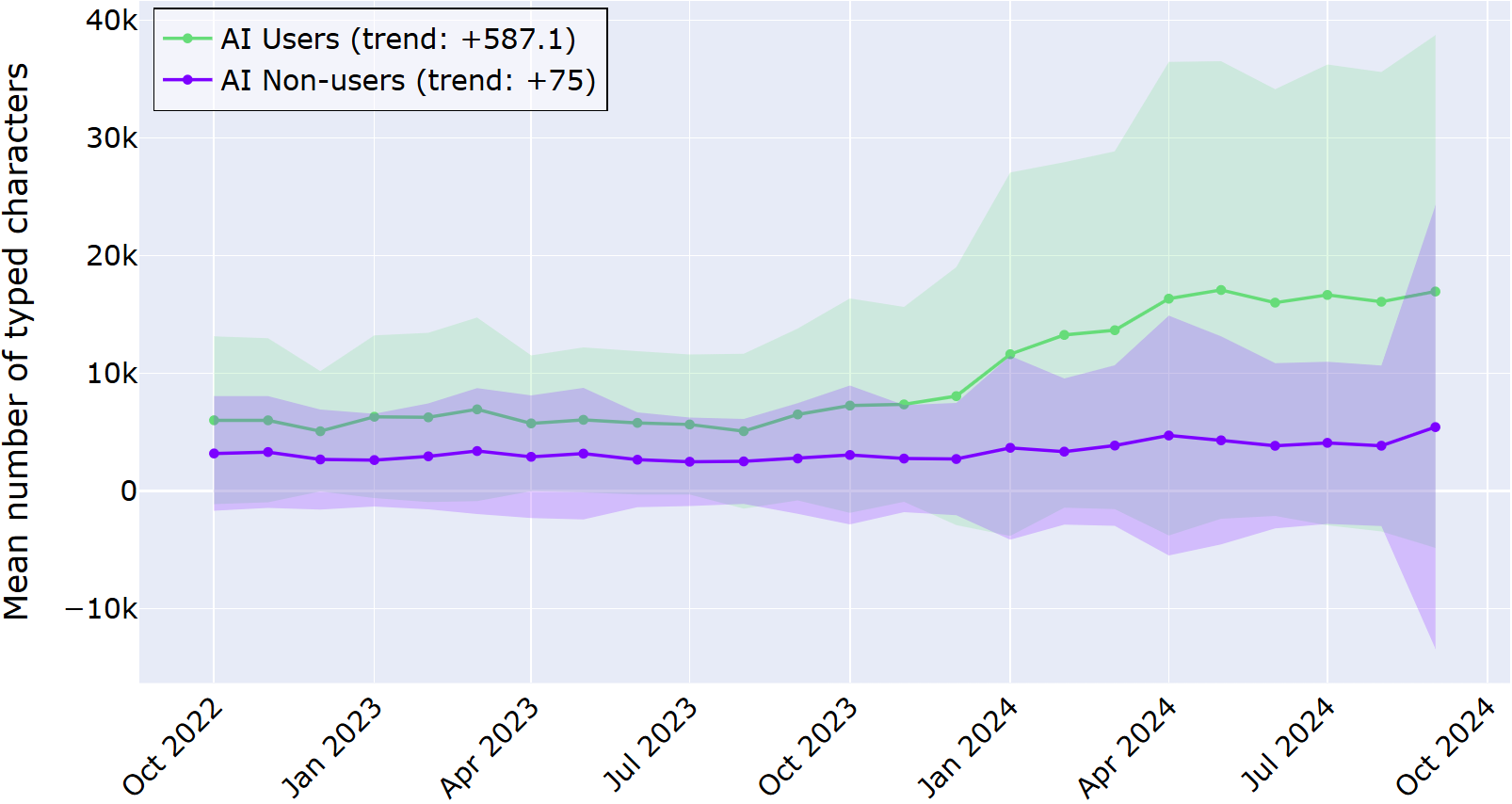
从上图可以清晰地看出,对于采用 IDE 内 AI 助手的开发者,其输入的字符数始终多于从未使用过 AI 助手的开发者,并且在两年时间里,这一差距不断扩大。日志数据揭示,AI 用户每月输入的字符数增加了近 600 个,而非 AI 用户每月输入的字符数仅增加 75 个。这些数据表明,这种差异并非一次性激增,而是开发者行为的持续转变。
调查对象(所有 AI 用户)同样体验到工作效率的提升。 超过 80% 的调查对象表示,引入 AI 编码工具或多或少带来了工作效率的提升,而只有两名调查对象表示工作效率或多或少有所下降。关于花在编码上的时间,超半数的调查对象表示编码用时有所减少,而约 15% 的调查对象表示编码用时增加。
访谈对象受也大多表达了类似看法。例如,一位开发者(拥有 3 – 5 年经验,经常使用 AI 工具)表示:
当我在命名或编写文档方面遇到困难时,我会立即向 AI 求助,它真的帮了很大的忙。
在这一维度,主观感知和实际行为相似。这些结果表明,使用 AI 工具后,开发者在编辑器中编写的代码更多了,并且认为工作效率有所提升。
代码质量
对于代码质量,本研究采用了一个简单的行为信号:开发者在 IDE 中启动调试会话的频率。这并不是衡量代码是“好”是“差”的完美指标,但确实能体现出大家认为需要逐步执行其程序以理解或修正问题的频率。在此维度,开发者的行为和主观感知并不一致,至少在统计学上没有显著关联:AI 用户的调试行为没有变化,但对代码质量和可读性的主观感知略有提升。
下图展示了调查周期内 AI 用户和非 AI 用户的平均调试实例启动次数。与之前一样,阴影区域表示与平均值 ±1 倍的偏差范围。在两年时间内,AI 用户和非 AI 用户都展现出积极的调试行为,并且两组用户之间的差异远小于工作效率指标方面的差异。
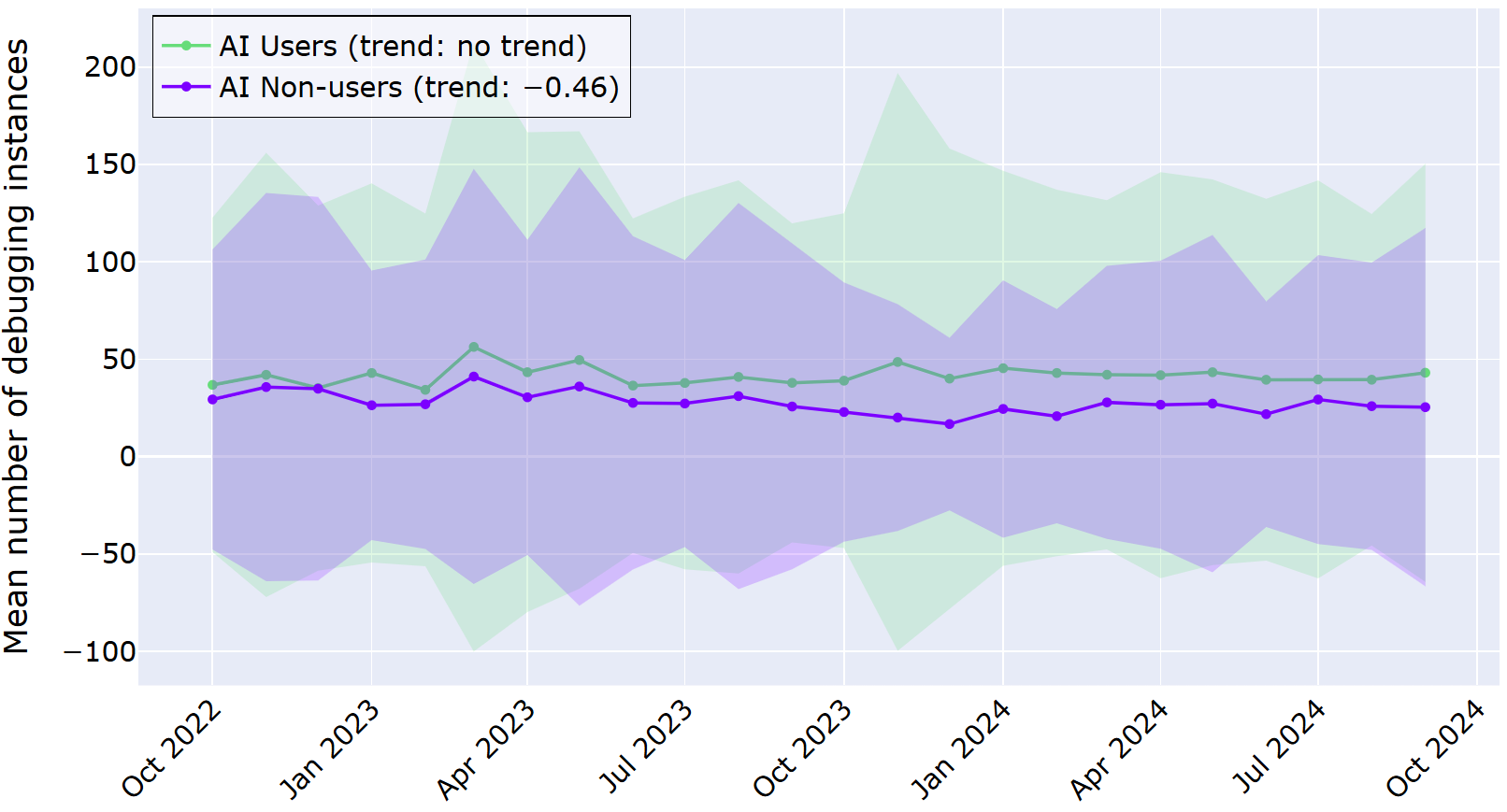
上图以两条相互接近的折线展示了各组每月的平均调试实例数量。我们的统计分析表明,对于 AI 用户,其行为没有随时间的推移而发生显著变化。对于非 AI 用户,该时间段内的调试启动次数略有减少。
大多数调查对象表示,使用 AI 编码工具在一定程度上对其代码质量产生了积极影响。具体而言,当被问及其代码质量是否因使用 AI 编码工具而得到提高时,近半数调查对象表示代码质量或多或少有所提升,而约 10% 的调查对象表示代码质量或多或少有所下降。对于代码可读性,相应调查数据分别为 43.5% 和 6.5%,不过有 50% 的调查对象表示未发现变化。
尽管 AI 工具带来了这些改进,但一些开发者仍不完全信任 AI 生成的代码。例如,一位拥有 3–5 年经验的开发者在访谈中表示:
我会反复检查 AI 生成的代码,即便如此,我还是觉得有点不放心。
对于此维度,我们的调查结果表明,尽管开发者从自身角度出发认为代码质量有所提高,但他们的行为(在我们选择分析的替代指标中)并未显示出 AI 用户有任何变化。
代码编辑
对于代码编辑,行为与主观感知之间的差异更为显著:尽管开发者表示变化不大,但日志数据却显示,他们的行为随时间的推移大幅增加。这里,遥测数据值反映的是开发者删除或撤消代码的频率,而在调查中,调查对象被问及他们是否认为使用 AI 工具后自己编辑自身代码的次数增多了。
下图展示了调查周期内 AI 用户和非 AI 用户的平均删除次数。与之前一样,阴影区域表示与平均值 ±1 倍的偏差范围。在两年时间里,趋势折线展现出 AI 用户和非 AI 用户有明显的差异。
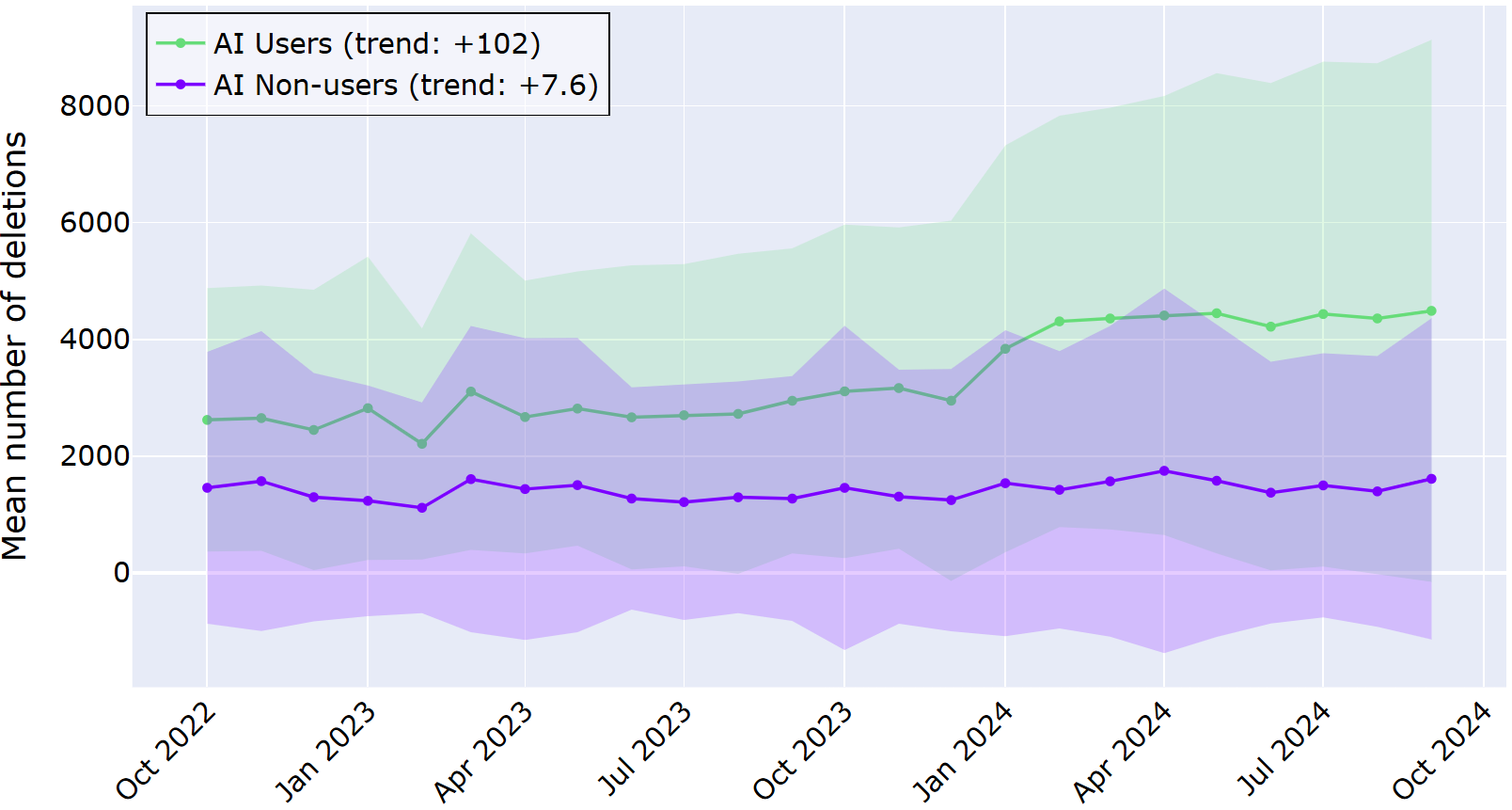
AI 用户的折线所处的位置明显更高一些,每月删除次数约 100 次,属于统计学意义上的显著增长。相比之下,在同一时期,非 AI 用户平均每月删除代码的次数仅增加了约 7 次。这些数据表明,在 AI 辅助生成代码的情况下,开发者进行编辑和改写的频率更高。
在定性数据中,开发者并未表示察觉到如此显著的变化。半数调查对象表示,自采用 AI 工具以来,他们并未察觉到其代码编辑行为有任何变化;约 40% 的调查对象表示代码编辑行为或多或少有所增加;约 7% 的调查对象表示代码编辑行为有所减少。一位拥有 15 年以上编码经验的系统架构师表示:
AI 就像另一双眼睛,能提供结对编程的优势,却没有社交压力 — 这一点对神经多元群体尤为友好。它并非时刻在监视,但当我需要代码审查和反馈时,可以随时调用。
与前文的代码质量维度相比,开发者对代码编辑的主观感知与实际行为恰好相反。具体而言,他们并未察觉到自身代码编辑量的显著变化,但日志数据显示,对于采用 AI 助手的开发者,其代码编辑量大幅增加。
代码重用
关于代码重用,本研究侧重于开发者向 IDE 粘贴内容的频率,这些内容并非来自同一 IDE 会话中的复制操作。对于此维度,AI 用户与非 AI 用户之间以及主观感知与行为之间的差异较小。
下图展示了调查周期内 AI 用户和非 AI 用户的平均外部粘贴次数。与之前一样,阴影区域表示与平均值 ±1 倍的偏差范围。在两年时间里,趋势折线未展现出 AI 用户或非 AI 用户有明显的变化。
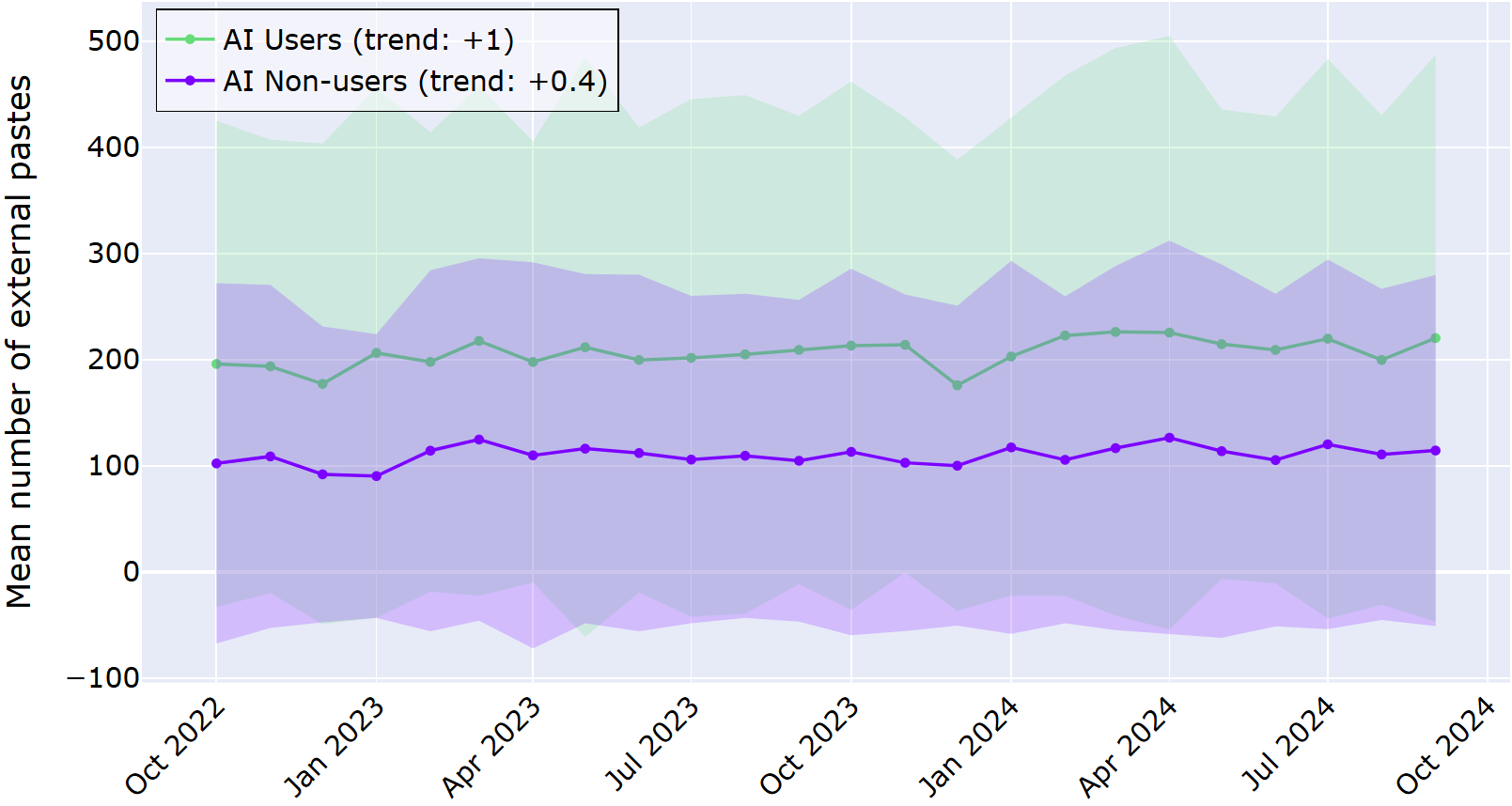
AI 用户的趋势折线整体高于非 AI 用户,这表明他们重用外部代码的频率更高。但两组人群的行为均没有随时间的推移而发生显著变化。
调查和访谈的反馈也未显示出清晰的规律。在调查中,约三分之一的调查对象表示自己察觉到采用 AI 工具后,自身对外部来源的代码的使用频率或多或少有所增加,而五分之一的调查对象表示使用频率有所下降;44% 的调查对象则表示未发现任何变化。
根据以往的研究,我们可能会认为使用 AI 工具的开发者重用外部代码的可能性会更高。然而,调查对象的反馈却给出了不同的结论。例如,一位拥有 15 年以上经验的开发者表示:
对于我来说,最好是为自己的行为承担责任,而不是采用第三方解决方案。
上下文切换
我们研究的最后一个维度是上下文切换,即开发者在浏览器等其他窗口中进行操作后跳转回 IDE 的频率。AI 工具,尤其是集成在 IDE 中的 AI 工具,通常被宣传为能减少开发者离开编辑器寻求帮助的需求,从而让开发者持续保持专注状态。尽管定性数据未显示出在任何方向上存在一定的规律,但遥测数据却揭示了一个更为复杂的真相:AI 用户在一段时间内激活 IDE 的次数实际上比非 AI 用户更多,这意味着 AI 用户切换上下文的频率至少与非 AI 用户一样高,甚至更高。
下图展示了调查周期内 AI 用户和非 AI 用户的平均 IDE 激活次数。与之前一样,阴影区域表示与平均值 ±1 倍的偏差范围。在两年时间里,趋势折线展现出 AI 用户的 IDE 激活次数略有增加。
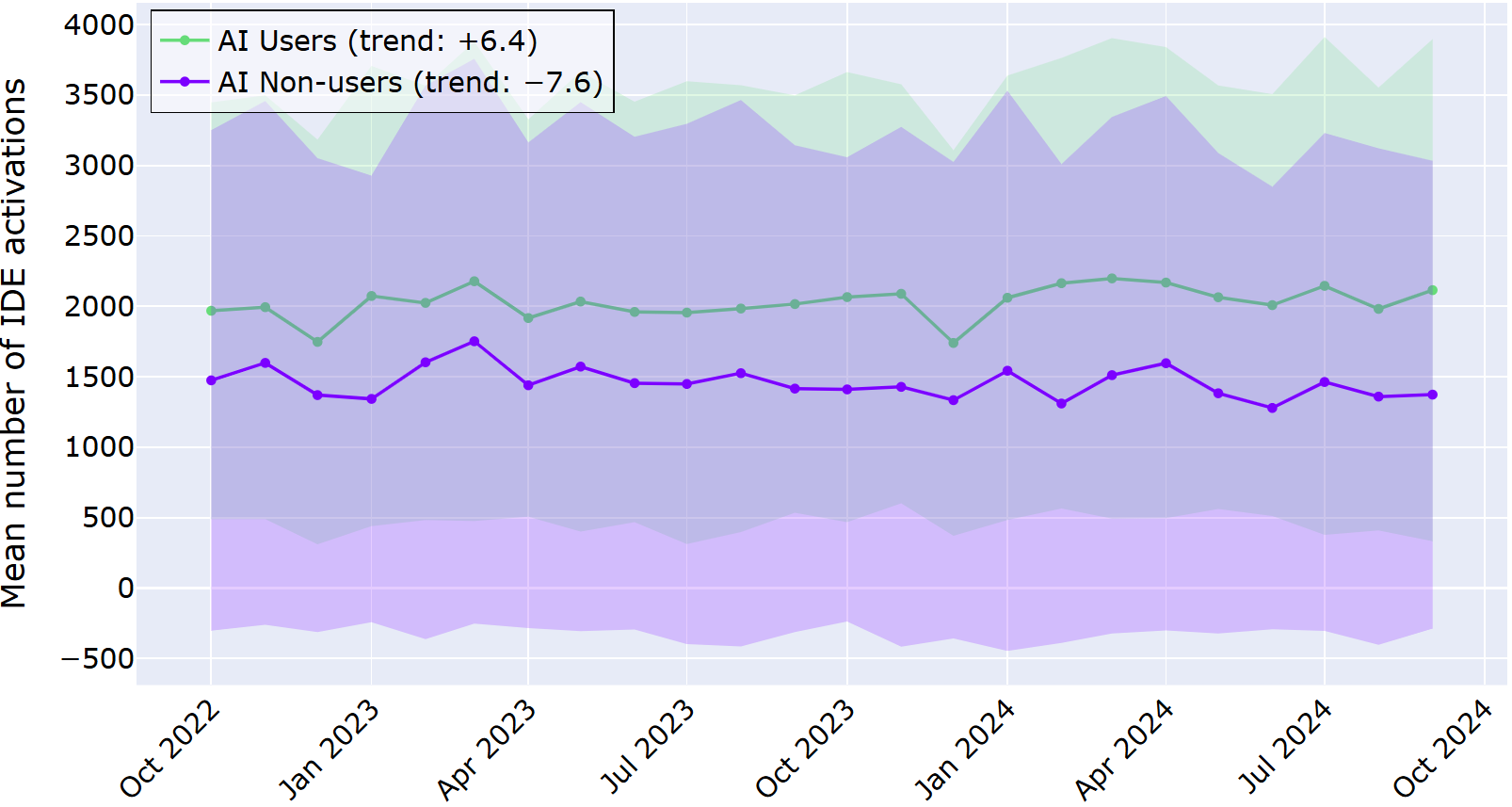
与上一个维度的情况类似,AI 用户的趋势折线整体来说更高。但此处的趋势出现了分化:AI 用户每月 IDE 激活次数增加约 6 次,而非 AI 用户则呈现相反的趋势,每月减少约 7 次。
与日志数据中呈现的差异不同,调查回复并未显示出清晰的规律。具体而言,约四分之一的调查对象表示 IDE 激活次数增加,约五分之一的调查对象表示激活次数减少,约半数的调查对象表示没有变化。
在访谈中,开发者表示,使用 AI 工具并不会单纯减少上下文切换次数,而是呈现出一种不同的碎片化规律。一位开发者表示:
我不再进行上下文切换,每次原本需要通过 Google 搜索的操作都能节省几秒钟的时间。
在此工作流维度,我们观察到了与之前相似的规律:AI 用户的日志数据显示略有增加,但定性数据并未呈现出清晰的规律。 这表明,即便利用了集成在 IDE 中的 AI 辅助工具,开发者仍在进行上下文切换,有时甚至比不使用 AI 辅助工具的开发者切换得更频繁。
AI 对工作投入度和注意力的影响
综合来看,我们的 HAX 研究结果表明,AI 编码助手正在以不易被察觉的方式悄然重塑开发者工作流。也就是说,我们的研究表明,这些转变十分微妙,开发者并不总是能清晰地察觉到自己习惯的改变。因此,在调查中结合多种方法(如将遥测数据与调查和访谈相结合)至关重要:这能揭示主观感受到的差异与日常行为中实际变化之间的偏差。
如果您正在构建或采用 AI 工具,那么结论很简单:不要只问人们是否喜欢这些工具。您应仔细观察他们实际在做什么!
本博文英文原作者:


Subscribe to JetBrains Research blog updates
Discover more



Understanding AI’s Impact on Developer Workflows
AI coding assistants are no longer shiny add‑ons: they are standard parts of our daily workflows. We know developers’ perspectives on them in the short term, and many say they get more done and spend less time on boilerplate or boring tasks. But we know far less about what happens over years of real work in real projects – and whether what developers perceive has changed in the workflow has actually changed.
There are already a number of studies on developer-AI interaction, but the existing research is often limited in scale or depth, and the studies are rarely long-term investigations. Our Human-AI Experience team (HAX) was interested in developers’ experience with AI tools over a long period of time, so they analyzed two years of log data from 800 software developers. They also wanted to analyze self-reported perceptions and compare them with the objective data, so they conducted a survey and follow-up interviews.
Here we present our findings from our HAX team’s mixed-method study, which our team is presenting this week at ICSE 2026 in Rio de Janeiro.
The study demonstrates how developers’ workflows have evolved with AI tools. A major takeaway from the study is that AI redistributes and reshapes developers’ workflows in ways that often elude their own perceptions.
In this blog post, we:
- Present our methodology for the study, namely:
- Log data from a two-year period
- Survey and interview responses
- Describe the components of developer workflows, including relevant previous research.
- Discuss the results of our mixed-methods study.
Analyzing how developers are evolving their workflows with AI tools
In this section, we will describe how we set up the HAX study, investigating both how developers behave (using log data) and what developers perceive (through interviews).
A major advantage of this design is that the methods compensate for each other’s blind spots. Logs can show that workflows are changing, but not why; self-reports can explain motivations and context, but they are biased and often miss subtle behavioral shifts. By triangulating across both, mixed methods make it easier to spot gaps between perception and practice and to build a more complete, grounded picture of how AI is reshaping everyday development work.
Telemetry in research
Telemetry is a well-established method for gathering data, in use since at least the 1800s. The word itself comes from the Greek for ‘far’ (tele) and ‘measure’ (metron), and it usually refers to data collected remotely. Its use enables more accurate experiments and better observability without constant manual measurement.
For example, telemetry is useful in healthcare settings for measuring blood pressure, heart rate, and oxygen levels over extended periods. In research, it can be used to capture continuous, real‑time data (for example, physiological, environmental, or system-performance signals) and send it to a central system for monitoring and analysis.
In the context of our research, telemetry is the stream of fine-grained, anonymized events that IDEs automatically record as developers work: which actions they take, when they take them, and in what sequence. That is, it collects information like the number of characters typed (not the actual characters), debugging sessions started, code deletions, paste operations, and window focus changes. If you’re interested, see our Product Data Collection and Usage Notice for further details.
We know from previous studies that telemetry can indeed uncover interesting patterns in developers’ behavior. For example, these researchers found that developers actually spend a good chunk (70%) of their time on comprehension activities like reading, navigating, and reviewing source code.
How developers behave: Investigating log data from a two-year period
For this study, telemetry served as a behavioral lens on developer workflows. Instead of asking developers how they think AI assistants affect their workflows, we looked at what actually happens in the editor over a span of two years: how much code is written, how often code is edited or undone, when external snippets are inserted, and how frequently developers switch back into the IDE from other tools. By aggregating and comparing these signals for AI users and non‑users, telemetry made it possible to observe subtle, long-term shifts in everyday practice that would be hard to capture through surveys or controlled lab tasks alone.
More specifically, our team worked with anonymized usage logs from several JetBrains IDEs, including IntelliJ IDEA, PyCharm, PhpStorm, and WebStorm. We filtered down to devices that were active in both October 2022 and October 2024 so the same developers could be tracked over a full two-year window. Note that the first date (October 2022) was chosen because that was when ChatGPT was first released.
From there, we built two groups: 400 AI users, whose devices interacted with JetBrains AI Assistant at least once a month from April to October 2024, and 400 AI non-users, whose devices never used the assistant during the study period. The reasoning behind checking for use from April 2024 was that at that point, AI assistants had become widely available and stable in IDEs; we also wanted to ensure that the users really had integrated AI assistants into their workflows.
As the telemetry logs are by nature complex, our team picked out well-defined events, i.e. user actions, to represent each of the workflow dimensions which are described in more detail below. These are:
- Typed characters – productivity
- Debugging session starts – code quality
- Delete and undo actions – code editing
- External paste events without an in-IDE copy – code reuse
- IDE window activations – context switching
Of course, any chosen proxy would have its limitations, and our chosen metrics do as well. That being said, our goal with this study was to detect patterns of change in developer workflows over time and not to identify causal effects.
By aggregating these metrics per user per month, we could see how each dimension evolved over time for AI users versus non-users, focusing on patterns of change. Overall, our dataset comprised 151,904,543 logged events performed by the 800 users.
Our data processing involved computing the total number of occurrences per device per month. This means we had a clear, high-level dataset of monthly counts for every action, which is ideal for tracking activity and identifying meaningful behavioral trends.
What developers perceive: Qualitative insights from surveys and interviews
To balance the behavioral view with developers’ own perspectives, our team also ran an online survey aimed at professional developers. We framed the questions around the same workflow dimensions, asking how they felt AI assistants had affected their productivity, code quality, editing habits, reuse patterns, and context switching. In total, 62 developers completed the survey, giving us a broad picture of perceived benefits, drawbacks, and changes since they started using AI tools.
The details of the survey can be found in §3.1 of the paper, as well as in the supplementary materials. In addition to demographic questions, the survey included:
- Scale questions about overall experience and reliance on AI tools for coding
- Scale questions on developer perception, specific to the workflow dimensions
- Open-ended question asking for a specific example of workflow impact and AI tools for coding
The first two types of questions (items 1 and 2) were constructed as 5-point scales, where the participants were asked to provide a rating, indicating the degree to which they agreed or disagreed with a statement. In our survey, the scale concerned the degree of change: with (1) being significantly decreased and (5) significantly increased.
The questions from item 2 can be summarized as follows:
- For productivity, we asked directly about overall productivity and also about time spent coding.
- For code quality, we asked directly about the quality of code and also about code readability.
- For code editing, we asked about the frequency of editing or modifying their own code.
- For code reuse, we asked about the frequency of use of code from external sources, e.g. libraries, online examples, or AI-suggested code.
- For context switching, we asked directly about the frequency of context switching – switching between different tasks or thought processes.
After the survey, our team invited a smaller group of participants to short, semi-structured interviews. In those conversations, we dug deeper into how they actually use AI day to day: when they reach for it, how they decide whether to trust a suggestion, and whether their work feels more or less fragmented now. Those qualitative stories helped us interpret the telemetry curves: for example, understanding why someone might report “not much has changed” even when their logs show big shifts in how much they type, delete, or paste external code.
Dimensions of the developer workflow
To understand the developer workflows better, our HAX study divided the areas of interest into the following dimensions, mentioned above:
- Productivity
- Code quality
- Code editing
- Code reuse
- Context switching
Productivity captures the most intuitive question people ask about AI tools: Do they help developers get more done? This dimension sets the stage by asking whether AI-assisted workflows are simply faster at producing code, and how that plays out over time compared to developers who do not use AI at all.
And although the impact of LLM-based coding tools on developer productivity has been a subject of many studies, there is not yet a clear picture of how – or whether – AI assistance really has a positive impact on developers’ productivity. On top of that, researchers use various measures (e.g. characters typed, tasks completed, completion requests accepted). Interestingly, this study observed that developers perceived their productivity as increasing with Copilot despite the data showing otherwise. Another study had similar findings: even though developers thought that their completion time of repository issues improved by 20%, the numbers actually show that they were 19% slower at completing tasks. In our study, we chose to measure code quantity.
Code quality shifts the focus from “how much code is written” to “how well the code is written.” Rather than inspecting code directly, this dimension looks at how often developers enter debugging workflows as a behavioral signal of running into problems or uncertainty. It introduces the idea that AI might change not only the number of issues that surface, but also how and when developers choose to investigate them, offering a window into how confident they feel about the code that ends up in their projects. Researchers in this study observed that developers spend more than a third of their time double-checking and editing Copilot suggestions.
Code editing looks at what happens after the first draft: how frequently code is reshaped, corrected, or thrown away. Here, the interest is in how much developers are editing, undoing, and deleting – as a way of understanding whether AI turns programming into a more iterative, high‑revision activity. This dimension helps illuminate the “curation” side of AI use: accepting suggestions, reworking them, and deciding what ultimately stays in the codebase. This study looked not at the time spent editing, but how much is deleted or reworked: of the code that is at first accepted, almost a fifth is later deleted, and about 7% is heavily rewritten.
Developers have always reused code (e.g. from libraries, internal snippets, Stack Overflow), but AI assistants introduce a new, often opaque channel for bringing external code into a project. Code reuse as a workflow dimension zooms out to ask where code comes from in the first place. We know from previous studies like this one that AI assistants provide boilerplate code and suggest commonly used patterns or snippets derived from training data. This dimension focuses on how often developers appear to integrate code from outside the current file or project, framing AI as part of a broader shift in reuse practices rather than an isolated feature.
Modern development work already involves frequent jumping between integrated development environments (IDEs), browsers, terminals, and communication tools, and AI assistants promise to streamline some of this jumping by keeping more help inside the editor. Context switching widens the lens from code to attention. This dimension asks whether that promise holds in practice, or whether AI ends up reshaping – rather than simply reducing – the ways developers move their focus across tools and tasks during everyday work.
For one, this study has shown that interacting with AI assistants can add cognitive overhead and fragment tasks, as developers alternate between writing code, interpreting suggestions, and managing the dialogue with the system. This raises an open question: are these tools actually reducing context switching overall, or mostly trading one form of interruption for another?
Two lenses on AI-assisted workflows
By combining different methods, our study is able to deliver a more complete picture of how AI coding tools change (or don’t change) developers’ workflows. We also learned that behavioral changes are largely invisible to the developers themselves. Together, these patterns sketch out what it really means to evolve with AI in a modern IDE.
In this section, we walk you through the results, presenting them by dimension. The table below displays an overview of our results.
Productivity
The first dimension of our study looked at how AI assistants affect productivity, measured in the telemetry part as how much code developers type over time and in the survey as how the developers perceived their productivity and time spent coding. Here, both the actual behavior and perception are aligned: with an in-IDE AI assistant, developers are writing more code.
In the graph below, the average number of typed characters is displayed for the AI users and AI non-users for the investigated time period. Shaded regions represent a ±1 deviation from the mean.
From the graph above, it is clear that developers who adopted the in‑IDE AI assistant consistently typed more characters than those who never used it, and this gap grew over the two‑year period. The log data revealed the trend that AI users increased the number of characters typed by almost 600 per month, in contrast to AI non-users, who only displayed an average increase of 75 characters per month. This data suggests that the difference is not just a one‑off spike; it’s a sustained shift in developer behavior.
Survey respondents (all AI users) similarly experienced an increase in productivity. Over 80% of respondents reported that the introduction of AI coding tools slightly or significantly increased their productivity, while two respondents said that it slightly or significantly decreased it. Regarding time spent coding, more than half said that their coding time decreased, while about 15% indicated that it increased.
Interview participants largely echo this in their own words. For example, one developer (3–5 years of experience and a regular AI user) said:
When I get stuck on naming or documentation, I immediately turn to AI, and it really helps.
In this dimension, both the perception and actual behavior are similar. These results demonstrate that developers are producing more code in the editor and perceive a productivity increase with AI tools.
Code quality
For code quality, the study uses a simple behavioral signal: how often developers start a debugging session in the IDE. This is not a perfect measure of “good” or “bad” code, but it does tell us how frequently people feel the need to step through their program to understand or fix something. In this dimension, the developers’ behavior and perception are not aligned, at least not in a statistically significant way: there is no change in AI users’ debugging behavior, but a slight improvement in perception of code quality and readability.
In the graph below, the average number of started debugging instances is displayed for the AI users and AI non-users for the investigated time period. As before, shaded regions represent a ±1 deviation from the mean. Across the two years, both AI users and non‑users show active debugging behavior, and the differences between the groups are much less dramatic than for the productivity measure.
The above graph shows the average number of debugging instances per month for each group as two lines that sit close together. Our statistical analysis told us that for AI users, there was no significant change in behavior over time. For AI non-users, there was a slight decrease in debugging starts in the time period.
Most survey respondents say using AI coding tools has somewhat positively changed their code quality. Namely, when asked whether the quality of their code increased because of using AI coding tools, almost half say that it slightly or significantly increased, while about 10% say that it slightly or significantly decreased. For the readability of the code, the respective numbers are 43.5% and 6.5%, though 50% indicate that they did not observe a change.
Despite this improvement with AI, some developers still do not completely trust AI-generated code. For example, a developer with 3–5 years of experience reported in the interview:
I triple-check it, and even then, I still feel a bit uneasy.
For this dimension, our results show us that although developers report an increase in code quality from their point of view, their behavior (in the proxy we chose to analyze) does not show a change for AI users.
Code editing
When we look at code editing, the difference between behavior and perception is more striking: while the developers reported little change, the log data showed a stark rise in their behavior over time. Here, the telemetry value was how often developers delete or undo code, and in the survey, they were asked whether they thought they edited their own code more with AI tools.
In the graph below, the average number of deletions is displayed for the AI users and AI non-users for the investigated time period. As before, shaded regions represent a ±1 deviation from the mean. Across the two years, the trend lines show a big difference between AI users and non‑users.
The AI users’ line sits noticeably higher, with a statistically significant increase of about 100 deletions per month. In contrast, AI non-users increased their deletions in the same period, on average, only about 7 times per month. This data suggests more frequent editing and rework when AI is helping to generate code.
In the qualitative data, the developers do not report seeing such a big change. Half of the respondents reported no perceived change in their code-editing behavior since adopting AI tools; about 40% reported a slight or significant increase, and about 7% reported a decrease. A system architect with more than 15 years of coding experience said:
AI is like a second pair of eyes, offering pair programming benefits without social pressure – especially helpful for neurodivergent people. It’s not always watching, but I can call on it for code review and feedback when needed.
Compared to the previous dimension of code quality, developers’ perception and actual behavior with respect to code editing are inverted. Namely, they do not perceive a significant change in how much they are editing code, but the log data shows a large increase for developers who have adopted AI assistance.
Code reuse
For code reuse, the study looked at how often developers paste content into the IDE that does not come from a copy action inside the same IDE session. The results for this dimension are less divergent, both between AI users vs. non-users and between perception vs. behavior.
In the graph below, the average number of external pastes is displayed for the AI users and AI non-users for the investigated time period. As before, shaded regions represent a ±1 deviation from the mean. Across the two years, the trend lines do not show a big change for either AI users or non‑users.
The trend line for AI users is higher overall than for AI non-users, indicating that they reuse external code more frequently. However, there is not a large change over time for either group.
The responses from the survey and interview don’t show a clear pattern either. In the survey, about a third of respondents said they perceived that their use of code from external sources slightly or significantly increased with the adoption of AI tools, while a fifth reported it decreased; 44% observed no change.
From previous studies, we might have expected that developers using AI tools are more likely to reuse external code. In contrast, they report a different picture. For example, a developer with over 15 years of experience says:
For me, it’s better to take responsibility for what I did myself rather than adopt a third-party solution.
Context switching
The last dimension we studied is context switching, or how often developers jump back into the IDE after working in another window, such as a browser. AI tools, especially in-IDE ones, are often marketed as a way to keep developers “in flow” by reducing the need to leave the editor for help. Although the qualitative data does not show a pattern in either direction, the telemetry tells a more complicated story: over time, AI users actually show more IDE activations than non‑users, meaning they are switching contexts at least as much, if not more.
In the graph below, the average number of IDE activations is displayed for the AI users and AI non-users for the investigated time period. As before, shaded regions represent a ±1 deviation from the mean. Across the two years, the trend lines do show a slight increase for AI users.
Like for the previous dimension, the trend line for AI users overall sits higher. However, here the trends diverge: AI users show an increase of about 6 IDE activations per month, while AI non-users show the opposite, a decrease of about 7 per month.
In contrast to the differences seen in the log data, the survey responses were less suggestive of a clear pattern. Namely, about a quarter of respondents indicated an increase, about a fifth a decrease, and about half no change.
In the interviews, developers indicate that using AI tools does not result in a simple drop in context switching, but a different pattern of fragmentation. One developer said:
I stopped switching contexts, saving a few seconds every time I would have googled something.
In this workflow dimension, we have seen a similar pattern as before: there was a slight increase in the log data for AI users, but no clear pattern in the qualitative data. This suggests that even with in-IDE AI assistance, developers are still switching contexts, sometimes even more than those not using AI assistance.
AI’s impact on effort and attention
Taken together, the results of our HAX study suggest that AI coding assistants are quietly reshaping developer workflows in ways that otherwise can go unnoticed. That is, our study shows that these shifts are subtle enough that developers don’t always see them clearly in their own habits. That’s why combining methods in investigations, like telemetry with surveys and interviews, matters: it reveals the gap between what feels different and what actually changes in day‑to‑day behavior.
If you’re building or adopting AI tools, the takeaway is simple: don’t just ask whether people like them. You should look closely at what they are actually doing!