Kotlin
A concise multiplatform language developed by JetBrains
A Better Way to Explore kotlinx-benchmark Results with Kotlin Notebooks


Benchmarking is an important part of writing efficient Kotlin code. The kotlinx-benchmark library helps you measure and compare performance across different implementations or hardware configurations.
However, raw text results only take you so far. Sometimes you need to visualize your data, not just read it. That’s where Kotlin notebooks come in.
Kotlin notebooks combine the expressiveness of Kotlin with the interactivity of notebook-style development. They give you one convenient place where you can:
- Load results as structured data.
- Explore results using the DataFrame API.
- Visualize results with charts.
Why use notebooks for benchmarking?
Let’s say you’ve run a benchmark suite and obtained text output from kotlinx.benchmark:
Benchmark                              Mode     Cnt Score    Error  Units

maps.LinearSearch                      avgt     10  12.500 ± 0.900  ms/op

maps.BinarySearch                      avgt     10   8.300 ± 0.600  ms/op

maps.HashLookup                        avgt     10   4.700 ± 0.400  ms/op

lists.Filter                           avgt     10  15.200 ± 1.200  ms/op

lists.Map                              avgt     10   9.800 ± 0.700  ms/op
The table works fine for a quick look, but once you accumulate more data, it becomes harder to navigate. Visualizing the same data gives you an instant overview of which implementations perform better and how stable the results are.
You can use Kotlin notebooks to visualise that data quickly:
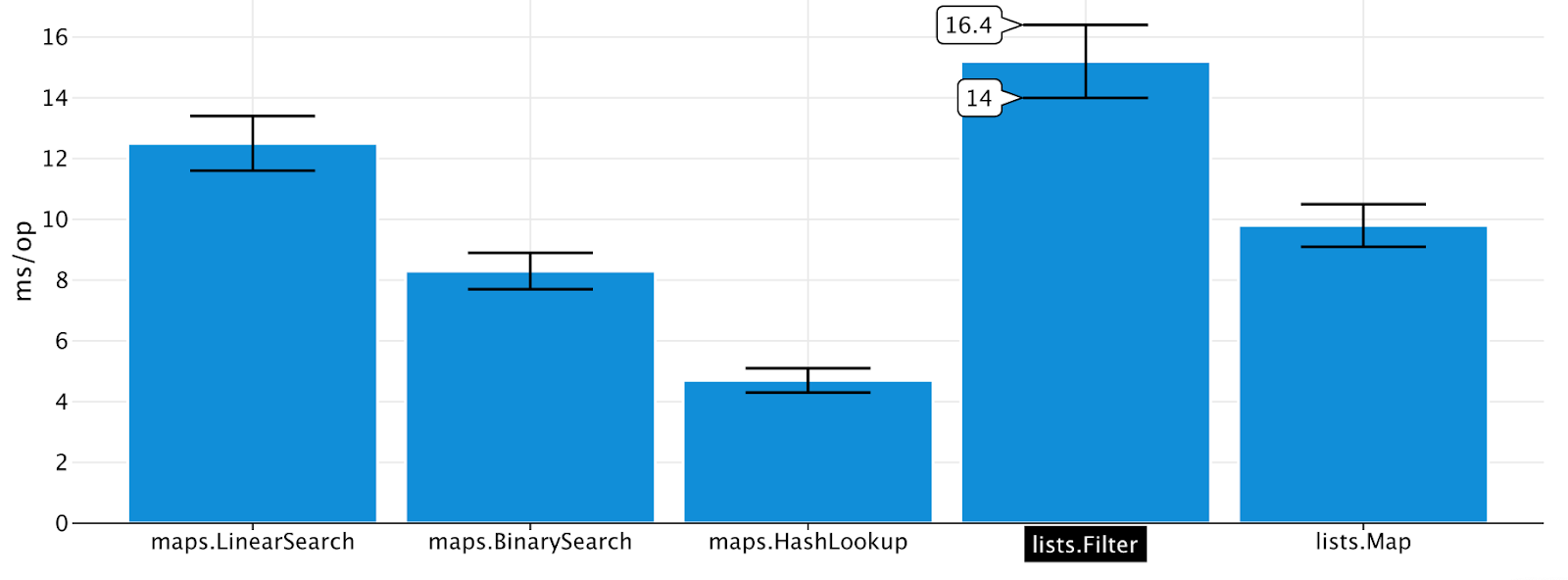
You can also run the same notebook on another machine and compare the results visually, revealing performance differences between environments or commits.
Comparing benchmark results
Kotlin notebooks make it easy to analyze and plot results from one or more benchmark runs.
For example, you can:
- Read benchmark JSON files generated by
kotlinx-benchmark. - Convert the results into typed DataFrames.
- Compute metrics such as percentage improvements.
- Plot the results with Kandy charts.
- Account for confidence intervals to perform statistically rigorous comparisons.
Several benchmark examples are available in the examples folder of the kotlinx-benchmark repository.
Generating and sharing notebooks
Once your notebook is ready, you can:
- Create a GitHub gist to share results quickly.
- Commit the notebook to your project for reproducible performance tracking.
- Publish it with JetBrains Datalore for interactive viewing online.
This workflow makes benchmark results easier to understand and share with your team.