
PhpStorm 2025.3 Is Now Out

Welcome to PhpStorm 2025.3! This release brings native Claude Agent integration, out-of-the-box Laravel support, support for PHP 8.5, improvements in generics, a new Islands theme, and more.

PHP
PHP 8.5 support
PhpStorm 2025.3 supports all of the changes introduced in the recently released PHP 8.5.
As usual, you can try new features by setting the project language level to PHP 8.5. You can do so in the settings (by going to PHP | PHP language level), by specifying the requirement in composer.json, or by simply using PhpStorm’s Switch to PHP 8.5 language level quick-fix.

Cloning objects with properties
PHP 8.5 changes clone from a standalone keyword to a language construct that optionally accepts a second array parameter. Now, clone can clone an object and modify its properties in one expression, and PhpStorm helps you detect the syntax that can be updated in your code and replace it.

In addition, PhpStorm 2025.3 ensures the proper usage of clone when it is promoted to a function and used as a callable.

Closures in constant expressions
PHP 8.5 allows you to use closures in the constructs that previously accepted only constant expressions. PhpStorm supports this with code checks and quick-fixes that ensure the proper usage of closures as attribute parameters, constants and class constants, or default values of properties and parameters.


Pipe operator
PHP 8.5’s pipe operator (|>) takes the return value of the left-side callable and passes it to the right-side callable, thus chaining multiple callables together.
PhpStorm ensures that the pipe operator is used correctly in your code, highlighting invalid callables in a pipe chain, improper syntax, incompatible types, or type mismatches.

The latest release of Xdebug supports pipes in PHP 8.5 as well. You can see the intermediate values passing through PHP’s pipes during a debugging session in PhpStorm.
#[NoDiscard] attribute
PHP 8.5 introduces a new #[NoDiscard] attribute, which indicates that a function’s or method’s return value cannot be ignored. PhpStorm adds support for this attribute as well.


Other PHP 8.5 features
Here are a few more PHP 8.5 features now supported in PhpStorm:
- Final property promotion, where a
__constructorparameter marked withfinalis considered promoted and treated like other promoted properties.

- Asymmetric visibility for static properties, similar to asymmetric visibility for object properties, which was implemented in PHP 8.4.
- The
array_first()andarray_last()functions, which return the first and last values of an array. - Attributes for constants that are allowed to target the constants declared in their own statements.
Generics improvements: support for nested generic types
PhpStorm 2025.3 further advances support for type annotations in PHPDoc comments. Now it can infer the variable type in nested generic type declarations such as Inner<Inner<\DateTime>>.

To display the type, place the caret at the required variable or expression and press Ctrl+Shift+P or select View | Type info in the main menu.
PhpStorm Light inspection profile
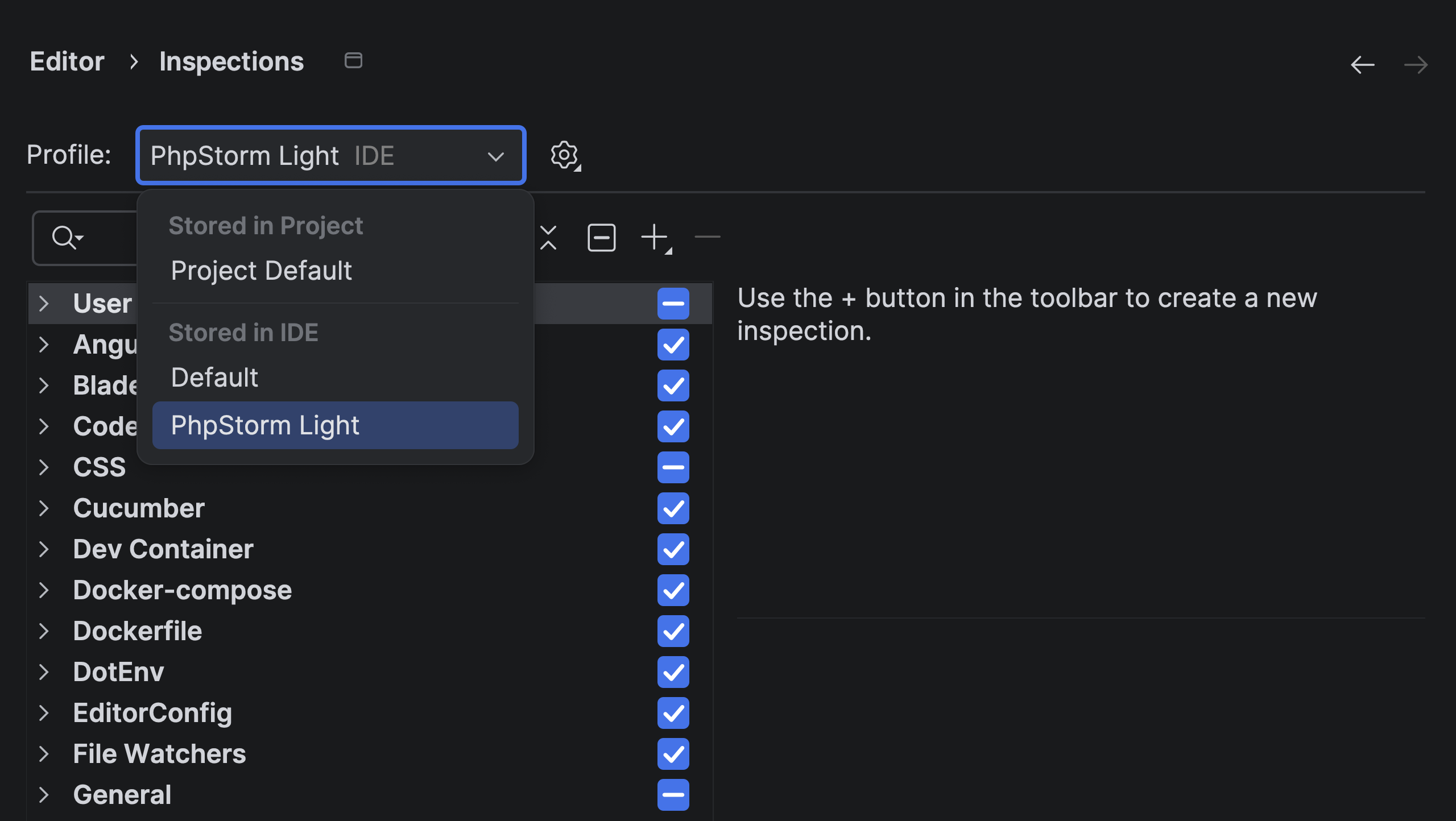
We’ve introduced a new inspection profile that improves the IDE performance for resource-constrained systems. PhpStorm Light is a lightweight version of the Default inspection profile tweaked to exclude non-critical and resource-consuming code checks, including all INFO-level inspections, Unused declaration, and Grazie grammar.
You can enable it in Settings | Editor | Inspections.
Laravel
Out-of-the-box Laravel support
A while ago, we announced that the Laravel Idea plugin had been made free for PhpStorm users. In PhpStorm 2025.3, we’ve bundled the Laravel Idea plugin into the IDE. Now PhpStorm offers full-featured support for every aspect of Laravel development out of the box, with no need to install additional plugins.
The developer of Laravel Idea, Adel Faizrakhmanov, will keep working on new Laravel support features, which will now be delivered as part of the PhpStorm IDE.
Pest 4 support
PhpStorm 2025.3 supports usage of all the new features introduced in the Pest v4 testing framework, including Playwright-powered browser testing.
When debugging browser tests with the ->debug() method in PhpStorm, use the Continue Test Run button on the test results toolbar to resume a paused test.

JetBrains AI
JetBrains AI is evolving to give you more choice, transparency, and flexibility in how you use AI inside your IDE. You can work with Claude Agent and Junie from a single chat interface, track your AI credits directly in the IDE, and soon you’ll be able to connect your own AI provider keys with BYOK.
Multi-agent experience: Junie and Claude Agent
Claude Agent has become the first third-party AI agent natively integrated into JetBrains IDEs. With its addition, JetBrains introduces a multi-agent experience that brings even more flexibility and power to your development workflow. Now that Claude Agent and Junie are available in the same chat interface, you can switch between agents seamlessly and get the right kind of assistance for every task.
The easiest way to start working with any agent now is to launch it directly from the AI chat. However, the Junie plugin will still be available for you if you prefer it this way.

Bring Your Own Key: More freedom and control Coming soon
BYOK will let you connect your own API keys from OpenAI, Anthropic, or any OpenAI API-compatible local model, giving you more flexibility and control over how you use AI in JetBrains IDEs. You’ll be able to use your favorite AI chat and agents without logging into JetBrains AI, which is perfect for developers who already have API keys and want to work with their preferred provider. Learn more in this blog post.
The feature is expected to roll out in the upcoming 2025.3.x releases.
Transparent AI quota tracking in IDE
You can now view your remaining AI credits, renewal date, and top-up balance directly inside your IDE, and if you run out of credits, you can initiate a top-up from there as well.
This update makes it easier to monitor and manage your AI resources – bringing more clarity and convenience to your AI usage.
Learn more about AI quotas in this blog post.
Streamlined MCP server setup
In PhpStorm 2025.3, we’ve improved the way MCP server configurations are imported from other tools. When you first open a project with an mcp.json file in it, PhpStorm will automatically fetch the configured MCP servers and prompt you to view or enable them in the IDE settings.

We’ve improved Laravel Boost setup as well. Now PhpStorm does more than just pick the server configuration automatically – it also suggests enabling the server when it is disabled.
Disclaimer: some AI features may work differently or be unavailable in your region. Learn more here.
Databases
A farewell to consoles
Starting from the 2025.3 release, PhpStorm and other JetBrains IDEs with database support will stop using the term query console. From now on, we’ll use query file – because consoles were essentially files all along, and it’s time the UI reflected that. We’ve also made the workflow simpler, more discoverable, and more consistent.
To learn more, check out this blog post.
Connection to cloud providers
PhpStorm now works with cloud database providers! In the new version, you can connect your AWS, Azure, and Google Cloud accounts to the IDE, browse the list of databases you have in those accounts, and choose the ones you’d like to connect to. PhpStorm will create new data sources and fill in all the connection details.
To connect to your cloud account, click New | Data Source from Cloud Provider and select the cloud provider.

All the cloud accounts connected to your IDE are displayed on the Clouds tab of the Data Sources and Drivers dialog.

User experience
Islands theme
The Islands theme is now the default look in PhpStorm. More than just a visual refresh, it reflects our commitment to providing the ultimate comfort throughout your development experience.

Instantly recognizable tabs, improved in-editor contrast, clear separation between working areas, and rounded corners create a soft and balanced environment that was designed around one goal: helping you stay focused and code with ease.
Learn more in this blog post.
Completion in the terminal
The terminal is a tool developers use every day. Now, you can be even more productive in it, thanks to completion that suggests commands, option names, and path parameters. Don’t remember the exact name of a Git branch? Need a long file path? Forgot a specific switch?
Just start typing and PhpStorm will suggest parameters for the given command.