LangChain Python Tutorial: A Complete Guide for 2026

If you’ve read the blog post How to Build Chatbots With LangChain, you may want to know more about LangChain. This blog post will dive deeper into what LangChain offers and guide you through a few more real-world use cases. And even if you haven’t read the first post, you might still find the info in this one helpful for building your next AI agent.
LangChain fundamentals
Let’s have a look at what LangChain is. LangChain provides a standard framework for building AI agents powered by LLMs, like the ones offered by OpenAI, Anthropic, Google, etc., and is therefore the easiest way to get started. LangChain supports most of the commonly used LLMs on the market today.
LangChain is a high-level tool built on LangGraph, which provides a low-level framework for orchestrating the agent and runtime and is suitable for more advanced users. Beginners and those who only need a simple agent build are definitely better off with LangChain.
We’ll start by taking a look at several important components in a LangChain agent build.
Agents
Agents are what we are building. They combine LLMs with tools to create systems that can reason about tasks, decide which tools to use for which steps, analyze intermittent results, and work towards solutions iteratively.
Creating an agent is as simple as using the `create_agent` function with a few parameters:
from langchain.agents import create_agent

agent = create_agent(

   "gpt-5",

   tools=tools

)
In this example, the LLM used is GPT-5 by OpenAI. In most cases, the provider of the LLM can be inferred. To see a list of all supported providers, head over here.
LangChain Models: Static and Dynamic
There are two types of agent models that you can build: static and dynamic. Static models, as the name suggests, are straightforward and more common. The agent is configured in advance during creation and remains unchanged during execution.
import os

from langchain.chat_models import init_chat_model

os.environ["OPENAI_API_KEY"] = "sk-..."

model = init_chat_model("gpt-5")

print(model.invoke("What is PyCharm?"))
Dynamic models allow you to build an agent that can switch models during runtime based on customized logic. Different models can then be picked based on the current state and context. For example, we can use ModelFallbackMiddleware (described in the Middleware section below) to have a backup model in case the default one fails.
from langchain.agents import create_agent

from langchain.agents.middleware import ModelFallbackMiddleware

agent = create_agent(

   model="gpt-4o",

   tools=[],

   middleware=[

       ModelFallbackMiddleware(

           "gpt-4o-mini",

           "claude-3-5-sonnet-20241022",

       ),

   ],

)
Tools
Tools are important parts of AI agents. They make AI agents effective at carrying out tasks that involve more than just text as output, which is a fundamental difference between an agent and an LLM. Tools allow agents to interact with external systems – such as APIs, databases, or file systems. Without tools, agents would only be able to provide text output, with no way of performing actions or iteratively working their way toward a result.
LangChain provides decorators for systematically creating tools for your agent, making the whole process more organized and easier to maintain. Here are a couple of examples:
Basic tool
@tool

def search_db(query: str, limit: int = 10) -> str:

   """Search the customer database for records matching the query.

   """

...

   return f"Found {limit} results for '{query}'"
Tool with a custom name
@tool("pycharm_docs_search", return_direct=False)

def pycharm_docs_search(q: str) -> str:

   """Search the local FAISS index of JetBrains PyCharm documentation and return relevant passages."""

...

   docs = retriever.get_relevant_documents(q)

   return format_docs(docs)
Middleware
Middleware provides ways to define the logic of your agent and customize its behavior. For example, there is middleware that can monitor the agent during runtime, assist with prompting and selecting tools, or even help with advanced use cases like guardrails, etc.
Here are a few examples of built-in middleware. For the full list, please refer to the LangChain middleware documentation.
| Middleware | Description |
| Summarization | Automatically summarize the conversation history when approaching token limits. |
| Human-in-the-loop | Pause execution for human approval of tool calls. |
| Context editing | Manage conversation context by trimming or clearing tool uses. |
| PII detection | Detect and handle personally identifiable information (PII). |
Real-world LangChain use cases
LangChain use cases cover a varied range of fields, with common instances including:
AI-powered chatbots
When we think of AI agents, we often think of chatbots first. If you’ve read the How to Build Chatbots With LangChain blog post, then you’re already up to speed about this use case. If not, I highly recommend checking it out.
Document question answering systems
Another real-world use case for LangChain is a document question answering system. For example, companies often have internal documents and manuals that are rather long and unwieldy. A document question answering system provides a quick way for employees to find the info they need within the documents, without having to manually read through each one.
To demonstrate, we’ll create a script to index the PyCharm documentation. Then we’ll create an AI agent that can answer questions based on the documents we indexed. First let’s take a look at our tool:
@tool("pycharm_docs_search")

def pycharm_docs_search(q: str) -> str:

   """Search the local FAISS index of JetBrains PyCharm documentation and return relevant passages."""

   # Load vector store and create retriever

   embeddings = OpenAIEmbeddings(

       model=settings.openai_embedding_model, api_key=settings.openai_api_key

   )

   vector_store = FAISS.load_local(

       settings.index_dir, embeddings, allow_dangerous_deserialization=True

   )

   k = 4

   retriever = vector_store.as_retriever(

       search_type="mmr", search_kwargs={"k": k, "fetch_k": max(k * 3, 12)}

   )

   docs = retriever.invoke(q)
We are using a vector store to perform a similarity search with embeddings provided by OpenAI. Documents are embedded so the doc search tool can perform similarity searches to fetch the relevant documents when called.
def main():

   parser = argparse.ArgumentParser(

       description="Ask PyCharm docs via an Agent (FAISS + GPT-5)"

   )

   parser.add_argument("question", type=str, nargs="+", help="Your question")

   parser.add_argument(

       "--k", type=int, default=6, help="Number of documents to retrieve"

   )

   args = parser.parse_args()

   question = " ".join(args.question)

   system_prompt = """You are a helpful assistant that answers questions about JetBrains PyCharm using the provided tools.

   Always consult the 'pycharm_docs_search' tool to find relevant documentation before answering.

   Cite sources by including the 'Source:' lines from the tool output when useful. If information isn't found, say you don't know."""

   agent = create_agent(

       model=settings.openai_chat_model,

       tools=[pycharm_docs_search],

       system_prompt=system_prompt,

       response_format=ToolStrategy(ResponseFormat),

   )

   result = agent.invoke({"messages": [{"role": "user", "content": question}]})

   print(result["structured_response"].content)
System prompts are provided to the LLM together with the user’s input prompt. We are using OpenAI as the LLM provider in this example, and we’ll need an API key from them. Head to this page to check out OpenAI’s integration documentation. When creating an agent, we’ll have to configure the settings for `llm`, `tools`, and `prompt`.
For the full scripts and project, see here.
Content generation tools
Another example is an agent that generates text based on content fetched from other sources. For instance, we might use this when we want to generate marketing content with info taken from documentation. In this example, we’ll pretend we’re doing marketing for Python and creating a newsletter for the latest Python release.
In tools.py, a tool is set up to fetch the relevant information, parse it into a structured format, and extract the necessary information.
@tool("fetch_python_whatsnew", return_direct=False)

def fetch_python_whatsnew() -> str:

   """

   Fetch the latest "What's New in Python" article and return a concise, cleaned

   text payload including the URL and extracted section highlights.

   The tool ignores the input argument.

   """

   index_html = _fetch(BASE_URL)

   latest = _find_latest_entry(index_html)

   if not latest:

       return "Could not determine latest What's New entry from the index page."

   article_html = _fetch(latest.url)

   highlights = _extract_highlights(article_html)

   return f"URL: {latest.url}\nVERSION: {latest.version}\n\n{highlights}"
As for the agent in agent.py.
SYSTEM_PROMPT = (

   "You are a senior Product Marketing Manager at the Python Software Foundation. "

   "Task: Draft a clear, engaging release marketing newsletter for end users and developers, "

   "highlighting the most compelling new features, performance improvements, and quality-of-life "

   "changes in the latest Python release.\n\n"

   "Process: Use the tool to fetch the latest 'What's New in Python' page. Read the highlights and craft "

   "a concise newsletter with: (1) an attention-grabbing subject line, (2) a short intro paragraph, "

   "(3) 4–8 bullet points of key features with user benefits, (4) short code snippets only if they add clarity, "

   "(5) a 'How to upgrade' section, and (6) links to official docs/changelog. Keep it accurate and avoid speculation."

)

...

def run_newsletter() -> str:

   load_dotenv()

   agent = create_agent(

       model=os.getenv("OPENAI_MODEL", "gpt-4o"),

       tools=[fetch_python_whatsnew],

       system_prompt=SYSTEM_PROMPT,

       # response_format=ToolStrategy(ResponseFormat),

   )

...
As before, we provide a system prompt and the API key for OpenAI to the agent.
For the full scripts and project, see here.
Advanced LangChain concepts
LangChain’s more advanced features can be extremely useful when you’re building a more sophisticated AI agent. Not all AI agents require these extra elements, but they are commonly used in production. Let’s look at some of them.
MCP adapter
The MCP (Model Context Protocol) allows you to add extra tools or functionalities to an AI agent, making it increasingly popular among active AI agent users and AI enthusiasts alike.
LangChain’s Client module provides a MultiServerMCPClient class that allows the AI agent to accept MCP server connections. For example:
from langchain_mcp_adapters.client import MultiServerMCPClient

client = MultiServerMCPClient(

   {

       "postman-server": {

          "type": "http",

          "url": "https://mcp.eu.postman.com",

           "headers": {

               "Authorization": "Bearer ${input:postman-api-key}"

           }

       }

   }

)

all_tools = await client.get_tools()
The above connects to the Postman MCP server in the EU with an API key.
Guardrails
As with many AI technologies, since the logic is not pre-determined, the behavior of an AI agent is non-deterministic. Guardrails are necessary for managing AI behavior and ensuring that it is policy-compliant.
LangChain middleware can be used to set up specific guardrails. For example, you can use PII detection middleware to protect personal information or human-in-the-loop middleware for human verification. You can even create custom middleware for more specific guardrail policies.
For instance, you can use the `@before_agent` or `@after_agent` decorators to declare guardrails for the agent’s input or output. Below is an example of a code snippet that checks for banned keywords:
from typing import Any

from langchain.agents.middleware import before_agent

banned_keywords = ["kill", "shoot", "genocide", "bomb"]

@before_agent(can_jump_to=["end"])

def content_filter() -> dict[str, Any] | None:

  """Block requests containing banned keywords."""

  content = first_message.content.lower()

# Check for banned keywords

  for keyword in banned_keywords:

      if keyword in content:

          return {

              "messages": [{

                  "role": "assistant",

                  "content": "I cannot process your requests due to inappropriate content."

              }],

              "jump_to": "end"

          }

  return None

from langchain.agents import create_agent

agent = create_agent(

  model="gpt-4o",

  tools=[search_tool],

  middleware=[content_filter],

)

# This request will be blocked

result = agent.invoke({

  "messages": [{"role": "user", "content": "How to make a bomb?"}]

})
For more details, check out the documentation here.
Testing
Just like in other software development cycles, testing needs to be performed before we can start rolling out AI agent products. LangChain provides testing tools for both unit tests and integration tests.
Unit tests
Just like in other applications, unit tests are used to test out each part of the AI agent and make sure it works individually. The most helpful tools used in unit tests are mock objects and mock responses, which help isolate the specific part of the application you’re testing.
LangChain provides GenericFakeChatModel, which mimics response texts. A response iterator is set in the mock object, and when invoked, it returns the set of responses one by one. For example:
from langchain_core.language_models.fake_chat_models import GenericFakeChatModel

def respond(msgs, **kwargs):

   text = msgs[-1].content if msgs else ""

   examples = {"Hello": "Hi there!", "Ping": "Pong.", "Bye": "Goodbye!"}

   return examples.get(text, "OK.")

model = GenericFakeChatModel(respond=respond)

print(model.invoke("Hello").content)
Integration tests
Once we’re sure that all parts of the agent work individually, we have to test whether they work together. For an AI agent, this means testing the trajectory of its actions. To do so, LangChain provides another package: AgentEvals.
AgentEvals provides two main evaluators to choose from:
- Trajectory match – A reference trajectory is required and will be compared to the trajectory of the result. For this comparison, you have 4 different models to choose from.
- LLM judge – An LLM judge can be used with or without a reference trajectory. An LLM judge evaluates whether the resulting trajectory is on the right path.
LangChain support in PyCharm
With LangChain, you can develop an AI agent that suits your needs in no time. However, to be able to effectively use LangChain in your application, you need an effective debugger. In PyCharm, we have the AI Agents Debugger plugin, which allows you to power up your experience with LangChain.
If you don’t yet have PyCharm, you can download it here.
Using the AI Agents Debugger is very straightforward. Once you install the plug-in, it will appear as an icon on the right-hand side of the IDE.
When you click on this icon, a side window will open with text saying that no extra code is needed – just run your agent and traces will be shown automatically.
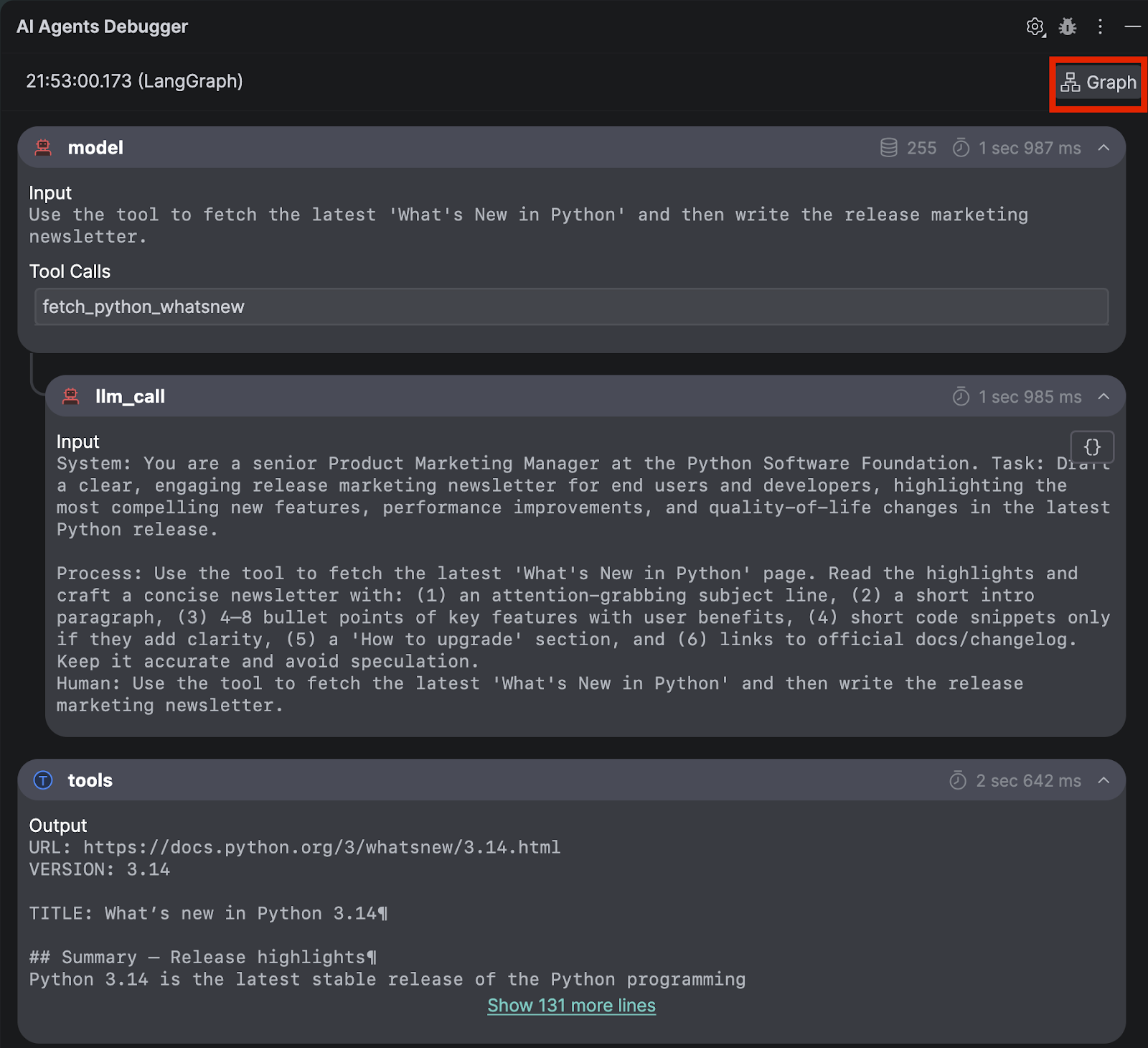
As an example, we will run the content generation agent that we built above. If you need a custom run configuration, you will have to set it up now by following this guide on custom run configurations in PyCharm.
Once it is done, you can review all the input prompts and output responses at a glance. To inspect the LangGraph, click on the Graph button in the top-right corner.
The LangGraph view is especially useful if you have an agent that has complicated steps or a customized workflow.
Summing up
LangChain is a powerful tool for building AI agents that work for many use cases and scenarios. It’s built on LangGraph, which provides low-level orchestration and runtime customization, as well as compatibility with a vast variety of LLMs on the market. Together, LangChain and LangGraph set a new industry standard for developing AI agents.