TeamCity
Powerful CI/CD for DevOps-centric teams
TeamCity 2026.1: CLI, MCP for AI Agents, Pipelines Enhancements, and More

TL;DR: TeamCity 2026.1 is out and packed with helpful features. We’re introducing the TeamCity CLI and MCP support, as well as Pipelines enhancements to make configuring TeamCity more convenient and powerful.
As of this release, AI Assistant is available in Enterprise trial accounts, and the SAML authentication plugin comes bundled with TeamCity.
For the full list of what’s new in 2026.1, make sure to check out our documentation.
Let’s take a closer look at what’s new.
Important security announcement
A high-severity post-authentication security vulnerability has been identified in TeamCity On-Premises. If exploited, this flaw may allow any authenticated user to expose some parts of the TeamCity server API to unauthorized users.
All versions of TeamCity On-Premises are affected, while TeamCity Cloud is not affected and requires no action. We have verified that TeamCity Cloud environments were not impacted by this issue.
This vulnerability has been assigned the Common Vulnerabilities and Exposures (CVE) identifier CVE-2026-44413. A fix for it has been introduced in version 2026.1. We have also released a security patch plugin for 2017.1+ so that customers who are unable to upgrade can still patch their environments.
We strongly recommend upgrading to TeamCity 2026.1 or installing the security patch plugin.
Read more about the vulnerability in the dedicated blog post.
TeamCity 2026.1 livestream
We hosted a livestream dedicated to the TeamCity 2026.1 livestream. During a 1-hour online event, we’ll walk you through all the new features and share our development plans for 2026. Watch the recording!
Introducing the TeamCity CLI
The TeamCity CLI is a free, lightweight, open-source tool that brings the power of TeamCity to your terminal and your AI agents. With the CLI, you can investigate failed builds, apply fixes, configure your Pipeline, and retrigger builds directly from the command line.
The TeamCity CLI also includes an agent skill for AI coding agents, enabling them to check build status, analyze failures, and interact with your Pipeline. Both you and your AI agent can follow updates in real time in the terminal, including build state changes, step progress, and streaming logs.
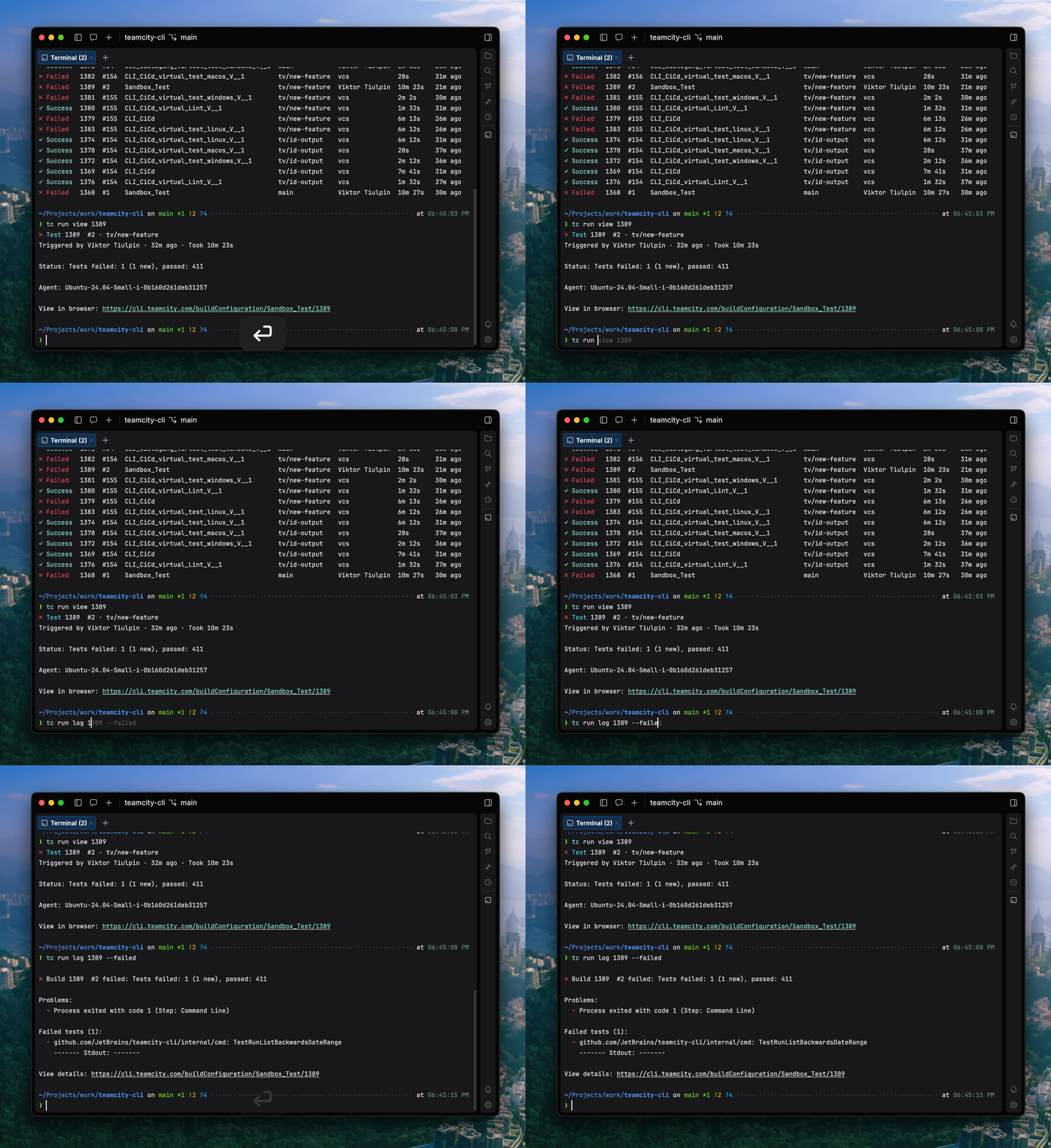
Currently, the TeamCity CLI includes over 60 commands, and we’re planning to expand the list. You can install the tool and connect locally using the following commands:
# macOS / Linux
brew install jetbrains/utils/teamcity

# via a bash script
curl -fsSL https://jb.gg/tc/install | bash

# Windows
winget install JetBrains.TeamCityCLI

# via a powershell script
irm https://jb.gg/tc/install.ps1 | iex

# Cross-platform via npm
npm install -g @jetbrains/teamcity-cli

# Log in to your server
teamcity auth login --server https://example.teamcity.com/
If you want to learn more about the TeamCity CLI, here’s a dedicated blog post.
MCP for AI agents
In addition to the TeamCity CLI, we’re also introducing support for the Model Context Protocol (MCP) to enable third-party integrations with AI tooling.
The Model Context Protocol is an open-source standard for connecting AI applications to external systems. Your external AI solution uses an authorized request to the specific endpoint and retrieves a list of ready-to-use tools for working with this resource.
MCP is useful when working with TeamCity from external AI-powered tools like JetBrains IDEs or Cursor. It is designed to give AI agents the ability to analyze, explain, and help fix build failures. By default, MCP allows starting remote runs, as well as accessing build logs and related data for troubleshooting.
You can get more context on the TeamCity MCP from our documentation.
AI Assistant is now available in trial Enterprise licenses
TeamCity AI Assistant is a built-in tool that understands the page you’re viewing and helps you find relevant information faster, right from the TeamCity interface. It’s connected to the TeamCity documentation and is great for answering quick questions about TeamCity, onboarding, and inspecting a selected build or project.
AI Assistant is available with the TeamCity Enterprise license – now also during the trial period.
Pipelines enhancements
Pipelines introduce a powerful new way to configure builds in TeamCity. Built on YAML and designed with full branching support, they align seamlessly with modern software development lifecycle practices. Changes to a Pipeline stay safely within a feature branch, allowing teams to iterate, review, and refine before merging into the main branch.
At the same time, TeamCity doesn’t force you into a single approach. While YAML is the primary format, you can also define Pipelines using the power of the Kotlin DSL, making it easy for enterprise teams to manage the most complicated setups.
For added convenience, TeamCity provides a Visual Editor that works hand in hand with YAML, offering an intuitive way to configure Pipelines without sacrificing control. You can seamlessly switch between visual and YAML-based configuration, so that you don’t need to learn yet another YAML schema.
We introduced Pipelines last year. Starting from 2025.07, they are available via the Early Access Program on TeamCity Servers.
We constantly improve Pipelines and keep expanding what users can do with them. Here are some highlights of what we’ve added in 2026.1:
Improved Pipeline Run page
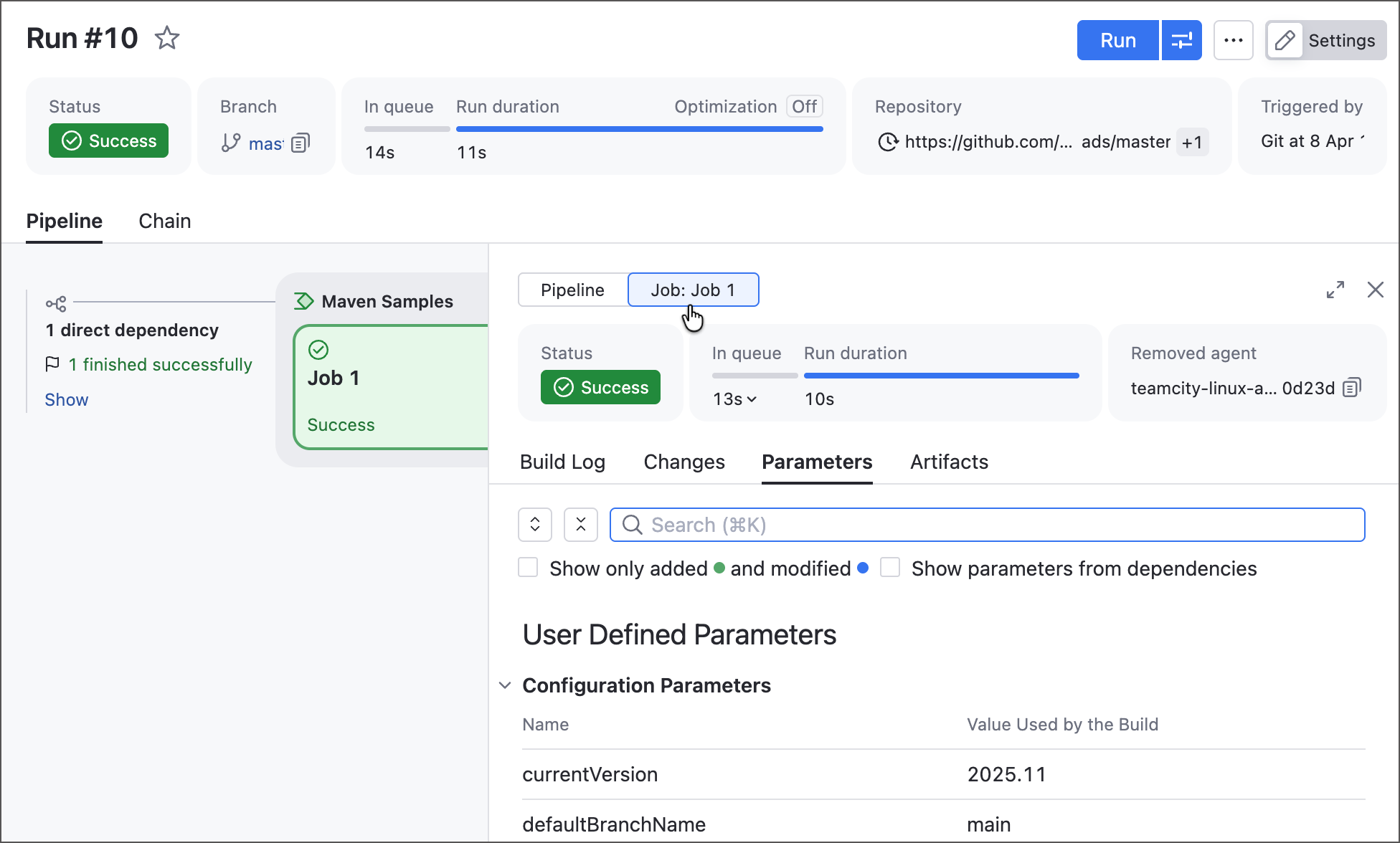
We improved the Pipeline Run page to include all familiar Build Results tabs (such as Overview, Build Log, Parameters, and more), giving you a complete overview of Pipeline execution results.
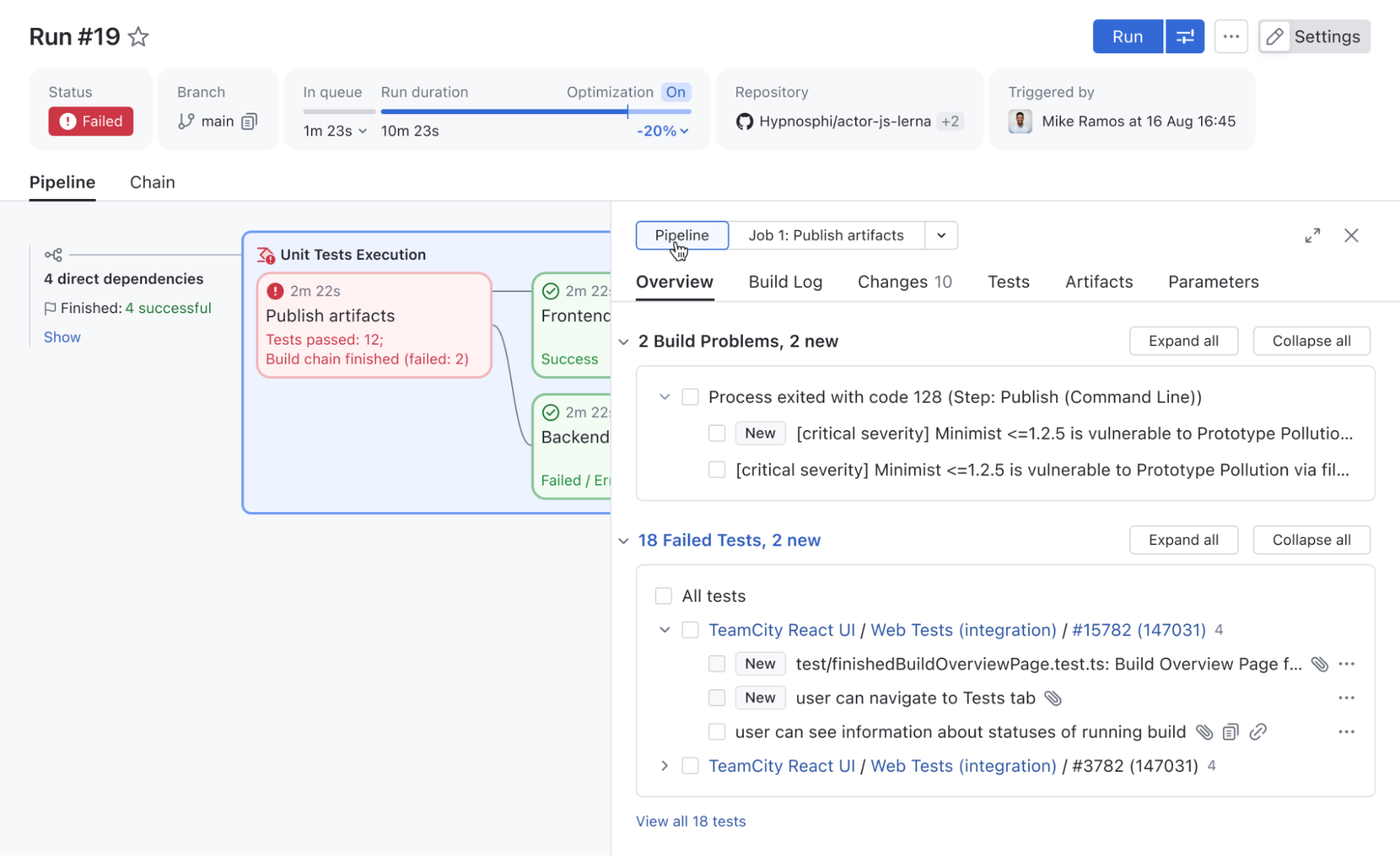
It now also includes a Pipeline/job switch, so you can quickly filter these tabs by job, making Pipelines easier to inspect, debug, and troubleshoot.
Build features are now available for jobs
Jobs can now use the following build features, previously available only for build configurations: Build files cleaner (Swabra), Build cache, Free disk space, and XML report processing.
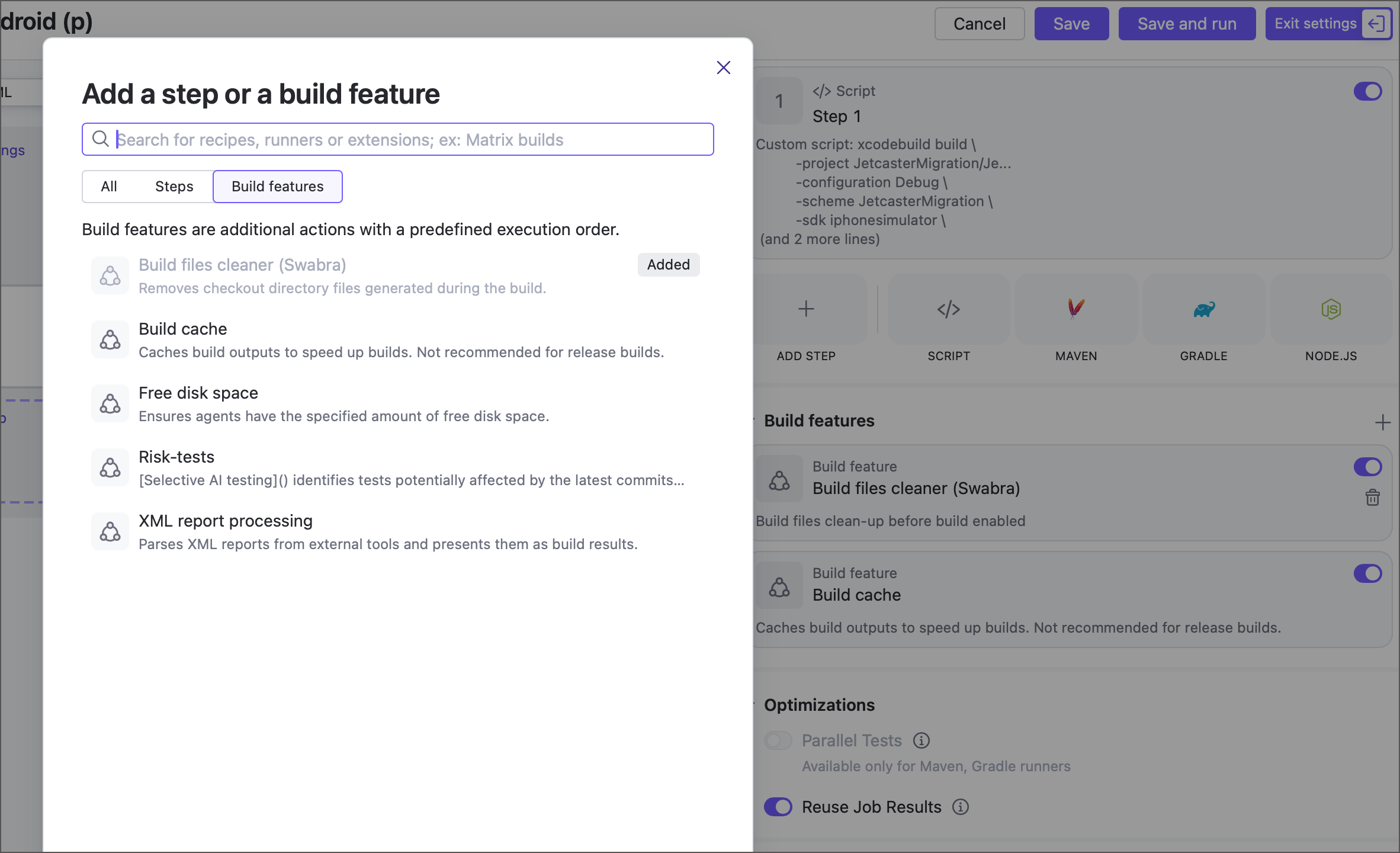
More build features will be available soon. Contact us if you’re looking for something specific, and we’ll let you know if it’s already possible to enable it with a feature toggle.
Pipeline upstream dependencies and combining Pipelines with build chains
Since 2026.1, it is now possible to define upstream dependencies for a Pipeline. This allows you to decompose a single large Pipeline into smaller parts, simplifying maintenance, improving access management, and enabling you to combine several separate Pipelines into a unified workflow.
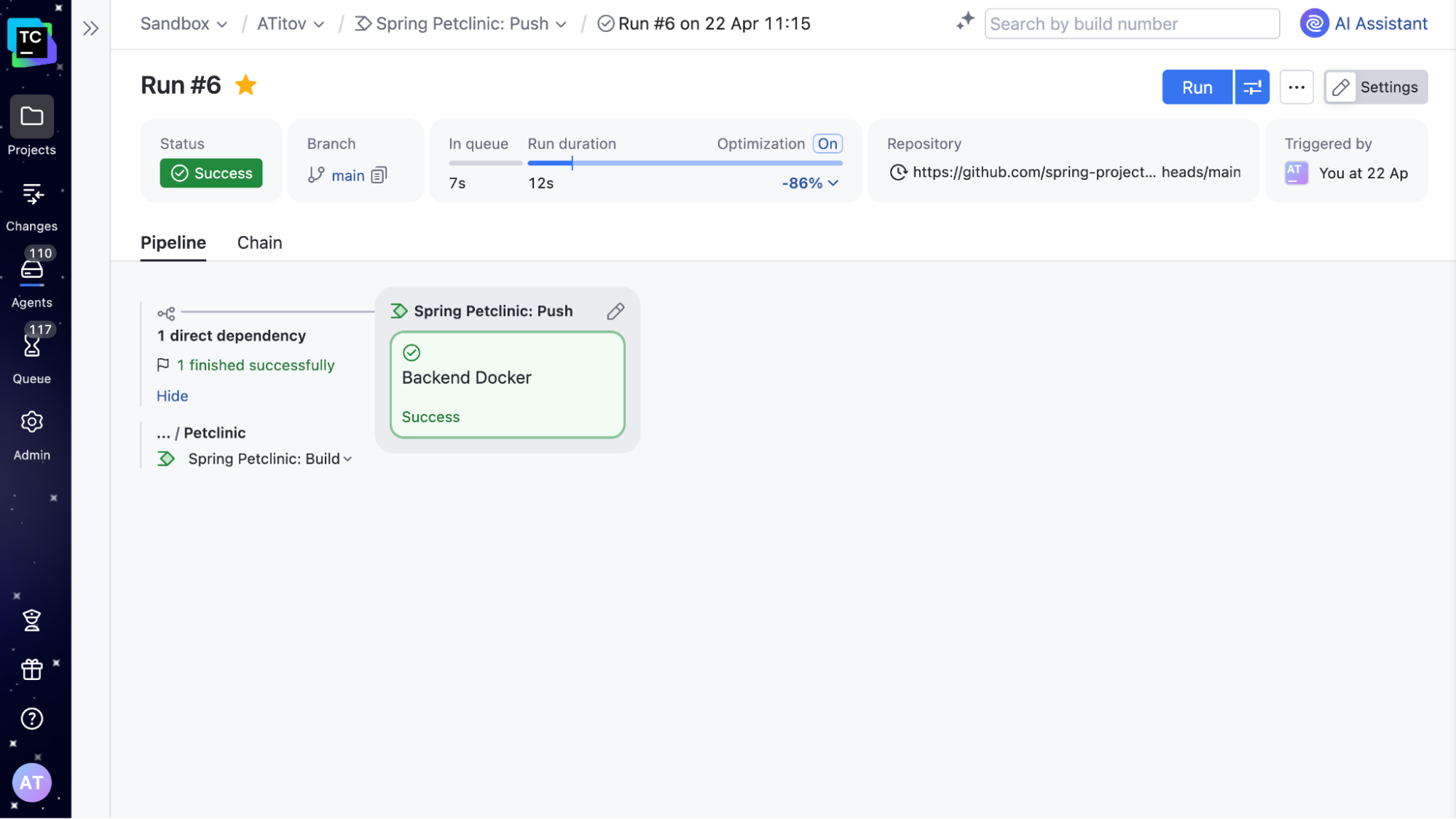
For instance, if you have separate Pipelines for microservices, upstream dependencies make it very convenient to set up a deployment Pipeline that deploys them all at the same time.
If you already have build configurations set up in your TeamCity, there is no need to rewrite them as Pipelines to take advantage of this functionality. A Pipeline can now define upstream dependencies on build configurations and vice versa. This means you can include new Pipelines in existing Build Chains whenever needed.
Kotlin DSL in Pipelines
In addition to YAML, it is now possible to define Pipelines in Kotlin DSL. It’s the same powerful Kotlin DSL, allowing you to leverage the full potential of a real, strongly typed programming language. Pipelines reuse most of the patterns used in build configurations, so you won’t need to learn them from scratch.
object MyPipeline : Pipeline({
    name = "A Pipeline"
    job {
        name = "Build"
        steps {
            script {
                content = "Hello Pipeline!"
            }
        }
    }
})
You can find the full list of Pipelines improvements in our documentation. Pipelines are currently offered via the Early Access Program. Sign up here to try them for your organization.
SAML authentication
The SAML authentication plugin is now bundled with TeamCity. SAML (Security Assertion Markup Language) is a widely used standard for single sign-on (SSO), allowing users to authenticate once via a central identity provider and access multiple services without re-entering credentials.
With SAML support, you can integrate TeamCity with your existing identity provider to simplify user management and improve security. It is confirmed to support Okta, OneLogin, AWS SSO, AD FS, and other SSO providers.
Learn more about the SAML authentication in our documentation.
Dynamic build step credentials
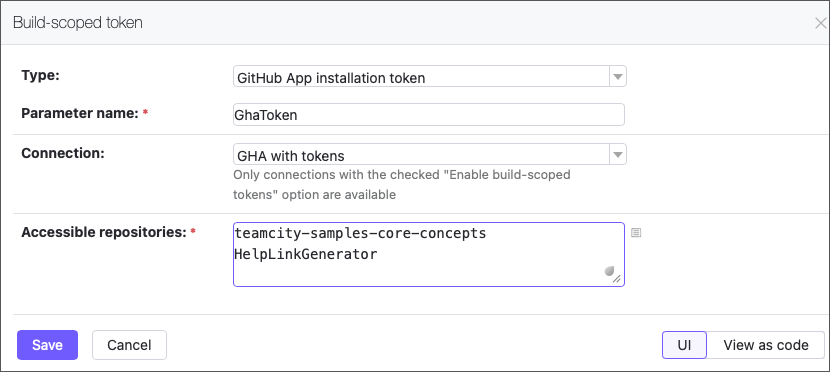
The new Build-scoped token feature lets your builds securely generate short-lived GitHub access tokens (up to 60 minutes) on the fly. Pass them to build steps as parameters to enable seamless access to repositories.
Small niceties worth mentioning
We’ve fixed quite a long-standing issue, and it is now possible to cancel the currently running build when new changes are made to the same VCS root and branch.
The corresponding setting is an extension of Running builds limit in the General build settings.
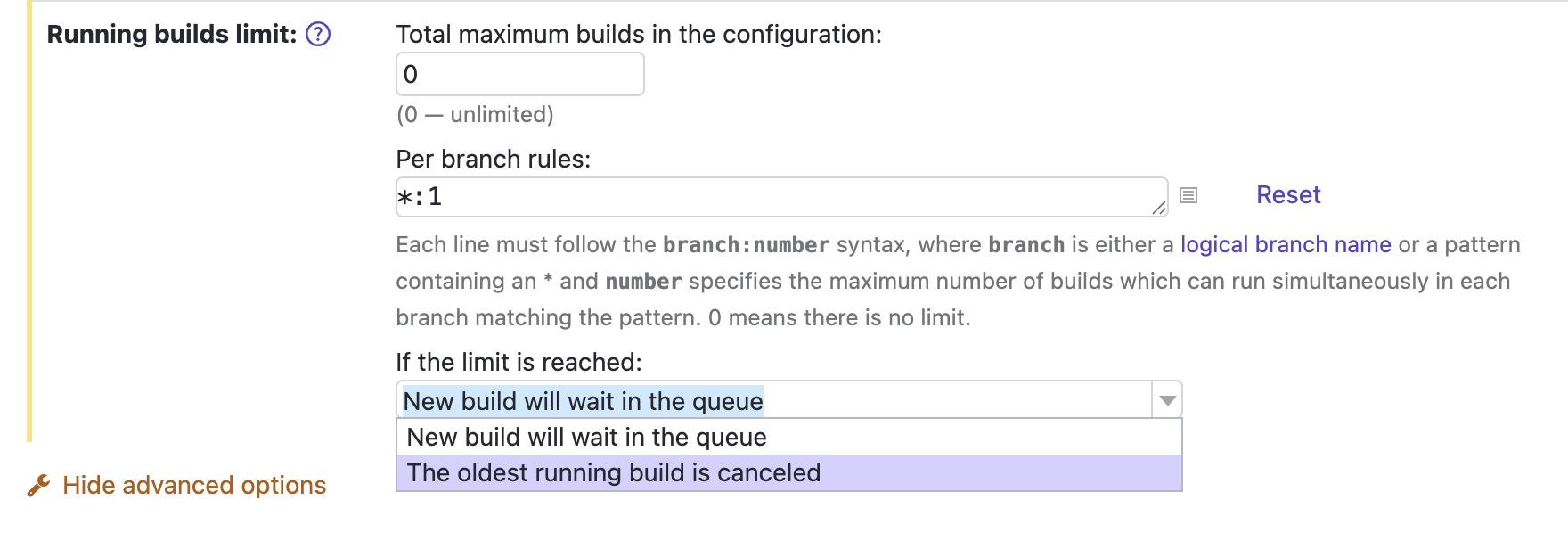
Another thing: If you know what reverse.dep.* parameters are, you may be glad that the problem detailed in this ticket has been fixed, too.
Release naming convention
We’re also changing the naming of TeamCity releases to align with other JetBrains tools. As before, we’ll have three major releases per year and several bug fixes after each release. The new naming format is YYYY.1, YYYY.2, YYYY.3.