

.NET Tools
Essential productivity kit for .NET and game developers
Testing with Rider for Unreal Engine

Rider for Unreal Engine Preview is widely used by many game developers around the world. We have more than 32,000 people registered in the program and we’ve gotten very positive feedback from them. According to our survey of early previewers:
- 28.3% use it for all their work and personal projects
- 15.4% use it for all their work projects
- 44.3% use it for all their personal projects
81.7% of the respondents think that Rider for UE is much better than any other editor they have used before! We’re encouraged by the results and are happy to keep improving the product.
The majority of the users are impressed by the helpful integrations provided by Rider for Unreal Engine, like code completion and documentation for the Unreal Engine reflection specifiers and macros, integration with the Unreal Editor, Unreal Engine log, code visions showing Blueprints usages, and many others. Today we’re adding another piece to this game development puzzle – Unreal Engine Automation Testing framework support.

Unreal Engine tests running in Rider
To add tests to your game, there is an Unreal Engine testing framework built in (check out this 3rd party tutorial). Rider can now launch tests and show their results in the Unit Test tool window:
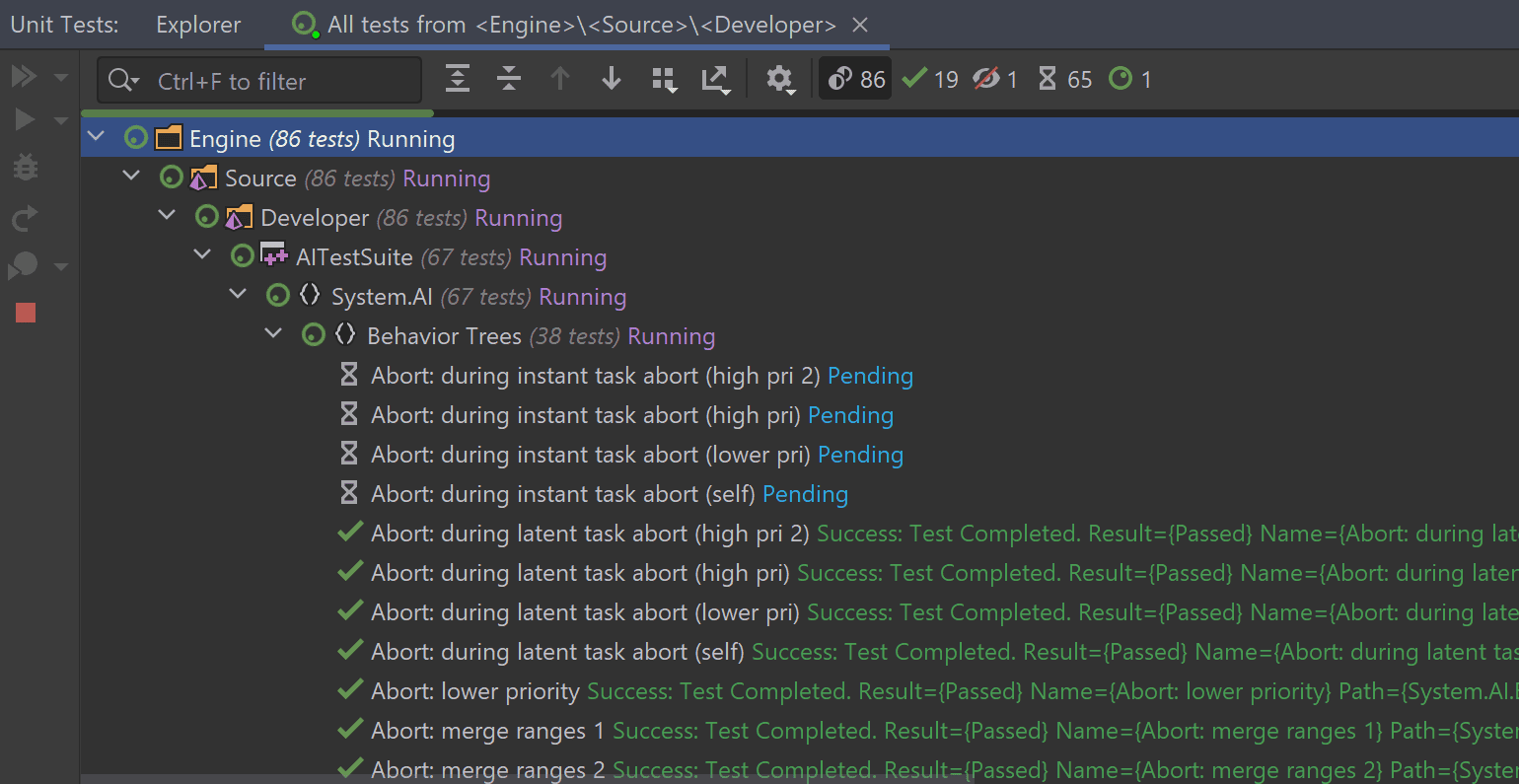
In this tool window you can review the results of the tests, reruns failed, and all or specific tests.
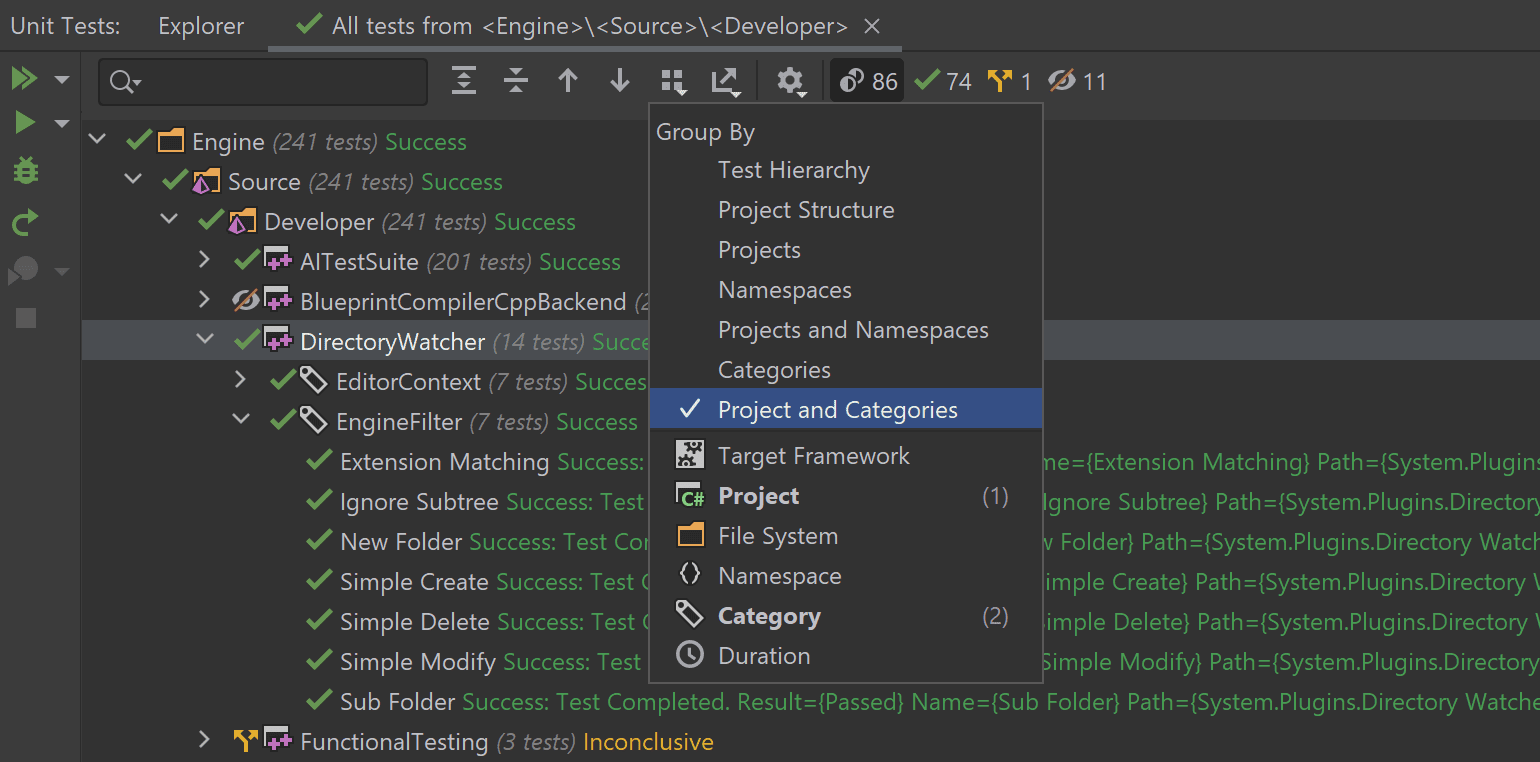
In the Unit Tests window, you can explore all the existing categories in the current solution. The categories are defined by the flags passed to the tests. Use Group By switcher to change the grouping in the tool window:
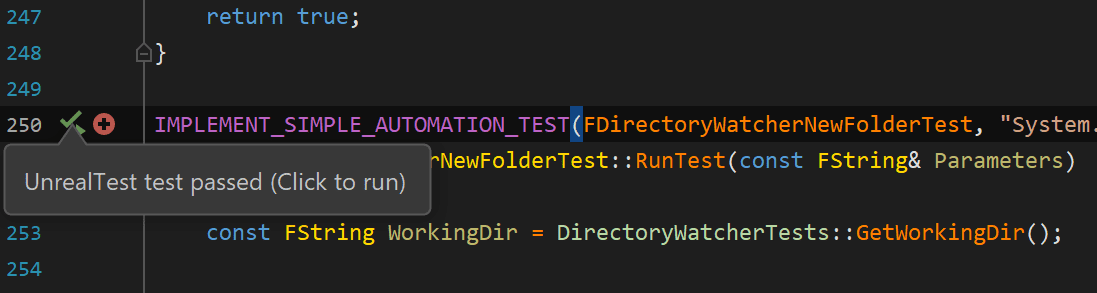
You can also run tests directly from the Unit Test tool window. Or from the Rider editor.You’ll see run icons in the left gutter near the test – click them to run the tests. These icons also show the status of the recently run tests:
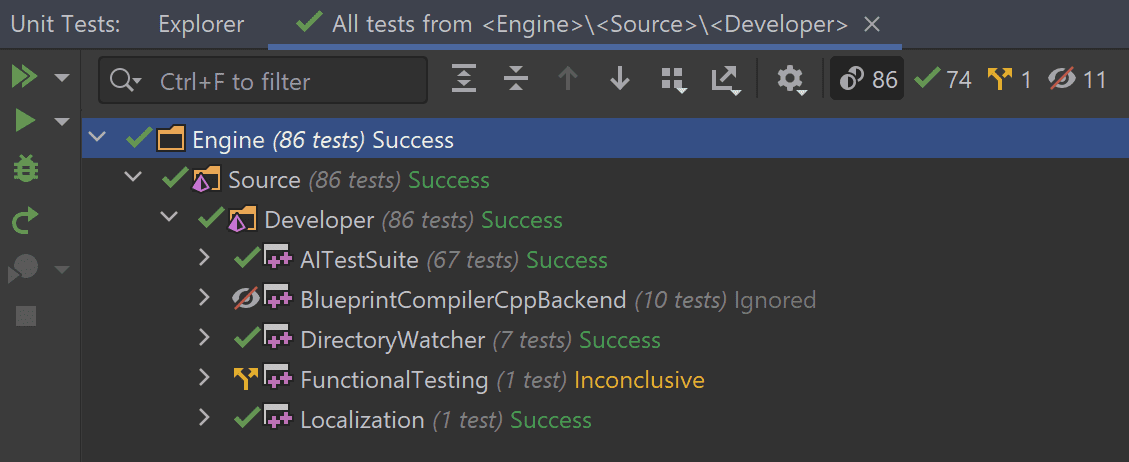
Tests with EAutomationTestFlags::Disabled flag will stay disabled in Rider, and will be marked with the corresponding Ignored symbol. Inconclusive tests are aborted tests, or other tests which were started but Rider could not read the test runner output.
Configuration and known issues
Engine tests work without any additional configuration. To get Unreal Engine plugin tests running in Rider, you need to:
- Index plugins by enabling Index plugins setting in Languages & Frameworks | C++ | Unreal Engine.
- Reference the plugin that includes the tests in the .uproject file.
Later, we plan to improve the UX and show a warning in this case (RIDER-68729).
There are a few known issues that are worth mentioning here:
- Tests only work in Rider on Windows – tests on macOS are not yet supported (RIDER-68429).
- Since StressFilter is ignored by Unreal Engine, Rider doesn’t support stress tests.
- Tests with the “
‘“ symbol are not supported in Rider. This will also be resolved on the Unreal Engine side. - Tests that don’t comply with current solution configuration will fail (RIDER-68730). For example, tests with “ClientContext” will fail to run when the “DebugGame Editor” configuration is selected.
Your Rider team
JetBrains
The Drive to Develop
Subscribe to a monthly digest curated from the .NET Tools blog:
Discover more




Rider for Unreal Engine Testi

Rider for Unreal Engine Önizlemesi dünya çapında birçok oyun geliştirici tarafından yaygın bir şekilde kullanılmaktadır. Programa kayıtlı 32.000’i aşkın kullanıcımız var ve kullanıcılardan oldukça olumlu geri bildirimler almaktayız. Önizleme programını ilk deneyen kullanıcılarla yürütülen anket sonuçlarına göre:
Katılımcıların;
- %28,3‘ü programı iş ve kişisel amaçlı projelerinde kullanıyor
- %15,4‘ü programı tüm iş projelerinde kullanıyor
- %44,3‘ü programı tüm kişisel projelerinde kullanıyor
Katılımcıların %81,7‘si ise Rider for UE’nin daha önce kullandıkları diğer düzenleyicilerden çok daha iyi olduğu görüşünde! Bu sonuçlar ürünü geliştirmeye devam etmek için bizi daha da cesaretlendirdi.
Kullanıcıların büyük bir kısmı, Rider for Unreal Engine’nin sunduğu entegrasyonların sağladığı olumlu sonuçlardan oldukça etkilendiklerini belirtti. Bu entegrasyonlar arasında kod tamamlama, Unreal Engine yansıtma belirteçleri ve makroları için belgeler, Unreal Editor ile entegrasyon, Unreal Engine günlük kaydı, Şema kullanımlarını gösteren kod görünümleri ve çok daha fazlası yer alır. Bugün bu oyun gelişme bulmacasına yeni bir parça daha ekliyoruz: Unreal Engine Otomasyon Testi için çerçeve desteği.
Rider’da yürütülen Unreal Engine testleri
Oyununuza testler eklemek için yerleşik Unreal Engine test etme çerçevesini deneyin (3. tarafa ait bu eğiticiyi inceleyin). Rider sayesinde testler yürütebilir ve sonuçları Unit Test araç penceresinde görüntüleyebilirsiniz:
Bu araç penceresinden testlerin ve yeniden yürütülen başarısız testlerin sonuçlarını inceleyebilir, dilerseniz tüm testleri ya da yalnızca belirli testleri görüntüleyebilirsiniz.
Unit Tests penceresinden uygulanabilir çözüm için geçerli tüm kategorileri keşfedebilirsiniz. Kategoriler, testin geçildiğini belirten bayraklarla gösterilir. Araç penceresindeki gruplamayı değiştirmek için Group By değiştiricisini kullanın:
Testleri doğrudan Unit Test araç penceresinden de yürütebilirsiniz. Alternatif olarak, Rider düzenleyiciyi de kullanabilirsiniz. Testin sol kısmında yer alan yürütme simgelerine tıklayarak testleri başlatabilirsiniz. Bu simgeler, son yürütülen testlerin durumunu da gösterir:
EAutomationTestFlags::Disabled bayrağı ile testler Rider’da devre dışı kalır ve karşılık gelen Yoksayıldı simgesi ile işaretlenir. Sonuç vermeyen testler, testin iptal edildiğini ya da yeni testler başlatılmasına rağmen Rider’ın test yürütücü sonucunu okuyamadığını gösterir.
Yapılandırma ve bilinen sorunlar
Motor testleri ek yapılandırma olmadan yürütülür. Rider’da yürütülen Unreal Engine eklenti testlerini edinmek için şunlara ihtiyacınız vardır:
- Diller & Çerçeveler | C++ | Unreal Engine ayarından İndeks eklentileri ayarının etkinleştirildiği İndeks eklentileri.
- .uproject dosyasında testleri içeren eklentiye göz atın.
Gelecekte UX’i geliştirmeye devam ederek bu gibi durumlarda uyarı verilmesini sağlamak istiyoruz (RIDER-68729).
Şu an için ele almaya değer bilinen birkaç sorun şöyledir:
- Testler yalnızca Windows’ta kurulu Rider’da çalışmaktadır. Henüz macOS desteği yoktur (RIDER-68429).
- Unreal Engine, StressFilter‘i yoksaydığı için Rider stres testlerini desteklemez.
- “
‘” sembolünü içeren testler Rider’da desteklenmez. Bu sorunun Unreal Engine tarafında da çözülmesi planlanmaktadır. - Mevcut çözüm yapılandırmasına uygun olmayan testler başarısız olur (RIDER-68730). Örneğin, “DebugGame Editor” yapılandırılması seçiliyken “ClientContext” içeren testler başarısız olur.
ERKEN ÖNİZLEME PROGRAMINA KATILIN
Rider ekibi
JetBrains
The Drive to Develop