
TeamCity
Powerful CI/CD for DevOps-centric teams
The Jenkins Migration Planning Kit

This article was brought to you by Cameron Pavey, draft.dev.
Jenkins has served the development community well for over a decade, but it was designed for a different era of software development. Developers who are tired of fighting with plugin compatibility issues, slow builds, and brittle configurations are exploring alternatives.
But is your organization ready for the move? What is the actual work involved? And how do you communicate the benefits of a more modern CI/CD solution to leadership to get their buy-in?
Our migration planning kit answers these questions:
- The migration-readiness assessment scores and plots your organization’s readiness against the pain you’re experiencing with Jenkins to determine whether you are an ideal migration candidate, need to address foundational issues first, or ought to focus on other priorities.
- You’ll see how Jenkins patterns compare to TeamCity to assess the effort required and plan for an effective migration.
- The safe migration plan guides you through the five phases of a successful migration: discovery & assessment, pilot setup, incremental migration, optimization, and full cutover.
- You’ll get templates and guidance on how to communicate the benefits of migration to management.
This guide contains a lot of information, so feel free to use the hyperlinks above to navigate to the information that’s most relevant for you right now.
Migration-readiness checklist: Assessing your team’s preparation
Before considering any migration, you need an honest assessment of your current CI/CD maturity and readiness for change. The following self-evaluation will help you determine whether migration is the right next step and identify areas that need attention.
Organizational-readiness assessment
Start by evaluating how your organization manages Jenkins infrastructure and pipeline development.
Do you manage Jenkins centrally, or is it distributed across teams? Centralized management typically indicates better standardization and makes migration coordination easier. Distributed management may require more planning but often means teams have stronger pipeline ownership.
Do you have standardized pipeline practices across your organization? If you have consistent patterns, shared libraries, and documented standards, you are typically better positioned for migration because you’ve already solved many of the organizational challenges. If your pipelines vary dramatically between projects, consider standardizing approaches before migrating.
Are your builds reliable, or do you regularly experience flaky failures? This question reveals both technical debt and team practices. Reliable builds point to good testing practices and stable infrastructure, while frequent flakiness could be due to underlying issues that migration alone won’t solve.
Technical-inventory questions
Understanding your current Jenkins footprint is essential for planning.
How many Jenkinsfiles do you maintain across all repositories? This gives you a scope estimate for the migration effort. Count both declarative pipelines and freestyle jobs that would need conversion.
Which Jenkins plugins are actively used in your pipelines? Create a comprehensive list including build tools, deployment integrations, notification systems, and reporting plugins. Research TeamCity equivalents for critical plugins, and identify any that might require custom development or workflow changes.
Do you have custom integrations, scripts, or Jenkins extensions? Custom code represents the highest migration risk because it cannot be automatically translated to TeamCity: Each integration must be completely rebuilt using different APIs, often without clear documentation of the original business requirements or dependencies. Document any custom plugins, shared libraries, or external integrations that directly interact with Jenkins APIs.
CI/CD pain point analysis
Consider and identify the specific problems migration should solve for your team.
Are your builds slow, or do you experience frequent bottlenecks? Common issues include slow build agents, inefficient artifact management, poor parallelization, and resource contention during peak hours. Having a clear goal is important as it will inform decisions throughout the migration process.
Do you face debugging challenges regularly? Consider how much time your team spends investigating pipeline failures, tracking down build-environment issues, or understanding why tests behave differently in CI versus local environments.
Do you have scalability issues that limit your current setup? Look for signs like build queues during busy periods, difficulty adding new projects, or infrastructure costs that grow faster than your team size.
Do you want more control over your pipeline logic and infrastructure? If you are frequently working around Jenkins limitations or investing significant time in custom solutions, you would likely benefit greatly from TeamCity’s more flexible architecture.
Do you need better visibility into flaky or slow tests? If your team struggles to identify unreliable tests or understand performance bottlenecks, TeamCity’s built-in test intelligence can provide immediate value.
Are you spending more time maintaining CI infrastructure than building products? This is often the clearest signal that your current platform has become a productivity drain rather than an enabler.
Interpreting your migration assessment
Let’s now determine your readiness for migration.
You can find a printable version of this readiness checklist in the supporting files.
First, calculate two separate scores:
Readiness score:
Give yourself 1 point for each “Yes”:
- Centralized Jenkins management
- Standardized pipeline practices across teams
- Reliable builds with minimal flaky failures
- Clear inventory of Jenkinsfiles and plugins
- Documented custom integrations and dependencies
Pain score:
Give yourself 1 point for each “Yes”:
- Slow builds or frequent bottlenecks
- Regular debugging challenges consuming team time
- Scalability issues limiting growth
- Need for more pipeline control and flexibility
- Poor visibility into test performance and failures
- More time spent maintaining than building
Migration recommendation
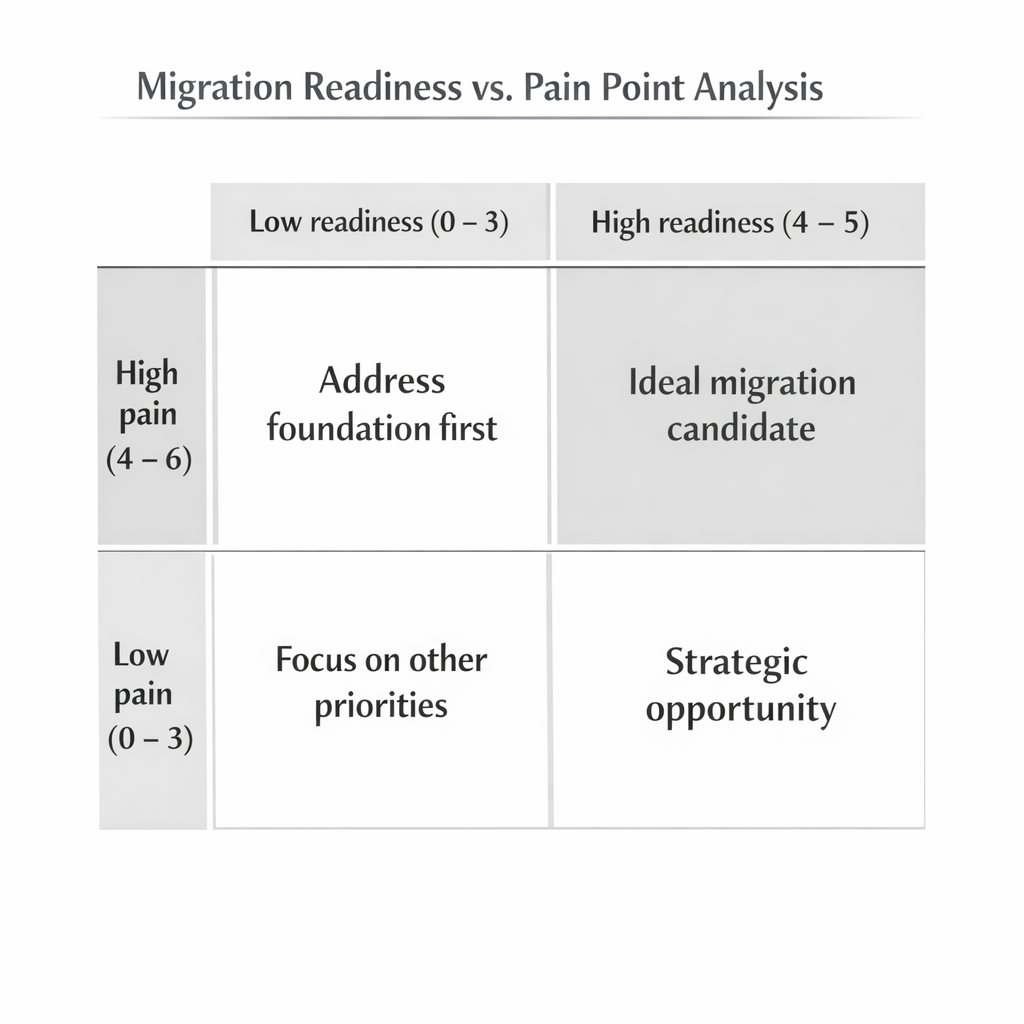
Low readiness (0–3 points) + high pain (4–6 points): Address foundational issues first, but consider that TeamCity’s better tooling can help with cleanup. Start with organizational improvements and a small pilot.
Low readiness (0–3 points) + low pain (0–3 points): Migration is not a priority. Focus on other improvements to your development process first.
Why choose TeamCity?
Knowing when it’s time to migrate is only part of the puzzle. You also need to have a solid platform to migrate to. TeamCity addresses the core problems that drive teams away from Jenkins while providing capabilities that simply don’t exist in older CI/CD platforms. Consider the following, to list just a few:
Kotlin DSL for maintainable pipeline logic
TeamCity’s Kotlin DSL provides type safety, IDE support, and compile-time validation. You can create reusable templates, refactor configurations with confidence, and catch errors before committing changes. Complex pipeline logic becomes maintainable code rather than fragile scripts that break unexpectedly.
Built-in test intelligence
Flaky test detection, automatic failure assignment, and a comprehensive test history are native platform features. TeamCity identifies which tests fail inconsistently, tracks patterns across builds, and assigns investigations based on recent changes. You’re not parsing logs or building custom solutions to understand test failures; the platform tells you what’s wrong and who should fix it.
Enterprise orchestration without enterprise complexity
Build chains, artifact dependencies, and parallel execution work without extensive configuration or specialized expertise. Visual pipeline editors make complex workflows immediately comprehensible to new team members. You gain sophisticated orchestration capabilities without the operational overhead typically associated with enterprise platforms.
How do Jenkins pipelines compare to TeamCity?
Understanding how your existing Jenkins patterns translate to TeamCity will help you determine what kinds of workflows you need to create as part of planning for an effective migration.
Pipelines vs. Build Chains
TeamCity offers two complementary approaches for defining build workflows: Build Chains and Pipelines. Build Chains is an established method for modeling dependencies and complex workflows, while Pipelines, a new feature as of version 2025.07, provides a modern pipeline experience. While Pipelines is a newer feature that does not yet support as many use cases as the more battle-hardened Build Chains, it offers a more familiar and intuitive interface for teams migrating from Jenkins.
The specifics of the CI/CD processes you’re looking to implement will determine which option is best for you.
Opt for Build Chains if:
- You need mature, production-ready orchestration with advanced features like artifact dependencies, custom triggers, and snapshot isolation.
- Your workflows involve large monorepos or multiproject builds where many components must be built, tested, and deployed in a coordinated fashion.
- Stability and long-term support matter more than having the latest pipeline syntax.
Opt for Pipelines if:
- You want a modern, YAML-based pipeline-as-code approach that feels closer to Jenkins, GitHub Actions, or GitLab CI.
- Your workflows are relatively straightforward (build → test → deploy) and don’t require deep artifact or snapshot dependency modeling.
- You value developer-friendly ergonomics and repo-first configuration over enterprise-grade complexity.
Sample patterns
Both Build Chains and Pipelines support Kotlin DSL for configuration (Kotlin DSL support is coming to Pipelines after 2025.11), which offers significant advantages over traditional Jenkinsfile syntax.
The following side-by-side examples compare common Jenkins pipeline patterns with TeamCity’s Kotlin DSL, showing syntax differences and TeamCity’s enhanced native capabilities.
Declarative pipeline definition
Jenkins’s declarative pipelines use a YAML-like syntax within Groovy that can become verbose and error-prone:
// Jenkinsfile

pipeline {

    agent any

    stages {

        stage('Build') {

            steps {

                sh 'echo "Building application..."'

                sh './gradlew build'

            }

        }

        stage('Test') {

            steps {

                sh './gradlew test'

            }

        }

        stage('Deploy') {

            steps {

                sh './deploy.sh'

            }

        }

    }

}
TeamCity’s Kotlin DSL provides type safety and better IDE support:
// .teamcity/settings.kts

import jetbrains.buildServer.configs.kotlin.*

import jetbrains.buildServer.configs.kotlin.buildSteps.script

import jetbrains.buildServer.configs.kotlin.triggers.vcs

object Build : BuildType({

    name = "Build and Deploy"

    vcs {

        root(DslContext.settingsRoot)

    }

    steps {

        script {

            name = "Build"

            scriptContent = """

                echo "Building application..."

                ./gradlew build

            """.trimIndent()

        }

        script {

            name = "Test"

            scriptContent = "./gradlew test"

        }

        script {

            name = "Deploy"

            scriptContent = "./deploy.sh"

        }

    }

    triggers {

        vcs {

            branchFilter = "+:*"

        }

    }

})
Triggering builds on VCS commits
Jenkins requires either polling or webhook configuration with plugins:
pipeline {

    triggers {

        pollSCM('H/5 * * * *')  // Poll every 5 minutes

        // OR

        githubPush()  // Requires GitHub plugin

    }

    stages {

        stage('Build on Commit') {

            when {

                anyOf {

                    branch 'main'

                    branch 'develop'

                    changeRequest()

                }

            }

            steps {

                sh './build.sh'

            }

        }

    }

}
TeamCity provides native VCS integration with sophisticated branch filtering:
object BuildOnCommit : BuildType({

    name = "Build on VCS Commit"

    vcs {

        root(DslContext.settingsRoot)

        branchFilter = """

            +:refs/heads/main

            +:refs/heads/develop

            +:refs/heads/feature/*

        """.trimIndent()

    }

    triggers {

        vcs {

            branchFilter = "+:*"

            enableQueueOptimization = false

        }

    }

    steps {

        script {

            name = "Build Application"

            scriptContent = "./build.sh"

        }

    }

})
Environment variables and configuration
Jenkins handles environment variables through pipeline syntax:
pipeline {

    environment {

        DATABASE_URL = 'jdbc:postgresql://localhost:5432/mydb'

        API_KEY = credentials('api-key')

    }

    stages {

        stage('Deploy') {

            environment {

                DEPLOY_ENV = 'staging'

            }

            steps {

                sh 'echo "Deploying to ${DEPLOY_ENV}"'

            }

        }

    }

}
TeamCity provides more flexible parameter management with type safety:
object Deploy : BuildType({

    name = "Deploy Application"

    params {

        text("database.url", "jdbc:postgresql://localhost:5432/mydb")

        password("api.key", "credentialsJSON:api-key")

        select("deploy.environment", "staging", options = listOf("staging", "production"))

    }

    steps {

        script {

            scriptContent = """

                echo "Deploying to %deploy.environment%"

                ./deploy.sh --env %deploy.environment%

            """.trimIndent()

        }

    }

})
Test reporting integration
Jenkins requires plugins for comprehensive test reporting:
pipeline {

    stages {

        stage('Test') {

            steps {

                sh './gradlew test'

            }

            post {

                always {

                    publishTestResults([

                        testResultsFiles: 'build/test-results/test/*.xml',

                        allowEmptyResults: false

                    ])

                    publishHTML([

                        allowMissing: false,

                        alwaysLinkToLastBuild: true,

                        keepAll: true,

                        reportDir: 'build/reports/tests/test',

                        reportFiles: 'index.html',

                        reportName: 'Test Report'

                    ])

                }

            }

        }

    }

}
TeamCity provides built-in test intelligence with automatic failure assignment:
object TestWithReporting : BuildType({

    name = "Test with Reporting"

    steps {

        script {

            name = "Run Tests"

            scriptContent = "./gradlew test"

        }

    }

    features {

        xmlReport {

            reportType = XmlReport.XmlReportType.JUNIT

            rules = "build/test-results/test/*.xml"

        }

        htmlReport {

            reportDir = "build/reports/tests/test"

            startPage = "index.html"

            reportName = "Test Results"

        }

        investigationsAutoAssigner {

            users = "teamlead"

            assignOnSecondFailure = true

            assignOnNewFailure = true

        }

    }

    failureConditions {

        executionTimeoutMin = 30

        testFailure = false  // Don't fail build on test failures, just report

    }

})
Conditional stages and matrix builds
Jenkins’s conditional logic can become complex and hard to maintain:
pipeline {

    stages {

        stage('Deploy to Production') {

            when {

                branch 'main'

                environment name: 'DEPLOY_PROD', value: 'true'

            }

            steps {

                sh './deploy-prod.sh'

            }

        }

    }

    strategy {

        matrix {

            axes {

                axis {

                    name 'JAVA_VERSION'

                    values '11', '17', '21'

                }

                axis {

                    name 'OS'

                    values 'ubuntu-latest', 'windows-latest'

                }

            }

        }

        stages {

            stage('Test Matrix') {

                steps {

                    sh './test-java-${JAVA_VERSION}.sh'

                }

            }

        }

    }

}
TeamCity’s approach is more explicit and maintainable, with better reusability:
object ProductionDeploy : BuildType({

    name = "Production Deploy"

    steps {

        script {

            name = "Deploy to Production"

            scriptContent = "./deploy-prod.sh"

            conditions {

                equals("teamcity.build.branch", "main")

                equals("deploy.environment", "production")

            }

        }

    }

})

// Matrix builds as separate build configurations with reusable functions

fun createTestBuild(javaVersion: String, os: String): BuildType {

    return BuildType({

        name = "Test Java $javaVersion on $os"

        params {

            text("java.version", javaVersion)

            text("agent.os", os)

        }

        steps {

            script {

                scriptContent = "./test-java-%java.version%.sh"

            }

        }

        requirements {

            equals("system.os", os)

        }

    })

}

// Create matrix builds programmatically

val testBuilds = listOf(

    createTestBuild("11", "Linux"),

    createTestBuild("17", "Linux"),

    createTestBuild("21", "Linux"),

    createTestBuild("11", "Windows"),

    createTestBuild("17", "Windows"),

    createTestBuild("21", "Windows")

)
Artifact management
Jenkins’s artifact handling requires careful configuration and lacks sophisticated dependency management:
pipeline {

    stages {

        stage('Build') {

            steps {

                sh './gradlew build'

            }

            post {

                success {

                    archiveArtifacts([

                        artifacts: 'build/libs/*.jar,build/distributions/*.zip',

                        allowEmptyArchive: false,

                        fingerprint: true

                    ])

                }

            }

        }

        stage('Deploy') {

            steps {

                // Copy artifacts from upstream build

                copyArtifacts([

                    projectName: 'upstream-job',

                    selector: lastSuccessful(),

                    target: 'artifacts/'

                ])

                sh 'deploy.sh artifacts/*.jar'

            }

        }

    }

}
TeamCity provides sophisticated artifact management, with dependency tracking and automatic cleanup:
object BuildWithArtifacts : BuildType({

    name = "Build and Archive"

    steps {

        script {

            name = "Build Application"

            scriptContent = "./gradlew build"

        }

    }

    artifactRules = """

        build/libs/*.jar => libs/

        build/distributions/*.zip => distributions/

        build/reports/** => reports/

    """.trimIndent()

    cleanup {

        keepRule {

            id = "keep_successful_builds"

            keepAtLeast = days(30)

            applyToBuilds {

                inBranches {

                    branchFilter = "+:refs/heads/main"

                }

                withStatus = BuildStatus.SUCCESSFUL

            }

            preserveArtifacts = PreserveArtifacts.ALL

        }

    }

})

object DeployWithArtifacts : BuildType({

    name = "Deploy Application"

    dependencies {

        artifacts(BuildWithArtifacts) {

            buildRule = lastSuccessful()

            artifactRules = """

                libs/*.jar => app/

                distributions/*.zip => packages/

            """.trimIndent()

        }

    }

    steps {

        script {

            name = "Deploy"

            scriptContent = """

                echo "Deploying artifacts..."

                ./deploy.sh app/*.jar

            """.trimIndent()

        }

    }

})
Benefits of Kotlin DSL
The advantages of TeamCity’s Kotlin DSL approach become clear when you’re managing complex pipelines:
Type safety and IDE support: Your IDE can provide autocompletion, refactoring tools, and compile-time error checking for pipeline configurations. This eliminates the trial-and-error cycles common with Jenkinsfile development.
Reusability and modularity: You can create reusable functions, templates, and shared configuration objects. This reduces duplication and makes it easier to maintain consistent patterns across multiple projects.
Version-control integration: Kotlin DSL configurations are easier to review in pull requests, track changes over time, and understand the impact of modifications. The type system makes it clearer what each change affects.
What does a safe migration plan look like?
Successfully migrating from Jenkins to a more modern system requires a structured, phased approach that minimizes risk while incrementally proving value as you go.
You’ll get the most value out of your migration if you don’t treat it as a direct-translation exercise but as an opportunity to modernize and improve your CI/CD workflows.
Phase 1: Discovery and assessment
Goal: Understand your current Jenkins environment and identify the biggest challenges you want to overcome through migration.
Key question: What are the most significant problems we want to solve by migrating, and how will you measure success?
The discovery phase involves conducting a comprehensive audit of your Jenkins instances and documenting all active jobs, pipelines, and their dependencies. Create an inventory that includes Jenkinsfiles, freestyle jobs, shared libraries, custom plugins, and external integrations. Pay special attention to identifying critical pipelines that cannot afford downtime and any custom functionality that might require special handling.
This audit should go beyond simple documentation. Ask what business goal each Jenkins pipeline was originally designed to accomplish. Many complex Jenkins configurations exist as workarounds for platform limitations rather than optimal solutions. Similarly, some pipelines may have evolved organically, accumulating complexity that can be eliminated in a fresh implementation.
During this phase, engage with development teams to understand their pain points with the current system. Document specific examples of maintenance overhead, debugging challenges, and workflow inefficiencies. This information will guide your migration priorities and help you measure the success of your TeamCity implementation.
Phase 2: Pilot setup
Goal: Set up a low-risk TeamCity environment, and demonstrate core capabilities with a representative workload.
Key question: Can you prove measurable value at a small scale before committing to a broader migration?
Choose a pilot project that represents typical patterns in your organization but won’t impact critical business operations if problems occur. This might be an internal tool, a staging-environment pipeline, or a new feature-branch workflow. The goal is to validate TeamCity’s capabilities with real work while building team confidence.
Resist the temptation to simply recreate your Jenkins pipeline as is in TeamCity. Treat the pilot as an opportunity to implement best practices from the start. Use TeamCity’s visual build chains to clarify pipeline dependencies, leverage Kotlin DSL for maintainable configuration, and take advantage of built-in features like test parallelization and flaky test detection.
Set up side-by-side comparisons where possible. Run the same builds in both Jenkins and TeamCity to compare performance, reliability, and developer experience. Document specific improvements, such as reduced build times, clearer failure diagnostics, or easier configuration management.
Collect detailed feedback from the development team using the pilot system. Focus on daily workflow impact. Is it easier to understand build failures? Are configuration changes simpler to make? Does the system provide better visibility into test results?
Phase 3: Incremental migration
Goal: Migrate remaining pipelines based on complexity and business criticality while maintaining Jenkins as a fallback option.
Key question: How can you migrate safely without disrupting team productivity or deployment capabilities?
Develop a migration priority matrix based on pipeline complexity, business criticality, and team readiness. Start with simpler, less critical pipelines to build expertise and confidence. Save the most complex or business-critical systems for later when your team has developed migration best practices.
For each pipeline migration, follow a consistent modernization approach. Review the original Jenkins implementation to understand its intended purpose. Then, design a TeamCity solution that accomplishes the same goals using native platform capabilities. This often results in simpler, more maintainable configurations.
Maintain Jenkins pipelines in parallel during this phase so you can do quick rollbacks if issues arise. Use feature flags or branch-based routing to gradually shift traffic to TeamCity while keeping Jenkins as a safety net. This parallel operation also allows you to validate that TeamCity implementations produce identical results.
Use Kotlin DSL consistently for new TeamCity configurations. This investment in type-safe, maintainable pipeline definitions pays dividends as your migration scales and more teams adopt the platform.
Phase 4: Optimization
Goal: Take full advantage of TeamCity’s advanced features to achieve benefits beyond basic pipeline migration.
Key question: How can you unlock capabilities that weren’t possible with Jenkins to improve development velocity and quality?
This phase focuses on using TeamCity’s built-in intelligence and optimization features. Enable flaky test detection to automatically identify unreliable tests that waste developer time. Configure test parallelization to reduce build times and provide faster feedback on changes.
Implement visual build chains to make complex workflows easier to understand and maintain. Use TeamCity’s dependency management to optimize resource utilization and reduce unnecessary work. Take advantage of TeamCity’s superior observability features. Set up dashboards that provide clear visibility into build performance, test results, and system health. Configure meaningful notifications that help developers focus on actionable issues rather than noise.
Consider implementing TeamCity’s integration features with development tools like IDEs, issue trackers, and deployment platforms. These integrations can significantly improve developer workflow efficiency when working with TeamCity builds.
Phase 5: Full cutover
Goal: Complete the migration by retiring Jenkins and ensuring all teams are successfully operating on TeamCity.
Key question: Are you confident enough in your TeamCity implementation to retire Jenkins and scale this success to other teams?
Establish comprehensive monitoring for your TeamCity environment before retiring Jenkins. This includes system performance metrics, build success rates, and developer satisfaction indicators. You want to catch any issues quickly and have data to demonstrate migration success.
Once you’re ready, create a formal Jenkins retirement plan that includes data archival, access revocation, and infrastructure decommissioning. Ensure you maintain access to historical build data and artifacts as needed for compliance or debugging purposes.
Document migration outcomes and lessons learned. Consider creating case studies that demonstrate measurable improvements in build performance, developer productivity, and system maintainability. This documentation will be valuable for expanding TeamCity adoption to other teams and for ongoing system optimization.
It may also be worth establishing an internal guild focused on CI/CD best practices with TeamCity. This group can help new teams adopt the platform effectively and continue evolving your implementation based on emerging needs.
Explaining the migration to management
Technical migrations often fail not because of technology issues but because of inadequate stakeholder communication and buy-in. Leadership needs to understand both the business case for migration and the risk-mitigation strategies that make it a safe investment.
Key benefits for leadership
Present migration benefits in terms of business impact rather than technical features.
Lower CI/CD maintenance overhead translates to engineering time that can be redirected from infrastructure firefighting to product development. Quantify this where possible: If senior engineers currently spend 10 percent of their time managing Jenkins, that represents a significant opportunity cost.
Faster builds and deployment cycles directly impact time to market and customer responsiveness. Demonstrate how TeamCity’s optimizations can reduce feedback loops and enable more frequent releases. This is particularly compelling for organizations pursuing competitive advantages through rapid innovation.
Better test insights and quality visibility reduce production incidents and customer-impacting defects. TeamCity’s flaky test detection and failure-analysis capabilities help teams identify quality issues before they reach customers, reducing support burden and protecting brand reputation.
Risk-mitigation talking points
Address leadership concerns about migration risk directly and specifically.
TeamCity supports parallel CI environments, which means you can validate the new system thoroughly without disrupting current operations. This isn’t a risky “big bang” migration that puts business continuity at stake.
No full cutover is required until teams are ready, which allows for controlled, incremental adoption. Teams can migrate when they have capacity and confidence rather than being forced into arbitrary timelines that create unnecessary stress and risk.
The phased rollout approach means early phases can be reversed easily if issues arise, while later phases build on proven success. This creates multiple decision points where leadership can evaluate progress and adjust strategy based on actual results rather than theoretical projections.
Business-case template
Below is a template you can adapt for your organization’s specific situation and leadership communication style. You can find an editable copy of this template in the supporting files.
Proposal: TeamCity Migration to Reduce CI/CD Maintenance and Improve Development Velocity
Executive summary
Our engineering team is requesting approval to migrate from Jenkins to TeamCity for our CI/CD infrastructure. This migration will reduce maintenance overhead currently consuming [X hours per week] of senior engineering time, improve build performance by an estimated [Y percent], and provide better visibility into code-quality issues before they reach production.
Current challenges
Our [your team name] team currently experiences [current pain point] with our Jenkins infrastructure. For example, [pipeline example] requires [specific maintenance burden or performance issue]. These issues are consuming approximately [time estimate] of engineering capacity that could be better spent on [strategic initiatives].
Proposed solution
TeamCity offers a modern CI/CD platform with built-in capabilities that address our current pain points:
- Reduced maintenance: The Kotlin DSL configuration eliminates plugin-compatibility issues and provides IDE support for pipeline development.
- Improved performance: Built-in test parallelization and intelligent caching can reduce build times by [estimated percentage].
- Better quality insights: Automatic flaky test detection and comprehensive failure analysis help teams identify issues faster.
Risk mitigation
This migration uses a proven, low-risk approach:
- Parallel operation: TeamCity will run alongside Jenkins during transition, allowing immediate rollback if issues arise.
- Incremental adoption: We’ll migrate one pipeline at a time, starting with noncritical systems to validate the approach.
- Pilot validation: Initial implementation will focus on [specific low-risk project] to prove value before broader adoption.
Success metrics
We will measure migration success through these metrics:
- Engineering efficiency: Reduction in CI/CD maintenance time from [current] to [target].
- Build performance: Average build-time improvement of [estimated percentage].
- Quality indicators: Faster identification of test issues and deployment problems.
Timeline and investment
- Phase 1 (discovery): [timeframe] – current system audit and TeamCity environment setup.
- Phase 2 (pilot): [timeframe] – single project migration and validation.
- Phase 3 (rollout): [timeframe] – incremental migration based on pilot results.
Recommendation
We recommend proceeding with Phase 1 (discovery) and a pilot implementation. This low-risk initial investment of [resource estimate] will provide concrete data about TeamCity’s benefits for our specific use cases and inform decisions about broader adoption.
Next steps
With your approval, we will:
- Conduct a comprehensive Jenkins environment audit.
- Set up a TeamCity evaluation environment.
- Execute pilot migration with [specific project].
- Report our results and recommendations for Phase 3.
Please let me know if you have questions about this proposal or would like additional details about any aspect of the migration plan.
Conclusion: Making migration a strategic success
Jenkins isn’t an inherently bad tool: It served the industry well during the early days of continuous integration and enabled countless teams to adopt automated build and deployment practices. However, like many tools from that era, Jenkins was designed for constraints and expectations that were different from what modern software development teams face today.
If your team is spending more time maintaining CI/CD infrastructure than building products, experiencing frequent pipeline-reliability issues, or lacking visibility into build and test performance, migration to a modern platform like TeamCity represents a strategic investment in developer productivity and system reliability.
The key to successful migration is approaching it as a systematic, risk-managed process rather than a disruptive technology replacement. With the right planning framework, you can migrate safely while improving your development workflows and team efficiency.
Start with the migration-readiness checklist to perform an honest assessment of your current situation and organizational readiness. This self-evaluation will help you determine whether migration makes sense for your team and identify areas that need attention regardless of platform choice.
Experiment with Kotlin DSL samples to understand how TeamCity’s approach differs from Jenkins and what benefits it offers for your specific use cases. The type safety and IDE support alone often convince teams that the learning investment is worthwhile.
Execute a focused pilot project to validate TeamCity’s benefits in your environment with real workloads and development patterns. This proof-of-concept approach allows you to make data-driven decisions about broader adoption while building team confidence and expertise.
TeamCity is a modern, scalable CI/CD platform that supports powerful pipeline authoring via Kotlin DSL, built-in test intelligence, and visual pipeline chains. Whether you’re a team of five or five hundred developers, TeamCity helps you ship software with confidence through better tooling, clearer visibility, and reduced maintenance overhead.
The migration frameworks and templates in this guide provide the structure you need to execute a successful transition. However, every organization’s situation is unique, so keep in mind that you’ll likely adapt these approaches based on your specific constraints and requirements.
Ready to explore how TeamCity can improve your development workflow? Visit the TeamCity website to learn more about our platform capabilities, or contact our team to discuss your specific migration requirements and get expert guidance for your transition planning.