

Fleet
More Than a Code Editor
Fleet Below Deck, Part II – Breaking down the editor

This is a multipart series on building Fleet, a next generation IDE by JetBrains.
- Part I – Architecture Overview
- Part II – Breaking down the editor
- Part III – State Management
- Part IV – Distributed Transactions
- Part V – The Story of Code Completion
- Part VI – UI with Noria
In the first part of this series we looked at an overview of the Fleet architecture. In this second part we’re going to cover the algorithms and data structures that are used under the covers in the editor.
An aggregate of data structures
Take a look at the following screenshot of the editor window in Fleet

There’s a line of text with syntax highlighting and a widget providing information about usages of the particular variable. Now one could find multiple ways to display this information, but the issue with editors is that they are not read-only. In addition to visualization of data, they can also be updated. A simple operation such as changing a function name could impact many things such as syntax highlighting, usages, and of course any other feature offered such as static analysis or on-the-fly compilation.
In order to be able to provide a good experience, we need to make sure that editing text and the consequent visualization can be as seamless as possible. In order to accomplish this, we have to store and manipulate data in an efficient manner. However, it’s not just one way of storing data. In fact, the image above stores data in multiple ways, using different data structures that all come together to form what we call the editor. In other words, think of the editor as an aggregator of data structures!
Let’s break these down!
Ropes everywhere
For those familiar with working with large amounts of text, you may already know that using strings (i.e. array of chars) to store them isn’t very efficient. Usually any operation on an array is going to imply having to create a new larger or smaller array, and copy the contents from the old one to the new one. This is hardly efficient.
A better and more standardized approach is to use rope structures. The idea behind this abstract data type is to store strings in leaf nodes on a tree.
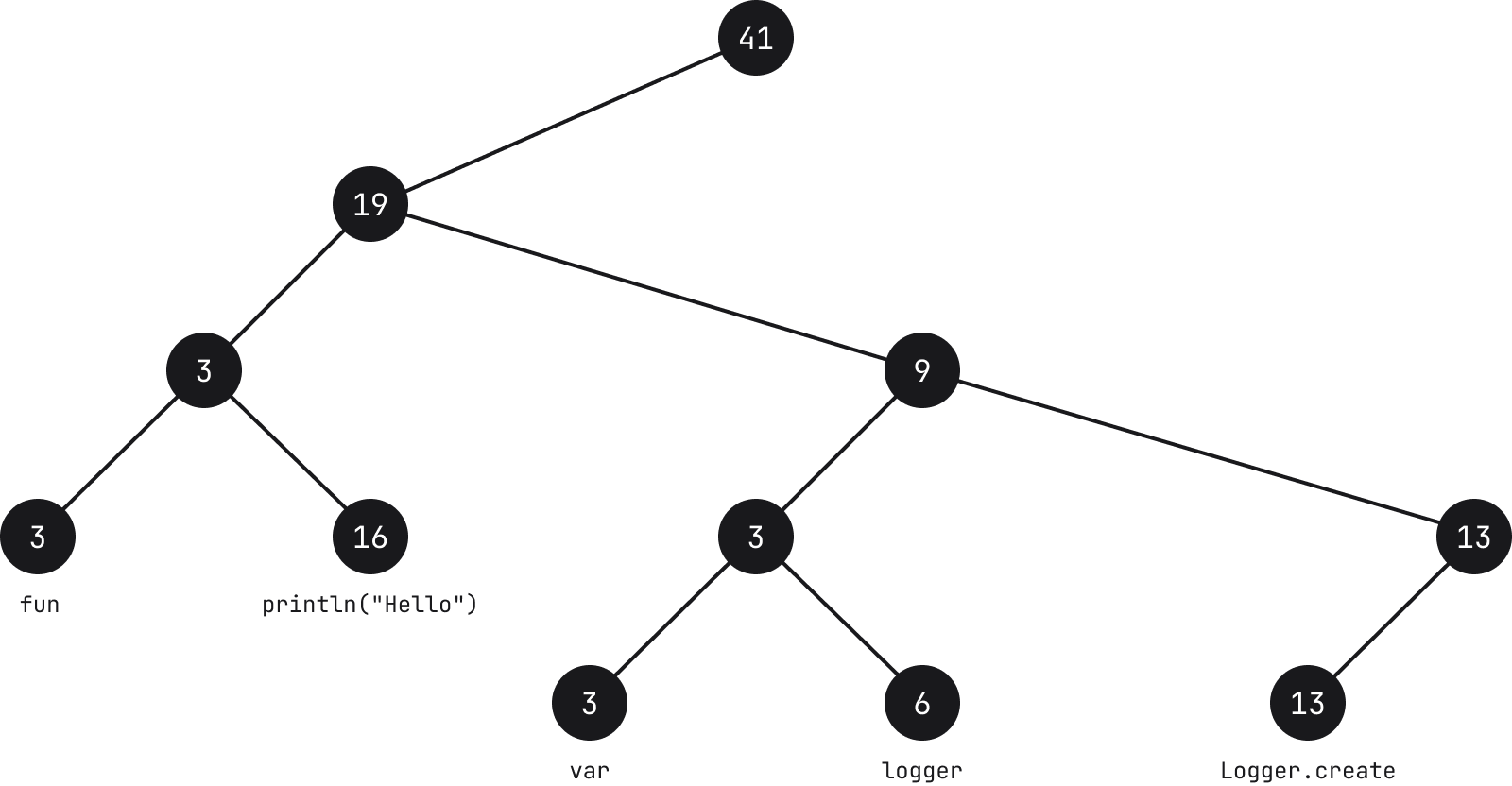
Each leaf node contains a string (see note below) and its length, called weight. Each intermediate node also contains a weight which is the sum of all the leaves in its left subtree.
Note: that the text used on the leaves is a mere example and does not represent how the actual text is broken down in Fleet.
From the example above, if we take for instance the node which holds the characters fun, the count of the node is 3 because the length of the string is 3. Moving up to the parent node, the count is also 3 because the sum of the weight of all nodes to its left is 3. Its parent in turn has a count of 19 because the sum of the leaves to its left is 3 and 16.
Common actions such as searching, appending, removing, splitting strings can be performed with O(log N) time complexity, where N is the length of the string. Operations start by traversing a tree, and given the information of the nodes, this makes it faster. For instance, if we want to find a character in position i = 30, we start with the node, and if 30 is less than the weight of the node (character count), we go to the left, subtracting (see note below) the value of the weight from i. If on the other hand i is higher, we go to the right. As we move down and the value of i decreases, once we reach a leaf node, the character at the i position of the string the leaf node holds is what we’re looking for.
Note: depending on the metric used, subtraction may not be the required operation. What’s important is that as we move down the tree we accumulate the metric up to that point and compare it to the key we are scanning for.
When inserting or deleting nodes in the rope structure in Fleet, we use a self-balancing B-Tree. We start by reading chunks of 64 characters, and once we get to 32 chunks we create a node and start collecting chunks for a second node. Each node has two numbers – in addition to the weight we also store the line count (combination of both is what we call metrics).

By storing the line count, we can navigate faster to specific offsets. Another trait of the tree in Fleet is that we aim to keep them wide as opposed to deep.
Interval trees for widgets et al.
As we saw before a fragment of code may not only contain the actual text, but also additional elements like usages.

We call these widgets, and they can be interline widgets such as the Find Usages or Run widgets, postline (e.g. debug information appearing after the line of code) or inlay (e.g. type hinting on variables and lambdas).
A widget in itself is merely a markup element, and the data structure that holds it is a variation on interval trees, which in some way is also a rope structure. In Interval trees, nodes hold a range and the weight corresponds to the maximum of the ranges from the subtree.
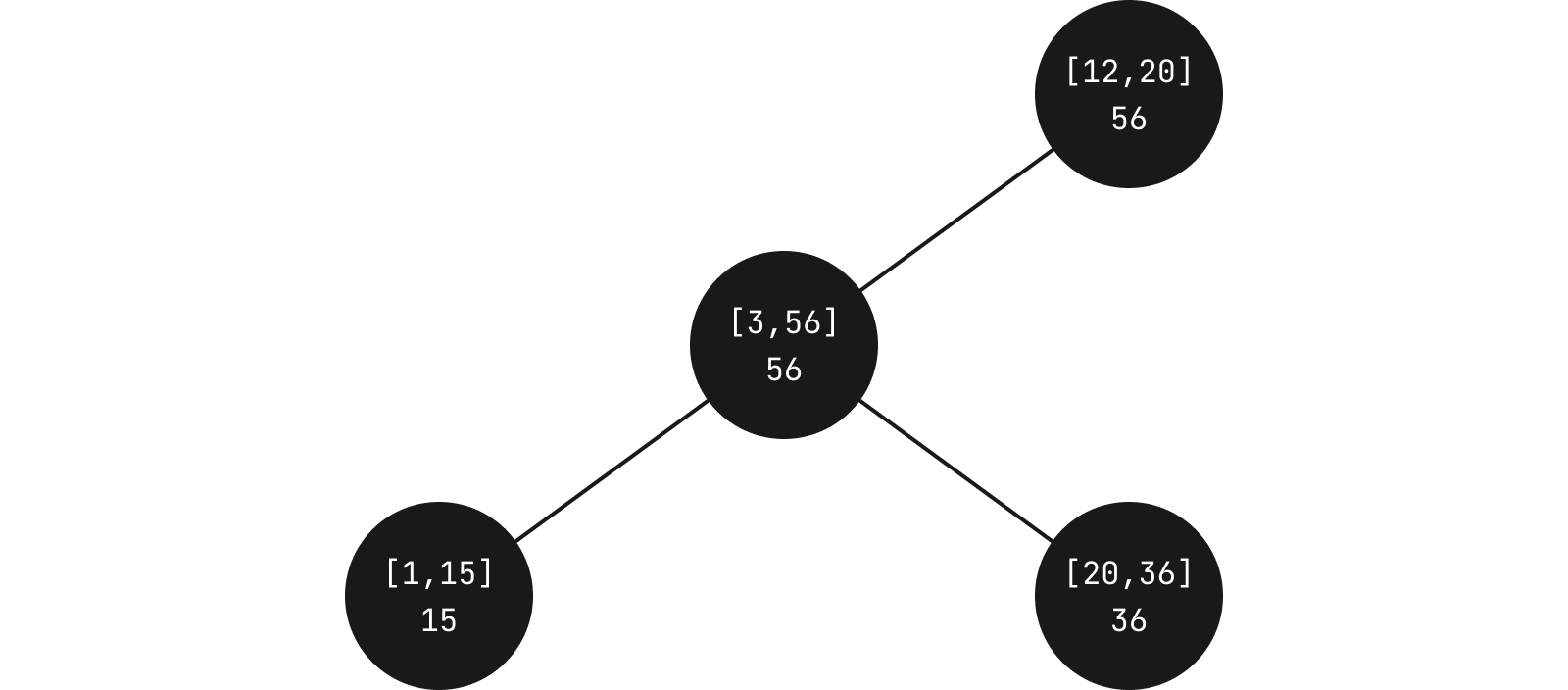
In Fleet, each node contains a relative start and end of children nodes. Leaves in turn contain an actual widget. When running queries to see if a particular widget needs to be displayed based on some specific coordinate, we traverse the tree until we find an intersection of the range with the one we’re querying.
An important aspect is that the leaves also contain the widget ID. This means that in addition to querying what intersects with a specific range, for any widget we can also query to determine where it actually is located.
One variation from a standard interval tree is that in Fleet we allow nodes to overlap. This leads to the possibility of making searches somewhat less efficient, but by allowing this, we can create balanced trees and have them updatable as we type.
In addition to widgets, interval trees in Fleet are also used to keep track of carets, highlighting of text, as well as sticky locations in text which we call anchors.
Ropes for Tokens and the Abstract Syntax Tree
When working with source code, whether it’s a compiler or an editor, you normally would use an Abstract Syntax Tree (AST). The way this works is that a parser analyzes the source code and creates a series of tokens. These tokens are then used to build up the AST.
Take the following code
fun compileBundles(ship: JpsModule, model: JpsModel, src: SrcBundles): DstBundles
It would be broken down into the following tokens
[fun][ ][compileBundles][(][ship][:][ ][JpsModule][,][ ][model][:][ ][JpsModel][,][ ][src][:][ ][SrcBundles][)][:][ ][DstBundles]
where each token is represented by square brackets (notice how empty spaces are also tokens). These tokens are then used to build the corresponding AST
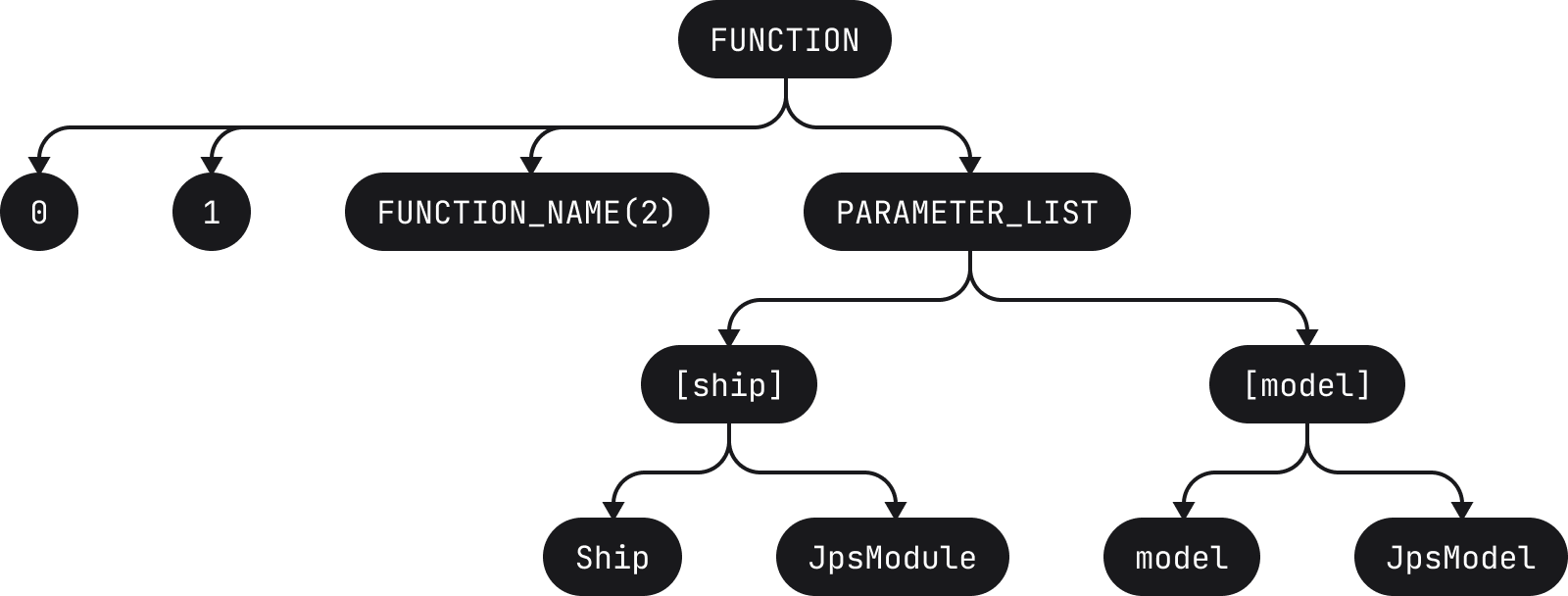
The AST is then used for a variety of operations such as syntax highlighting, static analysis, etc. It is an important part of any IDE.
By the way, if you’re interested in seeing how some code is translated into an AST, check-out this cool online AST explorer (which provides support for a variety of languages)
As we type in the editor, the text changes, meaning the tokens change, which in turn requires building a new AST so as to be able to provide the above functionality.
In Fleet, in order to avoid updating the AST directly, we use a rope structure to store the tokens in leaves (actually only the lengths are stored). To give an example, the above list of tokens could be represented with the following tree

When the user types something, for instance a space character, the tree is updated (length of 1 added in the leftmost leaf, causing increase in count along that path)
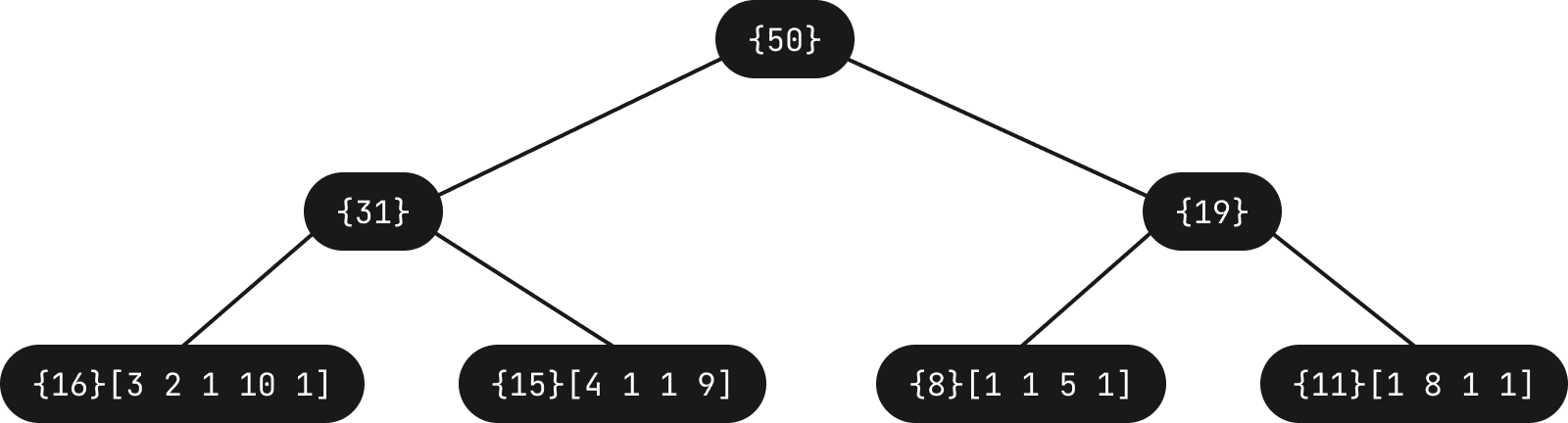
The specific leaf gets the new token length added, which in turn causes updates to certain nodes of the tree in order to adjust the weight. The parser then receives a notification which forces it to update and reparse the AST. As such, for a fraction of second the AST may not be entirely correct, however the user experience is much better when it comes to editing as very little has to be updated.
Ropes for Rendering
The image below is yet another example of the editor, but this time with a few additional elements, namely the actual usages widget expanded to display usages, soft-wrap of lines, and other things such as colored vertical lines in the scrollbar.
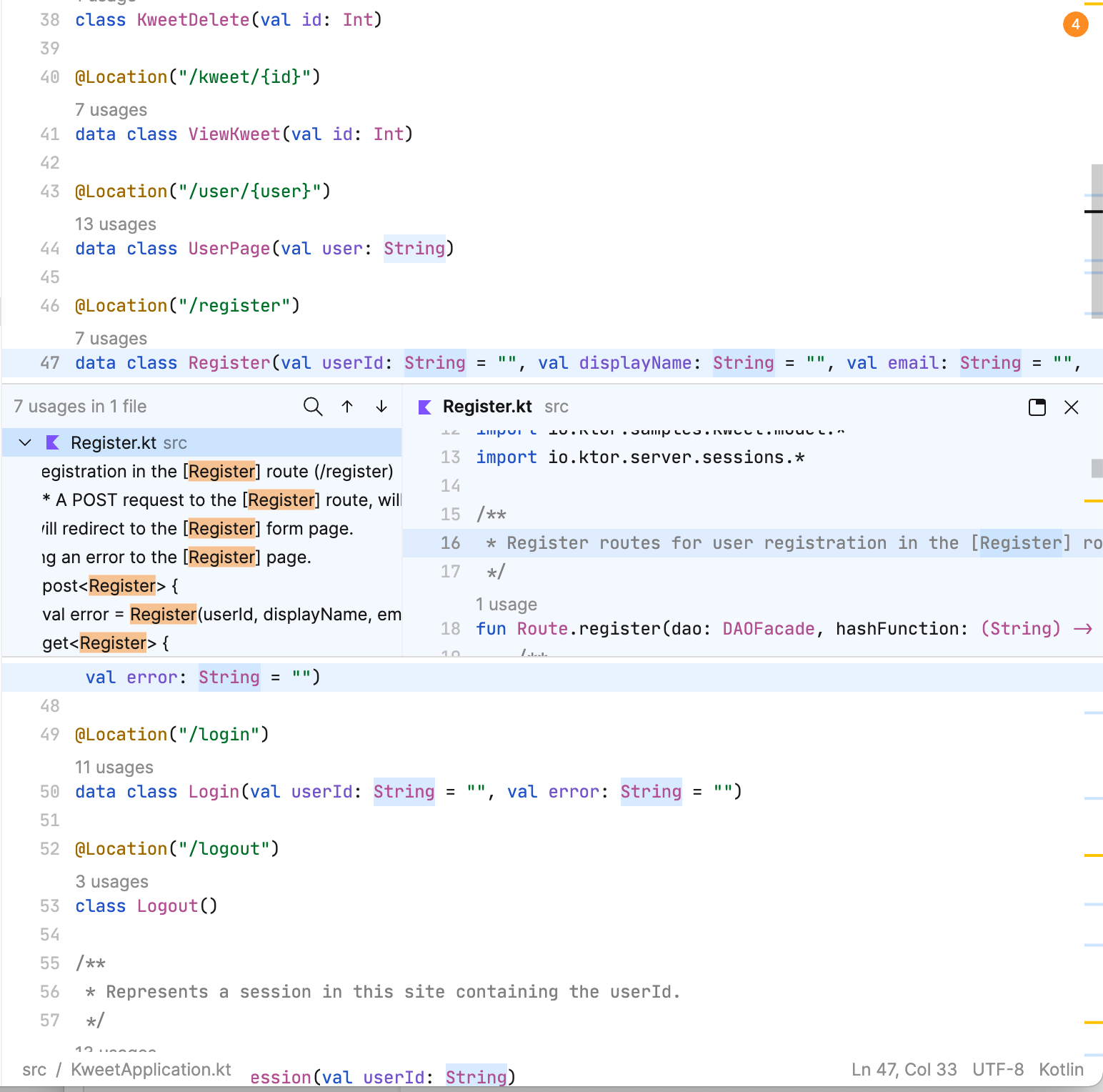
To render the above, for a specific Y coordinate, we need to know not only which line is displayed but also take into account all the widgets and soft-wrapped lines.
Fun fact: the editor rendered in the usages widget uses the same underlying data structures we’re exploring in this post. For usages in the same file, the same ropes are used to build and render this overlay editor.
Widget and soft-wrap information is also stored as a rope structure. Whereas before the leaves of the tree would hold the string and its length, in this case, we’re using leaves to hold what we call SoftLine objects. These are chunks of text accompanied by the heights that are considered visual lines. The weight of the nodes in this case (what we call metrics) are the height and length of the SoftLine. The height is stored in order to be able to support viewport queries. This height is affected by the interlines located inside of it. In addition, when soft-wraps are enabled, SoftLines don’t correspond one to one with real lines, but can span multiple lines.
A note on immutability
It’s important to mention that in Fleet we embrace immutability. Working with pure functions and immutable objects provide many benefits. Pure functions allow us to not only reason better about the code but also know that calling a function will not cause some other part of a system to change without our knowledge (i.e. have side-effects). In terms of data, knowing that an object is immutable means that it is thread-safe, and consequently there would not be race conditions when attempting any updates. For multi-threaded environments, this provides huge benefits.
This idea of immutability is also central to operations that use rope structures. Previously we spoke about how we make updates to nodes and leaves of the trees. These are all done in an immutable way – any operation on the tree produces a new copy of the tree which shares the structure with the old one, except from the root to the single node which needs changing. The fact that the trees in general are wide and not deep means that paths are very short. If the operation leads to any unreferenced nodes, these get garbage collected.
This is a significantly different approach from what we do on the IntelliJ platform where we use read-write lock mechanisms to perform changes.
Summary
As we’ve seen in this second part on how we build Fleet, something as simple as an editor where we can type and read code turns out to be a complex underlying aggregation of multiple different data structures, many of them being ropes. If you’re interested in learning more about ropes, make sure you check out the series on Rope Science, which has heavily influenced the work we’ve been doing on Fleet.
Until the next time, happy sailing!
Discover more


Fleet의 내부 구조, 파트 II – 에디터 해부하기

목차
JetBrains의 차세대 IDE인 Fleet 구축에 대해 알아보는 연재 게시물입니다.
- 파트 I – 아키텍처 개요
- 파트 II – 에디터 해부하기
이 시리즈의 첫 파트에서는 Fleet 아키텍처의 개요를 살펴보았습니다. 이 두 번째 파트에서는 에디터 내부에서 사용되는 알고리즘과 데이터 구조를 다룹니다.
데이터 구조의 집합체
다음에 나온 Fleet의 에디터 창 스크린샷을 살펴보세요.
구문 강조 표시가 되어 있는 텍스트 줄과 특정 변수의 사용 위치에 대한 정보를 제공하는 위젯이 있습니다. 이제 이 정보를 표시하는 방법에는 여러 가지가 있지만 에디터에서 문제는 이것이 읽기 전용이 아니라는 것입니다. 데이터는 시각적으로 표시될 뿐만 아니라 업데이트될 수도 있습니다. 함수 이름을 변경하는 것과 같은 간단한 작업도 구문 강조 표시, 사용 위치는 물론 정적 분석이나 즉석 컴파일과 같은 기타 많은 제공 기능에 영향을 미칠 수 있습니다.
훌륭한 사용자 경험을 제공하기 위해서는 텍스트 편집과 그에 따른 시각화 작업을 최대한 매끄럽게 수행할 수 있도록 해야 합니다. 이를 위해서는 효율적인 방식으로 데이터를 저장하고 조작해야 합니다. 그러나 이것이 데이터를 저장하는 유일한 방법은 아닙니다. 사실 위의 이미지는 서로 다른 데이터 구조를 사용하여 다양한 방식으로 데이터를 저장합니다. 이러한 구조가 모여서 에디터라고 하는 도구를 형성하는 것이죠. 즉, 에디터를 데이터 구조의 집합체로 생각하면 이해하기 쉽습니다!
그러면 자세히 알아봅시다!
모든 곳에 있는 로프
많은 양의 텍스트로 작업하는 데 익숙한 분들은 문자열(즉, 문자 배열)을 사용하여 이를 저장하는 것이 그다지 효율적이지 않다는 사실을 이미 알고 계실 겁니다. 일반적으로 배열에서 이루어지는 작업은 더 크거나 작은 새 배열을 만들고 내용을 이전 배열에서 새 배열로 복사해야 함을 의미합니다. 이러한 작업은 효율적이기가 매우 어렵습니다.
이보다 우수하고 표준화된 접근 방식은 로프 구조를 사용하는 것입니다. 이 추상 데이터 형식의 기본 개념은 트리의 리프 노드에 문자열을 저장하는 것입니다.
각 리프 노드에는 문자열(아래 참고 참조)과 가중치라고 하는 길이가 포함됩니다. 각 중간 노드에는 왼쪽 하위 트리에 있는 모든 리프의 합에 해당하는 가중치도 포함됩니다.
참고: 리프에 사용된 텍스트는 단순한 예이며 Fleet에서 실제 텍스트가 어떻게 세분화되는지를 나타내지 않습니다.
위의 예에서 문자 fun을 가지고 있는 노드를 예로 들면 문자열의 길이가 3이기 때문에 노드의 수는 3개입니다. 상위 노드로 이동하면 왼쪽에 있는 모든 노드의 가중치 합이 3이므로 개수도 3개입니다. 그러면 상위의 개수는 왼쪽에 있는 리프의 합이 3과 16이기 때문에 19가 됩니다.
문자열 검색, 추가, 제거, 분할과 같은 일반적인 작업은 O(log N) 시간 복잡도로 수행할 수 있습니다(여기서 N은 문자열 길이). 작업은 트리를 횡단하는 것으로 시작하고 노드의 정보가 주어지면 작업이 더 빨라집니다. 예를 들어 위치 i = 30에서 문자를 찾고 싶다면 노드에서 시작하고 30이 노드의 가중치(문자 수)보다 작으면 왼쪽으로 이동하여 i에서 가중치 값을 뺍니다(아래 참고 참조). 반대로 i가 더 크면 오른쪽으로 이동합니다. 아래로 이동하고 i 값이 감소함에 따라 리프 노드에 도달하면 리프 노드가 보유한 문자열의 i 위치에 있는 문자가 바로 우리가 찾고 있던 문자입니다.
참고: 사용된 메트릭에 따라 감산이 필요하지 않을 수도 있습니다. 중요한 것은 트리 아래로 이동할 때 해당 지점까지 메트릭을 누적하고 이를 스캔 중인 키와 비교한다는 것입니다.
Fleet의 로프 구조에서 노드를 삽입하거나 삭제할 때 자체 균형을 유지하는 B-Tree를 사용합니다. 64자의 청크를 읽는 것으로 시작하고 32개의 청크에 도달하면 노드를 만들고 두 번째 노드에 대한 청크 수집을 시작합니다. 각 노드에는 두 개의 숫자가 있으며, 가중치 외에 행 수도 저장합니다(이 둘의 조합을 메트릭이라고 함).
행 수를 저장하면 특정 오프셋으로 더 빠르게 이동할 수 있습니다. Fleet 트리의 또 다른 특성은 깊게가 아닌 넓게 유지하는 데 목표를 둔다는 것입니다.
위젯 등의 간격 트리
앞에서 본 것처럼 코드 조각에는 실제 텍스트뿐만 아니라 사용 위치와 같은 추가 요소도 포함될 수 있습니다.
우리는 이러한 위젯을 호출하며 이는 Find Usages(사용 위치 찾기) 또는 Run(실행) 위젯과 같은 행 간 위젯이거나 포스트라인(예: 코드 줄 뒤에 나타나는 디버그 정보) 또는 인레이(예: 변수 및 람다에 대한 타입 힌트)일 수 있습니다.
위젯 자체는 단순히 마크업 요소이며 이를 보유하는 데이터 구조는 어떤 면에서 일종의 로프 구조인 간격 트리가 변화된 형태입니다. 간격 트리에서 노드는 범위를 가지며 가중치는 하위 트리 범위의 최댓값에 해당합니다.
Fleet에서 각 노드는 하위 노드의 상대적 시작과 끝을 포함합니다. 리프는 다시 실제 위젯을 포함합니다. 특정 좌표를 기반으로 특정 위젯을 표시해야 하는지 확인하기 위해 쿼리를 실행할 때 쿼리 중인 항목과 범위의 교차점을 찾을 때까지 트리를 횡단합니다.
중요한 측면은 리프에도 위젯 ID가 포함된다는 것입니다. 즉, 특정 범위와 교차하는 항목을 쿼리하는 외에도 모든 위젯에 대해 실제로 존재하는 위치를 확인하기 위해 쿼리할 수도 있습니다.
표준 간격 트리에서 변형된 것 중 하나는 Fleet에서 노드가 겹칠 수 있다는 것입니다. 이로 인해 검색 효율이 다소 떨어질 수 있지만 이를 허용하면 균형 잡힌 트리를 만들고 입력 시 트리가 업데이트되도록 할 수 있습니다.
위젯 외에도 Fleet의 간격 트리는 캐럿, 텍스트 강조 표시, 앵커라고 부르는 텍스트의 고정 위치를 추적하는 데에도 사용됩니다.
토큰에 대한 로프 및 추상 구문 트리
소스 코드로 작업할 때 컴파일러든 에디터든 일반적으로 추상 구문 트리(AST)를 사용합니다. 추상 구문 트리의 작동 방식은 파서가 소스 코드를 분석하고 일련의 토큰을 생성하는 것입니다. 이렇게 생성된 토큰은 AST를 빌드하는 데 사용됩니다.
다음과 같은 코드가 있다고 가정해보겠습니다.
fun compileBundles(ship: JpsModule, model: JpsModel, src: SrcBundles): DstBundles
이는 다음과 같은 토큰으로 세분화됩니다.
[fun][ ][compileBundles][(][ship][:][ ][JpsModule][,][ ][model][:][ ][JpsModel][,][ ][src][:][ ][SrcBundles][)][:][ ][DstBundles]
여기서 각 토큰은 대괄호로 표시됩니다(빈 공간도 토큰이라는 점에 주목). 이러한 토큰은 해당 AST를 빌드하는 데 사용됩니다.
이 AST는 구문 강조 표시, 정적 분석 등과 같은 다양한 작업에 사용됩니다. 이는 모든 IDE에서 중요한 부분입니다.
일부 코드가 AST로 변환되는 방식에 관심이 있는 분들은 이 멋진 온라인 AST 탐색기를 확인하세요(다양한 언어 지원)
에디터에 입력할 때 텍스트가 변경됩니다. 즉, 토큰이 변경되므로 위의 기능을 제공할 수 있도록 새 AST를 빌드해야 합니다.
Fleet에서는 AST를 직접 업데이트하는 것을 피하기 위해 로프 구조를 사용하여 토큰을 리프에 저장합니다(실제로는 길이만 저장됨). 예를 들어 위의 토큰 목록은 다음 트리로 나타낼 수 있습니다.
예를 들어 사용자가 공백 문자와 같이 무언가를 입력하면 트리가 업데이트됩니다(가장 왼쪽 리프에 길이 1이 추가되어 해당 경로를 따라 개수가 증가함)
특정 리프에 새로운 토큰 길이가 추가되고, 이로 인해 가중치 조정을 위해 트리의 특정 노드가 업데이트됩니다. 그러면 파서가 AST를 업데이트하고 재분석하도록 하는 알림을 수신합니다. 따라서 몇 초 동안 AST가 완전히 정확하지 않을 수 있지만 업데이트해야 할 내용이 거의 없기 때문에 편집할 때 사용자 경험이 훨씬 더 개선됩니다.
렌더링을 위한 로프
아래 이미지는 에디터의 또 다른 예이지만 이번에는 몇 가지 추가 요소, 즉 사용 위치를 표시하도록 확장된 실제 사용 위치 위젯, 행의 소프트 랩 및 스크롤 막대의 색상 지정된 세로선과 같은 기타 요소가 있습니다.
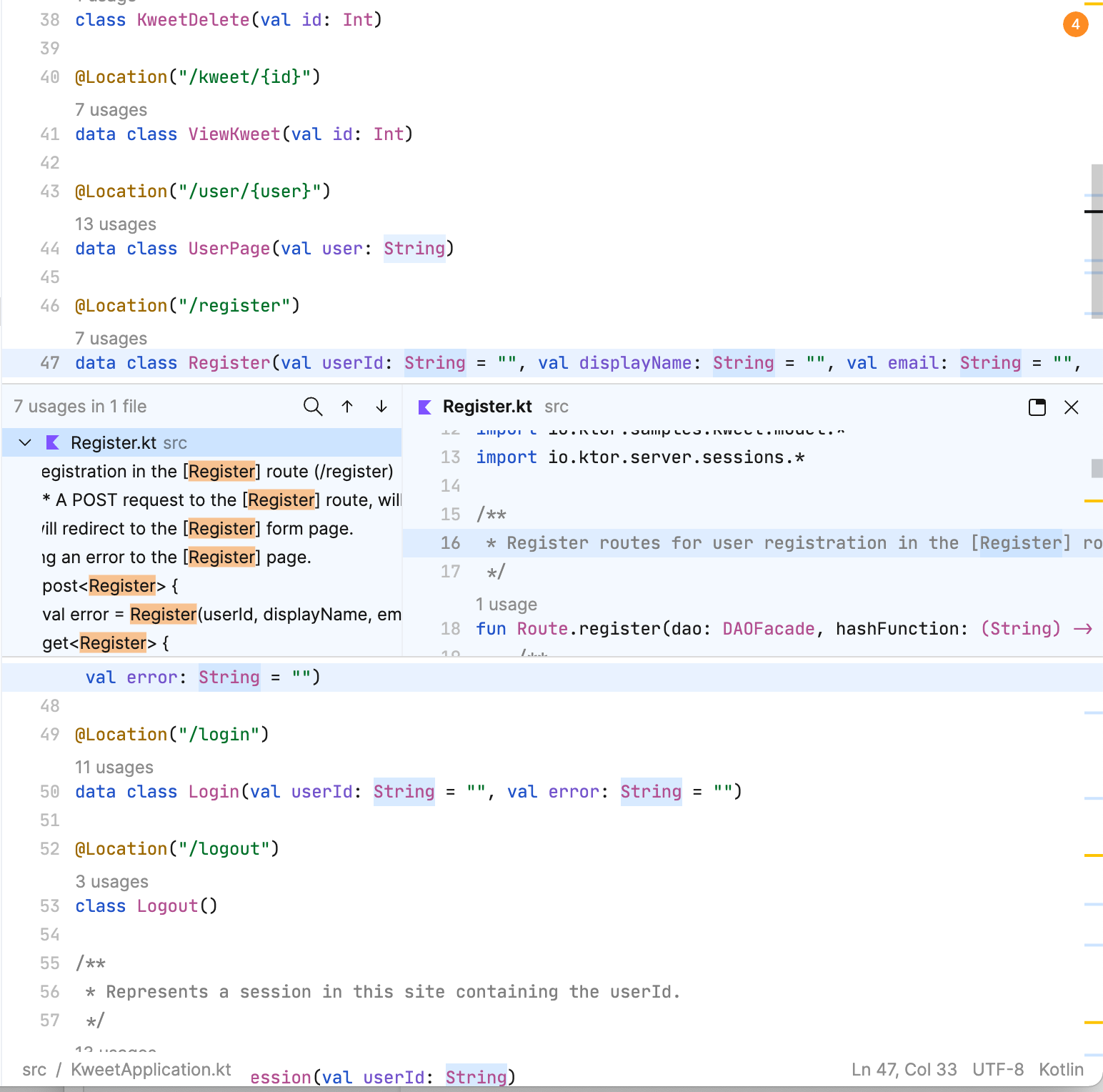
위의 내용을 렌더링하려면 특정 Y 좌표에 대해 어떤 줄이 표시되는지 알아야 할 뿐만 아니라 모든 위젯과 소프트 랩이 적용된 행도 고려해야 합니다.
재미있는 사실: 사용 위치 위젯에서 렌더링된 에디터는 이 게시물에서 알아보고 있는 것과 동일한 기본 데이터 구조를 사용합니다. 동일한 파일에서 사용하는 경우, 이 오버레이 에디터를 빌드하고 렌더링하는 데 동일한 로프가 사용됩니다.
위젯과 소프트 랩 정보도 로프 구조로 저장됩니다. 이전에는 트리의 리프가 문자열과 그 길이를 담았지만 이 경우에는 리프에 SoftLine 객체라는 것을 포함합니다. 이 객체는 높이에 수반되는 텍스트 청크이며, 시각적 선으로 간주됩니다. 이 경우에 노드의 가중치(메트릭이라고 함)는 SoftLine의 높이와 길이입니다. 뷰포트 쿼리를 지원할 수 있도록 높이가 저장됩니다. 이 높이는 내부에 있는 인터라인의 영향을 받습니다. 또한 소프트 랩이 사용되면 SoftLine이 실제 라인과 일대일로 대응하지 않으며 여러 라인에 걸쳐질 수 있습니다.
불변성에 대한 참고 사항
Fleet에서는 불변성이 수용된다는 점이 중요합니다. 순수한 함수와 불변 객체로 작업하면 많은 이점을 얻을 수 있습니다. 순수 함수를 사용하면 코드에 대해 더 잘 추론할 수 있을 뿐만 아니라 함수를 호출해도 시스템의 다른 부분이 자기도 모르게 변경(부작용이 따름)되지 않을 것이라는 사실을 알 수 있습니다. 데이터 측면에서 객체가 변경되지 않는다는 것은 스레드로부터 안전하다는 것을 의미하므로 업데이트를 시도할 때 경쟁 조건이 발생하지 않습니다. 다중 스레드 환경의 경우에 이는 엄청난 이점을 제공합니다.
이러한 불변성 개념은 로프 구조를 사용하는 작업에서도 핵심적입니다. 앞서 우리는 트리의 노드와 리프를 업데이트하는 방법에 대해 이야기했습니다. 이러한 작업은 모두 불변 조건에서 이루어집니다. 즉, 트리에서 어떤 작업을 수행하면 이전 트리와 구조가 동일한 트리의 새 복사본이 만들어집니다(단, 단일 노드에 대한 루트는 변경이 필요함). 일반적으로 트리는 넓기만 하고 깊지는 않기 때문에 경로가 매우 짧습니다. 작업으로 인해 참조되지 않은 노드가 발생하면 이러한 노드는 가비지 수집됩니다.
이는 읽기-쓰기 잠금 메커니즘을 사용하여 변경을 수행하는 IntelliJ 플랫폼과는 상당히 다른 접근 방식입니다.
요약
Fleet이 빌드된 방식에 대한 이 두 번째 파트에서 살펴보았듯이, 코드를 입력하고 읽을 수 있는 간단한 에디터의 경우에도 그 이면에는 다양한 데이터 구조의 복잡한 체계가 있고 그 중 많은 부분은 로프입니다. 로프에 대해 자세히 알아보려면 Fleet 개발 작업에 큰 영향을 주고 있는 로프 과학 시리즈를 확인하세요.
다음 시간까지 즐겁게 탐구하세요!
게시물 원문 작성자

Discover more






Fleet 后台探秘,第二部分 – 编辑器详解

在本系列博文中,我们将以多个部分为您介绍构建 Fleet 这款由 JetBrains 打造的下一代 IDE。
- 第一部分 – 架构概述
- 第二部分 – 编辑器详解
在本系列的第一部分中,我们概括介绍了 Fleet 架构。 在此第二部分中,我们将介绍编辑器幕后使用的算法和数据结构。
数据结构的聚合
请查看以下屏幕截图,其中展示了 Fleet 中的编辑器窗口
图中包含一行带有语法高亮显示的文本,以及一个提供特定变量用法相关信息的微件。 现在,人们可以通过多种方式显示这些信息,但编辑器方面的问题是它们并非只读。 除了数据可视化以外,数据还可以更新。 诸如更改函数名称这样简单的操作就可能会造成许多影响,例如影响语法突出显示、用法,当然还包括提供的任何其他功能,例如静态分析或实时编译。
为能提供良好的体验,我们需要确保编辑文本和随之呈现的可视化可以尽可能无缝衔接。 为了实现这一点,我们必须以有效的方式存储和处理数据。 然而,存储数据的方式并非只有一种。 事实上,上图就以多种方式存储数据,它们使用各自不同的数据结构,这些数据结构共同构成了我们所说的编辑器。 换言之,可以将编辑器视为数据结构的聚合器!
我们来详细介绍!
绳索全线贯通
对于熟悉处理大量文本的人来说,您可能已经知道使用字符串(即字符数组)进行存储的效率并不理想。 通常,对数组执行任何运算都意味着必须创建一个更大或更小的新数组,并将旧数组的内容复制到新数组。 这种方式很难保证效率。
效果更好且更加标准化的方式是使用绳索结构。 这种抽象数据类型背后的理念是将字符串存储在树上的叶节点中。
每个叶节点都包含一个字符串(请参阅下方注释)及其长度(称为权重)。 每个中间节点也包含一个权重,它是其左侧子树中所有叶节点的权重的总和。
注:叶节点上使用的文本只是一个示例,并不代表实际文本在 Fleet 中的分解方式。
在上面的示例中,如果我们以容纳字符 fun 的节点为例,则该节点的计数为 3,因为字符串长度为 3。 上移到父节点,计数也是 3,因为其左侧所有节点的权重之和为 3。 继续向上,该节点的父节点的计数则为 19,这是它左侧叶节点 3 和 16 的总和。
搜索、追加、移除、拆分字符串等常见操作的时间复杂度为 O(log N),其中 N 是字符串的长度。 运算从遍历树开始,鉴于节点信息,这种方式可以加快运算速度。 例如,如果我们要找到位置为 i = 30 的字符,从节点开始,用 i 减去(请参阅下方注释)权重值,如果 30 小于节点的权重(字符数),则我们向左查找。 另一方面,如果 i 大于权重,我们将向右查找。 随着我们向下移动且 i 值不断减小,当我们找到叶节点所容纳字符串为 i 的位置,该位置的字符就是我们所查找的字符。
注:根据使用的指标,可能并不需要减法运算。 重要的是,当我们沿着树向下查找时,我们会累积到该点的指标,并将其与我们正在搜寻的键进行比较。
在 Fleet 的绳索结构中插入或删除节点时,我们使用自平衡 B-Tree。 我们首先读取 64 个字符的块,一旦达到 32 个块,我们就创建一个节点并开始为第二个节点收集块。 每个节点包含两个数字 – 除了权重,我们还会存储行数(两者的组合就是我们所说的指标)。
通过存储行数,我们可以更快地导航到特定的偏移量。 在 Fleet 中,树的另一个特征是我们希望使之更宽,而非更深。
将区间树用于微件等
正如我们之前所看到的,一段代码可能不仅包含实际文本,还包含诸如用法等其他元素。
我们将这些元素称为微件,它们可以是行间微件(例如 Find Usages(查找用法)或 Run(运行)微件)、行后微件(例如出现在代码行之后的调试信息)或嵌入微件(例如变量和 lambda 的类型提示)。
微件本身只是一个标记元素,容纳微件的数据结构为区间树的变体,在某种程度上也是一种绳索结构。 在区间树中,节点容纳一个区间,权重对应于子树中区间的最大值。
在 Fleet 中,每个节点都包含子节点的相对起点和终点。 叶节点又包含一个实际微件。 运行查询以查看是否需要根据某个特定坐标显示特定微件时,我们会遍历树,直至找到与我们所查询的区间存在交集的区间为止。
一个重要的方面是叶节点还包含微件 ID。 这意味着除了查询与特定区间的交集,对于任何微件,我们还可以查询以确定其实际位置。
Fleet 中采用了一种标准区间树的变体,我们允许节点重叠。 这有可能会导致搜索效率降低,但允许节点重叠可以创建平衡的树,并使树可以在我们输入时更新。
除了微件以外,Fleet 中的区间树还被用于跟踪文本光标、高亮显示文本以及文本中被我们称为定位标记的粘性位置。
将绳索用于词例和抽象语法树
处理源代码时,无论是编译器还是编辑器,您通常都会使用抽象语法树 (AST)。 工作方式为解析器分析源代码并创建一系列词例。 随后,这些词例将用于构建 AST。以如下代码为例
fun compileBundles(ship: JpsModule, model: JpsModel, src: SrcBundles): DstBundles
它将被分解为以下词例
[fun][ ][compileBundles][(][ship][:][ ][JpsModule][,][ ][model][:][ ][JpsModel][,][ ][src][:][ ][SrcBundles][)][:][ ][DstBundles]
其中,每组方括号都表示一个词例(请注意,空格也是词例)。 随后,这些词例将用于构建相应的 AST
随后,AST 将被用于各种运算,例如语法高亮显示、静态分析等。 它是任何 IDE 的重要组成部分。
顺带一提,如果您有兴趣了解如何将某些代码转译成 AST,请了解一下这款超酷的在线 AST 浏览器(它提供了对多种语言的支持)
我们在编辑器中输入时,文本会发生变化,这意味着词例会发生变化,这转而需要构建新的 AST 以便提供上述功能。
在 Fleet 中,为了避免直接更新 AST,我们使用绳索结构将词例存储在叶节点中(实际上仅存储长度)。 举例来说,上文中的词例列表可以表示为以下树
当用户输入空格字符等内容时,树会更新(最左侧的叶节点的长度将增加 1,进而导致沿该路径的计数增加)
特定叶节点使新词例长度增大,转而会导致树的某些节点发生更新以调整权重。 随后,解析器会收到通知,强制它更新和重新解析 AST。 因此,AST 可能会有片刻不完全正确的情况,但在几乎不需要更新的编辑方面,用户体验要好得多。
将绳索用于渲染
下图是编辑器的另一个示例,但此次添加了一些附加元素,也就是将实际用法微件扩展为显示用法、自动换行以及诸如在滚动条中加入彩色竖线等其他元素。
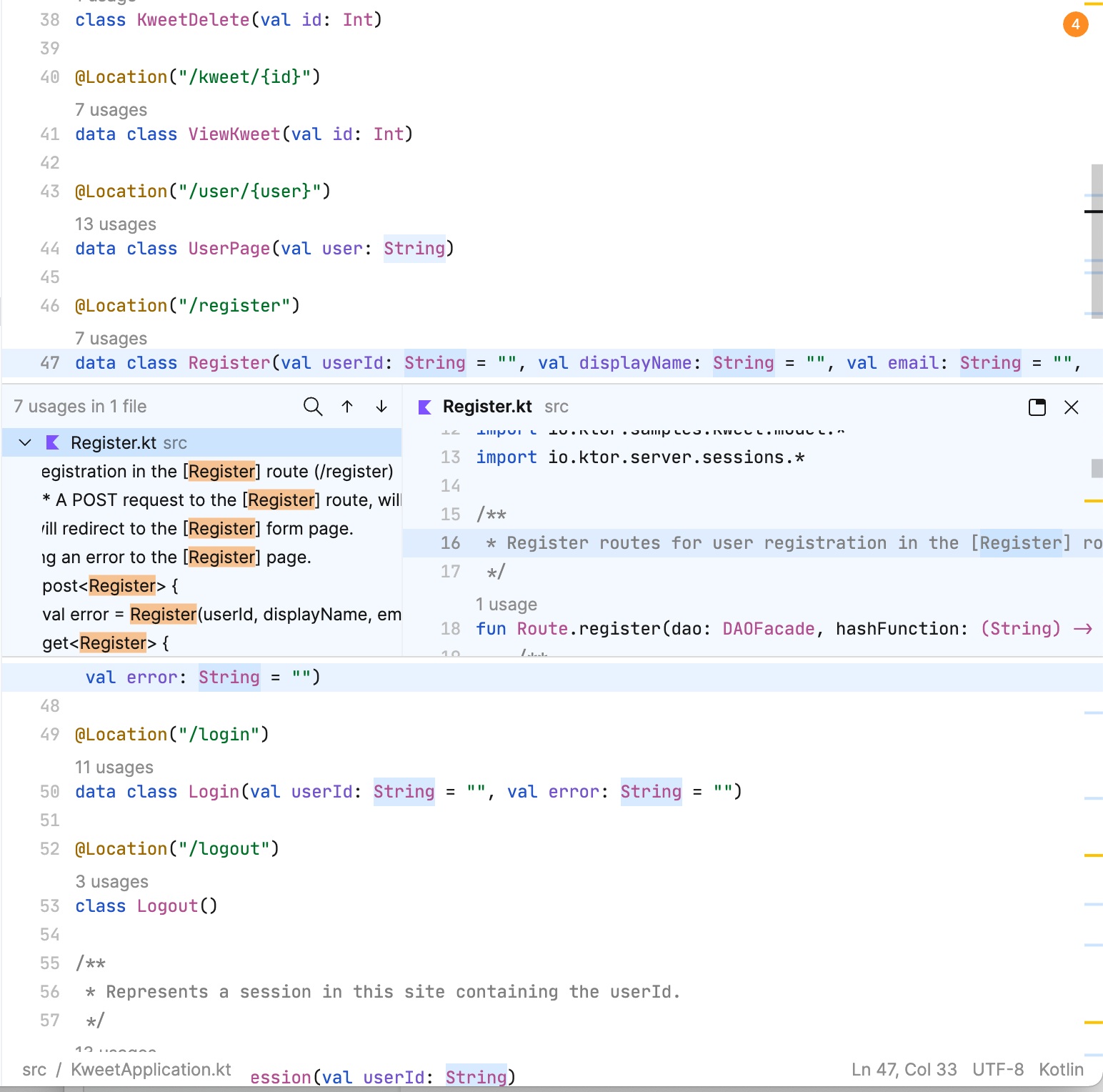
要渲染上述内容,对于特定的 Y 坐标,我们不仅需要清楚显示哪行,还需要考虑到所有微件和自动换行的行。
有趣的事实:用法微件中渲染的编辑器使用与我们在本文中所探索的相同底层数据结构。 对于同一文件中的用法,构建和渲染此叠加编辑器使用了相同的绳索。
微件和自动换行信息也会存储为绳索结构。 虽然之前树的叶节点会容纳字符串及其长度,但在此例中,我们将使用叶节点来保存我们所谓的 SoftLine 对象。 这些是带有高度的文本块,被视为视觉线。 此例中节点的权重(我们称为指标)为 SoftLine 的高度和长度。 存储高度是为了能够支持视口查询。 此高度受位于它内部的中间行影响。 此外,当启用自动换行时,SoftLine 不会与实际行一一对应,而是可以跨越多行。
关于不变性的说明
值得一提的是,我们在 Fleet 中拥护不变性。 使用纯函数和不可变对象有很多好处。 纯函数不仅使我们能够更好地思考代码,而且还可确保调用函数不会在我们不知情的情况下导致系统的其他部分发生变化(即出现副作用)。 在数据方面,知道对象为不可变对象意味着它具备线程安全性,因此在尝试任何更新时不会出现竞争条件。 对于多线程环境,这提供了巨大的好处。
这种不变性理念也是使用绳索结构的运算的核心。 之前我们谈到了如何更新节点和树的叶节点。 这些都是以不可变的方式完成的 – 树上的任何运算都会产生与旧树共享结构的树的新副本,差别仅限从根到需要更改的单个节点。 鉴于树通常宽度较大而深度较小这一事实,这一路径将很短。 如果运算导致出现任何未引用的节点,将对这些节点进行垃圾回收。
这与我们在 IntelliJ 平台上使用读写锁定机制执行变更的方法截然不同。
总结
正如我们在这个关于如何构建 Fleet 的第二部分中所见,可供输入和浏览代码的编辑器看似简单,实则为十分复杂的多种不同数据结构的底层聚合,其中多为绳索结构。 如果您有兴趣详细了解绳索,请务必参阅绳索科学系列内容,它对我们在 Fleet 上所做的工作产生了重大影响。
祝您工作愉快,期待早日再次相见!
本博文英文原作者: