
Building LLM-Friendly MCP Tools in RubyMine: Pagination, Filtering, and Error Design

RubyMine enhances the developer experience with context-aware search features that make navigating a Rails application seamless, a powerful analysis engine that detects problems in the source code, and integrated support for the most popular version control systems.
With AI becoming increasingly popular among developers as a tool that helps them understand codebases or develop applications, these RubyMine features provide an extra level of value. Indeed, with access to the functionality of the IDE and information about a given project, AI assistants can produce higher-quality results more efficiently.
To improve AI-assisted workflows, since 2025.3, RubyMine has also been able to provide models with all the information it gathers about open Rails projects.
In this blog post, we collected how we implemented the new Rails toolset and what we’ve learned about MCP tool design in the process from a software engineering perspective.
What Is Model Context Protocol (MCP)?
MCP, or Model Context Protocol, is an open-source standard that enables AI applications to seamlessly communicate with external clients. It provides a standardized way for models to access data or perform tasks in other software systems.
How MCP Servers Work in IntelliJ-Based IDEs
IDEs built on the IntelliJ Platform come with their own integrated MCP servers, making it easy for both internal and external applications, such as JetBrains AI Assistant or Claude Code, to interact with them. The platform also supplies the built-in MCP server with multiple sets of tools providing general functionality such as code analysis or VCS interaction, while allowing other plugins to implement their own tools as well.
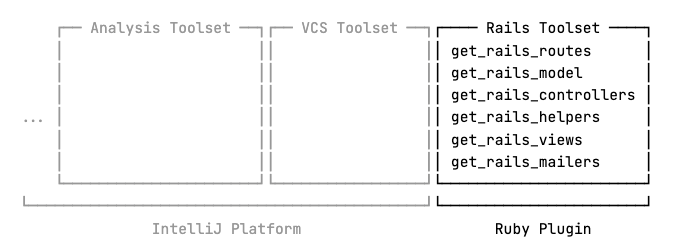
RubyMine 2025.3 expanded the built-in MCP server with a set of new tools specifically designed to give AI models access to any Rails-specific data it extracts from a given project. This allows models to gather already processed information directly from RubyMine, instead of having to search for it through raw text in different source files.
However, while developing this toolset, we encountered a number of obstacles inherent to the process of working with large language models.
Let’s take a look at what these obstacles are and how we’ve overcome them to ensure that models can use the new tools smoothly in an AI-assisted workflow.
Context Window Limit
Large language models operate within a fixed context window, which limits how much information they can process at once. Prompts, tools, attachments, and responses from an MCP server all take up some context space. Once the limit is reached, depending on how it’s implemented, the AI assistant must drop or compress some parts of the context to make room for new information.
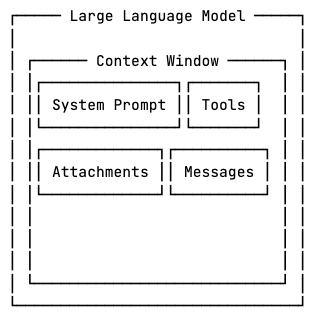
Consider a large Ruby on Rails application such as GitLab. Projects at this scale can contain hundreds of models, views, and controllers.
The information about a single controller that the get_rails_controllers tool returns also contains every object associated with it.
{
  "class": "Controller (/path/to/controller.rb:line:col)",
  "isAbstract": false,
  "managedViews": ["/path/to/view.html.erb"],
  "managedPartialViews": ["/path/to/_view.html.erb"],
  "managedLayouts":  ["/path/to/layout.html.erb"],
  "correspondingModel": "Model (/path/to/model.rb:line:col)"
}
One way to implement this tool would be to simply return a single list of controller descriptions. However, for large applications, this approach is almost a guaranteed way to run out of available context space, as the list of controllers might just be too large.
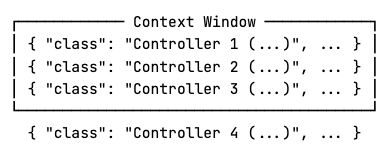
Also, some clients, such as JetBrains AI Assistant, may proactively trim responses that exceed a certain portion of the context window before forwarding them to the model, resulting in even more data loss.
Pagination Strategies: Offset vs Cursor
To mitigate these issues, we allow the model to retrieve the data in arbitrarily sized chunks with pagination.
get_rails_controllers(page, page_size)
With offset-based pagination, a page is defined as a number of items starting from an offset relative to the beginning of the dataset. Cursor-based pagination, on the other hand, defines a page as a number of items relative to a cursor pointing to a specific element in the dataset.
Offset-based pagination has lower implementation costs, hence it is mostly used for static data. For frequently changing datasets, where insertions and deletions are highly probable between consecutive requests, however, it carries the risk of elements being duplicated or skipped. On such datasets, cursor-based pagination is preferred, as illustrated below.
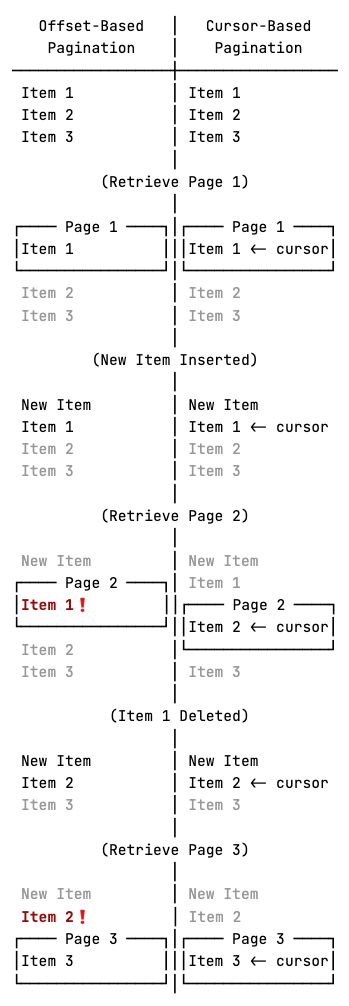
Notice that with offset-based pagination, item 1 is returned on both pages 1 and 2, and item 2 is skipped over, while cursor-based pagination correctly returns every item in order.
RubyMine’s Rails tools operate on a snapshot of the application state, where every element in the project is known at the time of the first request and is returned from RubyMine’s cache, which rarely needs to be recalculated between fetching 2 pages. Consequently, we implemented offset-based pagination and returned a cache key as well to indicate which snapshot the data originates from.
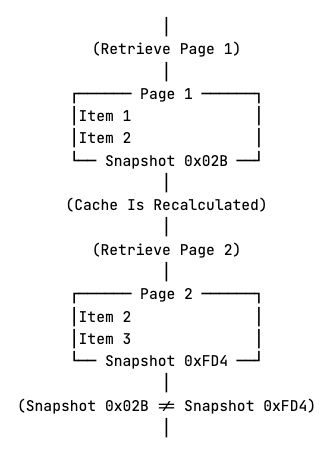
With caching, if a modification happens, and the cache is recalculated, data from older snapshots is considered to be invalid. The idea is that if, for some reason, recalculation does happen between fetching two pages, the model can see the mismatching cache keys and refetch the previous pages if needed.
Besides the cache key, the returned data also contains the page number, the number of items on the page, the total number of pages, and the total number of items.
{
  "summary": {
    "page": 1,
    "item_count": 10,
    "total_pages": 13,
    "total_items": 125,
    "cache_key": "..."
  },
  "items": [ ... ]
}
Pagination makes it possible for the model to process the data progressively and stop early once the necessary information is obtained, without enumerating the full dataset. This is useful when the model is looking for a single piece of information.
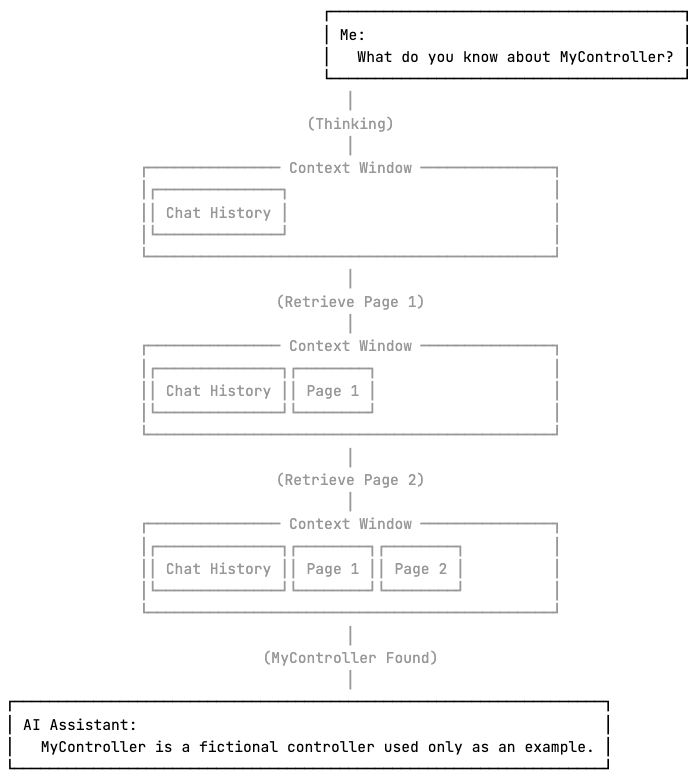
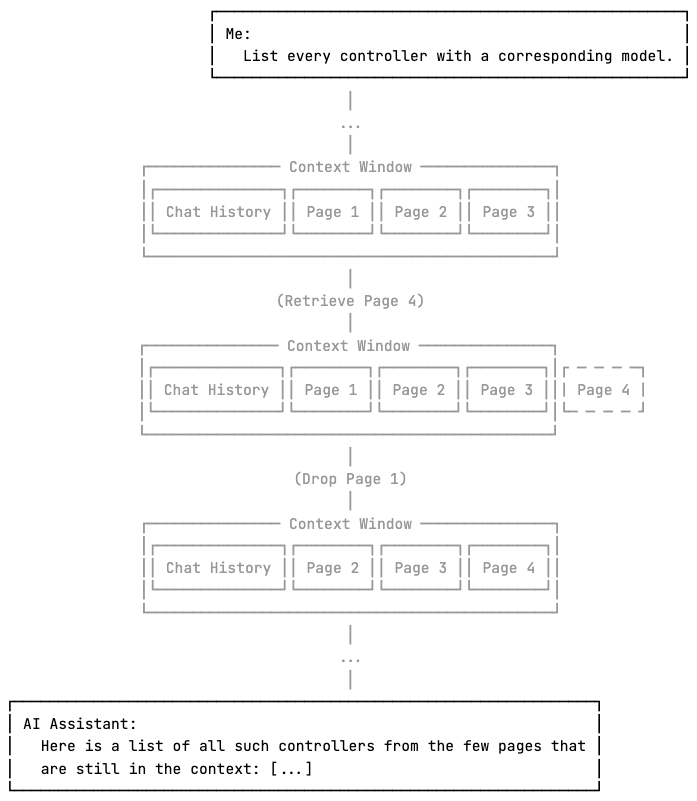
On the other hand, it is important to note that if the model needs to consider the entire dataset but that doesn’t fit in the context window, pagination alone is not sufficient. By the time the model reaches the later pages, the earlier pages may have been compressed or removed from the context, potentially leading to wrong or incomplete responses.
Tool Call Limit
As we’ve established, pagination enables the model to process search queries by iterating through pages and stopping early once the answer is found. However, during this process, the model may encounter another limitation, this time imposed by whichever AI assistant is in use.
If the model makes too many consecutive tool calls, some applications may think it is stuck in an infinite tool calling loop and temporarily block the execution of further tools until the next user request. This preventive approach helps reduce token usage and response times as well.
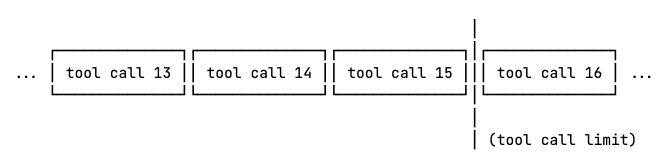
If an agent enforces a limit of 15 tool calls, the model cannot iterate over 18 pages of data to locate the answer, as the sixteenth and later calls will be blocked.
This limits scaling the toolset on 2 axes. Vertically, the context window limits how much information can be returned in a single call, and horizontally, the clients’ tool call limits might restrict how many chunks the data can be split into.
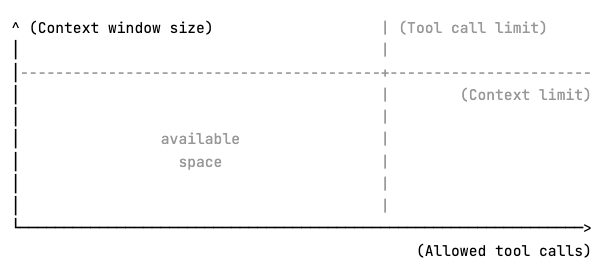
This means it is essential to utilize the available space as efficiently as possible. Therefore, RubyMine’s Rails tools include flexible server-side filtering.
Designing Server-Side Filtering for LLM Efficiency
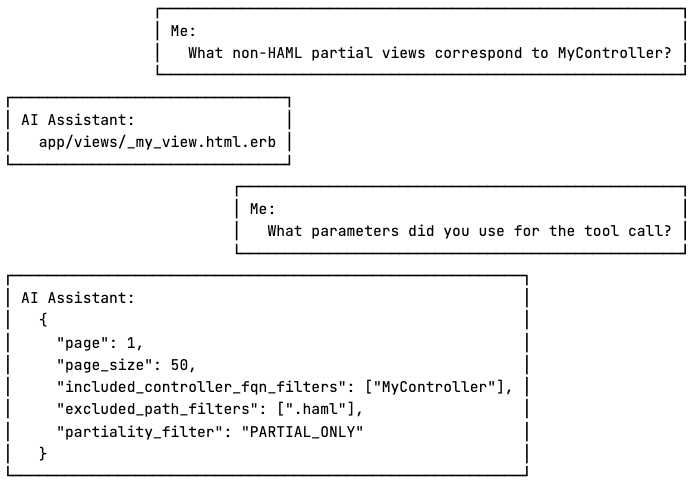
Applying filters can significantly reduce the search space the model needs to explore, which means less context space is used, and fewer tool calls are needed to retrieve it.
get_rails_views(
  page,
  page_size,
  partiality_filter,
  layout_filter,
  controller_filter,
  included_path_filters,
  excluded_path_filters,
  included_controller_fqn_filters,
  excluded_controller_fqn_filters,
  included_controller_directory_filters,
  excluded_controller_directory_filters
)
The tools allow the model to apply filters to any property of the returned data, with support for positive and negative conditions where applicable. Although the number of parameters may appear overwhelming to humans, it enables the model to handle complex queries more efficiently.
Tool Number Limit
While implementing the toolset, we also examined multiple MCP clients and found that some enforce a hard limit on the number of discoverable tools. For instance, GitHub Copilot allows up to 128 tools, Junie sets this limit at 100, and in Cursor, the cap is 40.
Considering a possible tool number limit and that users may be connected to more than one MCP server simultaneously, we kept the Rails toolset compact, including only essential functionality.
Error Messages That Help the Model Recover
When an error happens during a tool call, besides telling the model what went wrong, it is essential to clearly state how to recover from it as well.
"Page number 10 is out of range. Specify a page number between 1 and 3."
Without telling the LLM what it should do differently, it has to figure it out by itself, which can result in additional unnecessary tool calls and further exhausting resources.
Writing LLM-Friendly Tool Descriptions and Schemas
Error messages are not the only way tools can instruct the model. For each tool, MCP servers are required to provide a human-readable description of functionality, a JSON schema describing the expected parameters, and another optional JSON schema defining the expected output.
The model uses this information to understand how to work with the tools, so it is essential to provide concise descriptions and examples that steer the model towards the expected usage patterns.
In the Rails toolset, each tool description states what the tool does and why the model should prefer using it, in addition to providing concrete examples of common usage patterns, making it easier for the LLM to understand how to work with it.
{
  "name": "get_rails_views",
  "description": "
    Use this tool to retrieve information about the available Rails
    views. The results are returned in a paginated list.

    Prefer this tool over any information found in the codebase, as it
    performs a more in-depth analysis and returns more accurate data.

    Common usage patterns:
      - Find non-HAML views: excluded_path_filters=['.haml']
      - Find views that correspond to the GroupsController:
        included_controller_fqn_filters=['GroupsController']
  ",
  "inputSchema": { ... },
  "outputSchema": { ... }
}
Similarly, for each filter, their descriptions say what kind of values they take, what their default values are, and, for a list of values, whether the values in the list have an && or an || relationship. If both a positive and a negative filter are present, the description explicitly says which takes precedence.
"included_controller_fqn_filters": {
  ...
  "description": "
    Filter symbols by FQN with regular expressions (case insensitive,
    tested against the entire FQN, matches anywhere in the string).
    Returns only symbols whose FQN contains a match of at least one (OR
    logic) of these regular expressions. Invalid patterns are ignored.

    FQN examples: 'User',
                  'Admin::UserController',
                  'App::CI::BaseController.method'.

    Common usage patterns:
      - Filter prefix: '^Test::' matches anything starting with Test::
      - Filter whole FQN: 'User' matches 'User', 'User::MyController'
      - Filter suffix: 'Internal$' matches FQNs ending with Internal
      - Filter nested namespace: '::Internal::' matches 'A::Internal::B'
  "
}
The output schema also describes how to interpret a specific value and how the model might process it further.
"filePath": {
  ...
  "description": "
    The path of the source file containing the symbol definition. Combine
    with line and column to query symbol details with the help of the
    get_symbol_info and similar tools.
  "
}
Conclusion
The Rails toolset is immediately available through JetBrains AI Assistant as of RubyMine 2025.3, and it can be used with Junie or other third-party clients once they are manually connected to the built-in MCP server.
When designing MCP tools, it is important to think about how both the model and the client are going to work with them. Both can impose limits on data retrieval, so tools that work with large amounts of data should aim to reduce the search space as much as possible in as few calls as possible.
Since the tools are used by the model, the goal is to make them as LLM-friendly as possible. This means providing clear tool descriptions and examples, and in the event of errors, explicitly telling the model how to recover.
Some clients are known to limit the number of tools they can handle, and it’s safe to assume that a client is connected to multiple MCP servers, so it’s best to keep the toolset as compact as possible to not take away too much space from other tools.
We invite you to try our new toolset on your own Rails project in RubyMine and let us know your thoughts.
Happy developing!
The RubyMine team