TeamCity
Powerful CI/CD for DevOps-centric teams
How We Taught AI Agents to See the Bigger Picture

The problem: Good code is not always accepted code
AI agents can write working code. They can make changes that compile, pass tests, and finish tasks. And yet the pull request might still be rejected.
That happens because every codebase has its own internal logic. Teams have naming conventions, preferred APIs, and patterns they trust. Some of those rules are documented, but many are not.
Pavel Sher (Technical Lead for TeamCity) has reviewed thousands of commits over the years. That experience helps him spot when a change technically works but still does not fit the project. He can suggest better naming, a more appropriate approach, or a solution that stays consistent with the rest of the codebase.
This led us to a practical question: how can we help AI agents see the bigger picture, too?
The trap: Agents learn from what they see
When you ask an AI agent to write code, it usually looks through the codebase for examples. It tries to infer conventions from existing code and follow the patterns it finds.
That sounds reasonable, but it becomes a problem in large, long-lived projects.
If an agent sees the same pattern repeated 100 times, it will often assume that this is the right way to do things. It repeats the pattern because it is trying to stay consistent with the project.
But in legacy codebases, the most common pattern is not always the one the team wants to keep using.
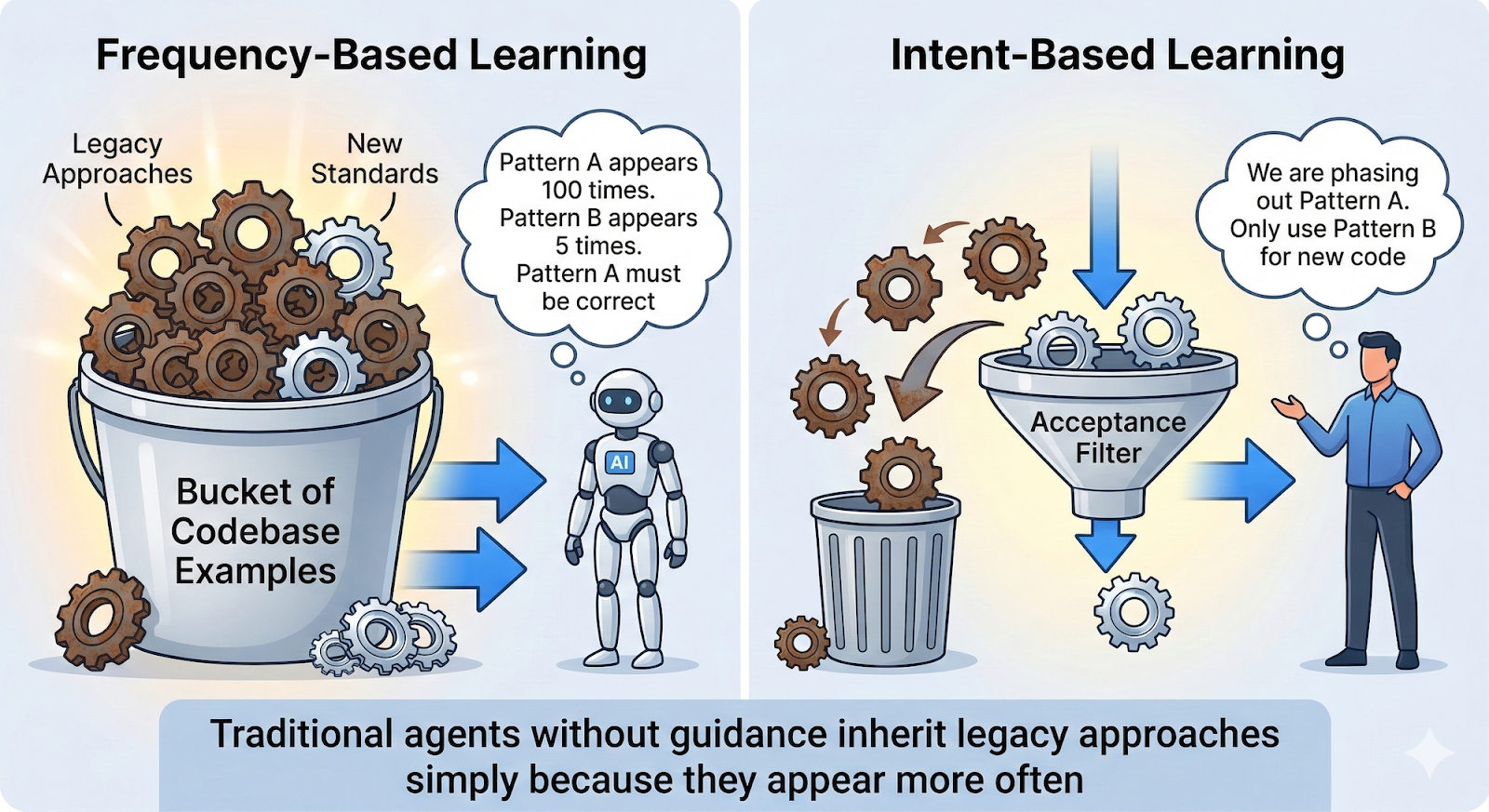
An agent cannot tell whether those 100 examples represent the current standard or an old approach the team is gradually replacing. It sees frequency and mistakes it for correctness.
That is the core issue. Without guidance, agents tend to inherit legacy approaches simply because those approaches appear more often.
The experiment: Refactoring legacy database code
Like many mature products, TeamCity has a fair amount of legacy code. In one of our experiments, we wanted to migrate several classes from an old database API to a newer one.
This was not a mechanical refactoring. The new API did not map directly to the old one, so a simple method-by-method replacement was not enough. The migration required understanding how to reshape the code, which patterns to use, and and how to handle special edge-cases.
We asked an AI agent to perform the migration.
The result looked good at first. The code worked, tests passed, and the new API was in place. But during review, Pavel noticed a major issue.
The agent had updated the API calls, but everything around them still followed the old design. It reused legacy error handling, legacy data flow, and legacy structure because that was what it found in the surrounding code.
So the result was technically correct, but conceptually inconsistent: new API calls implemented using the old design.
First step: Show examples of accepted work
Our first improvement was simple. Instead of relying only on the current codebase, we gave the agent examples of migrations that had already been reviewed and accepted.
In effect, the instruction became: “Here is how we migrated Class A, now apply the same approach to Class B.”
That worked noticeably better. The agent no longer focused only on replacing API calls. It started following the direction of the migration more accurately, and the resulting code fit the project better.
However, this approach did not scale well. We could not keep feeding accepted examples to the agent one by one for every new task.
Second step: Turn accepted changes into explicit rules
We continued by looking at accepted migration commits and studying what they had in common. From those commits, we extracted patterns the team had already approved and turned them into a practical set of rules.
The document was straightforward and simply told the agents: “When migrating from API X to API Y, follow these patterns, avoid these mistakes, and use these naming conventions.”
Using this document led to further improvements in the quality of changes. Merge requests began to pass review with far fewer comments.
The key insight: History is documentation
This is where we came to a realization.
We had been writing rules by hand, but the underlying knowledge already existed in the repository. Accepted commits showed what good changes looked like. Review comments reflected the concerns of the team. The project history already contained what we were trying to teach to AI.
So instead of documenting everything manually, we had another idea: we’d extract that knowledge directly from Git history.
CommitAtlas: Learning from repository history
That idea served as the basis for CommitAtlas, an internal tool that reads Git history and answers questions about how things should be done in the project.
At a high level, it works like this:
- Import commits into a database
- Use an LLM to describe each record based on the commit message and patch
- Answer questions such as “How do I migrate from API A to API B?” or “What naming convention do we use for services?”
Unlike ordinary code search, CommitAtlas does not simply show what appears most often in the repository. It analyzes recent accepted changes to identify which patterns the project is actively adopting.
For example, it may recognize that a newer API is replacing an older one, even if the older API still appears more frequently in the codebase.
Documentation on demand for AI agents
Now, before writing code, our AI agents can query CommitAtlas and get a short, task-specific guide assembled from real project history.
That guide can include:
- Recommended implementation patterns
- Code examples from accepted commits
- Links to the source commits
- Naming and style guidance
In practice, this gives the agent something close to what an experienced teammate would provide: context before implementation.
What we saw in practice
Our original hypothesis turned out to be correct. Git history contains a large part of the knowledge that makes code not just functional, but acceptable to the team.
When agents use CommitAtlas, they tend to:
- Understand project context faster
- Produce code that follows local conventions more closely
- Get fewer pull request rejections
The knowledge base also improves over time. Each new commit adds more real examples of how the codebase evolves, and human feedback helps refine the generated guidance.
Why this matters for legacy projects
If your project has been around for years, your repository contains a lot of institutional knowledge.
Commits, reviews, and accepted refactorings show how the codebase has evolved and what the team has learned along the way. Traditional documentation rarely keeps pace with that kind of change, especially in large systems. But repository history does keep pace, because it records what was actually changed and what was actually accepted.
For teams working with AI agents, this matters a lot. It is not enough to give the agent access to the code. You also need to give it access to the context that explains which patterns still belong to the project and which ones are being left behind.
That context is what helps agents produce code that fits naturally into an existing codebase and meets the standards experienced reviewers expect.
A practical takeaway
Many teams are starting to experiment with AI coding agents. In practice, the biggest challenge is not getting the agent to write code that compiles. The real challenge is getting it to write code that fits the project.
Every repository contains a large amount of implicit knowledge. Commit history, refactorings, and accepted pull requests all reflect decisions the team has made over time. Together they show which patterns are encouraged, which ones are being phased out, and how the codebase is evolving.
If AI agents can access and interpret that history, they can start making decisions that better match the intent of the project instead of simply copying what appears most often in the code.
For teams working with large or long-lived codebases, repository history may be one of the most useful sources of guidance you can provide to an AI agent. It captures how the system actually evolved and what changes were accepted along the way.
Helping agents learn from that history can make the difference between code that technically works and code that genuinely belongs in the project.
Subscribe to TeamCity Blog updates