Hi,
Today we are glad to announce availability of the new CLion EAP build. Download it from our confluence page right away, and share your feedback with us. A variety of new and long-awaited features and many important bug fixes were introduced in this build. Let’s have a look at the most valuable of them.
Create new C++ class, source file or header
When pressing Alt+Insert (on Windows/Linux) or Cmd+N (on OS X) in Project view or selecting New in the context menu there, you’ll find several new options:
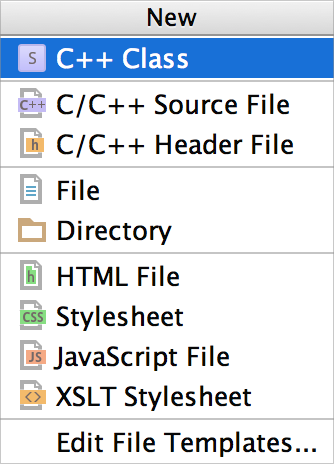
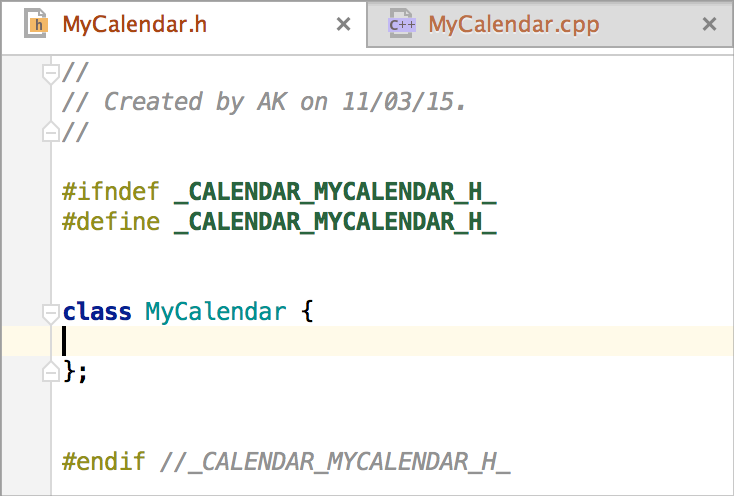
- C++ Class generates a pair of a source file and a header, including header in the source file and creating class stub in the header file:
- C/C++ Source File generates a simple source file, you can also select to create an associated header with it.
- C/C++ Header File generates a simple header file.
In all three cases you can also select the targets in which the files need to be included, and CLion will automatically update the appropriate CMakeLists.txt in your project.
Give this new feature a try and provide your comments and feedback to us. Any related issues are very welcome to our tracker.
Make all
Default “all” target for CMake project is supported now, that means you can find it in the configurations list, edit and select it for build and run. To run this configuration CLion asks you to select an executable. In general the IDE allows you now to change the executable for any configuration of your choice or even make configuration not runnable by changing this value to “Not selected”.
CMake actions in main menu
There are a couple of useful CMake actions that we’ve placed into CMake tool window. And now we’ve decided to add CMake section to Tools menu:

We’ve also placed Reload CMake Project action in File and Project View context menus for you convenience.
Other important changes include:
- A while ago we’ve updated CLion to use PTY as an I/O unit for running your targets. Now Linux and OS X users will get the same behaviour while debugging.
- A problem on OS X with debugger not stopping on breakpoints in class and template methods is fixed now.
- Latest CLion EAP build has CMake/GCC/Clang output coloring enabled so that you can find your way through the resulted output easier. If you still prefer the non-colored output use CMAKE_COLOR_MAKEFILE=OFF for CMake output, -fno-color-diagnostics flag for Clang and -fno-diagnostics-color for GCC.
- An issue with no flush to console without
\nwas fixed.
And last but not least, biicode, a C/C++ dependency manager, can now be used easily together with CLion! Get the details in our separate blog announcement.
The full list of fixed issues can be found in our tracker.
Develop with pleasure,
The CLion Team

I like the new “make all”, but there is still something wrong with the configuration handling.
I still cannot depend on configurations that do not have an executable. For example, I have a CMake setup in which a “deploy” target is used to copy files to a correct location, this “deploy” target does not create an executable or whatever.
So to be able to run my deployed application I created a new configuration which uses the correct directory and runs some executable.
This configuration depends on the “deploy” target, running this fails with “Executable is not defined”. I simply want to be able to depend on another make target, whatever that target is. Often this should not result in executing anything…
Now you can just set executable to “Not selected” to tell CLion that configuration could not be run. And then you can run the configuration that has an executable set (you can set it yourself manually in the edit configuration menu). Will it solve a problem for you?
Thanks for the reply, that is what I tried. My “deploy” target has no executable set. The “run” target is only a CLion configuration, not a CMake target.
To trigger a deploy before running, the “run” target depends on “deploy” in the configuration.
When I run my “run” target it starts building the “deploy” target (as expected), when it is done, it gives an error: “Error running deploy: Incorrect run configuration Executable is not specified”.
I’ve got it now, thanks for the explanation. Could you please create a ticket with description here: https://youtrack.jetbrains.com/issues/CPP. Will consider such case in the implementation.
See https://youtrack.jetbrains.com/issue/CPP-2671
Thanks.
Excellent.
Is there any special reason why you now default to awt.useSystemAAFontSettings=lcd ? On my desktop (Ubuntu 14.04, i3 + gnome-session, LCD screen) this looks much worse than older awt.useSystemAAFontSettings=on, as in all characters suddenly get a rainbowy glow around them, but with awt.useSystemAAFontSettings=on everything looks great. Not a huge deal, but now I always have to remember to patch clion64.vmoptions upon every update…
Could you please describe here (https://youtrack.jetbrains.com/issues/IDEA) and attach some screenshots with the description? We’ll check if we use it intentionally.
Sorry, I don’t have access to my private account on YouTrack from work, so I can only post the screenshots here:
1) With CLion defaults (awt.useSystemAAFontSettings=lcd), notice the rainbows:
http://i.imgur.com/qYw382v.png
2) With the my own settings (awt.useSystemAAFontSettings=on, swing.aatext=true, sun.java2d.xrender=True), no rainbows:
http://i.imgur.com/XInlgSl.png
Hope that helps!
Just noticed that the rainbowy image looks more or less acceptable on Dell Latitude E5450 laptop screen, but very annoying on a stand-alone DELL P2214H and similar screens. Still, a more conservative (“on”) anti-aliasing looks better in all cases to my taste.
I think the P2214H is a BGR monitor. That is, the subpixels are in a different order than the more common RGB order. The font renderer needs to be informed about this in some way, though I’m not sure how that works under Java + Ubuntu.
Could you please point JDK version and OS details?
Ubuntu 14.04 x86_64, JRE: 1.7.0_75-b13 amd64, JVM: OpenJDK 64-Bit Server VM by Oracle Corporation.
Regarding the in-place refactoring: where did the nice contrast color boxes around the variable being renamed and other uses go? Is this a new style, or something is wrong and I should report it as a bug? If it’s a new style, is it possible to get them back by changing some setting?
By the way, unfortunately, rename refactoring at the point of definition is still not working in most cases, and variables with the same name in adjacent blocks are sometimes thought of being valid in the current block.
With Rename looks like you mean smth related to https://youtrack.jetbrains.com/issue/CPP-2240 and https://youtrack.jetbrains.com/issue/CPP-2239. We know about it and going to fix asap.
Usages should be highlighted and the renamed symbol under the caret should have a red box, still this can be the problem pointed above. Leave you sample in the issue, please.
You are right, the rename refactoring problems that I’ve noticed generally fall in one of those 2 categories. Okay, looking forward to getting them fixed!
Regarding the boxes, please see this screenshot of what happens when I press Shift+F6 in the latest EAP: http://i.imgur.com/MbAs8E9.png . As you can see, the renamed symbol isn’t red (actually it is, but it’s selected, so the selection color overrides the red background color), and moreover neither the renamed symbol, nor the usages have the red / green boxes around them as it used to be the case in the previous EAP. I want my boxes back
!
Usages never have boxes, they were highlighted, but not boxed. Are you sure you’ve seen it?
Still it should appear on the selected symbol. What jdk version is it? And what os also?
Okay, I’ve just tried with the previous EAP (default settings, no changes to the *.vmoptions) and the red/green boxes aren’t there either
I’m not sure about green boxes, it could be that they never existed (or maybe that could happen when I search, and then refactor? search should have boxes, right?), or that I confused it with PyCharm, but I think they would be cool to have…
Shall I try installing latest JVM from Oracle, instead of using the one from the distribution repositories?
Yes, you can try. Please, share the results then.
Still the red box around selected symbol should appear (so that you see both – selection and a red box), and it does for us here on Ubuntu with open JDK 1.7.0_65.
Could you please also try
1) install jdk 8
2) with jdk 8 check some options from http://docs.oracle.com/javase/6/docs/technotes/guides/2d/flags.html#aaFonts like
“lcd”|”lcd_hrgb” : VALUE_TEXT_ANTIALIAS_LCD_HRGB
“lcd_hbgr” : VALUE_TEXT_ANTIALIAS_LCD_HBGR
“lcd_vrgb” : VALUE_TEXT_ANTIALIAS_LCD_VRGB
“lcd_vbgr” : VALUE_TEXT_ANTIALIAS_LCD_VBGR
And share with us if it makes better/worse look.
I’ve tried the latest version from the Oracle website [JRE: 1.8.0_40-b26 (Oracle Corporation) JVM: 25.40-b25 (Java HotSpot(TM) 64-Bit Server VM)] and the refactoring still looks the same like I posted earlier ( http://i.imgur.com/MbAs8E9.png ), that is no red box or any other boxes for that matter.
Search, however, does have nice green boxes: http://i.imgur.com/Ogv6LDK.png <— it would be great to have red one for refactored symbol and green ones for usages.
I've also tried all other antialiasing settings, but the results are the same as for OpenJDK, and "on" still looks best (see comparison above).
One small question to get the full picture – does this ‘fields’ actually resolved correctly? I mean if you place a caret at the usage and go to declaration (with Ctrl+B), will it navigate correctly to the declaration?
And considering the antialiasing problem – I’ve placed your comments and description to the issue tracker – https://youtrack.jetbrains.com/issue/IDEA-137639. Please follow and provide more details if we need some.
> One small question to get the full picture – does this ‘fields’ actually resolved correctly?
I’ve tried, yes, it is; with Ctrl+B I can correctly jump to the declaration in the function parameter list without any problem.
> And considering the antialiasing problem – I’ve placed your comments and description to the issue tracker – https://youtrack.jetbrains.com/issue/IDEA-137639.
Thanks, I will subscribe from home!
Clion EAP: http://i.imgur.com/QIrgNAo.png (no red box); PyCharm Professional 4.0.5: http://i.imgur.com/wJSD5T8.png (red box). Neither have green boxes when renaming, only in search. Suggest to 1) bring back the red box to Clion 2) add green boxes to both
I’m afraid nothing was removed on purpose and we’ve failed to reproduce here in CLion. We’ll discuss the problem with the team and come back to you. Sorry for inconvenience.
Looks like we’ve found the problem and it will be fixed with the next build. Please, check when it’s available and provide feedback.
Anyways, the new EAP is really hot. In the last few days I’ve been checking the blog a couple of times per day to see if it’s finally there or not. Overall, it’s much more stable than the previous one, and also a lot more performant / responsive on my project. Keep up the good work!
Thanks! We’ll do our best.
Great work! One minor issue though. When displaying a large (many lines) console output, the now default behaviour is not to scroll automatically to the end, but keep only the initial output lines. To go to the end, I have to press the scroll-to-end button. Before this release, the default behaviour was to automatically scroll to the end. Was this change intentional? I preferred the automatic scroll, is there any way of achieving it?
Thanks!
Looks like it was broken occasionally in the latest EAP (https://youtrack.jetbrains.com/issue/IDEA-137557). Should be fixed in the next build. Sorry for inconvenience.
Здравствуйте!
IDE Выглядит крайне многообещающе, интересует такой маленький вопрос (не смог найти такой парметр в Code style). Можно ли изменить положение * и & в случае когда они озночают указатель и ссылку. Т.е я хочу сигнатуру метода вида const T* foo() и const T& foo(). Тоже самое косается обявления указателей и ссылок, необходимо чтобы * и & были вплотную к типу (т.е int* p и int& r).
Во вкладке Spaces в разделе Other посмотрите на Before/After ‘*’/’&’ in declarations.
Hello!
CLion is a great IDE, but I have one little trouble with code style.
I want to change position of ‘*’ and ‘&’ operators close to type (not to names).
For example I want int* p instead int *p (int& r instead int &r). And also I need another methods signature: const T& method() instead T const& method.
Can I change something in code style for such a result?
Thank you!
As I’ve already answered check Spaces tab, Other section, Before/After ‘*’/’&’ in declarations.
Hi! Thanks for making the world better!
Do you plan to add more features to new class window?
It would be awesome if when creating new class to indicate namespace.
And also a good feature that I think is useful is to have the possibility to split header and sources in different folders. I saw that a lot CMake projects use to have a include and a src folder, something like this
include/LIBNAME/Code.hpp
src/LIBNAME/Code.cpp
it will be something like this added in future updates?
Thanks!
Have a good day!
Thanks. We haven’t thought about it, but definitely could consider. Please feel free to add you ideas (with use cases description) to our tracker: https://youtrack.jetbrains.com/issues/CPP