IntelliJ IDEA
IntelliJ IDEA – the Leading IDE for Professional Development in Java and Kotlin
Using Spring Data JPA with Kotlin

This post was written together with Thorben Janssen, who has more than 20 years of experience with JPA and Hibernate and is the author of “Hibernate Tips: More than 70 Solutions to Common Hibernate Problems” and the JPA newsletter.
Spring Data JPA is based on the Jakarta Persistence specification and was originally designed for Java. That often raises the question of whether it is a good fit for Kotlin projects.
The short answer is yes!
You can use Spring Data JPA with Kotlin without any issues and enjoy Kotlin’s compact syntax and language features, like null safety and extension functions, when writing your business code.
And doing all of that is so quick and easy could explained in this short blog post. Let’s use Spring Data JPA with Kotlin to define and use a simple persistence layer.
Required dependencies
The easiest way to get started is to use the “New Project” wizard in IntelliJ. Once you select Kotlin and Spring Data JPA, the basic setup is done for you. That includes configuring the Kotlin no-arg and all-open plugins. They ensure that your Kotlin classes fulfill Jakarta Persistence’s requirements for non-final classes and parameterless constructors. You also get the kotlin-reflect dependency, which is required by Spring.
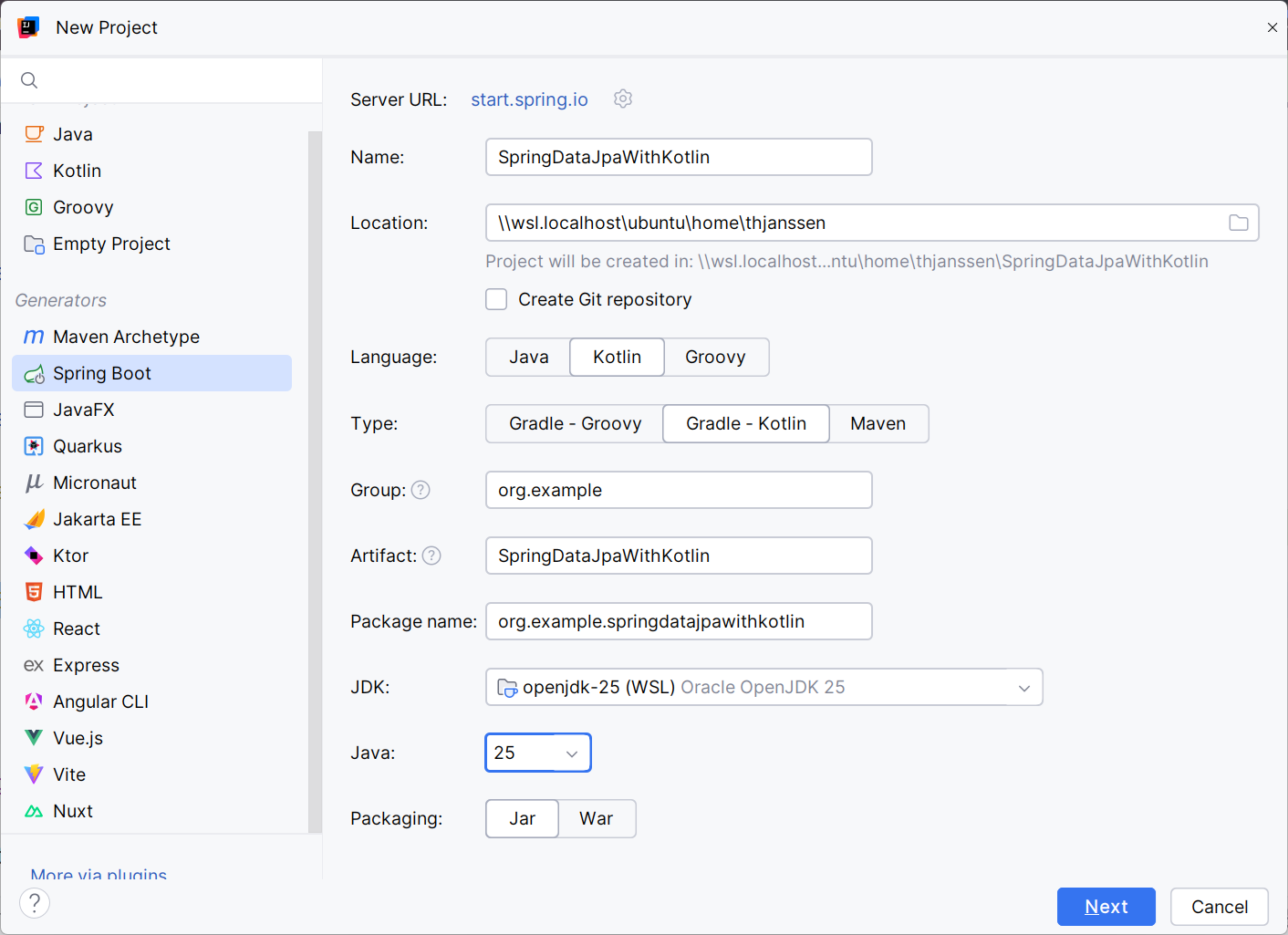
On the next page, you can select the Spring Boot Starter modules and other dependencies you want to use. In this example, that’s Spring Data JPA and the PostgreSQL database driver.
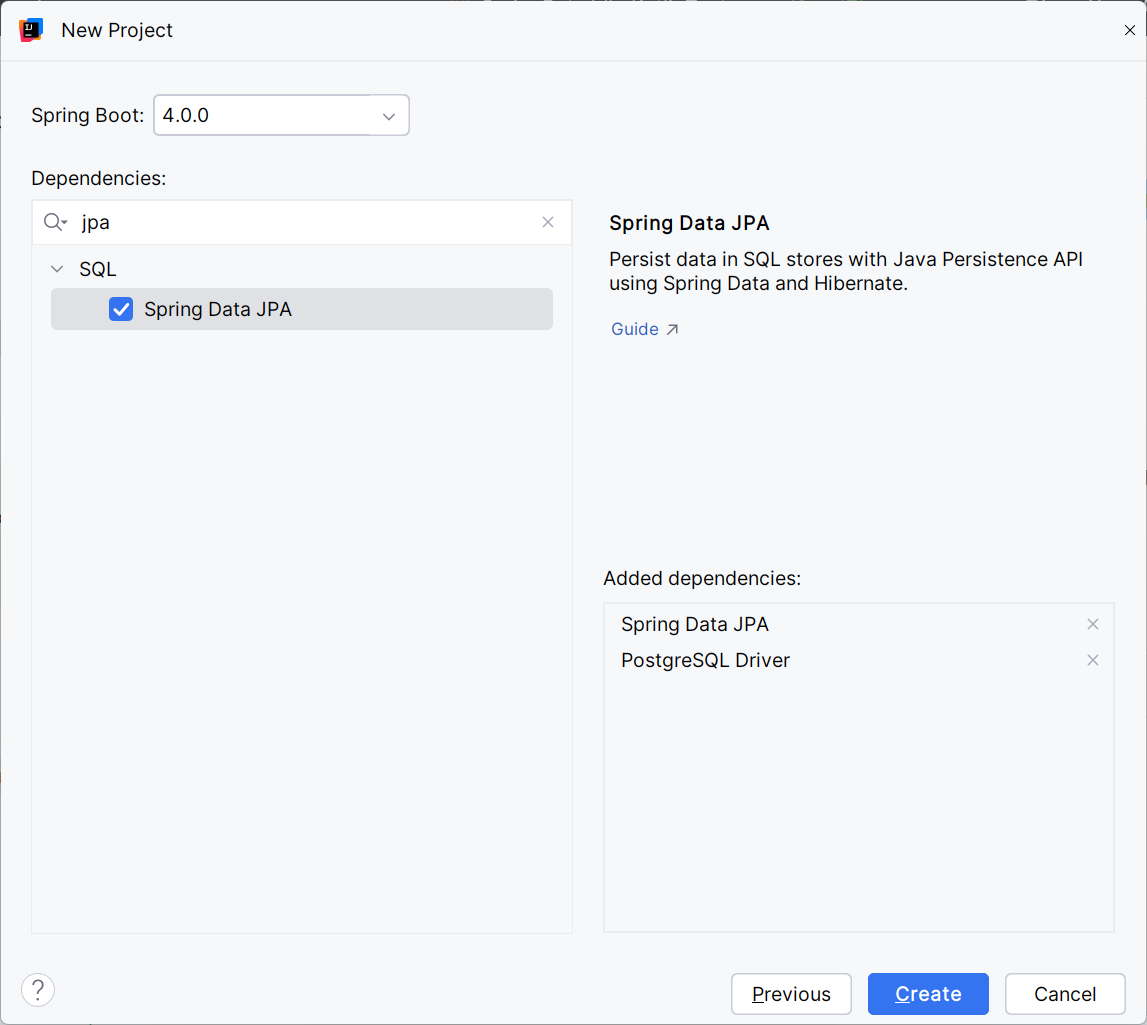
Adding Kotlin to an existing project
If you already have a Java-based Spring Boot project with the required dependencies, you can simply add a Kotlin class to it. Starting with version 2026.1 Intellij IDEA automatically adds the plugins plugin.spring and plugin.jpa to your build configuration and configure the all-open plugin.
In case you’re using an older IDEA version, you have to add the following configuration yourself.
plugins {
   kotlin("plugin.spring") version "2.2.20"
   kotlin("plugin.jpa") version "2.2.20"
}

allOpen {
   annotation("jakarta.persistence.Entity")
   annotation("jakarta.persistence.MappedSuperclass")
   annotation("jakarta.persistence.Embeddable")
}
Database and logging configuration
After defining your project’s dependencies, you need to set up the database connection in your application.properties file, and you can provide your preferred logging configuration.
The following settings connect to a local PostgreSQL database and activate detailed Hibernate logging. The logging configuration instructs Hibernate to log the executed SQL statements and all bind parameter values. This information is extremely helpful during development and debugging, but it generates a lot of output. So, please make sure to use a different logging configuration in production.
spring.datasource.url=jdbc:postgresql://localhost:5432/postgres

spring.datasource.username=postgres
spring.datasource.password=postgres

logging.level.root=INFO
logging.level.org.hibernate.SQL=DEBUG
logging.level.org.hibernate.orm.jdbc.bind=TRACE
Modelling entities
You can then start modeling your entities in Kotlin. The Jakarta Persistence specification defines a few requirements for entity classes. As we explained in a recent article on common best practices, some of these requirements don’t align well with Kotlin’s data classes. But you will not run into any issues and enjoy Kotlin’s concise syntax if you define your entity classes as regular Kotlin classes and annotate the fields you want to persist.
It’s a general best practice to avoid exposing your entity classes and their technical dependencies in your API. Most teams introduce a second non-entity representation of their data for that. Using Kotlin, you can easily model those classes as a data class. Doing that requires additional mapping code to convert your data between the different formats. You could, of course, do that in your business code. But it’s much more comfortable to add a set of converter functions to your entity class or select the data class directly from the database. You will see an example of the second approach later in this article. Let’s concentrate on the entity class for now.
Here is a simple Person entity. It maps the person’s first and last name, along with a many-to-one relationship to the company they work for.
The PersonData class represents the same information. You can use it in your API without exposing any technical details of your persistence layer. To make using this class as comfortable as possible, the Person entity class provides 2 functions with the required mapping code.
@Entity
class Person(
    @Id
    @GeneratedValue
    var id: Long? = null,

    var firstName: String? = null,

    var lastName: String? = null,

    @ManyToOne(fetch = FetchType.LAZY)
    var company: Company? = null,

    @Version
    var version: Integer? = null
) {
    fun createPersonData(): PersonData {
        return PersonData(
            id = id!!,
            firstName = firstName ?: "",
            lastName = lastName ?: "",
            version = version
        )
    }

    companion object {
        fun createPersonFromData(data: PersonData): Person {
            return Person(
                id = data.id,
                firstName = data.firstName,
                lastName = data.lastName,
                version = data.version
            )
        }
    }
}

data class PersonData(
    val id: Long,
    val firstName: String,
    val lastName: String,
    val version: Int
)
The functions
The Company entity follows the same approach:
@Entity
class Company(
    @Id
    @GeneratedValue
    var id: Long? = null,

    var name: String = "default",

    @Version
    var version: Integer? = null
)
After you modeled your entity classes, you can start defining your repositories.
Designing and using a repository
Spring Data JPA’s repository abstraction works the same way in Kotlin as it does in Java. You extend one of the provided repository interfaces, such as JpaRepository or CrudRepository, and Spring Data provides you with an implementation.
These repositories define a set of standard methods for fetching entities by primary key, persisting new entities, and removing existing ones. They also integrate with Spring’s transaction handling, so that you can use the @Transactional annotation on your business or API layer to define the transaction handling.
Here is an example of a simple PersonRepository definition. It inherits all standard methods defined by the JpaRepository. Let’s see how to add your own query methods in one of the following examples.
interface PersonRepository : JpaRepository<Person, Long> {}
To make it even easier, IntelliJ IDEA can create the repository for you automatically. Just start typing repository name in the service and IDEA will suggest creating it:

With this repository in place, you can focus on your business logic. That’s especially convenient in Kotlin because constructor injection and concise function definitions keep your classes short and focused.
@Component
@Transactional
class PersonController (
   private val personRepository: PersonRepository) {
   fun createNewPerson(person : Person): Person {
       // add additional validations and/or logic ...
       return personRepository.save(person)
   }
}
In this example, Spring injects a PersonRepository instance and joins an active transaction or starts a new one before entering the createNewPerson method. If it started a new transaction, it also commits it after completing this method call. And the PersonRepository, together with the Jakarta Persistence implementation, provides the required code to create and execute a SQL INSERT statement that stores the provided Person object in the database.
2025-11-16T16:02:53.988+01:00 DEBUG 10104 --- [SDJWithKotlin] [           main] org.hibernate.SQL                        : select next value for person_seq
2025-11-16T16:02:54.012+01:00 DEBUG 10104 --- [SDJWithKotlin] [           main] org.hibernate.SQL                        : insert into person (company_id,first_name,last_name,version,id) values (?,?,?,?,?)
2025-11-16T16:02:54.014+01:00 TRACE 10104 --- [SDJWithKotlin] [           main] org.hibernate.orm.jdbc.bind              : binding parameter (1:BIGINT) <- [null]
2025-11-16T16:02:54.014+01:00 TRACE 10104 --- [SDJWithKotlin] [           main] org.hibernate.orm.jdbc.bind              : binding parameter (2:VARCHAR) <- [John]
2025-11-16T16:02:54.014+01:00 TRACE 10104 --- [SDJWithKotlin] [           main] org.hibernate.orm.jdbc.bind              : binding parameter (3:VARCHAR) <- [Doe]
2025-11-16T16:02:54.014+01:00 TRACE 10104 --- [SDJWithKotlin] [           main] org.hibernate.orm.jdbc.bind              : binding parameter (4:INTEGER) <- [0]
2025-11-16T16:02:54.015+01:00 TRACE 10104 --- [SDJWithKotlin] [           main] org.hibernate.orm.jdbc.bind              : binding parameter (5:BIGINT) <- [2]
You might know all of this from using Spring Data JPA with Java. Kotlin does not change any of this behavior, and you also get all the benefits from using Kotlin when implementing your business logic.
Let’s take a look at another example.
Fetching and updating an existing entity follows the same pattern. The updateLastName function loads the entity by its primary key and changes the lastName. That’s all you have to do. The Jakarta Persistence implementation finds that modification during its next dirty check and updates the database automatically.
@Component
@Transactional
class PersonController (
   private val personRepository: PersonRepository) {
   fun updateLastName(id : Long, lastName : String): Person {
       var person = personRepository.findById(id).orElseThrow()
       person.lastName = lastName
       return person
   }
}
As you can see, Kotlin’s concise syntax helps keep the business logic easy to read, and Spring handles all the boilerplate code for you. That makes implementing your application very comfortable.
Adding your own queries
In addition to the standard methods provided by Spring Data JPA’s repositories, you need to define queries that fetch the data used in your business code. You can do that in 2 ways, both of which work fine with Kotlin.
The first and most convenient option is to use derived query methods. Spring analyzes the method name, derives the corresponding JPQL query, and binds the method parameter values. This is a good choice when your query is simple and only requires one or two bind parameters.
You can add a derived query method directly to your repository. Or In IDEA, you can start typing a desired method name and use autocompletion to have it automatically added to your repository.
You can see a typical example in the following code snippet. The findByLastName method fetches all Person entities with a lastName equal to the provided one.
interface PersonRepository : JpaRepository<Person, Long> {
   fun findByLastName(lastName: String): List<Person>
}
If your query becomes more complex, you should instead annotate your repository method with a @Query annotation. That allows you to write your own JPQL query and gives you full control over the executed statement. You can use joins, grouping, or any other JPQL feature you need.
Here you can see the same query statement as in the previous example. But this time, using a @Query annotation instead of Spring Data’s derived query feature.
interface PersonRepository : JpaRepository<Person, Long> {
   @Query("select p from Person p where p.lastName = :lastName")
   fun getByLastName(lastName: String): List<Person>
}
When you call one of these methods, Spring Data JPA uses Jakarta Persistence’s EntityManager to instantiate a Query, set the provided bind parameters, execute the query, and map the result to a managed Person entity object.
2025-11-16T16:47:20.949+01:00 DEBUG 16193 --- [SDJWithKotlin] [           main]
org.hibernate.SQL                        : select
p1_0.id,p1_0.company_id,p1_0.first_name,p1_0.last_name,p1_0.version from person p1_0
where p1_0.last_name=?
2025-11-16T16:47:20.952+01:00 TRACE 16193 --- [SDJWithKotlin] [           main]
org.hibernate.orm.jdbc.bind              : binding parameter (1:VARCHAR) <- [Doe]
But entities are not the only projection you can use. For many use cases, a read-only DTO projection that only fetches the required information is more efficient. And Kotlin’s data classes are a great way to model such a DTO.
If you only want to show the first and last names of multiple people along with the company they work for, you could use the following PersonWithCompany data class.
data class PersonWithCompany(
    val firstName: String,
    val lastName: String,
    val company: String
)
In the next step, you can define a repository method that returns a List of those objects. If you annotate that method with a @Query annotation and provide a JPQL query that returns 3 fields with matching names, Spring Data JPA automatically maps each record to a PersonWithCompany object.
interface PersonRepository : JpaRepository<Person, Long> {
   @Query("select p.firstName, p.lastName, c.name as company from Person p join p.company c")
   fun findPersonsWithCompany(): List<PersonWithCompany>
}
As you can see in the log output, using a data class as your query projection combines the convenience of Kotlin data classes in your business code with the performance benefits of fetching only the required information from the database.
2025-11-16T16:59:42.260+01:00 DEBUG 22541 --- [SDJWithKotlin] [           main]
org.hibernate.SQL                        : select p1_0.first_name,p1_0.last_name,c1_0.name from
person p1_0 join company c1_0 on c1_0.id=p1_0.company_id
2025-11-16T16:59:42.278+01:00  INFO 22541 --- [SDJWithKotlin] [           main] c.t.j.k.s.SDJWithKotlinApplicationTests  : PersonWithCompany(firstName=Jane,
lastName=Doe, company=Mighty Business Corp)
Provide your own repository method implementations
If you need more flexibility than Spring Data JPA’s @Query annotation provides, you can also add your own method implementations to a repository. You do that by creating an interface that defines only the methods you want to implement, letting your repository extend that interface, and providing an implementation of that interface. This is called a fragment repository.
In this example, the PersonFragmentRepository defines the searchPerson method that expects a PersonSearchInput parameter.
interface PersonFragmentRepository {
   fun searchPerson(searchBy : PersonSearchInput): List<Person?>?
}

data class PersonSearchInput(
   val firstName : String?,
   val lastName : String?,
   val worksForCompany : String?
) {}
In the next step, you have to implement the PersonFragmentRepository. The name of your class should be the interface name with the postfix Impl. Spring Data then automatically detects this class, wires it into your repository, and delegates all calls to the searchPerson method to your class.
The goal of the following searchPerson implementation is to check which fields of the PersonSearchInput object are set and consider only those fields in the query’s WHERE clause. This is a typical implementation for complex search dialogs, where users can choose which information to search for.
override fun searchPerson(searchBy: PersonSearchInput): List<Person?>? {
    val cBuilder = em.criteriaBuilder
    val cQuery = cBuilder.createQuery(Person::class.java)
    val person = cQuery.from(Person::class.java)
    val wherePredicates = mutableListOf<Predicate>()

    searchBy.firstName?.let {
        wherePredicates.add(cBuilder.equal(person.get<String>("firstName"), searchBy.firstName))
    }
    searchBy.lastName?.let {
        wherePredicates.add(cBuilder.equal(person.get<String>("lastName"), searchBy.lastName))
    }
    searchBy.worksForCompany?.let {
        val company = person.join<Person, Company>("company")
        wherePredicates.add(cBuilder.equal(company.get<String>("name"), searchBy.worksForCompany))
    }

    cQuery.where(*wherePredicates.toTypedArray())
    return em.createQuery(cQuery).resultList
}
As you can see in the code snippet, the searchPerson method uses Jakarta Persistence’s Criteria API to define a query based on the fields set on the provided PersonSearchInput object.
It first gets a CriteriaBuilder and uses it to create a CriteriaQuery that returns Person objects. It then defines the FROM clause and creates a List of Predicates. For each field of the PersonSearchInput object that’s not null, an equal predicate gets added to the wherePredicates List.
Thanks to Kotlin’s concise syntax and null handling, defining those Predicates is straightforward. Only the handling of the company name requires a little attention. If that field is set, you have to add a join to the Company entity before you can define the equal predicate.
You can then use the wherePredicates List to define the WHERE clause, execute the query, and return the result.
After you define the PersonFragmentRepository and implement it, you can use it in your repository definition. Let’s add it to the PersonRepository, which you already know from previous examples. It now extends Spring Data JPA’s JpaRepository and the PersonFragmentRepository.
interface PersonRepository : JpaRepository<Person, Long>, PersonFragmentRepository {
    fun findByLastName(lastName: String): List<Person>

    @Query("select p from Person p where p.lastName = :lastName")
    fun getByLastName(lastName: String): List<Person>

    @Query("select p.firstName, p.lastName, c.name as company from Person p join p.company c")
    fun findPersonsWithCompany(): List<PersonWithCompany>
}
When you use this PersonRepository in your business code, Spring Data JPA provides the implementations of all methods defined by the JpaRepository. It also generates the implementations of the 3 query methods. Only the calls to the searchPerson method get delegated to your PersonFragmentRepositoryImpl class.
Summary
As you’ve seen in this article, Kotlin works well with Spring Data JPA. You can model your entities and define repositories in the same way you would in a Java application. Kotlin’s concise syntax often makes these parts of your code easier to read and maintain without changing any persistence behavior. If you follow the established Jakarta Persistence best practices for Kotlin, you get a smooth development experience and an efficient persistence layer.
To learn more about persistence with Kotlin, check out two other articles in this series:
About the author