TeamCity
Powerful CI/CD for DevOps-centric teams
Best CI Tools for 2026: What the Data Actually Shows

Continuous integration (CI) and continuous delivery or deployment (CD) are core DevOps practices that help teams improve code quality by giving fast, reliable feedback on every code change.
With a well-established CI/CD process in place, software development teams can release more frequently, deliver value to users sooner, and learn faster from their feedback.
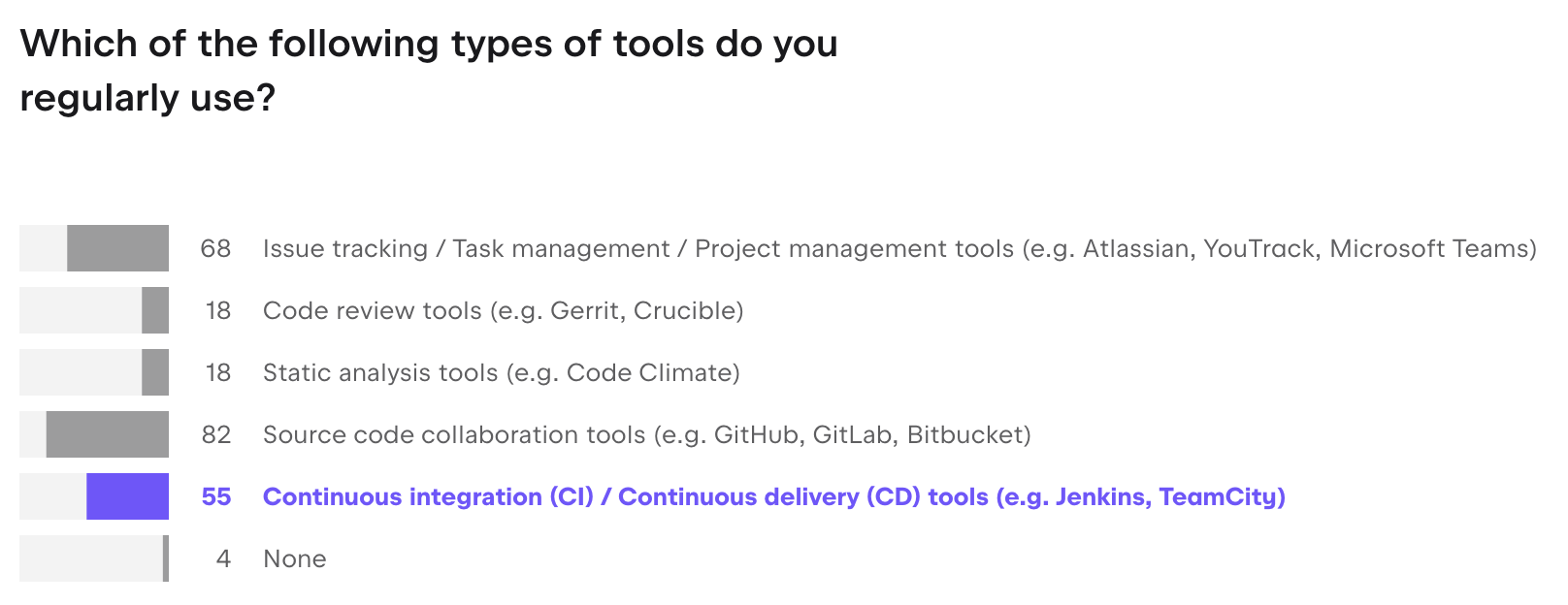
CI/CD is now a standard part of modern development workflows. According to the State of Developer Ecosystem Report 2025, 55% of developers regularly use CI/CD tools.
At the same time, developers can choose from a wide range of CI/CD systems, including GitHub Actions, Jenkins, GitLab CI, Azure DevOps, TeamCity, and others. This reflects a diverse and fragmented tooling landscape where no single tool fits every team.
This guide looks at the most widely used CI/CD tools in 2026 and focuses on how teams choose between them. Instead of trying to identify a single “best” tool, we break down the trade-offs so you can find the right fit for your stack, your team, and your constraints.
The landscape in numbers
CI in organizations
Organizationally, GitHub Actions leads with 33% adoption, followed by Jenkins at 28% and GitLab CI (19%).
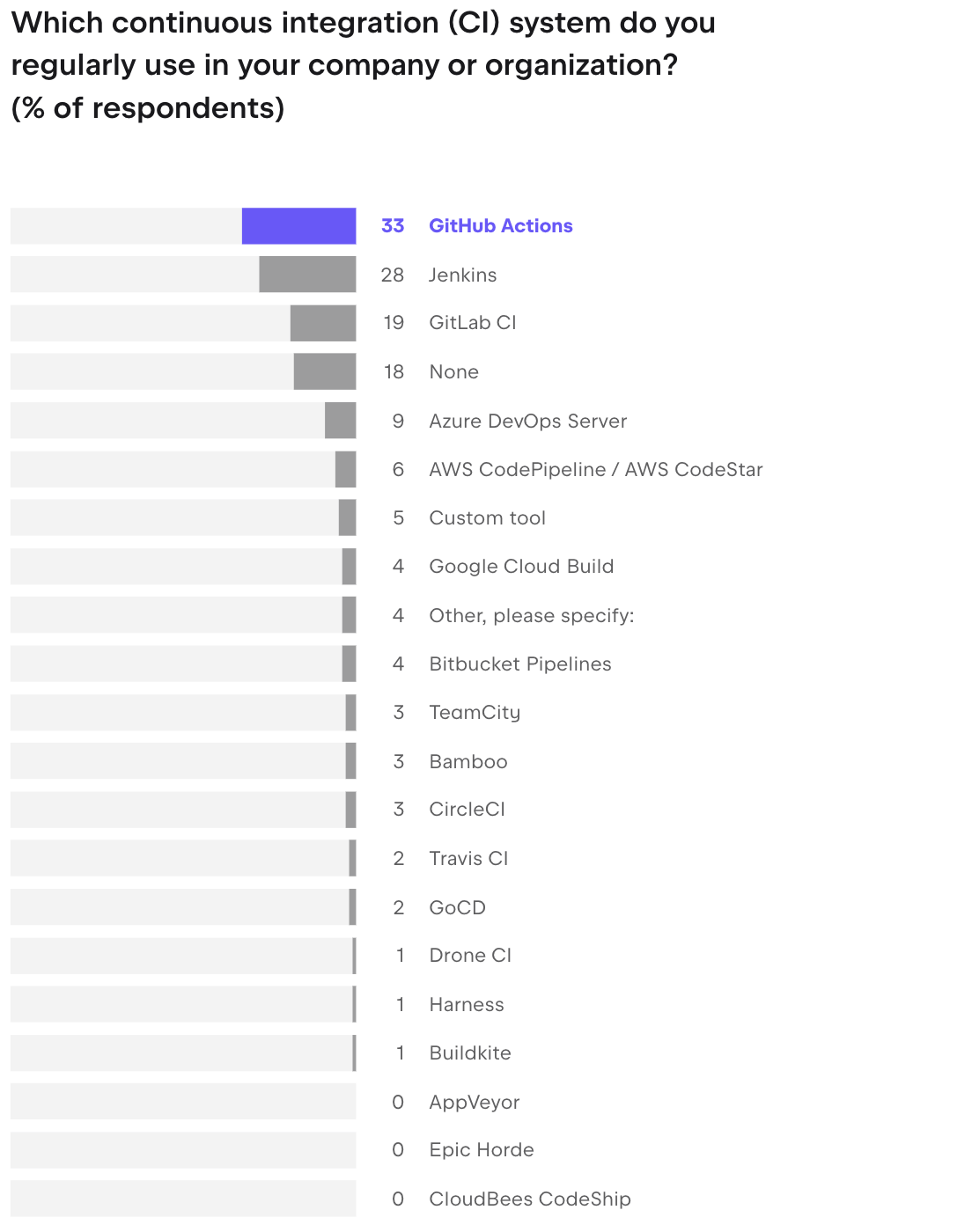
The top three are fairly consistent across both contexts: GitHub Actions, Jenkins, and GitLab CI lead in both personal and organizational use.
Interestingly, 18% of respondents report not using any CI/CD tool at all. It highlights a structural gap between how CI/CD is discussed and how it’s actually adopted. If nearly one in five organizations reports not using any CI/CD system, then CI/CD cannot be treated as a universal baseline.
Instead, it suggests a split market: on one side, teams with mature, automated pipelines, and on the other, teams still relying on manual processes, ad hoc scripts, or fragmented tooling.
This has two implications. First, adoption barriers remain real, whether due to complexity, cost, or lack of internal expertise.
Second, the competitive landscape is not just about replacing one CI tool with another, but about converting non-users into users. By not addressing this group explicitly, the article frames the problem as tool selection within an already mature category, while overlooking a significant portion of organizations that are still at an earlier stage of CI/CD adoption.
CI in personal projects
In personal projects, GitHub Actions is the clear front-runner (39%), with a noticeable drop to Jenkins (13%) and GitLab CI (10%). In organizations, the picture is more balanced: GitHub Actions still leads at 33%, but Jenkins (28%) and GitLab CI (19%) are much closer behind.
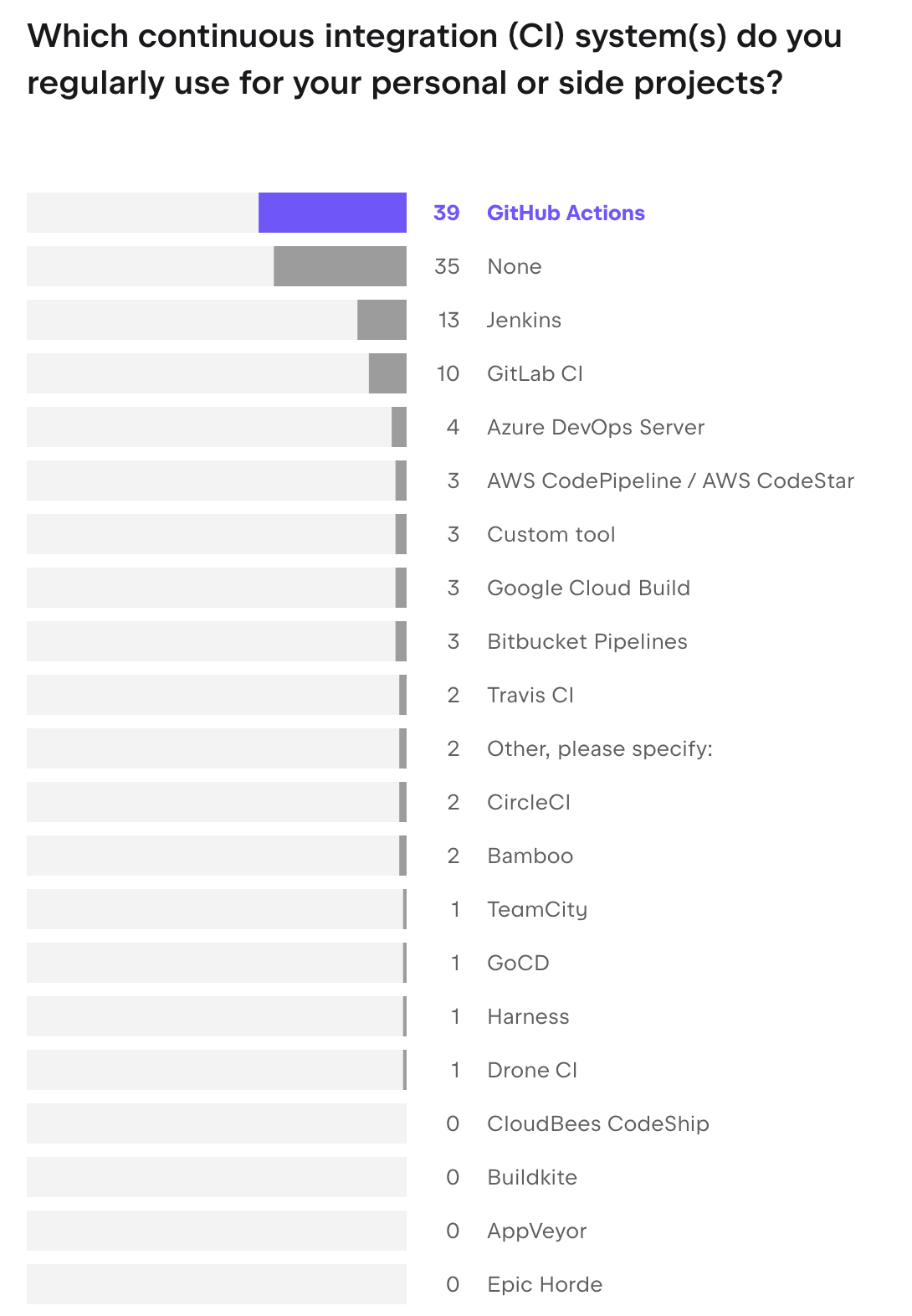
That gap is where the “easy” story breaks down. Personal setups tend to stick to GitHub-native tools because they’re quick to spin up and require almost no upfront decisions.
In an organization, things look very different. Tooling is layered, pipelines have history, and Jenkins is often still in the mix. A side project starts from zero. An enterprise setup carries years of decisions, integrations, and switching costs.
The survey also revealed something that doesn’t make the headlines often enough: roughly one-third of organizations run two CI/CD tools simultaneously, and nearly one in ten run three or more.
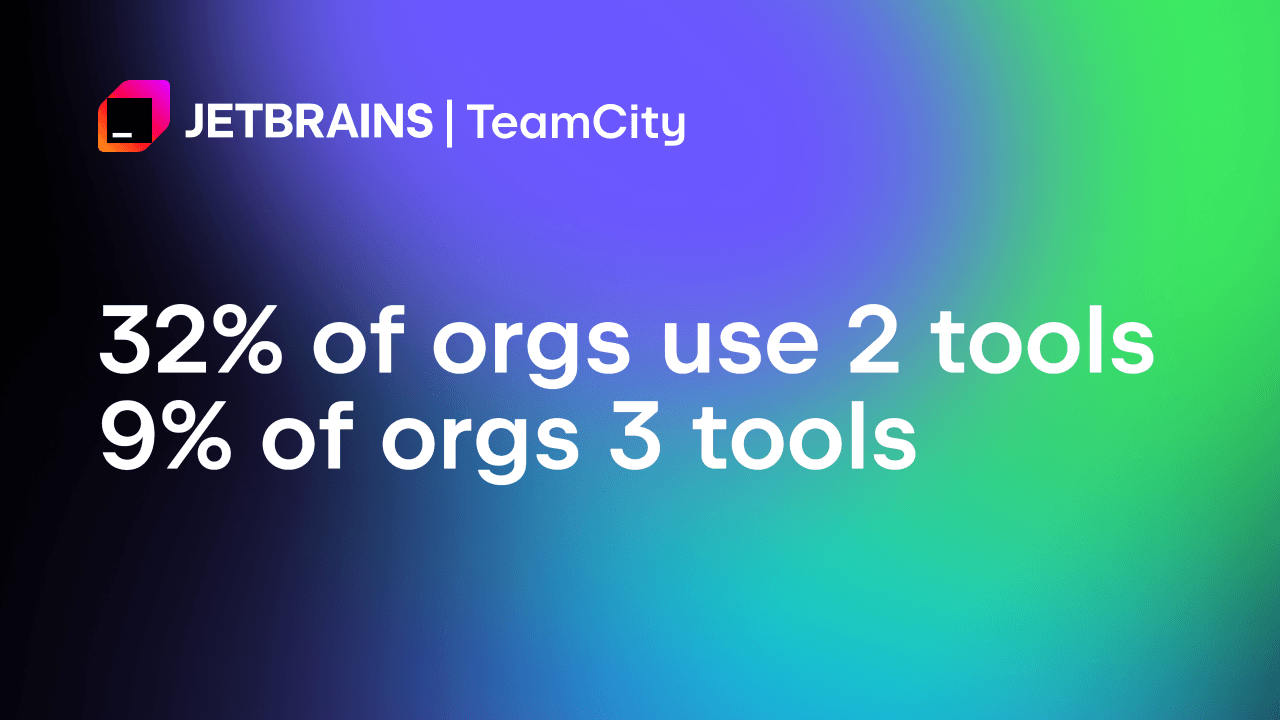
It’s the reality of how engineering organizations evolve. Migration is time-consuming and expensive. So you end up with GitHub Actions for new microservices and Jenkins for the monolith, indefinitely.
How teams actually choose
At a high level, most CI/CD tools cover the same core capabilities. The real differences emerge in how pipelines are configured, how well the system scales, how deeply it integrates with the rest of your stack, and how much control it gives you over infrastructure and security.
To keep the comparison practical and decision-focused, we evaluate CI/CD tools across six dimensions. These criteria reflect patterns we see in the State of Developer Ecosystem Report 2025 data and in a dedicated CI/CD survey conducted by TeamCity and JetBrains Research. They also mirror how platform and DevOps teams assess tooling in real migration and procurement scenarios.
Core evaluation criteria
| Criterion | Why it matters | What to look for |
| Pipeline configuration | Affects how easily you can describe build, test, and deploy logic. Influences onboarding speed and maintainability. | Config-as-code (YAML, DSL) and version control integration |
| Scalability and parallelism | Determines how quickly pipelines run under heavy load and large monorepos. | Distributed agents, build chains, and concurrency controls |
| Integrations | CI/CD sits in the middle of your stack, from VCS to cloud and collaboration tools. | Native VCS integrations, plugin ecosystem, and API maturity |
| Security and compliance | Protects code and secrets and supports governance and audits. | RBAC, SSO/SAML, secrets management, and audit logs |
| Developer experience | Good feedback loops improve adoption and reduce friction. | UI clarity, IDE plugins, and test reporting speed |
| Observability and analytics | Helps debug flaky builds and monitor pipeline health over time. | Dashboards, trend metrics, and flaky test detection |
Open source vs. commercial: The honest trade-off
CI tools can be divided into two big groups: open-source projects and commercial platforms. The real question isn’t “open-source or commercial?”, though: it’s “what is the actual total cost of ownership, including human time”?
Open-source tools like Jenkins offer maximum control and flexibility. You own the infrastructure, you own the data, and you own the plugin ecosystem. For teams with strong DevOps expertise and strict infrastructure requirements, that’s genuinely valuable. And the license is free, which definitely matters and might well prove to be a decisive factor.
The catch is that free-to-license is not free-to-run. Jenkins, in particular, has a well-documented maintenance tax. Plugin sprawl, maintenance cost, bus factor when only one person in the company holds the knowledge of how it all works together – these are real costs that don’t appear on any invoice.
“We manage things via GitHub Actions, but need Jenkins for dedicated machines and specialized hardware. As well as cost reductions.”
However, open-source tools come with their own limitations. Some of the most prominent ones include the maintenance burden, inconvenient UX, and lack of dedicated support.
Conversely, commercial products, such as TeamCity, GitLab, or CircleCI, offer faster onboarding, integrated support, and a full feature set out of the box.
Here’s a brief comparison:
| Type | Advantages | Limitations | Best fit |
| Open source (Jenkins, Tekton, Drone) | Full control over infrastructure and data. No license fees. Large plugin ecosystems. | Requires setup, upgrades, and maintenance. Security is entirely your responsibility. Features may lag behind managed services. | Teams with strong DevOps expertise and strict infrastructure requirements. |
| Commercial or managed (TeamCity, GitLab, CircleCI, Harness) | Fast onboarding with batteries included, vendor support, and built-in compliance and security options. | Cost scales with usage. Some risk of vendor lock-in and ecosystem limitations. | Growing teams that want velocity and governance without running everything themselves. |
In practice, many organizations end up with a mix. For example, they might keep a legacy Jenkins cluster for critical pipelines while moving new services to GitHub Actions or TeamCity Cloud.
“Due to historical circumstances, a single project has inherited assets from several legacy projects. As a result, management requires the use of multiple tools. Although an integration plan has been formulated, a lack of personnel has left it unimplemented over time.”
Top CI/CD tools in 2026
If you search for the best CI/CD tools 2026, you see the same names repeated across most top-ranking listicles. Jenkins, GitHub Actions, GitLab CI/CD, CircleCI, TeamCity, and Harness consistently appear in external roundups.
JetBrains’ State of Developer Ecosystem Report 2025 and dedicated CI/CD survey tell a similar story:
- GitHub Actions dominates personal projects and is increasingly used in organizations.
- TeamCity and Bitbucket Pipelines appear less frequently overall, but they have noticeable traction within organizations that care about hybrid and on-premises setups.
- Tools like CircleCI and Harness are widely recognized in cloud native and enterprise contexts, even when they are not the default choice for hobby projects.
- Jenkins and GitLab remain strong, especially in medium and large companies and in long-lived setups.
Below, we focus on six tools you will encounter again and again, with a short description of who they are for, what they do best, and one limitation to be aware of.
GitHub Actions
Model: Cloud CI/CD with optional self-hosted runners
Configuration: YAML workflow files stored in the repository
GitHub Actions is the most popular CI/CD choice for personal projects and a very common choice for smaller companies. It lives directly inside GitHub, so you can trigger workflows on pull requests, commits, and releases without configuring external webhooks.
- Best for: Teams already on GitHub who want a frictionless way to add CI/CD.
- Standout features: Native pull request checks, a huge marketplace of reusable actions, and simple onboarding for new projects.
- Limitation: Tightly coupled to GitHub. If your organization uses multiple VCS providers or wants to avoid vendor lock-in, this becomes a constraint.
“In case of test environment, we use Github Actions as it provides us free tried pipelines and even the junior developers can deploy and test their work like the live environment.”
GitLab CI/CD
Model: SaaS and self-managed
Configuration: YAML .gitlab-ci.yml files
GitLab CI/CD is part of a broader DevOps platform that combines source control, issue tracking, and security testing. It is particularly popular with teams that want security and compliance checks integrated into merge requests and pipelines.
Since it’s an all-in-one platform that includes VCS hosting, many teams also choose it because the CI tools are “closer” and more deeply integrated with the source code.
“We’re using GitLab for versioning” or “because our repository is GitLab” are some of the popular answers to the question of why organizations use GitLab as their CI/CD tool.
- Best for: Teams that want an all-in-one DevSecOps platform.
- Standout features: Built-in security scans, multi-project pipelines, and a consistent experience between SaaS and self-managed deployments.
- Limitation: Works best if you standardize on GitLab for source control. Other VCS options are supported but less deeply integrated.
CircleCI
Model: Cloud with optional server offering
Configuration: YAML files stored in the repository
CircleCI focuses strongly on performance, parallelism, and container native workflows. It is well known for its fast feedback loops, elastic scaling, and good support for Docker and Kubernetes-based workloads.
- Best for: Teams that value speed and high parallelism and are comfortable in a cloud-native environment.
- Standout features: Fine-grained resource classes, strong Kubernetes deployment support, and detailed build insights.
- Limitation: Credit-based pricing and advanced configuration can be difficult to understand at first, especially for very large workloads.
Jenkins
Model: Self-hosted, open-source
Configuration: Jenkinsfile (Groovy) and extensive UI options
Jenkins remains one of the most widely used CI tools for professional work. It is extremely flexible and has a plugin for almost everything, which is exactly why many organizations still rely on it for complex or long-running setups.
“Jenkins provides better observability for devs and others” and “Some stuff works really well in Jenkins, specifically Windows-related things” were some of the replies as to why organizations use Jenkins.
At the same time, people also mentioned that Jenkins requires specialized knowledge that not everyone on the team might have: “Jenkins requires more specialized knowledge, and the configuration is accessible to fewer people”.
- Best for: Organizations with established on-premises infrastructure and teams with deep CI/CD expertise.
- Standout features: Rich plugin ecosystem, strong support for custom workflows, and the ability to run almost anywhere.
- Limitation: Plugin sprawl and maintenance overhead. Teams often report that upgrades and dependency management consume a noticeable amount of time.
TeamCity
Model: Self-hosted and TeamCity Cloud
Configuration: Kotlin DSL, YAML, intuitive web UI
TeamCity is a CI/CD platform designed for polyglot, often enterprise-scale engineering organizations. It supports a wide range of VCS providers, build tools, and languages, and offers powerful features such as build chains, snapshot dependencies, and test history.
- Best for: Organizations that need complex pipelines, hybrid cloud and on-premises setups, or centralized governance across many teams.
- Standout features: Self-optimizing pipelines, intelligent test splitting and retries, hybrid build agents, and deep integration with JetBrains IDEs.
- Limitation: The breadth of features means there is a learning curve. Teams often start simple and gradually adopt more advanced capabilities.
Harness
Model: Cloud and hybrid
Configuration: YAML plus visual configuration
Harness positions itself as a software delivery platform rather than just a CI/CD tool. It combines pipelines, feature flags, cost management, and security checks in a single product, with a strong focus on governance and AI-assisted workflows.
- Best for: Regulated or compliance-sensitive organizations that want policy, audit, and deployment governance in one place.
- Standout features: Policy as code (PaC), integrated cost visibility, AI-assisted rollout decisions, and advanced deployment strategies.
- Limitation: Best suited for organizations that are ready to standardize on one vendor for large parts of their delivery stack.
Below is an additional section you can insert after the existing “Top CI/CD tools in 2026” section (right after the six primary tools), expanding coverage to include all tools shown in the survey charts while maintaining the same tone, structure, and level of depth.
Other CI/CD tools you will encounter in practice
The “top six” tools dominate mindshare, but they are far from the whole picture. The survey data shows a long tail of CI/CD systems that teams actively use in production, often for very specific reasons.
These tools rarely compete head-to-head across all scenarios. Instead, they tend to solve narrower problems, fit into specific ecosystems, or persist as part of legacy and hybrid setups.
Understanding where they fit helps explain why most organizations end up running more than one CI/CD tool at the same time.
Azure DevOps Server
Model: Self-hosted and cloud (Azure DevOps Services)
Configuration: YAML pipelines and classic UI pipelines
Azure DevOps remains a common choice in organizations that are deeply invested in the Microsoft ecosystem. It combines CI/CD with boards, repos, and artifact management, similar to GitLab’s all-in-one approach.
● Best for: Microsoft-centric environments and enterprises already using Azure services.
● Standout features: Tight integration with Azure infrastructure, enterprise-grade RBAC, and mature project management tooling.
● Limitation: Less appealing outside the Microsoft ecosystem, especially for teams standardizing on GitHub or multi-cloud setups.
Bitbucket Pipelines
Model: Cloud
Configuration: YAML
Bitbucket Pipelines is tightly coupled with Bitbucket Cloud, much like GitHub Actions is with GitHub. Its adoption is strongly correlated with teams already using Atlassian products.
● Best for: Teams using Bitbucket and the Atlassian stack (Jira, Confluence).
● Standout features: Native integration with Bitbucket repositories and simple setup for small to mid-sized projects.
● Limitation: Less flexible and less scalable compared to standalone CI/CD platforms.
AWS CodePipeline and AWS CodeBuild
Model: Fully managed cloud
Configuration: JSON and YAML
AWS-native CI/CD tools (AWS CodePipeline and AWS CodeBuild) are often used as part of a broader cloud architecture rather than as standalone developer tools. Teams adopt them when they want pipelines to live entirely inside AWS.
● Best for: Teams building and deploying exclusively on AWS.
● Standout features: Deep integration with AWS services, IAM-based security, and event-driven pipelines.
● Limitation: Developer experience can feel fragmented, especially compared to tools designed specifically for CI/CD workflows.
Google Cloud Build
Model: Fully managed cloud
Configuration: YAML
Google Cloud Build plays a similar role in the GCP ecosystem as AWS CodePipeline does in AWS. It is often used as part of infrastructure automation rather than as a central developer-facing CI tool.
● Best for: GCP-native teams and container-based workloads.
● Standout features: Strong integration with GKE, container registries, and Google Cloud services.
● Limitation: Limited flexibility outside GCP-centric workflows.
Travis CI
Model: Cloud and limited self-hosted options
Configuration: YAML
Travis CI was one of the early popular CI tools, especially in open-source communities. Its presence in the survey reflects legacy usage and long-lived projects rather than new adoption.
● Best for: Existing projects already configured with Travis CI.
● Standout features: Simple configuration and strong historical presence in open source.
Bamboo
Model: Self-hosted (Atlassian)
Configuration: UI with some code-based options
Bamboo is another Atlassian product, often used in organizations that standardized on Atlassian tooling before cloud-native CI/CD became dominant.
● Best for: Enterprises already using Atlassian Data Center products.
● Standout features: Integration with Jira and Bitbucket Server, predictable licensing.
● Limitation: Slower evolution and less competitive feature set compared to modern CI/CD platforms.
GoCD
Model: Open-source, self-hosted
Configuration: YAML and UI
GoCD focuses on modeling complex deployment pipelines, particularly in environments with strict promotion workflows.
● Best for: Teams that need explicit pipeline modeling and deployment visualization.
● Standout features: First-class support for pipeline dependencies and promotions.
● Limitation: Smaller ecosystem and lower adoption compared to Jenkins or GitLab.
Drone CI
Model: Open-source and cloud
Configuration: YAML
Drone CI is a container-native CI system built around Docker. It appeals to teams that want a lightweight, code-first approach.
● Best for: Teams comfortable with containerized pipelines and minimal UI.
● Standout features: Simple, Docker-based execution model.
● Limitation: Limited ecosystem and fewer enterprise features.
Buildkite
Model: Hybrid (cloud control plane with self-hosted agents)
Configuration: YAML
Buildkite separates orchestration from execution. Pipelines are managed in the cloud, while builds run on infrastructure you control.
● Best for: Teams that want cloud convenience but full control over compute.
● Standout features: Hybrid execution model and strong performance at scale.
● Limitation: Requires managing your own agents and infrastructure.
AppVeyor
Model: Cloud
Configuration: YAML
AppVeyor is primarily focused on Windows-based builds and .NET ecosystems.
● Best for: Windows-heavy projects and legacy .NET pipelines.
● Standout features: Strong Windows support.
● Limitation: Narrow use case and limited adoption outside that niche.
CloudBees CodeShip
Model: Cloud (now largely phased out)
Configuration: YAML
CodeShip was a CI/CD service under CloudBees. Its near-zero presence in the survey reflects how quickly tools can fade when the market consolidates.
Read more: TeamCity vs Cloudbees: An Enterprise Comparison
Epic Horde
Model: Self-hosted (specialized)
Configuration: Custom
Horde is a specialized CI system developed by Epic Games, primarily used in game development pipelines.
● Best for: Large-scale game development workflows.
● Standout features: Designed for massive build farms and asset-heavy pipelines.
● Limitation: Highly specialized and not intended for general-purpose CI/CD.
Custom CI/CD tools
A small but consistent percentage of teams report using custom-built CI/CD systems.
This usually happens when:
- infrastructure requirements are highly specific
- existing tools cannot support performance or security constraints
- or the organization has accumulated significant internal tooling over time
While this gives maximum control, it also shifts the full burden of maintenance, scaling, and reliability onto the team.
What this long tail actually tells you
Looking at the full list, a pattern emerges.
Most of these tools are not trying to win the entire CI/CD market. They succeed by fitting into a specific context:
- a cloud provider (AWS, GCP)
- a broader platform (Atlassian, Azure)
- a legacy setup that is too expensive to migrate
- or a highly specialized workflow (game development, hardware builds)
This is why tool consolidation is slow in practice.
Even when teams adopt GitHub Actions or TeamCity for new services, older systems rarely disappear overnight. They continue to run critical pipelines, sometimes for years.
Comparison table: Capabilities
The table below summarises the CI tools using the criteria introduced earlier. This is an intentionally high-level overview and focuses on the dimensions that teams most often mention in surveys and interviews.
| CI/CD tool | Deployment model | Config format | Best for | Parallelism and scale | Git or Kubernetes integration | Secrets and RBAC | Observability and analytics |
|---|---|---|---|---|---|---|---|
| GitHub Actions | Cloud with self-hosted runners | YAML | Small and medium-sized teams on GitHub | Matrix builds, scalable hosted runners | Native GitHub integration, marketplace actions | Encrypted secrets, GitHub roles | Logs in UI, marketplace integrations |
| GitLab CI/CD | SaaS and self-managed | YAML | Unified DevSecOps platform | Parallel jobs, autoscaling runners | Deep GitLab integration, Kubernetes tools | RBAC, SSO/SAML, security dashboards | Built-in pipeline graphs and metrics |
| CircleCI | Cloud and server | YAML | Fast CI for container workloads | High parallelism, fine-grained resources | Orbs for AWS/Kubernetes, strong Docker support | Contexts, restricted env variables | Insights dashboard, timing breakdowns |
| Jenkins | Self-hosted | Groovy, UI, YAML via plugins | Complex or legacy setups | Horizontal scaling with agents | Plugin-based integrations | Plugins for RBAC and secrets | Plugins for metrics and monitoring |
| TeamCity | Self-hosted and TeamCity Cloud | Kotlin DSL, YAML, UI | Enterprise build chains, polyglot teams | Distributed agents, build chains, cloud agents | Native Git, Perforce, Kubernetes | Fine-grained RBAC, SSO, secure params | Build history, test analytics, dashboards |
| Harness | Cloud and hybrid | YAML plus UI | Regulated and policy-driven teams | Auto-scaling infrastructure | Kubernetes-native, GitOps | RBAC, policy as code, audit trails | Deployment analytics, cost insights |
| Azure DevOps | SaaS and self-managed | YAML and UI | Microsoft-centric enterprises | Parallel jobs, hosted/self-hosted agents | Azure-native, GitHub, Kubernetes | RBAC, Azure AD integration | Dashboards, logs, release tracking |
| Bitbucket Pipelines | Cloud | YAML | Atlassian ecosystem users | Limited parallelism, cloud runners | Native Bitbucket integration | Repo-level secrets and permissions | Basic logs and pipeline view |
| AWS CodePipeline / CodeBuild | Fully managed cloud | JSON, YAML | AWS-native pipelines | Event-driven scaling | Deep AWS integration | IAM-based access and secrets | CloudWatch logs and metrics |
| Google Cloud Build | Fully managed cloud | YAML | GCP-native workloads | Autoscaling container builds | GCP and GKE integration | IAM roles, Secret Manager | Cloud logging and build history |
| Travis CI | Cloud | YAML | Legacy open-source projects | Limited vs modern tools | GitHub integration | Encrypted secrets | Basic logs and history |
| Bamboo | Self-hosted | UI and YAML (limited) | Atlassian Data Center users | Agent-based parallel builds | Bitbucket Server, Jira | Role-based permissions | Built-in reports and logs |
| GoCD | Self-hosted | YAML and UI | Complex deployment pipelines | Pipeline-level parallelism | Plugin-based integrations | RBAC via plugins | Pipeline visualization, audit trails |
| Drone CI | Open-source and cloud | YAML | Container-native lightweight CI | Docker-based parallel execution | Git-based triggers, Docker | Secrets via config/plugins | Basic logs |
| Buildkite | Hybrid (cloud + self-hosted agents) | YAML | Hybrid infrastructure control | Highly scalable via own agents | GitHub, Bitbucket, Kubernetes | Fine-grained access control | Build insights, integrations |
| AppVeyor | Cloud | YAML | Windows/.NET builds | Parallel Windows jobs | GitHub and Bitbucket | Secure variables | Logs and build history |
| CloudBees CodeShip | Cloud | YAML | Legacy CI/CD users | Limited scalability | GitHub, Bitbucket | Basic secrets management | Basic logs |
| Epic Horde | Self-hosted | Custom | Game development pipelines | Massive distributed build farms | Perforce and custom integrations | Internal enterprise controls | Custom telemetry |
| Custom tools | Self-hosted | Custom | Highly specialized environments | Fully customizable | Fully customizable | Fully customizable | Fully customizable |
As a rule of thumb, GitHub Actions and CircleCI often win on setup and execution speed, while TeamCity and GitLab tend to lead on governance and flexibility across complex organizations.
Comparison table: Pricing and total cost of ownership
Pricing models change frequently, so always check vendor pages for details, but the trade-offs are fairly stable across tools.
| CI/CD tool | Free tier or trial | Usage limits (typical) | Paid tiers and scaling approach | Hosted runners or agents | Main cost drivers | Notes on TCO |
|---|---|---|---|---|---|---|
| GitHub Actions | Included with most GitHub plans | Minutes quota per month | Per-minute billing on hosted runners, higher tiers include larger quotas | Hosted and self-hosted runners | Build minutes, storage, network | Very attractive for small teams, costs rise with scale |
| GitLab CI/CD | Free tier with limited minutes | Quotas by plan tier | Premium tiers add features and higher compute limits | Cloud and self-managed runners | Compute usage, support, licensed users | Predictable for self-managed setups, more variable on SaaS |
| CircleCI | Free tier with credits | Credit model, limits by plan | Credits buy compute, storage, concurrency | Cloud and self-hosted options | Credits, concurrency, data transfer | Flexible but harder to predict without monitoring |
| Jenkins | Free and open source | No license limits | None for the tool itself | Self-managed agents and servers | Hardware, maintenance, plugins | Low license cost, higher operational overhead |
| TeamCity | Free tier with 3 agents and 100 build configs | Agent and config limits | Additional agents (on-prem), tiered cloud plans | Cloud-hosted and self-managed agents | Agents, infrastructure, support | Predictable at scale, especially self-hosted |
| Harness | Trial and usage-based pricing | Depends on modules enabled | Modular pricing linked to services or deployments | Managed runners with hybrid options | Active services, deployments, seats | Optimized for enterprise governance use cases |
| Azure DevOps | Free tier available | Limits on parallel jobs and users | Per-user licensing and parallel job scaling | Microsoft-hosted and self-hosted agents | Parallel jobs, users, storage | Predictable for enterprises already in Azure ecosystem |
| Bitbucket Pipelines | Free tier with build minutes | Monthly build minutes quota | Usage-based pricing tied to build minutes | Cloud runners | Build minutes | Simple pricing, can grow with usage |
| AWS CodePipeline / CodeBuild | Free tier (limited) | Pay-as-you-go per execution | Fully usage-based pricing | Fully managed cloud | Build time, compute, storage, data transfer | Can be cost-efficient but fragmented across services |
| Google Cloud Build | Free tier with limited build minutes | Build minutes quota | Pay-per-use compute pricing | Fully managed cloud | Build time, storage | Predictable inside GCP, tied to ecosystem usage |
| Travis CI | Free tier (limited, mostly OSS) | Build minutes and concurrency limits | Subscription tiers based on usage | Cloud | Build minutes, concurrency | Declining usage, mainly legacy projects |
| Bamboo | Paid (no meaningful free tier) | Agent-based limits | Server/Data Center licensing + agents | Self-hosted agents | License, infrastructure, maintenance | Predictable but requires ongoing maintenance |
| GoCD | Free and open source | No license limits | None for the tool itself | Self-hosted | Infrastructure, maintenance | Similar to Jenkins but smaller ecosystem |
| Drone CI | Open source and cloud | Depends on setup | Paid cloud tiers or self-hosted scaling | Self-hosted or cloud | Infrastructure or subscription | Low cost, but requires setup and maintenance |
| Buildkite | Free trial | Usage tied to pipelines and agents | Usage-based pricing (per user/agent) | Hybrid (self-hosted agents) | Agents, compute, users | Cost tied to infra you control |
| AppVeyor | Free tier (limited) | Build minutes and concurrency limits | Subscription tiers | Cloud | Build minutes | Niche usage, mainly Windows workloads |
| CloudBees CodeShip | Legacy/free tiers (limited) | Limited usage | Subscription-based | Cloud | Build usage | Largely phased out, limited relevance |
| Epic Horde | No public free tier | Internal usage model | Not commercially standardized | Self-hosted | Infrastructure, maintenance | Designed for internal, large-scale game pipelines |
| Custom tools | No standard model | Fully dependent on implementation | Internal investment only | Self-hosted | Engineering time, infrastructure | Highest flexibility, highest long-term cost |
If you are evaluating tools purely on cost, remember to include the time that developers and DevOps engineers spend on setup, incident response, upgrades, and compliance reviews.
In survey responses, many teams highlight the “hidden” cost of maintaining complex, plugin-heavy setups versus using managed or hybrid options.
What makes a CI/CD tool enterprise-ready?
For smaller projects, any of the tools above can work, especially if they integrate nicely with your source control and cloud provider. However, as organizations grow, additional requirements start to dominate the conversation:
- Where is our code and build data stored, and who controls access?
- How do we enforce policies across teams?
- What does our audit trail look like?
- How fast can we recover from an outage?
In the State of Developer Ecosystem 2025 report and in the dedicated CI/CD survey, large organizations are much more likely to prefer self-hosted or hybrid CI/CD setups, often precisely because they want control over where agents run and how data is handled.
Here are the capabilities that enterprise teams mention most often.
Enterprise evaluation matrix
Enterprises also report a strong preference for tools that can coexist with existing infrastructure and that do not require a “big bang” migration.
| Capability | Why enterprises care | Example tools or approaches |
|---|---|---|
| Deployment flexibility | Hybrid and self-hosted options help satisfy data residency and compliance rules. | TeamCity, GitLab self-managed, Jenkins, Azure DevOps, Buildkite |
| RBAC and SSO or SAML | Centralized identity management and fine-grained permissions reduce risk. | TeamCity, Harness, GitLab, GitHub Enterprise, Azure DevOps |
| Audit logs and traceability | Required for ISO, SOC, and internal compliance audits. | TeamCity, GitLab, Jenkins (with plugins), Azure DevOps |
| Policy as code | Lets teams encode rules about approvals, environments, and secrets. | Harness, GitLab, Open Policy Agent integrations, Kubernetes-native workflows |
| Change approval workflows | Prevents unreviewed deployments to sensitive environments. | TeamCity, GitLab, Azure DevOps, Harness |
| Disaster recovery and backups | Minimizes downtime and data loss in outages or migrations. | Self-hosted TeamCity, GitLab, Jenkins, Azure DevOps (enterprise setups) |
| Test reliability and flaky detection | Ensures release quality at scale, especially in large test suites. | TeamCity (test history, flaky detection), CircleCI (insights), GitHub Actions (via integrations) |
| Compliance support | Helps satisfy SOC 2, ISO 27001, and GDPR requirements. | TeamCity, Harness, GitLab, Azure DevOps, GitHub Enterprise |
In practice, this often means gradual adoption of TeamCity, GitLab, or cloud alternatives alongside existing Jenkins or Azure DevOps pipelines, sometimes over many months.
How to choose the right CI/CD tool
With so many options, it helps to think in terms of a simple decision path. The “best” CI/CD tool for your team depends on your size, your risk appetite, and the stack you already use.
The steps below give you a framework you can walk through with your engineering and DevOps leaders.
Step-by-step selection guide
| Step | Question | If yes | If no |
|---|---|---|---|
| 1 | Do you need full control over infrastructure or have strict on-premises or data residency requirements? | Focus on self-hosted or hybrid tools such as TeamCity, Jenkins, GitLab self-managed, or Azure DevOps Server. | Move to step 2. |
| 2 | Is most of your code already on GitHub? | Start with GitHub Actions as your default choice for fast onboarding. | Move to step 3. |
| 3 | Are you heavily invested in GitLab as your code and issue platform? | Evaluate GitLab CI/CD as the primary option. | Move to step 4. |
| 4 | Are you deeply tied to a specific cloud provider (AWS, GCP, Azure)? | Consider cloud-native CI/CD like AWS CodePipeline, Google Cloud Build, or Azure DevOps for tighter integration. | Move to step 5. |
| 5 | Do you prefer configuration as code and flexible pipeline design? | Consider TeamCity (Kotlin DSL or YAML), GitLab CI/CD, Jenkins, CircleCI, or Buildkite. | If you want a more UI-driven or policy-centric setup, look at Harness or Azure DevOps. |
| 6 | Do you run large monorepos or have strict performance and parallelism requirements? | Look at TeamCity, GitLab, CircleCI, or Buildkite for build chains and scalable execution. | Move to step 7. |
| 7 | Is RBAC, SSO, audit logging, and compliance a hard requirement? | Shortlist TeamCity, Harness, GitLab, Azure DevOps, or GitHub Enterprise. | Move to step 8. |
| 8 | Do you want minimal maintenance and fast onboarding above all else? | Prefer managed options such as GitHub Actions, CircleCI, Google Cloud Build, TeamCity Cloud, or Harness Cloud. | Move to step 9. |
| 9 | Do you have many languages, platforms, or legacy systems within a single organization? | Consider TeamCity or Jenkins for flexibility, often combined with cloud CI/CD for simpler services. | Most modern cloud CI/CD tools will work; choose based on ecosystem and cost. |
The short version
- Maximum control and hybrid deployment: TeamCity, Jenkins, or GitLab self-managed.
- Speed and tight GitHub integration: GitHub Actions
- Compliance and governance first: TeamCity, GitLab, or Harness.
- Heavy Kubernetes and GitOps workflows: Argo CD or Flux for CD, combined with TeamCity, GitHub Actions, or GitLab for CI.
FAQs
What is the most popular CI/CD tool in 2026?
Survey data from JetBrains shows GitHub Actions as the most popular tool for personal projects, with strong adoption in organizations as well. Jenkins and GitLab remain very common at the organizational level, especially in medium and large companies.
Are there free and open source CI/CD tools?
Yes. Jenkins, Tekton, and Drone are all open source and free to use. They give you full control over installation and configuration, but you are responsible for maintenance, security patches, and scalability. (Source)
Which CI/CD tools are best for enterprise or compliance-driven teams?
Teams that operate in regulated industries or under strict internal policies tend to choose enterprise-ready tools with strong RBAC, audit logs, and deployment approvals. TeamCity, GitLab self-managed, Harness, and GitHub Enterprise are all common choices in these scenarios. (Source)
Which CI/CD tools scale best for large projects or monorepos?
TeamCity, GitLab, and CircleCI are frequently used for monorepos and very large builds, thanks to distributed agents, build chains, and advanced parallelism controls. Jenkins can also scale well when configured carefully, although maintenance overhead tends to rise. (Source)
How widely are CI/CD tools adopted in 2026?
Across the broader State of Developer Ecosystem 2025 data, CI/CD usage continues to grow year over year, with a clear majority adoption among professional developers. The dedicated CI/CD survey confirms that tools such as GitHub Actions, Jenkins, GitLab, and TeamCity are part of most respondents’ everyday workflows. (Source)
Conclusion
CI/CD is now a core part of software development rather than an add-on. Most teams rely on pipelines to keep code in a releasable state, reduce manual work, and shorten feedback loops.
At the same time, “best CI/CD tool” is not a single product. It is a set of trade-offs:
- Open-source tools like Jenkins and Tekton give you deep control at the cost of maintenance.
- Cloud tools such as GitHub Actions and CircleCI provide speed and low-friction integration with modern stacks.
- Enterprise platforms like TeamCity, GitLab, and Harness focus on governance, hybrid deployments, and long-term maintainability.
The right choice for your team depends on where your code lives today, how strict your compliance requirements are, and how much operational overhead you are willing to take on.
If you are ready to explore how TeamCity can fit into your own ecosystem, you can start with a free trial and try it on a real project: https://www.jetbrains.com/teamcity/