TeamCity
Powerful CI/CD for DevOps-centric teams
Bamboo End of Life: How to Prepare and Choose the Right CI/CD Replacement

If your team is using Bamboo, you’ve probably seen the news: Bamboo Data Center is being retired as part of Atlassian’s broader Data Center transition strategy. Support will continue for several years, but many teams have already started thinking about the next step.
Whether you’re considering Bamboo Cloud or moving to an entirely new CI/CD solution, the good news is that you don’t need to rush into a decision. There’s enough time not only to evaluate migration options, but also to rethink your whole CI/CD process.
For some teams, this is a good opportunity to step back and look at years of accumulated CI/CD workflows. In some cases, it might be more viable to rebuild the whole process than to carry it forward.
In this guide, we’ll look at what Bamboo’s end of life means in practice, how to prepare for the transition, and what to consider when evaluating replacement options.

What Bamboo’s end of life means for teams
According to Atlassian’s timeline, license sales to new customers end in 2026, with full end of life for Bamboo Data Center on March 28, 2029.
CI/CD systems sit at the center of your software delivery process. They connect source control, testing, artifact storage, deployment tooling, infrastructure, secrets management, and developer workflows.
If you’ve been using Bamboo for 5 to 10 years, you’ve probably accumulated a significant amount of legacy in your CI/CD setup. With Bamboo Data Center reaching end of life, the real question is less about which tool replaces Bamboo and more about which parts of your current setup are worth keeping, and which aren’t.
Here are some practical steps for planning a migration away from on-premises Bamboo.
Start with an audit, not a tool comparison
Before evaluating alternatives, spend time auditing your current Bamboo installation. Document:
- Build plans and jobs
- Agent configurations
- Deployment projects
- Artifact storage and retention policies
- Shared credentials and variables
- Repository integrations
- Custom scripts and plugins
- Jira and Bitbucket integrations
- Compliance and security requirements
Identify which pipelines are truly business-critical and which have simply accrued over time. Many organizations find that a significant portion of their CI/CD configuration is no longer actively used.
💡 Read also: Bamboo to TeamCity migration guidelines
Don’t migrate your technical debt
When starting a migration project, the natural instinct is to recreate everything as is. That approach feels safe. In reality, it usually makes more sense to review the CI/CD process completely.
One Netherlands-based software company is a good example. The company had relied on Bamboo for more than 15 years, supporting around 1,000 developers across multiple product lines and running roughly 200 build agents, one of the largest Bamboo deployments in existence.
Rather than migrating its existing configuration directly, the team rebuilt its CI/CD pipelines from scratch using TeamCity’s Kotlin DSL.
“We decided not to migrate the old configuration directly because we would also migrate a lot of historical pain,” says their Principal Architect.
A migration team of three to four engineers redesigned pipelines product line by product line, removing legacy dependencies and outdated steps along the way instead of carrying them forward.
The biggest gain was build speed. One of their largest applications, built from 27 million lines of code, went from a full rebuild taking over an hour to one taking about six minutes, a 90% reduction.
“We had a build time of over an hour in our old workflows. It’s now six minutes for a full rebuild,” says the architect.
But it illustrates an important point: a migration is one of the few moments when you’re already touching your CI/CD infrastructure. Use that opportunity to improve it.
What to look for in a Bamboo replacement
What to look for in a Bamboo replacement
Once you’ve audited your environment and identified areas for improvement, it’s time to look at alternatives.
Different teams prioritize different things, but a few criteria consistently matter during CI/CD migrations.
💡 Read also: How to Choose a CI/CD Tool
Configuration as code
Most mature engineering organizations want their CI/CD configuration versioned, reviewable, and managed alongside application code.
Configuration as code supports transparency, code reviews, and makes large-scale changes easier to manage.
If your team has invested heavily in Bamboo Specs, you’ll likely want a platform with a similarly robust approach.
Scalability
Bamboo became popular among larger engineering organizations because it combined strong Atlassian integrations with an agent-based architecture that supported distributed builds and scalable CI workloads.
As you evaluate alternatives, consider:
- Number of agents
- Parallel execution
- Queue management
- Large monorepos
- Multi-project environments
As an organization grows, scalability matters more. A platform that works well for fifty developers may behave very differently at five hundred.
Hosting flexibility
Deciding where your builds need to run should be part of your evaluation. For some teams, the plan is simply to move everything to SaaS. Others need to weigh:
- On-premises execution
- Hybrid infrastructure
- Access to internal networks
- Specialized hardware
- Regulatory compliance controls
Reliability
CI/CD sits at the center of your delivery pipeline, so instability there has an immediate, visible cost. When comparing alternatives on this front, pay attention to:
- Platform stability
- Support responsiveness
- Build visibility
- Troubleshooting capabilities
- Recovery options
Reliability won’t show up as a line item on a feature comparison chart, but it’s what teams remember most after a migration: fewer dropped builds and fewer outage postmortems.
Integrations
Bamboo’s tight integration with Jira, Bitbucket, and the rest of the Atlassian ecosystem was one of its biggest draws for many teams. If that ecosystem still matters to you, check how well any replacement connects to:
- Source control
- Issue tracking
- Deployment tooling
- Notifications
- Developer workflows
A good migration should carry low risk of disrupting the systems your team already relies on.
Common Bamboo replacement options
There’s no single right replacement for Bamboo. The best choice depends on your environment, your existing workflows, and your long-term strategy.
Bitbucket Pipelines
For organizations already invested in Atlassian Cloud, Bitbucket Pipelines is the most direct option. For teams with relatively simple, cloud-based workflows, it’s a natural fit.
GitHub Actions
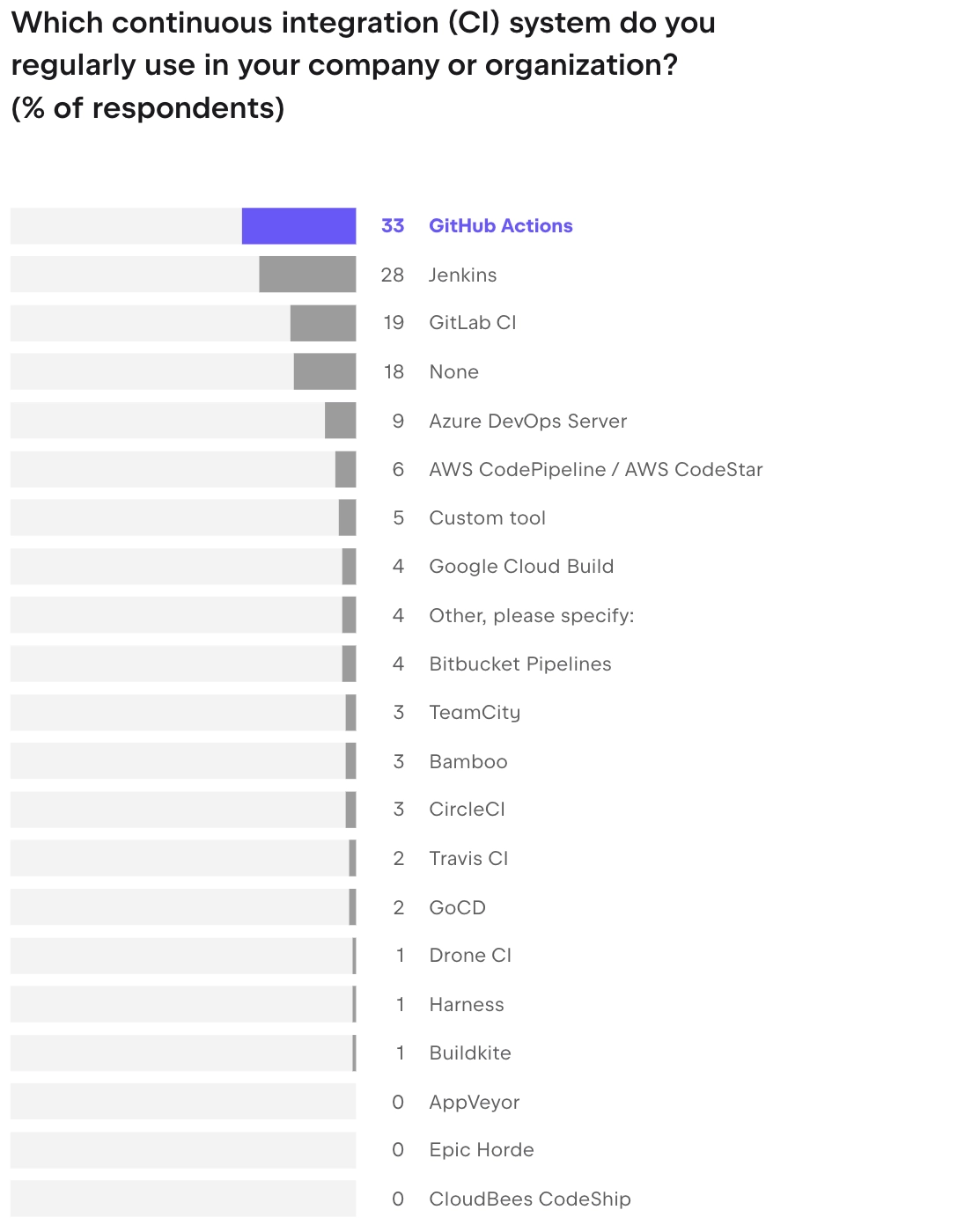
GitHub Actions has become one of the most widely used CI/CD platforms in the industry. According to JetBrains’ State of Developer Ecosystem Report 2025, it leads organizational adoption at 33%, ahead of Jenkins at 28% and GitLab CI/CD at 19%.
For teams already standardized on GitHub, it offers a rich developer experience and a large ecosystem of integrations.
The limitation: GitHub Actions supports self-hosted runners, but it isn’t a fully self-hosted CI/CD platform. Teams looking for a true on-premises replacement for Bamboo should weigh that against their compliance and infrastructure requirements.
💡 Read also: Best CI Tools for 2026
GitLab CI/CD
GitLab CI/CD is a practical choice for organizations looking to consolidate source control, CI/CD, and DevOps workflows in one platform. It tends to attract teams already committed to the GitLab ecosystem.
Jenkins
Jenkins remains one of the most flexible and widely deployed CI/CD platforms, with a large plugin ecosystem available for nearly any customization.
The tradeoff is operational complexity. Teams that choose Jenkins need to own and maintain the platform themselves.
TeamCity
For Bamboo users in particular, TeamCity is often considered, because it offers many of the same characteristics that drew organizations to Bamboo in the first place:
- Support for complex build environments
- Build agent architecture
- Self-hosted, cloud, and hybrid deployment
- Strong integrations
- Advanced configuration-as-code capabilities
One feature that comes up often in migrations is Kotlin DSL. Several organizations rely on it because it makes CI/CD configuration manageable as code while staying expressive.
The company that has just migrated from Bamboo, for instance, found configuration-as-code in TeamCity noticeably more robust than what they’d had in Bamboo, with APIs that integrated more natively into their workflows.
Treat the migration as a transition, not a cutover
Organizations often approach Bamboo migrations as infrastructure projects: select a new platform, migrate existing pipelines, retire the old system.
In practice, migrations tend to be more iterative than that.
CI/CD systems accumulate integrations, deployment processes, environment-specific logic, artifact flows, and operational conventions over time, much of which is rarely documented in one place. Many of these dependencies only become visible once teams start moving workloads to a new platform.
This is one reason large-scale migrations are typically phased rather than executed as a single cutover. A pilot project often reveals differences in how platforms handle artifacts, dependencies, build agents, permissions, or deployment workflows.
These discoveries are a normal part of the process, and they often lead teams to revisit assumptions that have gone unchallenged for years.
💡 Read also: Bamboo to TeamCity Migration Guidelines
One of the company’s migration, covered above, follows the same pattern. Rather than recreating its existing workflows, the team used the transition to review dependencies, simplify build chains, and redesign the parts of its delivery process that had become hardest to maintain.
That experience isn’t unique. Many teams find that the most valuable outcomes of a migration have less to do with the new platform itself and more to do with the decisions made along the way: retiring obsolete jobs, reducing unnecessary complexity, standardizing environments, improving configuration management, or clarifying ownership of critical delivery workflows.
For that reason, it’s usually worth running the old and new systems in parallel for a period of time.
Parallel operation gives you a chance to compare outputs, validate behavior, and build confidence before moving critical workloads over, and it gives teams room to improve workflows as they migrate them instead of simply translating them one to one.
The organizations that get the most value from a Bamboo migration aren’t necessarily the ones that finish fastest. They’re the ones that use the transition to build a delivery platform that’s easier to maintain, easier to understand, and better aligned with how their engineering teams actually work.
Final thoughts
Bamboo’s end of life sets a deadline, but the more useful question is what kind of delivery platform you want running five years from now.
The migrations that pay off aren’t usually the fastest ones. They’re the ones that use the deadline as a reason to simplify workflows, question old assumptions, and fix the parts of the pipeline that have quietly been broken for years.
Whatever you replace Bamboo with, aim for more than matching its features. Aim for a setup your team won’t need to migrate away from again anytime soon.