
.NET Tools
Essential productivity kit for .NET and game developers
What’s Been Fixed in Rider 2025.3

Each release of JetBrains Rider is shaped by an ongoing conversation between our team and our users. Your feedback, bug reports, and upvotes complement our internal QA processes and performance tracking, helping us understand how issues manifest across diverse environments and project setups. This collaboration allows us to prioritize the fixes that have the greatest real-world impact.
Rider 2025.3 continues that tradition. Alongside exciting new features, this release includes over 300 refinements and fixes – the result of our commitment to polishing every part of the IDE experience.
In this post, we’ll take a look at the key fixes we’ve made, targeting reliability issues, performance bottlenecks, and the day-to-day friction points you’ve reported and upvoted most.
UPD: The Rider 2025.3.0.1 bug-fix update fixes a critical issue that prevented plugins from being upgraded from previously installed to their latest compatible versions. [IJPL-218019] . Click here for a full list of resolved issues.
Core stability and smoother workflows
This update brings broad stability and performance refinements across the IDE. Startup is faster, visual flicker in the editor has been reduced, and features like code completion, search, and navigation are available earlier in the startup sequence. Our internal benchmark tests tell us you’ll definitely feel the difference in your day-to-day use of Rider 2025.3.
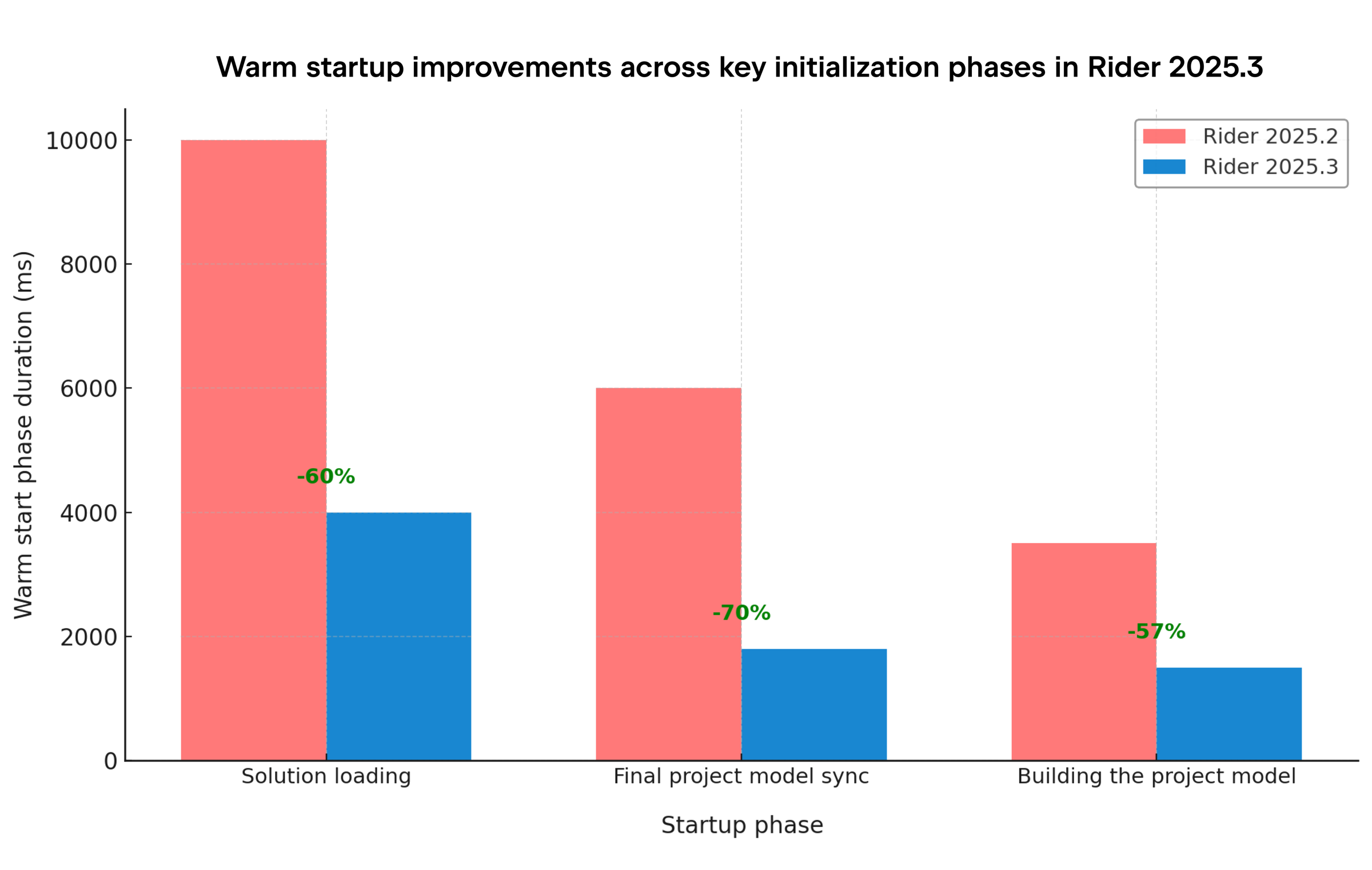
In addition to those startup performance boosts, we’ve also addressed these most-upvoted issues:
- RIDER-128989 – We’ve fixed an issue that caused
Environment.CurrentDirectoryto point to the project folder instead of the expected working directory after launching from Rider. - RIDER-125818 – We’ve corrected a behavior causing files to open unexpectedly in the editor after certain actions.
Stronger unit testing and debugging
Rider 2025.3 comes with fixes for a few long-standing issues that would previously interrupt the testing or debugging cycle, ensuring a smoother feedback loop for developers.
- RIDER-121579 – We’ve prevented the duplication of tests in the test runner UI.
- RIDER-99516 – We’ve resolved an issue that caused the unit test log window to constantly scroll to the top and disrupt the review of test results.
- RIDER-121165 – We’ve improved the Attach to Remote Process dialog so that command-line arguments are displayed correctly.
- RIDER-74532 – We’ve fixed a problem that would cause the IDE to crash when debugging Unreal Engine projects with specific exceptions.
Project and build system reliability
This release introduces numerous under-the-hood improvements to Rider’s project model and build system, particularly for cross-platform .NET projects.
- RIDER-128229 – We’ve fixed an issue that would cause a project to fail unexpectedly when building a class library inside a MAUI project.
- RIDER-125658 – We’ve restored the Show All Files feature in the Solution Explorer view to ensure consistent visibility of non-included files.
You should now experience fewer stalls when switching branches or renaming files, and Rider better synchronizes with MSBuild and .NET Core projects to keep your solution model consistent.
Editing, refactoring, and navigation
We’ve also fixed a range of editing and refactoring issues that previously disrupted the flow of coding.
- RIDER-126769 – We’ve removed a hang that occurred during rename refactoring, ensuring it can be safely canceled.
- RIDER-128694 – We’ve fixed a duplication bug in code completion that repeated the first character of the suggested completion.
- RIDER-128778 – We’ve resolved an issue where code completion would use incorrect text ranges after a Split String action.
Game and cross-platform development improvements
Game development workflows continue to receive special attention, with targeted fixes across Unity, Unreal Engine, and Godot.
- RIDER-125327 – Rider can now download binaries and symbols from the symbol server when debugging a minidump.
- RIDER-115995 – We’ve fixed the Run scene and Debug scene functionality in Godot projects.
- RIDER-86108 – We’ve improved the IL Viewer for Unity projects to ensure compatibility with the latest engine versions.
- RIDER-125818 – We’ve corrected the behavior affecting .NET Core and Unity solutions that caused new files to open in the editor when switching views in the IL Viewer.
If you use Rider for game development, be sure to check out the latest feature updates for Unity, Unreal Engine, and Godot on our What’s New in Rider 2025.3 webpage.
Try the latest fixes early with nightly builds
If you ever encounter a blocking issue and need access to a fix before it’s included in a regular bug-fix update, you can switch to Rider’s nightly build channel via the JetBrains Toolbox App. Nightly builds are fully licensed versions of Rider that include the latest changes and fixes under active development.
Some fixes may not be critical enough to warrant an immediate hotfix release, yet they can still have a noticeable impact on specific workflows. Instead of downgrading to an earlier version, you can use a nightly build to get those improvements right away and continue working without interruption.
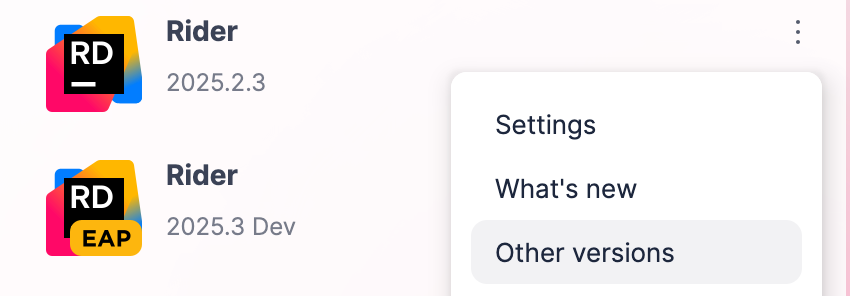
To access nightly builds, click the three-dot menu next to your current Rider installation in the JetBrains Toolbox App, select Other versions, and choose from the available options. Make sure the version number of the nightly build matches the release you’re currently using.
That’s it for now
If you’d like to help us decide what to focus on next, head over to this Reddit thread and vote for the top 5 issues you’d like to see fixed in Rider 2026.1. Your input directly influences our priorities for upcoming releases.
But for now, we invite you to try out the latest Rider release and share your thoughts with us either in the comments below, or on X or Bluesky.